When you're building an accounting software integration, you're not just connecting two systems—you're creating a financial data pipeline that needs to be resilient, scalable, and easy to maintain. For integration developers, this means making a critical upfront choice between building direct, one-off connections for each accounting platform or leveraging a unified API to accelerate the entire process.
The Modern Blueprint for Accounting Integration
If you’re an integration developer tasked with connecting your app to multiple accounting platforms like QuickBooks and Xero, the architectural path you pick from the start will define your project's future. The old-school method is building direct, one-to-one API connections for each platform. This might seem straightforward for your first integration, but it quickly creates a massive maintenance headache. Each new platform you add just compounds the problem.
This direct approach leads to what we call "API sprawl." Every accounting system has its own unique API structure, authentication quirks, data formats, and error handling. Managing these individual connections demands constant developer attention. Any API update from a single platform can break your integration, forcing your team to drop everything and fix it.
The Rise of Unified API Architecture for Developers
There’s a much smarter way for developers to do this: use a unified API platform. This architecture slides a single integration layer between your app and all the different accounting systems. Instead of building and maintaining a dozen fragile, individual connections, your team builds just one robust integration.
For development teams, this model is a game-changer. Here’s how a service like API2Cart can help and speed up the process:
- Faster Development: You code once against a standardized set of API endpoints. API2Cart handles all the messy work of translating those calls into each accounting platform's native language, drastically cutting down development time.
- Lower Maintenance: When an accounting platform updates its API, the API2Cart team manages the necessary changes. This shields your app from the disruption and saves your engineers countless hours of reactive maintenance.
- Simplified Data Models: API2Cart normalizes all the disparate data. It can take a Xero invoice and a QuickBooks invoice and transform them into a single, consistent data object that your app can easily work with, eliminating the need to write custom parsers for each system.
This shift toward integrated solutions is reshaping the entire industry. The global accounting software market hit an estimated $19.38 billion in 2024 and is set to grow significantly, a surge driven by the demand for automated, real-time data sync. Choosing the right software, whether for general business or a niche like finding the best accounting software for rental property, is just the first step.
For an integration developer, the choice is pretty stark. You can either spend your time juggling a dozen fragile API connections, or you can build one robust integration that scales effortlessly. A unified API lets you focus on building great features for your application, not on maintaining the plumbing.
Ultimately, choosing a unified architecture is a strategic move. It prioritizes speed and scalability, allowing your team to deliver a more reliable and feature-rich accounting software integration with a fraction of the effort. If you want to dive deeper, check out our guide on eCommerce accounting system integration for more practical insights.
Mapping Core Data Entities for a Flawless Sync
Once you’ve landed on an integration architecture, the real work for an integration developer starts at the field level. A solid accounting software integration isn’t just about shoving data from point A to point B. It’s about meticulously translating the language of your source system into the native language of the accounting platform. This means precisely mapping your core data entities—products, customers, orders, and payments.
This process goes way beyond simple one-to-one field matching. As a developer, you'll get tangled up in complex problems like handling custom fields that don't exist in the destination system, sorting out currency conversion oddities for international sales, and unraveling thorny tax calculation logic that changes from one region to the next.
This is where the architectural choice you made earlier really comes into focus. Building individual, point-to-point connections creates a messy, high-maintenance system. On the other hand, using a hub-and-spoke model through a unified API simplifies everything.
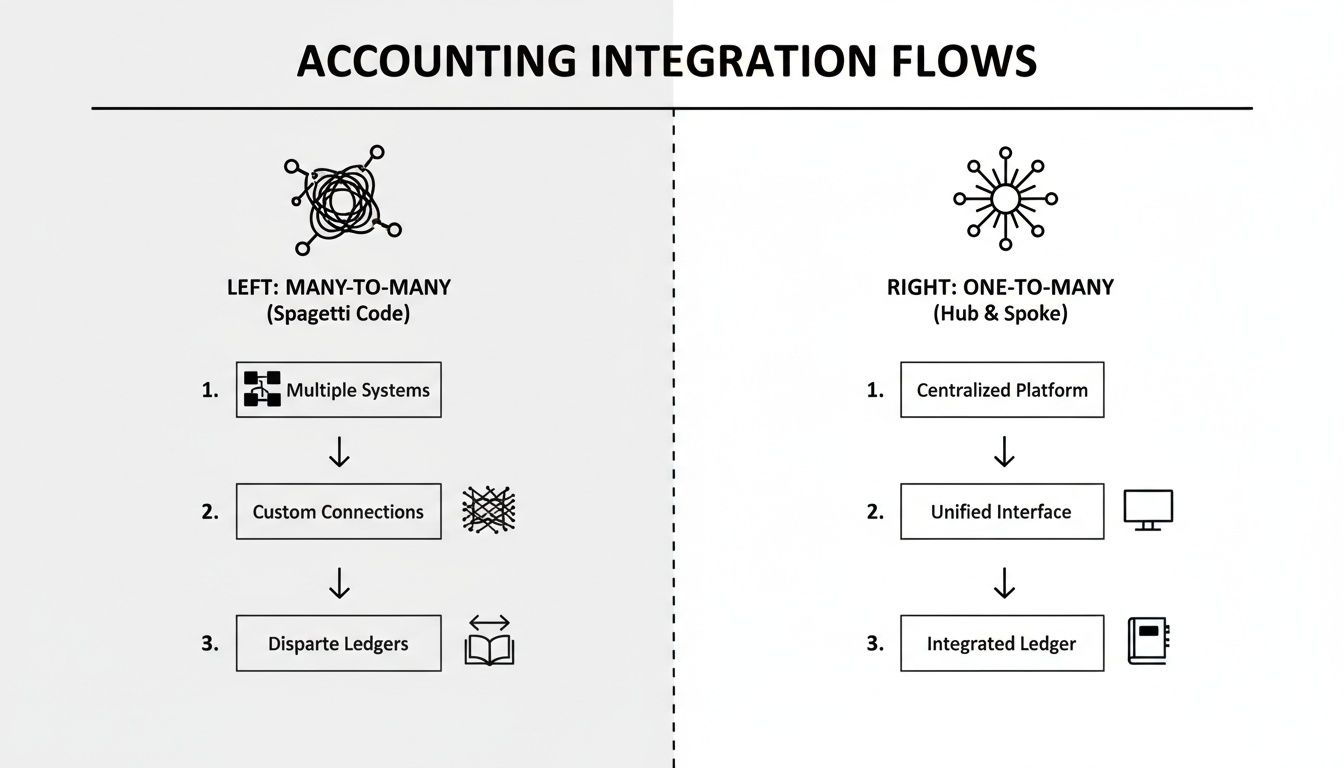
The difference is stark. The many-to-many approach creates a web of "spaghetti code" that's a nightmare to debug and scale. A one-to-many model is clean, manageable, and built for growth.
From Orders to Invoices
The most common workflow for an integration developer is turning an order from an eCommerce platform into a sales invoice in the accounting system. Sounds easy, right? But the devil is always in the details. An order object is often packed with nested information—the customer, the products they bought, shipping details, and any discounts they used.
Your code needs to unpack all of this, look up (or create) the right customer in the accounting software, find the matching product items, and then build a new invoice from scratch. This means correctly applying every line item, tax, and shipping charge to ensure the final invoice total is a perfect match with the original order.
A single mapping error—like misreading a discount or applying the wrong tax rate—can trigger a waterfall of reconciliation headaches later. Your goal as a developer is to build a process so bulletproof that the finance team never has to touch a manual entry.
Managing Customer and Product Data
A big decision you'll face as a developer is how to handle customer and product records. For every new order, do you create a new customer in QuickBooks? Or do you first search for an existing customer by email to avoid creating duplicates? The second option is definitely the best practice, but it demands robust logic to handle fuzzy matches and other edge cases.
It’s the same story with products. You have to map SKUs from your source system to the corresponding "Items" in the accounting platform. So, what happens when a product from an order doesn't exist in the accounting software yet? Your integration needs a clear rule: either fail the sync and flag it for a human to review, or automatically create a new product item on the fly.
Mapping data entities always surfaces a few common roadblocks. I've compiled the most frequent challenges and how a unified API helps solve them.
Data Entity Mapping Challenges and Solutions for Developers
| Data Entity | Common Direct API Challenge | How API2Cart Streamlines It |
|---|---|---|
| Products | Inconsistent SKU formats and missing product records require complex "if-exists-then-update-else-create" logic for each platform. | API2Cart provides standardized product objects and methods (product.add, product.update) that handle this logic behind the scenes, saving you from writing redundant code. |
| Customers | Preventing duplicate customer records requires writing custom search-before-create logic based on email or phone, which varies by API. | You map to a single customer model, and API2Cart's structure makes it easier to implement de-duplication logic once for all platforms. |
| Orders/Invoices | Order objects contain deeply nested data (line items, discounts, shipping) that must be manually parsed and reconstructed for each accounting API. | Orders are returned in a clean, normalized format, making it simple to extract line items, taxes, and totals without custom parsing for each system. |
| Payments | Reconciling payments with invoices is tricky, especially with gateway fees and multi-payment orders. This often requires multiple API calls. | Payment information is linked directly to the standardized order object, simplifying the process of creating paid invoices or matching payments. |
| Taxes | Translating tax rates from a shopping cart into the specific tax codes required by an accounting system like Xero or QuickBooks is highly error-prone. | Tax details are presented in a consistent structure, abstracting away the platform-specific tax code requirements and reducing errors. |
As you can see, what feels like a simple mapping task can quickly spiral into a series of platform-specific workarounds.
How a Unified API Simplifies Data Mapping for Developers
This is precisely where a unified API like API2Cart becomes a developer’s best friend. Instead of writing custom mapping logic for QuickBooks, then starting from scratch for Xero, you map your data just once to API2Cart's standardized data model.
Think of API2Cart as a universal translator for your code. It gives you a single, consistent structure for products, customers, and orders, no matter which accounting platform is on the other end.
For any integration developer, this is a game-changer:
- Less Complexity: No more writing endless
if/elseblocks to handle the unique data structures of every accounting API. You code against one predictable model. - Faster Development: Mapping to one well-documented model is exponentially faster than learning and mapping to a dozen different native APIs. Your time-to-market shrinks dramatically.
- Fewer Bugs: By abstracting away platform-specific quirks, a unified API drastically cuts down the chances of mapping errors related to things like custom fields or tax structures.
For example, when you pull an order through API2Cart, the customer data, product details, and tax info are all presented in a standardized format. Your app can process this clean data, send it back to create an invoice, and API2Cart handles the grunt work of translating that request into the specific format required by QuickBooks, Xero, or any other platform you’ve connected. This approach takes the pain out of the entire accounting software integration process, letting you focus on your app's core features instead of the messy plumbing of each connection.
Choosing Your Data Sync Strategy: Webhooks vs. Polling
Once you’ve mapped out your data entities, you've hit a critical fork in the road for your accounting software integration: how will you keep that data in sync? This choice comes down to two classic strategies—polling and webhooks. Getting this right is the difference between an application that feels snappy and real-time versus one that feels sluggish and out-of-date.

Polling is the old-school, straightforward method. Think of it as your app periodically tapping the accounting software on the shoulder and asking, "Hey, got anything new for me since I last checked?" It’s dependable and relatively simple to set up, which makes it a perfectly good choice for tasks that aren’t super time-sensitive.
Webhooks flip that model on its head. Instead of your application constantly asking for updates, the accounting software proactively tells you when something important happens. It sends a little data packet—a payload—to a specific URL you've provided. This is a far more elegant and efficient way to work, cutting out all the useless API calls and delivering updates the moment they happen.
When to Use Webhooks: The Real-Time Advantage
For any workflow that needs to feel instant, webhooks are your go-to. They are the engine behind a slick, automated user experience where a change in one system triggers an immediate, hands-off reaction in another.
As a developer building an accounting software integration, you’ll want webhooks for scenarios like these:
- Instant Invoicing: An order is marked 'complete' in a merchant's eCommerce store. A webhook fires off instantly, your application catches it, and—boom—a new sales invoice is created in QuickBooks or Xero without anyone lifting a finger.
- Real-Time Inventory Updates: An invoice gets paid in the accounting system. A webhook can immediately ping your inventory software to adjust stock levels, preventing frustrating oversells.
- Customer Record Sync: A customer updates their billing address in your app. A webhook can push that change straight to their accounting profile, making sure future invoices don't get lost in the mail.
The real beauty of webhooks is server efficiency. You stop wasting resources on thousands of pointless API calls that just come back empty-handed. This isn't just good for your own infrastructure; it's essential for staying on the right side of the strict API rate limits most accounting platforms enforce.
But webhooks aren’t a silver bullet. If your server has a temporary hiccup, you could miss a notification. That’s why the most robust integrations often use a hybrid approach. For a deeper dive into the mechanics, our guide comparing webhooks vs APIs is a great resource.
When Polling Still Makes Sense for Developers
Even with the slickness of webhooks, polling is far from obsolete. It’s your safety net—a crucial tool for guaranteeing data integrity and dealing with systems that haven’t fully embraced event-driven architecture.
Here’s where you’ll still want to lean on polling:
- Nightly Reconciliation: It’s a smart move to run a polling job every night (or even every hour) to fetch all records modified in the last 24 hours. This batch process acts as a reconciliation engine, catching any updates that a failed webhook might have missed.
- Initial Data Migration: The moment a user connects their accounting software, you need to pull in all their historical data—customers, products, invoices, the works. This kind of bulk import is a perfect job for a scheduled polling process.
- Legacy System Integration: Let's be honest, some older accounting platforms just don't have great (or any) webhook support. In those cases, polling isn't just an option; it's your only option.
How API2Cart Manages the Chaos for You
Trying to manage these different sync strategies across dozens of accounting platforms is a developer’s nightmare. Each platform implements webhooks with its own unique event types, payload structures, and security hoops to jump through. Polling is no picnic either, with different endpoints, data formats, and rate limits for every single connection.
This is exactly where a unified API like API2Cart becomes a lifesaver. It abstracts away all that platform-specific mess.
You get to work with a single, consistent mechanism instead of building custom logic for every integration. API2Cart offers a standardized webhook system that automatically translates events from platforms like QuickBooks and Xero into a clean, uniform format. And if you need to poll, you can use API2Cart’s consistent list methods with simple date filters to reliably pull fresh data from every platform you support. This approach doesn’t just save you a few hours; it saves hundreds of development hours.
Handling Data Transformation and Reconciliation
Connecting two systems is just the beginning. The real test of a solid accounting software integration happens in the messy middle ground of data transformation. A successful sync isn't just about dumping data from one place to another; it's a careful process of reshaping, translating, and verifying financial information to keep the books perfectly balanced.
For any developer building these connections, this is where financial accuracy is either made or broken. You aren't just moving numbers around. You're translating complex business logic from one platform to another, which means getting your hands dirty with tricky tax calculations, multi-currency conversions, and correctly mapping all those different payment gateway fees.
Navigating Complex Financial Logic
The differences between how systems handle money can be staggering. An eCommerce platform might record sales tax as a simple line item percentage. But an accounting system like Xero or QuickBooks needs specific tax codes tied to a city, state, or country. Your integration has to be the translator, mapping that simple percentage to the exact tax code the ledger requires.
Payments from gateways like Stripe or PayPal add another layer of fun. They take their processing fees before the money ever hits the bank, so the deposit amount rarely matches the gross sales total on the invoice. Your transformation logic has to account for that difference, usually by creating a separate expense transaction for the fee so that everything balances down to the penny.
This drive for unified financial data is why the market is exploding. Integrated accounting software is seeing massive adoption, with North America alone expecting a 17.9% CAGR from 2022-2028 as businesses ditch their dozens of disconnected tools. You can find more details on this trend over at Fortune Business Insights.
Building a Resilient Reconciliation Engine
Even with perfect transformation logic, things will go wrong. Discrepancies happen. A dropped API call, a server hiccup, or a user manually editing an invoice in the accounting software can throw everything out of sync. This is exactly why a resilient reconciliation engine isn't optional—it's essential.
Your engine's job is to automatically flag these mismatches. A common approach is to run a scheduled job, maybe every night, that compares recent transactions between the two systems. It could be as simple as checking if yesterday's total order value from the store matches the total value of invoices created in the accounting system.
Any deviation should immediately trigger an alert and pop the mismatched transactions into a manual review queue. This proactive check prevents small errors from snowballing into a month-end accounting nightmare that takes days to fix.
The goal here is to build a system that fails gracefully. Instead of a transaction just failing to sync and vanishing into thin air, your integration needs rock-solid error handling and detailed logging. When something doesn't sync, log the entire payload, the error response you got from the API, and stick it in a queue for a human to look at later.
How API2Cart Offloads the Heavy Lifting for Developers
Building and maintaining all this complex transformation and reconciliation logic for every single accounting platform is a mountain of work. Each API has its own quirks for handling taxes, currencies, and payment data. This is where a unified API service like API2Cart becomes a game-changer for developers.
API2Cart essentially acts as a normalization layer, absorbing the unique complexities of each accounting platform. It serves up financial data to your app in a consistent, predictable format, taking a huge amount of the dirty work off your plate before the data even touches your code.
- Standardized Data Models: API2Cart takes the different financial data structures from platforms like QuickBooks and Xero and molds them into a single, unified format. This means your app only has to work with one clean data model, which massively simplifies your transformation logic.
- Simplified Tax and Currency Handling: Instead of writing custom code to figure out the unique tax structures of every platform, API2Cart often presents this data in a normalized way, drastically cutting down the risk of miscalculations.
- Reduced Maintenance Burden: When an accounting platform updates its API and changes how it handles data, the API2Cart team updates their connector. Your integration stays stable and is shielded from the constant churn of individual API changes.
By working with a service like API2Cart, you can stop getting bogged down in the finicky, error-prone details of financial data mapping for every new platform. You get to focus on your application's core features, ship faster, and build a more reliable and scalable accounting software integration.
Ensuring Performance and Security in Your Integration
When you're building an accounting software integration, you’re constantly juggling speed and safety. It's a classic balancing act. Get it wrong, and you don’t just have a technical glitch—you have a serious business liability. Any integration that's slow, leaky, or insecure can cause real damage. As developers, our job is to engineer a solution that’s not just fast under load but also secure from the ground up.

Performance-wise, you have to architect for volume from day one. That means being smart about API rate limits, batching payloads whenever you can, and using asynchronous processing so large data syncs don't bring the whole system to a crawl. On the security front, it all comes down to solid authentication, data encryption, and strict access controls.
Fortifying Your Integration with Security Best Practices
You can’t just bolt on security at the end of a project; it has to be baked into the foundation. Financial data is a high-value target, so your integration needs to be a fortress. The first line of defense is always authentication and authorization.
For any serious integration, implementing a modern protocol like OAuth 2.0 is non-negotiable. It gives you a secure, token-based way to grant access without ever touching—or storing—a user's actual credentials. If you want to dig deeper into the specifics, there’s a great breakdown of different API authentication methods that’s worth a read.
Beyond authentication, here are a few other critical layers to get right:
- Data Encryption: All data flying back and forth must be encrypted in transit using TLS 1.2 or higher. And don’t forget about data at rest—any sensitive info in your database, like API keys or tokens, needs to be encrypted, too.
- Principle of Least Privilege: This is a big one. An API key should only have the bare minimum permissions it needs to do its job. If your integration just needs to read invoices, its key should never have the power to delete them.
- Input Validation and Sanitization: Be ruthless about validating all incoming data from external systems. This is your best defense against injection attacks and a whole host of other common vulnerabilities.
Getting the architecture right is just one piece of the puzzle. For a more comprehensive look, it’s always a good idea to brush up on software development security best practices.
The API2Cart Advantage for Security and Performance
Now, imagine managing all these security and performance complexities across dozens of different accounting platforms. The challenge multiplies instantly. Each platform has its own rate limits, its own authentication quirks, and its own security protocols. This is exactly where a unified API service like API2Cart becomes a game-changer for developers.
API2Cart handles all that heavy lifting behind the scenes. Their team are experts at managing authentication tokens for each platform, abstracting away the different rate-limiting schemes, and providing a secure, hardened infrastructure. This offloads a massive amount of risk and development overhead from your plate.
By using a specialized service like API2Cart, you inherit a battle-tested security and performance model. This frees your team to focus on building core application features instead of becoming experts in the security protocols of a dozen different accounting APIs.
The future of accounting is also being shaped by AI, which puts even more pressure on building robust integrations. The AI accounting market is expected to jump from $6.68 billion in 2025 to $37.6 billion by 2030, all driven by its power to automate tedious tasks and create deeper system connections. We’re already seeing businesses report a 70% drop in reconciliation times, which makes secure, high-performance integrations more critical than ever.
Developer FAQ on Accounting Integration
When you're in the trenches building an accounting software integration, you're bound to run into some tough questions. We see the same ones pop up all the time from engineering teams—everything from surprise costs to tricky technical decisions. Here’s a quick rundown of the most common issues and some straight answers from our experience.
What Are the Biggest Hidden Costs in Building Direct Integrations?
It’s not the initial build that gets you. The real budget-killer is ongoing maintenance. When you build a direct line to an accounting platform like QuickBooks or Xero, you're essentially tying your app to a constantly moving target.
These platforms are always pushing out API updates, tweaking authentication methods, or killing off old endpoints. A direct integration model locks your team into a purely reactive cycle. You're stuck monitoring changelogs for every single platform and scrambling to patch your code just to keep things from breaking. It's not a one-and-done project; it’s a forever tax on your engineering resources.
Other major costs that sneak up on you include:
- Authentication Hell: Juggling different flows like OAuth 1.0a and OAuth 2.0 across multiple platforms is a massive headache and a huge time sink.
- Unique Error Logic: Every API has its own language for what went wrong. You’ll find yourself writing custom error handling and retry logic for every single integration you build.
- Rate Limit Balancing: Each platform has its own rules about how many API calls you can make. You have to build, monitor, and scale your infrastructure to play nice with every system's specific rate limits, which is a tricky balancing act.
A unified API service like API2Cart is built to absorb these costs for you. Their team takes on the maintenance burden, handling all the platform-specific updates so your developers only have to worry about one stable, predictable API.
How Does a Unified API Handle Custom Fields?
Ah, custom fields—the classic integration nightmare. Every accounting system has its own way of handling them, which makes direct mapping a mess. A smart unified API gets around this by standardizing how custom fields are presented in its data model, usually as a clean collection of key-value pairs.
When you pull an invoice or customer record through API2Cart, for example, the response will include a neat, dedicated section for all custom fields. This setup lets your application work with custom data the same way every time, no matter if it came from QuickBooks Online or Sage.
What this really means is you can map these fields in your app’s UI or business logic without writing a bunch of fragile, platform-specific code. It cleans up your codebase and makes the entire integration much easier to scale.
Is API Polling Completely Obsolete Compared to Webhooks?
Not a chance. While webhooks are definitely the go-to for real-time updates and are way more efficient, polling still has a critical job to do in any solid accounting software integration. Webhooks aren't perfect. All it takes is a temporary server outage on your end or a random network hiccup, and you could miss a crucial event notification.
This is exactly why polling is so important for data reconciliation. It’s your safety net.
The best strategy is almost always a hybrid approach:
- Use Webhooks for Instant Updates: This is perfect for time-sensitive actions, like creating an invoice in your accounting system the second an order is placed.
- Use Polling for Reconciliation: Set up a daily or even hourly polling job to fetch any records that have been modified since the last check. This catches anything a webhook might have missed, ensuring your data stays 100% accurate.
Polling is also a reliable fallback for older systems that don't even have webhook support. Think of it as a dependable tool in your kit that guarantees no data ever gets left behind.
Ready to stop wrestling with individual accounting APIs and get back to building features? With API2Cart, you can connect to multiple platforms through a single, unified API, saving you countless hours of development and maintenance. Start your free 30-day trial today and see how easy accounting software integration can be.