For any integration developer building software that connects to other systems, picking the right API authentication method is the bedrock of your app's security and user experience. Think of it like choosing the right key for a lock. A simple key works fine for a garden shed, but you'd need a far more complex system for a bank vault.
A one-size-fits-all approach just doesn't cut it in the messy, diverse world of eCommerce integrations.
Why Choosing the Right Authentication Method Matters
Selecting an API authentication method isn't just a technical detail to check off a list. It's a critical decision that directly impacts your development timeline, your security posture, and the trust users place in your application.
For developers building integrations across multiple eCommerce platforms like Shopify, Magento, or WooCommerce, this choice has massive consequences. Get it wrong, and you're looking at potential data breaches or a clunky, frustrating user experience. Get it right, and you build a secure, seamless connection that feels invisible to the user—it just works.
Before diving in, it's crucial for any integration developer to understand the difference between two fundamental concepts:
- Authentication: This is all about verifying identity. It answers the question, "Who are you?" When your application presents its credentials, it's authenticating itself.
- Authorization: This determines what an authenticated user or application is allowed to do. It answers the question, "What can you access?" After your app authenticates, authorization dictates whether it can read product data, write order information, or delete a customer record.
This distinction is everything. Different API authentication methods handle these jobs in very different ways. A simple method might only handle basic authentication, while a more robust framework like OAuth 2.0 manages both, allowing end-users to grant specific, limited permissions to your third-party app.
Quick Guide to API Authentication Methods
To help you get your bearings, this table breaks down the most common methods, their typical use cases, and how they stack up in terms of security and complexity. It's a great starting point for figuring out which path makes sense for your integration project.
| Method | Primary Use Case | Security Level | Implementation Complexity |
|---|---|---|---|
| API Keys | Simple server-to-server communication, internal APIs | Low | Very Low |
| Basic Auth | Internal tools, testing, simple machine-to-machine | Low | Very Low |
| OAuth 2.0 | User-delegated access ("Login with Google"), third-party apps | High | High |
| JWT | Stateless authentication for microservices, mobile apps | High | Medium |
| HMAC | Verifying request integrity, webhook validation | High | Medium |
| Mutual TLS | High-security B2B integrations, financial services | Very High | High |
Each of these has its place, but as you can see, the trade-offs between security and ease of implementation are significant for any developer on a timeline.
Navigating the eCommerce Authentication Maze
The real challenge kicks in for developers working with multiple platforms. Shopify uses OAuth 2.0, Magento has its own token-based system, and WooCommerce often relies on key/secret pairs.
Building, securing, and maintaining separate authentication flows for each platform is a massive drain on development resources. It forces your team to become experts in dozens of different security protocols instead of focusing on building your actual product.
For an integration developer at a SaaS company, this isn't just a technical hurdle—it's a strategic bottleneck. The time spent managing disparate authentication systems directly delays market entry, inflates maintenance costs, and slows down your ability to onboard new merchants.
This is where a unified API provider like API2Cart becomes a game-changer. It abstracts away all that complexity, offering a single, standardized authentication process to connect with over 40 different shopping carts. For a developer, this means instead of juggling multiple credentials and security flows, your application authenticates just once with API2Cart to securely access the data it needs. The result is a dramatically faster integration timeline and reduced development overhead.
This visual decision tree can help simplify the initial choice between common authentication scenarios.
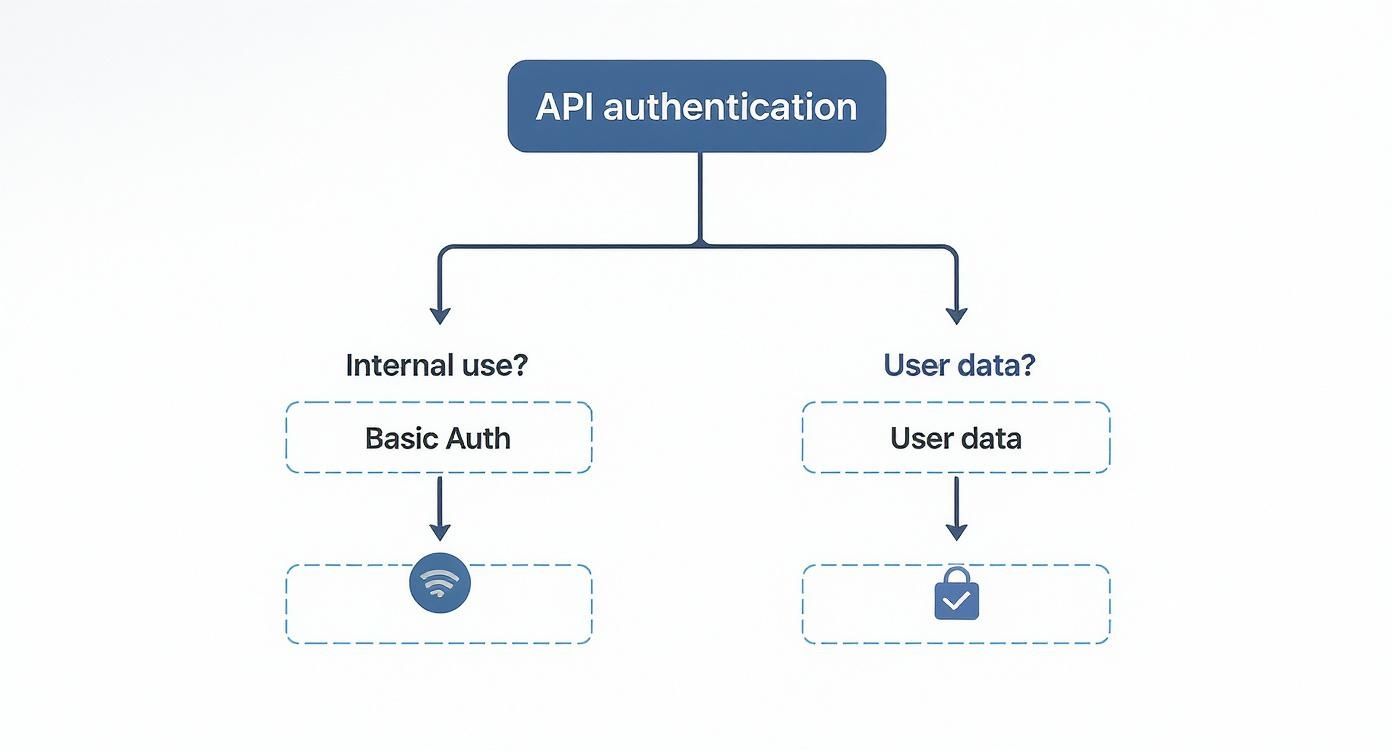
As the flowchart shows, one of the first questions any developer should ask is whether the API access is for internal systems or if it requires permission to handle end-user data. That single question will immediately guide you toward the right architectural path.
How Core Authentication Methods Work
Knowing the names of different API authentication methods is one thing. But for an integration developer, what really matters is understanding what’s happening under the hood. Let's get past the textbook definitions and dig into the mechanics of how these core methods actually secure your API calls.

This hands-on look will give you the technical confidence to see not just what each method is, but how it keeps your integrations safe day-to-day.
API Keys: The Digital Doorman
API Keys are easily the most straightforward way to handle API authentication. Think of an API key as a unique name badge for your application. When your server makes a request, it shows this key to the API, which logs the request and confirms your app has permission to be there.
Technically, the key is usually sent as a request header or a query parameter. The server on the other end just looks for a valid key in its database. If it finds one, the request goes through.
But this simplicity is also its biggest weakness. An API key is just a single, static string of text. If it ever gets leaked, an attacker can use it to make requests on your behalf until you figure it out and revoke the key.
For a developer, using API keys safely means following these best practices:
- Secure Storage: Never, ever hardcode keys in your client-side code. Always keep them safe on the server using environment variables or a proper secret management service.
- Regular Rotation: Get in the habit of generating new keys and retiring old ones. This practice shrinks the window of opportunity for an attacker if a key is ever compromised.
- Restrictive Permissions: Grant keys only the permissions they absolutely need. A key used for reading public product data should never have the power to write or delete customer information.
For an integration developer connecting with dozens of platforms, managing unique API keys for each service can quickly turn into a logistical nightmare. This is a classic pain point that API2Cart solves by handling all that credential management for you behind a single API key, dramatically simplifying your code.
Basic Authentication: The Original Handshake
Basic Authentication is even simpler than API Keys, if you can believe it. It works by sending a username and password with every single request, encoded using Base64. It’s the digital equivalent of taping your login details to every message you send.
And because Base64 is an encoding format—not an encryption one—it offers zero real protection. Anyone who intercepts the request can instantly decode the credentials.
For this reason, Basic Auth is only considered remotely safe when used exclusively over an encrypted HTTPS connection. Its use should be limited to trusted internal networks or simple server-to-server jobs where more advanced methods are just overkill.
The only real benefit is its simplicity. For most modern applications, especially those touching sensitive user data, it's a risky choice that has been almost entirely replaced by better, more secure methods.
OAuth 2.0: The Secure Valet Key
OAuth 2.0 is the undisputed industry standard for delegated authorization. Instead of giving an application your master key (your password), you give it a temporary, limited-access "valet key." The application can use this key to do specific things on your behalf, like accessing your product catalog, without ever seeing your real credentials.
This protocol involves a few key players:
- Resource Owner: The end-user who actually owns the data (e.g., the store merchant).
- Client: Your application that wants to access that data.
- Authorization Server: The server that authenticates the user and hands out the access tokens.
- Resource Server: The API server where the protected data lives.
OAuth 2.0 became the king of API authentication because it strikes the perfect balance between security and usability. It’s a foundational framework protecting billions of API requests every day, letting third-party apps access user resources without ever exposing passwords. You can explore more about the essential API authentication methods for secure data access to see just how widespread its impact is.
For developers, the most critical part of OAuth 2.0 is understanding "grant types," which are just different ways of getting an access token. The two most common are:
- Authorization Code Grant: This is perfect for web and mobile apps where a user is present. The user gets redirected to the service provider (like Shopify) to log in and approve your app's request. Your app then gets an authorization code, which it swaps for a real access token.
- Client Credentials Grant: This flow is designed for server-to-server communication where there’s no user involved. Your application authenticates itself directly using its own client ID and secret to get a token.
For a B2B SaaS developer, building and maintaining separate OAuth 2.0 flows for dozens of eCommerce platforms is a massive headache. Each platform has its own little quirks and endpoint URLs. A service like API2Cart simplifies this by providing a single, standardized OAuth 2.0 flow, hiding all the platform-specific details behind the scenes and saving you a ton of development time.
JSON Web Tokens: The Self-Contained Passport
A JSON Web Token (JWT) is a compact, self-contained way to securely send information between parties as a JSON object. The best analogy for a developer is a passport: it contains information about who you are (the payload), it’s issued by a trusted authority (the signature), and it can be verified on the spot without calling back to a central database for every single request.
A JWT is made of three parts, separated by dots:
- Header: This contains the token type (JWT) and the signing algorithm being used (like HMAC SHA256 or RSA).
- Payload: This holds the "claims," which are statements about the user and other data. This includes standard claims like
iss(issuer),exp(expiration time), andsub(subject). - Signature: This is created by taking the encoded header, the encoded payload, a secret key, and signing them with the algorithm from the header.
The signature is what guarantees the token's integrity. When your server gets a JWT, it can recreate the signature using the header, payload, and its own secret key. If the signature it generates matches the one on the token, it proves the token is legit and hasn't been messed with. This makes JWTs fantastic for stateless authentication, where the server doesn't need to store session data, which is a huge win for scalability.
Comparing Security And Usability Tradeoffs
Choosing the right API authentication method isn't just a technical detail—it's a strategic balancing act for an integration developer. Every choice pits robust security against developer effort and the end-user's experience. Making the right call means understanding these tradeoffs long before you write a single line of code.
This breakdown will help you defend your choice based on your project’s real needs—from the sensitivity of the data you're handling to how quickly you need to ship.
Authentication Method Tradeoffs for Developers
To make the decision clearer, let's compare the most common methods side-by-side. This table breaks down the core strengths, weaknesses, and ideal scenarios for each approach, giving you a quick reference for your next integration project.
| Method | Key Security Feature | Primary Weakness | Best For | Avoid For |
|---|---|---|---|---|
| API Keys | Simplicity and direct server identification | No user context; keys can be long-lived and exposed | Internal services, server-to-server calls, simple scripts | Apps needing user-delegated access or granular permissions |
| Basic Auth | Extremely easy to implement | Transmits credentials with every request; insecure without HTTPS | Internal network tools or very low-risk, non-production APIs | Any public-facing application or one handling sensitive data |
| OAuth 2.0 | Granular, user-delegated permissions with defined scopes | Complex implementation with multiple flows and redirects | Third-party applications acting on a user's behalf | Simple server-to-server communication where no user is involved |
| JWT | Self-contained, stateless identity and permission data | Token revocation can be complex to manage properly | Scalable microservices and modern web/mobile applications | Scenarios requiring instant, server-side session invalidation |
| mTLS | Mutual, cryptographic verification of both client and server | High implementation overhead; requires certificate management | High-security B2B, financial, or enterprise integrations | General consumer applications or simple API integrations |
As you can see, there's no single "best" method. The right choice is always driven by the specific demands of your use case.
API Keys Vs. OAuth 2.0: The Permission Question
One of the most frequent decisions integration developers face is choosing between a simple API Key and the more involved OAuth 2.0 framework. The deciding factor almost always boils down to one thing: user-delegated permissions.
API Keys are straightforward. They identify your application to an API, making them perfect for server-to-server calls where your app is the only actor. Think of it as a key to a building’s main entrance; it gets you in, but it doesn't grant you access to specific, restricted rooms.
OAuth 2.0, on the other hand, is built for situations where an end-user must grant your application permission to act on their behalf. If your app needs to "read a merchant's products but not their customer data," OAuth 2.0 is non-negotiable. It provides the granular, user-consented access that protects privacy and builds trust.
For integration developers, this is absolutely critical. Managing credentials for dozens of merchants means OAuth 2.0 is the only secure and scalable path for third-party access.
JWTs Vs. Stateful Sessions: The Scalability Factor
Another key tradeoff comes down to using JSON Web Tokens (JWTs) for stateless authentication versus traditional stateful server sessions. This choice directly impacts your server architecture and its ability to scale gracefully.
Stateful Sessions: In a classic setup, the server creates a session for an authenticated user and stores it, often in memory or a database. Every single request has to be checked against this stored session, which can create a performance bottleneck as user numbers climb.
JWTs (Stateless): With JWTs, the user's identity and permissions are baked right into the token itself. The server just needs to verify the token's signature without looking up session data. This "stateless" approach means you can easily add more servers to handle traffic without worrying about how to sync up session stores.
While JWTs offer huge scalability benefits, they require careful handling of token expiration and revocation. For a deeper dive into how these two powerful methods stack up, you can review our detailed comparison of OAuth vs JWT.
Basic Auth: Simplicity At A High Cost
Basic Authentication represents the starkest tradeoff of all: incredible simplicity in exchange for minimal security. Its only real advantage is that it’s dead simple to implement, requiring just a Base64-encoded username and password in the request header.
But here’s the catch for any developer: since Base64 is trivial to decode, Basic Auth is dangerously insecure over unencrypted connections. Even over HTTPS, sending credentials with every request dramatically increases the attack surface. Its use should be confined to highly controlled environments, like internal network tools or low-risk APIs where security is a distant concern.
For any application handling sensitive eCommerce data—orders, customers, or payments—the risks associated with Basic Auth far outweigh its simplicity. Modern, more secure alternatives should always be the default choice.
Advanced Methods For High-Stakes Environments
For certain high-security use cases, even standard methods fall short. Mutual TLS (mTLS) is an advanced technique that adds another layer of security by requiring both the client and the server to present and validate certificates. This creates a trusted, two-way authenticated channel, often used in enterprise and financial integrations where verifying the identity of both parties is mission-critical.
Ultimately, the right authentication method depends entirely on your context. What works for a simple internal script is completely wrong for a multi-tenant SaaS application. For developers building integrations with dozens of shopping carts, the complexity of managing all these varied authentication methods is a major headache.
This is where a unified API like API2Cart becomes so valuable. It abstracts away this complexity, providing a single, secure authentication flow that lets you connect to 40+ platforms without having to become an expert in each one's unique security protocol.
Solving Real-World Integration Challenges
Theory is one thing, but real-world API integrations are messy. As an integration developer, you’re not just plugging in one authentication method in a perfect, sandboxed environment. You’re juggling a tangled web of different protocols, managing credentials that expire at the worst possible times, and constantly defending against new threats.
This is where the rubber meets the road. The challenges you'll face aren't about picking one "best" method, but about orchestrating several of them into a secure and resilient system that doesn't fall over.
The Multi-Platform eCommerce Nightmare
Imagine you’re an integration developer building an inventory sync app for eCommerce merchants. Things start off easy. Your first client is on Shopify, which uses a standard OAuth 2.0 flow. Great. But then your next client signs up using Magento, which has its own token-based system with completely different endpoints and refresh logic. Client number three uses WooCommerce, which often relies on a consumer key and secret pair.
Suddenly, you’re not building one integration; you’re building and maintaining three entirely separate authentication workflows.
- Shopify: Demands a full OAuth 2.0 user-consent redirect flow.
- Magento: Uses a different set of token endpoints and credential types.
- WooCommerce: Employs a key/secret pair that behaves differently from a typical API key.
Every new platform you add throws another layer of complexity into the mix. This means more development time, more maintenance overhead, and a wider surface area for security vulnerabilities. This multi-platform chaos is often the single biggest bottleneck for B2B SaaS companies trying to grow their market share.
This is precisely the headache that a unified API like API2Cart is built to solve. It acts as an abstraction layer, handling the unique authentication protocols for over 40 different eCommerce platforms behind a single, consistent API. You authenticate once with API2Cart, and it manages the rest, saving your team hundreds of development hours and getting your product to market faster.
Managing Token Expiration and Refresh Cycles
Many modern authentication methods, especially OAuth 2.0, issue short-lived access tokens for security. While this is a solid security practice, it creates a new headache for developers building background jobs or data sync tools. What happens when your app needs to sync orders at 3 AM and the token has already expired?
Your application has to be built to handle this gracefully. The flow usually looks something like this:
- Make an API request with the current access token.
- Get a
401 Unauthorizederror because the token is expired. - Use a long-lived refresh token to ask the authorization server for a new access token.
- Securely store the new access token (and often a new refresh token).
- Retry the original API request with the fresh token.
Automating this refresh cycle is non-negotiable for any application that needs persistent, unattended access to an API. If you don't get this right, you'll end up with failed jobs, gaps in your data, and a stream of angry support tickets from frustrated users. This is another complex task API2Cart handles automatically, ensuring your integrations remain connected without manual intervention.
Securing Webhooks with Signed Signatures
Webhooks are fantastic for getting real-time data updates, but they also punch a potential hole in your security. As a developer, how can you be sure the data hitting your server endpoint is actually from the platform it claims to be from, and not a bad actor trying to inject malicious data?
The answer is signed signatures. When a platform like Shopify sends a webhook, it includes a special header containing a cryptographic signature (often an HMAC-SHA256 hash). This signature is created using the webhook's payload and a secret key that only you and the platform know.
Your server’s job is to recalculate this signature on your end using the exact same payload and secret. If your calculated signature matches the one in the header, you can be 100% confident the webhook is authentic and its content hasn’t been tampered with. This validation step is an absolute must for securing any app that relies on webhooks. For more context on practical API challenges, you might find some parallels in guides about connecting with remote online notary APIs.
Unfortunately, even with strong authentication, security incidents are rampant. A recent report found that nearly 99% of organizations experienced an API-related security incident. What's truly shocking is that a staggering 95% of those breaches originated from authenticated sessions where attackers used compromised credentials. This just goes to show why a layered security model that goes beyond simple authentication is so critical. You can find more API security statistics on blog.arcade.dev.
How a Unified API Simplifies Authentication
Picture the engineering headache of building and maintaining separate authentication flows for dozens of different eCommerce platforms. It's a common trap that forces integration developers into a painful cycle of redundant work, slowing down new features and bloating the maintenance budget. Each platform—from Shopify to Magento to WooCommerce—comes with its own unique protocols, error handling, and token refresh logic.
Instead of building out your application's core value, your team ends up becoming experts in the subtle quirks between Shopify's OAuth 2.0, Magento's token system, and WooCommerce's key/secret pairs. This complexity creates a huge barrier to growth, making it painfully expensive and slow to add support for the next shopping cart on your roadmap.

This is exactly where a unified API provider like API2Cart flips the script. It elegantly abstracts away all that authentication chaos, presenting one single, consistent method for developers to connect with over 40 different shopping carts and marketplaces.
Abstracting Away Complexity
Think of a unified API as a universal adapter for an integration developer. Your application makes just one authentication handshake with API2Cart, and from there, API2Cart handles all the specific, messy handshakes required by each individual eCommerce platform behind the scenes.
Let's say a developer is building a new inventory management app. Without a unified API, their integration roadmap would look something like this:
- Month 1-2: Build and test the Shopify OAuth 2.0 integration.
- Month 3-4: Rework the system for Magento's unique token-based authentication.
- Month 5: Now, tackle the key/secret implementation for WooCommerce.
This cycle just keeps repeating for every new platform, burning through months of precious engineering time. With API2Cart, that same developer performs a single authentication flow. Once they're connected, they can talk to any supported platform using the same standardized API calls and credentials. A multi-month slog becomes a task completed in a tiny fraction of the time, dramatically speeding up time-to-market. If you're curious how this stacks up against other tools, you can dive into the differences between a unified API vs embedded iPaaS.
The Strategic Advantage for Developers
This standardized approach is about so much more than just convenience. It delivers a massive strategic advantage by slashing both upfront development costs and the ongoing maintenance burden. Developers are finally freed from the hamster wheel of monitoring and updating dozens of separate auth libraries every time a platform decides to change its API.
By presenting a single, secure entry point to the fragmented eCommerce ecosystem, a unified API eliminates the need for developers to become authentication experts for every platform. This shift allows teams to redirect their focus from building connectors to delivering valuable, market-leading features.
For B2B SaaS companies, this translates directly to faster time-to-market. It gives you the power to scale integrations across a huge range of customer platforms without a proportional jump in your development overhead. A unified API transforms the tangled web of API authentication methods into a single, manageable connection, fueling faster growth and a far more reliable integration experience for your users.
Best Practices For Secure Implementation
Picking the right API authentication method is a huge first step, but it’s the implementation that truly guards your application and your users. Following best practices is what turns a good design on paper into a rock-solid defense against real-world threats. For any integration developer, this isn't just a checklist—it's how you build trust.
One of the most basic, non-negotiable rules is to enforce HTTPS (using TLS) for all API communication. Without it, every credential and token you send is just plaintext traveling over the network. That makes them incredibly vulnerable to man-in-the-middle attacks, where an eavesdropper can just snatch up that sensitive data.
Secure Credential Management
How you store and handle credentials is just as critical as how you send them. One of the most common and dangerous mistakes a developer can make is hardcoding API keys, secrets, or passwords directly into source code. The moment that code hits a public repository, those credentials are out in the open for good.
You have to follow these rules for storing secrets:
- Use Environment Variables: On your server, always keep secrets in environment variables. This keeps them completely separate from your codebase.
- Leverage Secret Managers: For even tighter security, use a dedicated service like AWS Secrets Manager, Google Secret Manager, or HashiCorp Vault. These tools give you centralized control, auditing, and the ability to rotate keys easily.
This kind of discipline is a core part of a strong security posture. You can find more essential advice in our guide to API security best practices.
Applying the Principle of Least Privilege
This is a powerful security philosophy for any developer: grant only the absolute minimum permissions needed for a task. This simple idea drastically limits the potential damage if an account or token is ever compromised.
When using OAuth 2.0, this means requesting the most minimal set of scopes you can get away with. If your app only needs to read product data, it should never ask for permission to write customer information. Limiting scope is a straightforward yet highly effective way to shrink your application's attack surface.
On top of that, always set short lifespans for your access tokens. A token that expires in a few minutes or hours is far less of a prize for an attacker than one that’s valid for weeks. Pair this with robust logging, and you can start to spot unusual activity—like a sudden spike in requests from a strange IP address—which helps you catch potential breaches early. For in-depth guidance on security and common vulnerabilities, consulting the OWASP guidelines is an excellent move.
While adding layers like multi-factor authentication (MFA) certainly helps, it's no silver bullet. Even with wide adoption, a surprising 28% of users still fall for sophisticated bypass tactics like SIM-jacking and adversary-in-the-middle (AiTM) attacks. This just goes to show that even strong defenses can be broken, which is why a comprehensive, multi-layered security strategy is so important.
Common Questions Answered
When you're deep in the weeds of API integration, a few key questions always pop up. Let's clear up some of the most common points of confusion for integration developers.
What Is The Difference Between Authentication And Authorization?
It’s easy to mix these two up, but they handle very different jobs.
Authentication is all about identity—proving your application is who it says it is. Think of it like showing your ID to a bouncer at a club. They're just verifying your identity, not deciding which VIP rooms you can enter.
Authorization, on the other hand, is about permissions. Once your application is "inside the club," authorization determines what it's allowed to do. Can it read orders? Can it update products? That's authorization. In the API world, OAuth 2.0 is a perfect example of a framework that handles both: it confirms the user's identity and then asks for their permission (authorization) to grant specific access rights to an application.
When Should I Use API Keys Instead Of OAuth 2.0?
This is a classic "right tool for the job" scenario for an integration developer.
You should use API Keys for straightforward server-to-server communication where there's no end-user involved in granting permissions. It's a great fit for things like internal scripts or just identifying your project for rate-limiting purposes. An API key is like a library card—it proves your app has an account but doesn't grant it any special, private permissions on behalf of a user.
Reach for OAuth 2.0 anytime a third-party application needs to access a user's private data on their behalf. If your app needs a user to grant permission to "manage my products" or "read my orders," OAuth 2.0 is non-negotiable. It allows that user to give your app delegated consent without ever having to share their actual password.
For developers connecting to dozens of different eCommerce platforms, this choice can be a headache. API2Cart abstracts this complexity away by providing a single, standardized authentication flow. This saves you from having to build and maintain separate handlers for both API Keys and OAuth 2.0 across every single shopping cart, significantly speeding up development.
How Can I Make My JWT Implementation More Secure?
JWTs are powerful, but they need to be handled with care. Here are a few critical security tips for developers:
- Always use HTTPS. First and foremost, never transmit JWTs over an insecure connection. No exceptions.
- Use a strong secret key. For symmetric algorithms like HS256, your secret key needs to be long and complex. For asymmetric ones like RS256, make sure you're using a robust key pair.
- Set short expiration times. The 'exp' claim is your best friend. Setting a very short lifespan for a token drastically limits the window of opportunity for an attacker if a token is ever compromised.
- Don't store sensitive data in the payload. Remember, a JWT's payload is just Base64 encoded, not encrypted. Anyone who gets their hands on the token can read what's inside.
Managing authentication across dozens of platforms is a complex and time-sucking task for any integration developer. API2Cart solves this by providing a unified API to connect with over 40 shopping carts using a single, secure authentication method, which can dramatically speed up your integration timeline. Start your free trial today.