At its core, a cart API is the set of rules that lets different software systems talk to an online store's shopping cart. For an integration developer, it's the digital engine powering a customer’s entire shopping session, handling everything from adding a product to the basket to calculating the final, precise cost in real-time. This behind-the-scenes communication is what makes it possible to build custom storefronts or plug in third-party services like shipping calculators and inventory managers.
Why a Cart API Is Essential for Modern eCommerce
In simple terms, a cart API is like a universal translator for a developer. It creates a standardized language for your application to communicate with any shopping platform's backend, whether that’s Shopify, Magento, or WooCommerce.
This constant dialogue is absolutely critical because a shopping cart isn't just a static webpage. It’s a dynamic, temporary container that holds a user's chosen items, applied discounts, and shipping details right before they commit to buying. For any integration developer, getting this API right is the key to building a smooth, interactive customer experience. A cart API is a critical component, providing the backbone for managing customer selections and transactions, which is often considered foundational to any e-commerce app.
The Developer's Core Challenge
The real headache for developers isn't learning one cart API—it's learning dozens of them. Every e-commerce platform has its own unique API, and they all differ in frustrating ways:
- Endpoints: The specific URLs you need to call to perform an action change from platform to platform.
- Data Structures: What one system calls
product_id, another might callvariant_sku. The differences seem small but break everything. - Authentication Methods: Juggling different API keys, security tokens, and access protocols for each platform is a huge operational burden.
- Rate Limits: Every API has its own rules about how many requests you can make in a given period, which makes syncing data a delicate balancing act.
This fragmentation forces developers to build and maintain a separate, brittle integration for every single platform they want to support. It’s a slow, expensive process that pulls focus away from building the features that actually matter to customers. If you want a deeper dive, you can explore a more detailed explanation of how APIs work in eCommerce to get a better handle on these concepts.
The real value of an API-first approach is moving from manual chaos to automated control. It allows developers to sync stock, send orders directly to suppliers, and manage multi-store operations without endless custom code.
This is precisely where the complexity of integration makes a unified solution so valuable. Instead of wrestling with countless different APIs, developers can turn to a service like API2Cart. It offers a single, standardized API that connects to over 40 different shopping platforms. With this approach, you write your integration code just once and can deploy it across an entire ecosystem of stores, which dramatically slashes development time and future maintenance costs.
Understanding the Core Cart API Building Blocks
To get the most out of a cart API, you first need to speak its language. For developers building integrations, that means getting a solid grip on the fundamental data models that are the backbone of every eCommerce transaction. Think of it like learning grammar before writing a novel—nailing these concepts is the key to manipulating cart data with confidence.
At the heart of it all is the Cart object. This isn't just a simple list; it’s the main container for a customer's entire shopping session, usually tracked by a unique ID (often called a quote_id). This object is what holds everything together as a customer browses and adds products.
This diagram shows how a Cart API fits into the puzzle, acting as the essential bridge connecting a custom storefront to various eCommerce platforms.
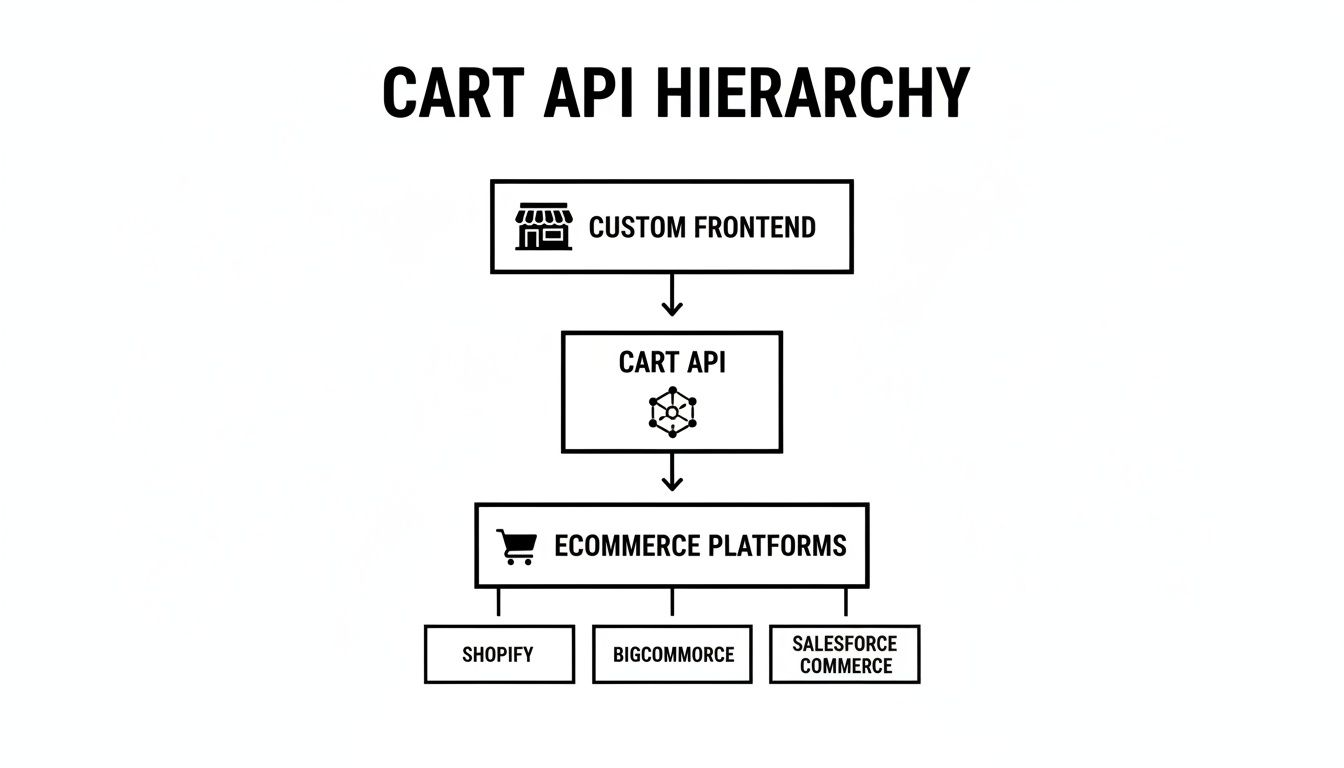
This top-down view makes it clear: you can build any user experience you want on the frontend, and the API takes on the heavy lifting of talking to all the different backend systems.
Breaking Down the Cart Object
So, what’s inside the Cart? It’s a collection of several smaller, but equally important, objects. Let’s take a look at the key data models you'll be working with.
Key Cart API Data Models
This table breaks down the essential objects and their functions within a standard Cart API.
| Data Model | Primary Function | Common Attributes |
|---|---|---|
| Cart | The main container for a user's entire shopping session. | quote_id, customer_id, currency, subtotal, grand_total |
| Line Item | Represents a single product added to the cart. | sku, product_id, variant_id, quantity, unit_price, total_price |
| Discount | Applies a price reduction to the cart or specific items. | coupon_code, discount_amount, discount_type (fixed/percent) |
| Tax | Calculates and applies taxes based on location and rules. | tax_rate, tax_amount, jurisdiction |
| Shipping | Manages shipping options and calculates costs. | shipping_method_id, address, shipping_cost |
Understanding these models is the first step. Now let's see how they interact.
How The Pieces Fit Together
Inside the main Cart object, you’ll find an array of Line Items. Each one represents a specific product a customer wants to buy. Programmatically, this isn’t just a product name; it's an object packed with critical details you'll be reading and updating all the time:
- SKU or Variant ID: The unique code for the exact product, right down to its size or color.
- Quantity: How many units the customer wants.
- Price: The price per item before any discounts or taxes kick in.
These line items are what you’ll be playing with when a customer adds, removes, or updates the quantity of products in their cart. Next up, the API gives you objects for Discounts and Coupons. These aren't just simple subtractions; they’re applied programmatically and can be tied to specific rules, products, or the total cart value.
As a developer, your job is to make API calls that correctly apply a coupon code to the cart object, and then verify that the API response reflects the updated total. This ensures the frontend and backend are perfectly in sync.
Finally, a cart API has to crunch the numbers for Taxes and Shipping. These are almost never static values. Instead, the API calculates them on the fly based on the customer’s address, the total weight of the items, and the selected shipping method. Your app will need to call the API to fetch these costs and show them to the user before they hit the checkout button.
For B2B software developers, the real headache is that these data models look different on every single shopping platform. This is where a unified integration solution like API2Cart becomes a lifesaver. Instead of trying to map fields for Shopify, Magento, and WooCommerce one by one, API2Cart offers a single, standardized data structure. You make one call to cart.item.add, and API2Cart translates it into the native format for each of the 40+ platforms it supports. This massively speeds up development, letting you focus on building features, not on deciphering dozens of different API schemas.
Choosing the Right Integration Pattern
Connecting your software to a cart API is more than just making a few calls. It's a fundamental architectural decision. As an integration developer, the pattern you choose will define whether your application feels responsive and efficient, or slow and clunky. Each method is a different way of "talking" to an eCommerce platform, and the best choice hinges entirely on what you're trying to accomplish.

This is a critical fork in the road. Are you building a live checkout that needs instant updates? Or an analytics tool that can happily sync data overnight? Let’s break down the three main patterns you'll run into.
The RESTful API Approach
The most common way to integrate is with a RESTful API. This is a classic request-response model: your application actively sends a request to a cart API endpoint—say, to add an item—and then waits for the server to send back a confirmation. It’s a direct, predictable conversation.
REST APIs use standard HTTP methods that map cleanly to cart actions:
- POST: Create a new cart for a shopper's session.
- GET: Read the current contents of a specific cart.
- PUT/PATCH: Update the quantity of an item already in the cart.
- DELETE: Remove an item from the cart.
This approach is perfect for user-facing actions where immediate feedback is a must, like building a custom storefront or a mobile shopping app. The downside? If you need to monitor for changes, a pure REST strategy can be inefficient because it forces you to constantly "poll" the API, asking "anything new yet?" over and over again. You can learn more about the nuances by comparing it with other API architectures; check out our guide on the differences between REST API vs GraphQL.
For developers, the RESTful pattern is straightforward and predictable. You control the entire interaction, making it easy to implement and debug. The challenge arises when you need to sync data across dozens of different platform APIs, each with its own structure and rules.
Real-Time Updates With Webhooks
What if you need to know about an event the moment it happens, without constantly pestering the server? That’s exactly what Webhooks are for. Instead of your application polling the API, the API pushes a notification to your application when something specific occurs.
Think of it like a push notification system for your app. You subscribe to cart events like cart.updated or cart.created. When a customer adds an item, the eCommerce platform immediately sends a bundle of data (a payload) to a URL you've provided. This is incredibly powerful for time-sensitive workflows, like triggering an abandoned cart email sequence the instant a shopper navigates away.
Bulk Operations With Batch Synchronization
Sometimes, real-time updates are just overkill. For tasks like end-of-day reporting, reconciling inventory, or syncing massive product catalogs, Batch Synchronization is the most efficient pattern by far. This method involves gathering large sets of data and processing them in scheduled intervals, usually during off-peak hours when server load is low.
For instance, an inventory management system might run a job every night to sync stock levels across all connected stores. This dramatically reduces the number of API calls, respects rate limits, and minimizes the strain on both your system and the eCommerce platform's servers.
This approach trades real-time accuracy for raw efficiency, making it ideal for backend processes that don’t need immediate data. A unified service like API2Cart makes this much easier by providing consistent methods for batch operations across over 40 platforms, saving developers from having to write custom logic for each one.
Solving the Multi-Platform Integration Headache
The biggest challenge any eCommerce developer faces isn’t mastering a single cart API—it’s trying to manage dozens of them at once. Integrating with just one platform is a serious project. Trying to scale that effort across multiple platforms becomes an exponential nightmare. This is the core headache of eCommerce integration: navigating the sheer diversity of the ecosystem.
For a developer, this isn't some abstract problem. It translates directly into real-world roadblocks that bog down projects and blow up budgets. Every platform, from Shopify to Magento to BigCommerce, speaks its own unique dialect, creating a minefield of frustrating inconsistencies.
The Chaos of Platform Diversity
Imagine your app needs to pull cart data. On one platform, you might call a /cart/{id}/items endpoint. On another, it could be /carts/{quote_id}/products. This fragmentation infects every single part of the process.
- Inconsistent Data Structures: The same concept often goes by different names. One API might use
product_id, while another calls itvariant_sku. Your code has to be smart enough to handle every single variation. - Varied Authentication: Juggling different authentication methods like API Keys, OAuth 2.0, and custom tokens for each platform adds layers of complexity and introduces unnecessary security risks.
- Unique Rate Limits: Each platform plays by its own rules, enforcing limits on how many API calls you can make per minute. If you accidentally exceed them, your app can get temporarily blocked, turning reliable data synchronization into a guessing game.
Building and maintaining individual integrations is a slow, expensive, and fragile way to operate. Every new platform you add means another layer of custom code, another set of credentials to secure, and another potential point of failure.
The real cost of direct integration isn't just the initial development time. It's the ongoing maintenance, the emergency patches when a platform updates its API, and the lost opportunity to build features that customers actually care about.
A Smarter Path Forward
This is exactly where a unified cart API solution becomes a massive strategic advantage. Instead of building countless fragile bridges, you build one solid connection to a central hub. This is the entire value proposition of a service like API2Cart. For developers, the concept is simple but incredibly powerful: write your code once to a single, unified API and instantly connect to an entire ecosystem of platforms.
API2Cart acts as a universal translator, taking care of all the platform-specific complexities behind the scenes. Your application makes a standardized call, like cart.info, and API2Cart handles the messy work of converting that request into the native format for whichever shopping cart your customer uses. For businesses weighing decisions like selling on Walmart vs Amazon, a solid cart API is essential for managing everything efficiently from a single interface.
By taking this approach, you sidestep the endless cycle of building and patching. Instead of wrestling with dozens of different API docs, you focus on one clean, consistent interface. This shift is fundamental for any B2B SaaS that needs to scale. To get a deeper understanding of the benefits, check out our guide on multi-channel eCommerce integration and see how it can accelerate your growth. This strategy transforms integration from a constant headache into a powerful competitive edge.
How API2Cart Speeds Up Your Development Workflow
As an integration developer, your main goal is to build solid, reliable features for your customers, not to get lost in the weeds of dozens of quirky, individual platform APIs. This is exactly where a unified cart API service like API2Cart comes in, acting as a powerful middleman that turns a chaotic development process into a straightforward one. It completely removes the need to write, test, and maintain separate code for every shopping platform you want to support.
Instead of battling the unique endpoints for Shopify, Magento, and WooCommerce, you make a single, standardized API call. Let's say you're building a shipping service that needs to pull cart details to calculate rates. Without a unified API, your team would spend months building and debugging three separate integrations. With API2Cart, you just make one call to a method like cart.info, and our platform handles the translation for all of them.
From Months to Days With a Unified Data Format
One of the biggest time-sinks in any multi-platform integration project is data mapping. A product object from one platform will have a totally different structure from another, forcing you to write complex, brittle code to reconcile them. API2Cart solves this by giving you a single, consistent data format for every object—whether it's a product, customer, or cart.
This developer-first approach means your application only ever needs to understand one schema. You can pour all your energy into building your core logic instead of getting stuck writing endless "if-this-then-that" statements and data transformation scripts. It’s a game-changer that can shorten the development lifecycle from months down to just a few days.
Powerful Use Cases for Integration Developers
The practical applications are immediate and genuinely impactful. Imagine you're developing an inventory management system that needs to sync stock levels across a dozen different storefronts. Instead of building a fragile web of individual connections, you can use API2Cart to:
- Synchronize Inventory: Make a single
product.updatecall to adjust stock counts across all 40+ supported platforms at once. - Automate Order Fulfillment: Use our reliable webhooks to get real-time notifications for new orders, then push shipping information right back to the store.
- Manage Product Listings: Programmatically add new products or update pricing across an entire ecosystem from one central dashboard.
- Build Marketing Automation: Trigger abandoned cart workflows by listening for cart updates and retrieving customer data through a single, clean API call.
For a developer, the ultimate benefit is simplicity and scale. You write your integration code once, and it works everywhere. This lets your team stop managing API chaos and start delivering real value to your customers, much faster.
Built for Developers to Ship Faster
The entire API2Cart ecosystem is designed to remove friction for developers. With comprehensive documentation, interactive API docs, and SDKs for popular languages, you can hit the ground running. This focus on the developer experience is critical in an industry where speed is everything.
By 2024, global e-commerce sales hit roughly $6.7 trillion, making cart-to-checkout efficiency a top priority for merchants. With average cart abandonment rates hovering around 68%, every single improvement counts. In fact, over 40% of large retailers are now adopting headless architectures that rely on a flexible cart API to improve the checkout flow, with some reporting conversion lifts of 5–12%. You can explore more data on these industry trends to see where the market is headed. API2Cart gives you the tools to build these superior, high-converting experiences without all the integration overhead.
Got Questions About Cart APIs? We’ve Got Answers.
When you’re working with any cart API, a few common questions always pop up, especially if you're new to multi-platform integrations. Let's cut through the noise and get you some clear, straightforward answers.
What Is the Difference Between a Cart API and an Order API?
Think of a Cart API as managing everything that happens before a customer clicks "buy." It's dynamic and handles the live shopping session—adding items, swapping variants, applying coupon codes, and calculating totals on the fly. It’s all about the pre-purchase state.
An Order API, on the other hand, deals with the aftermath. Once the checkout is complete, the cart's data is frozen into a permanent, static record: an order. The Order API then takes over to manage fulfillment, shipping updates, and historical records. The cart is temporary; the order is forever.
The growing API economy shows just how valuable these specialized tools are. Some analysts estimate the API management market will hit around $6.89 billion by 2025, and that’s just a slice of a multi-billion dollar pie. This trend proves that dedicated tools like a cart API are mission-critical infrastructure. You can find more insights on the expanding API market here.
How Do I Handle Security and Authentication?
Most cart APIs rely on standard, battle-tested methods like API Keys or OAuth 2.0. Your job is to store these credentials securely and send them with every request you make. And, of course, always use HTTPS to keep the data encrypted in transit.
This is one of those areas where a unified solution like API2Cart really shines. Instead of juggling dozens of different keys and authentication flows, you just authenticate with API2Cart once. We handle all the individual connections and their specific security protocols behind the scenes, which cleans up your codebase and shrinks your attack surface.
Can I Build a Custom Checkout Experience?
Absolutely. In fact, this is one of the main reasons developers turn to a cart API, especially in the world of headless commerce.
The API gives you full programmatic control over the cart's contents and state in the backend. This frees you up to build a completely custom, pixel-perfect frontend UI for the entire shopping journey. You can design an experience that eliminates friction, boosts conversions, and perfectly matches your brand—no templates required.
Why Use API2Cart Instead of Direct API Connections?
Because connecting directly to each platform is a nightmare to scale. Every shopping cart—Shopify, Magento, BigCommerce, you name it—has its own unique API with its own quirks, data structures, and update schedules. Building and maintaining separate integrations for each one is slow, eye-wateringly expensive, and incredibly fragile.
The real killer with direct integrations isn't the initial build; it's the endless, soul-crushing maintenance. Every time a platform pushes an update, your connection is at risk. Your team gets stuck in a reactive cycle of patching and debugging instead of building new features.
API2Cart was built to solve this exact problem. We give you a single, unified API that connects you to over 40 shopping platforms out of the box. You write your code once against our API, and we handle the chaos of talking to everyone else. It drastically cuts down your development time, slashes your maintenance overhead, and lets your engineers focus on what actually makes your product unique.
Ready to stop wrestling with individual platform APIs and accelerate your development? API2Cart provides a single, unified API to connect with over 40 shopping carts at once. Start your free 14-day trial and see how quickly you can integrate.