Before you write a single line of code for your integration with Salesforce API, you need a rock-solid architectural plan. I've seen too many projects stumble because they skipped this step. This is your roadmap to building an integration that's scalable, secure, and doesn't require a total rewrite six months down the line.
Laying the Groundwork for a Smooth Salesforce Integration
Every good integration starts with a clear blueprint. It's tempting to jump straight into coding, but that's a classic mistake that leads to scope creep, performance nightmares, and headaches you just don't need. For any integration developer, this initial planning is where the real magic happens. It's where you turn vague business goals into concrete technical requirements.
You want to move past a fuzzy idea like "connect our eCommerce store to Salesforce." Instead, aim for something specific and actionable. For example: "Sync new customer and order data from Shopify into Salesforce Sales Cloud in near real-time, giving our sales team a 360-degree view of every customer." Now that's a goal you can build against.
Define Your Integration Objectives
First things first, you need to map out the exact data flows. What specific data needs to move, where does it need to go, and how fast?
- Data Objects: Pinpoint the core objects you're syncing. This usually means Customers (mapping to Accounts/Contacts), Products (Product2), and Orders (Order/OrderItem).
- Sync Direction: Where is the source of truth? Is data flowing one-way from your eCommerce store to Salesforce? Or do you need a two-way, bidirectional sync for things like inventory levels?
- Frequency: How fresh does the data need to be? Does a new order need to pop up in Salesforce instantly (a real-time sync)? Or is a nightly batch job good enough for updating product stock?
A clear plan doesn't just guide development; it helps you pick the right tools for the job. If you're looking to connect multiple platforms, it's worth exploring how api integrations platform can cut down on complexity from the start.
Set Up Secure and Authorized Communication
With your goals locked in, the next step is the technical handshake between your app and Salesforce. This is all handled through a Connected App, which is your application's official entry point into the Salesforce world. A huge part of this is making sure the connection is buttoned up and secure, which often starts with a detailed cybersecurity risk assessment.
You'll need to configure your Connected App's authentication settings and get the credentials you need to make API calls. This means choosing the right OAuth 2.0 flow for your app's design.
For a standard server-side application that needs to access Salesforce data, the Web Server Flow is your go-to. This process grants you a Consumer Key (your Client ID) and a Consumer Secret (your Client Secret). Nailing these foundational steps ensures your integration is built on a secure and scalable architecture right from day one.
Choosing the Right Salesforce API for Your Project
Once you’ve handled authentication and have your foundation in place, the next big decision is picking the right tool from Salesforce's API toolkit. An integration with Salesforce API isn't a one-size-fits-all job. The API you choose will directly define your integration's performance, scalability, and overall feel. For a developer, picking the wrong one can mean sluggish response times or, even worse, blowing through governor limits when you least expect it.
Think of it like choosing a vehicle for a specific task. You wouldn’t take a sports car to haul a ton of bricks, and you wouldn’t drive a cargo truck for a quick trip to the corner store. Salesforce offers different APIs for a reason—each one is purpose-built for a specific kind of job. Your goal is to match the API to the integration scenario you're building.
This quick flowchart lays out the typical path from initial planning to making that first successful connection.
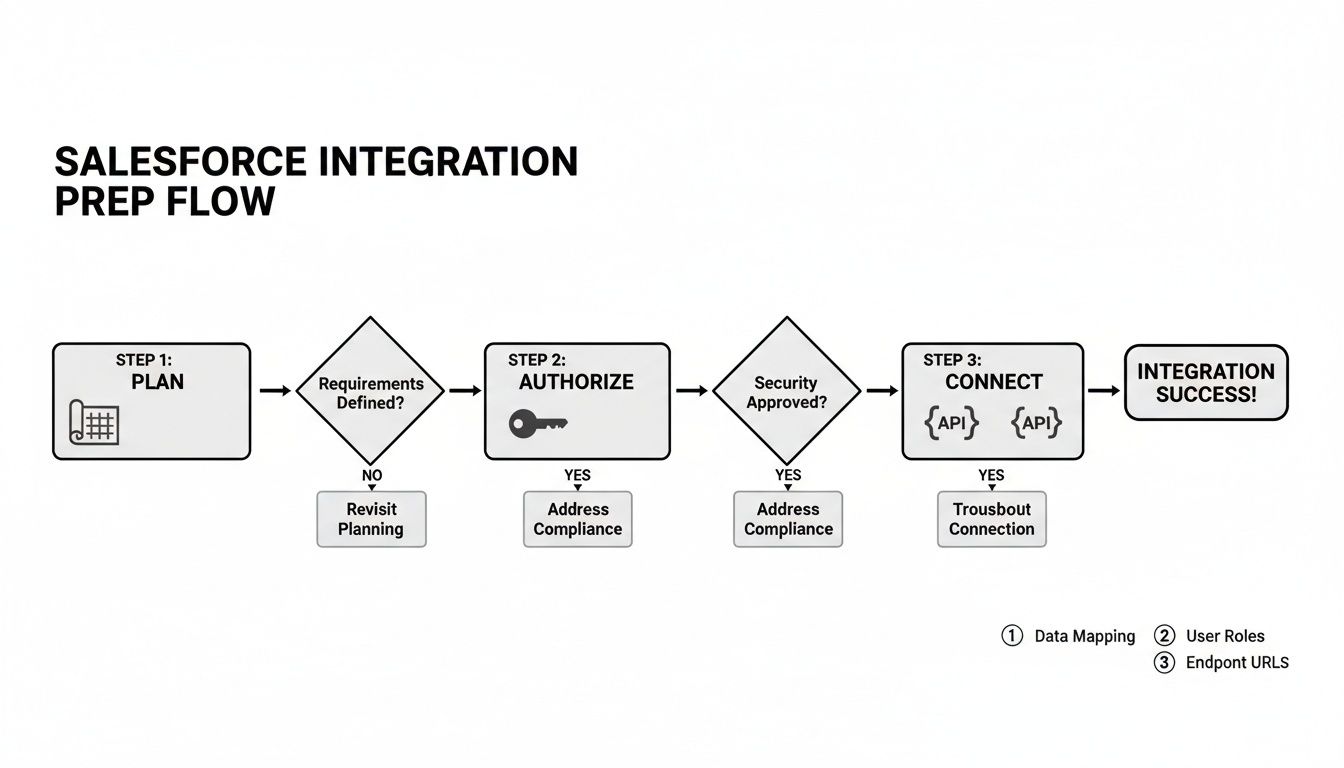
As you can see, picking the right API is a core part of the "Connect" phase, flowing directly from your initial planning and authorization work.
REST API for Real-Time Interactions
For most developers, the REST API is the natural starting point. It’s built for interactive, single-record operations where speed and responsiveness are everything. Because it uses standard HTTP methods and lightweight JSON, it feels familiar and is incredibly easy to work with.
A classic eCommerce use case is creating a new Contact in Salesforce the instant a customer creates an account on your website. You fire off a single, synchronous POST request and get an immediate success or failure response. It's clean, simple, and perfect for user-facing actions.
Bulk API 2.0 for Large Data Volumes
But what about when you need to sync your entire product catalog of 50,000 SKUs into Salesforce? Trying that with the REST API would be agonizingly slow and would almost certainly exhaust your daily API call limits. This is exactly why the Bulk API 2.0 exists.
The Bulk API is designed to process massive datasets asynchronously. You simply upload your data in a CSV, and Salesforce queues it up for processing in the background. This frees up your application to handle other tasks. It's the go-to for initial data migrations, nightly inventory updates, or importing a huge list of marketing leads.
The core principle is simple: if the dataset is large and the operation doesn't need to be instantaneous, the Bulk API is your best friend. It’s designed specifically to respect Salesforce's multi-tenant architecture and keep things running smoothly for everyone.
Streaming API for Event-Driven Updates
Sometimes, you need Salesforce to tell you when something changes instead of constantly polling for updates. The Streaming API flips the script with a publish-subscribe model that delivers near real-time notifications. Using powerful features like Change Data Capture (CDC), your application can subscribe to data changes on specific Salesforce objects.
For instance, when a service agent updates an order's status to "Shipped" in Salesforce, a CDC event can be pushed to your application instantly. This lets you trigger a shipping confirmation email to the customer without hammering the API every few minutes. It's a much more efficient, event-driven way to build.
Composite API for Combining Calls
Finally, the Composite API is a clever tool for optimizing against network latency. It lets you bundle multiple individual REST API requests into a single, efficient HTTP call. Imagine you need to create a new Account and then immediately create a Contact associated with that new Account.
Instead of making two separate round-trips to Salesforce, you can use the Composite API to execute both operations as a single, atomic transaction. This seriously cuts down on network overhead and makes your integration feel much snappier to the end user.
Making the right API choice isn’t a small detail—it has a massive impact. Organizations that adopt API-led connectivity report they innovate 64% faster and slash integration complexity by half. This acceleration is driven by robust APIs, which are central to building modern, interconnected customer experiences. You can read more about how Salesforce is shaping the API economy and what it means for the future.
This comparison table breaks down the key Salesforce APIs to help you choose the right tool for common eCommerce integration tasks.
Salesforce API Selection Guide for eCommerce Integration
| API Type | Best For (Use Case) | Data Volume | Processing Model |
|---|---|---|---|
| REST API | Single record create/update/delete. Real-time UI interactions (e.g., new customer signup). | Low | Synchronous |
| Bulk API 2.0 | Initial data migration, nightly inventory sync, or syncing thousands of records at once. | High (50k+ records) | Asynchronous |
| Streaming API (CDC) | Real-time notifications from Salesforce to your app (e.g., order status change). | Low (event-based) | Push (Pub/Sub) |
| Composite API | Bundling multiple related REST calls into one transaction to reduce network latency. | Low to Medium | Synchronous |
Choosing the right API from this list ensures your integration is efficient, scalable, and respects Salesforce's platform limits, preventing performance bottlenecks down the road.
Of course, all these scenarios assume you're pulling data from a single eCommerce source. The complexity multiplies when your SaaS needs to connect to dozens of platforms like Shopify, WooCommerce, and Magento. Instead of building custom logic for each platform's unique API before pushing to Salesforce, API2Cart can dramatically speed up the process. It provides a single, unified API to retrieve standardized customer, product, and order data from over 40 shopping carts. You can then map this clean data and send it to the appropriate Salesforce API, eliminating the massive overhead of building and maintaining dozens of individual connectors.
Once you’ve picked the right Salesforce API for your project, the real work begins. This is where you move from theory to practice, translating data flows into the actual logic that connects your eCommerce platform to Salesforce. It’s a detailed process of mapping and strategic planning that ultimately determines how reliable your entire integration will be.

The biggest hurdle for a developer? eCommerce platforms and Salesforce don't speak the same language. A "customer" record in Shopify looks very different from a "Contact" or "Account" in Salesforce. Your job is to act as the universal translator, making sure every bit of data ends up exactly where it belongs.
Modeling Your Core eCommerce Objects
First things first, you need to decide how your core eCommerce data will live inside Salesforce. This is more than a simple one-to-one field match; you have to understand Salesforce’s relational data model to build a structure that’s both solid and scalable.
Customers: You can't just dump an eCommerce customer record into a single Salesforce object. A customer's personal information usually maps to a Contact, while their company details (if they have any) go into an Account. The crucial part is linking that
Contactto the rightAccountto give your sales team a complete 360-degree view.Products: Your product catalog from a platform like BigCommerce or WooCommerce will map to the Product2 object in Salesforce. This is pretty straightforward for basic info like SKU and name. But what about variants like size and color, or different price points? That’s where you’ll need to work with related objects like Pricebook2 and PricebookEntry.
Orders: Orders are the most complex piece of the puzzle. The main order details—like the order number and total amount—map to the Salesforce Order object. But each line item within that order needs to be created as a separate OrderItem record. Then, you have to link each
OrderItemback to both the parentOrderand the specificProduct2it represents.
This isn't just about matching field names. You’ll hit data transformation challenges left and right—things like converting currency formats, standardizing time zones, or mapping custom order statuses (e.g., turning "Awaiting Fulfillment" into a specific picklist value in Salesforce). A detailed mapping document is your best friend here. It should outline every source field, its Salesforce destination, and any transformation logic needed. For a deeper look at this, check out our guide on the essential steps to consider for shopping cart data mapping.
Choosing Your Synchronization Pattern
With your data models mapped out, the next big question is how and when does the data sync? The answer has a direct impact on both your system's performance and the experience of the end-users. You've really got two main patterns to choose from.
Real-Time Syncing with Webhooks
For critical, time-sensitive data, real-time sync is the only way to go. Webhooks are perfect for this. When a high-value order comes in or an urgent support ticket is created, your eCommerce store can fire off an immediate HTTP POST request to an endpoint you control. Your service can then process that payload and create the record in Salesforce instantly. This ensures your sales and support teams are always working with the freshest information.
Scheduled Syncing with Batch Jobs
Not everything needs to be instant. For less urgent updates—like a nightly inventory reconciliation or pulling in a large list of customers from a marketing campaign—scheduled batch jobs are much more efficient. Setting up a cron job to pull all changes from the last 24 hours and push them using the Salesforce Bulk API is a smart move. It stops you from flooding the system with thousands of individual API calls during business hours.
A pro tip: establish a clear "source of truth" for each data object to avoid sync conflicts. For instance, product pricing might be owned by the eCommerce platform, while the sales team owns and manages customer contact details within Salesforce.
Accelerating Development with API2Cart
This whole mapping and syncing dance gets way more complicated when you need to support more than one eCommerce platform. Imagine building and maintaining separate data mappers and sync logic for Shopify, then WooCommerce, then Magento, and on and on. It’s a huge engineering headache.
This is exactly where a tool like API2Cart can be a game-changer for a developer. It serves as a unified abstraction layer, giving you a single, standardized format for orders, products, and customers from over 40 different shopping carts.
Instead of fighting with the unique API quirks of each platform, your developers can:
- Use API2Cart's unified methods to pull clean, consistent data from any store you connect.
- Build just one data mapper to translate the standardized API2Cart format into your Salesforce object model.
- Spend their time building the Salesforce side of the logic instead of getting bogged down in the nuances of dozens of different eCommerce APIs.
This approach lets you sidestep the repetitive, time-sucking work of building individual connectors from scratch. Your team can deliver a robust, multi-platform integration with Salesforce API in a fraction of the time it would otherwise take.
Managing API Limits and Building Resilient Error Handling
Getting an integration with the Salesforce API to work is one thing. Building one that can handle the chaos of a live production environment? That’s a whole different ballgame for an integration developer. A truly resilient integration is designed from day one to anticipate the realities of working in a shared, multi-tenant world. That means respecting API limits and building bulletproof error-handling logic from the very start.
Salesforce runs on governor limits to keep the platform stable for everyone. Think of these not as suggestions, but as hard caps on the number of API calls you can make in a 24-hour rolling period. If you blow past them, your integration will grind to a halt, and critical business operations will follow. For any developer in this space, managing these limits is simply part of the job.
Staying Within Salesforce Governor Limits
The secret to avoiding limit exceptions is to make every single API call count. You have to architect your integration for maximum efficiency, cutting out any unnecessary chatter between your app and Salesforce.
Here are a few battle-tested techniques for developers to keep API call volume in check:
- Implement Smart Caching: Don't ask for data you already have. For information that rarely changes—like product catalogs or user roles—cache it on your application's side. A simple but effective strategy is to cache the data with a TTL (Time to Live) of a few hours, only refreshing it when it expires.
- Use the Composite API: We touched on this earlier, but it’s worth repeating. Batching multiple REST requests into a single Composite API call is a massive optimization. Instead of five separate calls to update an Account, create a Contact, and add three OrderItems, you can bundle them into one network request. That’s just one call against your limit.
- Leverage Webhooks: If your source system supports them, use webhooks for real-time updates instead of constantly polling Salesforce for changes. Polling (e.g., "Are there new orders yet? How about now?") burns through API calls like crazy. A webhook, on the other hand, only triggers a call when something actually happens.
Pro Tip: For developers building integrations with multiple eCommerce platforms, managing API calls on the source side can be just as challenging. API2Cart simplifies this by providing webhooks for critical events like new orders and product updates across 40+ platforms. This lets you build an event-driven architecture that listens for changes, rather than wasting API calls polling dozens of different stores.
Designing Robust Error Handling Logic
Let’s be honest: things will break. Networks drop, services go down temporarily, and users will send bad data. A resilient integration expects this and knows how to recover without someone having to step in manually. This is where intelligent error handling saves the day.
A rookie developer mistake is to just fail a request and log a generic error. The professional approach is to implement a retry mechanism with exponential backoff. If an API call fails with a temporary error (like a 503 Service Unavailable), don't just hammer the server again. Wait a moment—say, 2 seconds—and then retry. If it fails again, double the wait time to 4 seconds, then 8, and so on, up to a reasonable maximum. This simple pattern prevents you from overwhelming a service that's already struggling.
Beyond just retries, managing the sheer volume of requests is critical. It's worth digging into understanding concurrency limits to design solutions that won't fall over under heavy load.
Parsing Errors for Meaningful Debugging
When an API call fails for good, the error message from Salesforce is your best friend for debugging. These responses are usually detailed JSON objects with an error code and a human-readable message. Your logging system needs to capture this entire payload, not just a vague "Request Failed" note.
For instance, an INVALID_FIELD error response will tell you precisely which field in your payload was the problem. By logging this rich detail, you can diagnose and fix bugs in minutes instead of hours. Over time, your team can even build a library of common error codes and their solutions. You can find some fantastic advice on this topic by exploring these hints and tricks for better API error codes. This practice turns cryptic failures into actionable insights and dramatically speeds up the debugging process for any developer.
What About Multi-Platform Integrations? A Unified API Can Help
Building a solid integration with Salesforce API is a serious project even when you're just connecting one eCommerce platform. But what happens when your SaaS needs to support merchants on Shopify, WooCommerce, Magento, and dozens of others? The complexity doesn't just add up; it multiplies.
Suddenly, your dev team isn't building one connector. They're trying to become experts in a dozen different API architectures, authentication flows, data models, and rate limits. This approach is a one-way ticket to bloated development timelines, skyrocketing maintenance costs, and a support queue flooded with platform-specific bugs. It’s a classic developer nightmare and a massive roadblock to scaling your product.
The Unified API Advantage for Developers
This is exactly where a unified API like API2Cart comes in, acting as an abstraction layer to simplify the chaos for developers. Instead of wrestling with countless platform-specific APIs, your team works with a single, consistent API to pull standardized data from over 40 different shopping carts.
This strategy completely changes the game for your integration workflow:
- Write Code Once: You build your data mapping and sync logic just one time. That single codebase can then pull order, product, and customer data from any platform you enable.
- Slash Development Time: The time you save by not building and testing dozens of individual connectors is enormous. Your team can pour that energy into perfecting the Salesforce side of the integration and shipping value to users faster.
- Forget Maintenance Overhead: When a platform like Shopify updates its API (and they always do), your team doesn't have to scramble. API2Cart handles all the upkeep, ensuring your integration stays stable without constant fires to put out.
The API2Cart homepage gives you a quick visual of just how many platforms you can connect to through a single API.
This image really drives home the core value for a developer: one point of integration unlocks an entire ecosystem of potential customers for your SaaS.
A Practical Use Case: API2Cart and Salesforce
Let's say your app is designed to sync customer orders from any online store into Salesforce for advanced analytics. Without a unified API, your developers would be building a separate module for each shopping cart just to fetch order data before you could even think about pushing it to Salesforce.
With a solution like API2Cart, the process becomes incredibly efficient for your developers. They use one consistent method—like order.list—to pull order data from a Shopify store, a BigCommerce store, or a WooCommerce store. The data that comes back is already structured in a predictable, standardized JSON format. From there, you just map that clean data directly to your Salesforce Order and OrderItem objects.
This approach dramatically reduces complexity and frees your engineering team to focus on high-value features, not on the thankless task of maintaining a tangled web of API connectors.
The financial upside here is huge. For example, some platforms built on Salesforce APIs have shown a staggering 445% return on investment, generating millions in benefits. The entire CRM market, projected to grow from $112.91 billion in 2025, is fueled by the value these kinds of connections create. You can discover more insights about Salesforce integration ROI and see how these numbers reflect global demand. By simplifying how you connect to multiple data sources, a unified API helps you tap into this market potential far more quickly.
Testing and Deploying Your Salesforce Integration
Getting your integration across the finish line requires a sharp testing and deployment strategy. This isn't just a final checkbox; it's the critical phase that separates a stable, production-ready solution from one that generates endless support tickets. I've seen teams rush this stage, and it almost always undermines all the careful architectural work they've done.

This is where Salesforce Sandboxes become your most valuable tool. Think of them as perfect replicas of your production org where you can break things without consequence. They allow you to test every aspect of your integration with realistic data—without ever touching live customer information. A proper testing workflow isn't just one step; it’s a multi-stage process that builds confidence.
Structuring Your Testing Phases
To really trust your code, you need to break your testing down into distinct, manageable phases. Each phase validates a different layer of your integration, ensuring the entire data flow is sound from end to end.
- Unit Tests: Start at the most granular level. These are small, focused tests for individual functions. A classic example is testing a single data transformation, like converting an eCommerce "shipped" status into the correct Salesforce picklist value.
- Integration Tests: Now, zoom out a bit. Here, you're testing how different components work together. For instance, can your service successfully authenticate with Salesforce and then create a new Account record? This confirms the handshake between systems is working.
- End-to-End (E2E) Tests: This is the full dress rehearsal. You want to simulate a complete user journey from start to finish. A great E2E test would be to trigger a customer placing an order on a Shopify store and then confirming that the corresponding Account, Contact, and Order records show up correctly in your Salesforce Sandbox.
For developers connecting to multiple platforms, a unified API like API2Cart can simplify this process. Since you get standardized data, you can build one set of tests for your mapping logic, which will work regardless of whether the source is Magento or BigCommerce, speeding up your E2E validation.
Monitoring and Go-Live Readiness
Once testing is complete, deployment isn't the final step—it’s just the beginning of the next phase. You need a robust monitoring and alerting system in place from day one. Set up dashboards to track your API call usage against your daily limits, and configure alerts that ping your team immediately if error rates spike. This proactive approach helps you catch issues before they impact users.
The growing trend of AI is also shaping what happens post-deployment. We've seen an explosion in Salesforce API integrations with AI agents, with agent creation surging 119% in the first half of the year. This shift means monitoring isn't just about API calls anymore; it's about tracking how automated agents interact with your integration to handle customer service or even detect security threats. You can discover more insights about Salesforce developers and see how AI is changing the landscape.
Finally, create a detailed go-live checklist for migrating from sandbox to production. This list should include tangible steps like updating API endpoints, securely managing production credentials, and performing a final smoke test to ensure everything is operational. A smooth launch is the direct result of a rigorous testing and deployment plan.
Answering Your Top Salesforce API Integration Questions
When you're knee-deep in code, building a custom integration with the Salesforce API, you're bound to hit a few familiar walls. I've seen engineering teams wrestle with the same questions time and time again. Getting these sorted out early will save you a ton of headaches down the line and help you build something that actually lasts.
What's the Real Difference Between Salesforce REST and SOAP APIs?
Think of it this way: the REST API is your go-to for most modern web and mobile apps. It’s lightweight, speaks in simple JSON, and uses the standard HTTP methods you already know. If you need to do something straightforward and stateless, like updating a contact record, REST is almost always the right call. It's just faster and easier to work with.
The SOAP API, on the other hand, is the more formal, old-school option. It's built on a much stricter, XML-based protocol. You'd typically only reach for SOAP when dealing with complex, multi-step transactions or when you need a rigid contract (the WSDL file) between two enterprise-level systems. For most eCommerce integrations, it's overkill.
How Do I Stop My Integration from Hitting Salesforce API Limits?
This is the big one. To avoid getting locked out by your daily API call limits, you have to be smart and efficient. Don't make a thousand separate calls when one will do.
For huge data migrations or initial syncs, use the Bulk API. It’s designed specifically for that. For everything else, start batching smaller requests together using the Composite API. And of course, a solid caching strategy for data that doesn't change much (like product categories) is non-negotiable.
I can't stress this enough: optimize your SOQL queries. Only pull the fields you absolutely need. Trimming down your payload size is one of the quickest wins for making every single API call count.
When Does a Unified API like API2Cart Make Sense?
A unified API becomes a no-brainer the moment your app needs to talk to more than one eCommerce platform. If you're a developer building a SaaS product for merchants on Shopify, Magento, and BigCommerce, a tool like API2Cart completely changes the game.
Instead of getting bogged down building and maintaining dozens of unique connectors just to pull data before you can even think about sending it to Salesforce, you work with a single, standardized API. This frees up immense development resources and lets your team focus on what really matters: your core integration logic with Salesforce. It's simply the fastest way to scale your connectivity.
Are you building a SaaS that needs to connect with multiple eCommerce platforms and sync data to Salesforce? API2Cart provides a unified API to access data from over 40 shopping carts, saving you thousands of development hours. Learn more and start your free trial.