At its core, a Magento integration is about connecting a Magento-powered online store to other software—think inventory management systems, shipping solutions, or marketing automation platforms. This connection creates a seamless, automated flow of data for orders, products, and customers, getting rid of manual entry and building a truly unified business operation.
For any B2B SaaS developer, building a solid Magento integration isn't just a feature; it's a strategic move to tap into a huge market of high-value online merchants.
Why Magento Integration Is A Strategic Goldmine
For a B2B SaaS developer, Magento is much more than just another shopping cart. It’s a direct gateway to a profitable market filled with serious, high-volume merchants. These aren't hobbyists—they're established businesses that rely on sophisticated tools for everything from shipping and inventory to marketing automation. Integrating with their platform of choice isn't just a technical task; it's a massive business opportunity.
But the reality of building these integrations one-off can be a huge drain on resources. Developers often find themselves wrestling with outdated documentation, trying to make sense of the vast differences between Magento 1's old SOAP/XML-RPC APIs and Magento 2's more modern REST and SOAP APIs. This version chaos alone can easily double your development and maintenance workload, pulling your team away from improving your actual product.
The Real Cost of Manual Integration
The pain points of building direct, one-by-one integrations are real, and they can seriously slow down growth for any SaaS business:
- High Development Overhead: Creating a custom connector from the ground up demands deep, platform-specific knowledge and countless hours of coding, testing, and debugging.
- Ongoing Maintenance Burden: Magento is always evolving with new versions and security patches. Every single update puts your custom integration at risk of breaking, demanding immediate attention from your dev team.
- Scalability Challenges: As your user base grows, so does the number of Magento stores you have to support, each with its own unique setup and extensions. This complexity makes scaling a direct integration model incredibly difficult.
A smart Magento integration strategy often means optimizing logistics, too. This includes things like finding the best courier service for e-commerce success. This is precisely where a modern, unified API approach becomes a complete game-changer.
Instead of building and maintaining dozens of brittle, individual connections, a unified API allows you to connect once and access data from Magento and numerous other eCommerce platforms through a single, standardized interface.
The Unified API Advantage
Services like API2Cart offer a much more powerful alternative for integration developers. By connecting to a single API, you get to bypass all of Magento's version-specific quirks and tricky authentication methods. This approach fundamentally shifts your team's focus from tedious integration maintenance back to what really matters: building innovative features for your customers.
Think about it. Instead of debugging a bizarre issue with a specific Magento 2.3 store, your team could be developing a new analytics dashboard for your app. To learn more about this approach, you can explore our guide on how to expand your SaaS solution with Magento 2 integration.
The market potential is undeniable. Magento merchants process over $155 billion in transactions every year, and the ecosystem is packed with businesses actively looking for solutions to streamline their operations. For these stores, optimized data flows are not a luxury—they report returns as high as 516% on integration investments, which shows just how much they depend on well-connected software. You can find more insights about Magento's market share and statistics on envisagedigital.co.uk.
By offering a seamless Magento integration, you position your SaaS product as an indispensable tool for this powerful merchant base.
Navigating The Complex Magento API Landscape
If you’re a developer tasked with building a Magento integration, you know the first major hurdle isn’t writing code—it’s figuring out which API to even target. The Magento ecosystem is notoriously fragmented, with a completely different set of rules depending on whether you're connecting to a legacy Magento 1 store or a modern Magento 2 setup.
This isn’t just a minor version difference. It’s a fundamental architectural divide that can sink a project before it even gets off the ground.
Magento 1 primarily relies on older, clunkier protocols like SOAP/XML-RPC. Let's be honest, these APIs feel like a relic from a different era. They work, but you're dealing with verbose data structures and endpoint conventions that are far from intuitive. Authentication alone can be a cumbersome, multi-step headache.
Then came Magento 2, which introduced a much-needed upgrade with a more familiar RESTful API that uses JSON (though it still offers a SOAP alternative). Authentication shifted to OAuth 1.0a, which meant developers now had to generate consumer keys and secrets to manage access tokens. While this was a huge improvement, it created a new problem: you now have two entirely separate integration paths to build and, more importantly, maintain.
The Maintenance Nightmare of Version Fragmentation
This split between versions quickly turns into a serious maintenance headache. An endpoint for retrieving products in Magento 1 has a different structure and expects different parameters than its counterpart in Magento 2. The data models for orders, customers, and inventory just aren't directly compatible.
This means you can't just write your integration logic once and call it a day.
Instead, you’re forced to build and maintain conditional code paths for every single API call:
- Authentication Logic: One flow for Magento 1's API users and keys, and a completely different one for Magento 2's OAuth 1.0a token exchange.
- Data Mapping: You’ll be writing separate mappers to normalize product variants, order statuses, and custom attributes from two different API schemas into your application's internal model.
- Endpoint Management: You're stuck maintaining two distinct sets of API endpoints, each with its own quirks, error patterns, and potential failure points.
This is where development slows to a crawl. All the time spent digging through inconsistent documentation and debugging version-specific issues is time you're not spending on building valuable features for your users.
The diagram below shows how a unified API can cut through these core pain points to support real business growth.
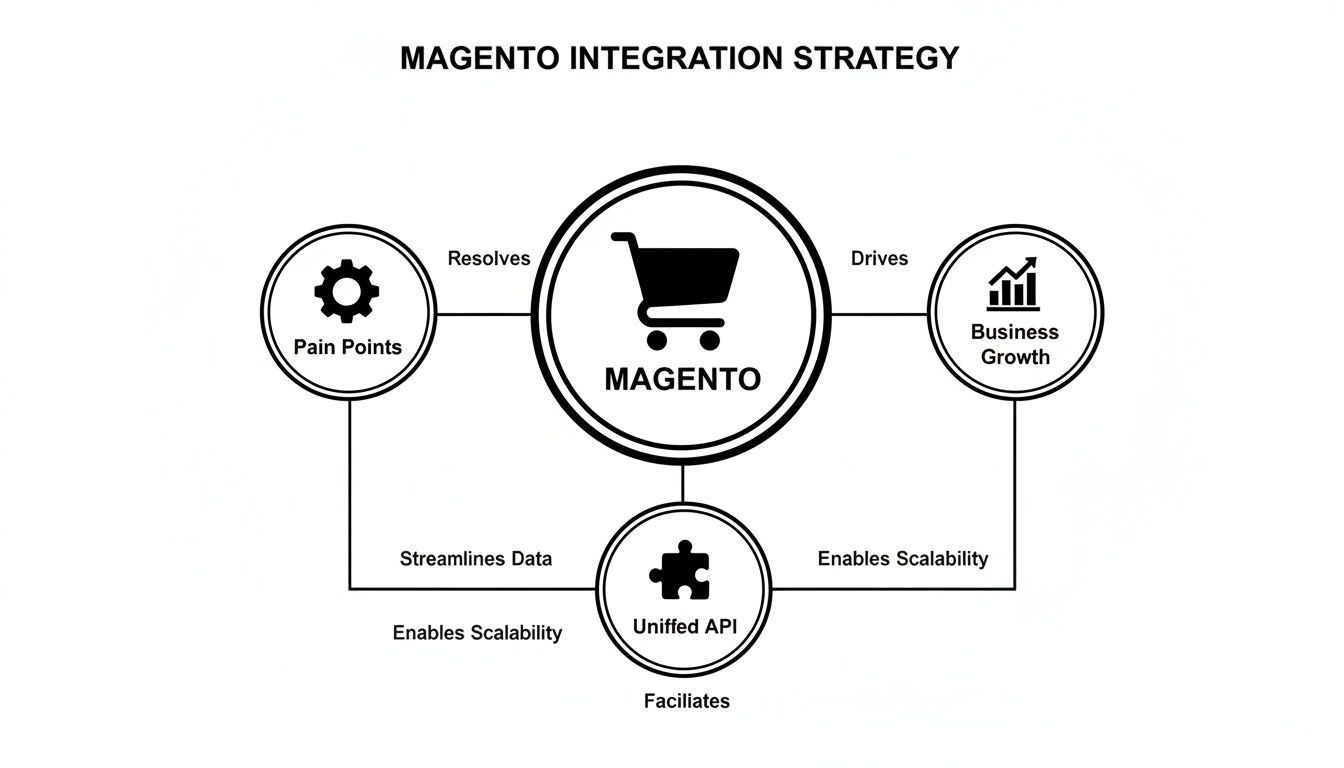
As you can see, a unified API acts as the bridge between all that platform-specific complexity and the scalable growth your SaaS needs.
Sidestepping Complexity with a Unified API
This is exactly where a unified API service like API2Cart becomes an integration developer’s secret weapon. It completely abstracts away the chaos of the Magento API landscape. Instead of wrestling with SOAP, REST, XML, and JSON across different versions, you get a single, consistent API to work with.
When you're building integrations for multiple platforms, the last thing you want is to become an expert in the historical quirks of each one. A unified API lets you sidestep the entire version fragmentation problem.
To see just how different the development experience is, let's compare building a direct integration versus using a unified API.
Magento Native APIs vs Unified API (API2Cart)
| Feature | Direct Magento API Integration | Unified API Integration (via API2Cart) |
|---|---|---|
| Authentication | Separate logic for M1 (SOAP/XML-RPC) and M2 (OAuth 1.0a). | Single API key for all platforms and versions. |
| Data Models | Manually map and normalize different data structures for M1 vs. M2. | Receive pre-normalized, standardized data (products, orders, etc.). |
| Endpoint Logic | Maintain separate code paths and endpoints for each Magento version. | Use one set of methods (e.g., product.list) for all versions. |
| Maintenance | High. Must monitor and update code for both M1 and M2 API changes. | Low. API2Cart handles all underlying platform updates. |
| Dev Time | Weeks or months per integration. Requires deep Magento expertise. | Days. Focus on core application logic, not platform specifics. |
The difference is clear. One path leads to ongoing maintenance and specialized knowledge, while the other accelerates development and simplifies your codebase.
API2Cart handles all the messy translation work behind the scenes. When you make a call to product.list, the service translates your request into the appropriate native API call for that specific Magento store—whether it’s a Magento 1.9 or a Magento 2.4 instance. The data you get back is already cleaned up and normalized into a predictable structure.
For a deeper dive into the specifics, check out this guide on how to connect to Magento 2 API via API2Cart to see some practical examples.
Ultimately, this approach lets your team focus on application logic rather than connection plumbing. You can start pulling orders, syncing inventory, and managing customer data right away, without writing a single line of version-specific code. This not only accelerates your time-to-market but also dramatically reduces the long-term maintenance burden, freeing up your engineering resources to innovate.
Synchronizing Core Product And Order Data

Alright, with authentication handled, we're at the heart of the matter: getting the data moving. This is where your magento integration stops being theoretical and starts adding real value. For any SaaS platform in the eCommerce space—be it an Order Management System (OMS), a Warehouse Management System (WMS), or a slick analytics tool—the reliable synchronization of products, orders, and customers is the entire game.
Going direct with Magento means you’re signing up to wrestle its complex data structures yourself. I’ve seen developers spend weeks mapping fields, untangling custom attributes, and figuring out the nuances between different product types. It's a minefield where one wrong step can lead to corrupted data or a completely broken user experience.
The Headaches Of Direct Data Mapping
One of the biggest hurdles is Magento's notorious product complexity. You aren't just dealing with simple products. You have to account for configurable, grouped, and bundled products, each with its own unique structure and parent-child relationships. Trying to map these variants to a clean, standardized model in your own application is a huge engineering lift.
Another classic pain point is normalizing order statuses. An order status like "Processing" in Magento might mean one thing, but in your SaaS app or another connected platform, it could mean something entirely different. This forces you to build and maintain complicated logic just to translate statuses correctly—a task that spirals out of control as you add more eCommerce platforms.
The core problem with direct integration is that you’re always translating. You write code to pull data, then more code to transform it, and you have to do it all over again for Magento 1 versus Magento 2. This is where a unified API completely changes the development cycle.
Services like API2Cart hand you a standardized data model from the get-go. Instead of you shouldering the burden of normalization, the data arrives in a clean, predictable format. A configurable product from Magento 2 and a simple product from Magento 1 are both presented through the same consistent structure, saving you from writing endless if-else statements.
Streamlining Data Retrieval With Unified Methods
Let's make this practical. Say you need to pull a complete list of products from a merchant's store. Without a unified API, you're looking at different API calls for different Magento versions. With a service like API2Cart, it's radically simpler.
You make a single call to the product.list method. That's it. This one method works for any connected Magento store, regardless of its version. It returns a standardized JSON object with all the essentials—SKU, price, images, attributes—and completely abstracts away Magento's underlying complexity.
Here’s how this approach speeds up development for key tasks:
- Initial Product Sync: Use
product.listwithcountandstartparameters to efficiently page through thousands of SKUs without hammering the API. - Inventory Updates: Once products are synced, the
product.updatemethod lets you push stock level changes back to Magento, keeping inventory accurate across systems. - Pulling New Orders: The
order.listmethod, filtered by date, lets you grab all new orders since the last sync, ready to be pulled into your system. - Creating Shipments: After you fulfill an order, use
order.shipment.addto send tracking information back to Magento, which then automatically notifies the customer.
This standardized approach means you write your business logic once. The code that processes an order from a Magento 2 store is the exact same code that handles an order from a Shopify or WooCommerce store connected through API2Cart.
Managing Large Data Sets Effectively
High-volume Magento stores can have tens of thousands of products and process hundreds of orders an hour. Trying to pull all that data in a single API call is a recipe for timeouts and failed requests. Smart pagination and filtering aren't just nice to have; they're essential for a reliable magento integration.
Instead of trying to grab everything at once, use API methods that support parameters like count and start. For example, retrieve products in batches of 100, process each batch, and then make the next call until you’ve synced the entire catalog. This chunking strategy makes your integration far more resilient to network hiccups and API rate limits.
The sheer scale of the Magento ecosystem makes this efficiency critical. Magento is a true eCommerce giant, powering over 661,770 websites. The demand for solid integrations is massive; for instance, the payment gateway Braintree is integrated into 56,918 Magento websites alone. For SaaS vendors, this signals a huge market of merchants desperate for unified tools. You can find more stats about Magento's powerful market presence on mageplaza.com.
Ultimately, by using a unified API, you get to stop being a platform-specific data janitor and start focusing on building the features that actually solve your customers' problems.
Implementing Real-Time Updates With Webhooks

In modern eCommerce, waiting for batch updates is a recipe for disaster. If your integration relies on periodically polling a store to see if there's anything new, you're building in delays. For a truly responsive Magento integration, you have to think in terms of events, not schedules. That's where webhooks come in.
Webhooks completely flip the old API model around. Instead of your app constantly asking Magento, "Got a new order yet?", the store proactively sends a message saying, "Hey, a new order just came in!" This "push" approach is the only way to handle use cases that need to react the moment something happens.
Why Webhooks Are Non-Negotiable
From a developer’s perspective, webhooks are the foundation for a much smarter, more efficient system. They cut down on thousands of pointless API calls, which saves resources on your server and reduces the load on the merchant’s store. Everyone wins.
Think about the everyday scenarios where a delay is unacceptable:
- Instant Order Notifications: A webhook can fire the moment a customer clicks "buy," pushing that data straight to your Order Management System (OMS) to get the fulfillment process rolling immediately.
- Real-Time Inventory Adjustments: An
inventory.updateevent keeps your warehouse management system perfectly in sync. As soon as stock changes in Magento, your connected systems know about it, which is crucial for preventing overselling. - Immediate Customer Data Syncs: A new customer registration can trigger a webhook to your CRM, kicking off a welcome email sequence before the customer has even left the site.
But let's be honest: building this directly with Magento is a headache. You have to wrestle with its native event system, which behaves differently across versions. You’re on the hook for building a resilient endpoint that can handle incoming data, validate it, and manage retries if something goes wrong. That's a serious engineering lift.
The Fast Track to Event-Driven Integration
This is exactly where a unified API service like API2Cart becomes a developer's best friend. Instead of battling Magento’s native event observers and tricky configurations, you just subscribe to a clean, universal set of webhook events.
API2Cart's webhook system does the heavy lifting for you, abstracting away all the platform-specific quirks. You subscribe to standard events like
order.addorproduct.update, and the service handles the messy part of capturing that event from any Magento store, regardless of the version.
The data payload you receive is predictable and consistent, whether it comes from Magento, Shopify, or WooCommerce. This means the code you write to process a new Magento order is the exact same code that handles an order from any other platform. This approach doesn't just save time—it makes your entire integration easier to scale and maintain.
For example, subscribing to the order.add webhook is a simple, three-step dance:
- Register Your Endpoint: Just give API2Cart a secure URL where you want to receive the notifications.
- Subscribe to Events: Pick and choose the events that matter to your app, like
order.add,product.update, orcustomer.add. - Process Payloads: Your endpoint listens for incoming POST requests, validates the payload's signature for security, and then runs your business logic.
This method completely removes the need to build and maintain separate webhook handlers for Magento 1 and Magento 2. It cleans up your codebase and lets you focus on building features your customers want, not the plumbing underneath.
To see this in action, check out this detailed web hook example from API2Cart that walks through the whole process. By taking this streamlined approach, your app can achieve genuine real-time synchronization, keeping your data perfectly aligned with the merchant's store at all times.
Building A Production-Ready Integration
Moving your code from a local dev environment to a live server is a massive leap. A Magento integration that hums along perfectly on your machine can quickly fall apart under the stress of real-world traffic, messy data, and network hiccups. Building for production isn't just about making sure the code works; it's about making sure it's resilient, secure, and ready to scale.
This means you have to plan for what can—and absolutely will—go wrong. API calls will time out, servers will become unresponsive, and you’ll hit rate limits. A truly solid integration is designed from day one to handle these bumps gracefully, keeping the experience stable for users and preventing data from getting corrupted.
Designing for Failure with Smart Error Handling
The first rule of production is that things break. A 503 Service Unavailable error from the Magento API isn't some rare edge case; it's practically a routine event. Your integration needs to be smart enough to tell the difference between a temporary glitch and a permanent failure, then react accordingly.
A retry mechanism is your first line of defense. But just blindly retrying a failed request over and over again can pour gasoline on the fire, especially if the server is already overloaded. This is where exponential backoff becomes your best friend.
Here’s a practical way to set it up:
- Initial Retry: After a failure, wait a short, randomized interval—say, 1-2 seconds—before trying again.
- Exponential Increase: If it fails again, double the waiting time for each next attempt (e.g., 2s, 4s, 8s). The randomness helps prevent a "thundering herd" of retries from multiple systems hitting the API all at once.
- Set a Limit: Cap the number of retries at a reasonable number, like 5 attempts. If it still fails, you stop hammering the API, log the failure, and flag it for a human to look at.
This approach gives a struggling API endpoint a chance to breathe and recover, dramatically increasing the odds of a successful request without bringing the server to its knees.
Respecting API Rate Limits to Avoid Throttling
Every API, Magento included, enforces rate limits to protect its infrastructure from being overwhelmed. If you blow past these limits, your requests will get throttled, triggering a domino effect of failures across your system. You have to be proactive here.
Rate limiting isn't just a technical hurdle; it's a fundamental part of the API contract. Ignoring it is like trying to merge onto the highway with your eyes closed—it’s not a matter of if you'll crash, but when.
Trying to build your own rate-limiting logic is a headache. You have to track request counts, manage timers, and build queuing systems, all while handling distributed states. This is another spot where a unified API service like API2Cart is a game-changer. It handles all the low-level interactions with Magento's native APIs, which includes managing rate limits automatically. Your app can fire off requests as needed, and API2Cart’s infrastructure queues and spaces them out perfectly so you never violate the platform’s limits. It lets you stay focused on your actual business logic, not on playing traffic cop.
Fortifying Your Integration with Security Best Practices
In a live environment, security is non-negotiable. A single vulnerability can expose sensitive customer and order data, which can be catastrophic for your reputation and your business.
Start with the basics: secure your API credentials. Never, ever hardcode keys, secrets, or tokens in your source code. Use a proper secrets management tool like HashiCorp Vault, AWS Secrets Manager, or whatever equivalent your cloud provider offers. These tools give you encrypted storage and tightly controlled access, slashing the risk of credentials getting exposed.
Beyond that, make sure you've covered these essentials:
- Validate All Incoming Data: Treat any data coming from an external system as untrusted. Sanitize and validate everything you receive from Magento via webhooks or API calls to shut down injection attacks.
- Use Secure Connections: This one should be obvious, but always ensure all communication with the Magento API and any other service uses HTTPS to encrypt data in transit.
- Implement Robust Monitoring: Constant monitoring is your early warning system. Set up alerts for strange error rates, spikes in API latency, or failed login attempts. Tools like Datadog, New Relic, or even a simple ELK (Elasticsearch, Logstash, Kibana) stack can help you see problems before your users do. Catching these anomalies early means you can diagnose and fix them before they escalate into a full-blown outage.
Your Magento Integration Questions Answered
Diving into a Magento integration for the first time can be a headache, especially given the platform’s reputation for complexity. As a developer, you don't need fluff—you need direct answers to get past the hurdles that bog down a project. This section cuts straight to the chase, tackling the most common questions we hear from developers building Magento connections.
Our goal here is to give you concise, practical insights to help you build a solid, efficient integration with any Magento store, and hopefully help you dodge a few common bullets along the way.
What Is The Biggest Difference When Integrating With Magento 1 Versus Magento 2
Honestly, it all boils down to the API technology. Magento 1 is stuck in the past with older, clunky SOAP/XML-RPC APIs that just don’t play well with modern applications. In stark contrast, Magento 2 rolled out a much cleaner, developer-friendly RESTful API that uses JSON and OAuth 1.0a for authentication.
Because of this fundamental shift, the data models and endpoint structures are completely different. This version fragmentation is a huge pain point, forcing developers to build and maintain two entirely separate codebases to support both.
A unified API service like API2Cart completely erases this problem. It handles the messy differences behind the scenes, giving you a single set of API methods and a consistent data structure for both Magento versions. This isn't just a minor convenience—it saves a massive amount of development time and cuts out the long-term maintenance nightmare of juggling two integrations.
How Can I Handle Real-Time Inventory Synchronization Efficiently
You could set up a cron job to poll for updates every few minutes, but that's a resource drain and not truly real-time. The best, most scalable approach is to use webhooks. A webhook-driven design lets Magento send an immediate notification to your application the second an inventory event happens, like a sale reducing stock or an admin making a manual adjustment.
This event-based model is far lighter on your server and the merchant's store compared to constant polling.
With a unified service, it gets even simpler. You just subscribe to a universal product.update webhook event. That one subscription triggers a notification with the updated product data from any connected Magento store, allowing your system to adjust stock levels instantly and prevent overselling.
What Are The Most Common Pitfalls To Avoid
Time and again, we see developers get tripped up by the same three issues on a Magento integration project. If you can get ahead of these from the start, you're already halfway to a successful deployment.
- Underestimating the Maintenance Treadmill: Magento is always changing—new versions, security patches, and third-party extensions. A custom-built integration is brittle by nature and will inevitably break with these updates, locking you into a never-ending cycle of fixes.
- Ignoring Data Volume and Rate Limits: High-volume stores with huge catalogs will quickly overwhelm an integration that wasn't built for scale. If you don't plan for proper pagination and respect API rate limits, you’ll end up with throttled requests and incomplete data syncs. It’s a classic rookie mistake.
- Botching the Data Mapping: Getting the data mapping wrong is a recipe for disaster. Failing to correctly map custom attributes, complex product variants, and different order statuses between systems leads directly to corrupted data and a terrible user experience.
A unified API helps you sidestep all three. The service provider takes on the maintenance burden, automatically manages API traffic to stay within rate limits, and provides a standardized data schema that makes the mapping process much more straightforward. It’s about building on a solid foundation instead of starting from scratch in a minefield.
Building a scalable Magento integration requires the right tools to navigate the platform's notorious complexities. With API2Cart, you can connect to Magento and 60+ other eCommerce platforms through a single, unified API. Save countless development hours, slash maintenance costs, and get back to building the features your customers actually want. Start your free trial today!