The QuickBooks Online API isn't just a technical interface; it's the bridge that connects your application directly to the financial heart of a business. For an integration developer, mastering this API is the key to building powerful solutions that automate accounting, sync critical sales data, and give businesses a real-time view of their finances.
The Strategic Value of QuickBooks API Integration for Developers

When you're building an integration, mastering the QuickBooks Online API is about more than just shuttling data back and forth. It's about solving real-world, high-stakes business problems. The biggest win? Stamping out manual data entry for good. Manual entry is slow, tedious, and—worst of all—a notorious source of costly human errors that can throw financial reports completely out of whack.
By automating these financial workflows, you’re creating a reliable, seamless link between a business's operational tools (like an eCommerce store or SaaS billing system) and its accounting system of record. This is where developers can deliver immense value and build features clients are more than willing to pay for.
Key Opportunities for Developers
Your fluency with the API can be directly translated into powerful, in-demand features. Think about the common pain points for any eCommerce or SaaS business:
- Automated Invoicing: When a sale closes on an online store or a subscription renews, your integration can instantly generate and send a perfectly formatted QuickBooks invoice. No more manual creation.
- Real-Time Inventory Sync: As soon as a product sells on any channel, the inventory count in QuickBooks Online gets updated. This simple sync prevents overselling and keeps stock levels accurate across the board.
- Effortless Payment Reconciliation: Your integration can automatically match payments from gateways like Stripe to the corresponding open invoices in QuickBooks, transforming a painful monthly reconciliation process into an automated background task.
For a developer, every manual accounting task is an opportunity. Your integration can be the solution that saves a business hundreds of hours a year, turning a tedious administrative burden into a streamlined, automated process.
As a developer, building an integration with the QuickBooks Online API allows you to tap into these opportunities directly. Here’s a look at how this translates into tangible benefits for your clients and your own development process.
Core Integration Benefits for Developers
| Benefit | Impact on Business Operations | Developer Opportunity |
|---|---|---|
| Error Reduction | Eliminates manual data entry mistakes, ensuring financial data accuracy. | Build a reputation for creating reliable, trustworthy financial tools. |
| Time Savings | Automates repetitive tasks like invoicing and reconciliation, freeing up hours. | Offer high-value automation features that justify premium pricing. |
| Real-Time Visibility | Provides an up-to-the-minute view of cash flow, sales, and expenses. | Develop dashboards and reporting features that give clients actionable insights. |
| Scalability | Handles growing transaction volumes without needing to add more staff. | Position your application as a solution that grows with a client's business. |
These benefits aren't just nice-to-haves; they solve core operational challenges, making your integration an indispensable part of a client's tech stack.
The Growing Demand for Cloud Accounting Integration
The migration to cloud accounting is happening fast, and it’s fueling massive demand for smart integrations. The numbers speak for themselves: QuickBooks Online's revenue exploded by a massive 68% between 2021 and 2023. By 2023, its online services were pulling in about 2.6 times more revenue than its traditional desktop software, with some estimates suggesting 80% of users now opt for the Online version. This incredible growth is powered by the ecosystem of third-party apps built on the QuickBooks Online API.
For an integration developer, this trend presents a massive opportunity, but also a challenge. Building a one-off integration to QuickBooks is just the beginning. To truly scale, your application needs to connect with other major accounting platforms as well. This is where unified API platforms like API2Cart are a game-changer. Instead of building and maintaining dozens of individual integrations from scratch, you can connect to QuickBooks and over 40 other platforms through a single, consistent API. This approach radically slashes development time, cuts maintenance overhead, and makes it far easier to expand your app's market reach. Exploring other financial APIs, like a Xero integration for customer feedback, can also offer more perspective on just how broad the applications for this technology are.
Connecting Securely With OAuth 2.0
Before your app can touch a single piece of user data, you need a trusted, secure connection. This is where OAuth 2.0 steps in, acting as the digital handshake for the QuickBooks Online API. It's the industry-standard way for your application to get permission to access resources on a user's behalf—all without ever seeing or storing their password.

For any developer building an integration, nailing this flow isn't just a suggestion; it's the bedrock of a secure and working application. The process guarantees that users give explicit consent for your app to perform specific actions, keeping them in full control of their financial data.
The OAuth 2.0 Token Exchange
At its heart, the OAuth 2.0 flow is a carefully orchestrated, multi-step dance designed for security. It starts by sending the user over to an Intuit sign-in page, where they'll be asked to approve your app’s request for access. Once they say yes, they're redirected back to your app with a special one-time-use code.
Your backend server then takes this temporary authorization code and swaps it for two crucial tokens:
- Access Token: A short-lived credential that’s only valid for 60 minutes. You'll stick this in the header of every API request to prove your app has permission to be there.
- Refresh Token: A much longer-lived credential, good for 100 days. Its only job is to get you a new access token when the old one expires, all without forcing the user to log in again.
This two-token system is a brilliant security feature. The powerful, long-term refresh token is never exposed to the user's browser; it only ever moves between your secure server and Intuit's.
Setting Up Your Sandbox Environment
Before you write a single line of code, you need a safe playground. The Intuit Developer Portal gives you a free sandbox that perfectly mimics the live QuickBooks Online environment, complete with sample company data to mess around with.
Your first move is to create an application in the portal. This is where you'll get your Client ID and Client Secret—think of them as your app's unique username and password for the API.
Heads up: You absolutely must configure a Redirect URI in your app settings. This is the exact URL where Intuit will send users back after they approve your app. It's a critical security backstop that ensures authorization codes only go to a pre-approved destination.
When you're dealing with sensitive credentials like these, protecting them is non-negotiable, especially in version control. Committing secrets directly into a Git repository is a massive security blunder. A solid external GitHub Secret Scanning guide can show you how to lock down your integration and prevent costly, accidental leaks.
How API2Cart Accelerates Authentication
Managing OAuth flows for multiple accounting platforms is a recipe for a headache. Each one has its own quirks, token rules, and error codes. This becomes a serious bottleneck for any developer whose software needs to connect to more than just QuickBooks.
This is where a service like API2Cart offers a huge strategic shortcut. Instead of building and maintaining separate OAuth clients for QuickBooks, Xero, and others, you integrate with API2Cart once. It handles the entire messy authorization process for you. Your users are presented with a simple, unified connection wizard, and API2Cart wrangles the complexities of each platform's specific OAuth implementation behind the scenes. This approach slashes initial development time and eliminates the long-term maintenance burden of keeping multiple authentication libraries up to date.
Working With Essential QuickBooks API Endpoints
Once you've nailed down the OAuth 2.0 connection, the real fun begins. A solid QuickBooks Online API integration isn’t about memorizing every single endpoint. It's about mastering the handful of core endpoints that drive almost every business workflow. For any developer building for eCommerce or SaaS, that means focusing on the data objects that track how money flows into the business.
Think of these key endpoints as the building blocks for telling a financial story. They let you create a customer, bill them for a service, record their payment, and stick that income in the right category. Getting this sequence right is the difference between an integration that helps and one that just makes a mess in the accounting file.
Managing Customer Data
Everything starts with the customer. You can't send an invoice or log a payment without a customer record to attach it to. The Customer endpoint is your go-to for creating, reading, updating, and finding customer information.
When you're syncing a new customer from your platform—let's say a new user who just signed up for your SaaS—you’ll be making a POST request to the /customer endpoint. The trick is to send enough detail to make the record actually useful.
- DisplayName: This is the only field that's absolutely required, and it needs to be unique. It’s usually the person's full name or their company's name.
- PrimaryEmailAddr: This is a big one. It's essential for sending invoices and other communications straight from QuickBooks.
- BillAddr and ShipAddr: For any eCommerce integration, capturing billing and shipping addresses is non-negotiable. It's critical for getting sales tax calculations right and keeping order fulfillment records straight.
Keeping customer data in sync means every transaction that follows can be correctly assigned. This simple, foundational step prevents you from creating "orphan" transactions that float around with no clear owner, which is an accountant's nightmare.
Generating Invoices from Sales Data
With a customer in the system, the next logical move is to bill them. Your integration will be spending a lot of time with the Invoice endpoint. It’s how you programmatically create detailed invoices that mirror real sales events, like a finished checkout in an online store or a recurring monthly subscription fee.
A good invoice request is all about linking different pieces of information. You have to reference the customer you're billing and then break down every single line item from the sale.
An invoice is so much more than a bill. It's a detailed, legal record of a transaction. Your integration has to perfectly translate sales data into invoice line items—product descriptions, quantities, rates, and tax codes—to keep the client's financial reporting sharp and accurate.
For instance, if a customer buys two different items from a Shopify store, your integration needs to create an invoice with two separate SalesItemLineDetail objects. Each line has to specify the ItemRef (which points to a product or service in QuickBooks), the Qty, and the UnitPrice. This isn't optional; that level of detail is absolutely essential for proper revenue tracking and inventory management.
Applying Payments to Invoices
Sending an invoice is only half the battle. You also have to record when it gets paid. The Payment endpoint is what you'll use to apply payments to open invoices, closing the loop on the sale. This is a make-or-break step for managing cash flow and keeping the accounts receivable report accurate.
A classic real-world scenario is getting a payment notification from a gateway like Stripe. When Stripe pings your system about a successful charge, your integration's job is to create a payment in QuickBooks and link it directly to the right invoice.
Here’s how that link happens:
- You provide the
CustomerRefto identify who paid. - You specify the
TotalAmtof the money that came in. - You add a
Lineitem containing theLinkedTxnobject, which points directly to theInvoiceIdthis payment is for.
Forget that last step, and the payment just sits in QuickBooks as an unapplied credit while the invoice stays marked "overdue." It’s a small detail that makes all the difference in proper reconciliation.
How API2Cart Speeds Up Endpoint Management
Here’s the thing: managing these individual endpoints for customers, invoices, and payments in QuickBooks is just one piece of the puzzle. If your software also needs to support other accounting systems like Xero or NetSuite, you'd typically have to go through this entire development process again for each one. That means learning all their unique object models, field names, and authentication quirks. Development grinds to a halt.
This is where a unified platform like API2Cart completely flips the script for a developer. Instead of building a dozen separate connectors, you integrate with API2Cart's single, standardized API. You use one set of methods—like order.add or customer.list—and API2Cart handles the hard work of translating those calls to each specific accounting platform's native endpoints. This lets you sync orders, customers, and other data to QuickBooks and dozens of other platforms without writing a single line of platform-specific code, which drastically slashes your development time and maintenance headaches.
Intuit itself is always adding to its API toolbox. They recently rolled out five new APIs, including a Projects API for tracking profitability and a Custom Fields API for more flexible data management. These additions create new opportunities for developers to build even more specialized tools. You can dig into these new features to see just how the platform is growing. Learn more about Intuit's new API developments on report.woodard.com.
Building Resilient Data Syncing Logic
Moving beyond individual API calls is where a good integration becomes a great one. The real challenge for a developer working with the QuickBooks Online API isn't just sending data—it’s making sure that data stays accurate, consistent, and up-to-date over time. This means building resilient logic that can handle the messy reality of business operations, from network hiccups to mismatched data formats.
A solid data syncing strategy is the foundation. You really have two main paths: scheduled polling, where your application periodically asks QuickBooks for updates, or real-time updates using webhooks. Polling is simpler to get started with, but it can be inefficient and create a noticeable lag in your data. Webhooks, on the other hand, deliver instant notifications, making your integration feel much more responsive.
Embracing Real-Time Updates With Webhooks
For any dynamic integration, webhooks are the way to go. Instead of your app constantly asking, "Anything new?" QuickBooks proactively sends a notification to your designated webhook endpoint the moment a relevant event happens. This could be anything from a customer's details being updated to a new payment being created.
Getting a webhook up and running involves a few key steps:
- Create a Webhook Endpoint: This is a public URL on your server that listens for incoming
POSTrequests from Intuit. - Subscribe to Events: In your Intuit Developer app settings, you'll subscribe to the specific events you care about, like
Customer,Invoice, orPaymententities. - Validate the Payload: Every webhook notification from Intuit includes a signature in the
intuit-signatureheader. You must validate this signature using your app's webhook verifier token. This confirms the request is authentic and hasn't been tampered with along the way.
This real-time approach is far more efficient than constant polling. It saves API calls and ensures data is synced almost instantly. For a deeper dive, check out this guide on the differences between webhooks and APIs.
Essential Data Mapping and Idempotency
Just receiving data isn't enough; you have to know what to do with it. Data mapping is the critical process of translating data from your system's format into the structure QuickBooks expects. This becomes essential when you're dealing with complexities like mismatched product SKUs, different regional tax rules, or multi-currency transactions. A robust mapping layer is what prevents bad data from corrupting a user's accounting file.
Just as important is preventing duplicate data. Network failures happen, and they can cause your app to send the same request twice. Without a safeguard, you might accidentally create two identical invoices. This is where idempotency comes in. By including a unique identifier in your API request header, you're telling the QuickBooks Online API to process that specific transaction only once, no matter how many times it gets the request.
An idempotent request is a developer's best friend. It transforms a potentially disastrous "create duplicate invoice" error into a harmless "this has already been done" response, making your integration incredibly robust against network instability.
This diagram shows the typical data flow through the essential QuickBooks API endpoints, from creating customers to processing their payments.
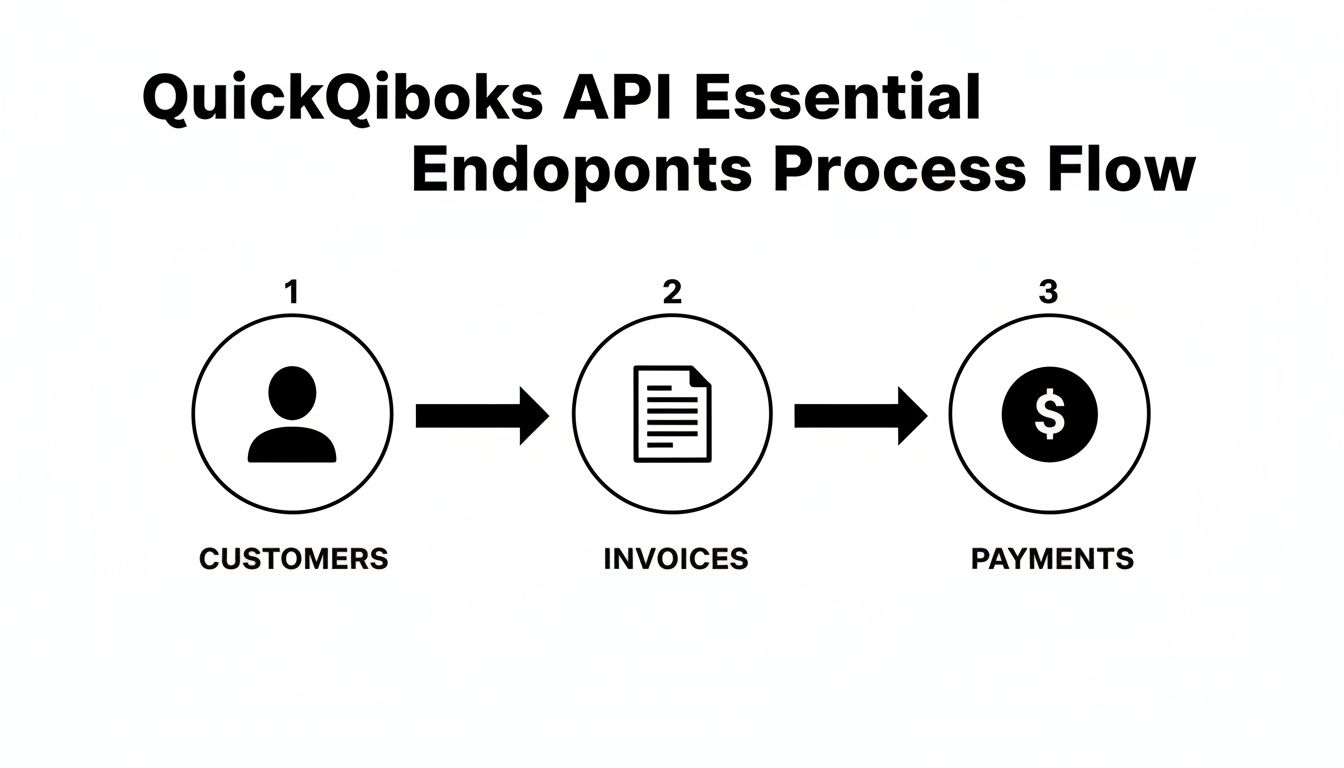
This flow really highlights how each API endpoint builds upon the last, reinforcing the need for accurate and timely data synchronization at every stage.
Using API2Cart to Accelerate Development
Building a direct integration with the QuickBooks Online API is a solid first move, but for a scalable SaaS business, it’s never the last step. Soon enough, your customers will be asking for connections to Xero, NetSuite, or Sage. This is where your development roadmap hits a wall. Building, authenticating, and maintaining a separate integration for every single accounting system is a massive drain on engineering resources.
This is exactly the headache that a unified API like API2Cart was built to solve for developers. Instead of wrestling with dozens of unique authentication flows, data structures, and error codes, your team writes code just once against a single, consistent API. You can think of API2Cart as a universal translator, handling all the platform-specific quirks behind the scenes.
Write Once, Connect to Many
Picture this common developer scenario: your SaaS platform needs to sync customer and order data from a Shopify store into a user's accounting system. If you go the direct route, you build a dedicated connector for the QuickBooks Online API. Great. But when a new client signs up who uses Xero, your team is right back at square one, building another connector from scratch.
With API2Cart, the process is completely different. You use one standardized set of API methods to push the data. From there, API2Cart routes and formats that data for whichever accounting platform the end-user has connected—whether it's QuickBooks, Xero, or any of the 40+ other supported platforms. This approach absolutely slashes initial development time and gets rid of the long-term maintenance nightmare of juggling multiple, brittle integrations.
A unified API strategy completely flips the integration script for a developer. Instead of asking, "Which single integration should we build next?" your team can deliver connectivity to an entire ecosystem of accounting platforms all at once. You end up offering way more value to your customers with a fraction of the effort.
This model is a strategic shortcut that lets you expand your market reach without watching your development costs explode.
A Practical Example of Accelerated Integration
Let's get practical and break down how API2Cart helps with a simple task: syncing a new invoice.
Without a unified API, your code would be a mess of conditional logic:
- IF the platform is
QuickBooks, format the invoice withSalesItemLineDetailobjects and handle its OAuth 2.0 flow. - IF the platform is
Xero, you'd have to re-format everything for Xero's invoice structure and deal with its own unique OAuth 2.0 process. - IF the platform is
NetSuite, you’d be starting over again for its SOAP or REST API.
This branching logic quickly becomes a tangled web that’s incredibly difficult to maintain. With API2Cart, your code is clean and simple. You just make a single API call, like order.add, with a standardized JSON payload. API2Cart takes care of all the messy conditional logic and data translation on its end.
This doesn't just speed up development—it makes your codebase leaner and far more robust. You get to focus on your core product features instead of getting bogged down in integration plumbing.
Getting Your Integration Ready for Production
Moving from the sandbox to a live production environment is a huge step for any developer. It’s less about flipping a switch and more about adopting a production-ready mindset. We're now talking about reliability, security, and scalability for handling real-world financial data.
Things will break. Network requests fail, and APIs go down. Instead of letting those hiccups crash your sync jobs, you need a graceful way to recover. A proven best practice is implementing an exponential backoff strategy. If a request fails, you wait a moment before retrying. If it fails again, you double that waiting period, and so on, until you hit a max number of retries.
Managing API Limits and Security
Like any major API provider, Intuit enforces rate limits to keep its platform stable. If you hit those limits, your app will get throttled, leading to failed requests and a pretty terrible user experience. It's on you as the developer to monitor your API usage and design your sync logic to work efficiently within those boundaries.
Just as critical is how you handle your credentials. API keys and refresh tokens are the keys to the kingdom—treat them like passwords.
- Secure Storage: Never, ever hardcode credentials in your source code. Use a proper vault service or encrypted environment variables to keep them safe.
- Token Rotation: Make it a policy to regularly rotate your API keys and refresh tokens. This limits the window of opportunity if a credential ever gets compromised.
A production-ready integration isn't defined by what it does when everything goes right. It's defined by how it behaves when things go wrong. Your approach to error handling and security is what separates an amateur app from a professional one.
The QuickBooks Online ecosystem is also getting smarter. For instance, AI is becoming a massive factor, with 81% of accountants reporting real productivity gains from it. This shows just how powerful a solid integration can be in supporting sophisticated workflows.
Scaling for Multiple Users
If you're building a SaaS product, connecting a single account is just the beginning. The real challenge is designing a scalable, multi-tenant architecture that can securely manage connections for hundreds or thousands of different QuickBooks accounts. This means every client's data—including their OAuth tokens and API keys—must be completely isolated and encrypted.
Honestly, handling this complexity for QuickBooks and dozens of other platforms is a monumental task. This is exactly where a tool like API2Cart can save you a world of pain. It provides a pre-built, secure, multi-tenant environment right out of the box. It manages all the messy parts like authentication, rate limiting, and error handling across multiple accounting systems, letting your team focus on building your core features instead of reinventing the integration wheel.
Common Questions About The QuickBooks API
When you first start building an integration with the QuickBooks Online API, it doesn't take long to realize that every company's setup is a little different. Many of the trickiest errors developers run into aren't bugs in their code, but unexpected roadblocks thrown up by company-specific settings.
One of the classics is the dreaded Duplicate document number fault (#6140). This error pops up when your integration tries to create an invoice with a document number that already exists, but only if the user has a specific preference enabled in their account to warn them about duplicates.
The right way to handle this is to first query the Preferences entity and check the value of SalesFormsPrefs.CustomTxnNumbers. If it’s true, you know you need to generate a unique DocNumber. If it's false, your best bet is to just let QuickBooks assign the number for you.
Handling Different Company Configurations
That's just one example. You'll run into all sorts of other configuration-based hurdles. Your code might fail when it tries to assign a tax rate to an invoice, only to find out the company uses Automated Sales Tax (AST). Or you might get an error because you're attempting to post a transaction into an accounting period that's already been closed.
The key to building a resilient integration is to check the company's configuration before you try to post anything. Don't just assume a default setup. Query the
PreferencesandCompanyInfoendpoints first to get the lay of the land.
This proactive approach lets you build logic that adapts on the fly. You can check for things like:
AccountingInfoPrefs.BookCloseDate: Make sure you aren't trying to post to a locked accounting period.TaxPrefs.UsingSalesTax: See if the company is using automated sales tax.CurrencyPrefs.MultiCurrencyEnabled: Know whether you need to handle transactions in foreign currencies.
Building your integration to pre-fetch and cache these settings will save you countless headaches and make your app far more reliable for your users.
Getting these details right for QuickBooks is already a significant task. But if your roadmap includes supporting Xero, NetSuite, and other accounting platforms, the complexity multiplies. Each one has its own unique settings, error codes, and quirks. This is where a unified API becomes a massive shortcut for any developer.
Instead of building and maintaining dozens of individual connectors, API2Cart gives you a single, unified API for QuickBooks and over 40 other platforms. We take care of all the platform-specific logic, error handling, and authentication headaches so you can stay focused on building your core product.
Check out https://www.api2cart.com to see how you can get your integration to market faster.