At its core, a shopping cart API is the bridge that lets different software applications talk to an eCommerce platform's backend. For an integration developer, it’s the set of keys to the kingdom, allowing you to access and work with vital store data like orders, products, customers, and inventory levels on platforms like Shopify, WooCommerce, or Magento. This connection is what allows B2B SaaS apps to automate tasks and sync information without missing a beat.
Why a Shopping Cart API Is Essential for B2B SaaS
For any B2B SaaS company that serves eCommerce merchants, a shopping cart API isn't just a technical nice-to-have—it's the strategic core of your product. As an integration developer, your primary challenge is connecting your software to the fragmented landscape of eCommerce platforms your clients use.
Let's say your software is an Order Management System (OMS). Its entire purpose is to pull in new orders from your clients' online stores. Without an API, that process would be a nightmare of manual exports and imports. It would be slow, clunky, and full of human error. No serious software company can operate that way.
The real headache for developers is the sheer fragmentation of the eCommerce world. There are literally hundreds of shopping platforms out there, and each one speaks its own unique "language" through a proprietary API. Building and maintaining a separate, native integration for Shopify, then another for Magento, then another for BigCommerce... well, it's a massive undertaking. This direct, one-by-one approach creates some serious roadblocks:
- Massive Development Overhead: Each new integration is a full-blown project, easily eating up hundreds of developer hours.
- Slow Time-to-Market: Adding support for new shopping carts becomes a major bottleneck, slowing down your ability to attract and sign up new customers.
- Ongoing Maintenance Burden: APIs are constantly changing. They get updated, fields are deprecated, and authentication methods evolve. Keeping dozens of unique connectors up and running turns into a never-ending cycle of fixes and patches.

The Unified API Solution
This is exactly where a unified shopping cart API changes the game for a developer. Think of it as a universal translator for eCommerce. Instead of painstakingly learning the language of every single platform, you only have to learn one.
A unified API abstracts away all the complexity of individual platform APIs. It gives developers a single, consistent set of commands and data structures to work with, turning a messy, many-to-many integration problem into a clean one-to-many connection.
Services like API2Cart provide this unified layer. By building a single integration to API2Cart, your application instantly gets connected to over 60 different shopping platforms. This completely transforms the development timeline.
A powerful use case is rapid market expansion. Instead of burning months just to build a single Magento integration, your team can use API2Cart to connect to dozens of carts in a fraction of that time. This frees up your engineers to focus on what actually matters: building the core features of your product that deliver real value to customers, rather than getting stuck in the expensive and distracting business of integration maintenance.
Choosing Your Integration Path: Direct vs. Unified API
When you're ready to connect your B2B SaaS application to an eCommerce platform, you’ll hit a critical fork in the road. As an integration developer, the path you take from here will define your product's scalability, speed to market, and long-term engineering overhead. The choice boils down to two very different strategies: direct integration or a unified API approach.

The Direct Integration Path
The direct path means building a custom, one-to-one connector for every single shopping cart you need to support. If your first big client uses Shopify, you build a Shopify integration. When a prospect on Magento comes along, you build another one entirely from scratch. This approach gives you granular control over each connection, which can feel empowering at first.
But that control comes at a steep price. Each integration is a full-blown development project demanding serious resources and deep, specialized knowledge of that platform's unique API quirks, data models, and authentication methods. The initial build is just the beginning—you’re now on the hook for an endless cycle of maintenance, updates, and bug fixes for every single connector you build.
The Unified API Advantage
The alternative is a much more modern and scalable approach for a development team: using a unified shopping cart API. This strategy slips an intermediary layer between your app and the dozens of platforms out there, abstracting away all their individual complexities. Instead of building countless connectors, you build just one.
Think of it this way: building direct integrations is like hand-crafting a different power adapter for every country you visit. You'd need a separate plug for the UK, another for Europe, and yet another for the US. A unified API is the universal travel adapter—it has one plug that connects to your device and works everywhere, letting you focus on your trip instead of the electrical outlets.
A unified API service like API2Cart acts as this universal adapter for eCommerce. It provides a single, consistent set of API endpoints that allows your application to communicate with over 60 different shopping platforms simultaneously. This transforms a chaotic integration landscape into a streamlined, manageable system.
This single point of connection massively simplifies development. Your team only needs to learn one API specification, not dozens. This doesn’t just speed up your initial launch; it makes it possible to expand your market reach at a pace you couldn’t imagine otherwise. Adding support for a new platform is no longer a months-long project—it's often as simple as flipping a switch. You can see for yourself how a universal shopping cart API provides this powerful abstraction.
A Developer's Comparison: Direct vs. Unified API Integration
For B2B eCommerce vendors, the math is pretty clear. Supporting each storefront type natively means building and maintaining dozens of one-off connectors. On the other hand, a single unified API that covers 60+ platforms turns complex O(n) connector work into simple O(1) integration work, shrinking development and maintenance overhead by a massive multiple. In fact, some API providers report integration cost reductions of up to 9x for customers using unified connectors.
Let’s break down what that really means for a development team day-to-day.
| Factor | Direct API Integration (DIY) | Unified API (e.g., API2Cart) |
|---|---|---|
| Development Time | Months per integration, requiring deep platform-specific knowledge. | Weeks for a single integration that unlocks dozens of platforms. |
| Maintenance Burden | High; continuous monitoring and patching for each unique connector. | Low; maintenance is handled by the API provider. |
| Scalability | Extremely slow and resource-intensive to add new platforms. | Rapid; new platforms are added centrally by the provider. |
| API Consistency | Inconsistent; data models and methods vary wildly across carts. | Consistent; one set of methods and data structures for all carts. |
| Developer Focus | Building and fixing connections. | Building core product features that deliver customer value. |
Ultimately, a unified API empowers your developers to shift their focus from the plumbing to the architecture. By offloading the complex, repetitive, and frankly thankless task of integration management to a specialized service like API2Cart, your team can get back to what they do best: innovation and building a better product for your users.
Getting to Know the Core API Endpoints and Data Models
Once you’ve decided to go with a unified shopping cart API, the next step is learning to speak its language. At the core of any eCommerce integration are the fundamental data entities that make a store tick. As a developer, you won't be working with abstract ideas—you'll be hitting specific API endpoints that read and write very precise data models.
A good way to think about this is that the endpoints are the "verbs" of your integration, and the data models are the "nouns." You need both to get anything done. For example, you might call the product.update endpoint (the verb) to change the price field on a product object (the noun). Getting comfortable with these basic interactions is the first real step to building any kind of powerful eCommerce software.
A unified API like API2Cart gives you a consistent structure across dozens of different platforms, so you only have to learn one set of nouns and verbs. Let's break down the most important ones you'll be working with.
The Product Entity
The product entity is the digital version of whatever a merchant is selling. It's way more than just a name and a picture; it's a complex object packed with all the information needed to show, manage, and sell an item. Your app will probably spend a lot of its time reading from and writing to this entity.
Here are the common product-related methods you’ll use:
product.list: This pulls a list of all products from a store. It’s absolutely essential for doing an initial data sync or for pulling a catalog into your application.product.info: Use this to grab detailed information for a single product using its ID. It’s perfect for showing a product page or when you need to update one specific item.product.add/product.update: These two methods are the engine for any PIM (product information management) or multi-channel listing tool. They let you create new products from scratch or modify existing ones—things like changing prices, tweaking descriptions, or adding new images.
Inside the product model, you’ll always find key data fields like SKU, name, description, price, quantity, and an array of images. Understanding this structure is non-negotiable for accurate data mapping.
The Order Entity
If the product is what a store sells, the order entity is the receipt. For most B2B SaaS apps—from order management systems to shipping platforms and analytics tools—this is easily the most dynamic and critical piece of data you'll handle.
Working with orders usually involves these key API endpoints:
order.list: Fetches a history of orders, often with filters you can use for date ranges or statuses. This is the bedrock for syncing order data into an OMS or ERP.order.info: Pulls all the juicy details for a single transaction, including the customer's info, what they bought, the shipping address, and payment status.order.update: This lets you modify an order's status. A classic example is changing it from "Processing" to "Shipped."order.shipment.add: This is how you add tracking information to an order that’s already been placed—a must-have function for any shipping or fulfillment app.
An order model is a rich data structure that contains nested objects for line items, customer details, and shipping info. You can always count on seeing fields like order_id, status, total_price, and customer_email.
The Customer Entity
Behind every single order is a customer. The customer entity is where you’ll find all the information about the people buying from the store. This data is pure gold for marketing automation platforms, CRMs, and customer support tools.
Here are the common endpoints for managing customer data:
customer.list: Retrieves a full list of customers. You can use this to build out marketing segments or to import contacts directly into a CRM.customer.info: Gathers everything the store knows about a specific customer, including their name, email, address, and order history.customer.add: Creates a new customer profile right inside the eCommerce platform.
Speed Up Development with a Unified Model
Without a service like API2Cart, your team would have to learn the unique data structure for orders on Shopify... then learn a completely different one for Magento, and yet another for WooCommerce. This is a massive source of friction that grinds development to a halt.
API2Cart solves this problem by normalizing all that chaotic data into a single, unified model. A "product SKU" is always in the same field, no matter what platform you're pulling from. You can dive deeper into this approach by learning more about a standardized shopping cart REST API.
By providing a single, predictable data model for products, orders, and customers across 60+ platforms, API2Cart eliminates the need for platform-specific data mapping. This dramatically accelerates development, reduces complexity, and allows you to focus on building features, not parsers.
How to Achieve Real-Time Data Sync with Webhooks
Imagine constantly calling a friend to ask, "Anything new?" It's annoying, inefficient, and you're always a little behind. That’s what building an integration by repeatedly calling an API endpoint like order.list feels like. This old-school method, known as polling, burns through server resources, racks up API calls, and guarantees a delay between when something happens and when your app finds out.
To build a modern, responsive system, you have to flip that model on its head. Instead of your application pulling data, you need the eCommerce platform to push it the instant something important happens. This is the heart of an event-driven architecture, and it’s powered by webhooks.
Think of a webhook as a "reverse API." Your application gives the shopping cart platform a unique URL—a listener endpoint. When a specific event occurs, like a new order (order.add) or a stock update (product.update), the platform immediately sends a notification with all the relevant data straight to your URL. This proactive push is nearly instantaneous and wildly more efficient.
The Power of Normalized Webhooks
While webhooks are a huge step up from polling for a developer, they bring their own flavor of chaos in a multi-platform world. Shopify's webhooks are different from Magento's. They use different event names, structure their data payloads differently, and have their own security quirks. Trying to handle these variations for every platform means writing, testing, and maintaining a tangled mess of custom logic for each one. That completely defeats the purpose of moving faster.
This is a massive headache that a unified shopping cart API is built to solve.
A service like API2Cart acts as a universal translator for webhooks. It takes the unique webhook events from over 60 different platforms and normalizes them into one clean, consistent format. An
order.addevent looks exactly the same to your app whether it came from WooCommerce, BigCommerce, or any other cart you’ve connected.
This normalization is a game-changer for developers. A key use case is building a real-time order management dashboard. With API2Cart, your team only needs to build one listener endpoint and write one set of rules to process incoming data. It strips away a huge layer of complexity, letting you roll out a true real-time data sync strategy across all your supported platforms without the usual development nightmare.
Implementing a Webhook Listener
For an integration developer, setting up your app to receive these unified webhooks is straightforward. It boils down to a few key steps:
- Create a Listener Endpoint: This is simply a public URL in your application built to accept incoming HTTP POST requests from the API provider.
- Register the Webhook: Inside your API2Cart dashboard, you subscribe to the events you care about (like
order.addorproduct.update) and point them to your listener's URL. - Process the Payload: When an event fires, your listener gets a JSON payload. Your code just needs to parse this standardized data to grab what it needs, like the new order ID or the updated product SKU.
- Validate the Request: Security is paramount. You should always confirm the request is genuinely from the API provider. This is typically done by checking a secret key or signature sent in the request headers. If you want to dive deeper into the mechanics, our article explains what a webhook is in more detail.
The diagram below shows the core data entities that webhooks keep in sync, like products, orders, customers, and inventory.
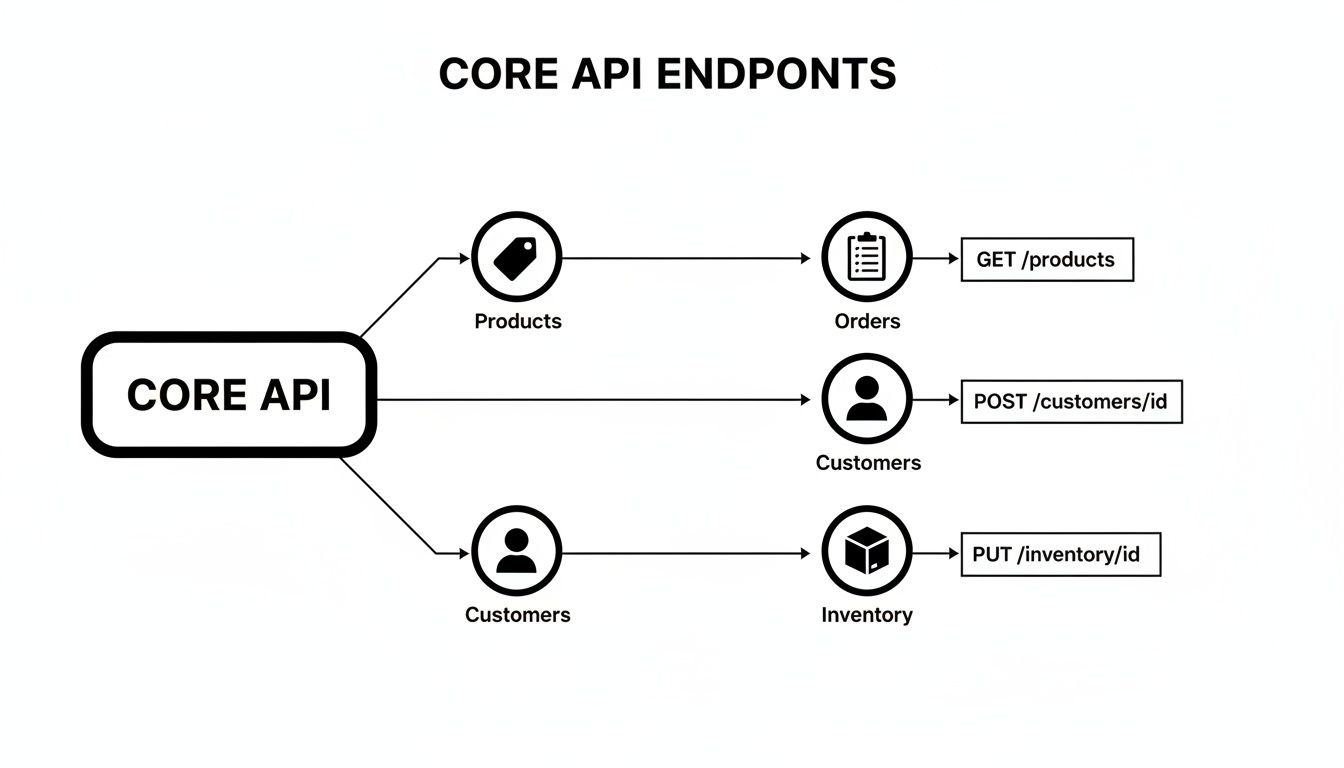
This process is the foundation of a real-time integration. By using a normalized webhook system, you ensure your application stays perfectly in sync with store data, creating a seamless and dependable experience for your users.
Best Practices for Building Resilient API Integrations
A solid integration with a shopping cart API goes way beyond just making the first successful connection. It's about building an intelligent, resilient system that can handle the messy reality of network issues and weird platform behaviors. For developers in the trenches, this means you have to stop thinking in simple request-response terms and start architecting for failure.
This mindset is really what separates a brittle, flaky connection from a robust integration that your users can actually rely on. The name of the game is to anticipate problems—network glitches, API downtime, usage caps—before they turn into lost data or a dead app.
Implement Sophisticated Error Handling
Let's be clear: not all errors are the same. A 503 Service Unavailable is a temporary hiccup that’s telling you to try again later. A 400 Bad Request, on the other hand, is a hard "no"—something is fundamentally wrong with your request, and trying again won't fix it. Your integration has to be smart enough to know the difference.
Just wrapping everything in a generic try/catch block is a recipe for trouble. Instead, your error logic needs to distinguish between a few key types:
- Transient Errors: Think of these as temporary roadblocks. Network timeouts, a server being briefly unavailable (
5xxstatus codes), or hitting a rate limit. These are the perfect candidates for a retry. - Permanent Errors: These are dead ends. You've sent bad authentication credentials (
401 Unauthorized), a malformed request (400 Bad Request), or asked for something that just isn't there (404 Not Found). Retrying these is pointless and just wastes resources.
By splitting errors into these two buckets, your application can react intelligently. It can retry when there's a good chance of success and log the permanent failures for a human to investigate later.
Use Retry Logic with Exponential Backoff
When you do hit a transient error, hitting "retry" immediately is usually a terrible idea. If an API server is already struggling, slamming it with more requests is like throwing gasoline on a fire. This is where exponential backoff becomes your best friend.
It's a simple but powerful strategy: you increase the waiting time between each retry. For example, you might wait 1 second after the first failure, 2 seconds after the second, 4 seconds after the third, and so on. This gives the API server a chance to catch its breath and recover, while still ensuring your request gets through once things are stable.
For even better results, add a little "jitter"—a small, random amount of time—to each delay. This stops hundreds of your own clients from retrying at the exact same millisecond, which can create its own "thundering herd" problem.
A queue-based architecture is a fantastic pattern for handling this. Instead of making API calls directly in your main application thread, you can offload API tasks (like "create order" or "update product") to a message queue. Dedicated worker processes can then pull tasks from this queue, execute them, and manage all the retry and backoff logic independently. Your main app stays snappy and responsive, even if the external API is having a bad day.
Prevent Duplicate Operations with Idempotency
Picture this: a network glitch causes your app to send the same order.add request twice. Without the right safeguards, you’ve just created two identical orders. Now you have an angry customer and a fulfillment headache. This is exactly the problem idempotency solves.
An idempotent operation is one that can be run over and over again without changing the result after the first successful run. The most common way to achieve this is by generating a unique idempotency key (a simple UUID works great) for any critical request, like creating an order or processing a payment.
You send this key along in the request header. If the API server sees a request with a key it's already processed, it doesn't do the work again. Instead, it just returns the original success response. This simple trick is a critical safety net against data duplication and keeps your users' stores clean and accurate.
Of course, resilience isn't just about handling failures; it's also about preventing bad data from getting in. This is where implementing robust validation comes in. For example, following the best practices for blocking non-compliant orders before checkout is key to preventing problems downstream and maintaining data integrity from the start.
Putting Theory Into Practice: How API2Cart Accelerates Your Roadmap
High-level benefits are nice, but what development teams really care about is tangible business value. A unified shopping cart API isn't just another tool in your tech stack; it's a strategic accelerator that turns sluggish, manual workflows into fast, automated systems. Let's dig into a few real-world use cases for an integration developer to see how API2Cart solves integration headaches, directly impacting your product roadmap and ability to win new markets.
Order Management System Automation
Use Case: You're building an Order Management System (OMS). The core promise of your product is to pull orders from dozens of eCommerce platforms into one clean, unified dashboard. The old-school way involves building—and worse, maintaining—separate connectors for every single shopping cart. That’s a project that can burn months of engineering time and stall your roadmap.
API2Cart Solution: With API2Cart, your developers use a single method—order.list—to pull orders from over 60 platforms. Pair that with the order.add webhook, and your OMS gets new orders the instant they’re placed, regardless of whether they came from Shopify or BigCommerce. This unified approach means you stop writing platform-specific spaghetti code, freeing your team to build high-value features like advanced analytics instead of fighting API inconsistencies.
Shipping and Fulfillment Platform Integration
Use Case: For a shipping platform, data must flow both ways. You need to pull order details to print labels, and then push tracking information back to the original storefront. For merchants, manually copying and pasting tracking numbers across multiple sales channels is a huge operational drag.
API2Cart Solution: API2Cart completely automates this. Once a label is generated, a single call to the order.shipment.update endpoint sends the tracking number and carrier details straight back to the correct order on Magento, WooCommerce, or any other connected store. This kills the risk of manual data entry errors and streamlines a critical workflow for your users.
Real-Time Inventory Synchronization
Use Case: You're building an Inventory Management App to prevent overselling. Its entire value proposition rests on flawless, real-time stock synchronization. If a product sells out on a merchant's Amazon store, its stock level must be updated on their Shopify and eBay stores immediately.
API2Cart Solution: This is exactly what API2Cart's product.update method is for. As soon as your application detects an inventory change, it can make one API call that broadcasts the new stock level across every connected storefront simultaneously. This is critical for ensuring data consistency and avoiding the costly mistake of selling products that are already out of stock, a core value-add for your customers.
When you're building for specific platforms like Shopify or WooCommerce, leveraging a unified API dramatically shortens your development timeline by abstracting away the complexities of their native cart systems. You can find more details on platform-specific design in guides on WordPress & Shopify Website Design.
Common Questions About Shopping Cart APIs
Got questions? You're not alone. Here are some of the most common things developers ask when they start digging into shopping cart APIs.
How Does a Unified API Handle Different Data Structures?
Every eCommerce platform has its own unique way of organizing data. Think about it: the order object you get from Shopify looks nothing like the one from Magento. This is where a unified API provider like API2Cart comes in. It acts as a universal translator.
We ingest all the unique data structures from each platform and map them to our own standardized, consistent data model.
For you as a developer, this means order.status is always order.status, no matter where the data came from. You don't have to write a custom parser for every single cart, which can save you hundreds of hours and keep your codebase clean and simple.
What Is the Difference Between API Polling and Webhooks?
This is a classic question for an integration developer. The difference really comes down to "pulling" versus "pushing."
Polling is like constantly asking, "Are we there yet?" Your application has to repeatedly send requests to the API just to check for new data, like asking, "Any new orders?" every five minutes. It’s not very efficient and always comes with a delay.
Webhooks flip the script entirely. It's an event-driven approach where the shopping platform pushes data to your application the moment something happens—like a new order being placed. This is far more efficient and gives you true, real-time updates.
API2Cart supports both methods. You can use webhooks for instant syncs on platforms that support them, and fall back to smart, date-filtered polling for the ones that don't. You get the best of both worlds.
How Can API2Cart Speed Up My Integration Roadmap?
Building and maintaining individual integrations is a massive resource sink for a development team. Seriously. Each new connector demands specialized knowledge, can take months to develop, and requires constant attention to keep it from breaking.
API2Cart completely removes that bottleneck.
Instead of building dozens of separate connections, you integrate with our single API and instantly gain access to over 60 shopping platforms. This slashes your time-to-market, letting you onboard customers from all over the eCommerce world in days, not months. It turns a messy O(n) integration headache into a simple O(1) task, freeing up your developers to focus on your core product instead of chasing APIs.
Ready to stop building integrations one by one and connect to 60+ platforms at once? API2Cart provides the unified shopping cart API that scales with your business. Explore our documentation and start your free trial today at https://www.api2cart.com.