
At its core, eCommerce integration is all about connecting an online store with other business software, creating a seamless, two-way street for data to flow. For an integration developer, it's the digital plumbing that lets systems for inventory, shipping, or marketing talk directly with platforms like Shopify or Amazon in real time. The goal? To keep data consistent everywhere and automate the tedious tasks that eat up a merchant's day.
The Critical Role of Ecommerce Integration in SaaS
For any developer or product manager in the B2B SaaS world, ecommerce integration is more than just a technical checkbox—it's the engine that drives your growth. Think of it as the central nervous system connecting your application (whether it's for order management, warehouse operations, or product information) to a vast, fragmented universe of shopping carts and marketplaces.

This kind of connectivity isn't just a nice-to-have feature anymore. It’s a baseline expectation. Your customers, the merchants, need their tools to play nicely together without any friction. They're not looking to manually export orders or update stock levels; they demand automation that simply works.
Why Integration Is a Market Imperative
The biggest headache for any software developer is the crippling cost and complexity of building dozens of unique integrations from scratch. Every platform, from Shopify and Magento to Amazon, speaks its own language. Each has a unique API, a different data structure, and its own authentication quirks.
Building these connectors one by one is an absolute slog. It's slow, it's expensive, and it pulls your engineering team away from what they should be doing: making your core product better. You can learn more about what goes into a solid ecommerce API integration and why it's so vital for modern apps.
This is exactly the problem a unified API service like API2Cart was built to solve. Instead of wrestling with countless individual connections, you integrate just once with API2Cart. That single point of contact opens up access to data from over 60 different shopping carts and marketplaces, dramatically cutting down your development timeline.
A unified solution strips away the complexity of each platform's unique API. It frees your team to focus on creating real value for your users, not getting bogged down in tedious API maintenance. It flips a major engineering bottleneck into a powerful competitive edge.
Seizing the Market Opportunity
The global e-commerce integration market is absolutely exploding, with some forecasts putting its value between $5.0 billion and $15.0 billion by 2025. For SaaS providers, this trend screams urgency.
Tools like API2Cart can slash your engineering costs by up to 9x while plugging you into a massive ecosystem of potential customers. To scale effectively, SaaS companies need to think beyond just the tech and consider broader 10 actionable ecommerce growth strategies that integration enables.
Choosing Your Integration Path: Direct vs. Unified APIs
When you're building an ecommerce integration, one of the first and most critical decisions you'll make is architectural. Do you build direct, point-to-point connections to each platform one by one? Or do you go with a unified API? This choice will have a huge impact on your development roadmap, your budget, and how well you can scale down the line.
Let's walk through the two main paths, starting with the one that, on the surface, often looks like the easiest way in.
The Direct API Approach: The Point-to-Point Labyrinth
The direct, or point-to-point, approach means connecting your application straight to a platform's native API. If your first target is Shopify, the task feels pretty clear: learn the Shopify API, figure out its specific authentication, and map its data models to your own. For a single integration, that's totally manageable and gives you fine-grained control.
But that initial simplicity is misleading. The minute your product manager comes knocking and asks for a second integration—let's say with Magento—the complexity doubles. Now your team has to learn a completely new API, a different authentication flow (like OAuth 2.0), and a totally different way of structuring product and order data.
The real issue with direct integrations is that the complexity doesn't just add up; it multiplies. Each new platform adds another unique, fragile connection that has to be built from scratch and, more importantly, maintained forever.
Think about the workflow for just three platforms:
- Platform Research: Your team sinks weeks into deciphering the documentation for Shopify, WooCommerce, and BigCommerce.
- Development: You end up with three separate codebases to handle authentication, data retrieval, and data mapping for each one.
- Maintenance: A month later, WooCommerce pushes a breaking API update. Your team has to drop everything to patch the integration before customers start screaming.
- Repeat: Two months after that, Shopify deprecates an endpoint you depend on. The cycle of reactive, expensive maintenance just never stops.
The Unified API: A Strategic Alternative
Now, let's look at the unified API model. The best way to think of it is like a universal power adapter for ecommerce data. Instead of trying to build a unique plug for every different socket (Shopify, Magento, Amazon), you build a single connector to the universal adapter. That adapter then handles the tricky translation to and from every individual platform.
For a developer, this changes the entire game. You write your code once against a single, consistent API. A service like API2Cart provides one standardized data model for products, orders, customers, and everything else. Suddenly, a product from Shopify and a product from WooCommerce look identical to your application.
This means a single codebase can pull an order from any of the 60+ platforms API2Cart supports. The nightmare of tracking dozens of API changelogs, dealing with deprecations, and patching breaking changes is completely outsourced. Your developers are finally free from that maintenance trap and can get back to building the core features of your application.
Direct API vs. Unified API: A Developer's Comparison
To lay it all out, here’s how the two approaches stack up from a developer's point of view. The table below breaks down the trade-offs you'll face when deciding which path to take.
| Factor | Direct API (Point-to-Point) | Unified API (e.g., API2Cart) |
|---|---|---|
| Development Time | High. Requires separate development cycles for each platform, often taking months per integration. | Low. A single integration to the unified API can be done in weeks, unlocking multiple platforms at once. |
| Maintenance Cost | Very High. A huge chunk of your engineering budget gets eaten up by reactive maintenance and updates. | Zero. The unified API provider handles all platform-specific maintenance, updates, and bug fixes. |
| Scalability | Poor. Adding the 10th integration is just as hard as the first, creating a massive engineering bottleneck. | Excellent. Adding a new platform is a simple configuration change, with no new code required. |
| Data Consistency | Low. Your team has to manually map and normalize messy, inconsistent data from every platform. | High. Data comes pre-normalized into a single, clean, and predictable format, which simplifies development. |
| Time-to-Market | Slow. Unlocking each new market segment is gated by a multi-month integration project. | Fast. You can connect with dozens of platforms almost instantly, speeding up your market expansion. |
For any developer, the choice boils down to this: do you want to build and maintain dozens of brittle, individual bridges, or build one solid highway to a central data hub? While the direct path might look tempting for a single connection, a unified API is the clear strategic choice for any B2B SaaS company that’s serious about growing in the ecommerce world.
Getting to Grips with Core Ecommerce Data and Workflows
Great ecommerce integration isn’t just about high-level strategy; it’s about getting your hands dirty with the data. For any developer, this is where the real work happens. At the heart of it all are five fundamental data entities that make an online store tick: Products, Orders, Customers, Inventory, and Shipments.
Each of these isn't just a simple piece of information. A "Product," for example, is a complex beast with SKUs, variants, prices, descriptions, and categories. An "Order" is a collection of line items, shipping addresses, payment statuses, and fulfillment details. The real headache is that Shopify represents this data one way, Magento another, and so on down the line.
This is the exact problem a unified API is built to solve. Think of a service like API2Cart as a universal translator. It takes all those different, inconsistent data models and standardizes them into a single, clean, and predictable format. Instead of your team burning hundreds of hours mapping data for each platform, you work with one logical structure. That means faster development and way fewer bugs.
This decision tree shows the first big choice developers have to make when mapping out an integration.
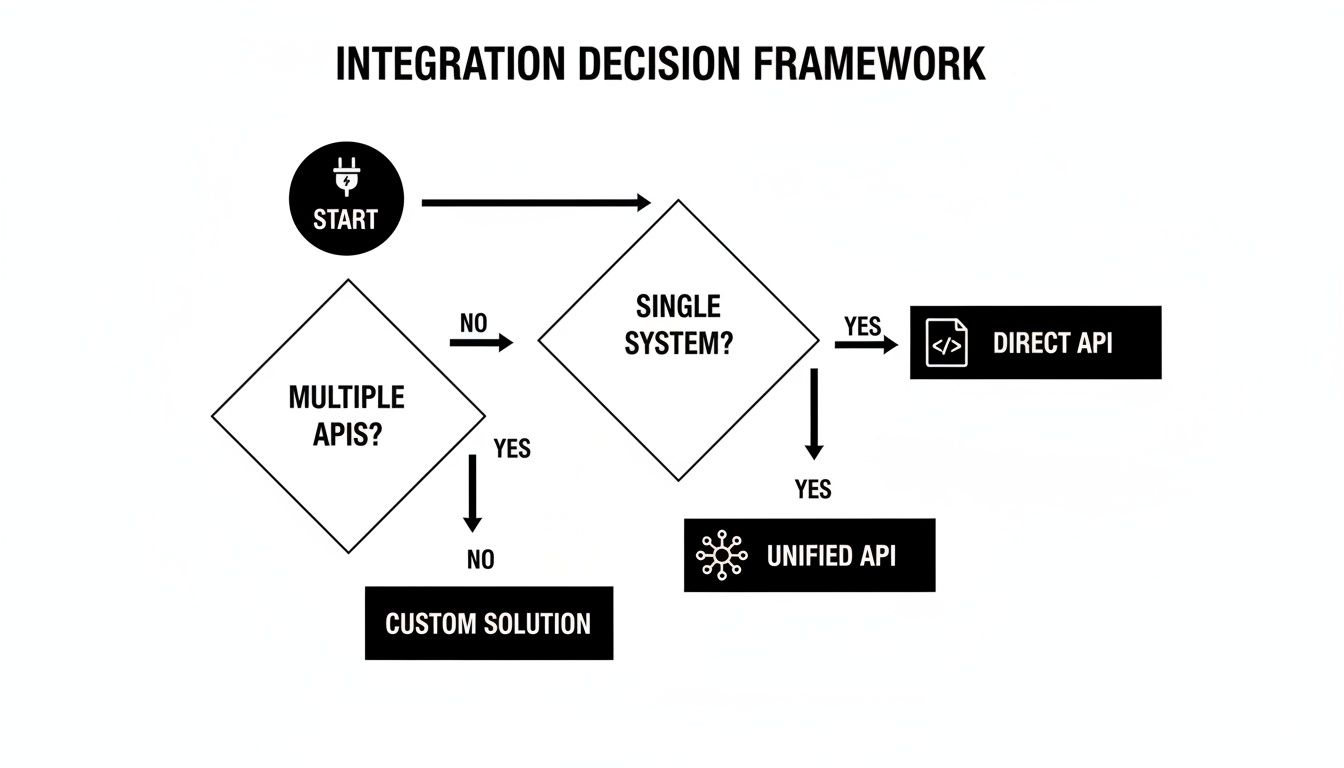
As the flowchart shows, a unified API offers a much cleaner path to connecting multiple platforms, helping you skip the repetitive and high-maintenance cycle of building direct integrations from scratch.
Breaking Down the Core Data Entities
To build workflows that don't break, you have to know the data inside and out. Each entity has a specific job and needs to be handled in its own way.
Products: This is your entire catalog. The key attributes you'll always deal with are
product_id,name,SKU,price,description,images, andvariants(like size or color). Getting product data right is non-negotiable for Product Information Management (PIM) systems and any software that lists products across multiple channels.Orders: This is the lifeblood of any online store. A typical order object contains an
order_id,customer_info,line_items(the actual products bought),total_price,shipping_address, and astatus(like pending, processing, or shipped). Properly understanding this is key to mastering ecommerce order fulfillment.Customers: This entity holds all the shopper info—things like
customer_id,name,email, andaddress. For CRMs and marketing automation platforms, this data is pure gold for syncing customer lists for email campaigns or support tickets.Inventory: At its simplest, this is just the stock level (
quantity) tied to a product or a specific variant. Keeping this number accurate across every single system is easily one of the most critical—and challenging—parts of ecommerce integration.
Building the Must-Have Sync Workflows
Once you understand the data models, you can start building the workflows that automate everything. These are the real-time data conversations happening between your software and the ecommerce store.
1. Real-Time Inventory Updates
The number one goal here is to stop overselling before it happens. When a product sells on one channel, its stock level has to be updated everywhere else, instantly.
This workflow is a classic use case for an event-driven approach. A webhook fires from the ecommerce platform the moment an order is created, which triggers a function in your app. That function then makes a quick API call (
product.update) to adjust the stock quantity for that SKU in your system and push the update to any other connected channels.
2. New Order Import
This is a bread-and-butter workflow for any Order Management System (OMS) or Warehouse Management System (WMS). Your system has to pull in new orders as soon as they’re placed so they can be picked, packed, and shipped. There are two main ways to do this:
- Polling: Your application makes a periodic API call—say, every five minutes—to fetch any new orders created since the last time it checked. Using a method like API2Cart's
order.listwith acreated_fromfilter makes this incredibly efficient. - Webhooks: For truly instant notifications, webhooks are the modern way to go. The moment an order is created, the platform sends the order data directly to an endpoint you specify. To get a better handle on this real-time method, check out our guide on how webhooks are a perfect supplement to an API.
The sheer scale of this data flow can be mind-boggling. With global ecommerce sales expected to hit $6.88 trillion by 2025 across 28 million active online stores, the volume of data that needs to be synchronized is massive. This data explosion is exactly why unified APIs have become so essential for handling the scale that modern OMS, WMS, and PIM systems demand.
How a Unified API Puts Your Integration Roadmap on the Fast Track
It’s one thing to talk about integration architecture, but it’s another to see it in action. The real test of any ecommerce integration strategy is how fast your developers can ship reliable, working connections. This is where a unified API completely changes the game. It swaps out months of tedious, platform-specific coding for a single, efficient process.
For the developers in the trenches, this means waving goodbye to a mountain of complexity and getting a huge productivity boost. Let’s jump into a few real-world examples to see exactly how a service like API2Cart can slash your development timeline and cut down on engineering headaches.
Use Case One: Order Management Systems
For any Order Management System (OMS), there are two table-stakes workflows: grabbing new orders the second they come in and importing a client’s entire order history. A unified API makes both incredibly simple.
- Real-Time Order Sync with Webhooks: Constantly checking for new orders (polling) is slow and wasteful. With API2Cart, you just set up
order.addwebhooks. The instant a customer buys something on a connected store like Shopify or BigCommerce, the platform pushes the full order details straight to your system. No more delays, and your fulfillment process can kick off immediately. - Importing Historical Data: When you sign a new client, they’ll often need you to pull in years of their past orders. Instead of writing custom scripts for every single platform they've used, you call one API method:
order.list. Using simple filters likecreated_fromandcreated_to, you can pull down their entire order history from any supported cart, all neatly arranged in a standard format.
Simply put, a unified API turns a messy, multi-platform headache into a clean, repeatable process. You write your order-handling logic once, and it just works—whether the data comes from Shopify, Magento, WooCommerce, or dozens of others.
Use Case Two: Inventory and Price Synchronization
If you’re building inventory management software, keeping stock levels accurate across every sales channel is your bread and butter. A single mistake can lead to overselling, which means canceled orders and angry customers.
Think about what it takes to update the stock count for one SKU that’s listed on Shopify, Magento, and an Amazon marketplace. Without a unified API, that’s three different authenticated API calls, each with its own weird data structure and endpoint. It’s a pain.
With API2Cart, it’s just one simple action. You make a single product.update call, passing the product ID and the new quantity. API2Cart acts as the translator, sending the correct, platform-specific requests to update the stock on Shopify, Magento, and Amazon all at once. The same goes for price updates, letting you manage pricing across all your channels with a single command. For a closer look at the mechanics, check out our guide to integrating digital commerce APIs for a deeper dive.
Use Case Three: Shipping and Marketing Automation
These efficiency gains aren’t just for order and inventory systems. The benefits ripple out to any software that needs good ecommerce data. The pattern is always the same: a unified API breaks the integration bottleneck.
For Shipping Software:
- Get Order Details: Your app uses the
order.infomethod to grab everything it needs to create a label—shipping address, customer info, and the items purchased—from any connected store. - Send Back Tracking Info: After the label is printed, your system calls the
order.shipment.addmethod. API2Cart pushes the tracking number and carrier details right back to the original store, which then automatically sends its native "your order has shipped" email to the customer.
For Marketing Automation Platforms:
- Build Customer Segments: You can use the
customer.listmethod with filters to pull specific groups of customers—say, everyone who bought a certain product or lives in a particular city—and sync them right into your email campaigns. - Rescue Abandoned Carts: The
cart.listmethod lets you see who left items in their cart without checking out. This is pure gold for triggering automated recovery emails that can win back otherwise lost sales.
No matter the scenario, the story is the same. API2Cart’s library of over 100 API methods gives you a stable, well-documented toolkit to do whatever you need. You get to stop building fragile, one-off integrations and start using a robust, scalable solution that gets your product to market faster.
Navigating Security, Scalability, and Common Pitfalls
Building a successful ecommerce integration is about more than just moving data from point A to point B. The real trick is creating a connection that’s secure, reliable, and tough enough to handle real-world pressures. This is where you get into the non-functional requirements—the behind-the-scenes engineering that separates a fragile connector from a rock-solid, enterprise-grade solution.

Without a strong foundation, even the most feature-rich integration will eventually crumble. It might be a security threat, an unexpected spike in data, or just the inevitable quirks of third-party APIs. Let’s break down the key areas every developer needs to get right.
Fortifying Your Integration Security
Security isn't something you can just bolt on at the end. It has to be baked into the very fabric of your integration from day one. A single breach can torch customer trust and expose sensitive data, which makes robust security a total non-negotiable.
As a developer, your biggest worries are authentication and data protection. This boils down to implementing secure protocols and managing credentials like they're gold, all to prevent anyone from getting in who shouldn't be.
Key security practices include:
- OAuth Authentication: This is the gold standard for a reason. Instead of storing a merchant's actual store credentials, your app gets a temporary token with limited permissions. It’s a world away from the risk of handling raw API keys directly.
- Secure API Key Management: For platforms still using static keys, you absolutely must store them in an encrypted vault. Never, ever hardcode keys in your source code where they can be easily exposed.
- Data Encryption: All data, whether it’s flying between your app and an API or just sitting in your database, needs to be encrypted. Using HTTPS/TLS for all API calls isn't optional; it's the mandatory baseline.
This adds up to a huge maintenance burden when you’re building direct integrations one by one. But this is where a unified API service like API2Cart steps in. It handles all this security complexity for you, providing a standardized, battle-tested security model across all 60+ platforms it supports. You get connections that meet modern security standards without writing a single line of custom code for each one.
Designing for Scalability and Performance
An integration that hums along perfectly with ten orders a day can completely fall apart during a Black Friday sale. Scalability is all about planning for that massive surge in data and making sure your system can take the punch without slowing down or crashing.
The biggest scalability challenge isn't just your own server capacity; it's the external limits imposed by each ecommerce platform. Every API has its own rate limits—a cap on how many requests you can make in a given time. Hit those limits, and your app can get temporarily blocked, grinding your entire operation to a halt.
Trying to manage all these different rate limits across dozens of platforms is a developer’s nightmare. It forces you to write complex logic to throttle requests, implement backoff-and-retry mechanisms, and build sophisticated job queues.
This is another spot where a service like API2Cart delivers immense value. Its entire infrastructure is designed to manage these platform-specific headaches. The system intelligently handles rate limiting, concurrency, and load balancing, giving your application a consistent and reliable data pipe even when sales are going through the roof. You get to focus on your app's core logic, not on tiptoeing around API timeouts.
Sidestepping Common Developer Pitfalls
Beyond security and scale, developers often stumble into a few common traps that can completely derail an ecommerce integration project. Knowing what they are ahead of time is the best way to avoid them.
The most frequent challenges include:
- Inconsistent Data Formats: Every platform has its own unique way of structuring data. One might return phone numbers with country codes, while another doesn’t. You can burn weeks writing fragile data-mapping code just to normalize all these little inconsistencies.
- Poor Error Handling: APIs fail. It happens. A network connection might drop, or a platform could return a bizarre error code. If your code doesn't gracefully handle these failures, you're risking data loss or, even worse, data corruption.
- Ignoring API Deprecation: Ecommerce platforms are constantly updating their APIs, and that sometimes means old endpoints get retired. If you aren't monitoring their changelogs and updating your code, your integration will eventually just break.
Once again, a unified API like API2Cart is engineered to solve these exact problems. It normalizes data into a single, predictable format, gives you clear error codes to work with, and has a dedicated team that handles all platform maintenance and API updates. This frees your team from the reactive, time-sucking work of putting out fires and lets you build new features with confidence.
Your Ecommerce Integration Project Checklist
Building a solid ecommerce integration isn't something you can just wing. A clear, structured plan is your best defense against the common headaches—like scope creep and launch day surprises—that can derail a project.
Think of this checklist as a roadmap. It breaks down the entire process into manageable phases, guiding your development team from the initial whiteboard sketches to a successful, scalable deployment. Following these steps helps keep everyone focused, tames the complexity, and ultimately leads to a solution you can rely on.
We've laid out the critical milestones below to help you navigate your integration project from start to finish.
Integration Project Milestone Checklist
| Phase | Key Action | Consideration / Pro-Tip |
|---|---|---|
| 1. Discovery & Planning | Define Your Scope | Don't try to connect to every platform at once. Prioritize based on where your customers are. |
| Identify Key Data Entities | Start with the essentials: orders, products, and customers. You can always add shipments and other data later. | |
| Choose Your Architecture | Decide early: build direct point-to-point connections or use a unified API to save time and maintenance headaches. | |
| 2. Development | Map Your Data Fields | Figure out exactly how data from a platform (e.g., Shopify's order.name) maps to your system's fields. |
| Build the Sync Logic | Use a mix of webhooks for instant updates and scheduled polling for bulk data syncs. | |
| Implement Error Handling | What happens if an API goes down or sends weird data? Plan for it with solid logging and retry logic. | |
| 3. Testing & Deployment | Run End-to-End Tests | Simulate the entire flow. Create an order on a test store and make sure it appears correctly in your app. |
| Deploy & Monitor | Once live, keep a close eye on API performance, error rates, and data accuracy. Catch problems before users do. |
Following a structured checklist like this turns a potentially chaotic process into a predictable one. It ensures that every critical step is considered, from initial strategy to post-launch monitoring, setting your integration up for long-term success.
Phase 1: Discovery And Planning
The foundation of any good integration is laid right here, in the planning stage. If you rush this part, you're just setting yourself up for technical debt and painful revisions down the road.
First, define your scope. It’s tempting to want to support every shopping cart from day one, but that’s a recipe for disaster. Talk to your customers, figure out which platforms they use most, and prioritize a small handful to target first.
Next, identify key data entities. What information is absolutely essential for your app to function? For most, it’s orders, products, and customers. Nail these core objects before you even think about tackling more complex data like shipments or returns.
Finally, you need to choose your architecture. Are you going to build direct, one-to-one connections for each platform? Or will you use a unified API? A provider like API2Cart can slash your development timeline by giving you pre-built access to over 60 platforms through a single integration point.
Phase 2: Development And Implementation
With a solid plan in hand, your team can start writing code. The goal here is to build robust, resilient logic from the get-go.
Your first task is to plan the data mapping. This is where you define exactly how fields from a source platform will translate into your application's data model. A unified API handles a lot of this normalization for you, but you'll still need to map the standardized fields to your own system.
Then, you'll develop the sync logic. A smart integration uses a combination of methods. Webhooks are perfect for getting real-time updates (like a new order), while scheduled polling is better for retrieving bulk data or catching anything the webhooks might have missed.
Most importantly, you must implement error handling. APIs fail. Rate limits get hit. Data formats change unexpectedly. Build comprehensive logging and smart retry mechanisms to manage these hiccups gracefully without disrupting the user experience.
Phase 3: Testing And Deployment
You can’t afford to skip this phase. Rigorous testing is the only way to find bugs before your customers do.
You need to execute end-to-end testing. This means testing the entire data lifecycle. Create a product in a test store, place an order for it, and verify that all the correct information flows through the integration and appears perfectly in your application.
Once you’re confident it’s working, you can deploy and monitor. Going live isn't the end of the job. You need to continuously watch your integration's performance, keeping an eye on API response times, error rates, and data consistency to address any issues proactively.
Frequently Asked Questions
Even with a solid plan, developers always run into specific questions once they start digging into an ecommerce integration project. Here are some straight answers to the questions we hear most often.
What Is the Biggest Challenge of Building Direct Ecommerce Integrations?
Without a doubt, the single biggest headache is the never-ending maintenance. Every shopping platform—from Shopify to WooCommerce—has its own API, its own way of structuring data, and its own authentication quirks.
This means every time a platform pushes a major API update, your dev team has to drop what they're doing and scramble to patch your code. Multiply that across five or ten different integrations, and it becomes a constant, resource-draining fire drill. It pulls your best engineers away from building your core product and traps them in a reactive maintenance cycle. This is exactly the problem a unified API service like API2Cart solves by handling all those platform-specific updates for you.
How Do Webhooks Differ from API Polling for Developers?
API polling is the old-school way of doing things. Your application has to repeatedly ask the ecommerce platform, "Anything new yet?"—say, checking for new orders every five minutes. It's simple enough to set up, but it's inefficient, creates delays, and can quickly burn through your API rate limits.
Webhooks are the modern, event-driven answer. Instead of you asking for data, the platform instantly sends you a payload the moment something happens, like a new order being placed. You get true real-time data. API2Cart uses webhooks whenever possible, giving you instant updates for critical workflows like order processing and inventory syncs.
How Does a Unified API Handle Different Data Fields Between Platforms?
This is the magic of data normalization, and it's the core value of a unified API. One shopping cart might store product variations under product.variants, while another calls it product.options. Without a unified API, your developers are stuck writing and maintaining fragile mapping logic for every single platform. It's tedious and prone to breaking.
A service like API2Cart acts as a universal translator. It takes all those different fields and maps them to one standardized, predictable data model. So when your app requests product data through API2Cart, you get it back in the same clean format, no matter if it came from Magento, BigCommerce, or somewhere else. This single step can save hundreds of hours of development time and radically simplify your code.
Ready to stop building integrations one by one and get back to building your product? Let API2Cart handle the complexity of connecting to 60+ shopping platforms. Try our unified API for free and see how fast you can expand your reach.