A familiar request starts the whole mess.
A product manager asks for “just a Shopify integration” so customers can import orders, sync inventory, and push product updates. That sounds contained. Then sales asks for WooCommerce because a prospect needs it. A week later, another deal depends on Amazon. Soon Magento, eBay, Walmart, and a marketplace connector are all in the backlog. What looked like one feature becomes an integration program.
For a developer, multi channel ecommerce integration is not one connector. It is a long-term architecture decision about data models, sync strategy, authentication, retry behavior, and maintenance ownership. If that decision is wrong, every new platform multiplies the burden. If it is right, each new platform becomes an extension of a stable core.
The Inevitable Ticket Multi Channel Integration Creep
The first ticket is usually small enough to underestimate.
“Connect to Shopify orders.”
“Add stock sync.”
“Support product updates.”
Those are reasonable asks in isolation. They become expensive when every platform expresses the same business object differently. One cart calls a field qty, another splits available and reserved stock, another hides critical changes behind a delayed feed. The ticket stays named “integration,” but the work becomes schema translation, edge-case handling, and support escalation.

Why the backlog keeps growing
The pressure is not imaginary. Brands selling on three or more marketplaces via effective multi-channel eCommerce integration achieve 104% growth in GMV, according to Mirakl’s 2025 trends data at Mirakl. That number explains why commercial teams keep asking engineering for one more connector.
Support feels that growth pressure too. Once merchants sell across several channels, failures stop being isolated bugs. A missed order import can trigger fulfillment delays, inventory mismatches, and customer complaints in parallel. Teams that already struggle with operational triage often need better processes around issue flow. That is why adjacent tooling like intelligent ticket routing software becomes relevant around integration-heavy products.
What developers actually inherit
By the time the third or fourth platform lands, the engineering problem has changed:
- Connector drift: Each platform integration evolves differently as APIs change.
- Uneven feature support: One platform supports webhooks, another requires polling, a third has partial event coverage.
- Debugging overhead: The same merchant-facing symptom can have different root causes on each connector.
- Roadmap distortion: New feature work gets delayed by connector maintenance.
Tip: If every new marketplace requires a fresh architecture discussion, you do not have an integration layer. You have a set of adapters with shared branding.
A lot of teams only realize this after support tickets pile up. The software category these teams are building often overlaps with the problems described in API2Cart’s overview of what multichannel software solves. The pattern is consistent. Merchant demand expands faster than custom connector stacks can mature.
That is why multi channel ecommerce integration should be treated as core infrastructure early. Not after the sixth platform.
The Two Paths of Integration Architecture
Teams often choose between two patterns. They may not name them this way internally, but the trade-off is clear.
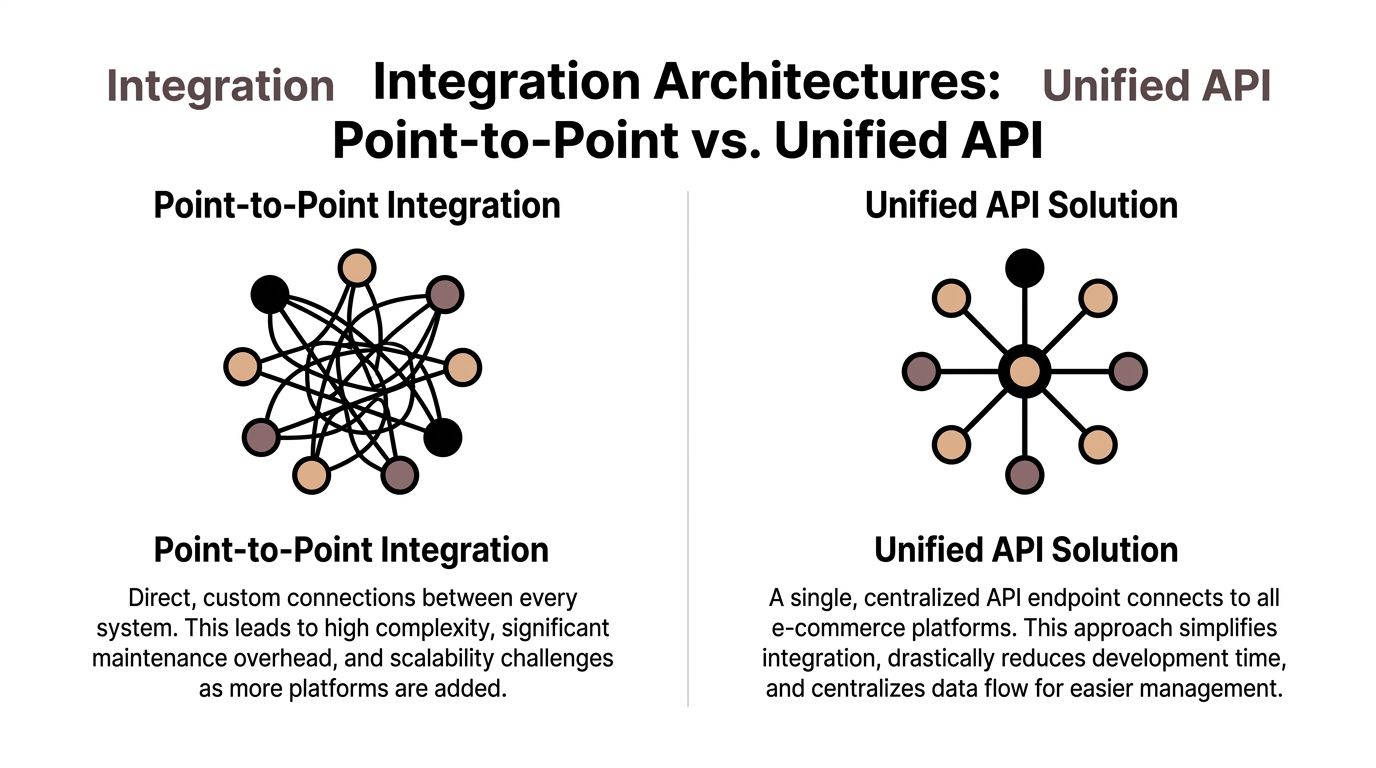
One path is to build a direct connector for each platform. The other is to build once against a unified layer and let that layer absorb platform-specific variance.
Path one point to point
Point-to-point looks attractive at first because it feels direct. Need Shopify data? Call Shopify. Need Amazon order updates? Build an Amazon module. Need WooCommerce products? Add another service.
This works early because the first connector ships fast enough to justify itself.
Then the hidden costs show up:
- Every connector has its own auth flow
- Every connector needs separate monitoring
- Every connector breaks on its own release schedule
- Every connector teaches the team a different API dialect
The architecture starts to resemble a collection of exceptions. Shared business logic gets copied into platform-specific handlers because normalization happens too late.
Path two unified API
A unified API changes the shape of the problem. Your system integrates once with a normalized layer for orders, products, inventory, customers, and shipments. Platform-specific differences still exist, but they are pushed to the integration boundary instead of leaking into the whole codebase.
The biggest win is not convenience. It is containment.
Your core services can operate on one internal model. Your sync engine can use one set of workflows. Your alerting can group failures by entity type and operation instead of by platform-specific implementation detail.
That matters for catalog work. Product catalog integration via a unified model can achieve 99% consistency in pricing, images, and attributes across channels, while boosting conversion rates by 15-25%, according to industry analyses summarized by Alumio. Those outcomes depend on a normalized model and disciplined mapping, not on a pile of isolated scripts.
What the trade-off really is
The comparison is not flexibility versus rigidity. It is local control versus system-wide scalability.
| Architecture | What you control directly | What gets harder over time |
|---|---|---|
| Point-to-point | Each connector’s exact behavior | Maintenance, testing, onboarding, consistency |
| Unified API | Core workflows and normalized entities | Handling a smaller set of edge cases at the boundary |
A lot of developers frame this as “build vs buy,” but that is too shallow. The better framing is whether your product should own connector complexity or consume it as infrastructure.
For teams weighing that decision, API strategy matters as much as feature coverage. This comparison of unified API vs embedded iPaaS is useful because it focuses on where abstraction helps and where direct control still matters.
Key takeaway: Point-to-point integration can ship a connector. A unified API can support a platform program.
Scoping Your Integration Core Technical and Business Requirements
Before writing code, define what the integration must do for your product, not what the target platform happens to expose.
That sounds obvious, but a lot of teams start from endpoints instead of use cases. They browse docs, see available resources, and begin wiring calls. Later they discover they never clarified whether the product needs near real-time inventory sync, historical order imports, or marketplace-specific fulfillment logic.
The market pressure to get this right is substantial. The global market for specialized multi-channel retail solutions is projected to reach $1.95 billion in 2025, according to Anchor Group’s multichannel retail statistics. For B2B SaaS vendors, that is a reminder that integration scope affects product relevance, not just engineering effort.
Technical requirements to pin down early
Start with entity coverage.
- Orders: Do you need list, detail, status changes, shipment association, and refunds?
- Products: Read-only import, full CRUD, variant support, category mapping, images?
- Inventory: Absolute stock updates, delta updates, reservations, warehouse-level logic?
- Customers: Read access only, update support, consent-sensitive fields?
Then define sync mechanics.
Authentication model
Know whether the platforms you target rely on OAuth, API keys, app credentials, or store-specific tokens. This affects onboarding flow, credential rotation, and support burden.Freshness requirement
Some features tolerate batch delays. Others do not. If your product promises low-stock alerts or fast order routing, freshness becomes a contract.Data mapping ownership
Decide where transformation lives. In the connector, the integration layer, or your domain services. Teams get into trouble when every service performs its own partial mapping.
Business requirements that should shape the MVP
The business side should narrow the initial scope, not broaden it.
Consider:
- Target merchant profile: High-volume marketplace sellers need different workflows than DTC merchants.
- Primary value proposition: Is your product an OMS, WMS, shipping app, PIM, or analytics tool?
- Channel priority: The best first platforms are the ones that unlock the most customer demand for your segment.
A shipping tool, for example, needs accurate order states, addresses, and fulfillment updates first. A PIM needs strong catalog normalization and channel-specific attribute handling. An analytics product may need broader read access and less write complexity.
A practical scoping filter
Use three questions before approving any integration requirement:
| Question | Why it matters |
|---|---|
| Does this support a customer-facing workflow? | Avoid integrating endpoints nobody uses |
| Does this require write access or only read access? | Write paths carry more testing and rollback risk |
| Is this universal or platform-specific? | Universal features belong in the MVP core |
If your team is evaluating providers during this stage, use a framework rather than a feature checklist alone. This guide on how to choose the right API provider is a useful reference because it pushes the conversation beyond endpoint count and into supportability.
An Integration Developer's Implementation Playbook
Most integration failures come from ordinary things handled poorly. Not from rare platform outages.
The recurring issues are familiar. Data models diverge. Webhooks arrive out of order. Polling windows miss updates. Rate limits punish burst traffic. Retries duplicate writes. Credentials expire at the worst time.
Data models need a deliberate center
Do not let your internal model become a mirror of one platform’s schema.
Create a canonical model for the entities your product needs. Then map platform fields into that model and preserve non-standard fields in an extension bucket or metadata object. This keeps your business logic stable while still allowing access to platform-specific attributes when they matter.
A weak canonical model causes two bad outcomes at once. Either it becomes too generic to support advanced features, or it becomes polluted by every platform’s quirks.
Webhooks and polling solve different problems
Real-time inventory synchronization, often reliant on webhooks, can reduce order cancellation rates by up to 30-50% by preventing overselling across channels such as Shopify, Amazon, and eBay, based on benchmarks summarized by VendorElite. That makes event-driven updates important where supported.
But webhooks are not a full sync strategy. They are a change-notification strategy.
Use webhooks for immediacy. Use polling for reconciliation, gap filling, and platforms with weak event coverage.
Comparison of Data Sync Methods
| Criterion | Webhooks (Event-Driven) | Polling (Scheduled Checks) |
|---|---|
| Update timing | Near real-time when supported | Depends on schedule |
| Platform dependency | Requires webhook support and reliable delivery | Works almost anywhere with list endpoints |
| Failure mode | Missed events, duplicate delivery, out-of-order events | Delayed updates, missed windows if filters are wrong |
| Infrastructure need | Public receiver, signature verification, queueing | Scheduler, date filters, pagination control |
| Best use | Orders, inventory, urgent state changes | Backfill, reconciliation, unsupported event types |
Tip: Treat webhook payloads as triggers, not truth. Fetch the latest entity state before committing critical updates.
If your team is working through channel-specific workflows, practical examples like this guide on eBay and Shopify integration are useful because they expose how different sales channels create different operational expectations even when the merchant sees “sync” as one feature.
Rate limits are product constraints
Rate limits should influence architecture early.
Do not place synchronous user-facing actions directly on external API calls unless failure is acceptable. Queue writes where possible. Batch reads where it is safe. Store cursors and incremental timestamps carefully. Build backoff behavior that respects platform responses instead of hammering harder under failure.
A good pattern is:
- enqueue work
- coalesce duplicate jobs
- process by connector and store
- apply platform-aware concurrency
- persist retry state with reason codes
Error handling should classify before it retries
A retry policy without error classification causes noise and repeated failure.
Separate errors into categories:
- Transient: timeouts, temporary network failures
- Quota-related: rate limits, throttling
- Auth-related: expired or revoked credentials
- Validation-related: bad payload shape, missing required data
- Business-state conflicts: order already shipped, product locked, unsupported state
Each category needs a different response. Some should retry automatically. Others need merchant action or internal support review.
Security at scale is mostly process discipline
Credential handling becomes messy once you support many stores and channels.
Keep secrets isolated, rotate when the platform requires it, and log access carefully. Avoid leaking full payloads into logs if they contain customer or order data. If your integration team uses support tooling, define what engineers can inspect and what must be redacted.
The strongest multi channel ecommerce integration stacks are usually not flashy. They are predictable. They queue aggressively, reconcile often, classify failures well, and expose enough observability to explain what happened to support and to customers.
The Unified API Solution How API2Cart Accelerates Development
Once the technical pain becomes clear, the value of a unified layer stops being abstract.
A developer working on an OMS, shipping tool, or PIM usually does not want to become an expert in every cart and marketplace authentication flow, product schema, and event model. The better use of engineering time is building routing logic, exception handling, merchant-facing controls, and reporting.

Where a unified API helps in practice
API2Cart is one example of this model. It provides a unified API for many shopping carts and marketplaces with numerous API methods for orders, products, customers, shipments, inventory, and catalog workflows, as described in the publisher background and related verified context. For a developer, that means building against one normalized method set rather than maintaining separate connectors for each platform.
That changes implementation work in practical ways:
- A shipping app can normalize address and order data before label generation.
- A PIM can read product catalogs from multiple carts and push updates through one integration layer.
- An OMS can standardize order ingestion and shipment updates across channels.
- An analytics platform can aggregate customer and order data without custom extraction logic per cart.
The overlooked problem of SLA-aware routing
A lot of integration content talks about inventory sync and catalog mapping. Less of it deals with channel-specific fulfillment obligations.
That gap matters. Descartes notes that handling channel-specific SLAs is a key underserved area in multi-channel operations, and unified APIs can help automate order routing based on marketplace rules such as Amazon Prime versus eBay requirements in ways that are hard to build in-house from scratch, as discussed in its multichannel ecommerce guide.
If your software ingests orders from multiple sources, SLA-aware logic belongs close to your integration boundary. The system should know which orders require special routing, faster reservation, or stricter fulfillment sequencing before downstream teams act on them.
Key takeaway: A unified API is not only a connector simplifier. It is a way to make integration behavior programmable at the product level.
For developers, that distinction matters. The value is not “fewer APIs to learn.” The value is getting a stable interface so the team can spend time on merchant-facing workflows instead of connector survival work.
Your Vendor Evaluation and Implementation Roadmap
Not every unified API provider is a fit for every product. The wrong one hides complexity until production traffic arrives.
A useful evaluation process asks how the provider behaves under operational stress, not just how many logos appear on the website.

Vendor evaluation checklist
Use questions like these:
- Platform coverage: Does it support the carts and marketplaces your customers already use?
- Entity depth: Are orders, products, inventory, shipments, and customers all covered at the level your product needs?
- Webhook support: Can it support event-driven flows where available, and does it also provide polling-friendly methods?
- Docs quality: Are request and response examples concrete enough for implementation?
- Error transparency: Does the provider expose meaningful failure details, not just generic status codes?
- Change management: Is there a changelog and a reliable way to learn about connector updates?
- Support model: Can your engineers get technical answers without a long sales loop?
A vendor that looks good in a feature matrix but weak in debugging support will cost you later.
A simple implementation roadmap
Sandbox and validation
Connect test stores first. Validate auth flows, entity availability, pagination behavior, and timestamp filtering. Do not start with production accounts if basic assumptions are still untested.
Mapping and MVP
Map only the fields required for the first customer-facing workflow. Keep the MVP narrow. If the first feature is order import, do not simultaneously solve full catalog sync unless the product requires it.
Customer migration
Move a small cohort first. Watch for payload edge cases, merchant configuration differences, and support questions that indicate onboarding friction.
Scale and monitor
Once the integration is stable, instrument it well. Track failures by connector, operation, and merchant. Separate onboarding issues from sync issues. Make sure support can tell whether the problem is upstream, mapping-related, or downstream in your own services.
A roadmap like this keeps adoption boring, which is exactly what you want from infrastructure work.
Scaling Integrations Without Scaling Headaches
The hard part of multi channel ecommerce integration is not opening a connection. It is living with that connection for years while customers add channels, platforms change behavior, and your own product grows more ambitious.
That is why this is an architectural decision first and a feature decision second.
Point-to-point connectors can be justified for one urgent deal. They are much harder to justify as a long-term product pattern. The maintenance cost spreads into support, QA, onboarding, and roadmap planning. A unified approach contains that sprawl and gives the team one place to solve recurring integration problems.
For developers, the strategic win is focus. When connector logic becomes infrastructure instead of handcrafted product code, engineers can spend more time on routing rules, merchant workflows, analytics, fulfillment logic, and user-visible features.
A scalable integration stack does not eliminate complexity. It puts complexity in one layer, gives it repeatable patterns, and stops every new platform from rewriting your roadmap.
Frequently Asked Questions for Developers
What happens when a platform has fields that do not fit the unified model
That is normal. A good unified model should cover common entities cleanly and still allow extension fields or metadata for platform-specific attributes.
Do not force every edge-case field into your main domain objects. Keep a stable canonical model for core logic, and store platform-specific extras in a structured extension layer. That preserves portability without losing useful data.
Is build versus buy only about development speed
No. The larger cost is maintenance ownership.
When you build direct connectors, you also own version changes, auth drift, failed sync investigation, and support tooling around all of that. A unified API changes the cost structure because your team manages one integration surface and one normalization approach instead of many separate ones.
How should we migrate existing connector users without disruption
Run both paths for a limited period where possible.
A common migration pattern is:
- Connect a pilot group to the new integration path.
- Compare imported entities and update timing.
- Keep writes gated until reads are trusted.
- Migrate feature by feature, not all at once.
- Retire the old connector only after support volume stabilizes.
This approach reduces surprise for both customers and support teams.
How do we test shopping cart differences before launch
Use representative stores, not only ideal test fixtures.
Include stores with:
- large catalogs
- variant-heavy products
- incomplete customer records
- mixed fulfillment states
- historical orders with unusual statuses
Also test replay scenarios. Re-import the same order, resend the same webhook event, retry failed updates, and verify idempotency behavior. Integration bugs often hide in repeated events rather than first-pass success.
Should we rely on webhooks only
No. Webhooks are valuable, but they should be paired with reconciliation logic.
Use polling or scheduled validation jobs to catch missed updates, backfill changes, and verify that the system of record matches your internal state. The safest production integrations assume that some events will arrive late, duplicated, or not at all.
What should support teams see when something fails
Support should see enough to act without exposing sensitive data.
At minimum, expose connector name, store, entity type, operation, last attempt time, failure category, and whether the issue is retrying automatically or waiting for intervention. If support cannot distinguish auth failure from validation failure, engineering will become the default dashboard.
If you are building multi channel ecommerce integration for an OMS, WMS, PIM, shipping app, ERP, or analytics product, API2Cart is worth evaluating as a unified layer for orders, products, customers, shipments, and inventory across many carts and marketplaces. Start with a demo or trial, validate your core workflows in a sandbox, and decide from actual implementation friction rather than from connector theory.