Think of a POS API as a digital bridge connecting a point-of-sale system to other software. It’s the universal translator that lets your B2B SaaS—whether it’s for inventory management, marketing automation, or shipping logistics—talk directly with a retailer's in-store hardware and software. For a developer, understanding how to leverage a POS API is crucial for building solutions that seamlessly integrate into the modern retail ecosystem, allowing for a real-time flow of critical business data.
What Is a POS API and Why Does It Matter to Developers
For any developer building software for the retail sector, a POS API (Application Programming Interface) is more than just a technical specification; it's the gateway to creating a unified, modern retail experience. In simple terms, it's a set of rules and protocols that defines how different software applications can interact with a point-of-sale system, which is the operational heart of any brick-and-mortar business.
This API acts as the central nervous system for retail operations, creating a two-way conversation between disparate systems. When a customer makes a purchase in-store, a well-integrated POS API can instantly push that sales data to an inventory management tool, update a customer profile in a CRM, or trigger a post-purchase email from a marketing platform.
The Role in Modern Omnichannel Retail
The modern customer journey is no longer a linear path. A customer might browse a product online, check its availability at a nearby store via an app, and then visit the physical location to make a purchase. This "omnichannel" experience is simply impossible to execute without a robust POS API.
It is the core technology that enables the synchronization of data across every sales channel, ensuring consistency and accuracy. Without it, retailers are left managing disconnected data silos, leading to common and costly operational headaches like:
- Inaccurate inventory levels: Selling an item online that is actually out of stock in the physical store.
- Fragmented customer profiles: Failing to recognize a loyal online shopper when they walk into a brick-and-mortar location.
- Manual data reconciliation: Wasting valuable hours exporting sales reports from one system just to manually import them into another.
For developers at B2B software companies, mastering POS API integration is no longer a niche skill—it's a fundamental requirement. It’s the difference between offering a disjointed tool and providing a truly integrated solution that solves a retailer’s most pressing operational challenges.
Why Integration Is Essential for Developers
As a developer, your primary goal is to build software that provides real, tangible value to your users. By integrating with a POS API, you empower your application to become an indispensable part of a retailer's daily operations.
Whether you're developing a shipping solution that requires order details, an accounting platform that needs sales data, or an analytics dashboard that visualizes sales trends, direct access to POS data is non-negotiable. You can learn more about the specifics in our guide on POS integration with eCommerce platforms. This connectivity enables you to build powerful features that solve real-world retailer pain points, making your software stickier and more valuable in a crowded marketplace.
Understanding the Core Architecture of a POS API
To build a solid integration with any Point of Sale system, a developer must first get familiar with its core architecture. Think of it this way: every POS system has its own unique API blueprint, and understanding that blueprint is the first step toward connecting your application to it reliably and efficiently.
The global POS market is expanding at an incredible pace, a clear sign of the massive shift toward integrated retail. The market was valued at USD 38.56 billion in 2025 and is on track to hit a staggering USD 138.92 billion by 2034. For any B2B SaaS vendor, this explosive growth means mastering POS API integration is no longer a "nice-to-have"—it's an absolute must for staying competitive. You can find more on these trends over at Fortune Business Insights.
Key API Endpoints and Data Models
At the heart of any POS API are its endpoints. These are simply specific URLs that your application calls to either retrieve data (e.g., fetch orders) or perform an action (e.g., create a new customer). While every POS system has its own architectural quirks, most are built around a handful of core data objects that are fundamental to retail operations.
Most of your development work will center on these core data models:
- Products: This is where all product information lives—names, SKUs, prices, descriptions, and categories. You’ll use this endpoint to add new items to the catalog, update pricing, or pull a full list of products.
- Inventory: This endpoint is all about tracking stock levels for each product, often across multiple store locations. It's critical for preventing overselling and ensuring stock counts between a business's online store and physical shops are always synchronized.
- Customers: This model holds all customer information, like names, contact details, and their purchase history. It’s the bedrock for building out features like loyalty programs or personalized marketing campaigns.
- Orders: This is where all transaction data is managed. When a sale is made, the POS creates an order object that contains all the crucial details: the items purchased, payment amount, customer info, and any taxes applied.
To get a better sense of how POS systems process transactions, it's also helpful to understand the fundamentals of payment gateway API integration.
The following table breaks down the most common endpoints you'll encounter as a developer and what they do.
Essential POS API Endpoints and Their Functions
This table outlines the primary API endpoints developers will interact with, their corresponding HTTP methods, and the core function each one performs.
| Endpoint | HTTP Method | Description | Example Use Case for a Developer |
|---|---|---|---|
GET /products |
GET | Retrieve a list of all products. | Displaying a merchant's entire product catalog in your app. |
POST /products |
POST | Create a new product. | Adding a new item to the merchant's POS system from your software. |
PUT /inventory/{id} |
PUT | Update the stock quantity for a specific product. | Syncing inventory levels after an online sale to the physical store's POS. |
GET /orders |
GET | Fetch a list of recent orders. | Importing sales data into an accounting or analytics platform. |
POST /orders |
POST | Create a new order. | Pushing an order from a third-party delivery app into the POS. |
GET /customers |
GET | Retrieve a list of customers. | Building a customer directory or a marketing email list. |
POST /customers |
POST | Create a new customer profile. | Adding a new loyalty program member directly to the POS. |
As you can see, these endpoints map directly to the core operations of a retail business. Working with them effectively is key to a successful integration.
Here’s a quick look at what a typical JSON response for a product might look like. Notice how it structures essential data like price, name, and unique identifiers, making it easy for your application to parse.
{
  "id": "prod_12345",
  "name": "Classic White T-Shirt",
  "sku": "TSHIRT-WHT-M",
  "price": "25.00",
  "quantity": 150,
  "description": "A comfortable, 100% cotton t-shirt."
}
Authentication and Security
Connecting to a POS API securely is non-negotiable for a developer. After all, you’re handling sensitive business and customer data. Most modern APIs rely on one of two primary authentication methods.
- API Keys: This is a straightforward approach where a unique secret key is generated for your application. You simply include this key in the header of every API request to prove your identity.
- OAuth 2.0: A more robust and secure protocol that allows a user to grant your application limited access to their data without ever sharing their login credentials. This method involves a multi-step token exchange and is the standard for most modern platforms.
Beyond just authentication, you have to prioritize security best practices across the board. All API communication must be encrypted using TLS. If you’re handling any payment information, strict adherence to PCI DSS compliance is mandatory to protect cardholder data. Building a connection that merchants can trust is just as important as building one that works.
Choosing the Right Data Synchronization Strategy
A POS integration is only as good as its data synchronization. Get it wrong, and you're left with stale inventory, missed orders, and unhappy customers. Get it right, and you have a seamless, real-time flow of information that powers your entire operation.
For developers, this all comes down to a crucial choice between two main strategies: webhooks and API polling. Each has its place, and knowing when to use which is the hallmark of a great integration.
At a high level, the process looks something like this: your application makes a request, the API processes it, and the POS system responds.
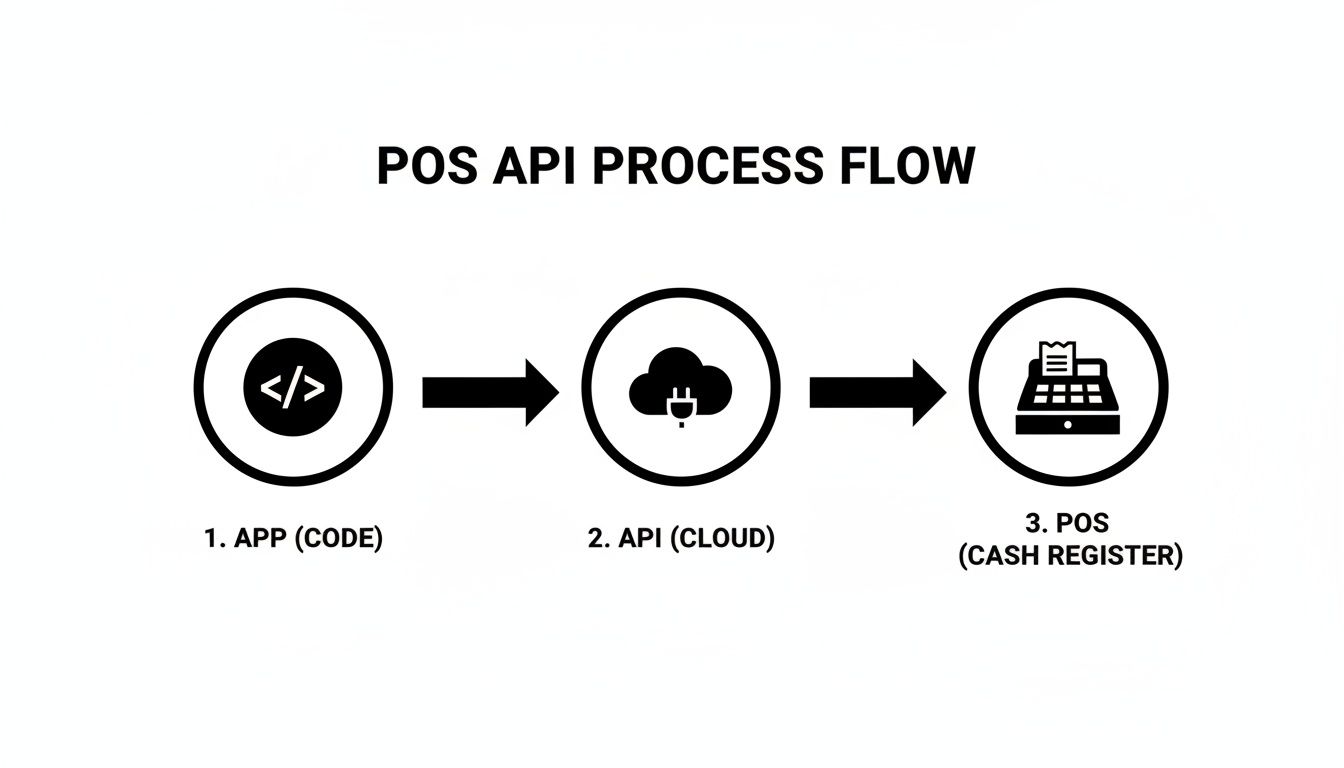
The real magic, though, is in how your application knows when to ask for new information.
Webhooks: The "Push" Approach for Real-Time Updates
Think of a webhook as a push notification for your server. Instead of your application constantly bothering the POS API with "Is there anything new yet?", the POS system proactively sends a message to your app the instant something happens. It’s an event-driven approach that is incredibly efficient for use cases that require immediate action.
Webhooks are the gold standard for real-time data flow. Here’s where they really shine:
- Instant Order Confirmations: A sale is made at the register. A webhook fires immediately, telling your shipping software to get the package ready. No delays.
- Real-Time Inventory Sync: An item sells out in-store. A webhook instantly updates the stock on your eCommerce site, preventing you from selling a product you no longer have.
- Customer Profile Updates: A new customer signs up at the POS. A webhook zaps their info straight into your CRM, ready for your next marketing campaign.
With the market for cloud-based POS software projected to capture 56.02% of revenue in 2025 and swell to over USD 20.84 billion by 2031, webhooks are more important than ever. These modern systems are built for this kind of instant communication.
API Polling: The "Pull" Method for Scheduled Check-Ins
But what if the POS system you’re integrating with is a bit older and doesn’t support webhooks? That’s where API polling comes into play. It’s the classic approach: your application has to make a scheduled API call to "pull" data and check for anything new.
While it’s not as slick as webhooks, polling is still a workhorse for many integrations.
The trick to effective polling is to be smart about it. Constantly asking "Anything new?" without any context is a quick way to hit API rate limits and waste resources. Instead, poll intelligently.
Here’s how to do it right:
- Use Filters: Don't ask for all orders every time. Instead, use timestamp filters like
updated_at_minto only request records that have changed since your last check. This dramatically reduces the data you have to process. - Implement Smart Scheduling: Not all data needs to be updated every second. You might check for new orders every five minutes during peak business hours but scale back to once an hour overnight. Match your polling frequency to the business rhythm.
If you’re looking to dive deeper into building robust sync logic, our guide on real-time API synchronization offers a ton of practical advice on this very topic.
Navigating Common POS Integration Challenges
Ask any developer who's built a POS API integration, and they'll tell you it's a minefield. While the benefits are huge, the path is littered with predictable roadblocks that can completely derail a project. For any developer stepping into this space, knowing what’s coming is the first step to building an integration that actually lasts.
The fundamental issue is a total lack of standardization. Every POS provider, whether it's a sleek cloud-based system or a clunky on-premise relic, brings its own API architecture, data models, and security rules to the table. This fragmentation creates a massive, and often underestimated, amount of engineering work.
The Problem of Inconsistent Architectures
Imagine you’ve just spent weeks building a perfect integration with one POS system. Your next customer signs up, but they use a different provider. Suddenly, you’re back at square one. The endpoints have different names, the data structure for a simple "order" is unrecognizable, and the authentication flow is a whole new puzzle. This is the frustrating reality of building direct POS integrations one by one.
- Varying Data Models: One API might call it
product_name, while another usesitemName. Mapping these mismatched fields across every system becomes a tedious and error-prone chore. - Different Authentication Flows: Some systems get by with a simple API key. Others demand a complex OAuth 2.0 handshake. Juggling these different security protocols adds another layer of complexity and risk.
- Inconsistent Error Handling: Error codes and messages are all over the place, making it nearly impossible to build universal error-handling logic that works across all your connections.
As you wrestle with these issues, locking down the connection is non-negotiable. Implementing strong API authentication best practices is critical to protect the sensitive retail data flowing through your system.
Operational and Maintenance Headaches
Even after you get an integration live, your work is far from over. POS systems don't sit still—they evolve, and so do their APIs. This introduces ongoing maintenance headaches that can drain your engineering resources.
The real cost of integration isn’t just the initial build. It’s the continuous, long-term effort required to maintain, update, and troubleshoot dozens of unique connections, each with its own set of rules and behaviors.
This is especially true given how fast the market is moving. The global POS market is projected to grow at a 19.7% CAGR, hitting USD 132.57 billion by 2030, fueled by innovations like contactless payments and AI. As POS providers add new features and adapt to updated security standards like PCI DSS v4.0, they'll be pushing frequent API updates.
This creates several operational nightmares for your team:
- API Versioning: A POS provider can release a new API version at any time, marking the one you're using as deprecated. This forces you to scramble and refactor your code, often on a tight deadline, just to keep the service running.
- Managing Rate Limits: Every POS API has rate limits to prevent abuse. If you’re not careful, your app can easily blow past these limits during peak business hours, causing your integration to fail right when it's needed most.
- High Costs of Scaling: The cost to build and maintain each integration can easily run into thousands of dollars per platform. As your business grows and customers demand more POS connections, these costs multiply, choking your ability to scale efficiently.
These challenges make it clear that a more strategic approach is needed—one that abstracts away the chaos and lets developers get back to building features instead of just managing plumbing.
The Unified API: A Smarter Integration Path for Developers
After wrestling with the messy reality of building one-off connections, it's clear a more strategic approach is needed. Instead of battling dozens of unique POS systems, imagine having a universal translator that lets your app speak to all of them in a single, consistent language. This is the core idea behind a unified API.
This model effectively hides the architectural chaos, giving your developers a single, clean API to work with. For any B2B SaaS developer, this approach completely changes the integration game.
Write Code Once, Connect to Many with API2Cart
A unified API from a provider like API2Cart is built to deliver this exact advantage. It works as an intermediary layer, connecting your software to a whole ecosystem of POS and eCommerce platforms—think Square, Lightspeed, and Clover—all through a single integration point. Your team writes code once against the unified POS API, and API2Cart manages all the complex, varied connections on the back end.
This approach brings some game-changing benefits to the table for any development team:
- Drastically Reduced Development Time: Instead of spending months building and debugging individual connections, your team integrates just once to get access to dozens of platforms. This frees up your engineers to focus on what matters: your core product. For example, a single integration that would take months can be reduced to weeks, allowing you to launch support for multiple POS systems simultaneously.
- Predictable and Simplified Maintenance: When a POS provider decides to update their API, API2Cart's team handles all the necessary changes. Your team is completely shielded from the endless maintenance cycle of fixing broken connections and dealing with deprecated API versions.
- Faster Time-to-Market: With the integration bottleneck gone, you can onboard new customers using different POS systems almost instantly. This dramatically speeds up your market expansion and revenue growth, allowing you to say "yes" to more potential clients without a lengthy development delay.
How a Unified Data Model Works in Practice
The real magic of a unified API lies in its standardized data models. A provider like API2Cart takes the completely different data structures from each individual POS system and maps them to a single, logical format. An "order" object, for instance, looks the same whether it originally came from Square or Shopify.
In practice, this means your developers can stop writing custom mapping logic for every new platform. They can build features based on a predictable data structure for key entities like orders, products, customers, and inventory. For a deeper look into the benefits, you can explore more about how a unified API can streamline your development workflows.
A unified API shifts your focus from plumbing to innovation. It lets you bypass the low-level, repetitive work of custom integration and concentrate on what you do best—building great features that solve your customers' problems.
Take a simple product.list request as an example. Through a unified API, the response returns product data in a consistent JSON format, no matter what the underlying POS system is. This standardization gets rid of the need for complex data transformation logic inside your application, making your codebase much cleaner and easier to maintain. By adopting this smarter integration path with a solution like API2Cart, you can turn a major development headache into a powerful competitive advantage.
Frequently Asked Questions About POS API Integration
Jumping into POS API integration for the first time? You probably have a lot of questions, especially if you're a developer new to the retail tech space. Let's walk through some of the most common queries we hear and provide the straightforward answers you need.
What Is the Main Difference Between a POS API and an eCommerce API?
From a developer's perspective, think of a POS API as the digital brain of a brick-and-mortar store. It’s built for the speed and unique needs of in-person sales, often connecting directly with hardware like barcode scanners, cash drawers, and receipt printers. Its primary job is handling transactions that happen right there at the checkout counter.
An eCommerce API, like the ones from Shopify or Magento, is designed for the online world. It's all about managing web orders, digital product catalogs, and the entire online shopping journey. While both deal with orders and products, a POS API is optimized for in-store speed and hardware interaction, whereas an eCommerce API is built for the web.
A unified solution like API2Cart bridges this divide. It provides a single, standardized API that allows your application to interact seamlessly with both POS systems and eCommerce platforms, eliminating the need to build and maintain separate integrations for each.
How Do I Handle Inventory Synchronization Between a POS System and an Online Store?
The gold standard here is bi-directional synchronization. This ensures your inventory count is accurate everywhere, all the time, preventing you from selling a product online that just sold out in-store. As a developer, this is a critical feature to get right.
Here’s how it works:
- In-Store to Online: Someone buys the last red sweater in a physical shop. The POS system should immediately fire a webhook. This real-time alert tells your application to update the inventory on the corresponding eCommerce site, marking that sweater as "out of stock."
- Online to In-Store: The reverse is just as important. When an order comes through your website, the eCommerce platform's API sends its own webhook. This signal updates the inventory in your POS system, so a cashier doesn't accidentally sell the same item to a customer in the store.
If a system you're connecting to doesn't support webhooks, you'll have to fall back on API polling. This means setting up your app to make scheduled API calls every few minutes (say, every 5-10 minutes) to check for any changes on either side.
What Are the Most Critical Security Concerns When Using a POS API?
Nothing is more important than protecting payment data and customer PII (personally identifiable information). For a developer, the top concern is ensuring compliance with the Payment Card Industry Data Security Standard (PCI DSS), the set of rules that governs how credit card details are handled.
Here are the non-negotiables for security:
- Never Store Sensitive Card Data: Seriously, just don't do it. Use tokenization to process payments. This swaps the actual card number for a secure, non-sensitive token that is safe to handle.
- Encrypt All Data in Transit: Every piece of information sent between your app and the POS API must be encrypted using Transport Layer Security (TLS). There are no exceptions.
- Use Secure Authentication: Implement a robust method like OAuth 2.0 to ensure that only authorized applications can access the API.
Why Should a Developer Use a Unified API Instead of Connecting Directly?
Connecting directly to one POS API is fine if you only ever plan to support that single platform. But what happens when your customers start asking for integrations with Square, Lightspeed, and Clover? Suddenly, that one-off approach doesn't scale. You're now on the hook for building, testing, and maintaining a separate, custom integration for every single one.
This is where a unified API provider like API2Cart becomes a game-changer for a development team. It saves a massive amount of engineering time and dramatically shrinks your time-to-market.
API2Cart acts as a single integration point, connecting your software to a whole ecosystem of POS and eCommerce platforms. Your developers write code once to the API2Cart API, and our service handles all the unique, messy connections behind the scenes. You get to stop worrying about different API architectures, constant platform updates, and mapping dozens of different data fields. Instead, you can focus on what you do best: building great features that deliver value to your customers.
Stop wasting months on custom integrations. With API2Cart, you can connect your software to over 40 POS and eCommerce platforms through a single, unified API. Start your free 14-day trial and see how quickly you can expand your market reach.