
Think of the Shopify API as the central nervous system for millions of online stores. It's not just a bunch of code; it’s the universal translator that lets your B2B SaaS application talk directly to a global eCommerce powerhouse. For an integration developer, mastering this API is key to building software that can sync orders, manage inventory, and push product updates for merchants automatically.
Why the Shopify API Is a Goldmine for SaaS Developers

For any SaaS developer building for eCommerce, integrating with Shopify is no longer a "nice-to-have." It's table stakes. Shopify is the backbone for a huge slice of the online retail world, making it ground zero for services in order management (OMS), warehouse management (WMS), and product information management (PIM). If you want your software to play in this space, you need to speak Shopify's language fluently.
It's important to get a feel for just how big Shopify is in the grand scheme of things. You can find a good Shopify platform comparison to see how it stacks up. That market dominance translates into a massive, concentrated pool of potential customers for your software.
The Integration Challenge for Developers
But tapping into this opportunity comes with a significant technical catch. Building and maintaining a custom Shopify API integration is a serious undertaking for any development team. Your engineers will have to wrestle with tricky OAuth authentication protocols, stay within tight rate limits, keep up with constant API version changes, and make sense of unique data structures. That's a lot of specialized work for just one platform. Now, imagine doing it all over again for WooCommerce, Magento, and every other cart your customers use.
The real headache for a growing SaaS isn't just building one integration; it's the never-ending cycle of maintaining dozens of them. Each new platform you support adds another layer of complexity, pulling your engineers away from building your actual product.
This is where a unified API solution completely flips the script for a developer. What if you could write your code once to a single, consistent API, and it would just work for Shopify, Magento, WooCommerce, and 60+ other platforms? That's what a service like API2Cart does—it handles all the messy, platform-specific implementation details for you.
For a developer, using API2Cart translates to direct benefits:
- Slash your development timeline. Forget spending months building individual connectors from scratch. You can have a production-ready integration in a fraction of the time.
- Drastically reduce engineering costs. Free up your dev team to focus on core application logic and new features, not on the tedious, repetitive work of integration maintenance.
- Instantly broaden your market reach by offering a whole suite of integrations right out of the box, making your product more attractive to a wider range of customers.
Instead of getting trapped in the integration hamster wheel, you can get back to what matters: shipping code that delivers value to your customers. If you're still on the fence, check out these key reasons your SaaS app should integrate with Shopify and see the growth it can unlock.
Choosing Your Toolkit: REST vs GraphQL
Before your developers write a single line of code, there’s a critical decision to make: which architectural approach will you use? The Shopify API comes in two distinct flavors, REST and GraphQL, and your choice will shape the entire development process. Getting this right from the start is the key to building an efficient and scalable integration.
Think of the classic REST API like ordering from a fixed, set menu at a restaurant. When you request the products endpoint, Shopify serves you the entire, predefined data structure for products—every single variant, description, and tag. This approach is predictable and incredibly well-documented. It's perfect for straightforward tasks where you need the complete picture of a resource.
GraphQL, on the other hand, is like ordering à la carte. Instead of a fixed menu, you hand the kitchen a precise list of exactly what you want. You can ask for just the price and SKU for three specific product IDs and get nothing more. This precision makes GraphQL incredibly efficient, especially for complex jobs, because it cuts out all the noise and reduces data transfer sizes.
Matching The Tool to The Task
The right choice really boils down to what your integration needs to accomplish. If you want to get into the weeds on the technical differences, you can explore this detailed comparison of REST API vs GraphQL.
Here's a quick breakdown to help guide your decision:
- Choose REST when: Your application is doing simple create, read, update, or delete (CRUD) operations on whole resources. For instance, if your PIM needs to sync an entire product record over to Shopify, REST's structured endpoints are your best bet.
- Choose GraphQL when: Your application needs to pull specific, nested bits of data from multiple resources in a single go. A mobile app that needs to display a customer's name, their last five order numbers, and the titles of the products from those orders could grab it all in one highly efficient GraphQL query.
To help you decide at a glance, here’s a quick comparison of how the two Shopify APIs stack up for common integration tasks.
Shopify API Comparison: REST vs GraphQL
| Feature | REST API | GraphQL API |
|---|---|---|
| Data Fetching | Fetches entire, predefined data objects (over-fetching). | Fetches only the specific data fields you request (no over-fetching). |
| Number of Requests | Often requires multiple requests to different endpoints for related data. | Can fetch data from multiple resources in a single request. |
| Best Use Case | Simple CRUD operations on whole resources (e.g., syncing a full product). | Complex queries needing specific data from multiple sources (e.g., a customer dashboard). |
| Learning Curve | Generally easier to understand for beginners; follows standard HTTP conventions. | Steeper learning curve but more powerful and flexible once mastered. |
| Payload Size | Larger, as you get all data fields whether you need them or not. | Smaller and more efficient, as you only receive what you ask for. |
While choosing the right Shopify API is a great first step, the real challenge for a B2B SaaS company comes next.
The Unified API Advantage
Now, imagine going through this decision-making process, but multiplying it by 60+ different eCommerce platforms. Each one has its own API quirks, data models, and architectural choices. This is where the complexity explodes for a SaaS developer. A unified API service like API2Cart abstracts this entire problem away.
Instead of forcing your developers to become experts in both Shopify's REST and GraphQL APIs—plus dozens of others—a unified solution provides one consistent set of methods. You simply call
product.listororder.info, and API2Cart handles the translation to the appropriate native API in the background.
This approach massively accelerates development. Your team writes code once to a single, standardized API, effectively outsourcing the immense challenge of building, learning, and maintaining connections to a fragmented ecosystem. It allows you to focus your precious engineering resources on your core application features, not on the plumbing of individual platform integrations. What could have been a months-long integration project becomes a matter of days.
Mastering Authentication and Rate Limits

Before you can do anything cool with the Shopify API, you have to master two fundamental rules of engagement: the secure handshake and the polite conversation. Think of authentication as the secure handshake—it’s how Shopify verifies that your app has permission to touch a store’s sensitive data. Then comes the polite conversation: respecting rate limits to ensure you don’t overwhelm the platform, keeping things stable for everyone.
For any developer, this journey starts with Shopify’s OAuth 2.0 flow. This is the standard dance where a merchant grants your app specific permissions, like "read orders" or "update products." Once they agree, your app gets its API keys and an access token. This token is your digital passport for every single request you make on that store's behalf.
Of course, securely managing these tokens across thousands of different customer stores is a serious engineering challenge all on its own. If you want to go deeper on this, you can explore the different types of API authentication methods to really understand what's happening under the hood.
Navigating Shopify API Rate Limits
Once you're authenticated, you have to play by the traffic rules. Shopify uses what’s known as a "leaky bucket" algorithm to manage the firehose of API calls hitting its servers. Imagine a bucket that can hold a certain number of your API requests. As you make calls, you fill the bucket. At the same time, the bucket has a small hole in the bottom, allowing requests to "leak" out at a steady rate, freeing up capacity.
If you pour in requests too fast, the bucket overflows. When that happens, Shopify will slam the door with a 429 Too Many Requests error, temporarily blocking your app. This isn't just Shopify being difficult; it's a critical defense mechanism for a platform that can process $4.2 million in sales per minute during peak events like Black Friday.
To keep your app from getting shut down, you have to code defensively. Smart developers always build in a few key strategies:
- Monitor API response headers to keep an eye on your current bucket level.
- Implement exponential backoff, a fancy term for intelligently waiting longer between retries after you get a
429error. - Queue requests on your end to smooth out sudden bursts of activity and feed them to Shopify at a manageable pace.
Building and maintaining this kind of robust logic for just one platform is a complex, time-consuming job. Now, imagine trying to manage unique authentication flows and different rate-limiting rules for dozens of eCommerce platforms your customers might use. It quickly becomes a nightmare.
The API2Cart Solution for Developers
This is exactly where a unified API like API2Cart becomes a game-changer for integration developers. Instead of you building custom logic for Shopify’s leaky bucket, another system for Magento's limits, and a third for WooCommerce, API2Cart handles it all for you.
API2Cart completely abstracts away the authentication and rate-limiting headaches. As a developer, you connect to a single, standardized API, and the service manages all the unique handshakes and traffic rules for Shopify and 60+ other platforms behind the scenes. This frees up your team to focus on building the features that matter to your customers, not on the tricky plumbing of each individual connection. The result? You get to market drastically faster and with less code to maintain.
Working with Essential Shopify API Endpoints
Think of the Shopify API as a massive toolkit. You don't need every tool for every job, but knowing your way around the core components is non-negotiable for an integration developer. For most B2B SaaS apps, that means mastering four key data objects: Products, Orders, Customers, and Inventory. These are the absolute cornerstones of any eCommerce business.
Instead of just giving you a dry list of endpoints, let's put them into a real-world context. Imagine you're a developer building a Warehouse Management System (WMS). Your software's entire purpose revolves around order data. It needs a constant, reliable feed of new orders to get the fulfillment process rolling.
To make that happen, a developer would typically hit the GET /admin/api/2024-07/orders.json endpoint. They'd filter it by status=open and fulfillment_status=unshipped to pull only the orders that are actually ready to be packed and shipped. Once a package is out the door, the WMS needs to talk back to Shopify, using POST /admin/api/2024-07/orders/{order_id}/fulfillments.json to send tracking information back to the store.
The Power of Abstraction
This direct approach works perfectly fine if you're only ever integrating with Shopify. But the moment you zoom out, the complexity explodes. Merchants don't just use Shopify; they rely on a whole ecosystem of third-party apps. In fact, the Shopify App Store has over 13,000 apps, and the average merchant installs six of them to handle everything from shipping to marketing. This is a huge market for robust integrations, a point driven home in this deep dive into Shopify statistics.
For a B2B SaaS vendor, building a custom connector for every single platform just isn't scalable. This is where a unified API like API2Cart completely changes the game for your development team.
Instead of writing specific code for Shopify’s
orders.jsonendpoint and then another chunk of code for Magento’s, you just use a single, standardized method:order.list. API2Cart acts as the universal translator in the background, speaking the native API language of each platform on your behalf.
This abstraction layer is a massive shortcut for developers. It lets your team write cleaner, more maintainable code that works across dozens of eCommerce platforms from day one.
Standardizing Core Data Operations with API2Cart
Let's see how this plays out with other essential data. A Product Information Management (PIM) system, for example, needs to be the one source of truth for all product data, which means it needs solid two-way synchronization. Using API2Cart, a developer can:
- Fetch Products: Forget calling Shopify's
GET /products.jsonendpoint. With a unified API, you'd simply use theproduct.listmethod, and API2Cart handles the specific call to Shopify, Magento, or any other connected cart. - Update Inventory: Instead of digging through docs to find Shopify's
POST /inventory_levels/set.json, you'd use a standardizedproduct.updatemethod and just specify the newquantity. The platform handles mapping this to the correct endpoint for each cart.
This unified approach dramatically cuts down development time and cognitive load. You skip the tedious process of studying the unique data structures, endpoint names, and authentication quirks for every platform your customers might use. The result is a much faster path to market and way less engineering overhead, freeing up your team to build the core features that make your product great.
Building Real-Time Integrations with Webhooks
Constantly polling an API for updates is like hitting refresh on a tracking page over and over—it’s inefficient and a waste of resources. There's a much smarter way: webhooks. Think of webhooks as push notifications for your server. Instead of you constantly asking Shopify for new data, the API tells you the moment something important happens.
This event-driven approach is the key to building responsive, real-time integrations. An order management system, for example, can't afford to wait around for a scheduled sync to learn about a new sale. By subscribing to the orders/create webhook topic, Shopify instantly pushes the new order data to your application's listener URL, triggering your fulfillment workflow right away.
Setting Up a Reliable Webhook Listener
Just creating an endpoint isn't enough; you have to build a robust webhook listener ready for the real world of network communication. As a developer, you need to ensure your listener can:
- Acknowledge Immediately: Your listener must send a
200 OKresponse back to Shopify the second it receives a payload, before doing any heavy processing. This tells Shopify "I got it," preventing it from thinking the delivery failed. - Handle Retries: Network glitches are a fact of life. Shopify will try sending a webhook again if it doesn't get a timely success response. Your system needs to be smart enough to handle potential duplicate events without creating duplicate orders or messing up inventory counts.
- Validate Payloads: Every webhook request from Shopify comes with a unique signature in its headers. You absolutely must verify this signature to ensure the data is authentic and hasn't been tampered with.
The real challenge for an integration developer isn't just handling webhooks from Shopify. It's building a system that can reliably process them from dozens of different platforms, each with its own signature format, retry logic, and payload structure.
The Hidden Challenge of API Versioning
On top of webhooks, developers have to deal with API versioning. Shopify releases new API versions every quarter, and older versions are eventually retired. This puts your integration on a constant maintenance treadmill. A minor change to an endpoint or data field in a new version can completely break your sync logic, forcing your team to continuously monitor changelogs and scramble to update code.
This is where a unified API service like API2Cart offers a massive advantage. Imagine building for Shopify's ecosystem, where over 5.8 million live stores operate as of June 2025. Platforms like API2Cart simplify this by offering over 100 API methods across more than 60 carts, including Shopify, cutting integration costs by up to 9x and enabling real-time webhooks for high-volume synchronization. To get a sense of this scale, discover more insights about Shopify's growth on podbase.com.
API2Cart acts as a shield, protecting your developers from this complexity. It manages the API versioning across all supported platforms, so your team writes code just once against a stable, unified endpoint. When Shopify releases a breaking change, API2Cart’s team handles the adaptation, ensuring your integration stays stable without requiring constant, reactive maintenance from your engineers. This lets you focus on your product, not the ever-shifting foundation it's built on.
The Strategic Advantage of a Unified API
Let's be honest: the integration gauntlet is a painful reality for any B2B SaaS developer. First, you have to master Shopify’s REST and GraphQL APIs. Then you're managing OAuth tokens for thousands of stores, coding defensively for rate limits, building webhook listeners, and constantly chasing new API versions. That's a huge undertaking for just one platform.
Now, imagine multiplying that entire effort across Magento, WooCommerce, BigCommerce, and dozens of others. It’s not a scalable strategy.
This is exactly where a unified API service becomes a game-changer. Instead of trapping your engineering team in a tangled web of individual connectors, you can write your code just once against a single, standardized API. Services like API2Cart act as a universal translator, taking care of all the platform-specific headaches behind the scenes.
Accelerate Your Go-to-Market Strategy
The biggest win here for a developer is pure speed. A unified API lets you completely sidestep months of painstaking development, testing, and maintenance. Your team can connect to the entire eCommerce ecosystem in a fraction of the time, opening the door to a much broader market from day one.
A unified API empowers developers to focus on building core product features that create value for customers, rather than getting bogged down in the endless, costly cycle of integration maintenance.
This diagram shows the difference between the clunky 'pull' method of API polling and the sleek, real-time 'push' notifications you get with webhooks—a critical feature managed seamlessly by unified APIs.
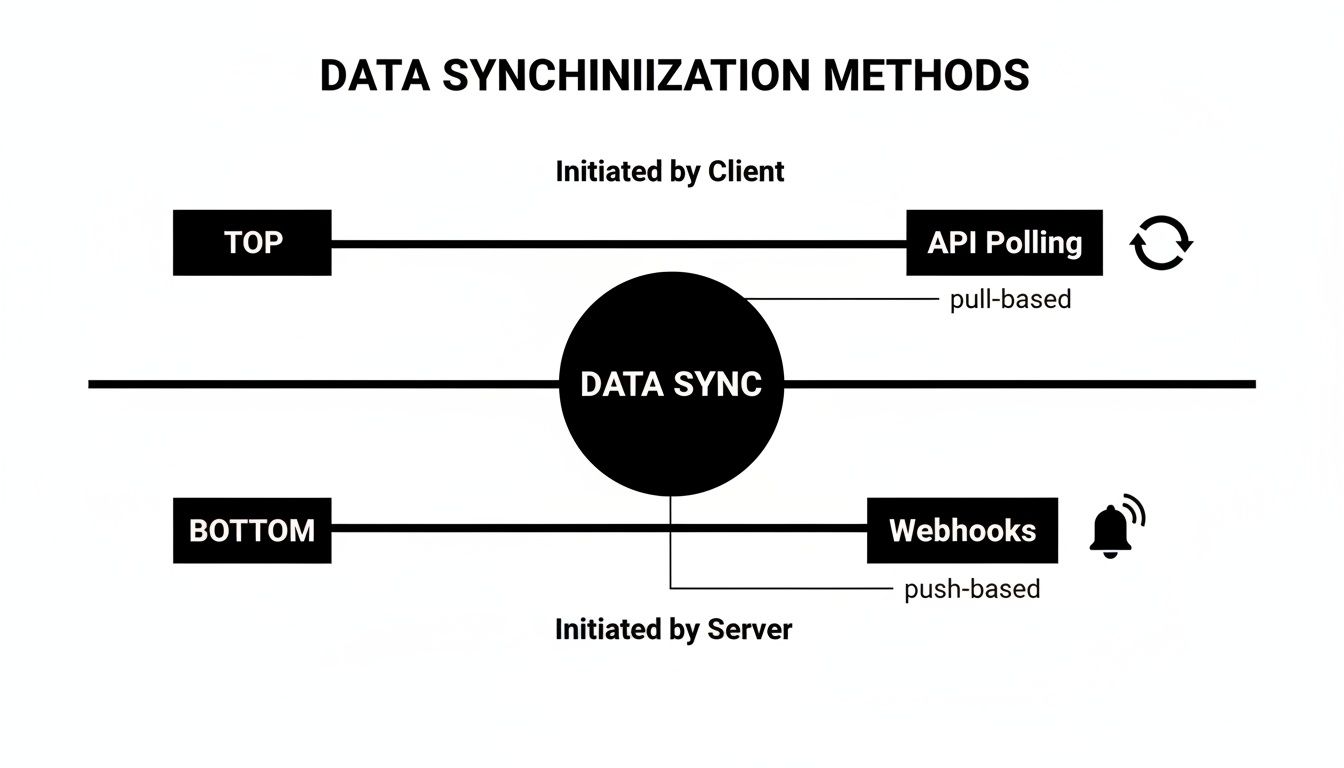
As you can see, webhooks are essential for modern eCommerce apps that need instant updates for things like new orders and inventory changes. Polling just can't keep up.
For any business selling across multiple channels, managing those connections is a major operational challenge. This detailed Shopify Amazon integration guide shows just how complicated multi-channel operations can get, which really underscores why a simplified, unified approach is so valuable.
At the end of the day, using a unified solution like API2Cart delivers clear, measurable wins for a development team:
- Drastically reduced development costs and much lower ongoing engineering overhead.
- Faster time-to-market for launching new integrations and features.
- Immediate access to a wider customer base across 60+ eCommerce platforms.
- A future-proofed architecture that's shielded from random API changes on individual platforms.
It’s about transforming integration from a necessary evil and a major cost center into a powerful growth engine for your SaaS business.
Frequently Asked Questions About the Shopify API
As you get deeper into Shopify development, a few common questions always pop up. Let's clear up some of the most frequent ones developers run into when working with Shopify's APIs and unified integration platforms.
What Is the Main Difference Between Shopify's Admin API and Storefront API?
Think of it this way: the Admin API is for the merchant, while the Storefront API is for the customer.
The Admin API is your behind-the-scenes toolkit. It’s what you use to build apps that help merchants run their business—things like managing products, processing orders, or updating customer information. This requires authenticated access because you're directly manipulating store data.
On the other hand, the Storefront API is all about building custom shopping experiences. It gives you public, read-only access to a store's product catalog and allows you to create a checkout. It’s perfect for building custom websites, mobile apps, or any unique front-end where people buy things.
How Does API2Cart Handle Data Differences Between Shopify and WooCommerce?
This is where the magic of a unified API really shines for a developer. Instead of you having to write custom code to handle the unique data structures of Shopify, then another set for WooCommerce, and another for BigCommerce, API2Cart does the heavy lifting. It maps all those different platform-specific fields to a single, consistent data model.
When your app calls a method like product.info, you get back a standardized JSON response every single time, regardless of the underlying platform.
For an integration developer, this is a massive time-saver. API2Cart manages all the complex data mapping and transformation internally, so your application works with one consistent, predictable structure across all platforms.
What Is the Best Way to Get Real-Time Order Updates from Shopify?
The most robust and efficient way is to use Webhooks.
Polling the Orders API—checking for new orders every few minutes—is inefficient and can quickly burn through your API rate limits. Instead, you can subscribe to a webhook topic like orders/create. When a new order is placed, Shopify instantly "pushes" a notification with all the order data directly to your specified URL. It’s a real-time, event-driven approach that's far superior to constantly asking "anything new yet?"
Ready to skip the complexity of building and maintaining individual connections? API2Cart provides a single, unified API to connect with Shopify and 60+ other eCommerce platforms, saving you valuable development time. Start your free 30-day trial and see how quickly you can expand your integrations.