If you're an integration developer building B2B SaaS for the eCommerce world, think of the UNAS API as the digital handshake connecting your software to a merchant's storefront. It’s the bridge that lets applications like order management systems (OMS), inventory tools, and shipping software talk directly to the UNAS platform.
Unlocking Ecommerce Automation with the UNAS API
At its heart, the UNAS API offers a structured way for different software systems to request and swap data. This programmatic access is what makes real-time data sync, automated order processing, and seamless inventory updates a reality. For an integration developer, this is the core mechanism for building value. Without it, you’d be stuck with manual data entry or fragile web scraping—both of which are slow, unreliable, and a recipe for errors.
This connection is what empowers developers to build powerful, integrated solutions that save merchants time and cut down on costly mistakes. It's the foundation that supports any serious eCommerce operation.
Why Integration Developers Focus on APIs
For any SaaS provider, connecting your app to a merchant's UNAS store isn't just a nice-to-have feature; it’s a core requirement. The ability to pull in new orders, push out stock level updates, or sync customer details is absolutely fundamental. A solid integration turns your software from a standalone tool into a critical piece of a merchant’s daily workflow.
But building and maintaining these connections takes a ton of development work. Every shopping platform has its own API structure, unique authentication methods, and quirky data formats. This is where a unified API solution completely changes the game for a developer.
By abstracting away the complexities of each platform's API, developers can write their code once and connect to dozens of platforms at the same time. This approach slashes development timelines and cuts down on long-term maintenance headaches.
Speeding Up Development with a Unified Approach
A service like API2Cart simplifies this entire messy process for developers. Instead of sinking months into building a specific connector just for the UNAS API, you can use a single, standardized API to connect to UNAS and over 60 other platforms. This frees up your development team to focus on building your app's core features instead of getting bogged down managing a portfolio of complex integrations.
For instance, an inventory management system developer could use one API call through API2Cart to update product stock on a UNAS store, a Shopify store, and an Amazon marketplace all at once. For a shipping platform, a single order.list call can retrieve new orders from every connected cart, regardless of the underlying platform. You can learn more about how a unified UNAS integration can fast-track your roadmap and give you a scalable foundation for future growth.
Connecting to The UNAS API: A Practical Walkthrough

Making that first successful API call is a rite of passage for any developer. With UNAS, this process all comes down to getting your authentication right. This is your digital handshake, the secure key that unlocks the store's data for your application.
Now, if you're used to modern REST APIs with OAuth tokens, you'll find UNAS takes a more direct route. It uses a credential-based method that you’ll generate right from the store's admin panel. Think of it like logging into a secure website, but your code is doing the work. With every single request, your app needs to present the right username and a special encrypted password. Get it wrong, and the server will simply deny access, stopping your integration cold.
Generating Your API Credentials
First things first, you need to grab your unique API keys. These are generated directly inside the UNAS admin dashboard, which makes sense—it ensures only applications with explicit permission can touch the store’s data.
The process is pretty straightforward:
- Log in to the admin panel of the UNAS store you're connecting to.
- Head over to the Beállítások > Külső kapcsolatok > API section.
- On this screen, you'll find the two critical pieces of the puzzle: the Username and the PasswordCrypt.
- That
PasswordCryptvalue is a pre-encrypted version of a password, specifically for API use.
It’s absolutely critical to treat these credentials with the same care you would any sensitive password. Store them securely in environment variables or a secrets manager. Never, ever hardcode them into your application's source code. For a deeper dive on this topic, check out our complete guide on different API authentication methods.
Crafting Your First Authenticated Request
With your Username and PasswordCrypt ready, you're set to build your first authenticated request. The UNAS API expects these credentials to be sent inside an <Auth> block within the XML payload of every request. Miss this block, and the request will fail.
Here’s a quick PHP example using cURL that shows how to structure a simple getShop request. This is the perfect "hello world" test to confirm your connection is working properly.
UNAS API Authentication Parameters
To make an authenticated request, you need to include a specific set of parameters inside the <Auth> block of your XML payload. Here’s a quick breakdown of what they are and what they do.
| Parameter | Description | Example Value |
|---|---|---|
Username |
The API username you generated in the UNAS admin panel. This identifies your application. | api_user_123 |
PasswordCrypt |
The pre-encrypted password key associated with your API username. | a1b2c3d4e5f6g7h8i9j0k1l2m3n4o5p6 |
These two parameters form the foundation of every call you'll make to the UNAS API.
<?php // Your UNAS API credentials $username = 'YOUR_API_USERNAME'; $passwordCrypt = 'YOUR_PASSWORD_CRYPT_KEY'; // The XML payload for the getShop request $xmlPayload = <<<XML {$username} {$passwordCrypt} XML;// cURL request setup
$ch = curl_init('https://api.unas.eu/shop/getShop');
curl_setopt($ch, CURLOPT_HTTPHEADER, array('Content-Type: application/xml'));
curl_setopt($ch, CURLOPT_POST, 1);
curl_setopt($ch, CURLOPT_POSTFIELDS, $xmlPayload);
curl_setopt($ch, CURLOPT_RETURNTRANSFER, true);
// Execute the request and get the response
$response = curl_exec($ch);
curl_close($ch);
// Output the response from the UNAS API
echo $response;
?>
If everything is correct, you'll get an XML response back containing the shop's details. That's your confirmation that authentication was successful!
Of course, things don't always work on the first try. When you're debugging, it's incredibly helpful to see exactly what's being sent and received over the network. To get that level of insight, learn how to open HAR files and transform your debugging workflow. This skill will save you a ton of time diagnosing issues with malformed requests or incorrect credentials.
Working with Core UNAS API Endpoints
Once you've established a secure connection, the real work begins: manipulating store data. The UNAS API provides a handful of core endpoints that act as your primary tools for managing products, orders, customers, and inventory. Think of these endpoints as specialized doorways, each leading to a different department of the eCommerce store.
For developers, mastering these interactions is everything. Your application's value depends entirely on its ability to reliably pull order details, update stock levels, or sync customer information. Each task requires sending a precisely structured XML request to the correct endpoint and then correctly interpreting the XML response that comes back. To get this right consistently, it's incredibly helpful to understand the principles behind effective API design best practices.
Managing Products with getProduct and setProduct
A store’s product catalog is its foundation. Any integration will almost certainly need to perform two key actions: fetching product data and updating it.
getProduct: This is your go-to for fetching detailed information about products. You can query for specific items by ID or retrieve entire lists of products, complete with pricing, descriptions, and images.setProduct: When you need to update stock levels, change prices, or add new product variants,setProductis the endpoint you'll call. You construct an XML payload with the new data and send it to UNAS to overwrite the existing information.
A classic example is an inventory management system. It would regularly call getProduct to monitor current stock levels. The moment a sale happens on another channel, it would immediately call setProduct to decrease the stock count on the UNAS store, preventing overselling.
Handling Orders and Customers
Order and customer management are the bread and butter for most B2B SaaS applications. Your software needs to see new orders as they come in and access customer data for things like shipping or marketing.
The primary endpoints for these jobs are:
getOrder: Use this to pull a complete list of orders or retrieve the details of a specific one, including items purchased, shipping address, and payment status.setOrder: This allows you to update an order's status—for instance, changing it from "Processing" to "Shipped" and injecting tracking information.getCustomer: Lets you fetch customer details using their ID or email, giving you access to their contact info and order history.
A common workflow for a shipping application involves polling the
getOrderendpoint every few minutes to find new, unshipped orders. Once a shipping label is created, the application callssetOrderto update the order status and provide the customer with a tracking number.
The Challenge of Manual Endpoint Management
While working directly with these UNAS API endpoints gives you precise control, it also creates a massive amount of development overhead. Each endpoint has its own required parameters and unique XML structure. You have to build, test, and maintain the logic for every single one.
Now, imagine doing this not just for UNAS, but for 40 or 50 different eCommerce platforms. Each platform comes with a different authentication method, data format (XML, JSON, SOAP), and endpoint structure. The complexity spirals out of control fast, eating up huge amounts of developer time.
This is exactly the problem a unified API like API2Cart is built to solve. Instead of you building dozens of individual connectors, you interact with a single, standardized set of methods. For example, retrieving orders from UNAS, Shopify, and Magento all becomes one consistent API call: order.list. API2Cart handles the platform-specific translation behind the scenes, returning the data in a clean, unified JSON format. This approach radically speeds up development, letting you focus on your app's core features, not the quirks of individual APIs.
Direct Integration vs. A Unified API: The Strategic Choice
For any integration developer, the path of least resistance often looks like a direct connection to the UNAS API. It feels straightforward—one platform, one API, one set of docs to read. But this seemingly simple route hides some serious long-term costs and complexities that can quickly throw a project off course.
The truth is, direct integration is never a one-and-done deal. It’s a commitment. You’re signing up your engineering team for a continuous cycle of maintenance. You'll be the one monitoring for API updates, handling version changes, and squashing bugs that pop up from weird platform quirks. This isn't just a development expense; it's an ongoing operational drag that pulls your best people away from building your actual product.
The Hidden Costs of Going Direct
When you build a single integration, you solve a single problem. The issue is that the eCommerce market is incredibly fragmented. Your customers don't just use UNAS. Sooner or later, you’ll get requests to support Shopify, Magento, WooCommerce, and a dozen others. Each new platform adds another layer of unique complexity, requiring a brand new, custom-built connector with its own maintenance schedule.
This is where the direct approach completely falls apart. Your team ends up spending more time juggling a portfolio of fragile, high-maintenance integrations than they do innovating. That initial speed you gained from building one connection gets eaten up by the slow, resource-draining reality of supporting a multi-platform world.
The Unified API Advantage
A unified API, like the one from API2Cart, offers a much smarter alternative. Instead of building connections one by one, you integrate with a single, standardized API that has already done the heavy lifting of connecting to dozens of platforms. Think of it as a universal adapter that shields your developers from the specific quirks of each individual shopping cart.
This diagram shows the core data endpoints—products, orders, and customers—that are fundamental to any eCommerce integration.
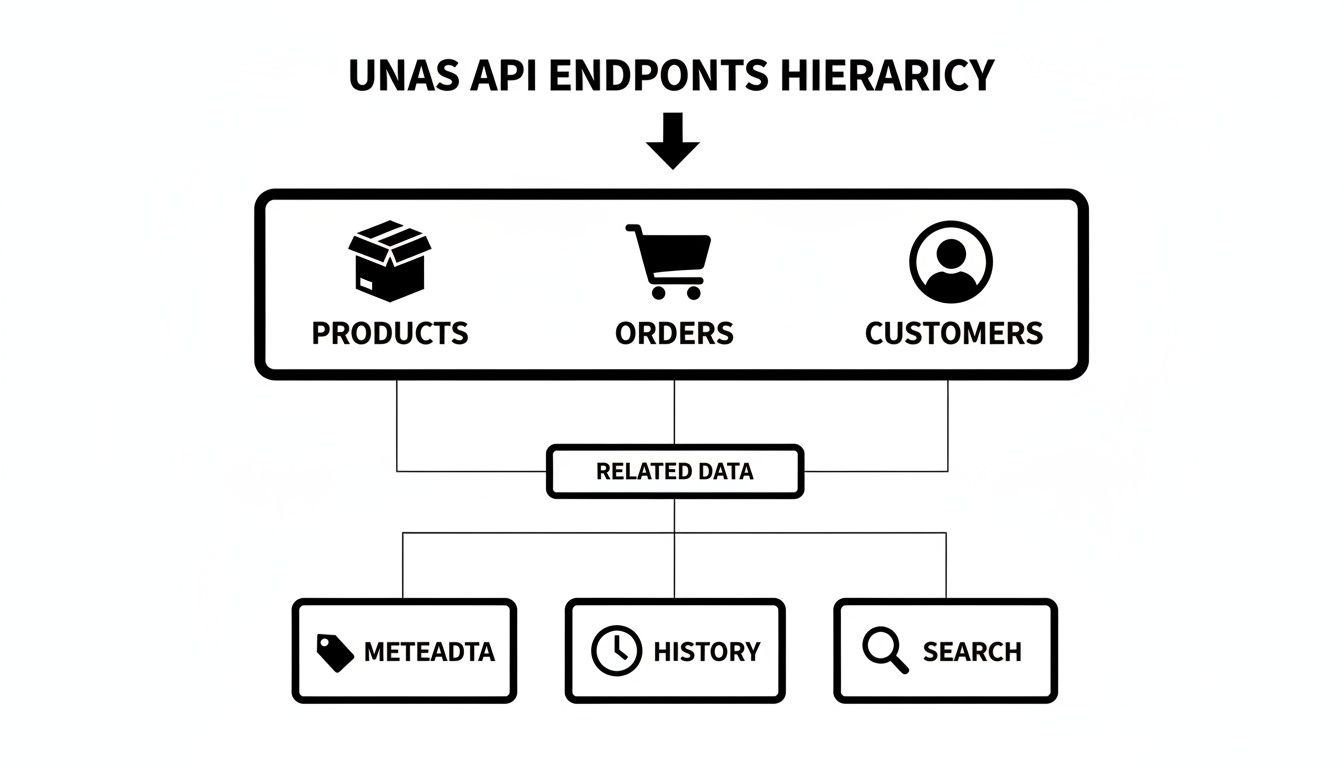
A unified API takes all these different data structures and normalizes them into one consistent format, which makes the development work massively simpler.
You write your code just once to fetch an order, update a product, or pull customer data. API2Cart takes care of the translation, sending the correctly formatted request to the UNAS API or any other platform your customers use. This completely changes the development dynamic from a painful one-to-many problem back to a simple one-to-one relationship.
By using a unified API, developers can sidestep the need to become experts in dozens of different systems. This drastically reduces development time and frees up your team to focus on creating value for your users, not on integration maintenance.
This table gives a clear, side-by-side look at the trade-offs between the two approaches.
Integration Approach Comparison
| Feature | Direct UNAS Integration | Integration via API2Cart |
|---|---|---|
| Initial Setup | Requires learning the UNAS API, handling authentication, and building a custom connector from scratch. | A single integration to the API2Cart API, with standardized authentication and data formats. |
| Time-to-Market | Can be quick for one platform, but scaling to others takes months of new development per platform. | Significantly faster. Connect to UNAS and 60+ other platforms through one initial integration. |
| Maintenance | Your team is fully responsible for monitoring UNAS API updates, fixing bugs, and handling breaking changes. | API2Cart manages all platform-specific updates and maintenance, ensuring your integration remains stable. |
| Scalability | Poor. Each new eCommerce platform requires building and maintaining a brand-new, separate integration. | Excellent. Adding support for new platforms is instant once the initial API2Cart integration is complete. |
| Development Cost | Low initial cost for one platform, but costs multiply exponentially as you add more integrations. | Higher initial investment but drastically lower total cost of ownership when supporting multiple platforms. |
| Data Structure | Requires writing custom code to handle the unique data formats and logic of the UNAS API. | All data (orders, products, customers) is normalized into a single, consistent format across all platforms. |
Ultimately, the choice comes down to strategy. While a direct connection might seem like a quick win, a unified API is a long-term investment in speed, scalability, and focus.
In the fast-moving eCommerce sector, this efficiency is non-negotiable. Unified APIs are changing how B2B SaaS vendors connect with the entire ecosystem. API2Cart connects to over 60 top eCommerce platforms and marketplaces—including giants like Shopify, Magento, and Amazon—all through one API. This eliminates the need for developers to build and maintain dozens of custom connectors, a task that traditionally consumes months of work.
With over 100 API methods, businesses can manage essential store data like orders, products, and inventory at scale. For instance, shipping software providers have seen their integration costs drop by up to 9x while launching new platform support faster than ever. After adopting API2Cart, they can pull all new orders from every connected store with just a single API call. You can find out more about how a unified API works and see why it’s become a go-to for savvy developers.
How API2Cart Accelerates Your UNAS Integration

Sure, you could integrate directly with the UNAS API. But that path often leads developers down a rabbit hole of platform-specific maintenance and constant updates. The smarter move? Using a unified API service like API2Cart, which turns a messy, multi-platform problem into one clean workflow.
Instead of becoming an expert on UNAS's particular XML structure, you can get back to what matters: your application's core logic.
API2Cart essentially works as a universal translator. Your app talks to its simple, JSON-based API, and API2Cart does the heavy lifting of converting your requests into the exact XML format the UNAS API is expecting. This middle layer doesn't just cut down your initial dev time; it insulates you from future API updates and breaking changes.
Practical Use Cases for Integration Developers
For any integration developer, the benefits really click when you look at day-to-day tasks. A unified API transforms clunky, platform-specific code into simple, repeatable actions.
Let's walk through two common scenarios for B2B SaaS applications:
- Order Management Systems (OMS): Forget about building custom XML parsers just to fetch new orders from UNAS. You can make a single
order.listcall to API2Cart. This one method works the same way for UNAS as it does for dozens of other platforms, giving you back clean, consistent JSON every time. - Inventory Synchronization Tools: To stop overselling, your software needs to push stock level updates in near real-time. With API2Cart, a single
product.updaterequest can adjust inventory on a UNAS store, a Shopify store, and an Amazon account all at once. - Shipping & Fulfillment Software: Your app needs to retrieve new orders, update their status to "shipped," and add tracking numbers. Instead of writing custom UNAS XML for
getOrderandsetOrder, you use API2Cart's universalorder.listandorder.updatemethods. This logic can be reused for every other platform you connect to.
API2Cart replaces dozens of unique, platform-specific API calls with a single, unified method. This consistency dramatically simplifies your codebase, reduces bugs, and accelerates your time-to-market.
A Look at a Simplified Code Flow
Imagine your OMS needs to pull all new orders placed in the last hour. If you were integrating directly with the UNAS API, you'd be stuck crafting a specific XML payload with all the right authentication details and date filters.
With API2Cart, it's a whole lot simpler.
You just make a single GET request that looks something like this:
GET /v1.1/order.list.json?api_key={your_key}&store_key={unas_store_key}&created_from=2024-10-26T10:00:00
Behind the scenes, API2Cart is handling the authentication, the XML conversion, and the actual request to the UNAS API. Your application just gets a standardized JSON response back, making the data easy to process and scale.
This approach is a huge part of the growing API economy. A recent analysis found that the eCommerce sector is responsible for 28% of all API data flow, powering things like real-time inventory and order processing. You can check out more stats on this trend and why unified APIs are becoming critical for B2B SaaS vendors in the full API usage report.
Ultimately, a unified approach gives you a scalable foundation. You solve the immediate problem of connecting to the UNAS API while future-proofing your integration strategy, making you ready to connect to any new platform your customers ask for. If you're weighing your options, our guide on choosing the best API integration platform for your software might be a useful read.
Got Questions About the UNAS API? We've Got Answers
Even seasoned developers hit a few roadblocks when they first tackle a new API. Getting the lay of the land upfront can save you hours of debugging and help you build a much more solid connection from day one. Here are some of the most common questions that pop up when working with the UNAS API.
What Are the Rate Limits for The UNAS API?
Like pretty much any API out there, the UNAS API has rate limits in place to keep the platform stable for everyone. These limits cap how many requests you can fire off in a set amount of time, usually per minute. It’s absolutely critical to check the official UNAS documentation for the latest numbers and to build your code defensively right from the start.
A solid pro-tip is to implement an exponential backoff strategy in your application. In plain English, this just means if your request gets blocked for hitting the limit, your code automatically waits a bit before trying again. If it fails again, it waits a little longer, and so on.
Does The UNAS API Support Webhooks?
Nope. The UNAS API does not have native support for webhooks, which are used for real-time data updates. It works on a polling model instead. This means your application has to periodically ask the API, "Anything new? Any new orders? Any inventory changes?"
This polling requirement is a major headache for apps that need instant notifications. A unified solution like API2Cart gets around this by creating a webhook layer on top of polling-based APIs. It does the tedious polling for you and pushes data to your application with a webhook the second something happens.
What Data Formats Does The UNAS API Use?
The UNAS API is old-school in this regard—it exclusively uses XML for both sending requests and receiving responses. As a developer, you’ll have to build logic to create perfectly formatted XML to send data and then parse the XML that UNAS sends back. This can definitely add a layer of complexity, especially when you're used to modern, lightweight JSON APIs.
This is another spot where a unified API service really smooths things out. When you use a platform like API2Cart, you only ever have to deal with a standard JSON format. It handles all the messy XML translation to and from the UNAS API behind the scenes.
How Do I Handle Different Data Structures Between Platforms?
Data mapping is one of the biggest—and most frustrating—hurdles in eCommerce integration. Every single platform, UNAS included, has its own way of structuring data for products, orders, and customers. A product's "SKU" in one system might be called "item_code" in another, and "product_identifier" in a third.
Instead of writing a tangled mess of custom code to translate data for every platform, a unified API like API2Cart normalizes everything into one consistent model. This completely eliminates the need for you to build and maintain dozens of unique data mappers, which drastically simplifies your codebase and cuts down on potential break points.
Ready to skip the headaches of custom integration and connect to UNAS and 60+ other platforms at once? API2Cart provides a unified API that saves you development time and maintenance costs. Start your free 14-day trial and see how quickly you can get your integration live.