You're usually pulled into e commerce checkout work from the side.
A product team asks for “order sync.” Sales wants one more cart connection. A merchant reports that orders are arriving without shipping methods, taxes don't match, or guest checkouts create duplicate customer records in your system. At first it sounds like post-purchase plumbing. Then you trace the issue backward and find the problem inside checkout state, timing, and data consistency.
That's the part many teams underestimate. Checkout isn't a single submit action. It's a chain of API-visible transitions where cart data becomes customer data, payment intent, shipping choice, tax snapshot, and finally an order your downstream systems can trust.
Why Checkout Integration is a Critical Developer Challenge
The business stakes are obvious. A widely cited benchmark puts average cart abandonment at about 70%, with 28% of shoppers leaving because checkout is too lengthy or complicated and 25% leaving because of payment-security concerns, according to these checkout statistics. For an integration developer, those numbers matter because every mismatch in totals, address validation, shipping options, or order confirmation adds friction at the worst possible moment.

Where developers usually get trapped
The common assignment sounds simple: “pull new orders from stores into our app.” The hard part starts when you ask basic questions:
- What counts as an order? Some platforms create an order record before payment capture. Others only materialize it after authorization or after checkout completion.
- When is it safe to sync? If you import too early, your OMS or ERP may process a record whose totals or shipping method can still change.
- Which event is canonical? The cart update, checkout completion, payment authorization, and order creation may all arrive as separate events with different payload shapes.
- How do you handle guests? Many checkout flows favor guest checkout and fewer required fields, so your integration has to work with partial customer profiles rather than assuming a rich CRM-style record.
That last point gets missed a lot. Front-end teams reduce friction by trimming fields, enabling guest purchase, and using autofill. That's the right move for conversion, but it changes what your backend receives.
Practical rule: Build your order pipeline so it can process incomplete customer data without breaking fulfillment, fraud review, analytics, or post-purchase messaging.
Checkout failure is often a data problem
Developers often get handed a bug report that sounds like UX:
“The shopper saw one shipping price, then the final amount changed.”
That's usually not a button-color problem. It's stale shipping quotes, delayed tax recalculation, outdated inventory, or a cart summary built from a different data source than the final authorization call.
If your team is trying to understand why users leave before payment, it helps to collect direct feedback instead of guessing. Short pre-built cart abandonment surveys can reveal whether the breakage comes from trust, complexity, payment friction, or bad totals.
For developers building B2B commerce software, checkout integration sits right on the revenue path. If the data is late, inconsistent, or normalized badly, the UI can look polished and still fail in production.
The Anatomy of a Modern Checkout Flow for Developers
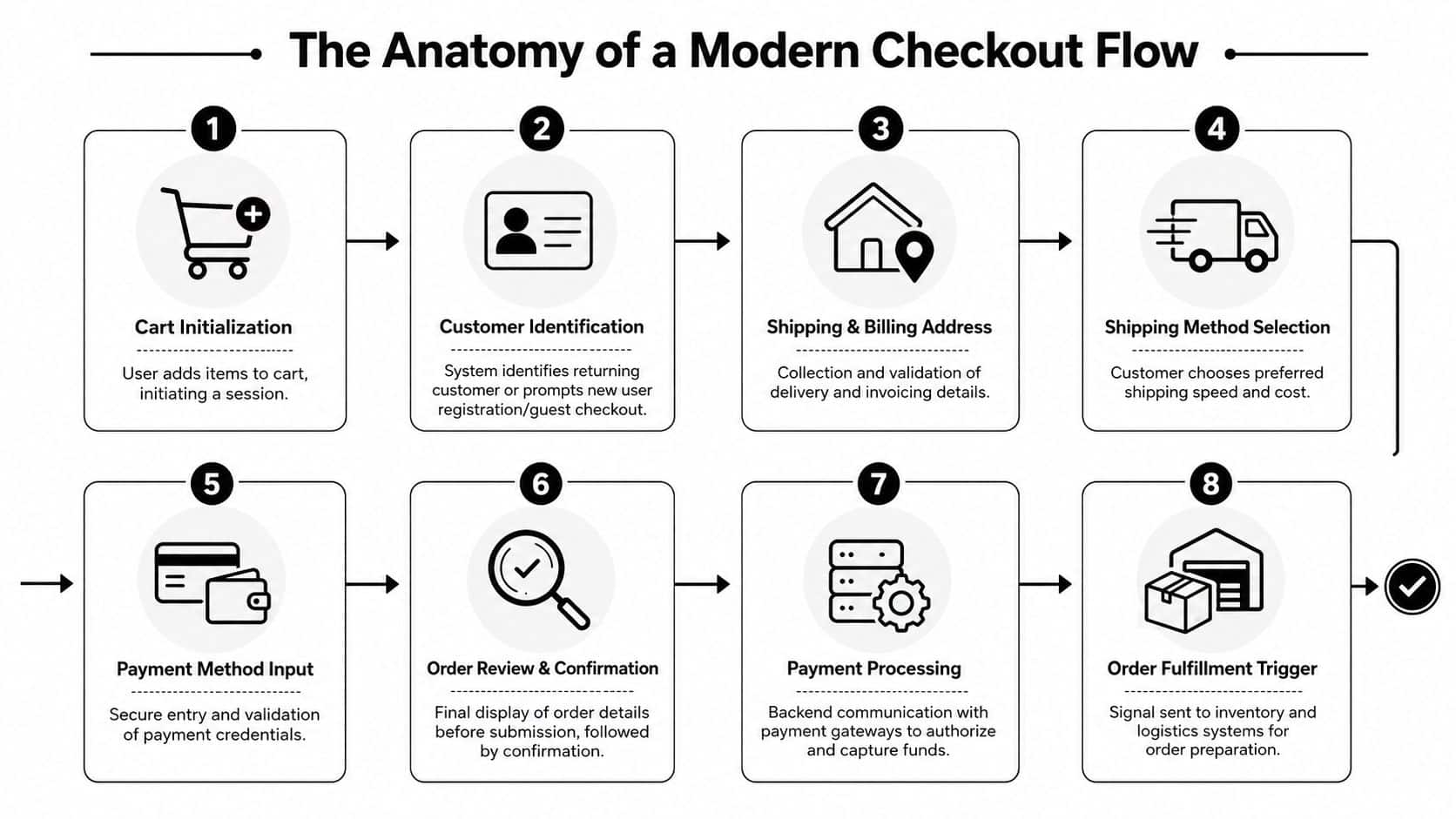
Checkout is easier to build when you stop treating it as one transaction and start modeling it as a sequence of state transitions.
Stage one, active cart state
The cart is your pre-order working set. It usually contains line items, quantities, item prices, applied discounts, currency, session identifiers, and sometimes provisional tax and shipping estimates.
From an integration perspective, abandoned-cart workflows, inventory reservation logic, and promotional validation all begin here. Don't assume cart totals are final. They're often recalculated when the address, shipping method, or coupon state changes.
Because checkout friction increases with form complexity, major best-practice guidance recommends reducing required fields, allowing guest checkout, and using autocomplete and autofill. For developers, that means your integration should expect incomplete profiles and guest orders rather than forcing a rigid account-first model. If your team is also working through the accessibility side of forms, this guide on how to achieve website ADA accessibility is useful context for input labels, reading order, and predictable interactions.
Stage two, identity and address capture
The customer phase modifies more than a single user record. You're collecting:
- Customer identifiers such as email, phone, and account ID if one exists
- Shipping address fields that may trigger tax and delivery recalculations
- Billing address fields that may differ from shipping
- Consent and preference fields that some downstream systems need for messaging or compliance
Here, address validation matters less as a UI nicety and more as a dependency. If you sync before address normalization completes, you can end up with duplicate customer entities, invalid shipment creation, or tax mismatches between storefront and fulfillment system.
The fastest checkout flow still fails if your downstream system treats every guest email variation as a new customer and can't reconcile orders later.
Stage three, shipping and payment selection
Many integrations get brittle. Shipping methods are often platform-specific objects with IDs, labels, costs, and delivery windows. Payment data is even trickier because your app usually shouldn't receive raw payment credentials at all.
A safer model is to treat payment as metadata around the order lifecycle:
| Object | What your integration usually needs | What it usually should not store |
|---|---|---|
| Payment method | Method label, transaction reference, status | Raw card data |
| Authorization | Result state, timestamp, amount, gateway reference | Sensitive payment payloads |
| Shipping method | Method ID, label, price, service level | UI-only intermediate values |
Stage four, order creation and post-checkout triggers
After confirmation, the checkout flow emits the record most back-office systems care about: the order. But even here, timing matters. Some platforms create an order before payment capture and update it afterward. Others attach shipment, fraud, or invoice details later.
That's why mature integrations treat order import as an event pipeline, not a single GET call. You need a way to ingest the initial order, then reconcile later mutations such as status changes, shipment creation, refunds, or corrected totals.
Essential Checkout Data Objects and Their Relationships
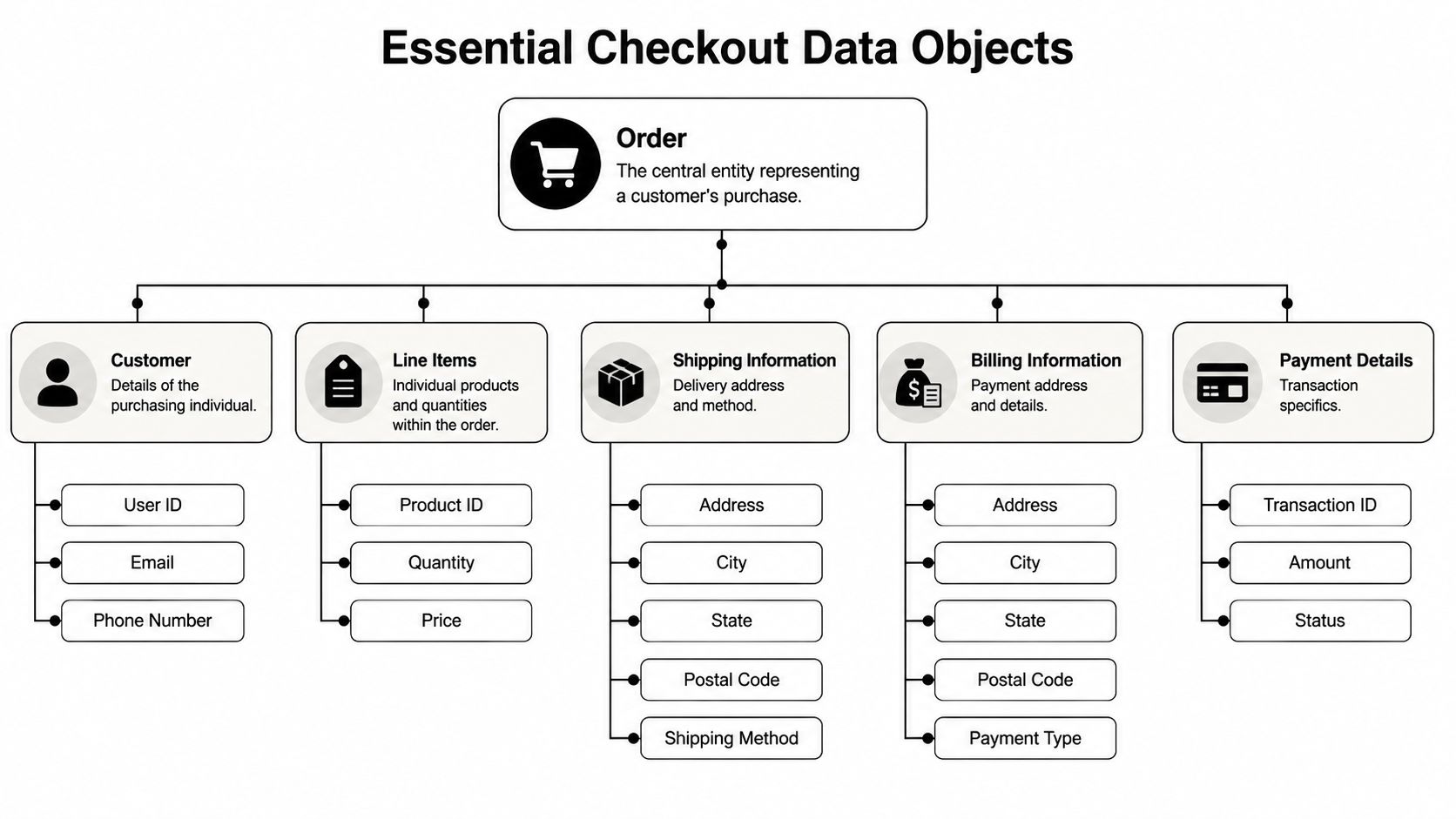
Most integration bugs in e commerce checkout come from weak data modeling, not weak transport. If your internal schema can't express relationships between cart, customer, order, payment, and shipment, every connector turns into special-case code.
The order object is the root
The order is the canonical post-checkout record. In practice, your normalized order model should hold both merchant-facing business fields and integration-facing traceability fields.
Typical fields include:
- Identity fields such as
order_id,store_id,external_order_ref - Financial fields like
subtotal,discount_total,tax_total,shipping_total,grand_total,currency - Lifecycle fields such as
status,financial_status,fulfillment_status,created_at,updated_at - Association fields linking customer, addresses, line items, shipments, and transactions
A useful pattern is to separate display totals from reconciliation totals. The storefront may present rounded values or bundled discounts one way, while your accounting or ERP workflow needs line-level breakdowns.
Customer and address aren't the same object
Developers often over-compress customer data. A customer record and an address record shouldn't be treated as a single blob.
Use separate structures for:
Customer entity
customer_idemailphoneis_guest- marketing or consent flags if provided
Shipping address
- recipient name
- street lines
- locality fields
- postal code
- country
- address validation result if available
Billing address
- often similar schema
- may differ from shipping
- may be absent in some guest flows
That split matters because downstream software uses them differently. A shipping platform cares about deliverability and recipient data. A CRM or marketing tool may only need durable customer identity. An ERP may need billing details for invoicing but not for fulfillment routing.
Implementation note: Don't use email alone as the durable customer key. Guest checkout, shared inboxes, and changed account emails will eventually break that assumption.
Line items carry more than product references
A checkout line item is not just sku + qty. It's a snapshot of what the shopper bought under a specific pricing context.
Your line item model usually needs:
product_idand variant reference if the platform distinguishes themskunamequantityunit_priceline_discounttax_amount- fulfillment or shipping flags where available
If your SaaS product handles reporting or inventory, preserve the raw external fields too. You'll need them when one platform exposes bundle children, another exposes only parent lines, and a third flattens everything.
Payment, shipment, and metadata complete the graph
The remaining objects usually hang off the order as child collections or linked entities.
| Data object | Why it matters in integrations | Common failure mode |
|---|---|---|
| Payment transaction | Reconciliation, fraud review, financial state | Imported before status is final |
| Shipment | Fulfillment visibility, carrier workflows | Missing until after order sync |
| Cart snapshot | Recovery and behavioral workflows | Lost once order is created |
| Custom fields | Merchant-specific logic | Dropped during normalization |
The right model isn't the smallest one. It's the smallest one that still preserves business meaning across many carts.
The Integration Wall Why Connecting to Carts is So Hard
Building direct checkout integrations across many carts looks manageable in the first sprint. Then the maintenance curve shows up.
One platform uses REST with predictable pagination. Another mixes older endpoints with newer resource shapes. A third delivers sparse webhook payloads that force follow-up fetches. Then authentication differs, status values don't map cleanly, and merchants start expecting identical behavior across every store you support.
Fragmentation shows up in four places
First, API architecture varies. You may deal with REST on one cart, SOAP-style legacy endpoints on another, and entirely different filtering semantics elsewhere. Even basic operations like listing orders by date can differ in parameter names, timestamp formats, and sort guarantees.
Second, data models don't line up. “Order status” can mean payment state on one platform and fulfillment state on another. A customer may be a stable account entity in one store and just guest checkout data embedded inside the order in another.
Third, authentication becomes a support burden. Some merchants can authorize via app flow. Others expect API keys, generated credentials, or store-specific tokens. Your onboarding code and your support playbooks both grow.
Fourth, event behavior is inconsistent. Webhook delivery timing, retries, payload depth, and mutation order can all vary. That means the same merchant action may produce very different integration behavior depending on platform.
The cost isn't only engineering time
As U.S. e-commerce retail sales reached $326.7 billion in Q1 2026, representing 16.9% of total retail sales, broad store connectivity became a significant product requirement rather than a nice-to-have, according to Statista's online shopping overview. If your product can't connect to the carts your prospects use, sales feels it before engineering does.
The deeper cost is product drag:
- Roadmaps slip because connector upkeep steals time from core features
- Support load rises because each platform has its own edge cases
- QA complexity expands because every release needs cross-platform regression checks
- Merchant trust drops when order timing or totals behave differently by cart
A lot of teams discover this only after they've built several direct connectors. By then, they've created a mini integration platform inside the product without planning to. If you want a sense of how cart API coverage shapes product strategy, the updates in cart API news and integration coverage are a practical reminder that the surface area keeps changing.
What makes checkout especially painful
Checkout data is harder than catalog sync because it's time-sensitive. Product imports can tolerate some delay. Checkout can't. If your system misses a shipping-method change, applies stale inventory assumptions, or imports an order before final confirmation, downstream automation starts from bad data.
That's why many multi-cart integrations feel stable in demos and fragile in production. The breakage appears in edge timing, not in happy-path API calls.
Solving Checkout Integration with a Unified API
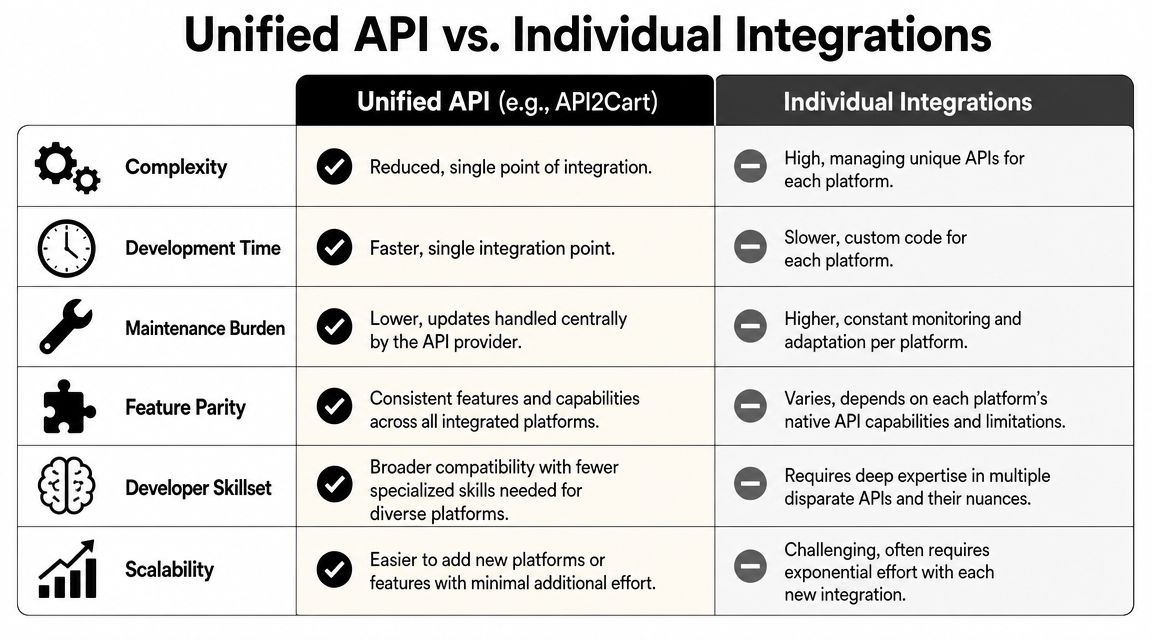
A unified API changes the problem from “maintain many cart-specific connectors” to “map one normalized contract into your product.” That doesn't remove all complexity, but it moves a large part of connector variance out of your codebase.
Many checkout guides under-explain how front-end UX breaks when pricing, inventory, or shipping data is stale. That's an integration issue, and reliable synchronization depends on the systems feeding checkout with current values. The broader point is reflected in this discussion of checkout best practices and backend consistency.
What the unified model buys you
Instead of writing custom code for every store platform, you integrate once against a shared resource pattern:
- Orders through methods such as
order.listand order-detail retrieval - Carts through methods such as
cart.listfor pre-checkout and abandoned-cart workflows - Customers, products, shipments, and inventory through similarly normalized methods
That means your application can implement one polling strategy, one webhook ingestion layer where supported, one canonical order schema, and one set of validation rules.
A useful overview of this design pattern appears in this unified API explanation.
A practical order sync pattern
For a mid-level developer building order ingestion, a clean pattern looks like this:
Track store connection state
- persist the merchant store identifier
- store the last successful sync timestamp
- keep connector health metadata
Fetch new or updated orders
- call
order.listusing date filters - request the fields your app needs
- page through results deterministically
- call
Normalize and validate
- map external statuses into your canonical model
- validate totals, currency, and addresses
- preserve raw payload fragments for troubleshooting
Write idempotently
- upsert by external order ID plus store ID
- version updates based on
updated_ator equivalent - avoid duplicate shipment or transaction creation
Trigger downstream jobs
- fulfillment creation
- customer segmentation
- reporting updates
- post-purchase messaging
Here's the important trade-off. A unified endpoint simplifies transport and field access, but your app still needs a strong internal model. Don't confuse connector abstraction with domain abstraction. You still have to decide what “paid,” “processing,” and “ready to fulfill” mean inside your own product.
Where API2Cart fits
One option for this architecture is API2Cart, which exposes a single API for orders, carts, products, customers, shipments, and related commerce data across many carts and marketplaces. For checkout-related work, the practical benefit is that methods like order.list and cart.list let your team build one ingestion and normalization layer instead of writing store-specific code for each platform.
The real speed gain isn't just fewer endpoints. It's fewer branching assumptions in your code, fewer onboarding paths for merchants, and fewer platform-specific bugs in order sync.
High-value checkout use cases
A unified API is most useful when checkout data has to move fast into another system:
- Abandoned cart recovery: fetch cart data before order creation and trigger follow-up workflows
- Order routing: send confirmed orders into OMS, WMS, ERP, or shipping pipelines
- Inventory synchronization: react when order creation changes available stock
- Reporting pipelines: normalize totals, discounts, and channel-level order data across stores
For developer teams, the main advantage is operational. You spend less time chasing connector divergence and more time hardening the logic that differentiates your product.
Advanced Integration Strategies and Best Practices
Reliable e commerce checkout integrations need more than endpoint coverage. They need discipline around timing, mapping, and failure recovery.
Webhooks versus polling
Webhooks are usually the right first choice when the platform supports them well. They reduce lag and let your system react to order creation or update events quickly. But they're not enough on their own. Payloads can be partial, retries can arrive out of order, and merchants can disable or misconfigure delivery.
Polling remains useful as a backstop. A list method with date filters can reconcile missed events, recover after downtime, and verify that your webhook stream didn't skip updates.
A durable setup often combines both:
- Use webhooks for speed
- Use polling for reconciliation
- Store event receipts and fetch full resource details before acting
- Make every write idempotent
If your app has to manage store credentials and merchant authorization safely, keep the auth layer explicit and testable. The guidance in API authentication patterns for commerce integrations is a good reference point for designing that part cleanly.
Map statuses into a canonical model
Status mapping is where many integrations become unreliable. Don't mirror every platform's labels directly into your app. Build a canonical model such as:
| Canonical state | Meaning in your system |
|---|---|
pending |
checkout or payment not finalized |
paid |
financially confirmed |
ready_for_fulfillment |
operationally actionable |
fulfilled |
shipment completed |
cancelled |
order should not continue |
Then keep a translation layer per platform. That lets your product logic stay consistent even when external labels differ.
Preserve structure for accessibility and edge cases
Accessibility is one of the least discussed integration concerns in checkout. Structured API data matters because discount amounts, sale prices, and validation errors need to be exposed in the right order for screen readers, and that behavior can vary by cart implementation, as discussed in this mobile checkout accessibility perspective.
That matters even more if your team is trying to build custom Shopify checkout experiences or other personalized flows. Once checkout logic becomes more customized, losing field structure or event order in the integration layer creates downstream accessibility regressions that are hard to detect in ordinary QA.
Preserve raw values, normalized values, and event order. You'll need all three when debugging taxes, discounts, or validation behavior across multiple stores.
Handle multi-store reality
Many merchants don't run a single storefront. They run regional stores, separate B2B and D2C catalogs, or channel-specific operations with slightly different checkout behavior.
Build for that upfront:
- Namespace records by store, not just merchant
- Version field mappings, because merchants customize workflows
- Audit every transformation, especially totals and statuses
- Retry safely, because order updates often arrive after the initial import
The teams that do this well don't chase a perfect universal checkout model. They define a stable internal contract, preserve raw source detail, and treat synchronization as an ongoing process rather than a one-time import.
If your product needs checkout-adjacent data like carts, orders, customers, shipments, and inventory across many commerce platforms, API2Cart is worth evaluating as a unified integration layer. It gives development teams one API contract to build against, which can simplify order sync, abandoned-cart workflows, and post-checkout automation without maintaining separate connectors for every cart.