You're probably here because the first version already “works.” A customer can click a button, enter payment details, and money moves. Then deeper problems surface. A payment succeeds, but your app can't tell which store order it belongs to. A retry creates duplicate records. A platform account model that looked clean in development gets messy once tenants, payouts, refunds, and delayed payment states start colliding.
That's where a serious stripe api integration stops being a checkout exercise and becomes systems engineering. In a multi-tenant SaaS product, the hard part isn't just collecting payment data safely. It's designing a payment layer that survives retries, handles asynchronous state changes, and maps Stripe events back to the right merchant, store, order, and accounting workflow without human cleanup.
Why a Scalable Stripe API Integration Matters
Stripe is often the default choice because the developer model is straightforward. Its API uses direct key-based authentication, follows a REST-style structure, and returns JSON responses, which makes it easy to understand and easy to automate in backend services. Stripe's own documentation also makes a clear distinction between publishable keys, secret keys, and restricted API keys, which matters immediately once multiple environments, services, and tenants enter the picture. You can review that model in Stripe's API key documentation.
The bigger reason teams treat Stripe as infrastructure is scale. A 2026 industry summary reported that Stripe processed about $1.9 trillion in total payment volume in 2025, had an estimated 22.3% market share, and handled over 500 million API requests per day, which is why developers usually assume production-grade reliability from a Stripe integration from day one, as summarized in this Stripe statistics roundup.
That expectation changes how you should build.
A prototype can get away with “create payment, wait for success, mark order paid.” A SaaS platform can't. Tenants will connect different storefronts, run different fulfillment rules, and expect your system to reconcile refunds, delayed confirmations, tax-bearing checkouts, and support workflows without manual digging.
What actually breaks first
The first failures usually aren't dramatic outages. They're consistency bugs.
- Tenant mix-ups: A valid payment lands in the wrong merchant workspace because the app didn't persist enough context with the Stripe object.
- Synchronous assumptions: The frontend treats “payment submitted” as “payment completed,” then downstream systems ship too early.
- Weak key management: One backend service gets broad API access it never needed.
- Missing order linkage: Stripe knows the transaction. Your app still can't confidently tie it to the source order.
Practical rule: Measure success by reconciliation quality, not by whether a checkout form renders.
What scalable means in practice
A scalable integration has a few traits from the start:
| Focus area | What good looks like |
|---|---|
| Security | Frontend uses publishable credentials only. Backend uses least-privilege server credentials. |
| State handling | Orders move to final states from verified backend events, not browser assumptions. |
| Tenant isolation | Every Stripe object carries enough context to map back to the right account and order. |
| Recovery | Retries don't duplicate charges, credits, or fulfillment actions. |
If you build with those constraints early, Stripe stays clean as volume grows. If you don't, the payment layer turns into a source of support tickets, finance exceptions, and brittle one-off fixes.
Architecting Your Integration Payments Billing or Connect
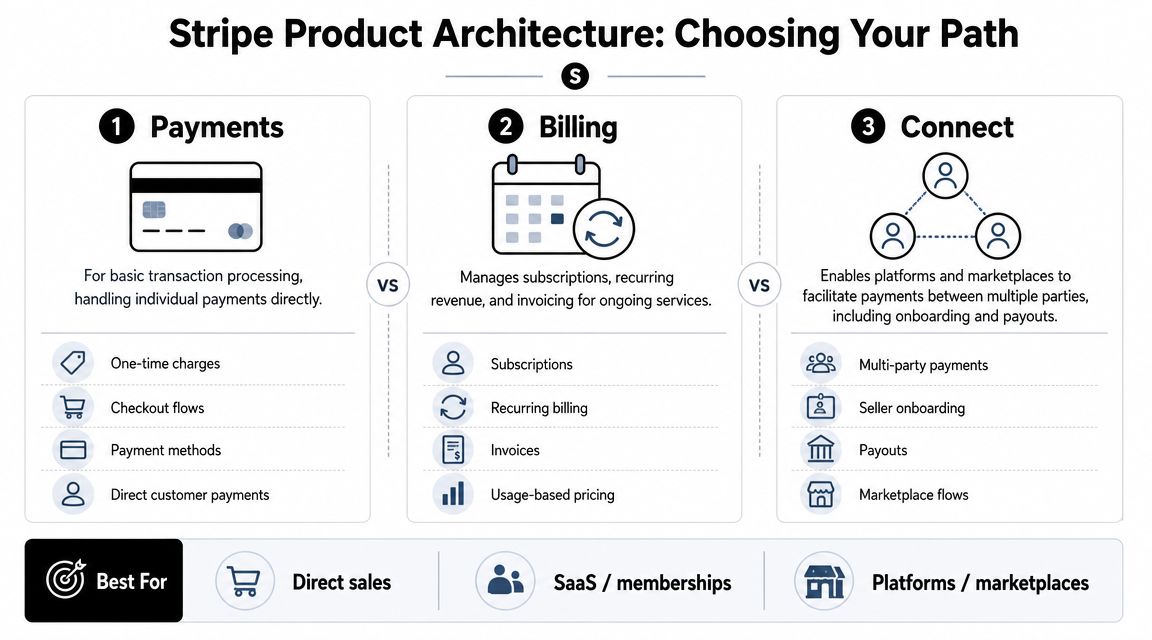
Before writing handlers, webhooks, or database tables, pick the Stripe product model that matches your business model. This decision shapes your internal schema, support burden, and even what counts as a “customer” in your system.
Payments for direct transaction flows
Use Payments when your application is collecting money for your own business entity and the transaction is mostly self-contained. This is the simplest model operationally because there's one payer, one merchant context, and a narrower reconciliation problem.
That simplicity disappears if you start layering subscriptions, invoices, or third-party seller payouts on top without changing architecture. Teams often begin with Payments because it feels lightweight, then gradually rebuild around recurring logic or marketplace flows later.
Billing for recurring revenue and invoicing
Use Billing when recurring revenue is a first-class part of the product. If your SaaS needs subscriptions, invoicing, renewals, or account-based commercial terms, Billing usually maps better than trying to recreate those workflows with ad hoc payment objects.
This also affects accounting downstream. A recurring revenue app needs stronger lifecycle thinking around trial transitions, invoice states, and subscription changes. If finance is going to depend on payment records for month-end work, it helps to understand how payment events connect to bookkeeping. A practical reference is Receipt Router's Stripe Xero guide, which shows the sort of accounting alignment developers should think about early instead of after launch.
Connect for platforms and marketplaces
Use Connect when your platform sits between buyers and third-party sellers, service providers, or recipients. For these platforms, onboarding, verification, fund routing, and payout logic start to matter as much as payment capture.
For new platform builds, the key architectural shift is Accounts V2. As noted in this overview of Stripe Connect changes, Stripe's recommended direction for new Connect platforms is built around a single Account object that can represent merchant, customer, and recipient roles. Apideck also reports that this newer direction reduces the old V1 mapping problem where teams had to juggle separate Account and Customer objects with no built-in relationship, as explained in its Stripe API introduction.
If your platform both charges end customers and pays third parties, model those relationships explicitly before you ship. Don't let your database pretend that one real-world actor can only play one role.
A quick decision frame
- Choose Payments if you're charging directly for one-off purchases.
- Choose Billing if recurring revenue, invoices, or plan changes are core behavior.
- Choose Connect if your app operates a platform with seller onboarding or payouts.
The wrong choice isn't just inconvenient. It usually creates migration work in your data model, support flows, and finance reporting.
Building the Core Payment Flow Client Server and Security
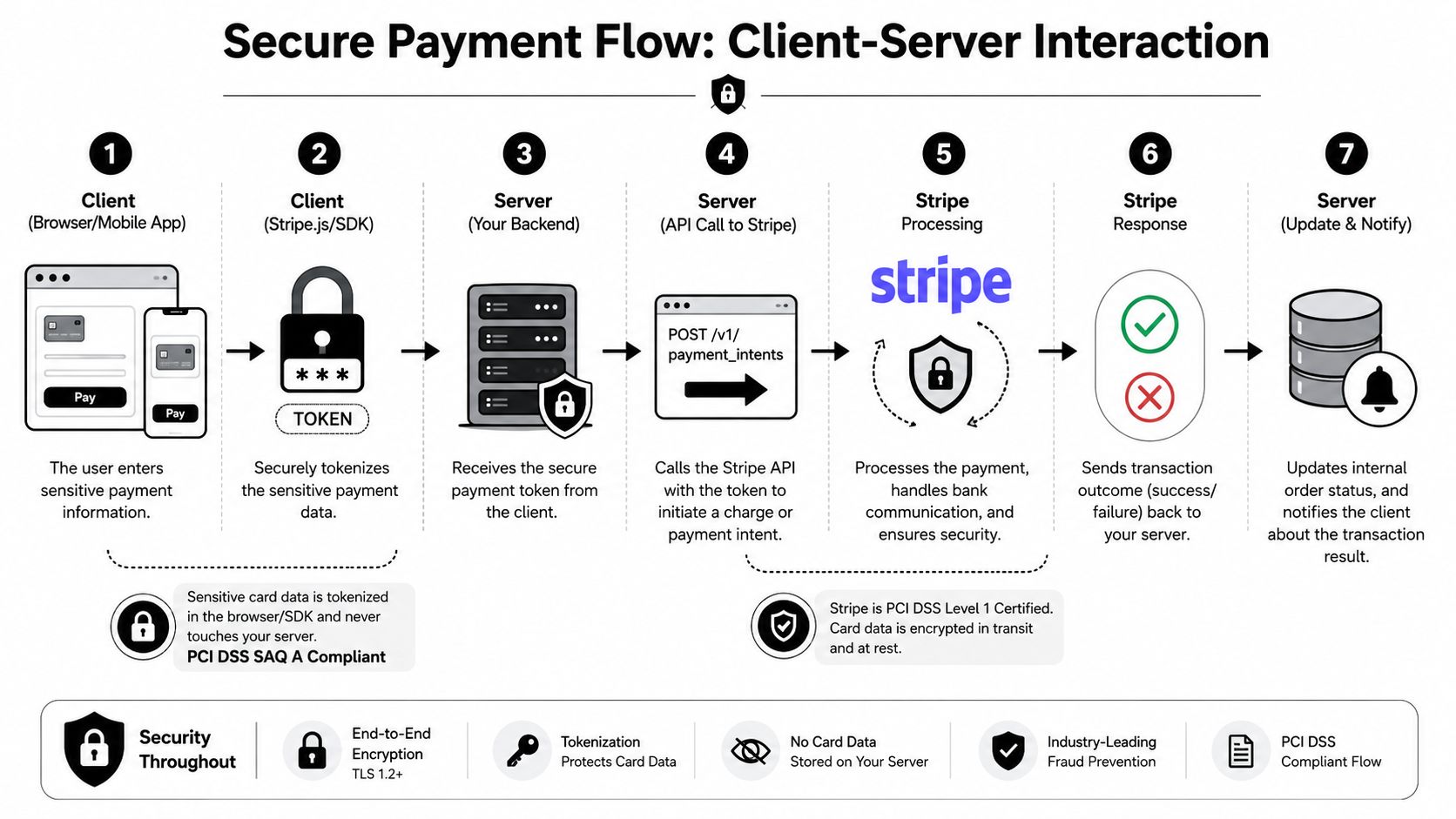
The safest default for common integration projects isn't the lowest-level payment API. It's the flow that keeps sensitive payment entry on Stripe-controlled components and keeps your server focused on business context, authorization, and persistence.
Stripe's current guidance explicitly recommends Checkout Sessions with the Payment Element for most integrations, because it can handle tax, discounts, shipping, and currency conversion automatically. Those are features Stripe notes are not available through Payment Intents alone in the same way, as described in Stripe's payments quickstart.
Start with the highest-level primitive that fits
A lot of developer content still jumps straight to Payment Intents because it feels more “API-driven.” In practice, that often means teams rebuild checkout concerns they didn't want to own.
Use this rule of thumb:
| Integration choice | When it fits | Trade-off |
|---|---|---|
| Checkout Sessions with Payment Element | Standard checkout flows, international scenarios, built-in commerce features | Less UI control |
| Lower-level Payment Intents flow | Custom payment UX or advanced orchestration requirements | More backend logic, more edge cases |
If your product isn't differentiating on checkout UX itself, custom payment orchestration is usually unnecessary complexity.
What the server should do
Your backend should own business decisions, not raw card handling. That means it should:
- Validate the authenticated tenant and order context.
- Create the Stripe-side payment object with your internal identifiers attached.
- Return only the client-safe information needed for the frontend step.
- Persist a local payment record before any browser success screen appears.
The browser should never be treated as the source of truth for final payment state. It's only the initiator.
What the client should do
The client's job is narrow:
- Collect payment details securely: Use Stripe's client components so raw payment data doesn't pass through your servers.
- Send app context, not secrets: The frontend should send the order reference, cart state, or draft invoice context your backend needs.
- Handle intermediate states: Redirects, additional authentication, and delayed completion should all be treated as normal.
Security note: If your checkout is public-facing, test it the way an attacker would. Teams that add payment forms and callback routes often benefit from independent checks such as white-label external pentests, especially before exposing multi-tenant payment flows.
Security choices that matter early
Stripe's key model is simple, but teams still misuse it.
- Publishable keys belong in client apps: They're designed for frontend exposure.
- Secret access belongs on the server only: Broad secret-key use across internal services is an easy way to create avoidable blast radius.
- Restricted API keys are the better default for new use cases: If one internal worker only needs a narrow set of actions, give it that and nothing more.
The practical point isn't compliance theater. It's damage control. If a service is compromised, least-privilege access limits what an attacker can do and what you have to unwind.
Where developers overcomplicate the first version
The first production-ready implementation usually needs fewer moving parts than people think:
- one server endpoint to initialize payment state
- one client integration using Stripe's higher-level primitives
- one durable local payment record
- one webhook pipeline for final outcomes
What it doesn't need is a custom payment state machine spread across browser callbacks, background jobs, and direct database updates from multiple code paths. That design almost always becomes inconsistent.
Mastering Asynchronous Operations with Webhooks and Idempotency
Payments are not a request-response problem. They're a state-transition problem.
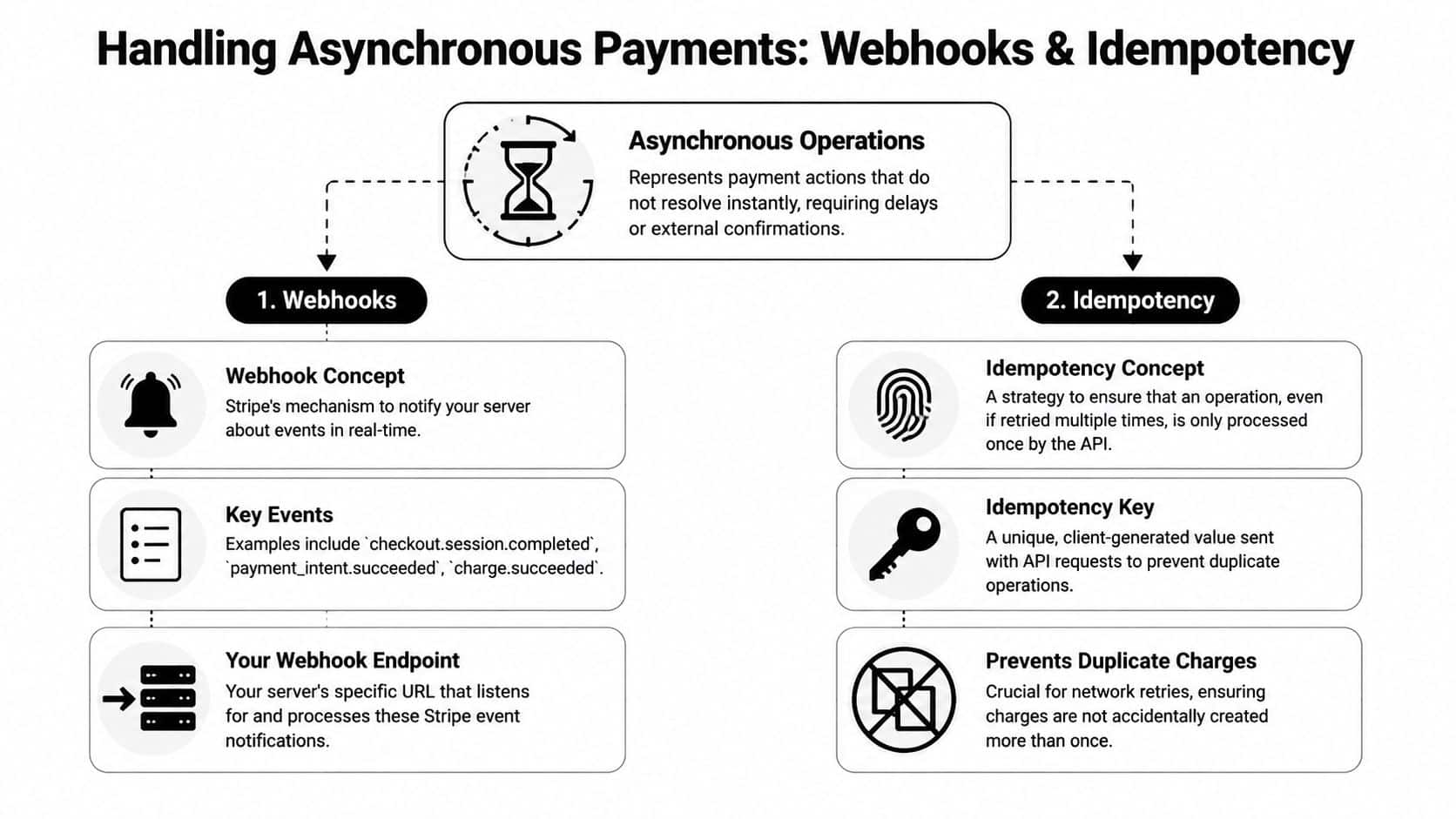
Modern payment integrations must assume outcomes like requires_action and processing, and Stripe guidance emphasizes relying on webhooks for final state changes instead of synchronous API responses alone. That's standard behavior for authentication-heavy flows and alternative payment methods, as described in this explanation of Stripe's payment model evolution.
Treat the webhook as your source of completion
The common failure pattern looks like this:
- The client submits payment.
- The API call returns a state that looks promising.
- The app immediately marks the order paid.
- The actual final event arrives later, or fails, or requires more action.
That's how teams end up with shipped orders that were never fully paid, or subscription access granted before settlement is complete.
Your webhook consumer should be the place where final business state changes happen. Browser redirects and client confirmations can improve UX, but they shouldn't be the authoritative trigger for fulfillment, entitlement, or accounting transitions.
Verify before you trust
A webhook endpoint is just an HTTP endpoint until you validate what hit it. Verification matters because payment state changes affect inventory, service access, and customer communication.
Build the consumer with these rules:
- Verify the webhook signature before parsing business meaning
- Persist raw event identifiers for audit and replay handling
- Process events through a queue or durable job layer when side effects matter
- Acknowledge quickly, then do heavier work asynchronously
If your team also works with store-side events, this pattern is similar to broader eCommerce event handling. A general primer on that shape is this webhook example article.
One hard rule: never let a webhook directly trigger irreversible side effects without a duplicate-event check.
Idempotency on outbound requests
Idempotency matters in two different places. The first is when your app sends requests to Stripe.
If a network timeout happens after your server submits a payment creation request, your retry logic may not know whether Stripe processed the first attempt. Without an idempotency key, your “retry” can become a second real operation.
Use a stable key derived from the business action, not from the HTTP request itself. For example, a payment initialization tied to a single internal checkout attempt should reuse the same key across safe retries.
Idempotency on inbound events
The second place is your own event consumer. Stripe may deliver the same event more than once, or your worker may retry after a partial failure.
A safe event-processing design usually includes:
| Layer | Idempotent check |
|---|---|
| Webhook receiver | Has this event ID been seen before? |
| Business action | Has this payment already transitioned the order to this state? |
| Downstream effects | Has fulfillment, credit grant, or invoice sync already run? |
That layered approach matters because “event already seen” isn't always enough. A job may crash after updating one subsystem but before updating another. Your code needs to be able to resume safely.
Events to model as business transitions
Don't just log events. Map them to explicit internal state changes.
- Completion events: move records into paid or active states
- Action-required events: keep the order pending and notify the client appropriately
- Failure or expiration events: close the attempt cleanly without leaving orphaned pending records
Systems stay understandable when every Stripe event is translated into a small set of internal states your own support and finance teams can reason about.
Solving the Multi-Store Reconciliation Challenge
This is the part most Stripe guides barely touch.
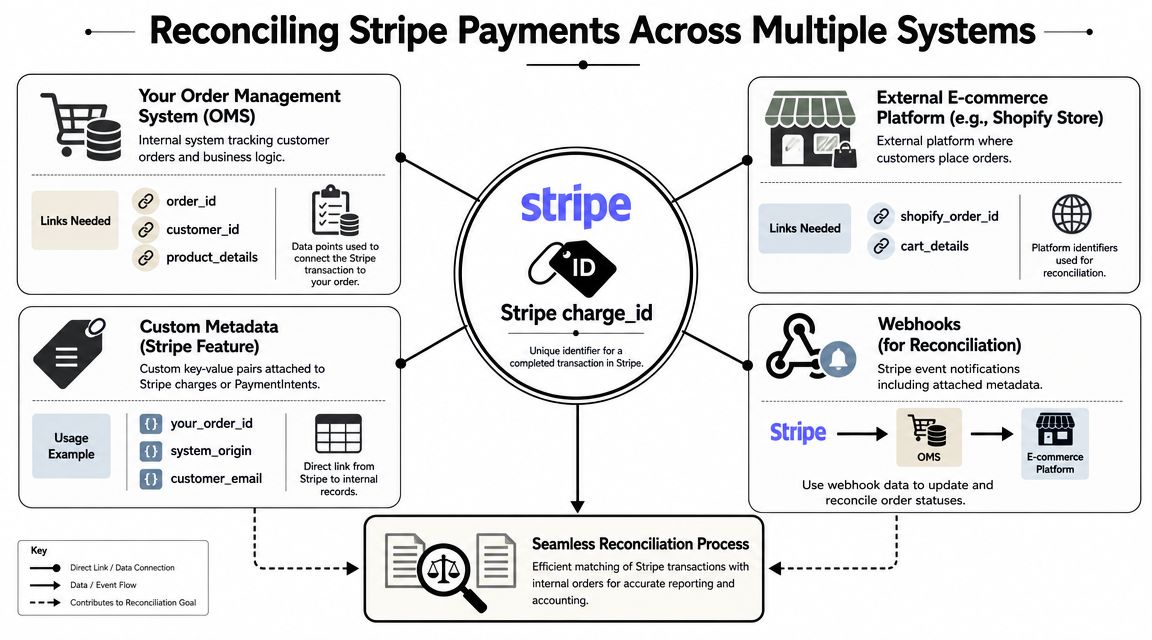
A successful payment record inside Stripe still doesn't answer the questions your SaaS gets from customers. Which store order did this belong to? Which catalog items were purchased? Which merchant account owns this payment inside your multi-tenant app? If the merchant runs several storefronts, which one generated the transaction?
Why payment success is not the end of the workflow
Stripe gives you payment-side truth. Your SaaS still needs order-side truth.
If your product serves merchants across many eCommerce platforms, payment and order data usually live in different systems with different identifiers, different event timing, and different data quality. A charge_id or payment object ID is useful for Stripe operations, but support teams need order references, fulfillment teams need line items, and finance teams need a consistent mapping back to merchant-specific sales records.
That gap gets worse in multi-store environments. One tenant may have several stores, each with its own order lifecycle and webhook behavior. The payment arrives in one place. The sales context lives somewhere else.
The hardest production bug is often not “payment failed.” It's “payment succeeded, but nobody can prove what it paid for.”
Metadata helps, but it doesn't solve fragmentation alone
You should attach your own identifiers to Stripe objects whenever possible. Internal order IDs, tenant IDs, source-system labels, and checkout attempt IDs all make reconciliation easier when webhook events arrive.
That gives you a bridge from Stripe back to your own application. It does not automatically give you normalized access to the merchant's storefront order data if that order lives across many different commerce systems.
A solid reconciliation record often needs both sides:
- Stripe-side identifiers: payment object ID, status history, customer/payment references
- App-side identifiers: tenant ID, internal order ID, checkout attempt ID
- Store-side identifiers: external order ID, line items, shipment context, storefront customer mapping
The expensive way to solve it
You can build direct integrations to every commerce platform your customers use. Some teams do.
The cost isn't just initial implementation. It's ongoing schema drift, auth changes, webhook differences, pagination quirks, and tenant-specific support problems. Even if each connector is manageable on its own, the aggregate maintenance burden grows fast when your product needs consistent order import and reconciliation behavior across many store types.
A unified commerce layer reduces reconciliation work
One practical way to close the gap is to put a unified commerce API between your payment events and your store-order lookups. In that model, Stripe handles payment execution and your app uses a single normalized interface to fetch the order context associated with the transaction.
That's where API2Cart can fit for B2B software vendors. It provides a unified eCommerce integration layer for 80+ shopping carts and marketplaces and exposes 100+ API methods to work with orders, products, customers, shipments, inventory, and related store data. For a Stripe-centered workflow, that means your app can store the right linkage at checkout time, then use one integration surface to retrieve the originating order data across many store platforms instead of maintaining platform-specific connectors.
A practical reconciliation pattern
A workable design looks like this:
- Create a local payment attempt record before redirecting or confirming payment.
- Attach internal context to the Stripe object so webhook events can be tied back to tenant and order references.
- Receive the Stripe webhook and resolve the payment to your internal order or checkout attempt.
- Fetch external store order details through a normalized commerce layer if your product needs merchant-side order confirmation, line items, or fulfillment context.
- Write a final reconciliation record that links payment identifiers, internal business records, and external order identifiers.
That final record becomes the anchor for support, reporting, refunds, and accounting exports.
What to persist for each transaction
Keep the reconciliation model boring and explicit. Don't rely on live API lookups for everything later.
| Record area | Store this |
|---|---|
| Payment context | Stripe object ID, payment state, event IDs |
| Tenant context | SaaS account ID, connected store ID, environment |
| Business linkage | Internal order ID or checkout attempt ID |
| Store linkage | External platform order ID and any retrieved order summary |
| Operational trace | Timestamps for webhook receipt, reconciliation completion, and retry status |
Once that exists, post-payment workflows become much simpler. Support can search one record. Finance can export one record. Engineering can replay one record.
That's the ultimate finish line for a stripe api integration in eCommerce SaaS. Not “money moved,” but “money moved and the system can explain it.”
From Testing to Production Security Deployment and Best Practices
Going live is mostly about removing ambiguity. You want each service to know exactly what it can access, each event to be safe to replay, and each Stripe API call to return enough context without creating unnecessary request volume.
Lock down access before launch
Stripe's key model supports that if you use it properly.
- Use publishable keys only where client exposure is expected
- Keep secret access on backend services
- Prefer restricted API keys for new service-specific use cases
- Separate environments cleanly so test automation and production traffic never overlap
Least-privilege access is one of those choices that feels optional until an internal tool, background worker, or staging service gets more access than it should.
Test the workflows that actually fail in production
Don't stop at happy-path purchase testing. Run scenarios that exercise the parts teams usually leave implicit:
- Authentication-required flows: make sure the client handles intermediate states cleanly
- Webhook retries: verify duplicate deliveries don't duplicate business actions
- Partial failure paths: confirm your system recovers if the webhook is processed after a delayed downstream dependency
- Refund and cancellation reconciliation: make sure records remain traceable, not just “successful”
Build test cases around state transitions, not screens. A payment integration fails in production when state gets out of sync, not when a button looks wrong.
Reduce request volume deliberately
For high-volume integrations, request shape matters. Stripe supports expansion parameters so you can fetch related objects in a single call instead of scattering follow-up requests across your codepath. Stripe also distinguishes this from newer v2 include behavior for fields that are absent by default, and the operational point is simple: fewer synchronous calls mean less latency and less rate-limit pressure, as explained in Stripe guidance on expansion and include patterns.
That changes how I structure backend reads. I try to define the object graph a handler needs first, then fetch it in as few round trips as possible. Polling for every small status change is usually a smell when the event model already exists.
A short production checklist
Before rollout, confirm these are true:
- Every payment object can be traced back to tenant and order context
- Webhook signatures are verified
- Duplicate outbound requests and duplicate inbound events are both safe
- Final business state changes happen on the backend
- API access is scoped narrowly
- Operational logs let support trace a payment from checkout attempt to final reconciliation
If your app also authenticates against external commerce systems as part of reconciliation, the same discipline applies there. This overview of authentication in API integrations is a useful reminder that most production incidents come from boundary management, not from the basic API call itself.
A stripe api integration becomes reliable when each boundary is explicit: client versus server, initial request versus final outcome, payment data versus order data, and one tenant's records versus another's.
If your team needs to connect Stripe payment events back to merchant orders across many storefronts, API2Cart is worth evaluating as part of the integration architecture. It gives B2B SaaS teams one API surface for store data across many commerce platforms, which can simplify the post-payment reconciliation layer that usually takes the most custom effort.