If you're building a B2B SaaS product for multi-seller commerce, you've probably already hit the point where a basic payment gateway stops being enough. Charging a buyer is easy. Routing funds to the right seller, taking your fee, handling onboarding, and keeping the payout trail clean across many merchants is where the complexities begin.
That’s where what is Stripe Connect becomes the right question. Not because Stripe Connect is just another payment feature, but because it’s Stripe’s dedicated model for platforms and marketplaces that need structured money movement between buyers, sellers, and the platform itself. The catch is that payment orchestration is only part of the integration problem when your merchants also run on Shopify, WooCommerce, Magento, Amazon, eBay, Walmart, and everything else.
Introducing Stripe Connect for Platforms and Marketplaces
A familiar SaaS pattern looks like this. The product starts with one merchant, one checkout flow, and one settlement destination. Then customers ask for vendor payouts, commission splits, partner revenue sharing, or local operators who need to get paid from the same transaction. At that point, the payment layer stops being a simple gateway integration and becomes a platform money movement problem.
Stripe Connect was built for that shift.
Stripe introduced Connect in 2012 as its payments product for platforms and marketplaces. In practice, it gives a platform a structured way to onboard sellers or service providers, route funds between parties, collect platform fees, and control payouts without building that infrastructure from scratch. For marketplace operators, vertical SaaS vendors, and embedded commerce products, that changes the operating model. Payments now involve multiple financial parties, not just a buyer and a single merchant of record.
Where Connect fits
Connect is a strong fit when your product needs to:
- Route transaction revenue to third parties as part of the core checkout or invoicing flow
- Collect platform fees or commissions on merchant activity
- Onboard sellers, providers, or business partners before they can receive funds
- Support multi-entity commerce models where your software coordinates payments instead of keeping all funds in one merchant account
Practical rule: If your application needs to pay third parties from the same transaction flow, a standard card processing setup usually will not cover the full requirement.
Connect is mature and widely used, which matters if your team is betting its payout logic, onboarding flow, and compliance model on one provider. But payment capability alone does not make the rollout straightforward.
The integration work gets harder when Connect has to coexist with the rest of the commerce stack. A B2B SaaS platform may use Stripe for money movement while its merchants run on Shopify, WooCommerce, Adobe Commerce, BigCommerce, Shift4Shop, Amazon, eBay, or Walmart. The platform then has to line up payment events with orders, refunds, inventory, fulfillment updates, tax handling, and merchant-specific business rules across dozens of cart APIs.
That is the gap many Stripe Connect guides skip. They explain payment orchestration in isolation. Real platform teams have to connect that payment layer to fragmented eCommerce data across 80 or more systems. That is why the strategic decision is often bigger than Stripe itself. The winning architecture usually pairs Stripe Connect with a unified API layer that standardizes order, product, customer, and fulfillment data across the carts your merchants already use.
Understanding The Core Architecture of Stripe Connect
A platform team usually feels the architecture decision before it sees it in code. One merchant wants funds split to a seller. Another needs delayed payouts. A third asks why the refund in Stripe does not match the order state in Shopify. Those requests all point to the same thing. Connect is an account architecture first, not just a payment feature.
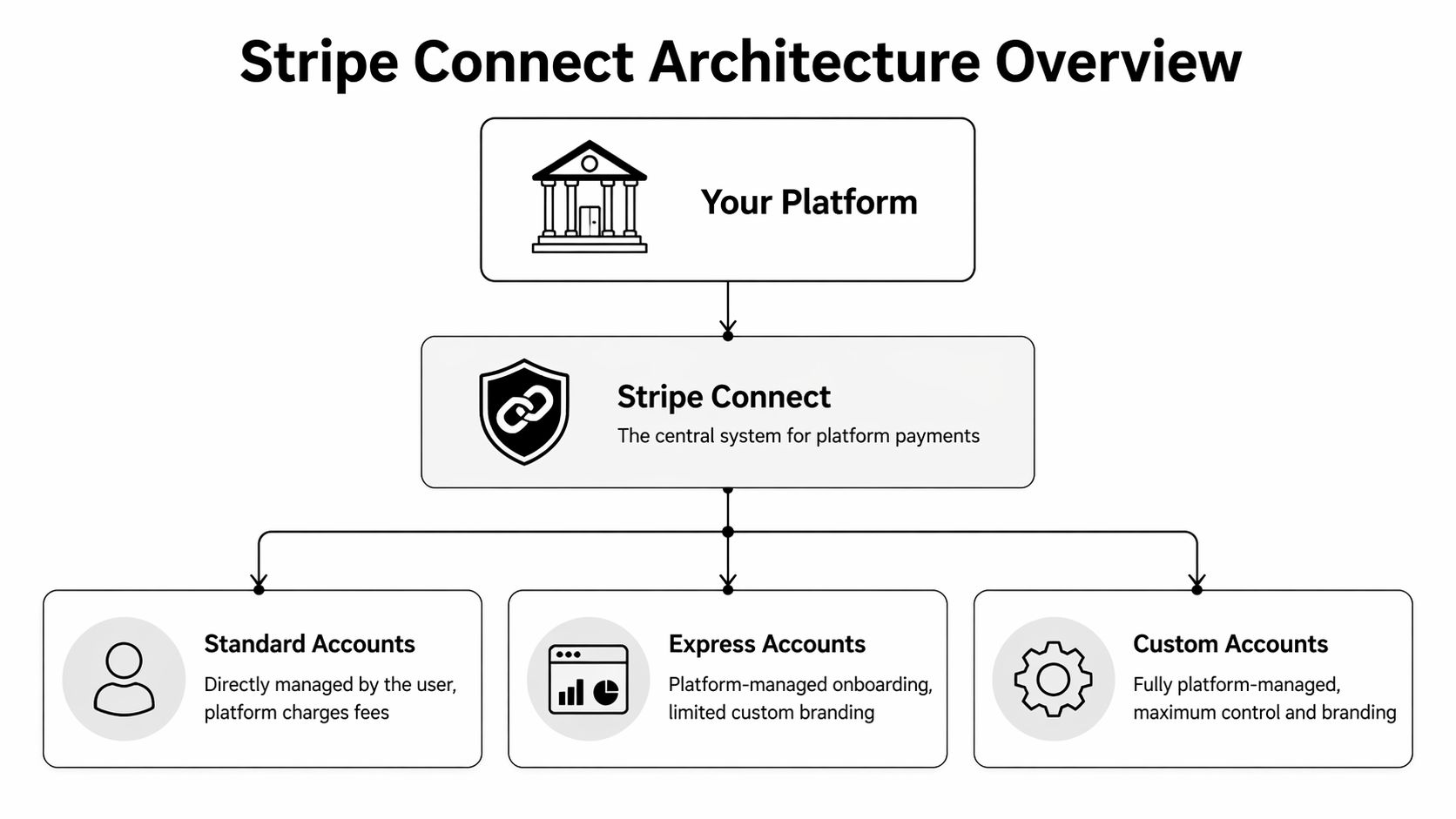
At the center is a clean separation between your platform account and each seller’s connected account. Your application orchestrates onboarding, checkout, fee logic, and operational workflows. Stripe provides the payment rails and payout infrastructure. Each seller keeps a distinct payment identity inside that system.
That separation matters because it changes what your product is responsible for. The platform is no longer a single merchant account trying to imitate a marketplace. It becomes the coordination layer for many merchant accounts, each with its own verification status, payout settings, capabilities, disputes, and reporting context.
The components that matter in implementation
The underlying model is straightforward. The implementation is where teams feel the weight.
| Component | What it is | Why engineers care |
|---|---|---|
| Your application | Web app, mobile app, admin backend | Owns onboarding steps, permissions, checkout orchestration, and webhook-driven business logic |
| Platform Stripe account | Your main Stripe account | Holds Connect settings, API credentials, fee configuration, and platform-level reporting |
| Connected accounts | Seller or provider accounts | Creates a distinct financial identity for each merchant, with separate capabilities and payout destinations |
| Payments | Charges and fund collection | Determines how transactions are created, attributed, and tied back to merchant activity |
| Payouts | Fund disbursement to connected accounts | Affects seller cash flow, reconciliation timing, and support volume |
The practical lesson is simple. Treat the connected account as a first-class object in your system.
If it lives as a hidden field on a seller record, the integration usually gets messy fast. Support cannot see onboarding state clearly. Finance cannot reconcile payment and payout timing. Product teams struggle to explain why one merchant can accept charges while another is still restricted.
What the separation gives you, and what it does not
Connect reduces a lot of the pain involved in routing money to third parties. It gives each seller a clear boundary for identity, payout setup, and payment activity. That is a better model than pooling funds in one merchant account and trying to redistribute them with custom logic.
It does not remove platform complexity. It moves that complexity into account lifecycle management, event handling, and reconciliation.
For a B2B SaaS team, that distinction matters. Stripe can track charges, transfers, payouts, disputes, and verification state. Your product still has to map those events to the commercial record your merchants care about, which is usually the order. In a multi-cart environment, that order may live in WooCommerce for one merchant, Adobe Commerce for another, and BigCommerce for the next. The payment architecture is clean. The operational picture is not.
The architecture decision teams underestimate
The common mistake is scoping Connect as a checkout project. In practice, it touches identity, permissions, support workflows, reporting, and merchant onboarding. It also affects how your team models authentication between your app, Stripe, and external commerce systems. If you are standardizing those connections across many seller environments, the trade-offs between token models matter, especially when comparing OAuth vs JWT for platform integrations.
Another mistake is overbuilding control too early. Hosted and embedded onboarding usually reduce maintenance because Stripe handles more of the verification flow and UI updates. Fully custom onboarding can fit a tightly controlled product experience, but it also creates more edge cases for your team to maintain over time.
That trade-off gets sharper once Stripe Connect sits beside 80 or more commerce platforms. Every extra custom step in onboarding or account configuration becomes another place where payment state can drift away from order state, refund state, or merchant settings stored elsewhere. Strong implementations keep the payment account model clean, then use a unified commerce data layer to reconcile what happened in Stripe with what happened in the cart.
Choosing Your Integration Path Account Types and Onboarding
Your account type choice affects almost everything downstream. It changes seller onboarding, dashboard ownership, support burden, and how much payment UX you must build yourself.

Standard, Express, and Custom in plain terms
| Account type | Best for | Trade-off |
|---|---|---|
| Standard | Fastest launch, low operational burden | Least control over seller experience |
| Express | Platforms that want a managed middle ground | Some branding control, but not full ownership |
| Custom | Products that need deep embedded payments UX | Highest implementation and maintenance burden |
Standard accounts
Standard is the quickest way to get moving. The seller has a stronger direct relationship with Stripe, and much of the account management experience stays in Stripe-owned surfaces.
This works well when your team wants to avoid building a large payments settings layer. It works less well when your product promise depends on a tightly controlled, white-labeled merchant experience.
Use Standard if these statements are true:
- You need speed more than control
- Your sellers are comfortable leaving your app during onboarding
- Your support team doesn't want to own every payments-related workflow
Express accounts
Express sits in the middle. You keep more control over onboarding flow and platform experience, but Stripe still handles a meaningful part of the account management surface.
For many B2B SaaS teams, this is the practical choice. You reduce custom UI work without forcing sellers into a fully separate experience. If your team is already thinking carefully about auth and delegated access, this is also where adjacent platform decisions matter. For example, your authentication model for embedded merchant tooling should be deliberate, especially if you're comparing token strategies such as OAuth vs JWT for SaaS integrations.
Pick Express when you want a product-led onboarding flow, but you don't want to become a payments UI company.
Custom accounts
Custom gives you the most control and the most responsibility. Your platform can own nearly the entire seller-facing experience, which is attractive if payments must feel native inside your OMS, ERP, PIM, or marketplace admin.
But often, teams overbuild in this area. Full control sounds good until you realize you now own more edge cases around verification state, account requirements, support tooling, and compliance-sensitive UX.
A simple decision filter helps:
- Start with Standard if payments are important but not your product differentiator.
- Move to Express if reducing seller friction is important and you can support a moderate implementation footprint.
- Choose Custom only when embedded control is central to the product and your team can sustain the operational load.
What doesn't work is picking Custom because it looks more enterprise. In practice, many platforms would have shipped faster and safer with Express.
Managing Money Movement Payouts Webhooks and Compliance
After onboarding, the core integration work starts. Your platform has to track who paid, what fee you took, when funds become payable, and whether the connected account can receive money. In a basic demo, that looks straightforward. In production, it turns into state management across payments, transfers, reversals, refunds, disputes, and account requirement changes.
That complexity gets missed because teams focus on the charge flow and treat payout operations as a later concern. For a platform business, payouts are part of the product.
Model the full money movement lifecycle
A practical Connect implementation needs an internal model for the full lifecycle, not just the initial payment intent or charge. That model usually includes:
- The buyer payment event
- The commercial record in your app, such as seller, order, commission, tax, or service fee
- Stripe-side fund allocation based on your Connect configuration
- Platform fee capture
- Payout eligibility and timing
- Asynchronous updates from Stripe when any of that state changes
If those states are not explicit in your system, support gets messy fast. Finance sees one status, the seller dashboard shows another, and ops has no reliable answer for why a payout is pending.
Webhooks are part of the core architecture
Stripe Connect is event-driven in practice. Payouts settle later. Verification requirements can appear after onboarding. Refunds and disputes arrive asynchronously. External bank failures can change payout status after your original API call succeeded.
Your app should treat webhook consumption as a primary integration path, not as a side utility. Teams that need a quick engineering reference can keep this guide on what a webhook is in eCommerce integrations in their internal docs.
A dependable webhook pipeline usually has four properties:
- Idempotent processing so retries do not create duplicate internal records or trigger duplicate downstream actions
- Queue-based handling so temporary failures in your app do not block event intake
- Replay and reconciliation workflows so you can recover from missed events
- Event-to-business mapping so
payout.paid,account.updated, or refund-related events update seller-visible state in your product
I have seen teams ship Connect with working payments and weak event handling. The result is predictable. Money moved correctly inside Stripe, but the platform UI was wrong for hours or days.
Payout logic needs product decisions, not just API calls
Stripe gives you the primitives. Your team still has to decide how payouts should behave for your business model.
Questions come up quickly. Do you release funds as soon as they are available, or hold them until an order clears a fraud review? Do you split platform fees at charge time or after fulfillment milestones? What happens when a seller is restricted after orders are already paid? How do you explain reserve behavior or payout delays inside the seller portal?
Those are product and operations decisions expressed through payments infrastructure. They affect trust just as much as checkout success rates.
Stripe handles a large portion of the payments compliance burden, especially around identity checks, account requirements, and regulated money movement infrastructure. Your platform still owns the operating model around those controls.
That includes seller communication, exception handling, policy enforcement, support escalation, and any business-specific risk rules tied to your vertical. Teams building internal controls around regulated operations can borrow useful patterns from companies working on fintech with compliance process automation.
A clean ownership split looks like this:
- Stripe owns payment rails, verification workflows, and requirement signaling
- Your platform owns user-facing policy, operational response, auditability, and business rule enforcement
This matters even more in a multi-cart environment. A seller may get paid through Stripe Connect while the underlying order lives in Shopify, Adobe Commerce, BigCommerce, WooCommerce, or a marketplace connector. If account status changes or payouts are delayed, your support team still needs order context, fulfillment status, and seller system data in one place. Connect solves the money movement layer well. It does not solve the cross-platform commerce state around it.
That is where many B2B SaaS teams underestimate the implementation scope. The payment integration works, but the surrounding operational data is still fragmented across dozens of carts and marketplaces.
The Multi-Cart Integration Challenge Beyond Payments
A marketplace payment can settle perfectly and still create an operational mess for the seller.

Stripe Connect gives platforms strong control over payment collection, account-level money movement, fees, and payout state. The trouble starts after the charge succeeds. Sellers still need the order created in Shopify, stock adjusted in WooCommerce, shipment data written back to Magento, and marketplace records normalized from channels such as Amazon or Walmart.
For B2B SaaS teams, this is usually the part that expands the project from a payment integration into a systems integration program. Stripe handles the transaction layer. Your product still has to keep commerce state consistent across dozens of carts, marketplaces, and seller back offices.
The failure mode product teams hit in production
A buyer checks out on your platform. Stripe processes the payment and your webhook flow marks it as paid. The seller, however, runs daily operations from a different system.
If your application does not push that order into the seller’s actual source of truth, operations break fast:
- The seller re-enters the order by hand
- Inventory remains inaccurate across channels
- Shipment, cancellation, and refund activity splits across multiple systems
Support volume rises next. Finance starts reconciling exceptions. Seller trust drops because they care less about a successful charge than about whether the order showed up where fulfillment happens.
CS-Cart makes this point directly in its overview of Stripe Connect, describing manual reconciliation across carts as a problem that can lead to 20-30% longer go-live times for multi-cart marketplaces, according to this CS-Cart analysis of Stripe Connect challenges.
Why Stripe Connect is only part of the integration
The practical boundary is straightforward:
| Stripe Connect handles well | Your platform still needs to handle across carts |
|---|---|
| Payment collection | Order creation in external commerce systems |
| Split funds and fees | Inventory sync across platform-specific schemas |
| Connected account onboarding | Shipment and fulfillment status mapping |
| Payout tracking | Refund and return state reconciliation with order data |
| Platform revenue reporting | Normalizing seller operations across 80 carts and marketplaces |
That distinction matters in multi-cart commerce. A paid transaction is only one event in the seller workflow. The primary implementation work involves keeping payments, orders, inventory, shipments, and refunds aligned even when every merchant runs a different stack.
Teams that want to avoid building and maintaining separate connectors for each platform usually adopt a unified commerce API strategy for multi-cart integrations. That architectural choice reduces the number of moving parts between Stripe Connect and the seller systems that run fulfillment.
How API2Cart Accelerates Stripe Connect Implementations
A Stripe Connect rollout gets harder the moment sellers ask, "Can you also push the order into my store?" For a B2B SaaS team serving merchants across Shopify, Magento, WooCommerce, BigCommerce, PrestaShop, and marketplace stacks, that request represents the actual scope. The payment flow may already work. The operational flow usually does not.

API2Cart speeds up this part of the implementation by giving your team one commerce integration surface instead of a growing queue of cart-specific connectors. That matters because Stripe events rarely stand alone. A successful charge often needs to trigger order creation, stock updates, customer sync, shipment status changes, or refund reconciliation in the seller’s commerce system.
The practical benefit is not only faster delivery. It is a simpler architecture to operate six months later, when new merchants arrive on platforms your roadmap did not originally cover.
A practical event flow
In a typical platform build, the sequence looks like this:
- Stripe Connect confirms the payment or account event.
- Your application processes the webhook and applies platform rules.
- API2Cart sends the corresponding order, product, customer, or inventory action to the merchant’s commerce platform through a common API model.
- Your team handles exceptions in one integration layer instead of debugging platform-specific connectors one by one.
That design reduces duplicate mapping work. It also contains complexity where it belongs. Stripe manages money movement. Your platform manages business logic. API2Cart handles the cart-side data exchange across many commerce systems.
If your team is validating that architecture, API2Cart’s explanation of a unified API for multi-platform commerce integrations reflects the design pattern many integration teams adopt after they have felt the cost of maintaining custom connectors.
Where engineering teams save time
The biggest savings usually come from maintenance, not the first demo.
One-off connectors create the same problems again and again:
- Field mappings drift as each platform changes its schema
- Webhook timing and retry behavior differ across commerce systems
- Refunds and cancellations need cart-specific logic
- Every new seller platform creates another testing and support stream
A unified layer gives teams a consistent way to read and write commerce data while Stripe Connect keeps the payment side separate. That split is easier to reason about in production, especially for OMS, WMS, ERP, and marketplace products that need payment status to line up with order and fulfillment state.
The same architectural separation shows up in adjacent payment-heavy products. Teams building a fiat and crypto OTC trading platform also separate transaction execution from surrounding operational systems because transaction success alone does not resolve reconciliation, workflow state, or downstream system updates.
As noted earlier from Sharetribe’s overview of Stripe Connect, the Stripe ecosystem is large enough that broad compatibility matters. For SaaS vendors, API2Cart helps turn that market opportunity into an integration plan your team can support.
Building Your Scalable Platform with Stripe and API2Cart
Stripe Connect is the right answer when your product needs multi-party payments. It gives platforms a mature way to onboard sellers, route funds, collect fees, and manage payouts without building that payment infrastructure from scratch.
For B2B eCommerce SaaS teams, that still leaves a second system problem. Sellers don't run their business from payment events alone. They run it from orders, products, inventory, shipments, and customer records inside commerce platforms. That’s why the durable architecture is two-layered. Use Connect for money movement. Use a unified commerce integration layer for operational data.
That same design pattern shows up in adjacent fintech builds too. Teams building a fiat and crypto OTC trading platform also separate transaction infrastructure from surrounding operational systems because payment execution alone doesn't cover reconciliation, workflow state, and platform logic.
If you’re an integration developer, the practical takeaway is straightforward. Don’t ask whether Stripe Connect can process marketplace payments. It can. Ask whether your platform also needs to synchronize the seller systems that sit behind those payments. In most real implementations, the answer is yes.
If you're building a marketplace, OMS, WMS, ERP, PIM, or multi-store SaaS product, explore API2Cart to connect with 80 shopping carts and marketplaces through one API. It’s a practical way to pair Stripe Connect’s payment infrastructure with the order, inventory, customer, and shipment data your platform needs to operate at scale.