Your PM asks for a “simple” CRM sync. Pull customers and orders from storefronts and marketplaces, push them into the CRM, keep everything current, and make support, sales, and marketing all happy. On a whiteboard, that looks like a few arrows.
In code, it turns into authentication differences, schema mismatches, missing events, partial updates, retries, duplicate records, and hard questions about who owns each field. That is the core work behind integration CRM systems. The first connection is rarely the problem. The fifth one is. The tenth one becomes a maintenance product of its own.
Modern CRM architecture makes this unavoidable. CRM stopped being a standalone database when API-based connectivity turned it into a hub for sales, service, marketing, support, ERP, and commerce data. That shift also shows up in adoption patterns: cloud-based CRMs account for 87% of CRM systems, and cloud CRM represented about 80% of CRM sales in 2025, according to IBM's CRM integration overview. If your product touches customer, order, or catalog data, integration isn't an add-on. It's part of the product surface.
The Hidden Complexity of eCommerce and CRM Integration
A store sync sounds straightforward until you write down the objects you need to move. Customer records. Addresses. Orders. Line items. Refunds. Fulfillment state. Product references. Tax and shipping totals. Status transitions. Then you realize each source system names and structures those fields differently.
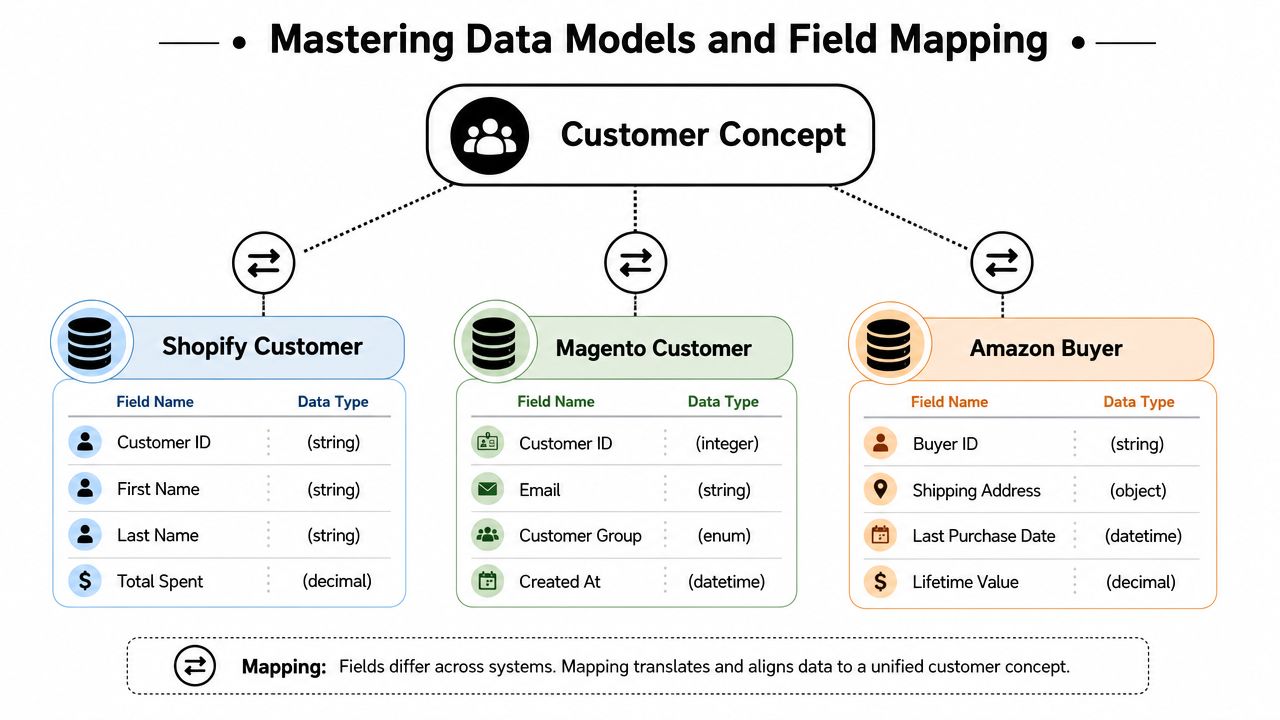
A mid-level developer usually hits the same wall fast: one platform exposes a clean customer object, another nests address data in ways that don't match your CRM, and a marketplace may give you buyer data with tighter constraints than a direct storefront. Even before business logic starts, the transport and contract layer is already fragmented.
Where teams usually underestimate the job
The hard part isn't “connect API A to API B.” The hard part is keeping that connection correct after edge cases start showing up in production.
Common examples:
- Identity collisions: The same person checks out with different emails, guest checkout creates a sparse profile, or a marketplace sends buyer info that can't map cleanly to your CRM contact model.
- Order lifecycle drift: One system treats a partially refunded order as updated order state. Another emits a refund object separately. Your CRM pipeline may expect one canonical event.
- Catalog mismatch: Variants, bundles, parent-child relationships, and deleted products often don't round-trip cleanly.
- Auth differences: Some integrations are app-install flows. Others rely on store credentials, tokens, or rotating access patterns.
- Operational gaps: Retries, replay, webhook ordering, and historical backfill all need different handling than live sync.
A CRM integration fails quietly long before it fails visibly. It starts with one unmapped field, one missed update, or one retry that writes stale data over fresh data.
This is why teams evaluating regional implementation patterns often end up reading broader operational guides like ecommerce integrations Canada. The useful part isn't geography. It's seeing how multi-system commerce projects turn into data ownership and sync reliability problems.
Why build versus unify matters this early
If you build one connector per platform, every new commerce source adds another API contract, another auth model, another event model, and another support surface. If you unify early, you spend more time defining your canonical CRM contract and less time translating every source by hand.
That's the architectural fork integration teams should recognize before writing connector code. A practical place to think about that data layer is eCommerce data integration, because the problem usually starts at the boundary between raw commerce payloads and what your CRM can consume reliably.
Choosing Your Integration Architecture
Before discussing field mapping or sync strategy, pick the shape of the system. Most integration debt comes from architecture decisions that felt fast at the beginning.
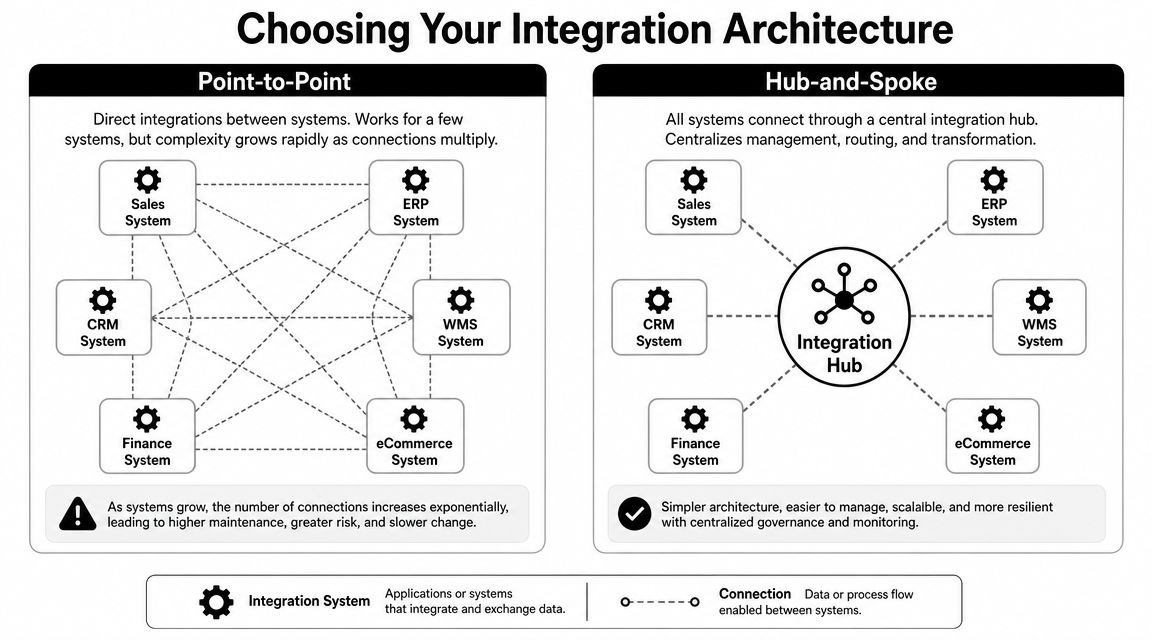
The two patterns that matter most are point-to-point and hub-and-spoke.
Point-to-point works until it doesn't
Point-to-point means your app connects directly to each commerce platform and transforms data into the CRM path itself. For a proof of concept, it feels efficient. You own the code, the retries, the object mapping, and the deployment path.
The problem is multiplication. Add one storefront integration and you've added one connector. Add a marketplace, and now you've introduced a different event model. Add another storefront family, and your team is maintaining parallel ingestion logic for the same business object.
A simple way to evaluate it:
| Pattern | Good fit | Main cost |
|---|---|---|
| Point-to-point | Few systems, narrow scope, temporary need | Connector sprawl, brittle maintenance |
| Hub-and-spoke | Multiple sources, repeatable integrations, productized sync | More design upfront, stronger abstraction required |
Point-to-point also tends to leak source-system assumptions into your CRM write path. One connector writes raw order status values. Another normalizes them. A third skips unsupported fields. Six months later, reporting is inconsistent and nobody remembers why.
Hub-and-spoke is slower to sketch and faster to live with
In a hub-and-spoke model, your application talks to a central integration layer. That layer handles source-specific auth, transport, normalization, and often event ingestion. Your CRM sync service consumes a more consistent contract.
That trade-off matters because the commercial upside of getting CRM architecture right is real. Businesses earn an average of $8.71 in ROI for every $1 spent on CRM software, and effective CRM deployment can increase sales by more than 29% and productivity by more than 34%, according to SellersCommerce CRM statistics. If the business depends on that return, the integration layer can't be treated as throwaway glue code.
Here's the practical engineering difference:
- With point-to-point, every platform change forces your team to revisit connector-specific code.
- With hub-and-spoke, you invest in one internal contract and one set of downstream CRM rules.
- With a unified API layer, your developers connect once and spend more of their time on business logic than source-specific maintenance.
Practical rule: If your roadmap includes more than a handful of commerce sources, treat normalization as infrastructure, not feature code.
API2Cart fits the hub model in a very literal way. It exposes a single API over many carts and marketplaces, so a CRM-facing service can consume standardized commerce operations instead of rebuilding each connector independently. If you want a clean explanation of why direct connector webs become fragile, the point-to-point integration breakdown is useful context.
The build versus buy question engineers should ask
Don't reduce this to “control versus convenience.” That framing is too shallow.
Ask these instead:
- Where is your product differentiation? If it's in CRM workflows, attribution logic, support automation, or revenue operations, custom connector maintenance is probably not the thing to own.
- How many auth and schema variants are you prepared to support for years, not weeks?
- Who handles source drift? API versions change, payloads expand, and edge cases appear after merchants start using the integration in ways your test data didn't cover.
The right answer isn't always buy. If you only need one tightly scoped connection and your domain logic is unusual, building may still make sense. But if your roadmap says “support many stores, many channels, and one CRM data contract,” unify early.
Mastering Data Models and Field Mapping
Most broken CRM integrations aren't transport failures. They're modeling failures. The API call succeeds, but the data is wrong, incomplete, or semantically inconsistent.
That starts with one uncomfortable truth. There is no universal “customer” object across commerce systems. There are only platform-specific representations that overlap enough to trick teams into assuming they're the same.
Build a canonical model before writing transforms
Your CRM integration needs a canonical data model. Not a vague spreadsheet. An explicit contract with types, ownership rules, nullability, enum normalization, and update semantics.
At minimum, define canonical models for:
- Customer
- Order
- Product
- Address
- Order line
- Shipment or fulfillment event
- Refund or financial adjustment
For example, a customer model should answer questions like:
| Field | Canonical rule |
|---|---|
| external_customer_id | Store source-specific identifier separately from CRM contact ID |
| Normalize casing, but preserve raw source in audit trail if needed | |
| phone | Store normalized value plus raw source input when formatting differs |
| addresses | Separate billing and shipping, support multiple entries |
| marketing_consent | Don't infer from account creation unless the source makes that explicit |
If you skip these rules, each connector invents them independently.
The ugly parts of real mapping
Order state is where many teams get burned. One source may send “paid,” another “processing,” another “completed,” and your CRM workflow might only understand “open,” “won,” “fulfilled,” and “closed.” If you map source labels directly into CRM stages, reporting becomes nonsense.
Product data has a different kind of problem. Variants, attributes, and option sets often exist in source-specific shapes. If your CRM only needs high-level commercial context, don't mirror the full product graph unless you have to. Pull the minimum stable subset: product identifier, title, SKU, quantity, price context, and variant descriptor.
Address data is deceptively messy too. Some systems split street lines cleanly. Others return one freeform block. Some treat region as code, others as display text. Don't model addresses as a single string if downstream teams need segmentation, routing, or deduplication.
A helpful way to prevent drift is to define mapping rules like a contract, not tribal knowledge. HelpWithMetrics' data contract guide is worth reading for that reason. It pushes teams to document what a field means, who owns it, and what can break consumers.
The transform layer should be boring. If engineers are debating what “customer status” means during incident response, the model was never defined well enough.
Build path versus unified path
If you build from scratch, each connector needs:
- Source schema parsing
- Type coercion
- Enum translation
- Null handling
- Fallback logic for missing fields
- Version-aware contract updates
If you use a unified commerce API, a lot of that source-specific translation moves out of your codebase. The win isn't magic. It's fewer transformation branches for your team to maintain.
The goal in integration CRM systems isn't to preserve every source nuance. It's to preserve the business meaning your CRM needs, without letting platform differences leak into every downstream workflow.
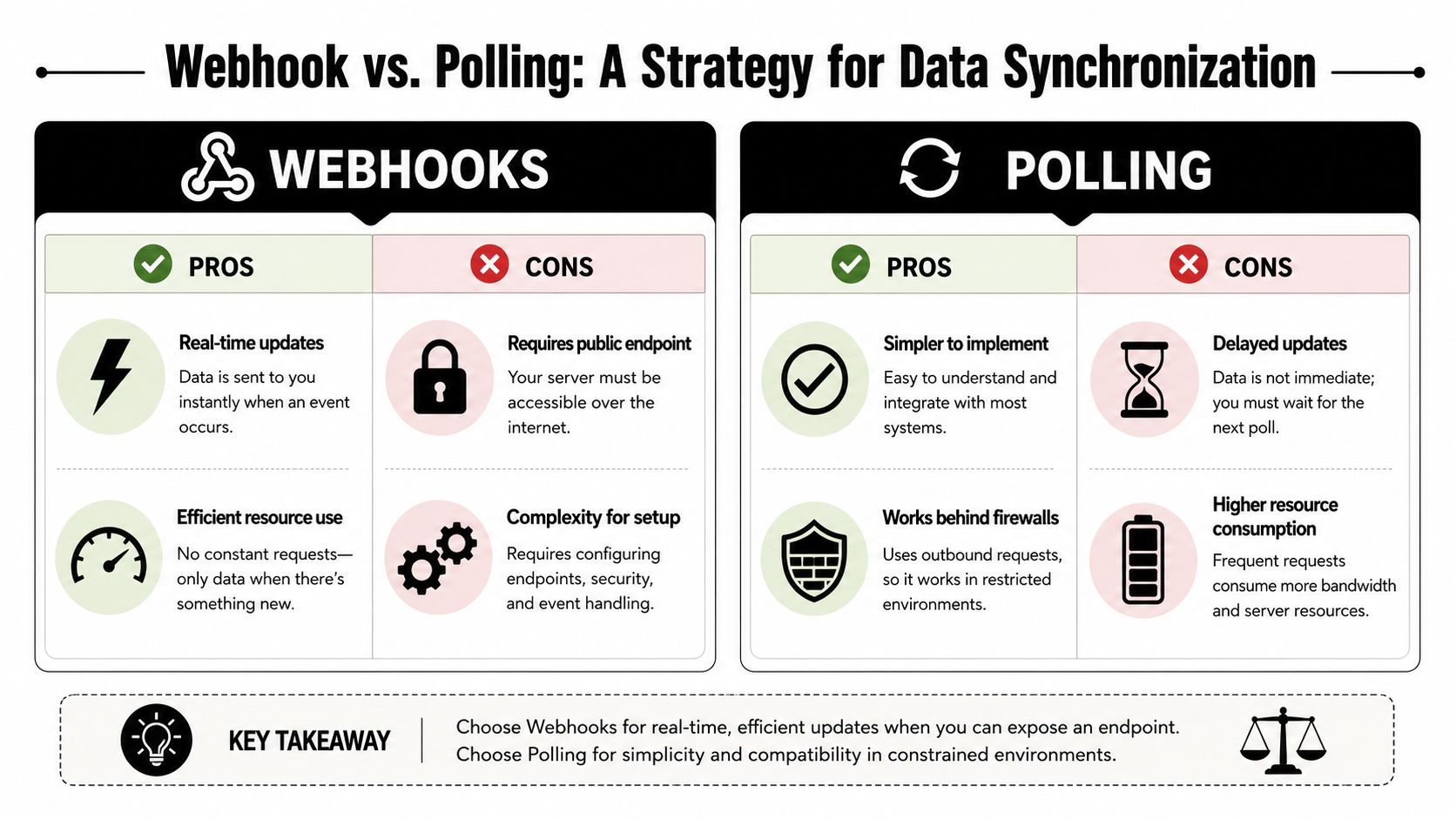
Webhook vs Polling A Strategy for Data Synchronization
Once the model is stable, the next question is freshness. How will your CRM learn that something changed?
For most commerce integrations, the answer is some mix of webhooks and polling. Treating this as an either-or decision usually leads to fragile systems. Production sync is more nuanced than that.
Webhooks for immediacy
Webhooks are event notifications sent by the source when something happens. New order, updated customer, changed product, canceled fulfillment. They're the closest thing to near-real-time sync in many integrations.
They work well when your CRM workflows depend on speed. A support queue may need order visibility quickly. A sales workflow may want recent purchase context as soon as the order lands.
But webhooks come with operational baggage:
- Delivery isn't guaranteed forever: Providers may retry, but retries have limits.
- Order isn't always guaranteed: Update events can arrive out of sequence.
- Payloads vary: Some send full objects, others send lightweight references that force a follow-up fetch.
- Endpoint pressure spikes: Event bursts can flood your ingestion path.
If you need a practical refresher on event receiver design, this webhooks guide is a solid operational reference.
Polling for control
Polling means your integration asks the source system for changes on a schedule. This is less elegant, but often easier to reason about.
Polling is useful when:
- the source doesn't support webhooks for the object you need
- your environment prefers pull-based access
- you need periodic reconciliation anyway
- you want a predictable backfill strategy
A common pattern is incremental polling with a modified-since filter. Your worker stores a cursor, fetches recent changes, and processes them in batches. That gives you deterministic replay and easier incident recovery than webhook-only architectures.
Here's the trade-off in simple terms:
| Method | Strength | Weakness |
|---|---|---|
| Webhook | Low latency, event-driven | Delivery gaps, ordering issues, burst handling |
| Polling | Predictable, replay-friendly | Higher latency, repeated requests |
The hybrid pattern usually wins
The system that holds up in production usually does both.
Use webhooks to detect likely changes quickly. Then fetch the authoritative object through the API before writing to the CRM. That avoids trusting incomplete event payloads. Run polling on a schedule as a reconciliation lane to catch missed or delayed events.
That hybrid design also helps with these practical issues:
- Idempotency: A repeated webhook shouldn't create duplicate CRM records.
- Gap recovery: Polling can repair missed webhook windows.
- Write safety: API fetches give you full current object state before applying transforms.
- Backfill support: Historical imports are naturally polling-based.
For teams using a unified commerce layer, API2Cart supports both patterns in a useful way: webhooks where supported and list methods with date filters for controlled polling. That's relevant if you want one sync strategy across many commerce systems instead of redesigning ingestion per source. For event basics, the article on what a webhook is gives the right framing.
Fast sync is good. Recoverable sync is better. If you have to choose, build the system you can replay.
Building for Scale and Reliability
A demo sync only proves that two happy-path requests worked in sequence. Production asks harder questions. What happens when the source rate-limits you, credentials expire, payloads arrive late, or one merchant connects multiple stores with overlapping customers?
That's where most engineering time goes. And it matches what teams run into in practice. A primary pain point for B2B SaaS teams is ongoing maintenance, not the initial connection. Multi-store and multi-channel sync introduces more failure modes than generic CRM articles discuss, which is why reliability work like API limit handling and sync latency management matters so much, as noted in RudderStack's CRM integration article.
Start with ownership and failure boundaries
Before tuning retries, define ownership clearly.
- Source of truth per field: Don't let both sides write the same field unless you've defined conflict rules.
- Direction per object: Some data should only flow into the CRM. Some should be bidirectional. Don't assume all entities need two-way sync.
- Write path isolation: Separate ingestion, normalization, and CRM write workers so one failure doesn't stall the whole pipeline.
A clean architecture usually has these stages:
- Connector ingress receives events or fetches batches.
- Normalizer maps source payloads into your canonical model.
- Deduplication layer resolves identity and suppresses replays.
- Queue or job system buffers downstream writes.
- CRM writer applies validated changes with idempotent operations.
- Audit log records input, transform result, and write outcome.
Rate limits, retries, and auth are not side details
They are the integration.
When one source throttles, don't just retry blindly. Your worker should classify errors:
- Retryable: temporary timeout, service unavailable, transient transport issue
- Backoff-required: explicit rate-limit response or quota exhaustion
- Non-retryable: malformed request, schema violation, invalid credentials until refreshed
Exponential backoff helps, but it only works if paired with jitter and max-attempt limits. Otherwise every worker retries on the same cadence and creates another spike.
For authentication, keep three rules simple:
- Store credentials securely: never scatter access secrets across worker configs.
- Refresh centrally: token lifecycle logic should live in one place.
- Fail closed: if auth breaks, stop writes and surface clear alerts instead of partially processing stale jobs.
Don't let your retry policy become a denial-of-service script aimed at a partner API.
What usually works better than teams expect
These patterns reduce incident volume more than flashy architecture changes:
- Idempotency keys: Every inbound event or fetched object should have a stable replay-safe key.
- Dead-letter queues: Bad records need a quarantine path, not infinite retries.
- Per-merchant isolation: One noisy tenant shouldn't block everyone else.
- Schema version awareness: Track payload versions so transform regressions are diagnosable.
- Replay tooling: Support should be able to replay a failed sync without engineering editing rows by hand.
The build versus unify decision matters here too. If you own every connector, you also own every auth edge case, rate-limit variant, and drift issue. If you abstract that layer, your team can spend more time on CRM logic and less on keeping many external integrations alive.
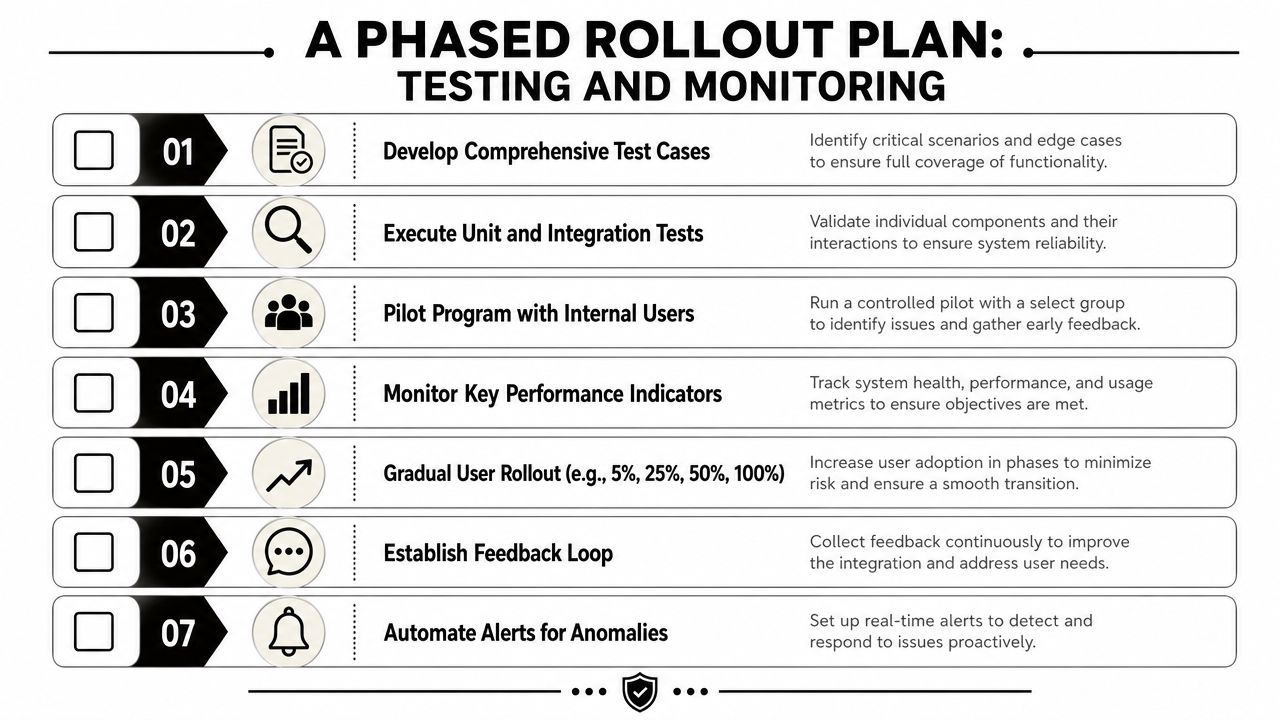
A Phased Rollout Plan Testing and Monitoring
The safest CRM integration is the one you don't release to everyone at once. Rollouts fail when teams treat “it passed QA” as equivalent to “it will survive real merchant data.”
A phased approach is the right one. Guidance for CRM implementation recommends defining objectives, mapping fields and workflows, cleaning and migrating data, validating API limits and sync latency, and starting with a small pilot group. Pilot testing is often limited to 5-10 users before broader deployment, according to Vantage Point's implementation methodology.
Test what breaks in the field
Don't stop at unit coverage. Integration CRM systems fail at boundaries, so test boundaries directly.
Use a checklist like this:
- Canonical mapping tests: Validate enum translation, null handling, and required-field enforcement.
- Replay tests: Send the same event multiple times and confirm no duplicate CRM writes happen.
- Out-of-order tests: Process older and newer updates in the wrong sequence and confirm your write rules preserve the latest valid state.
- Backfill tests: Import historical orders and make sure they don't trigger live workflow automations incorrectly.
- Permission tests: Confirm CRM write scopes are restricted to what the integration needs.
Monitor the integration, not just the servers
A healthy worker process can still write bad business data. Monitoring should include application-level signals that reflect sync quality.
Track at least:
| Signal | Why it matters |
|---|---|
| Sync latency | Tells you whether events are arriving but sitting in queues |
| Error class distribution | Distinguishes transient failures from mapping defects |
| Record mismatch counts | Catches silent drift between source and CRM |
| Dead-letter volume | Shows whether failures are accumulating outside main flow |
| Per-tenant failure patterns | Reveals isolated merchant or store issues |
You also need alert thresholds tied to behavior, not only uptime. An integration can be “up” while dropping one object family without notice.
Watch the ratio of received updates to successful CRM writes. That gap exposes silent data loss faster than generic infrastructure dashboards.
Roll out by risk, not by confidence
The cleanest rollout sequence is usually:
- Internal stores or test tenants
- Small pilot group
- A limited production cohort with close monitoring
- Broader enablement after observed stability
Keep a kill switch. Keep replay tools ready. Keep logs searchable by merchant, source object ID, and CRM object ID. Those three details matter more during rollout week than any polished dashboard.
Conclusion Focus on Your Product Not Plumbing
Building integration CRM systems from scratch teaches you a lot. It also implicitly assigns your team a second product to maintain. One product is your actual application. The other is a long-lived connector platform made of auth logic, schema translators, event pipelines, retries, reconciliation jobs, audit trails, and support runbooks.
That second product doesn't stay small.
If you build everything yourself, the first version may ship quickly for one source. Then another commerce platform arrives. Then a marketplace. Then a merchant with multiple stores. Then a customer whose CRM workflow depends on strict freshness, clean deduplication, and replayable event history. At that point, the work is no longer “add another integration.” It's “operate an integration estate.”
That's why the build versus buy decision should be made with maintenance in mind, not just initial development speed. Building gives you direct control, which can be the right move for narrow or unusual cases. But if your roadmap includes multiple commerce sources and one consistent CRM-facing contract, unifying that layer usually protects your engineering time.
The practical question is simple: where do you want your best developers spending their effort? On connector drift, source-specific payload bugs, and auth edge cases, or on the workflows customers pay for?
For most B2B SaaS teams, the durable advantage isn't in writing yet another storefront connector. It's in what the CRM does once the data is there. Lead routing. Support context. Revenue workflow automation. Segmentation. Reporting. Customer lifecycle logic. Those are product capabilities. The plumbing exists to support them, not replace them.
If your team needs commerce data inside a CRM without building and maintaining one-off connectors for every cart or marketplace, API2Cart gives developers a unified API layer to work against. That can shorten the path from prototype to stable production sync, especially when your roadmap includes multiple commerce platforms, order and customer ingestion, and ongoing connector maintenance you'd rather not own.