Data has been used in nearly all areas of the eCommerce business. It is what consumers take into account when making decisions. It is what online merchants use to give their customers a first impression. And lastly, that is the basis for most SaaS eCommerce solutions. Data has been the foundation of all methods of trading, inventory control, ordering, warehousing, and much more. Constant data acquisition means integration with shopping platforms. For you as a software vendor, eCommerce data integration is essential to succeed.
This article will tell you more about eCommerce data integration and how it might impact your SaaS company.
What is eCommerce Data Integration?
eCommerce data integration means the connection that allows each B2B SaaS software provider to manage and control its business operations efficiently. They can use it to handle information about products, shipments, orders, and much more of their customers' online shops. Without such type of integration, quick access to client stores isn't possible at all.
Additionally, eCommerce integration eliminates unnecessary operations and saves substantial time for B2B SaaS solution vendors who can now concentrate on other essential tasks. It also establishes reliable and up-to-date product information across all online services to prevent out-of-stock scenario. If B2B SaaS solution providers are looking to increase their client base, then eCommerce data integration is essential..
eCommerce data integration is very important for SaaS software providers like shipment management, email automation, order and inventory management, warehouse systems, ERP, and other B2B SaaS solution vendors, whose clients have online shops.

Understanding the Core of Connectivity Data Types and Flow
From a developer’s perspective, ecommerce data integration is a translation layer. Your SaaS app asks for something simple, like “give me new paid orders since this timestamp,” but every platform answers in its own structure, field names, data conventions, and update semantics.
If you need a quick technical refresher on what sits underneath that exchange, this overview of API integration is a useful companion. In practice, ecommerce data integration means building a stable contract between your product and a changing set of commerce systems.
The core data types you’ll work with
Most B2B SaaS integrations revolve around a small set of entities. The complexity comes from how differently platforms represent them.
Orders
These drive order import, routing, label creation, fraud review, returns, and ERP handoff. The usual problems are status differences, partial fulfillments, tax breakdowns, bundled items, and edited orders.Products
Product data powers listing management, catalog sync, merchandising tools, and PIM workflows. The hard parts are variants, attributes, category structures, localized descriptions, and image handling.Inventory
Operational risk is swiftly evident within inventory. Inventory feeds stock availability, marketplace listing accuracy, and allocation logic. If sync lags or stock semantics differ, overselling starts immediately.Customers
Customer records support CRM sync, support tooling, personalization, loyalty, and post-purchase workflows. Data privacy rules, duplicates, guest checkout behavior, and platform-specific customer IDs all complicate the model.Shipments and fulfillment events
These matter for carrier platforms, WMS tools, tracking software, and customer communication systems. A mismatch between fulfillment states across systems creates support tickets quickly.
Flow matters as much as schema
A lot of teams focus on fields first and direction second. That’s backwards.
You need to define whether each entity is:
- Read-only for reporting or import
- Read-write for operational updates
- Event-driven through webhooks
- Batch-polled on a schedule
- Bi-directional with conflict handling
An analytics platform may only need read access to orders and customers. A shipping app usually needs to read orders, write shipment updates, and push tracking details back. A multichannel listing tool often needs product read-write plus inventory synchronization with strict timing expectations.
The cleanest integrations start by narrowing scope. Teams get into trouble when they promise “full sync” before they define direction, ownership, and error behavior for each object.
What are the Main Benefits of eCommerce Data Integration for Your Business?
Recognizing what eCommerce data integration is is not enough, as you need to fully comprehend why this integration is required to make your SaaS solution quite competitive. In general, the more shopping sites you are linked to is better, since that means surrounding yourself with advantages like new positive business marketplaces and a greater number of various clients and increased revenues.
A robust eCommerce integration helps to utilize the following:
- Expand the customer base by linking to Magento, Shopify, BigCommerce, WooCommerce, Opencart, PrestaShop, and many other shopping platforms. Integration with such eCommerce platforms offers access to the vast number of online merchants that are based on these online shopping platforms.
- Via eCommerce data integration you will have access to a variety of online merchants who will become your potential customers. Besides, with this integration, you as a SaaS solution vendor can collect and process all the required data from online shops based on eCommerce platforms.
- Integrating with various shopping sites will also help you accept and introduce advanced functionality to your clients, generating even more revenue for your company.
- You're going to increase your profit because more customers will bring more revenue to your business.
Which Features You Can Perform Having eCommerce Data Integration?

For those B2B SaaS businesses whose clients are online store owners, eCommerce data integration allows them to provide the following functionality:
Email Marketing System
- Send emails featuring new items, discounts, and special offers
- Analyze order history
- Notify customers on order statuses
- Recover abandoned carts
- Work with product reviews
Order and Inventory Management Software
- Import orders from any sales channel
- Sync inventory management across different platforms
- Create shipments and update order statuses
- Make reports to track the situation on each sales channel
Shipping Management Software
- Monitor and sync inventory levels
- Import orders from multiple sales channels
- Create shipments and update order statuses automatically
- Create shipping labels
What are the Popular Integrations in eCommerce?
According to API2Cart research these are the most popular platforms our clients integrate with:
- Shopify is one of the best and secure eCommerce platform. Over 3,900,000 online stores are actively using this platform. It is highly popular in the USA (more than 2,000,000 stores) and United Kingdom (166,000).
- Etsy is a global marketplace with more than 2 million sellers from 234 countries placing their products on it. Integration with Etsy can greatly expand your customer base.
- WooCommerce powers over 30% of all the online stores. The number of its clients is 6,5M active online stores.
- With seven years of experience and 350,000 satisfied store owners, OpenCart proves to be one of the best solutions for online stores.
- Covering 26% of all online stores worldwide, Magento allows you to reach more than 240,000 potential customers.
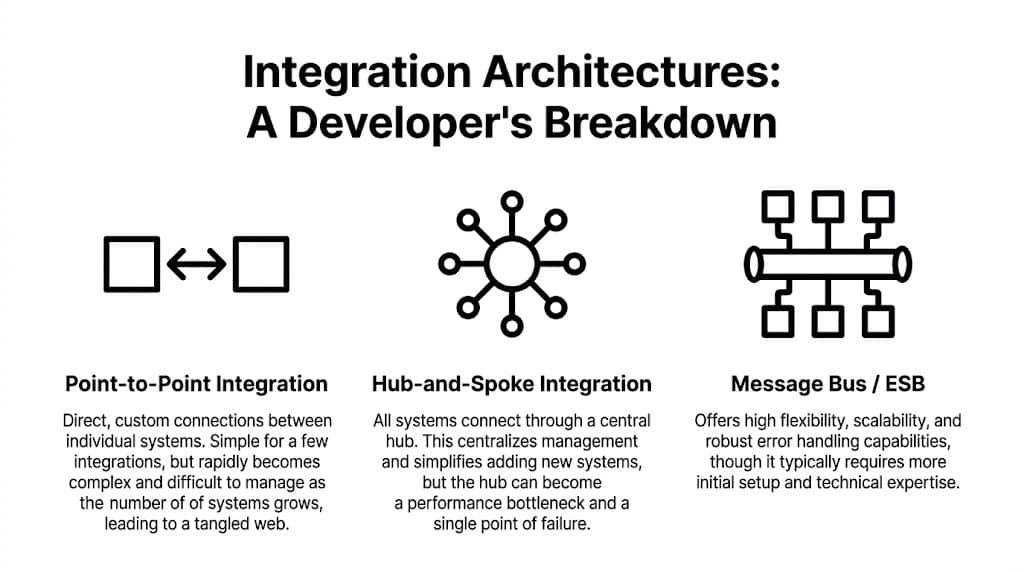
Choosing Your Integration Architecture A Developer's Breakdown
Architecture choice determines whether your integration layer becomes an asset or a drag on the roadmap. The wrong choice usually looks fine in the first release and painful a year later.
The urgency here is clear. 67% of retailers cite integration as their main technology focus for the next two years, and organizations with integrated systems can grow up to 5X faster according to Diginyze’s summary of ecommerce integration trends. That pressure reaches SaaS vendors directly, because your customers expect your software to fit into their existing stack.
Point-to-point connections
This is the most familiar pattern. Your app connects directly to Shopify. Then Magento. Then WooCommerce. Then Amazon. Each connector has custom logic.
It works when:
- you support only a few platforms,
- your customer base is narrow,
- and the feature surface is small.
It breaks when each connector starts drifting. Every new platform adds another auth path, rate-limit strategy, webhook implementation, and object translation layer. The codebase becomes a patchwork of exceptions.
ETL pipelines
ETL is useful when your main job is extracting, transforming, and loading data into a warehouse, analytics layer, or central catalog. It’s especially good for reporting, customer segmentation, operational dashboards, and product normalization.
But ETL alone doesn’t solve transactional interaction well. If your product needs to push updates back, react to near-real-time events, or manage write operations into multiple commerce systems, ETL needs help from other components.
Middleware and hub patterns
Middleware centralizes orchestration. Instead of dozens of direct links, systems connect through a hub, orchestration layer, or service bus. This usually improves observability and standardization.
The trade-off is operational complexity. You gain control, but you also own more infrastructure. A central hub can become a bottleneck if queues back up, transformations get expensive, or one service failure cascades outward.
Unified API model
This model abstracts many commerce platforms behind one contract. Your team integrates once against a common schema and method set, while the provider handles platform-specific differences underneath.
That doesn’t remove all complexity. You still need mapping rules, state ownership, retry logic, and product-level decisions. But it changes where complexity lives. Your team focuses on product workflows instead of platform-by-platform plumbing.
A related design choice comes up in transport and querying style. Teams comparing endpoint patterns often weigh REST API vs GraphQL based on payload efficiency, query flexibility, and implementation simplicity. That matters, but the larger architectural question is whether you want to manage dozens of commerce contracts yourself.
Comparison of Integration Architectures
| Architecture | Development Time | Maintenance Burden | Scalability | Best For |
|---|---|---|---|---|
| Point-to-point | Fast at the start | High after a few connectors | Weak when platform count grows | Early-stage apps with narrow platform scope |
| ETL pipelines | Moderate | Moderate | Good for data processing workloads | Analytics, reporting, catalog consolidation |
| Middleware | Longer upfront | Moderate to high | Strong if operated well | Enterprises with internal integration teams |
| Unified API | Faster than building many custom connectors | Lower platform-specific burden | Strong for multi-platform SaaS products | B2B SaaS vendors needing broad commerce coverage |
A good architecture reduces repeated decisions. A bad one forces the team to rediscover the same failure modes in every connector.
What are the Pitfalls of eCommerce Integration?
You also must be mindful of the integration challenges that can occur.
1. Firstly, on average, integration development takes 4-12 weeks. That is the time when your developer will learn the platform logic and architecture, put effort into reducing the friction between the product and the system, and much more.
2. Secondly, be ready to pay a few thousand of dollars plus maybe extra if the need for additional development occurs. Once the integration is complete and successfully iterated, it will need developer work and attention because new versions will appear and this will mean upgrades to be made. Plus, your clients might request modifications and custom improvements.
3. In addition, each integration is both tons of work to do and a separate thorn in the side that never goes away after the work is done, that somebody has to handle. For better and more reliable results, you will want someone to be reliable and expert, and that is not easy to find and difficult to allocate if they are a part of your product team.
Data mapping turns into ongoing engineering work
One of the deepest problems is schema mismatch. Ecommerce platforms organize data around storefront logic and customer journeys. ERPs and manufacturing systems organize it around materials, processes, and operational constraints. Flxpoint’s explanation of ecommerce API integration challenges describes this clearly: without normalization into a single clean data structure, teams get cascading errors and heavy manual intervention.
That’s exactly what happens in real projects. A product option in one platform might be a variant matrix in another and a configurable assembly in an ERP. If you don’t define a canonical model early, every downstream sync has custom translation logic.
Real-time sync is rarely as clean as teams expect
Inventory and order status are where reliability problems show up first. The moment two systems disagree, users notice.
Common trouble spots include:
- Webhook gaps because some platforms deliver events late, duplicate them, or occasionally miss them.
- Polling windows that create race conditions when updates happen near boundary timestamps.
- Write conflicts when two systems both think they own the latest inventory or order status.
- Peak traffic behavior where retry storms amplify failures instead of recovering cleanly.
A lot of developers eventually need a hybrid strategy: webhooks where available, polling where necessary, and reconciliation jobs for when neither is enough.
Rate limits and volume ceilings are product concerns
Rate limits are often treated like implementation details. They’re not. They shape onboarding capacity, sync freshness, and customer segmentation.
A platform may look fine with a handful of stores and become painful when you scale to high-volume merchants. Developers building importers, inventory sync services, or reporting jobs need queueing, backoff, request prioritization, and selective fetch logic from day one. This guide on API rate limits in ecommerce integrations is worth reviewing before your team hardcodes assumptions into every connector.
If your sync design only works in test stores, you don’t have an integration architecture. You have a demo.
Your Developer Checklist for a Successful Integration Project
Most integration failures start before coding. They begin when the team skips scope discipline, canonical modeling, and operational planning.
Use this checklist before you commit to build or buy.
Scope the data before you scope the project
Start by defining exactly which objects you need and what actions matter.
- Pick entities first such as orders, products, customers, inventory, and shipments.
- Define direction for each entity. Read-only, write-only, bi-directional, event-driven, or scheduled sync.
- Set freshness expectations so everyone knows where real-time matters and where delay is acceptable.
If you skip this, the project balloons from “order import” into “full commerce synchronization” without anyone saying it out loud.
Design the canonical model early
Create one internal representation for each key object. Don’t let platform schemas leak into your core application.
That means documenting:
- required fields,
- optional fields,
- normalization rules,
- conflict behavior,
- and fallback logic when platforms don’t provide equivalent data.
Evaluate tools like an operator, not just a coder
Documentation quality matters. SDK quality matters. Changelog clarity matters. Support responsiveness matters even more once real merchants are involved.
For test planning and validation workflows, these SubmitMySaas insights on API tools are useful when deciding how your team will verify payloads, retries, and failure handling in practice.
Plan for failure as a first-class feature
Include these from the start:
- Retry logic with bounded backoff
- Idempotency controls for duplicate events and repeated writes
- Monitoring and alerting for sync lag, failed jobs, and auth issues
- Reconciliation jobs to repair state drift between systems
- Tenant isolation so one bad store connection doesn’t degrade the rest
Don’t ask whether failures will happen. Ask which failures you can absorb automatically and which ones need a human response.
Make the buy-versus-build call honestly
If integrations are your core product, deeper internal ownership may make sense. If integrations are an enabling layer for a broader SaaS product, buying abstraction is often the better engineering decision.
The key metric isn’t whether your team can build connectors. It’s whether maintaining them is the highest-value use of your roadmap.
Key Integration Questions Answered
How should teams compare custom integration cost against a subscription product?
Look at total engineering ownership, not just initial delivery. Connector development is only the start. The larger cost often comes from maintenance, platform changes, support load, and sync reliability work over time.
Are webhooks enough for ecommerce data integration?
Usually not by themselves. Shopify’s discussion of data integration challenges notes that webhook reliability is a hidden issue during peak periods, and developers often need backup polling logic. In practice, strong integrations use webhooks where they help and polling where they protect consistency.
What should security review focus on first?
Credential storage, tenant isolation, permission scope, auditability, and failure containment. Those are the areas that tend to become expensive later if the team treats them as cleanup work.
When does a unified API make the most sense?
When your product needs to support multiple commerce platforms without turning your roadmap into connector maintenance.
How to Easily Implement eCommerce Data Integration?
The best strategy for all integration issues would be to use a third-party option like API2Cart. It takes care of all implementations and allows B2B SaaS solution vendors to focus on other business needs.

The key benefit that API2Cart brings to B2B SaaS providers is connection to multiple shopping platforms using a single API. API2Cart is an excellent option for software vendors, such as shipping, order, inventory management systems, and many others. Above all, it allows SaaS software to get, add, update, delete and synchronize online merchant's data based on popular shopping platforms including WooCommerce, Magento, Shopify, OpenCart, and 80+ other platforms.
With API2Cart's completely integrated API, you as a SaaS solution vendor can eliminate almost all of the issues concerning shopping platform integration and save considerable amounts of money on building integration modules and on other expenses. As API2Cart makes it much easier to connect to common shopping platforms, your company doesn't need to set up separate integrations and you don't have to stress about any improvements and upkeep.
Moreover, API2Cart has plenty of pricing options and you can test the service free for 14 days.