At its core, POS integration is all about getting your point-of-sale system to talk to other business software. It creates a connected network where data can flow automatically between them, which means no more manual data entry. Everything from sales to inventory levels gets synced up, giving you a single, reliable source of truth for the entire business.
Why Seamless POS Integration Is Now Mission-Critical
If you're an integration developer, you've seen the shift firsthand. What used to be a "nice-to-have" feature—hooking a POS system into other apps—is now an absolute must-have for any retail or hospitality business that wants to stick around. The POS is no longer just a cash register sitting on the counter. It has become the central nervous system of the entire operation, capturing every sale, every inventory change, and every customer interaction.
But all that data is pretty useless if it's trapped. A standalone POS system is like a brain without any nerves connecting it to the rest of the body. It knows what’s happening at its own terminal, but it has no way to tell the warehouse management system (WMS), the accounting software, or the marketing platform what’s going on.
The Driving Forces Behind Integration Demand
This explosion in demand for POS integration isn't random. It’s being pushed by huge market trends that directly affect the software you build. Businesses are ditching their old, clunky hardware for flexible, cloud-based POS systems, and that has opened the floodgates for API-driven connections. You can get a closer look at this market shift and its implications for technology.
This is where you, the developer, come in. Your job is to build the digital bridges that turn all those isolated data points into a smart, unified commerce engine.
To meet this demand, it helps to understand the main business and technology trends pushing companies to invest in better POS integration.
Key Drivers of Modern POS Integration
| Business Driver | Technical Implication for Developers |
|---|---|
| Omnichannel Commerce | Build real-time data syncs between eCommerce platforms and brick-and-mortar POS systems for unified inventory and customer profiles. |
| Data-Driven Decisions | Create endpoints to pull and consolidate sales data from all channels into a single, actionable view for analytics and reporting. |
| Operational Efficiency | Develop automation workflows that eliminate manual data entry, reducing human error and freeing up staff for higher-value tasks. |
| Personalized Marketing | Integrate POS customer data with CRM and marketing automation tools to enable targeted campaigns and loyalty programs. |
Ultimately, these drivers point to one conclusion: your expertise in building these connections is what empowers businesses to thrive.
- Omnichannel Commerce: Customers expect a seamless experience. They want to buy online and pick up in-store, or return an online order at a physical shop. None of that is possible without real-time data flowing between the website and the in-store POS.
- Data-Driven Decision Making: Business owners need a clear, unified picture of how they're performing. A solid POS integration pulls sales data from every channel into one place, giving them accurate insights into what's selling, where, and to whom.
- Operational Efficiency: Manually keying in sales figures or updating stock levels is painfully slow and a recipe for disaster. Automating this through integration saves time, prevents overselling, and keeps inventory counts accurate across the board.
For any SaaS company, offering strong POS integration isn't just a feature—it's a major competitive advantage. It weaves your software directly into a retailer’s daily workflow, making your tool an essential part of their tech stack.
To get a feel for how these integrations work in the real world, it’s worth checking out a good guide to POS software integration. It really puts into perspective how critical these connections are for unified commerce.
Understanding Core POS Integration Architectures
For any developer working on a POS integration, picking the right architecture is the most important call you'll make. It’s the difference between building a solid, scalable bridge for data and getting tangled in a fragile web that’s a nightmare to maintain. Your choice here defines how data flows, how much time you'll spend on upkeep, and how fast you can connect to new POS systems down the road.
Let's walk through the common models, from the brittle, old-school connections to the smarter frameworks developers use today.
This map shows how a modern POS integration takes raw transaction data and turns it into real business intelligence.
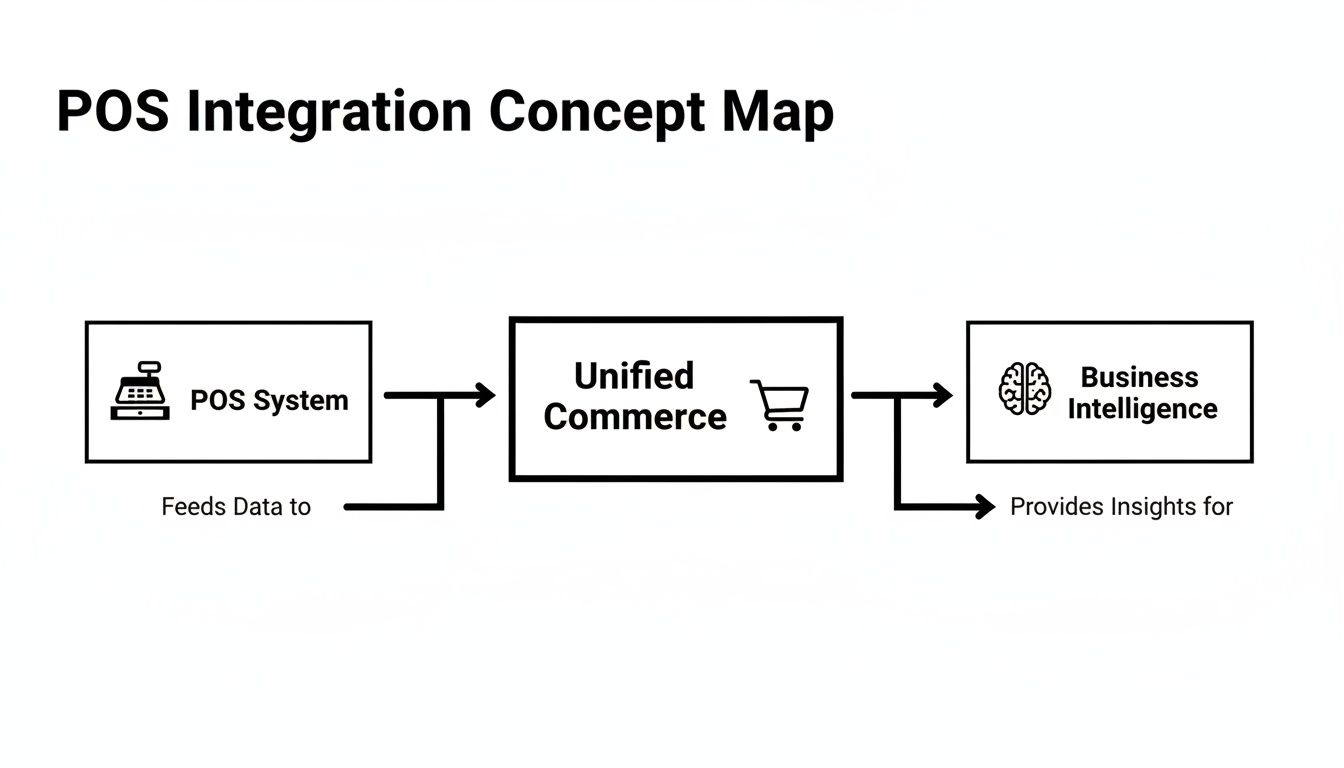
As you can see, the path is strategic: the POS captures the sale, the integration unifies the data, and the business uses that unified data to make smarter decisions.
The Point-to-Point Spaghetti Mess
The most basic method is point-to-point integration. With this model, you're stuck building a unique, custom connection for every single system that needs to talk to the POS. Want to connect your warehouse management system (WMS) to a Lightspeed POS? That’s one custom job. Now you need to connect that same WMS to a Square POS? That’s another completely separate integration you have to build from scratch.
It gets out of hand quickly. If you have five different software systems that each need to connect to five different POS platforms, you’re suddenly looking at 25 unique integrations to build, test, and maintain. Every single one has its own API logic, data mapping, and authentication rules.
This model isn't called "spaghetti integration" by accident. It creates a tangled, fragile mess of code that’s expensive to build, a headache to troubleshoot, and practically impossible to scale. When a single POS provider updates its API, you’re not just fixing one connection—you’re patching every single custom link tied to it.
The Hub-and-Spoke Improvement
A more organized strategy is the hub-and-spoke model. Here, you create a central "hub" where all your other systems—the "spokes"—connect. Instead of linking your WMS directly to five different POS systems, you connect it just once to your central hub. The hub then takes on the job of translating and sending data to each individual POS.
This is a big step up. It drastically cuts down on the number of direct connections your main application has to worry about. But, you're still on the hook for building and maintaining the entire hub yourself, which includes creating and updating all the spokes that plug into each unique POS API.
The Unified API: A Modern Solution
The modern, and much more efficient, evolution of this is the unified API. Think of it as a pre-built, professionally managed hub-and-spoke system that's ready to go. Instead of building the complex hub and all its spokes yourself, you plug into a third-party service like API2Cart that has already done all the heavy lifting.
With a unified API, your application makes a single API call to one endpoint, no matter which POS system is on the other end.
- To get orders: You use one standard method, like
order.list(). - To update inventory: You use one method, like
product.update(). - To add customers: You use a single call, like
customer.add().
API2Cart handles all the messy translation work behind the scenes, communicating with each specific POS system—whether it’s Clover, Square, or Lightspeed—in its own native language. This means your development team only has to code against a single, clean API. It completely removes the burden of building and maintaining dozens of unique POS integration connectors, letting you focus on your own product's features. This approach radically speeds up your integration roadmap, slashes technical debt, and turns scaling to new platforms into a simple configuration change instead of a months-long project.
Choosing Your Data Synchronization Strategy

After you've mapped out the architecture for your POS integration, the next big question is: how will the data actually move back and forth? This isn't a small detail; your choice here directly shapes your app's performance, how much you spend on servers, and its overall reliability.
For any developer, this comes down to a classic engineering trade-off between speed and efficiency. The two main ways to tackle this are with real-time updates using webhooks or scheduled check-ins through polling. Getting this right is key to building an integration that doesn't just work, but works well.
The Instant Gratification of Webhooks
Think of a webhook as a push notification for servers. Instead of your application constantly bugging a POS system with, “Anything new yet?”, the POS system proactively sends you a message the instant something happens. A cashier rings up a sale, and boom—the POS fires off a small data payload to a URL you've configured.
This real-time approach is a game-changer for anything time-sensitive.
- Order Fulfillment: An order placed in-store can instantly hit your warehouse management system (WMS), kicking off the pick-and-pack process before the customer even leaves.
- Customer Notifications: A new sale can immediately trigger a receipt sent by email or SMS.
- Loyalty Programs: That purchase just earned a customer 10 points? They can see it reflected in their account right away.
The major win here is immediacy. Your data is always fresh, which is the backbone of any true omnichannel experience. The catch? It all depends on the POS provider actually supporting webhooks, which isn't guaranteed. You also have to build a rock-solid endpoint that can gracefully handle data coming in 24/7, especially during massive sales events.
The Scheduled Check-In of Polling
Polling is the opposite approach. Here, your application is responsible for "checking in" with the POS API on a set schedule to ask for updates. It’s like hitting the refresh button on your inbox every five minutes. You might run a script that calls the orders.list() endpoint every few minutes to pull in any sales created since your last check.
Polling is the reliable workhorse of the integration world, especially when a POS system doesn't offer webhooks. It puts you in the driver's seat, giving you full control over the update frequency. This is a huge plus for managing your server load and making sure you don't blow through your API rate limits. Syncing nightly sales figures to an accounting platform, for instance, doesn't need to happen in real time—a scheduled job at the end of the day works perfectly.
But polling isn't without its own set of trade-offs. The data is only as fresh as your last poll, which introduces latency. If you poll too often, you can hammer both your server and the provider's API, leading to throttled connections or even a temporary block on your API key.
Webhooks vs Polling: A Developer's Decision Matrix
To build a truly effective POS integration, you must choose the right method for the right job. Often, the best solution involves a mix of both. This table breaks down the key factors to help you decide which approach fits your specific needs.
| Criterion | Webhooks (Real-Time) | Polling (Scheduled) |
|---|---|---|
| Data Freshness | Instant. Data is pushed as soon as an event occurs. | Delayed. Data is only as current as the last poll interval. |
| Server Load | Bursty. High traffic during peak times, but low otherwise. | Consistent and predictable, based on your polling frequency. |
| API Rate Limits | Minimal impact, as the POS initiates the call. | High risk. Frequent polling consumes your API call allowance quickly. |
| Implementation | Requires building a stable, public endpoint to receive data. | Simpler to set up initially, but requires careful scheduling logic. |
| Best Use Cases | Order fulfillment, inventory alerts, customer notifications. | Batch data processing, nightly reports, non-urgent data syncs. |
Ultimately, webhooks are superior for speed, while polling offers control and a fallback when real-time isn't an option. The most sophisticated integrations use webhooks for urgent tasks like order processing and polling for less critical, background jobs like end-of-day reporting.
How API2Cart Delivers the Best of Both Worlds
You shouldn't have to lock yourself into one strategy. A smart POS integration is flexible, using the best tool for each specific task. This is where a unified API like API2Cart gives developers a serious edge.
API2Cart is designed to support both synchronization strategies, allowing you to build the most efficient integration possible. It provides robust support for webhooks on all POS systems that offer them, giving you that crucial real-time capability.
For platforms that don’t have webhooks, API2Cart’s API methods are built for intelligent polling. You can use parameters like created_from or modify_from to request only the data that has changed since your last check. This drastically cuts down on redundant data transfer and keeps you safely within API rate limits. By handling the nitty-gritty of each sync method, API2Cart lets you focus on building great features, not wrestling with API mechanics. Learn more about how a unified POS integration API can accelerate your development.
How API2Cart Accelerates Your Integration Roadmap
For any developer, building a single POS integration is a serious project. Building dozens of them? That’s a massive undertaking that can freeze your product roadmap for months, if not years. Each POS system—from Square and Lightspeed to Clover—runs on its own unique API, with different authentication methods and data structures. This reality forces your engineering team to learn, build, and maintain a separate, fragile connection for every single platform.
This is where the idea of a unified API stops being a theory and becomes a practical, high-speed solution. Instead of tackling each POS integration as a one-off build, you can use a single, unified API to connect to all of them at once. API2Cart acts as a powerful development accelerator, letting you sidestep the complexity of individual APIs and get your features to market much faster.
Write Once, Connect to Many
The core value for a developer is beautifully simple: write your integration logic one time, then deploy it across a whole ecosystem of POS systems. Picture this: your Warehouse Management System (WMS) needs to pull in new orders. Without a unified API, you’d be writing custom code to handle the unique order formats from each and every POS. With API2Cart, you just use one standardized method.
This principle works across all the essential data you need:
- Order Management: Use a single API call to retrieve order details, customer information, and line items from any POS you’re connected to.
- Product Synchronization: Push product updates from your Product Information Management (PIM) system to multiple POS platforms at the same time, using just one set of code.
- Customer Data Sync: Pull customer profiles into your marketing automation tool to build unified segments, no matter where the customer originally made their purchase.
This approach completely changes the development game. Instead of sinking sprints into building yet another custom connector, your team can get back to improving your core application, confident that the integration piece is already handled.
The homepage for API2Cart shows exactly how this works, illustrating the value of connecting to multiple platforms through one API.
This visual gets right to the point of a unified API: your software connects once to API2Cart, which then manages all the individual connections to dozens of platforms on your behalf.
A Comprehensive Toolkit for Developers
Getting to market fast isn’t just about having a single API; it’s about the entire developer experience. API2Cart is designed to remove friction at every point in the development cycle. It starts with over 100+ API methods that cover every action you could possibly need to perform, from managing inventory levels to pulling specific transaction data.
Beyond the API methods, the platform gives you the tools you need to build quickly. This includes:
- SDKs: Ready-to-go Software Development Kits (SDKs) for popular languages like PHP, Python, and .NET.
- Detailed Documentation: Clear, thorough documentation packed with code samples to walk you through every endpoint and parameter.
- A Free Trial: A 14-day free trial that lets you connect to real stores and test out your integration logic before making any commitment.
By providing these resources, API2Cart lets you go from an idea to a working prototype in days, not months. You can validate your integration's functionality and prove its value to stakeholders fast, which takes a huge amount of risk out of the project.
The industry-wide shift to the cloud only makes this unified approach more powerful. Cloud platforms captured over 56% of POS software market revenue and are expected to grow even more. This move to cloud-based POS systems, which are naturally a better fit for API-driven architectures, makes it far easier for software vendors using unified solutions like API2Cart to sync data across many point-of-sale platforms at once. You can dive deeper into this trend by reading the full research on the POS software market from Mordor Intelligence. Ultimately, this trend means a single, modern integration strategy can give you coverage across the majority of the market.
Common Pitfalls in POS Integration and How to Avoid Them
Diving into a POS integration project can feel a lot like walking through a minefield. The path is full of hidden traps that can blow up your timeline, corrupt your data, and drag you into weeks of debugging. For developers, knowing where those traps are is half the battle.
A great integration isn’t just about code that works on launch day. It’s about building a resilient connection that can handle the messy reality of retail—from flash sales to inventory mistakes—without falling apart. Knowing the common failure points ahead of time is your best defense.
Underestimating Data Mapping Complexity
One of the biggest and most common mistakes is assuming data from one system will slide neatly into another. It never does. A "product" in a Lightspeed POS has a totally different structure than a "product" in an ERP. One system might use “SKU,” while another uses “item_code.” Variant handling, custom attributes, and bundled items only add to the chaos.
Just connecting the APIs is the easy part. The real work is in the data transformation layer—the engine that translates and maps fields from System A to System B. Skimping on this step leads to a chain reaction of problems:
- Corrupted Data: A badly mapped field can overwrite good data with junk, creating massive headaches for inventory and accounting teams.
- Failed Syncs: Mismatched data types—like sending a text string where a number is expected—will cause API requests to fail over and over again.
- Incomplete Information: Important details like custom order notes or gift messages can get lost in translation if they aren’t mapped explicitly.
The fix? Create a detailed mapping document before you write a single line of integration code. Define every field, its source, its destination, and all the transformation rules it needs to follow.
Ignoring API Rate Limits and Throttling
Every POS API has rate limits—a cap on how many API calls you can make in a certain timeframe. Ignoring them is a rookie mistake that will get your access shut down fast. A sudden burst of activity, like syncing a massive product catalog or a flash sale that brings in hundreds of orders per minute, can push you over the limit in seconds.
Once that happens, the API starts throwing 429 Too Many Requests errors, and your integration grinds to a halt.
Think of API rate limits like a speed limit on a highway. You can drive fast for a bit, but if you consistently push the pedal to the floor, you'll get pulled over. A temporary block might last a few minutes, but repeated offenses can lead to your API key being permanently revoked.
The solution is to build your integration defensively from day one. Your code should automatically handle Retry-After headers, use bulk endpoints whenever they’re available, and implement an exponential backoff strategy for failed requests.
The Duplicate Data Disaster
Here’s a situation that gives developers nightmares: a customer places one order, but your system creates two. This disaster often happens when your integration logic isn't idempotent. An idempotent operation is one you can run multiple times without changing the result beyond the first successful run.
Picture this: a network glitch happens right after you send a "create order" request. You don't get a success response, so your system does what it's supposed to do—it retries. But if the first request actually went through, a non-idempotent system will create a second, duplicate order. This throws inventory, fulfillment, and accounting into complete chaos.
A unified API platform like API2Cart is designed to help you manage these challenges. It abstracts away the unique rate-limiting rules of over 60+ platforms and provides standardized data models, which dramatically simplifies the data mapping process. This built-in management layer lets developers focus on building features, not on troubleshooting obscure API quirks or writing complex error-handling from scratch for every single connection.
Building Your First POS Integration: A Step-by-Step Plan
Alright, we’ve covered the theory. Now, let’s get practical and turn all those concepts into a concrete, actionable roadmap. Whether you're a developer mapping out sprints or a product manager defining the next big feature, this plan will guide you from a simple idea to a successful launch.
Think of this as your project outline for building a robust and valuable POS integration.

Follow these steps, and you’ll be on the right track to building an integration that actually works in the real world.
1. Define Your Integration Scope
Before a single line of code gets written, you have to be crystal clear on what this integration needs to accomplish. What data is absolutely essential for your software to deliver its core value? Resisting scope creep starts right here.
Focus on the non-negotiables first:
- Orders: Do you need to pull full order details, including line items and customer info attached to the sale?
- Inventory: Is real-time stock synchronization a must-have feature for your users?
- Customers: Will you need to create or update customer profiles between the POS and your app?
- Products: Does your software need to push new products to the POS, or just pull catalog data?
Nailing down these primary data flows is the bedrock of your entire project. Get this wrong, and you'll be building on a shaky foundation.
2. Choose Your Architecture
This is a major fork in the road. Are you going to build and maintain dozens of individual, point-to-point connections? That path often leads to a tangled mess of technical debt that becomes a nightmare to manage.
The alternative is to opt for the efficiency of a unified API solution.
For most SaaS businesses, the choice is pretty clear. The in-house approach is painfully slow and resource-heavy. A unified API like API2Cart, on the other hand, dramatically cuts down development time and slashes long-term maintenance costs.
By tapping into a pre-built integration infrastructure, you can skip months of tedious development work and get straight to delivering value to your users.
3. Design Data Flows and Prototype
With your scope and architecture decided, it's time to get into the logic. Map out exactly how data will move between the POS system and your application. Just as important, plan for what happens when things go wrong—because they will. Robust error handling is not optional.
Don't just stay on the whiteboard, though. Start building a proof of concept.
This is where a service like API2Cart can give you a massive head start. You can fire up a free trial and use the documentation and SDKs to build a working prototype in days, not months. This lets you:
- Validate your idea using real data from an actual POS system.
- Test the specific API methods you'll need, like pulling orders or updating inventory.
- Show, not just tell, the value of the integration to stakeholders with a functional model.
4. Test, Deploy, and Monitor
Once your prototype proves the concept, it’s time for rigorous testing. You need to hammer it with real-world scenarios. Simulate high-volume sales days, network failures, and messy data to make sure your integration is resilient enough for production. Only after it passes these stress tests should you move to deployment.
But your job isn’t done at launch. Far from it.
You need to set up comprehensive monitoring to keep an eye on API performance, error rates, and data sync latency. This proactive approach helps you spot and fix issues before they blow up and start affecting your customers.
For example, if you’re tackling a specific system, knowing the implementation details is key. For a Lightspeed POS integration, our guide can help you navigate those specifics. Following a clear roadmap de-risks the entire process, especially when a specialized platform is handling all the underlying complexity for you.
Developer FAQ for POS Integration
If you’re a developer or product manager tasked with building a POS integration, you’ve probably run into a few recurring questions. Let's walk through some of the most common ones we see pop up during the planning and development phases.
What Is the Biggest Challenge of Building POS Integrations In-House?
Hands down, the single biggest obstacle is the sheer diversity of POS systems out there. Every platform has its own API, data schema, authentication process, and rate-limiting rules. Building—and more importantly, maintaining—dozens of separate connections quickly becomes a massive and continuous drain on your engineering resources.
It's a constant battle. When a POS provider decides to update their API, your integration breaks, and your team has to drop everything to put out the fire. This is exactly why unified APIs like API2Cart are so effective. They handle all that complexity behind the scenes, letting you write your code once and connect to a whole ecosystem of systems.
How Should I Handle Data Mismatches Between Systems?
You can’t get around data mapping and transformation; they are non-negotiable. You’ll need to build a "translation layer" that maps fields from the source POS (like product_sku) to the corresponding fields in your target system, whether it’s an ERP or WMS (which might use item_code). Your integration logic has to be smart enough to handle different data formats for things like dates or currency precision.
A critical best practice here is to establish a single "source of truth" for essential data like inventory. This prevents the nightmare of synchronization conflicts. A robust integration platform like API2Cart dramatically simplifies this by providing standardized data structures, which cuts down development time and slashes the potential for errors.
When developers are tackling POS integrations with popular eCommerce platforms, specialized needs often arise, and sometimes the best move is to bring in outside help and hire Shopify developers to get the job done right.
Can a Unified API Handle Custom Data Fields?
This capability really depends on the unified API provider you choose. More advanced platforms like API2Cart are built specifically to handle this common requirement. They give you access to non-standard data through flexible metafields or custom_fields objects, which are attached to primary records like orders, products, or customers.
When you're evaluating a unified API for your POS integration project, always dig into their documentation or ask their support team how they manage custom data. For many specialized SaaS applications that need to store unique information, this is a make-or-break feature. API2Cart ensures you can access this data without having to build one-off workarounds for each POS system.
Ready to accelerate your POS integration roadmap and connect to over 60 platforms at once? Explore the unified API from API2Cart and see how our developer-friendly tools can help you launch faster. Start your free 14-day trial today.