
In a world where every business runs on specialized software, SaaS integration has shifted from a "nice-to-have" technical task to an absolute business necessity. For a developer, it’s the art of getting separate software applications to talk to each other, breaking down data silos and creating a single, efficient system. For B2B eCommerce software providers, this isn't just about tidying up a tech stack—it's about turning application chaos into a serious competitive advantage and accelerating your product roadmap.
Why SaaS Integration Is No Longer Optional
The modern business relies on a dizzying array of software tools. Think of a brilliant team where every member is an expert, but each speaks a different language. That's a business without integration. Critical information gets trapped inside individual apps, forcing teams into mind-numbing manual data entry, duplicated work, and costly mistakes.
A solid SaaS integration strategy acts as the universal translator, creating seamless communication and automating workflows between all your tools. For integration developers, this creates a new reality: building and maintaining connections to a constantly growing list of platforms is now a core part of the job. It’s less about just writing code and more about strategically positioning your software to win in a connected ecosystem.
The Unavoidable Rise of Application Networks
The explosive growth of the Software-as-a-Service market is fueling an unprecedented demand for integrations. The global SaaS market is on track to jump from $315.68 billion in 2025 to $375.57 billion in 2026, driven by an economy that depends on interconnected digital tools.
This boom means the average enterprise is juggling 291 SaaS apps, yet a staggering 71% of them don't talk to each other, creating massive data silos that kill efficiency. You can find more details on this growth at Fortune Business Insights. For B2B eCommerce software developers, this integration gap isn't a problem—it's a goldmine of opportunity.
This trend sends a clear message: for your software to stay competitive, it must do more than its core job well. It has to play nicely with all the other tools your customers already use. Standalone applications are quickly going extinct.
From Technical Task to Strategic Imperative
Integration is no longer just another feature on a product checklist; it's the very foundation of a modern, scalable software product. Businesses are actively looking for solutions that centralize their operations, and they will always choose the software that connects best with their existing tech stack.
This shift has a direct impact on developers in a few critical ways:
- Customer Demands: Potential clients don't just ask if you integrate; they expect your application to connect with their CRM, ERP, shipping software, and multiple eCommerce platforms right out of the box.
- Competitive Landscape: If your competitor integrates with a key platform that you don't, you're already behind. Every new integration you offer is another reason for a customer to choose you.
- Product Innovation: A smart integration strategy frees up your development team to focus on building core, value-adding features instead of burning countless hours on API maintenance and fixing broken connections.
For a deeper look at the basics, you can check out our guide on what SaaS integration is and how it works. This guide, however, is all about showing you how to tackle it strategically as a developer.
Exploring Core SaaS Integration Architectures
To get software systems talking to each other effectively, you first have to pick the right architectural pattern. A solid SaaS integration strategy isn't just about writing code; it's about understanding how applications communicate and the trade-offs each method brings in speed, cost, and complexity.
Think of it like building a transportation network. You could build a direct, private road between two towns, or you could design a central highway system that connects all towns efficiently. Both get the job done, but the right choice depends entirely on your goals.
Point-to-Point Connections: The Direct Route
The simplest integration pattern is the point-to-point connection. This is a direct, custom-built link between two apps designed for a single purpose. For instance, you might code a direct connection to push new order data from a Shopify store to a specific shipping app.
While this is straightforward for one or two connections, the approach breaks down at scale. Every new app needs another custom-built link, creating what developers call "spaghetti architecture"—a tangled, brittle mess of integrations that are a nightmare to maintain and troubleshoot. It’s like building a separate, unique road for every single house-to-house trip in a city.
This decision tree shows the path from application chaos to a structured, strategic integration approach.
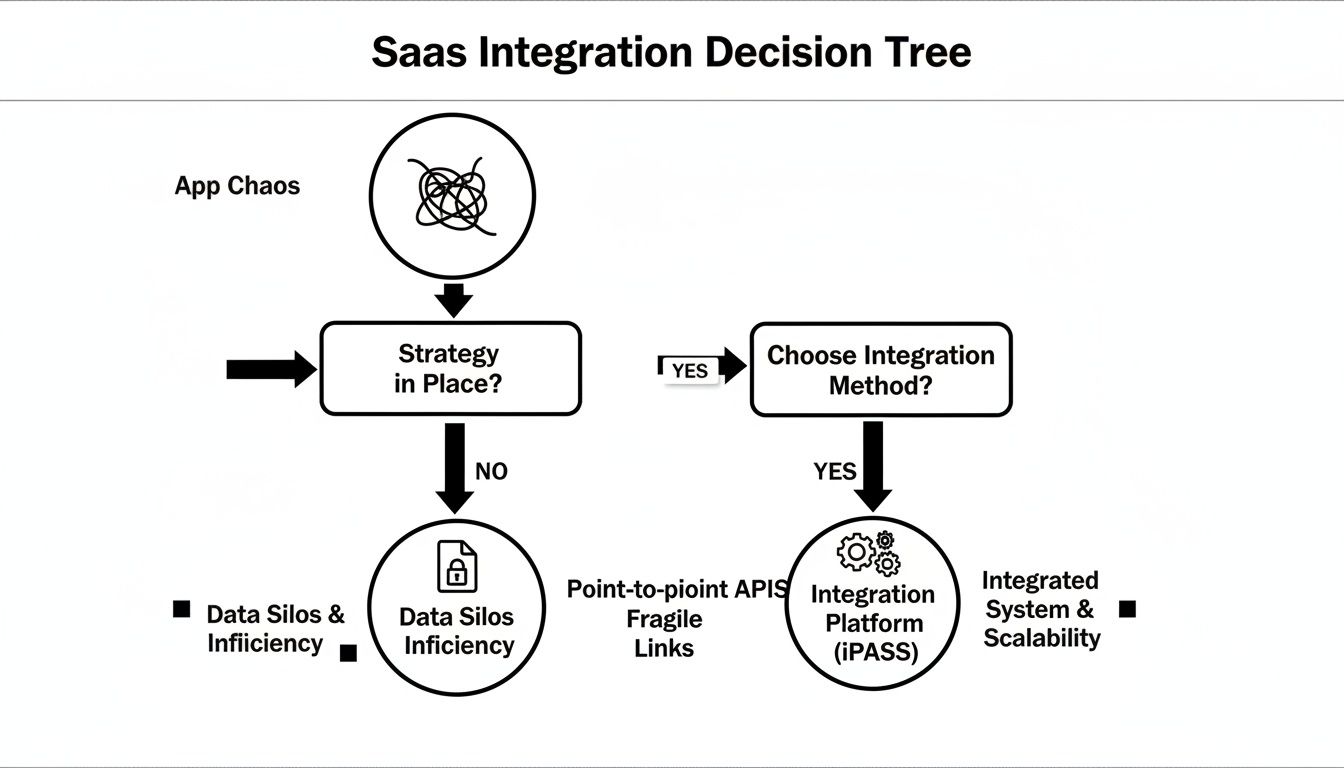
As the visual makes clear, avoiding integration leads to siloed data. Embracing it, on the other hand, opens the door to a far more efficient and interconnected system.
Middleware: The Central Hub
Middleware functions as a central hub or translator between multiple applications. Instead of connecting every app directly to every other app, each application connects just once—to the middleware platform. This hub then handles all the data flow, transformation, and routing between every connected system.
This "hub-and-spoke" model is significantly more scalable and manageable than point-to-point integrations. Adding a new app means building just one new connection to the hub, not dozens of new direct links.
For developers, middleware abstracts away a ton of complexity. You connect to one standardized system, and it takes care of the unique quirks of each application's API on the back end.
Webhooks vs. Polling: Getting Data Updates
A critical part of any SaaS integration is figuring out how to get timely data updates. There are two main ways to do this:
- Polling: Your application periodically "polls" or asks another application's API if there's any new data. For example, it might ask every five minutes, "Any new orders yet?" While reliable, polling can be inefficient and generate a lot of unnecessary API traffic.
- Webhooks: Instead of asking for data, your application provides a URL where another system can push updates the moment they happen. When a new order is created, the source system instantly sends the data to your webhook URL. This is incredibly efficient and delivers real-time information.
Webhooks are generally the better choice for real-time needs, but not all platforms support them reliably for every data type. A truly robust integration often uses a hybrid approach, relying on webhooks when they're available and falling back to smart, filtered polling when they're not.
SaaS Integration Patterns At a Glance
To help you decide which approach fits your project, here’s a quick comparison of the most common integration architectures.
| Pattern | Best For | Pros | Cons |
|---|---|---|---|
| Point-to-Point | Simple, one-off connections between two systems. | Quick to implement for a single integration; low initial complexity. | Becomes unmanageable at scale ("spaghetti architecture"); brittle and hard to maintain. |
| Middleware | Connecting multiple applications in a scalable, manageable way. | Centralized management; easier to add/remove apps; reduces complexity. | Higher initial setup cost and complexity; potential single point of failure. |
| Webhooks | Real-time data synchronization and event-driven workflows. | Highly efficient; provides instant updates; low server load. | Not all APIs support them; requires a publicly accessible endpoint; can be hard to debug. |
| Polling | When webhooks aren't available or for non-critical data syncs. | Simple to implement; reliable and predictable data fetching. | Inefficient; can create high API call volume; data is not real-time. |
Ultimately, choosing the right pattern depends on balancing your immediate needs with your long-term scalability goals.
The Build Vs. Buy Decision For API Connectors
Every SaaS development team eventually hits this fork in the road: do we build our API connectors from scratch, or do we buy a ready-made solution? This isn’t just a tech question—it’s a major business decision that will shape your budget, your product roadmap, and your ability to keep up with the competition.
Making the right call means taking a hard, honest look at your team's bandwidth and what your company really does best.
At first glance, the "build" route looks appealing. It promises you complete control. You can shape every single connection to fit your exact needs. For one simple, straightforward integration, this path can even feel pretty efficient. But that initial feeling of simplicity is often a trap.
The true cost of building an integration isn't found in that first sprint; it's buried in the never-ending maintenance that comes after.
The Hidden Costs Of Building In-House
When you build your own API connectors, you're signing your engineering team up for a lifetime of support tickets and bug fixes. Every shopping cart and marketplace has its own API quirks, authentication protocols, and data structures. That complexity doesn't just add up—it multiplies with every new platform you support.
Just think about the ongoing jobs your team suddenly owns:
- Constant Monitoring: You are now solely responsible for the uptime and performance of every single connection you build.
- API Versioning: When a platform like Shopify pushes a major API update, your team has to drop everything to rewrite, test, and deploy a fix. This happens all the time.
- Security Overhead: Your engineers are now on the hook for managing API tokens, handling data encryption, and patching security holes across dozens of different systems.
- Error Handling: Building reliable error handling and smart retry logic for countless different APIs is a huge, thankless job.
All this extra work quietly eats away at your most precious resource: developer time. Before you know it, your best engineers are spending their days as full-time API mechanics instead of building the features your customers actually pay for.
The Strategic Argument For Buying A Solution
The "buy" decision treats SaaS integration less like a construction project and more like a utility. It's like deciding whether to build your own power plant or just plug into the grid. By using a unified API, you effectively outsource all the messy, repetitive work of building and maintaining individual connectors. When making this decision, considering existing platforms can save valuable development time. For instance, teams can use solutions like Zapier Integration for specific workflow automations.
A unified API platform acts as a universal adapter, giving you a single, consistent API to talk to dozens of different platforms. This opens up some serious strategic advantages.
A unified API platform allows you to immediately access a wide market of potential customers without the upfront investment and ongoing maintenance costs of building connections one by one.
This is exactly where a service like API2Cart becomes a game-changer for an integration developer. Instead of burning months of dev time to build just one connector, your team can integrate with over 60 eCommerce platforms through a single API. You can get a clearer picture of how this works by exploring how an API integration platform operates.
It lets your business slash its time-to-market, dramatically cut engineering overhead, and free up your developers to focus on building features that make your product stand out.
How API2Cart Accelerates eCommerce Integrations
Let's be honest: building custom integrations is a massive resource drain. While it's technically possible, the time and effort your developers spend wrestling with dozens of different APIs is time they aren't spending on your core product. That’s where a unified API solution comes into play for the savvy integration developer.
API2Cart is built specifically for B2B SaaS companies that serve the eCommerce space. It completely handles the messy, complex work of connecting to over 60 different shopping carts and marketplaces.
Instead of writing custom code for Shopify, then more for WooCommerce, and yet another set for Amazon, your team uses a single, standardized API for all of them. The explosion of SaaS apps means enterprises are now juggling hundreds of tools, and for B2B vendors, this integration chaos is a huge roadblock. Connecting to platforms like eBay and Walmart requires an endless cycle of custom development and maintenance.
From Months to Weeks: Use Cases for Developers
Think of API2Cart as a universal translator for all your SaaS integration needs. It provides over 100 unified API methods to pull, add, update, and manage essential store data across all supported platforms. This allows developers to stop patching broken connections and get back to building features.
Here are some real-world use cases for integration developers:
- Order Management Systems: Instead of writing unique code for each platform, a single
order.listmethod fetches all order data from every connected store. This dramatically speeds up development time for features like order syncing and fulfillment processing. - Shipping Software: Update tracking info across all sales channels with one
order.shipment.addcall. This eliminates the complexity of handling different API endpoints and data structures for platforms like Magento, Shopify, and BigCommerce. - Inventory Management Tools: Use methods like
product.updateto sync stock levels in real-time across multiple platforms. This is critical for preventing overselling and removes the painful task of building separate logic for each cart's inventory system.
This unified model simplifies your entire development process. If you want to see a concrete example, a guide on setting up a seamless WooCommerce QuickBooks integration perfectly illustrates how this approach streamlines accounting workflows.
The image below shows how a unified API acts as a central hub, connecting your software to all the different eCommerce platforms without the point-to-point chaos.
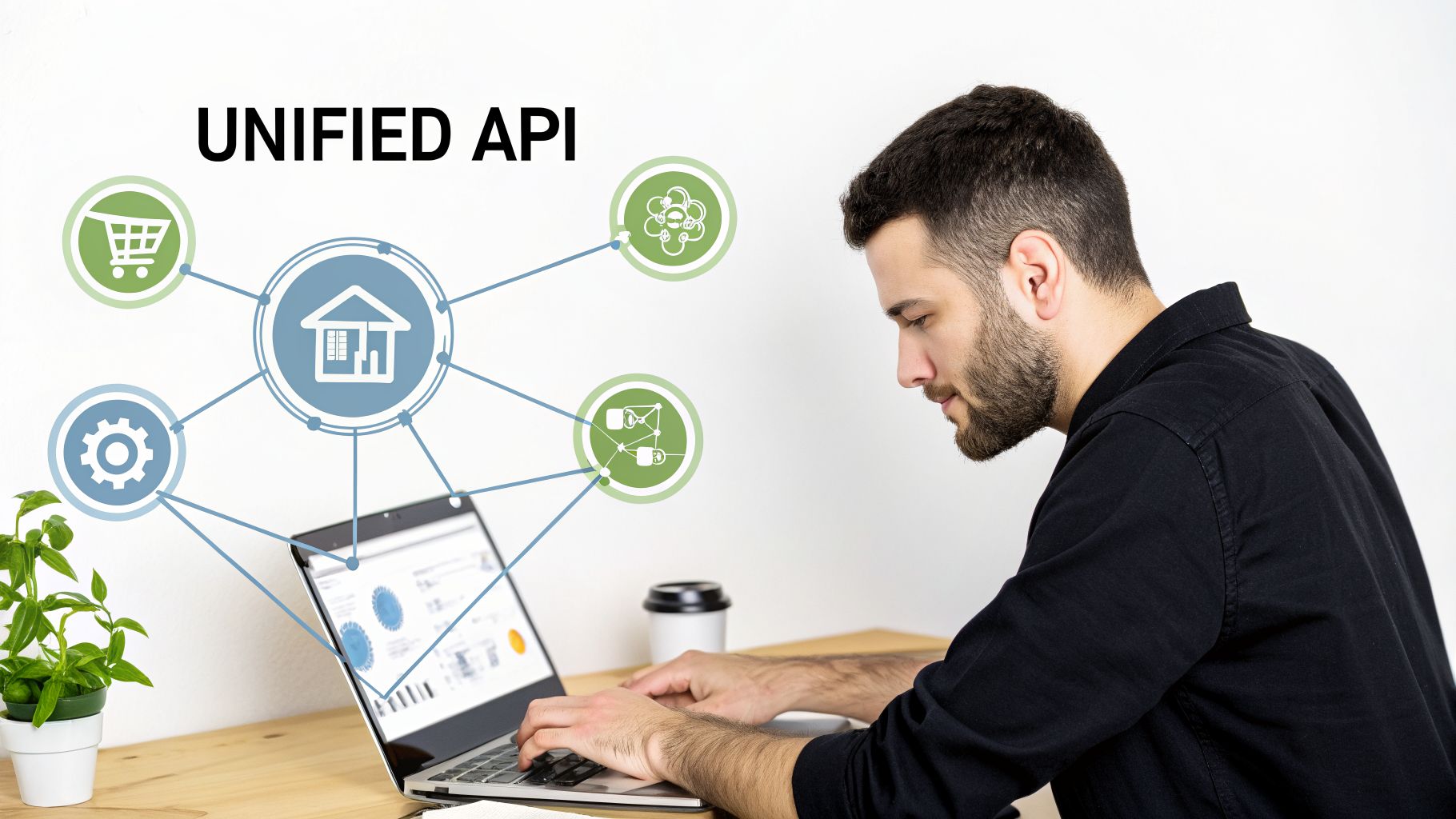
This architecture is simply more scalable and way easier to maintain than trying to manage a web of individual connections.
Developer-Centric Tools and Features
API2Cart was built with developers in mind. The goal is to provide everything an integration developer needs to build robust integrations quickly and painlessly.
By handling all the unique quirks of each platform's API behind the scenes, API2Cart lets your team tap into a market of over one million online merchants without the massive upfront engineering cost.
You’ll find a number of key features designed to speed things up:
- Comprehensive SDKs: We provide ready-to-use SDKs for PHP, Python, .NET, and NodeJS to help you get started in minutes.
- Webhooks for Real-Time Data: Get instant notifications for events like new orders or product updates. This is crucial for enabling real-time data sync without constant polling.
- Extensive Documentation: Our docs are clear and detailed, and our support team is always ready to help you work through any issues and build faster.
Ultimately, choosing a unified API like API2Cart is a strategic move. It gets your team out of the weeds of integration maintenance and back to innovating on your product—giving you a real advantage in a crowded eCommerce software market.
Implementing Secure And Scalable Integrations
Once you move past basic functionality, you’ll find that powerful integrations demand two things above all else: robust security and massive scalability. For developers building enterprise-grade connections, this isn't optional. Your customers need to trust that your software is reliable, secure, and ready to grow with them.
The reality is that modern SaaS integration patterns are tearing down traditional security perimeters. This puts the entire software supply chain at risk. Attackers are now actively targeting these trusted connections to steal data, making security a non-negotiable part of your development process.
Building A Foundation Of Trust
Security isn't just another feature on a checklist; it's a fundamental promise you make to your customers that their data is safe. Any serious SaaS integration project has to be built on this foundation.
Key security practices include:
- Secure API Key and Token Management: Attackers go straight for OAuth tokens and API keys. They must be stored securely, always transmitted over encrypted channels, and have their permissions (scopes) locked down to the bare minimum necessary.
- Data Encryption: All data absolutely must be encrypted. That means in transit using TLS 1.2+ and at rest using strong algorithms like AES-256. If data is ever intercepted, it has to be unreadable.
- Compliance and Governance: Adhering to regulations like GDPR and CCPA is mandatory, not optional. A proper OAuth 2.0 implementation is critical for managing user consent and ensuring you handle data according to the law.
A recent open letter from JPMorgan Chase's CISO flagged a critical vulnerability: if not secured properly, modern integration models can give attackers unprecedented access to confidential data by collapsing authentication and authorization into overly simplified interactions.
Designing Integrations That Scale
A SaaS integration that works perfectly for ten customers might fall apart completely when you hit one thousand. Scalability can't be an afterthought; it has to be baked into the design from day one.
Successful scaling strategies are all about efficiency and resilience. This means designing for high-volume data synchronization and building smart error handling from the start. For more detailed guidance, check out our article on SaaS integration best practices.
Here are some essential scalability tactics for developers:
- Smart Rate Limiting: You have to respect the API rate limits of every platform you connect to. Implement exponential backoff strategies to gracefully handle "429 Too Many Requests" errors and avoid getting your IP blocked.
- Graceful Error Handling: Your code has to anticipate failure. From temporary network hiccups to unexpected API changes, you need robust retry logic to protect data integrity and keep the system stable.
- Performance Monitoring: Keep a close watch on your API response times, error rates, and data throughput. Proactive monitoring helps you spot and fix bottlenecks before they ever become a problem for your customers.
What Is The Future Of SaaS Integration
The future of SaaS integration is being completely reshaped by one thing: artificial intelligence. AI isn't some far-off idea anymore; it's the engine behind modern software innovation, and that engine runs on data. The clean, connected data flowing from integrated SaaS tools is exactly what AI needs to power the next generation of intelligent features.
Without a solid integration game plan, you're stuck on the sidelines. The quality of your AI-driven features is a direct reflection of the quality and speed of the data you can feed them.
The Rise of AI-Powered Functionality
Just think about the incredible features that become possible when an AI can tap into unified data from a merchant's entire eCommerce operation. We're not just talking about basic automation here. We're talking about building genuinely intelligent systems.
- Predictive Analytics for Inventory: An AI can chew on historical sales data from multiple platforms, accurately forecast future demand, and suggest reorder points to kill stockouts before they happen.
- Intelligent Pricing Engines: By pulling in real-time competitor pricing and sales velocity, an AI can adjust prices on the fly to protect and maximize profit margins.
- Automated Customer Support: AI-powered chatbots can instantly access order histories and shipping statuses to give customers immediate, accurate answers without ever needing a human.
Every one of these features depends on a seamless flow of information between different apps. This is exactly why a robust SaaS integration foundation isn't just a technical nice-to-have—it's the launchpad for your company's future innovation.
The demand for real-time data from platforms like Shopify and Amazon is exploding, driven by the rapid adoption of AI. As the global AI SaaS market rockets toward a projected $775.44 billion by 2031, the integration gap becomes a critical barrier to progress. You can discover more insights about this trend and its impact on SaaS at BetterCloud.
Enabling The Next Generation Of Apps
As you start planning these next-gen features, your choice of integration tool becomes a make-or-break decision. You need a platform that's built for the speed and efficiency that AI requires. This is where a solution like API2Cart becomes so important.
With its support for webhooks that deliver instant data notifications and powerful filters to pull only the precise data you need, API2Cart is designed to be the data backbone for intelligent eCommerce apps. It delivers the clean, normalized, and real-time data that AI models thrive on, letting your developers build smarter, more competitive software without getting stuck in the weeds of API maintenance.
Frequently Asked Questions
Let's dig into some of the most common questions—and practical roadblocks—that trip up developers during SaaS integration projects.
What Is The Biggest Mistake Developers Make In SaaS Integration?
The single biggest mistake is underestimating the long-term maintenance. It’s easy to look at a single, point-to-point integration and think it’s straightforward. But once you have dozens of them, each with its own quirks and update cycles, your team’s time gets completely swallowed.
Instead of building core product features, developers end up playing a constant game of API whack-a-mole, fixing connections that break every time a platform pushes an update. This is exactly why a "buy" strategy using a unified API is often the smarter move for an integration developer. A solution like API2Cart takes on the burden of maintenance, security, and versioning for you, freeing your team to focus on innovation.
How Do I Handle Different Data Formats Between APIs?
This is a classic headache known as data mapping and transformation. Every single SaaS application has its own unique way of structuring data—what it considers an "order," how it defines a "product," and so on. Trying to manually write code to translate data between each system is not only tedious but also incredibly prone to errors.
This is where a unified API really shines for developers. A platform like API2Cart ingests data in all its various formats from over 60 different sources and presents it to your application in one clean, consistent structure. This alone can save your team hundreds of hours of custom coding and debugging.
Can I Use Webhooks For All Ecommerce Integrations?
In a perfect world, yes. Webhooks are fantastic for getting real-time data, which is ideal for any event-driven workflow. But we don't live in a perfect world. The reality is that not all eCommerce platforms have reliable or comprehensive webhook support for every single data type you might need.
Some platforms might not offer webhooks for inventory updates at all, while others might have webhooks that become unreliable under a heavy load. A resilient SaaS integration strategy almost always requires a hybrid approach. You use webhooks where they're dependable, but you also need efficient polling (requesting data at set intervals) as a fallback. A good integration layer like API2Cart supports both methods, giving you the tools to build a system that won't fail when one method does.
Ready to stop building and start scaling? With API2Cart, you can connect to over 60 eCommerce platforms through a single API, saving your team months of development time. Sign up for a free 14-day trial and see how easy it is to accelerate your integrations.