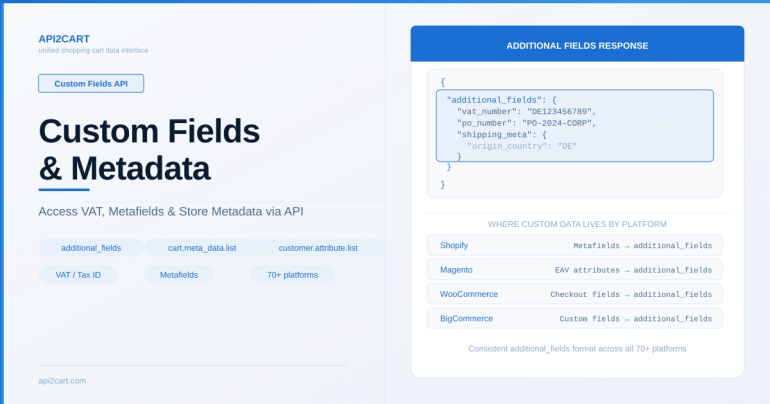
Summary: API2Cart provides access to custom fields and metadata through the additional_fields parameter on order and customer methods, cart.meta_data.list for store-level metadata, and customer.attribute.list for custom customer attributes. This covers VAT numbers, custom checkout fields, and platform-specific metafields.
eCommerce stores often contain custom data beyond the standard product, order, and customer fields. Tax identifiers, B2B company details, loyalty points, custom order notes — this metadata varies by platform and merchant configuration. API2Cart provides methods to access this additional data through a unified interface.
Accessing Order Metadata
Orders frequently contain custom fields set by plugins, checkout customizations, or platform-specific features. Use order.list or order.info with the params parameter to request additional fields:
GET https://api.api2cart.com/v1.1/order.info.json
?api_key=YOUR_KEY
&store_key=STORE_KEY
&order_id=12345
¶ms=id,status,totals,customer,shipping_address,billing_address,order_products,additional_fieldsThe additional_fields parameter returns platform-specific metadata that doesn't map to standard API2Cart fields, such as custom checkout fields, VAT numbers, or PO references.
Customer Attributes
Customer records can include custom attributes beyond name, email, and address. API2Cart provides:
customer.list/customer.info— retrieve customer data with standard and custom fieldscustomer.attribute.list— get available custom attributes defined in the storecustomer.group.list— retrieve customer groups (wholesale, VIP, B2B)
Customer groups are particularly important for B2B scenarios where pricing, tax rules, and payment terms differ by group.
Cart-Level Metadata
Store-wide configuration and metadata can be accessed through:
cart.meta_data.list— retrieve custom key-value pairs stored at the store levelcart.meta_data.set— write metadata to the store (useful for sync state tracking)cart.meta_data.unset— remove metadata entries
This is useful for storing integration state, last sync timestamps, or configuration flags directly on the store connection.
Tax and VAT Information
Tax data is available through several methods:
tax.class.list— retrieve tax classes configured in the storetax.class.info— get detailed tax rates, countries, and states for a class- Customer tax identifiers (VAT numbers) are typically found in customer address fields or additional_fields depending on the platform
Working with Additional Fields
The additional_fields approach in API2Cart is designed to surface data that is platform-specific without breaking the unified data model. Common examples:
- WooCommerce: Custom checkout fields from plugins like "Checkout Field Editor"
- Magento: EAV attributes on customers and orders
- Shopify: Metafields on orders and customers
- BigCommerce: Custom fields on products and orders
All of these are returned in a consistent format through the additional_fields parameter, so your application can parse them without platform-specific logic.
For details on available parameters, see the API2Cart documentation.
Frequently Asked Questions
How do I access Shopify metafields through API2Cart?
Use the additional_fields parameter when calling order.info or customer.info. Shopify metafields are returned alongside standard fields in a consistent format.
Can I write custom metadata to a store?
Yes. Use cart.meta_data.set to store key-value pairs at the store level. This is useful for saving sync state or configuration data.
Where is VAT/tax ID data stored?
Tax identifiers are typically found in customer address fields or in additional_fields on orders, depending on the platform. Use tax.class.list for store-level tax configuration.

Technical author at API2Cart focused on practical API integration, webhooks, store authentication, data synchronization and developer workflows.