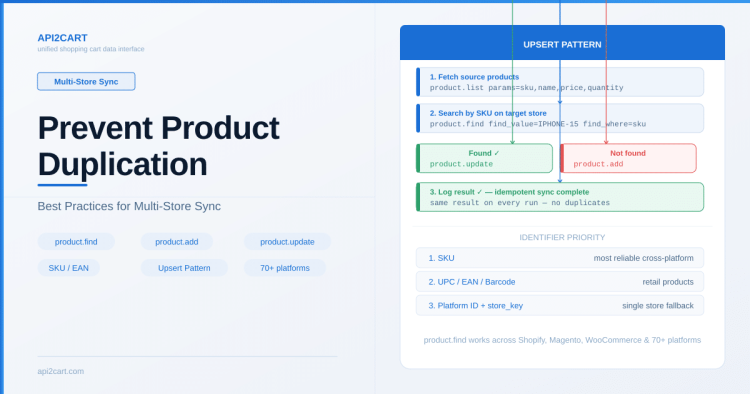
Summary: To prevent product duplication during multi-store sync, use API2Cart’s product.find method to check if a product exists by SKU before calling product.add. This upsert pattern works across all 70+ supported platforms.
When syncing product data across multiple eCommerce stores, one of the most common issues is creating duplicate records for the same physical item. This typically happens when integration logic doesn't properly identify whether a product already exists before adding it. Here's how to handle this correctly with API2Cart.
Why Duplicates Happen
Duplicates usually occur in these scenarios:
- Your sync runs again after a failure and re-creates products that were already added
- The same product exists on multiple channels with different internal IDs
- SKU fields are empty or inconsistently formatted across stores
Since each eCommerce platform assigns its own internal product ID, you cannot rely on platform IDs alone to match records across stores.
Using product.find to Check Before Adding
API2Cart provides the product.find method that lets you search for products by SKU, name, or other attributes across any connected store. The recommended approach before creating a new product:
- Call
product.findwith the product's SKU to check if it already exists - If found — use
product.updateto sync the latest data - If not found — use
product.addto create it
Example request to search by SKU:
GET https://api.api2cart.com/v1.1/product.find.json?api_key=YOUR_KEY&store_key=STORE_KEY&find_value=IPHONE-15-SILVER&find_where=skuThis works identically across Shopify, WooCommerce, Magento, BigCommerce, PrestaShop, and all other 70+ supported platforms.
Choosing the Right Identifier
For reliable deduplication, use this priority order:
- SKU — the most common cross-platform identifier. Works well when merchants maintain consistent SKUs
- UPC/EAN/Barcode — more reliable for retail products, available via
product.listwith additional fields - Platform ID + store_key — useful when mapping products within a single store connection
Handling Edge Cases
Some situations require extra care:
- Empty SKUs: Many merchants leave SKU blank, especially on Shopify. In this case, fall back to matching by product name + price combination, or require SKU as part of your onboarding
- Variants vs. parent products: Use
product.child_item.listto check variant-level SKUs separately from the parent product - Batch operations: When using
product.add.batchfor bulk imports, pre-filter your dataset against existing products usingproduct.listwith pagination
Using idempotency_key to Prevent Duplicate Operations
Beyond checking whether a product exists before adding it, API2Cart provides a built-in mechanism to prevent duplicate operations at the API level: the idempotency_key parameter.
The idempotency_key is a unique identifier you attach to any write request (product.add, product.update, product.add.batch, etc.). If API2Cart receives a repeated request with the same idempotency_key, it returns the cached response from the original request without executing the operation again.
How It Works
POST https://api.api2cart.com/v1.1/product.add.json
    ?api_key=YOUR_KEY
    &store_key=STORE_KEY
    &name=iPhone 15 Silver
    &model=IPHONE-15-SILVER
    &price=999
    &idempotency_key=098f6bcd4621d373cade4e832627b4f6
Key facts about idempotency_key:
- The cache lifetime is 15 minutes — repeated requests within this window return the cached result
- Use any unique string (UUID, hash of the product data, or a combination of SKU + timestamp)
- Available on all write methods:
product.add,product.update,product.add.batch,product.variant.add,order.shipment.add, and others - Protects against network retries, duplicate webhook triggers, or parallel sync workers hitting the same product
When to Use idempotency_key
- Retry logic: If your sync fails mid-way and you retry, the same
idempotency_keyensures already-completed operations are not repeated - Parallel processing: When multiple workers process the same queue, identical keys prevent double-writes
- Batch imports: Generate a deterministic key per product (e.g., MD5 of SKU + store_key) to make batch runs safe to re-execute
idempotency_key vs. product.find Check
These two approaches complement each other:
product.find— prevents duplicates when the product may have been created by a different system or a previous sync run (outside the 15-minute window)idempotency_key— prevents duplicates from the same request being sent multiple times within 15 minutes (retries, network issues, concurrent workers)
For maximum reliability, use both: check existence with product.find, and attach an idempotency_key to every product.add call.
Practical Sync Pattern
A reliable sync loop looks like this:
- Fetch all products from the source using
product.listwithparams=sku,name,price,quantity - For each product, call
product.findon the target store by SKU - If the product exists, compare fields and call
product.updateonly if data has changed - If the product doesn't exist, call
product.addwith the full product data and anidempotency_key - Log the operation for audit and retry on failures
This pattern ensures idempotent sync operations — running the same sync multiple times produces the same result without creating duplicates.
For more details on available product methods, see the API2Cart documentation.
Frequently Asked Questions
How do I check if a product already exists before adding it?
Use product.find with the SKU as the search value. If a result is returned, the product exists and you should use product.update instead of product.add.
What if the merchant doesn’t use SKUs?
Fall back to matching by product name combined with price, or require SKU as part of your onboarding. You can also use the platform’s internal product ID combined with the store_key for unique identification within a single connection.
Does API2Cart support upsert natively?
API2Cart provides product.find, product.add, and product.update as separate methods. You implement the upsert logic in your application by checking existence first, then choosing the appropriate action.

Technical author at API2Cart focused on practical API integration, webhooks, store authentication, data synchronization and developer workflows.