Summary: API2Cart's product variants API provides a unified model for all product types across platforms. This article gives a high-level overview of how different platforms structure products and variants, and links to detailed guides for implementation.
The Challenge: Every Platform Structures Products Differently
If you build a product sync, PIM, or listing tool, you quickly discover that every eCommerce platform has its own way of organizing products:
- Shopify — Products with up to 100 variants, defined by up to 3 options (Size, Color, Material)
- Magento — Simple, Configurable, Bundle, Grouped, Virtual, and Downloadable product types with EAV attributes
- WooCommerce — Simple, Variable, Grouped, and External products with global and per-product attributes
- BigCommerce — Products with options at the SKU level, modifier options, and variant rules
- PrestaShop — Products with combinations (attribute groups + attributes)
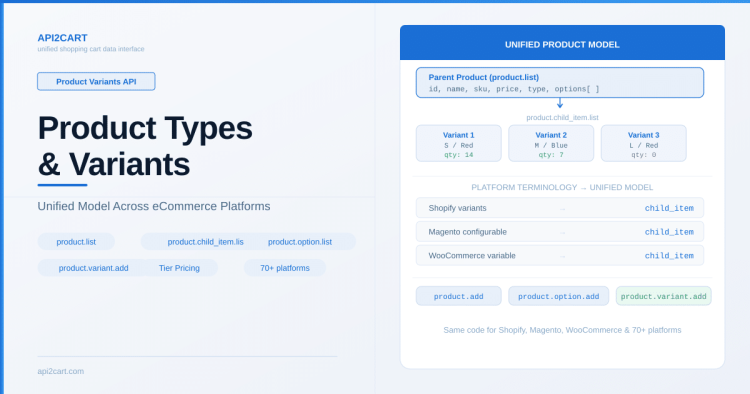
API2Cart normalizes all these structures into a consistent parent-product + child-items model that your application can work with uniformly.
API2Cart’s Unified Product Model
Regardless of the underlying platform, API2Cart represents products as:
- Parent product — the main item with name, description, base price, images, categories
- Child items (variants) — specific SKUs with their own price, quantity, and option combinations (e.g., Size: L + Color: Blue)
- Options — the configurable attributes that define variant combinations
This means Shopify "variants", Magento "configurable product children", WooCommerce "variations", and BigCommerce "SKU-level variants" are all accessed through the same set of methods.
Key Methods Overview
| Task | Method |
|---|---|
| List products | product.list |
| Get product details | product.info |
| List variants (child items) | product.child_item.list |
| Get variant details | product.child_item.info |
| List product options | product.option.list |
| Add a product | product.add |
| Add variants | product.variant.add |
| Add/manage options | product.option.add |
| Bulk product operations | product.add.batch, product.update.batch |
Detailed Implementation Guides
For step-by-step instructions on working with products and variants, see these documentation articles:
- Guideline on How to Work with Product Endpoints — covers creating, updating, and managing products across platforms
- How to Work with Product Attributes, Options, and Variants — detailed guide on configuring options, creating variants, and managing attribute values
Platform Comparison: What Gets Mapped Where
| API2Cart Concept | Shopify | Magento | WooCommerce | BigCommerce |
|---|---|---|---|---|
| Parent product | Product | Configurable Product | Variable Product | Product |
| Child item | Variant | Simple Product (child) | Variation | SKU/Variant |
| Option | Option (Size, Color) | Configurable Attribute | Attribute (for variations) | Product Option |
| Option value | Option value (S, M, L) | Attribute value | Term | Option value |
Practical Tips
- Always use
product.child_item.list(not the deprecatedproduct.variant.list) for retrieving variants - Use the
paramsparameter to request only the fields you need — this speeds up responses for large catalogs - When creating products with variants, the workflow is: create parent → add options → add option values → add variants
- For bulk operations, use
product.add.batchandproduct.variant.add.batchto process up to 250 items per request - Check platform API comparison to see which product parameters are supported on each platform
The product variants API works consistently across all 80+ supported platforms. For the complete parameter reference, see the API2Cart documentation.

Technical author at API2Cart focused on practical API integration, webhooks, store authentication, data synchronization and developer workflows.