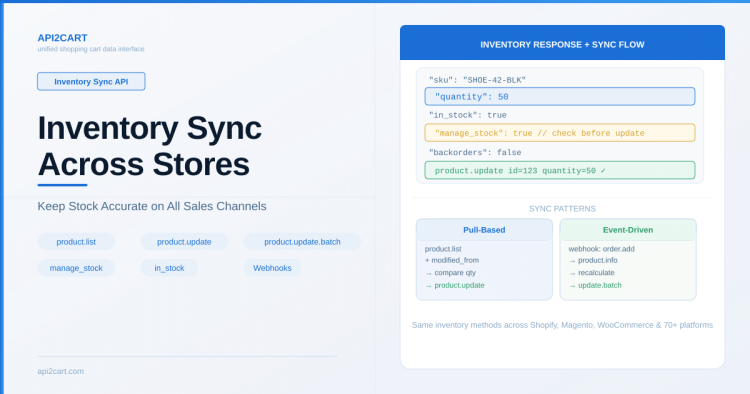
Summary: API2Cart's sync inventory API supports multi-location inventory (multi-stock) through the warehouse_id parameter and the inventory array on products. Use cart.info to retrieve warehouse configurations, product.list with inventory fields to get per-warehouse stock levels, and product.update with warehouse_id to update quantities at specific locations.
Why Use a Unified Sync Inventory API
A unified sync inventory API ensures your application uses the same code to manage stock whether the store runs Shopify, Magento, or WooCommerce — even when merchants operate multiple warehouses or fulfillment centers.
Multi-Location Inventory (Multi-Stock)
Modern eCommerce platforms increasingly support inventory tracked across multiple physical locations — warehouses, retail stores, dropship suppliers, or 3PL fulfillment centers. API2Cart provides a unified approach to multi-location stock management through the warehouse_id parameter available across product and order methods.
How Platforms Handle Multi-Stock
- Shopify: Inventory is tracked per "location" — each location has its own quantity for every variant
- Magento: Multi-Source Inventory (MSI) with sources and stocks
- WooCommerce: Depends on plugin (e.g., ATUM, custom solutions)
- BigCommerce: Native multi-location inventory support
API2Cart normalizes these differences. Regardless of how the platform implements multi-stock internally, you work with a consistent warehouse_id + quantity model.
Retrieving Warehouse Configuration
Before working with multi-stock data, retrieve the list of warehouses configured in a store using cart.info:
GET https://api.api2cart.com/v1.1/cart.info.json
?api_key=YOUR_KEY
&store_key=STORE_KEY
¶ms=warehousesThe response includes a warehouses array where each warehouse object contains:
id— unique warehouse identifiername— human-readable name (e.g., "EU Warehouse", "US East")description— optional descriptionavail— whether the warehouse is activeaddress— physical address of the warehousecarriers_ids— shipping carriers associated with this locationstores_ids— which stores this warehouse serves
Reading Per-Warehouse Inventory
When you retrieve products using product.list or product.child_item.list, the response can include an inventory array that provides stock levels broken down by warehouse location:
GET https://api.api2cart.com/v1.1/product.list.json
?api_key=YOUR_KEY
&store_key=STORE_KEY
¶ms=id,sku,name,quantity,inventory,in_stock,manage_stock
&count=50The inventory field on each product (or variant) returns an array of Product_Inventory objects, each representing the stock level at a specific warehouse. This lets your application see exactly how much stock is available at each location.
Updating Stock at a Specific Warehouse
To update quantity at a particular warehouse, include the warehouse_id parameter in your update call:
PUT https://api.api2cart.com/v1.1/product.update.json
    ?api_key=YOUR_KEY
    &store_key=STORE_KEY
    &id=123
    &warehouse_id=warehouse_eu_01
    &quantity=150
This sets the stock level for product ID 123 specifically at the EU warehouse, without affecting inventory at other locations.
Relative Quantity Changes
For high-traffic stores where multiple systems may update stock simultaneously, API2Cart recommends using relative quantity parameters instead of absolute values:
increase_quantity— add units to current stock (e.g., receiving new shipment)reduce_quantity— subtract units from current stock (e.g., manual adjustment)
PUT https://api.api2cart.com/v1.1/product.update.json
    ?api_key=YOUR_KEY
    &store_key=STORE_KEY
    &id=123
    &warehouse_id=warehouse_us_east
    &increase_quantity=50
This avoids race conditions where two systems read the same quantity and overwrite each other's changes.
Multi-Stock and Order Fulfillment
When creating shipments, you can specify which warehouse the order ships from:
POST https://api.api2cart.com/v1.1/order.shipment.add.json
    ?api_key=YOUR_KEY
    &store_key=STORE_KEY
    &order_id=5001
    &warehouse_id=warehouse_eu_01
    &tracking_numbers[ups]=1Z999AA10123456784
This tells the platform which location fulfilled the order, updating inventory at that specific warehouse and associating the correct return address with the shipment.
Variant-Level Multi-Stock
Multi-location inventory also works at the variant level. Use product.child_item.list to get per-variant inventory across warehouses, and product.variant.update with warehouse_id to update specific variant stock at a specific location.
Sync Inventory API: Practical Multi-Stock Workflow
- Call
cart.infowithparams=warehousesto discover all locations - Use
product.listwithparams=id,sku,inventoryto get current stock per warehouse - Compare with your WMS/ERP inventory levels
- For each difference, call
product.updatewith the specificwarehouse_id - Use
increase_quantityorreduce_quantityfor safe concurrent updates - Set up webhooks for
product.updateandorder.addto keep your system in sync with real-time store changes
Handling Stores Without Multi-Stock
Not all stores have multi-location inventory enabled. When a store uses single-location stock:
- The
warehousesarray incart.infomay be empty or contain a single default location - Simply omit the
warehouse_idparameter — updates will apply to the default (and only) stock location - The
quantityfield on products represents the total available stock
Your application code can handle both scenarios: check if multiple warehouses exist, and include warehouse_id only when needed.
Batch Inventory Updates
For stores with large catalogs, use product.update.batch to update inventory for hundreds of products in a single API call. Each product in the batch payload can specify its own warehouse_id, allowing you to update stock across multiple locations efficiently.
Frequently Asked Questions
How do I get stock levels per warehouse for a specific product?
Use product.info or product.list with params=inventory. The inventory array returns stock levels broken down by warehouse location, including warehouse ID and available quantity.
What happens if I update quantity without specifying warehouse_id?
If the store has multi-stock enabled and you omit warehouse_id, the behavior depends on the platform. Some will update the default warehouse, others may return an error. Always specify warehouse_id when working with multi-location stores.
Does the sync inventory API work the same across all platforms?
Yes. API2Cart provides the same warehouse_id parameter and inventory response structure across all 80+ supported platforms that support multi-location inventory. For platforms without multi-stock, the standard quantity field is used.
For the complete inventory API reference, see the API2Cart documentation.

Technical author at API2Cart focused on practical API integration, webhooks, store authentication, data synchronization and developer workflows.