WooCommerce API plays a critical role in modern eCommerce integrations by enabling seamless data exchange and automation. It allows software developers and SaaS providers to connect applications with WooCommerce stores. As a result, businesses can automate workflows and build scalable solutions for order management, inventory synchronization, and customer data processing.
The importance of WooCommerce API continues to grow. According to BuiltWith, WooCommerce is used by millions of websites globally. Therefore, the WordPress WooCommerce API remains one of the most widely adopted integration layers in eCommerce. As a result, software vendors need efficient ways to connect to WooCommerce API and manage store data across multiple systems.
At the same time, integration complexity is increasing. Research shows that organizations use hundreds of applications on average, many of which remain disconnected. Therefore, API-driven solutions help synchronize data, automate workflows, and improve operational efficiency.
In this article, we’ll explore how Woocommerce API manager works and review a practical WooCommerce API example. We’ll also cover key functionality and integration use cases, including abandoned cart recovery and multi-platform data synchronization.
What Is WooCommerce API?
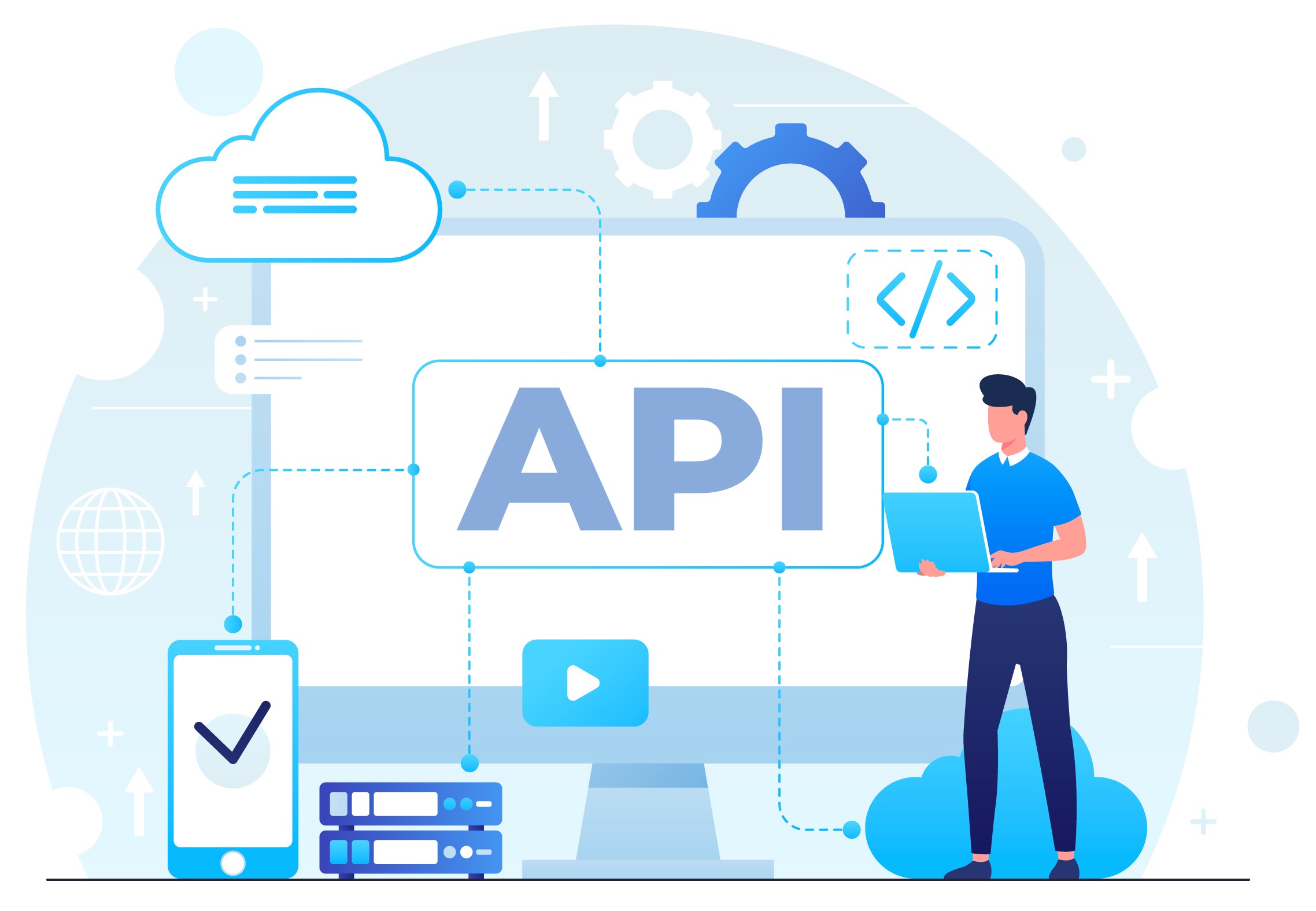
Woo API is a set of endpoints that allows developers to interact with WooCommerce stores programmatically. It enables applications to retrieve, create, update, and manage store data. This includes products, orders, customers, and categories.
As part of the broader WordPress ecosystem, the WordPress WooCommerce API provides flexible integration capabilities. It supports SaaS platforms, mobile apps, and third-party services. In practice, the WooCommerce API WordPress architecture follows REST principles. It also uses JSON format for data exchange, which simplifies communication between systems.
Moreover, this API allows developers to build custom workflows and automate operations. It also helps extend store functionality without modifying the core platform. For example, software solutions can sync inventory across multiple channels. They can also process orders in real time or integrate external services such as CRM, ERP, and marketing platforms.
Therefore, it becomes a foundational layer for building scalable eCommerce ecosystems. It is especially important for software vendors that need to integrate with multiple online stores efficiently and connect to WooCommerce API in a standardized way.
WooCommerce API Specifics
Before building integrations, it is important to understand how WooCommerce API works in practice. WooCommerce API is based on a RESTful architecture and uses standard HTTP methods such as GET, POST, PUT, and DELETE. This makes it easy to interact with store data and integrate external systems.
In most cases, Woo API returns data in JSON format. This makes Woocommerce API JSON responses easy to process, store, and transfer between systems. As a result, developers can quickly build integrations for products, orders, and customer data without complex data transformation.
Authentication is handled through API keys or OAuth. Therefore, developers can securely connect to WooCommerce API and control access to store data. At the same time, WooCommerce API supports a wide range of endpoints for working with products, categories, orders, customers, shipping, and taxes.
However, WooCommerce API is highly flexible and frequently updated. This means developers must handle versioning, data structure changes, and compatibility issues. Without proper planning, integrations can become difficult to maintain over time.
Key Features of WooCommerce API
Woocommerce API provides a wide range of features that help software developers and SaaS providers build integrations and automate eCommerce workflows. It enables data exchange, system synchronization, and process automation across WooCommerce stores.
REST Architecture and Data Access
WooСommerce API manager follows a RESTful architecture and supports standard HTTP methods such as GET, POST, PUT, and DELETE. It returns data in JSON format, which makes it easy to integrate with external systems and services.
- Products and categories
- Orders and transactions
- Customers and user roles
- Coupons and discounts
- Shipping and tax settings
Authentication and Security
WooCommerce API supports multiple authentication methods. Therefore, developers can choose the подходящий option based on their integration needs.
- OAuth 1.0 — secure but more complex to implement
- Basic authentication — uses API keys and requires HTTPS
- JWT authentication — token-based access for secure communication
Proper authentication is essential to protect store data and prevent unauthorized access.
Flexibility and Customization
One of the main advantages of Woo API is its flexibility. Developers can extend functionality and adapt API behavior to specific business requirements.
- Create custom endpoints using WordPress hooks
- Modify API responses based on business logic
- Build plugins to extend WooCommerce functionality
As a result, Woocommerce API manager is well suited for SaaS platforms that require tailored integrations.
Performance and Data Handling
WooCommerce does not enforce strict API rate limits. However, developers still need to optimize performance when working with large datasets.
- Use pagination for large product or order lists
- Optimize API requests to reduce нагрузку on the server
- Handle data efficiently to avoid performance bottlenecks
This is especially important for large stores with thousands of products and orders.
Overall, WooCommerce API is a flexible and powerful solution for building eCommerce integrations. It supports webhooks, customization, and scalable data workflows. However, developers still need to manage authentication, performance, and long-term maintenance.
What Is WooCommerce Abandoned Cart API?
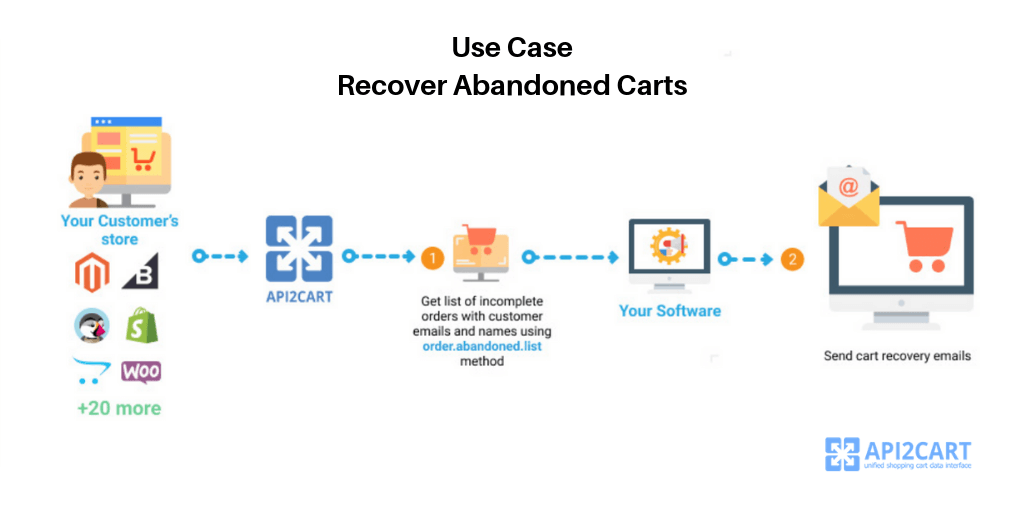
The WooCommerce Abandoned Cart API is a specialized functionality that allows developers to track and retrieve abandoned cart data from WooCommerce stores. It helps identify customers who added products to the cart but did not complete the purchase.
In practice, this API enables software providers to automate recovery workflows. For example, systems can trigger reminders, send discounts, and personalize follow-up communication. As a result, businesses can recover lost sales and improve conversion rates.
Key Features
- Abandoned cart tracking: retrieve incomplete orders and analyze customer behavior.
- Access to cart data: get product details, quantities, and total cart value.
- Customer insights: use available customer data to personalize recovery campaigns.
- Marketing automation: trigger emails, push notifications, or SMS messages.
- Analytics and optimization: build data-driven strategies to improve conversions.

How to Implement WooCommerce Abandoned Cart API
Using WooCommerce Abandoned Cart API helps reduce cart abandonment and improve conversion rates. It allows developers to retrieve cart data and build automated recovery workflows.
There are two main approaches to implementation. You can build the integration in-house or use a third-party solution.
Developing an Integration In-House
Building a custom integration provides full control over data processing. However, it also introduces several technical and operational challenges.
- Long development time and higher engineering costs
- Continuous updates due to WooCommerce changes
- Extensive testing to ensure stability and security
- No official support for custom implementations
- Limited documentation for abandoned cart functionality
How API2Cart Simplifies WooCommerce API Integration
Instead of building and maintaining custom integrations, software providers can use a unified API solution such as API2Cart. It allows you to connect to WooCommerce API and 80+ other eCommerce platforms through a single integration.
As a result, developers can retrieve abandoned cart data, automate recovery workflows, and manage store data without handling multiple APIs. This significantly reduces development time and ongoing maintenance effort.
Moreover, API2Cart standardizes data across platforms. Therefore, SaaS solutions can scale faster and deliver consistent functionality to their users.
API2Cart Method for Retrieving Abandoned Cart Data
API2Cart provides the order.abandoned.list method. It acts as a unified woocommerce api endpoint for retrieving abandoned carts across WooCommerce and other platforms.
With this method, developers can retrieve customer data, cart contents, and order details in a standardized format. You can also explore a WooCommerce API example in the official documentation.
{
 "return_code": 0,
 "return_message": "string",
 "pagination": {
  "previous": "string",
  "next": "string",
  "additional_fields": {},
  "custom_fields": {}
 },
 "result": {
  "orders_count": 0,
  "order": [
   {
    "id": "string",
    "order_id": "string",
    "basket_id": "string",
    "channel_id": "string",
    "customer": {
     "id": "string",
     "email": "string",
     "first_name": "string",
     "last_name": "string",
     "phone": "string",
     "additional_fields": {},
     "custom_fields": {}
    },
    "create_at": {
     "value": "string",
     "format": "string",
     "additional_fields": {},
     "custom_fields": {}
    },
    "currency": {
     "id": "string",
     "name": "string",
     "iso3": "string",
     "symbol_left": "string",
     "symbol_right": "string",
     "rate": 0,
     "avail": true,
     "default": true,
     "additional_fields": {},
     "custom_fields": {}
    },
    "shipping_address": {
     "id": "string",
     "type": "string",
     "first_name": "string",
     "last_name": "string",
     "postcode": "string",
     "address1": "string",
     "address2": "string",
     "phone": "string",
     "phone_mobile": "string",
     "city": "string",
     "country": {
      "code2": "string",
      "code3": "string",
      "name": "string",
      "additional_fields": {},
      "custom_fields": {}
     },
     "state": {
      "code": "string",
      "name": "string",
      "additional_fields": {},
      "custom_fields": {}
     },
     "company": "string",
     "fax": "string",
     "website": "string",
     "gender": "string",
     "region": "string",
     "default": true,
     "tax_id": "string",
     "identification_number": "string",
     "alias": "string",
     "additional_fields": {},
     "custom_fields": {}
    },
    "billing_address": {
     "id": "string",
     "type": "string",
     "first_name": "string",
     "last_name": "string",
     "postcode": "string",
     "address1": "string",
     "address2": "string",
     "phone": "string",
     "phone_mobile": "string",
     "city": "string",
     "country": {
      "code2": "string",
      "code3": "string",
      "name": "string",
      "additional_fields": {},
      "custom_fields": {}
     },
     "state": {
      "code": "string",
      "name": "string",
      "additional_fields": {},
      "custom_fields": {}
     },
     "company": "string",
     "fax": "string",
     "website": "string",
     "gender": "string",
     "region": "string",
     "default": true,
     "tax_id": "string",
     "identification_number": "string",
     "alias": "string",
     "additional_fields": {},
     "custom_fields": {}
    },
    "payment_method": {
     "name": "string",
     "additional_fields": {},
     "custom_fields": {}
    },
    "shipping_method": {
     "name": "string",
     "additional_fields": {},
     "custom_fields": {}
    },
    "shipping_methods": [
     {
      "name": "string",
      "additional_fields": {},
      "custom_fields": {}
     }
    ],
    "status": {
     "id": "string",
     "name": "string",
     "history": [
      {
       "id": "string",
       "name": "string",
       "modified_time": {
        "value": "string",
        "format": "string",
        "additional_fields": {},
        "custom_fields": {}
       },
       "notify": true,
       "comment": "string",
       "additional_fields": {},
       "custom_fields": {}
      }
     ],
     "refund_info": {
      "shipping": 0,
      "fee": 0,
      "tax": 0,
      "total_refunded": 0,
      "time": {
       "value": "string",
       "format": "string",
       "additional_fields": {},
       "custom_fields": {}
      },
      "comment": "string",
      "refunded_items": [
       {
        "product_id": "string",
        "variant_id": "string",
        "order_product_id": "string",
        "qty": 0,
        "refund": 0,
        "additional_fields": {},
        "custom_fields": {}
       }
      ],
      "additional_fields": {},
      "custom_fields": {}
     },
     "additional_fields": {},
     "custom_fields": {}
    },
    "totals": {
     "total": 0,
     "subtotal": 0,
     "shipping": 0,
     "tax": 0,
     "discount": 0,
     "additional_fields": {},
     "custom_fields": {}
    },
    "total": {
     "subtotal_ex_tax": 0,
     "wrapping_ex_tax": 0,
     "shipping_ex_tax": 0,
     "total_discount": 0,
     "total_tax": 0,
     "total": 0,
     "total_paid": 0,
     "additional_fields": {},
     "custom_fields": {}
    },
    "discounts": [
     {
      "code": "string",
      "value": 0,
      "type": "string",
      "additional_fields": {},
      "custom_fields": {}
     }
    ],
    "order_products": [
     {
      "product_id": "string",
      "order_product_id": "string",
      "model": "string",
      "name": "string",
      "price": 0,
      "price_inc_tax": 0,
      "quantity": 0,
      "discount_amount": 0,
      "total_price": 0,
      "tax_percent": 0,
      "tax_value": 0,
      "tax_value_after_discount": 0,
      "options": [
       {
        "option_id": "string",
        "name": "string",
        "value": "string",
        "price": 0,
        "weight": 0,
        "type": "string",
        "product_option_value_id": "string",
        "additional_fields": {},
        "custom_fields": {}
       }
      ],
      "variant_id": "string",
      "weight_unit": "string",
      "weight": 0,
      "barcode": "string",
      "parent_order_product_id": "string",
      "additional_fields": {},
      "custom_fields": {}
     }
    ],
    "bundles": [
     {
      "product_id": "string",
      "order_product_id": "string",
      "model": "string",
      "name": "string",
      "price": 0,
      "price_inc_tax": 0,
      "quantity": 0,
      "discount_amount": 0,
      "total_price": 0,
      "tax_percent": 0,
      "tax_value": 0,
      "tax_value_after_discount": 0,
      "options": [
       {
        "option_id": "string",
        "name": "string",
        "value": "string",
        "price": 0,
        "weight": 0,
        "type": "string",
        "product_option_value_id": "string",
        "additional_fields": {},
        "custom_fields": {}
       }
      ],
      "variant_id": "string",
      "weight_unit": "string",
      "weight": 0,
      "barcode": "string",
      "parent_order_product_id": "string",
      "additional_fields": {},
      "custom_fields": {}
     }
    ],
    "modified_at": {
     "value": "string",
     "format": "string",
     "additional_fields": {},
     "custom_fields": {}
    },
    "finished_time": {
     "value": "string",
     "format": "string",
     "additional_fields": {},
     "custom_fields": {}
    },
    "comment": "string",
    "store_id": "string",
    "warehouses_ids": [
     "string"
    ],
    "refunds": [
     {
      "id": "string",
      "shipping": 0,
      "fee": 0,
      "tax": 0,
      "total": 0,
      "modified_time": {
       "value": "string",
       "format": "string",
       "additional_fields": {},
       "custom_fields": {}
      },
      "comment": "string",
      "items": [
       {
        "product_id": "string",
        "variant_id": "string",
        "order_product_id": "string",
        "qty": 0,
        "refund": 0,
        "additional_fields": {},
        "custom_fields": {}
       }
      ],
      "additional_fields": {},
      "custom_fields": {}
     }
    ],
    "gift_message": "string",
    "order_details_url": "string",
    "additional_fields": {},
    "custom_fields": {}
   }
  ],
  "additional_fields": {},
  "custom_fields": {}
 },
 "additional_fields": {},
 "custom_fields": {}
}
This approach allows you to connect to WooCommerce API and retrieve abandoned cart data without building custom integrations. As a result, developers can focus on business logic instead of API maintenance.
Conclusion
Leveraging the WooCommerce Abandoned Cart API unlocks significant opportunities for software developers and service providers looking to enhance eCommerce solutions. This API allows businesses to track abandoned carts, automate recovery campaigns, and improve conversion rates in online stores.
Its flexibility and scalability allow developers to create customized solutions tailored to merchant needs. By using analytics and personalized triggers, businesses can engage customers more effectively, reduce revenue loss, and improve the overall shopping experience.
Implementing WooCommerce Abandoned Cart API can significantly improve sales performance and customer retention. However, building and maintaining integrations across multiple platforms requires time and resources. Therefore, you can Start a Free Trial and simplify how you connect to WooCommerce API and other eCommerce platforms through a single integration.
FAQs
How can I retrieve abandoned cart data across multiple shopping carts?
You can retrieve abandoned cart data across multiple platforms using API2Cart. For example, the order.abandoned.list method allows you to access cart status, products, and customer details in one place.
As a result, you can track abandoned carts more efficiently and improve recovery strategies. Moreover, this approach removes the need to connect to WooCommerce API or other platforms separately.
How can you connect to Woocommerce API manager and sync data with other platforms?
To connect to Woocommerce API JSON, developers usually rely on the WordPress WooCommerce API, which provides access to store data such as products, orders, and customers.
However, instead of building separate integrations, you can use API2Cart to simplify this process. As a result, you can sync data across WooCommerce and other platforms through one unified interface.
What does a WooCommerce API example look like in real use?
A typical Woo API example returns data in Woocommerce API JSON format, including product details, pricing, and stock levels. Therefore, developers can easily parse and use this data in their systems.
Moreover, standardized JSON responses simplify integration with external tools. As a result, working with Woocommerce API WordPress becomes more predictable and easier to scale.
What is a WooCommerce API manager and why is it useful?
A Woocommerce API manager helps control API keys, access permissions, and integration settings within a store. Therefore, it plays a key role in managing secure connections.
In addition, when working with WordPress WooCommerce API, proper management ensures stable data exchange. As a result, businesses can maintain reliable integrations without constant manual adjustments.
How can I integrate WooCommerce with OpenCart using API2Cart?
API2Cart simplifies the process of connecting WooCommerce with OpenCart. Instead of building separate integrations, you can sync products, orders, and customers through one unified API.
Moreover, this approach reduces development time and maintenance effort. As a result, you can scale your integration faster and manage multiple platforms more efficiently.

SEO Content Specialist with 7+ years of experience in SEO content creation and 14+ years in marketing. Expertise includes SEO copywriting, keyword research, search intent analysis, and content strategy. Experienced in creating content for B2B SaaS, technology, fintech, and eCommerce companies. Focused on developing content that aligns user needs, business goals, and search engine requirements.