


PrestaShop API connection development is an important step for many eCommerce software and app providers. By integrating with the PrestaShop API, companies can access store data and automate key workflows. For example, they can manage customers, orders, products, and shipments across multiple stores. Moreover, the PrestaShop Webservice API provides flexible endpoints that allow software platforms to exchange data with PrestaShop stores efficiently.
Additionally, developers can rely on the official PrestaShop API documentation to understand available resources, authentication methods, and request formats. This documentation is essential when building reliable integrations or extending SaaS products with PrestaShop functionality.
Meanwhile, PrestaShop continues to remain one of the most widely used open-source eCommerce platforms. According to PrestaShop official data, the platform powers more than 300,000 online stores worldwide. Furthermore, data from Statista shows that PrestaShop maintains a strong presence in Europe and continues expanding globally. Therefore, PrestaShop API development has become increasingly valuable for SaaS vendors that want to connect their solutions with a large number of online merchants.
In this article, we will explore how the PrestaShop API works and how developers can build a stable integration. We will also review the main methods of the PrestaShop Webservice API and explain how to establish a reliable API connection.
What is PrestaShop?
PrestaShop has gained significant popularity among e-merchants worldwide. For instance, there are over 87,000 stores in the USA built on this platform. Additionally, it is widely used in countries like France (43,000+ stores), Spain (28,000+ stores), Poland (20,000+ stores), and Italy (20,000+ stores). This broad adoption means that integrating with PrestaShop can expand your software’s customer base significantly.
For SaaS providers offering services like mobile commerce, inventory management, shipping, repricing, PIM, and other eCommerce features, PrestaShop integration offers tremendous benefits. Developers looking for advanced integrations will find the PrestaShop webservice API essential for streamlining API interactions.
What is the PrestaShop API?
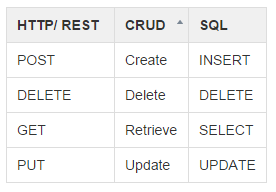
The PrestaShop API is a powerful tool that allows developers to interact programmatically with PrestaShop stores. It supports REST architecture, making data exchange between PrestaShop and external applications easy and efficient. With the API, developers can perform CRUD operations (Create, Read, Update, Delete) and integrate seamlessly with other systems using HTTP methods such as GET, POST, PUT, and DELETE.
Furthermore, PrestaShop API offers various functions for managing store data, including product, order, and customer management, inventory updates, and real-time synchronization. This makes it an excellent choice for developers aiming to automate workflows and optimize operations for eCommerce merchants.
Integrating with the PrestaShop API can open new growth opportunities for your business by connecting you to over 315,000 PrestaShop store owners worldwide. Leveraging PrestaShop’s API will allow your software to streamline operations, increase revenue, and enhance the user experience for store owners.
How to Easily Develop the Connection with API of PrestaShop?
API2Cart simplifies the integration process by providing a unified API to connect with PrestaShop API and over 60 other popular eCommerce platforms. This means that by integrating with API2Cart, you gain access to not only PrestaShop, but also platforms like Magento, WooCommerce, and BigCommerce, all without the need for additional coding.
API2Cart also offers comprehensive PrestaShop API documentation, which helps you navigate integration best practices. Whether you're working with product data, order synchronization, or inventory management, API2Cart’s unified platform streamlines the process, saving you both time and resources.
What Operations Can You Perform Using API2Cart?
API2Cart supports over 100 API methods for managing PrestaShop store data, including:
- Orders: order.count / list / info / add / update / status.list / shipment.list / abandoned.list
- Products: product.list / count / info / add / update / attribute.list / child_item.list
- Categories: list / count / add / update / delete
- Customer Data: list / count / find / add / update / delete
- Carts: cart.create / validate / list / delete / methods / disconnect
- Account: account.cart.list / cart.add / supported_platforms
By leveraging API2Cart, you can seamlessly manage these operations and more, giving you a significant advantage when integrating with PrestaShop and other platforms.
For a practical example of how to work with PrestaShop, developers can refer to the PrestaShop API documentation, which includes a detailed response example for adding orders through the API.
{
  "order_id": "25",
  "store_id": "1",
  "order_status": "Completed",
  "customer_email": "[email protected]",
  "order_payment_method": "PayPal",
  "currency": "USD",
  "date": "2012-09-25 19:40:00",
  "date_modified": "2014-05-05 05:05:00",
  "bill_first_name": "Adam",
  "bill_last_name": "Smith",
  "bill_address_1": "Green str. 35",
  "bill_address_2": "Red str, 2",
  "bill_city": "Chicago",
  "bill_postcode": "12345",
  "bill_state": "IL",
  "bill_country": "US",
  "bill_company": "Apple",
  "bill_phone": "8 800 5659 6896",
  "shipp_first_name": "John",
  "shipp_last_name": "Smith",
  "shipp_address_1": "Green str. 35",
  "shipp_address_2": "Green str. 35",
  "shipp_city": "Chicago",
  "shipp_postcode": "24545",
  "shipp_state": "IL",
  "shipp_country": "US",
  "shipp_company": "Apple",
  "shipp_phone": "880086544564",
  "subtotal_price": 563.23,
  "tax_price": 0,
  "total_price": 23.56,
  "shipping_price": 0,
  "discount": 5.5,
  "coupon_discount": 5.5,
  "gift_certificate_discount": 5.5,
  "send_notifications": false,
  "send_admin_notifications": false,
  "order_item": [
    {
      "order_item_id": "125, where {x} - 1,2,3,... etc",
      "order_item_name": "Product 1, where {x} - 1,2,3,... etc",
      "order_item_model": "sku_1, where {x} - 1,2,3,... etc",
      "order_item_price": "1.32, where {x} - 1,2,3,... etc",
      "order_item_quantity": "5, where {x} - 1,2,3,... etc",
      "order_item_variant_id": "52",
      "order_item_tax": 0,
      "order_item_option": [
        {
          "order_item_option_name": "Color",
          "order_item_option_value": "green",
          "order_item_option_price": 2.3
        }
      ]
    }
  ]
}
Conclusion
In conclusion, integrating with the PrestaShop API and leveraging the PrestaShop webservice API can significantly enhance your software’s functionality and expand your customer base. By using API2Cart, you can save both time and effort on integration while accessing a wide range of eCommerce platforms through a single API. This approach streamlines your development process and ensures that your software remains scalable and adaptable for future growth.
To see how API2Cart can help you integrate with PrestaShop and 60+ other platforms, try our free demo today!
FAQs
What is the Shopify Developer API and what can it do?
The Shopify Developer API is a powerful tool that allows developers to interact with Shopify stores and integrate them into their systems. Through the Shopify API development process, developers can access essential store data, including products, orders, customers, and inventory.
By leveraging Shopify Developer Docs, developers can create custom solutions, automate workflows, and build seamless integrations between Shopify and other platforms. The API enhances eCommerce systems’ functionality, improves customer experience, and streamlines business processes.
What are the key differences between Shopify REST API and Shopify GraphQL Admin API for developers?
The Shopify REST API uses fixed endpoints and predefined responses, which often means developers receive more data than needed. This requires multiple requests to gather related resources. Although easy to start with, it becomes less flexible at scale.
In contrast, the Shopify GraphQL Admin API allows developers to request only the data they need in a single query. As a result, integrations become faster and more efficient.
For example, developers can explore available endpoints, request parameters, and response structures in the PrestaShop API documentation to better understand how to retrieve and manage store data.
With API2Cart, developers can work with Shopify data seamlessly without worrying about whether the underlying API is REST or GraphQL, saving time and reducing maintenance overhead.
What are the main challenges developers face when building direct integrations with the Shopify Developer API?
.
One of the biggest challenges when building direct Shopify API integrations is the complexity and ongoing maintenance. Developers need to handle API version changes, adapt to the shift from REST to GraphQL, and manage authentication, scopes, rate limits, and security.
Additionally, Shopify's evolving rules and data structures require continuous updates to the integration. Scaling the integration for multiple stores, managing webhooks, error handling, and ensuring data synchronization across platforms adds significant engineering challenges.
By using API2Cart, developers can abstract these complexities behind a unified interface. This allows them to focus on core product features and enhance Shopify API development without worrying about constant API changes.
How does API2Cart simplify Shopify API integrations?
API2Cart simplifies Shopify API integrations by offering a unified API for connecting with Shopify and over 60 other eCommerce platforms. Developers only need to integrate once, saving time and reducing development costs.
By combining Shopify Developer Docs with API2Cart, developers gain access to real-time product, order, and customer data. This works across multiple platforms.


