You’re probably dealing with this already. One merchant wants your app to connect to Shopify through OAuth. Another runs a legacy cart that still expects Basic Auth. A marketplace asks for an API key plus a custom signing step. None of these flows are hard in isolation. The pain starts when you need all of them working at the same time, in production, for multiple tenants, without leaking credentials or waking up to broken sync jobs.
That’s what makes api with authentication a real engineering problem, not a checkbox in the docs. Authentication decides whether your integration can connect at all, how safely it can operate, and how much operational overhead your team inherits later. If you build B2B eCommerce software, auth is usually the first place where the clean architecture diagram meets platform reality.
Why API Authentication Is Your First Big Challenge
The first challenge in any integration project isn’t mapping orders or normalizing products. It’s getting a trusted connection in place that can survive real use.
One platform gives you a static API key. Another requires a merchant approval screen and a refresh token. A third uses username and password over HTTPS because nobody has updated the auth model in years. The request payloads may be manageable. The authentication layer is where timelines slip.
Security debt starts early
If your team treats auth as “something we’ll standardize later,” you usually create the riskiest part of the system first. Credentials end up in config files, refresh logic gets duplicated across services, and support engineers start asking how to reconnect stores after tokens expire.
The broader security picture makes this hard to ignore. In the past 12 months, 84% of organizations experienced API security breaches, and authentication failures were among the top vulnerabilities. Only 27% of organizations maintain a complete inventory of their APIs, which increases exposure when teams don’t fully know what they’re protecting, according to Arcade.dev’s API authentication metrics analysis.
Practical rule: If you can’t clearly list which services hold credentials, which jobs refresh them, and which endpoints consume them, your auth design isn’t done.
The business impact is immediate
Authentication problems don’t stay inside engineering. They hit onboarding, support, and revenue.
- Merchant onboarding slows down: Every custom auth flow adds one more chance for a user to abandon setup.
- Background syncs become fragile: If token renewal is inconsistent, imports fail long after a connection looked successful.
- Security reviews get harder: Enterprise buyers ask where credentials live, how scopes are limited, and how revocation works.
- Maintenance grows: Each connector ships with its own edge cases, retry rules, and secret handling.
A lot of developers learn authentication method by method. That’s useful, but it misses the core problem in integration work. You’re not implementing one auth scheme. You’re operating a portfolio of them. That changes what “good enough” means.
Understanding the Core Concepts of API Authentication
Authentication gets easier when you separate the moving parts. The office-building analogy still works because it maps well to code.
Authentication answers who you are. Authorization answers what you’re allowed to do. If a user shows an ID badge at the lobby, that’s authentication. If the badge only opens floors 3 and 5, that’s authorization.

Terms that matter in practice
When you read API docs, these are the concepts worth locking down:
- Principal means the identity trying to access the API. That may be a user, a merchant account, your app, or a background worker.
- Credentials are the proof. Passwords, API keys, client secrets, signed assertions, and certificates all fit here.
- Token is usually a temporary credential issued after successful authentication. In most modern APIs, your app sends a token on later requests instead of the original secret.
- Scopes define the allowed actions. For example, reading orders but not modifying products.
- Session lifetime is how long that proof remains valid before refresh or re-authentication is required.
A lot of implementation bugs happen because developers blur these terms. They store a long-lived secret where a short-lived token should go, or they ask for broad scopes because permission mapping wasn’t planned up front.
What this means in code
A secure integration usually follows a pattern like this:
- Your app presents a credential.
- The platform validates it.
- The platform issues a token or accepts the request directly.
- Your app includes the token, key, or signature on later API calls.
- The platform checks both identity and permissions before returning data.
That’s the basic loop whether you’re dealing with Basic Auth, API keys, OAuth, or JWT-backed sessions.
For a grounded walkthrough of common pitfalls, Context.dev’s guide to API authentication best practices is useful because it focuses on implementation behavior, not just definitions. For an eCommerce-specific take, API2Cart’s article on authentication in API integrations is a practical reference for teams dealing with platform variance.
Authentication proves identity. Authorization limits blast radius. Treat them as separate controls, because they fail in different ways.
Comparing Common API Authentication Schemes
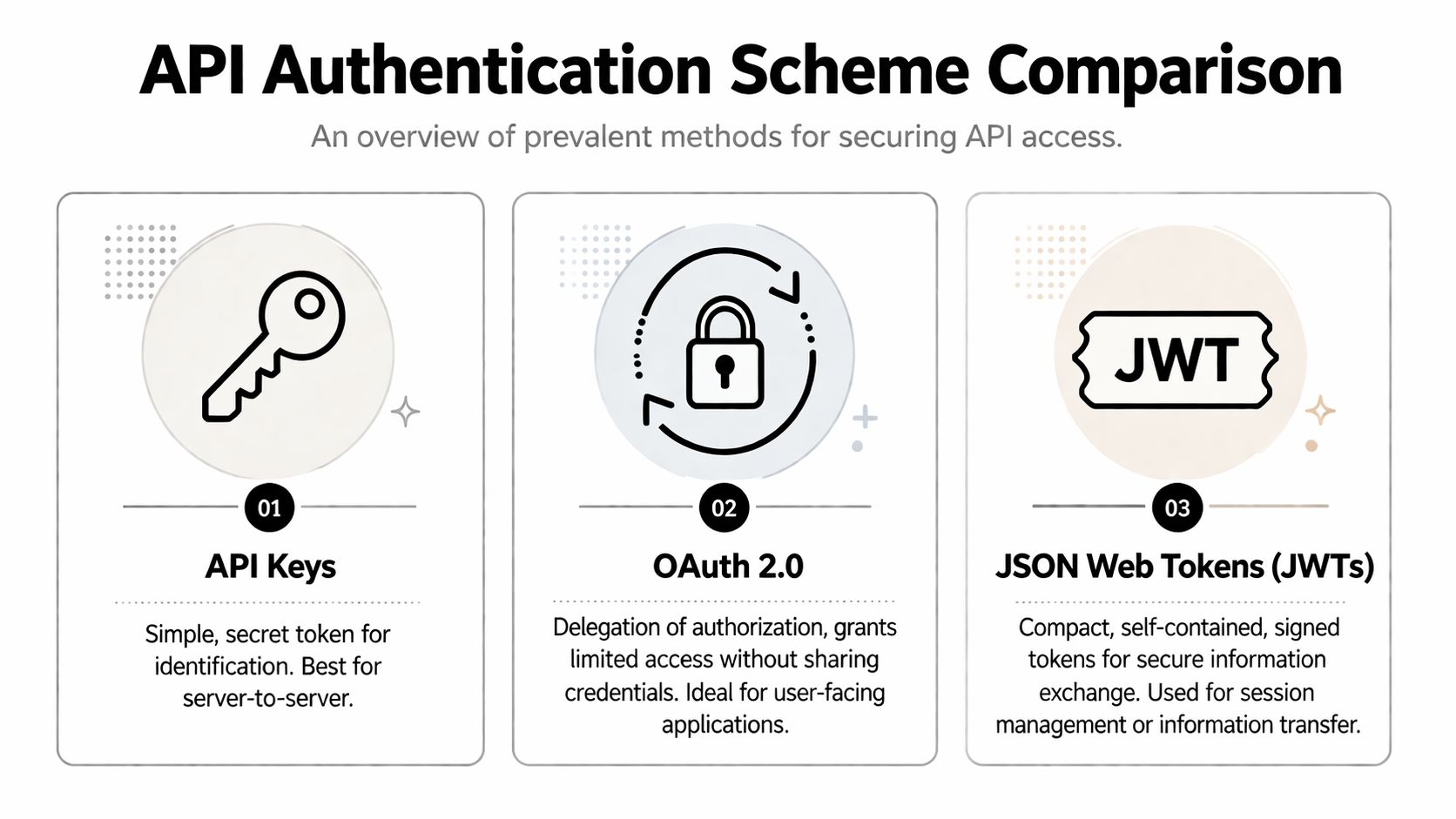
Most integration developers don’t get to choose one authentication model and use it everywhere. You inherit whatever each platform supports. The right question is usually not “which auth scheme is best?” It’s “which auth scheme fits this risk level, actor, and maintenance burden?”
Quick comparison
| Method | Security Level | Complexity | Primary Use Case |
|---|---|---|---|
| API Keys | Medium | Low | Server-to-server access, simple third-party integrations |
| Basic Auth | Low to medium when used over HTTPS | Low | Internal tools, older APIs, legacy platform support |
| OAuth 2.0 | High | Medium to high | Third-party delegated access, user-approved integrations |
| JWT | Depends on issuance and validation model | Medium | Session handling, identity propagation, service claims |
| HMAC | High for request integrity | Medium | Signed API requests, tamper detection |
| mTLS | High | High | Strict machine-to-machine communication in controlled environments |
API keys and Basic Auth
API keys are simple. That’s why they’re everywhere. You generate a secret, send it on each request, and the server maps it to an account or application. For backend jobs and internal service integrations, this can be fine if the provider gives you rotation, revocation, and narrow permissions.
The downside is that API keys usually identify the caller, not a delegated user action. They also tend to drift into places they shouldn’t live, like client apps, logs, or copied environment files.
Basic Auth is older and even simpler. A client sends a username and password pair, typically encoded in Base64. That encoding is not encryption, which is why it must be used with HTTPS. Postman notes that Basic Auth is simple and stateless, but it’s better suited to internal tools than modern delegated access in complex ecosystems, as covered in their overview of API authentication methods and trade-offs.
OAuth 2.0 and JWT
OAuth 2.0 is the standard answer when one system needs to access another system on a user or merchant’s behalf without handling that user’s password. It was standardized in 2012 and is adopted by 15,989 companies across 105 countries, according to Postman’s API authentication reference linked above.
That matters for eCommerce integrations because merchants often need to approve access to orders, customers, products, or fulfillment data. OAuth gives you revocable, scoped access and supports token refresh. It also introduces more moving parts: authorization redirects, code exchange, token storage, refresh schedules, and scope management.
JWTs are not a replacement for OAuth. They’re a token format. A platform may issue a JWT as an access token, an ID token, or an internal session artifact. JWTs are compact and convenient, but they’re easy to misuse if teams don’t validate signature, issuer, audience, and expiration consistently. When you need to inspect a token during development, a secure JWT manipulation utility can help with debugging structure and claims without building your own parser.
For developers comparing delegated access models, API2Cart’s breakdown of OAuth vs JWT in API integrations is a useful distinction because these terms often get mixed together in platform docs.
HMAC and mTLS
HMAC adds request signing. Instead of only sending a secret, the client signs parts of the request so the server can verify integrity and authenticity. This is useful when a provider wants stronger protection against tampering or replay.
mTLS uses client and server certificates for mutual verification. It’s powerful, but operationally heavy. Certificate provisioning, renewal, and trust management can be overkill for broad third-party app ecosystems. In tightly controlled machine-to-machine environments, it makes sense. In messy eCommerce platform networks, it can be painful.
If a platform supports OAuth for third-party access, use it. If it only supports API keys, wrap that choice in stricter storage, rotation, and audit controls.
Practical Implementation Patterns for Developers
The request pattern matters more than the language. Whether you’re writing Node, Python, Go, or Java, the same auth structures keep showing up.

Common request shapes
For an API key in a header:
GET /orders
Host: api.example.com
Authorization: Bearer YOUR_API_KEY
Accept: application/json
Some providers use a custom header instead:
GET /orders
Host: api.example.com
X-API-Key: YOUR_API_KEY
Accept: application/json
For OAuth access tokens, the structure usually looks the same from the resource server’s perspective:
GET /products
Host: api.example.com
Authorization: Bearer ACCESS_TOKEN
Accept: application/json
For Basic Auth:
GET /customers
Host: api.example.com
Authorization: Basic BASE64(username:password)
Accept: application/json
The most common implementation mistake isn’t building the header. It’s where the secret came from, how it was stored, and whether the process can recover when it expires.
Patterns that hold up under load
A stable integration usually includes these habits:
- Separate credential types: Don’t mix API keys, refresh tokens, and access tokens in one generic “secret” field. Their lifecycle is different.
- Centralize signing and header creation: One auth module should build outbound auth headers. Don’t let each connector roll its own.
- Store issue and expiry metadata: Your scheduler needs enough information to refresh before jobs fail.
- Retry carefully: Retry on transient auth transport failures. Don’t blindly retry invalid credentials.
- Log safely: Log token IDs, scope names, or auth flow states. Don’t log raw secrets.
A practical token flow
For long-running sync jobs, the pattern is straightforward:
- Load the merchant connection record.
- Check whether the access token is still valid.
- Refresh it if needed using the stored refresh credential.
- Persist the new token set atomically.
- Execute the API request.
- If refresh fails, mark the connection for reauthorization instead of looping forever.
That pattern sounds basic, but teams often bury refresh logic inside job handlers. Then every worker ends up implementing auth recovery differently.
Advanced Security Beyond Initial Authentication
Getting a token is the start of the work, not the finish.
Teams often focus on the handshake because that’s what gets the first successful request. The production risk sits in everything around it: storage, rotation, auditability, webhook verification, and endpoint visibility. If you ignore those parts, your integration works right up until it doesn’t.
Credential lifecycle matters more than the first request
A token stored in the wrong place is still a security incident waiting to happen. Browser local storage, shared config repos, copied support notes, and plaintext database fields are all common failure paths. In multi-tenant systems, sloppy storage also creates isolation risks. One bug in a credential lookup can expose the wrong merchant connection.
Use narrower permissions than you think you need. If your app only imports orders, don’t request write access to products just because the provider makes it easy. Least privilege limits damage when a token leaks and reduces the blast radius of internal mistakes.
Operational advice: Design revocation before launch. If a merchant disconnects your app or a credential is suspected to be exposed, your team should know exactly which jobs stop, which secrets are invalidated, and which alerts fire.
Verify incoming calls too
Authentication isn’t only for outbound API requests. If a platform sends webhooks to your app, treat those callbacks as untrusted until verified. Signature checks, timestamp validation, replay protection, and idempotent processing all belong here.
Rate limiting belongs in the same category. It doesn’t replace authentication, but it does limit damage from abuse, broken clients, and accidental loops. Many auth incidents turn into reliability incidents because systems accept too many bad requests too quickly.
Watch for shadow endpoints
One of the most underappreciated problems in integration environments is the endpoint you forgot existed. Shadow APIs, meaning undocumented or unmanaged endpoints, are a major security liability. Modern platforms need to discover and test every active endpoint because authentication flaws can enable issues like unauthenticated API key creation or MFA bypass, as explained in APIsec’s guide to securing shadow APIs.
That matters a lot in vendor ecosystems. Cart providers deprecate routes, add versions, and expose alternate paths over time. If your team only monitors the endpoints you intended to call, you can miss the ones your system still touches through old jobs, old SDKs, or stale customer setups.
For developers building their own controls, these API security best practices for integrations are a good checklist for validating storage, access control, and monitoring assumptions.
Solving Authentication for B2B eCommerce Integrations
The hardest part of eCommerce authentication isn’t understanding OAuth or API keys. It’s running many authentication models in parallel without turning your connector layer into a permanent maintenance project.
A WMS might need to connect to Shopify, Magento, WooCommerce, Amazon, and eBay at the same time. Those systems don’t just expose different resources. They authenticate differently, version differently, and fail differently. Most technical guides still don’t address the specific challenge for B2B SaaS vendors, which is orchestrating authentication across dozens of heterogeneous platforms while handling credential isolation and lifecycle management in a multi-tenant environment, as noted by Refgrow’s analysis of REST API authentication gaps.

Where teams usually get stuck
The common failure pattern looks like this:
- Connector-by-connector auth logic: Each platform gets its own auth class, refresh rules, storage assumptions, and error mapping.
- Inconsistent tenant isolation: Some credentials live in one vault path, others in database tables, others in worker config.
- Reauthorization pain: Support teams can’t easily tell whether a store needs a fresh OAuth approval or just a token refresh.
- Permission drift: Over time, apps request broad access because it’s easier than maintaining platform-specific permission maps.
This is why a simple “support multiple carts” roadmap item turns into infrastructure work.
A unified layer changes the workload
One practical way to reduce that burden is to use a unified API layer that normalizes connection management. API2Cart is one example. It lets B2B software vendors connect to 80+ shopping carts and marketplaces through a single API, while the platform handles the underlying differences in external cart authentication models. For an integration developer, that changes the work from “implement every cart’s auth flow separately” to “integrate once with one consistent connection model.”
That’s useful in concrete scenarios:
- OMS teams importing orders from many carts don’t have to build separate auth maintenance for each connector.
- Inventory and PIM tools can standardize how merchant connections are created and monitored.
- ERP and fulfillment platforms can reduce custom token refresh logic spread across background jobs.
- Support teams get a simpler mental model for reconnect flows and credential troubleshooting.
The engineering gain isn’t magic. It comes from reducing auth variance at the edge of your system.
The real scaling problem in eCommerce integrations isn’t one bad auth method. It’s twenty valid auth methods coexisting in the same product.
Frequently Asked Questions for Integration Developers
Authentication proves identity. Authorization defines permissions after identity is established. If your request includes a valid token, you may be authenticated. If that token lacks permission to update inventory, you still won’t be authorized to perform the action.
How should I handle token expiration in background jobs?
Don’t let every job decide that on its own. Put token validity checks and refresh behavior in a shared auth service or connector layer. A job should ask for a usable credential, not implement the refresh flow itself.
Also store expiry metadata alongside the token record. That lets you refresh proactively and avoid a burst of failing jobs at the same time.
Should I use API keys or OAuth for third-party integrations?
Use OAuth when a merchant or user is granting your app access to their account data. It gives you delegated access, revocation, and scope control. Use API keys when the provider only supports that model or when the integration is server-to-server and low risk.
Is JWT the same thing as OAuth?
No. JWT is a token format. OAuth is an authorization framework. Some OAuth systems issue JWTs, but the terms are not interchangeable.
What should I do when a platform supports only legacy Basic Auth?
Use it only over HTTPS, keep the credentials server-side, rotate when possible, and isolate access narrowly. Treat it as a compatibility requirement, not your preferred long-term model.
How do I secure my own API for customers?
Start with a small permission model, short-lived credentials where possible, strong secret storage, request logging without secret leakage, and webhook signature verification for inbound events. Make revocation and auditing part of the first release, not a later hardening task.
If your team is building B2B commerce software and auth complexity is slowing connector delivery, API2Cart is worth evaluating as a unified integration layer. It gives developers one API for connecting to many carts and marketplaces, which can reduce the amount of platform-specific authentication logic your team has to build and maintain.