Your backlog probably has a ticket that sounds small: “Connect our app to the customer's CRM and store.” You know what happens next. One merchant wants one commerce platform. The next one wants another. Then product asks for order sync, customer sync, abandoned cart events, refunds, and account activity pushed into the CRM in near real time.
That's where crm web integration stops being a connector task and turns into an architecture problem. If you build it like a one-off, you inherit every schema mismatch, every auth edge case, and every support ticket when data lands in the wrong record.
The hard part isn't moving JSON from A to B. The hard part is building an integration layer that stays readable, recoverable, and scalable when multiple systems write to the same customer story.
The True Challenge of CRM Web Integration
A junior developer usually sees the first request as a form-post problem. Capture lead data from the site, send it into the CRM, done. In production, that model breaks almost immediately.
A merchant site doesn't produce one clean “lead” event. It produces account creation, cart updates, guest checkout, order placement, payment status changes, refunds, shipment events, newsletter opt-ins, and support interactions. Your CRM isn't just storing contacts. It's trying to become the system sales, service, and marketing all trust.
A widely cited CRM roundup notes that CRM adoption can lift sales by 29% on average, and that 81% of CRM users access their CRM from multiple devices. The same source reports that 49% of businesses see improved data quality when their CRM is integrated with other systems. That's the value of crm web integration: it turns web activity into pipeline and service context that stays synchronized across channels and devices, according to 2024 CRM adoption and integration statistics.
What looks simple at ticket level breaks at platform level
The first store integration feels manageable. You map customer, order, and product objects. You wire up auth. You write a few handlers. Everyone is happy until the next merchant comes in on a different cart with different field names, different pagination behavior, different webhook payloads, and different rules around refunds or partial shipments.
Then your codebase starts to split into branches nobody wants to maintain:
- Store-specific transformers that drift over time
- Per-platform retry logic copied into multiple services
- Conditional CRM field mapping hidden in handlers
- Silent data loss when one upstream platform omits a field your CRM flow expects
Practical rule: If your integration design assumes one store platform and one CRM workflow, it will fail as soon as the second merchant asks for a variation.
That's why this work belongs in the same conversation as architecture, data governance, and operational design. If you need a useful framework for thinking beyond connectors, these enterprise integration best practices are worth reviewing before you lock in your approach.
The integration is part of the product
Developers often treat crm web integration like plumbing. Customers don't. They judge your product by whether their sales team sees the right customer record, whether support can trust order history, and whether updates appear when they need them.
In a B2B eCommerce SaaS product, integration quality becomes feature quality. If a cart event doesn't reach the CRM, the user experiences that as a product failure, not an API issue.
That's the mindset shift. You're not “adding a CRM connector.” You're building the customer-data path that powers handoff between commerce activity and revenue workflows.
Designing Your Integration Architecture
The biggest decision happens before you write handlers, queue workers, or field maps. You need to decide where complexity lives.
There are three common patterns. None is universally right. But one of them usually becomes the least painful choice once your product has to support more than a handful of merchant environments.
Three approaches and their trade-offs
| Approach | Where it works | Where it breaks |
|---|---|---|
| Point-to-point builds | Narrow use case, one or two supported platforms, strict custom logic | Maintenance explodes as platform count grows |
| Connector layer or workflow middleware | Fast for simple automations, acceptable for low-complexity workflows | Hard to govern at scale, another failure point, weaker fit for deep domain logic |
| Unified API architecture | Strong fit for multi-platform products that need a normalized access layer | Requires good canonical modeling and clear boundaries in your app |
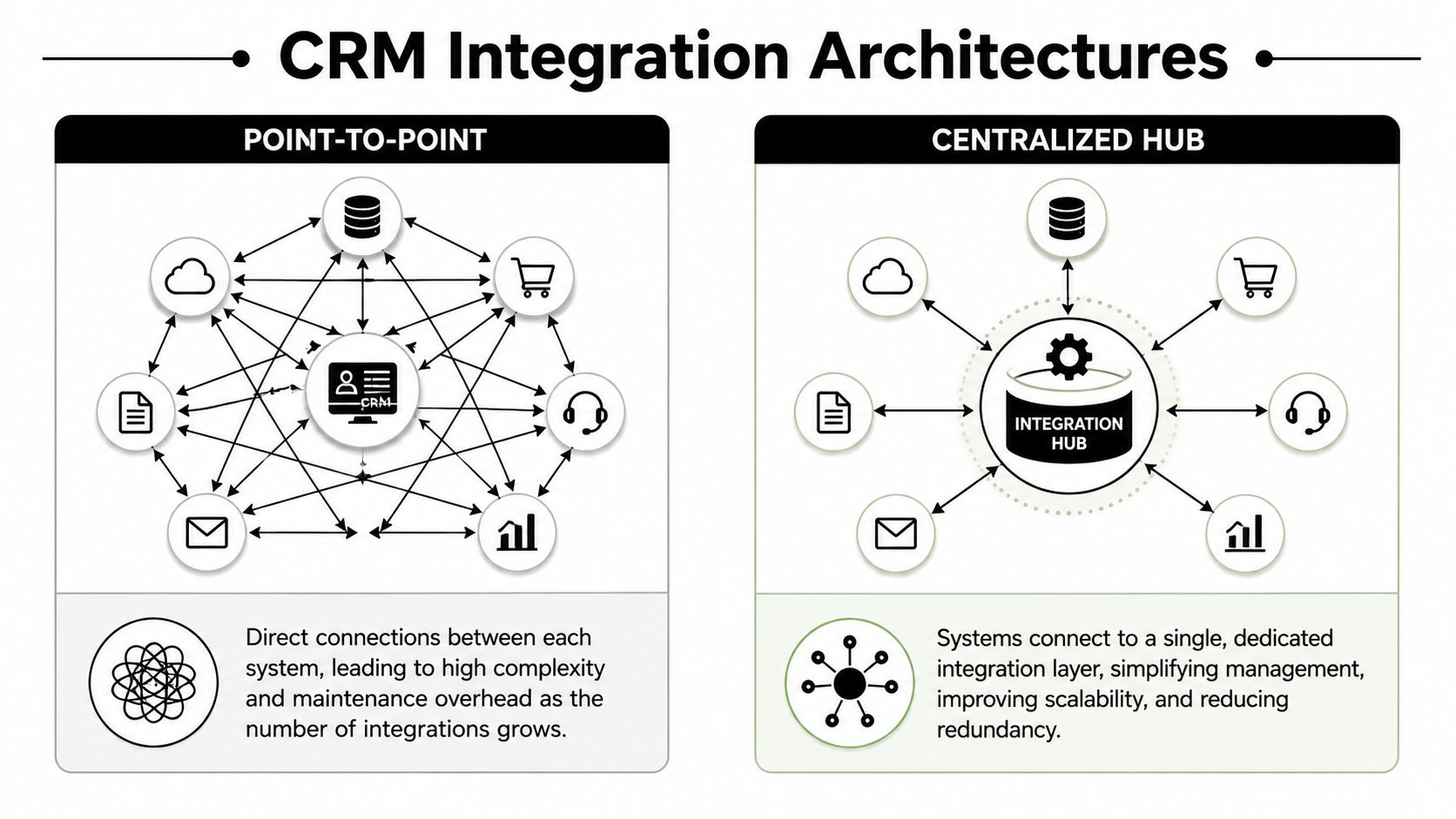
The architecture question matters because modern integrations are expected to span not just CRM and site forms, but also accounting, ERP, service, and eCommerce. Guidance on CRM integration patterns notes that API-based integrations offer complete control and are the preferred path when a CRM has extensive API access, especially when you need to scale beyond a few point-to-point connections, as described in this CRM integration architecture guidance.
To visualize the difference, use this model:
What developers usually underestimate
Point-to-point work looks cheap because the first connector ships quickly. The hidden cost shows up later in four places:
Authentication drift
Each upstream system has its own token lifecycle, permission model, and failure modes.Schema fragmentation
“Customer” means different things across systems. So does “order status.” So does “updated at.”Operational support
Your team now owns debugging across many APIs with different observability gaps.Version change pressure
When upstreams change payloads or endpoints, your team chases compatibility one connector at a time.
If your product is already seeing merchants on multiple carts or marketplaces, a centralized integration layer usually gives you a cleaner long-term shape. That matters for preventing CRM data silos, because silos aren't only caused by missing integrations. They're also caused by badly normalized ones.
A practical architecture stance
For integration developers, I'd use this rule set:
- Use point-to-point only when the business scope is narrow and unlikely to expand.
- Use workflow middleware carefully when the workflow is simple, low-risk, and mostly orchestration.
- Use a unified API strategy when your product must support many store platforms with a stable developer surface.
One option in that last category is a unified API model for multi-platform commerce integrations. In that design, API2Cart exposes a single API layer for many shopping carts and marketplaces, which can reduce the amount of platform-specific code you need to build around orders, products, and customers. For a CRM-eCommerce integration, that means your app can spend more effort on canonical mapping and workflow logic, and less on speaking many store dialects.
Architecture debt compounds quietly. Every shortcut in connector design becomes a support burden later.
Mastering Data Synchronization and Mapping
Most crm web integration bugs aren't dramatic outages. They're quieter. A customer updates their email in one system and the CRM still shows the old value. An order arrives before the contact record exists. A refund sync overwrites a lifecycle field that belonged to sales, not commerce.
That's why synchronization strategy and mapping discipline matter more than the transport itself.
Start with source of truth, not field mapping
A common integration mistake is failing to define the source of truth for each object. That creates duplicated work and inconsistent records. A more durable pattern is to map data flows precisely, use event-driven sync where possible, and add scheduled polling to close gaps, as outlined in this guidance on avoiding CRM integration mistakes.
Before you map fields, decide ownership:
Customer identity
Which system owns email, phone, and account creation state?Order lifecycle
Which system owns financial state, fulfillment state, and cancellation state?Product attributes
Which fields can safely flow into CRM, and which should stay in commerce or catalog systems?Activity timeline
Are you writing raw events, derived milestones, or both?
If two systems can update the same field and you haven't written a conflict rule, you don't have synchronization. You have a race condition.
Webhooks and polling solve different problems
Use both. Most production integrations need them together, not as mutually exclusive choices.
| Aspect | Webhooks (Event-Driven) | Polling (Scheduled) |
|---|---|---|
| Latency | Near real time when supported | Delayed by schedule |
| Reliability model | Depends on sender behavior and delivery guarantees | Depends on your scheduler and incremental filters |
| Load profile | Efficient for change-based traffic | Predictable but can be wasteful |
| Recovery | Requires replay strategy or fallback fetch | Easier for backfill and reconciliation |
| Implementation pain | More event handling complexity | More state tracking and duplicate detection |
| Best use | High-value events like orders, updates, status changes | Gap filling, audits, re-syncs, platforms with weak event support |
A good default pattern is simple:
- Accept webhooks for events that need fast CRM visibility.
- Persist raw event payloads before transformation.
- Run polling jobs for reconciliation windows.
- Compare external update timestamps against your sync ledger.
- Re-fetch records when webhook delivery is uncertain.
Build a canonical model early
Don't map platform A directly to CRM fields and then repeat the process for every platform. Define your own internal model first. That model should represent how your application understands a customer, order, address, consent status, and lifecycle stage.
Then write adapters:
- External platform shape to canonical model
- Canonical model to CRM write model
- CRM response to internal sync state
That separation gives you room to handle field mismatches cleanly. If one platform supports guest checkout and another requires account creation, both can still resolve into a canonical customer identity strategy.
For teams dealing with many commerce sources, shopping cart data mapping in four practical steps is a useful mental model. The important part isn't the format. It's the discipline of deciding names, constraints, ownership, and fallback behavior before production traffic starts.
When one-way sync is better than two-way sync
Two-way sync sounds mature. Often it's just dangerous.
Use one-way sync when:
- The CRM should observe commerce activity, not control it
- One system has richer validation rules than the other
- You can't reliably preserve semantic meaning in both directions
Use two-way sync only when both systems should co-manage the same object, and you've documented conflict resolution down to field level.
Building for Resilience Error Handling and Security
A production integration fails in ordinary ways. Tokens expire. Payloads arrive out of order. A field that used to be optional becomes required. A retry writes the same order note twice. If your design assumes clean input and stable upstream behavior, it won't hold.
The technical failures people blame on “the integration” are often really failures in validation, state management, and recovery logic.

An industry summary on CRM integration mistakes points to manual data-entry problems affecting 23% of users and poor tool integration affecting 17%, highlighting how data inconsistency and workflow fragmentation undermine adoption and trust, based on this review of common CRM integration failure modes.
Build for failure, not just success
Your integration service should assume these conditions are normal:
- Transient API failures happen and should trigger bounded retries.
- Duplicate deliveries happen and need idempotency keys or dedupe logic.
- Partial writes happen and require compensating actions or reconciliation.
- Schema drift happens and should raise validation alerts early.
- Permission failures happen and need visible diagnostics, not silent skips.
A practical resilience checklist looks like this:
Retry with control
Use exponential backoff for transient failures. Don't retry validation errors forever.Persist raw inputs
Store inbound payloads before transformation so you can replay or inspect them.Separate validation from transport
A successful API call doesn't mean the record was semantically valid.Use idempotent write patterns
Especially for orders, status updates, and customer merges.Track sync state explicitly
Record what was attempted, when, with what result, and from which source system.
Authentication deserves its own design
Developers often treat auth as setup work. In crm web integration, auth is an operational concern. Tokens rotate. Scopes change. Merchants disconnect apps. Permissions differ between stores.
Use a dedicated auth abstraction in your integration layer. Keep token storage isolated. Log auth failures with enough metadata to support support teams, but never log secrets or sensitive customer payloads.
For teams reviewing API auth patterns, practical authentication approaches for API integrations can help frame the choices around secure connection management.
The strongest integration code still fails if the auth lifecycle is handled as an afterthought.
Security rules that save you later
You don't need a bloated security architecture. You need disciplined defaults:
Minimize data collection
Don't pull fields into your service unless a downstream workflow needs them.Encrypt in transit and at rest
Customer records, tokens, and sync logs deserve the same treatment.Redact operational logs
Developers need traceability, not full exposure of PII.Segment tenant data carefully
Multi-merchant systems should make accidental cross-tenant access structurally difficult.Audit administrative actions
Credential updates, manual replays, and mapping changes should leave a trail.
Good resilience is boring by design. That's the goal. If an upstream system stumbles, your users should see a recoverable delay, not a broken customer record.
Testing Monitoring and Scaling Your Integration
Most integration teams test the happy path too heavily and the messy path too lightly. They verify that a new order can reach the CRM. They don't verify what happens when the customer already exists with a different identifier, the webhook arrives twice, and the order update lands before the create event.
That gap is where production incidents come from.
A people-process-technology view of CRM implementation is useful here. One source reports that around 70% of CRM projects fail to meet objectives, while only 6-10% of those failures are purely technical. Most failure causes sit in adoption, data quality, change management, and unclear objectives, which is why the technical foundation should reduce noise and uncertainty rather than create more of it, according to this analysis of why CRM projects miss their goals.

Test the workflows users actually depend on
A solid test strategy has layers. Each layer catches a different class of failure.
Unit tests
Use these for:
- Field transformation logic
- Deduplication rules
- Conflict resolution behavior
- Timestamp comparison logic
- Retry and backoff decisions
Integration tests
Use these for:
- Auth flows
- API contract handling
- Pagination behavior
- Error response parsing
- Webhook signature verification if applicable
End-to-end tests
These are the most important. Simulate business scenarios, not isolated endpoints:
- New customer places first order
- Existing customer places repeat order
- Refund updates CRM activity history
- Address change syncs without overwriting protected CRM fields
- Failed write enters retry queue and later reconciles
Don't stop at “API returned 200.” Verify the CRM record is correct after the full workflow completes.
Monitoring should tell you who is hurt and why
Teams often collect raw infrastructure metrics and still miss integration health. You need observability tied to business movement.
Track at least these categories:
| Signal | Why it matters |
|---|---|
| Sync lag | Tells you whether CRM users are seeing stale commerce activity |
| Failed writes by object type | Shows whether problems cluster around customers, orders, or products |
| Duplicate suppression events | Reveals idempotency stress and webhook replay behavior |
| Auth failure rate | Exposes disconnects, expired credentials, or scope changes |
| Queue depth and retry age | Shows whether incidents are temporary or compounding |
Add tenant-level visibility. Averages hide merchant-specific failures.
Scaling changes your bottlenecks
At small volume, your bottleneck is coding speed. At larger volume, it becomes state coordination and operational noise. You need to think about:
- Multi-tenant isolation so one bad merchant account doesn't poison queue throughput
- Backpressure controls so bursts don't flood downstream CRM writes
- Incremental sync checkpoints that survive restarts
- Replay-safe processing for webhook redelivery and manual re-runs
- Schema versioning for canonical models and mapping rules
Scaling also changes deployment discipline. Mapping updates should be versioned. Retry policy changes should be observable. Manual replay tools should be permissioned and auditable.
A healthy integration isn't the one with zero errors. It's the one where errors are expected, classified, visible, and recoverable without guesswork.
From Integration Developer to Strategic Enabler
The ticket starts as “connect the CRM to the web store.” The core job is broader. You're designing how customer intent, transaction data, and lifecycle updates move through the product in a way that other teams can trust.
That changes how you make decisions.
If you think only in terms of endpoint coverage, you'll ship connectors that become support liabilities. If you think in terms of architecture, source-of-truth ownership, synchronization strategy, and recovery patterns, you build an integration layer that can keep expanding without turning into a maze.
What good crm web integration looks like
The strongest implementations tend to share the same traits:
- A canonical internal model instead of direct platform-to-CRM mappings everywhere
- Clear ownership rules for customer, order, and product fields
- A mixed sync design that uses events for speed and polling for reconciliation
- Resilient processing with retries, idempotency, validation, and replay support
- Operational visibility that helps support and engineering diagnose issues fast
The architecture choice is still the hinge point. A narrow one-off build can work for a narrow one-off business. But if your product roadmap includes multiple commerce platforms, marketplaces, or merchant segments, your integration layer becomes part of the product platform.
The role shift that matters
Junior developers often think integration work is glue code. Senior developers know it shapes retention, onboarding speed, support load, and the credibility of customer data across the business.
That's why this work matters. Reliable crm web integration makes your app harder to rip out. It gives sales and service teams timely context. It lets product promise workflows that survive real-world complexity.
When you design the integration layer well, you're not just moving records between systems. You're making your software usable inside the customer's operating environment.
If your team needs to support many commerce platforms without building and maintaining a separate connector for each one, API2Cart is worth evaluating. It gives developers a single API for working with store data across many carts and marketplaces, which can shorten the path from “we need this integration” to a maintainable CRM-eCommerce workflow in production.