Your team usually reaches Sage Intacct the same way. A prospect in demo asks whether your app syncs with finance. A customer success manager flags an enterprise renewal that depends on ERP connectivity. Then engineering opens the docs and realizes this isn’t a quick “add one more connector” project.
That reaction is correct. The sage intacct api sits close to the financial system of record, so mistakes are expensive. If your product handles order management, warehouse logic, product data, shipping, or marketplace operations, a Sage Intacct connection can move you from “useful tool” to “part of the customer’s operating backbone.” It also forces architectural decisions early: direct build or unified abstraction, REST or XML, polling or events, order detail sync or financial summary posting.
For e-commerce integration developers, the challenge isn’t only getting data in and out. It’s translating storefront concepts like customers, orders, refunds, inventory adjustments, and tax into accounting objects and posting logic that won’t break reconciliation later.
Why Integrating with Sage Intacct is Critical for Your SaaS

When customers ask for Sage Intacct, they usually aren’t asking for a vanity integration. They’re asking whether your product can participate in the workflows that finance, operations, and fulfillment depend on every day. For a SaaS vendor, that changes the commercial value of the integration.
A shipping platform might need customer records, invoice references, and fulfillment status to align. An OMS may need to push sales orders and retrieve payment or receivables status. A WMS often has to reconcile inventory movement with what accounting expects to see. In all of those cases, the integration becomes operational, not optional.
Why the request keeps surfacing
Sage Intacct often lands in accounts where e-commerce volume, financial controls, and reporting requirements are more mature. That means your buyer is no longer evaluating just UI or workflow fit. They’re evaluating whether your software can connect cleanly to the system that controls downstream accounting.
Three practical outcomes matter:
- Stronger retention: Once your product participates in order-to-cash or inventory-to-GL workflows, replacing it gets harder.
- Less manual reconciliation: Teams stop exporting CSVs between storefronts, operational systems, and accounting.
- Better expansion paths: A single financial integration often opens follow-on use cases like reporting, returns, subscriptions, or multi-channel support.
A useful reference on this broader shift is API2Cart’s article on ERP automation for connected commerce operations.
Practical rule: If your customer’s finance team touches data your app creates, a Sage Intacct integration is a product capability, not a services add-on.
What this means for e-commerce developers
The e-commerce side of the house thinks in carts, checkouts, SKUs, shipments, and refunds. Sage Intacct thinks in customers, receivables, inventory, and ledger impact. Your connector has to bridge both models without losing meaning.
That usually requires decisions such as:
Order detail vs summarized posting
Some teams post every order as its own accounting object. Others batch operational detail and post financial summaries.Master ownership
Decide whether customer and item records originate in the commerce platform, your app, or Sage Intacct.Failure boundaries
If order creation succeeds but invoice creation fails, you need a recovery path that doesn’t duplicate transactions.
The fastest teams treat the integration as part of platform strategy early. The slowest teams wait until a large customer forces the roadmap and then discover the connector has wider product implications than expected.
The Dual API Approach REST vs XML
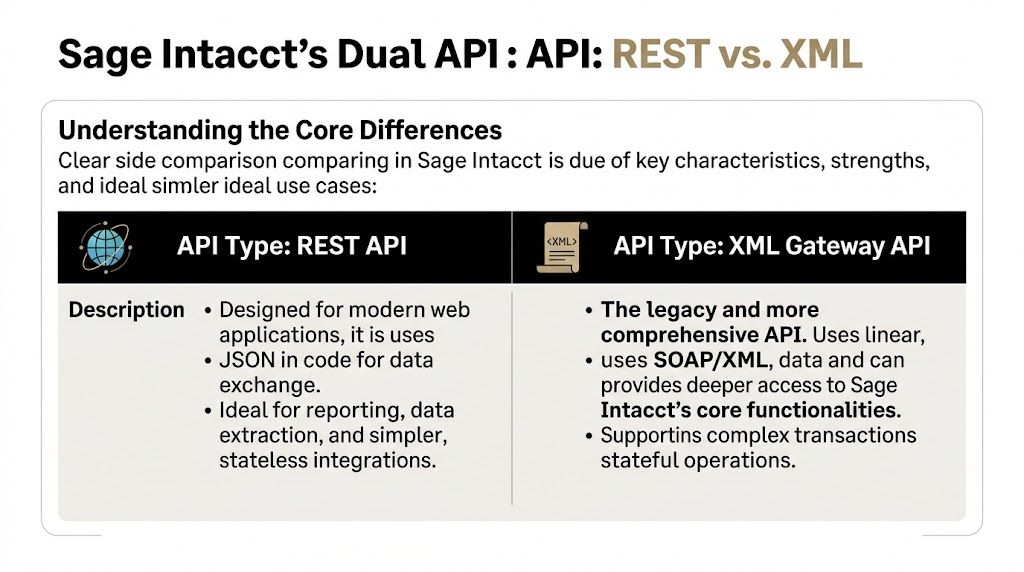
The first technical surprise in the sage intacct api isn’t authentication or schema shape. It’s that you’re dealing with two APIs, not one. Sage Intacct offers REST and SOAP/XML, and a serious integration often needs both. Sage recommends REST for new integrations, but the XML side still matters for complete coverage and more complex operations. According to Knit’s integration guide, REST can be 20 to 50% faster for some round trips, while SOAP/XML remains necessary for full feature access, including complex transactions and CRUD on custom objects and dimensions in many ERP sync scenarios (Knit’s Sage Intacct integration guide).
Where REST fits well
REST is the cleaner entry point for developers who are building modern services and internal integration workers. The payloads are JSON-based, stateless, and easier to test in tools your team already uses.
REST is usually a good fit when you need:
- Customer syncs: create, fetch, and update core records without session handling complexity
- Reporting-oriented reads: pull operational finance data into dashboards or downstream services
- Simple object workflows: straightforward CRUD where the object is exposed through REST
- Lighter service design: token-based auth and stateless calls make horizontal scaling simpler
For e-commerce scenarios, this often covers customer retrieval, basic account data access, and some object-level synchronization jobs.
Where XML still wins
XML is more verbose, but teams hit it quickly once they leave simple reads and writes. It remains the safer path for edge cases that matter in ERP-grade integrations.
Use XML when your workflow depends on:
| API style | Better for | Main limitation |
|---|---|---|
| REST | Simpler data access, lighter services, JSON workflows | May not expose every object or complex transaction path |
| XML Gateway | Deeper Sage Intacct coverage, complex operations, custom dimensions and objects | Higher implementation and maintenance overhead |
That matters in real builds. A direct commerce-to-accounting connector often starts with “we only need customers and invoices” and ends with location-specific posting, department tagging, inventory adjustments, and custom reporting requirements. The more your customer relies on dimensional accounting, the more likely XML becomes part of the design.
Don’t choose one protocol for ideological reasons. Choose based on object coverage, transaction complexity, and how much accounting fidelity the customer expects.
A workable pattern for developers
A hybrid integration layer generally offers better results than a pure REST or pure XML commitment. REST handles lighter, modern object interactions. XML covers what the REST surface doesn’t fully support.
That hybrid pattern also protects you from redesign later. If you model your connector around business actions instead of raw endpoints, you can route each action to the protocol that supports it best. “Create customer,” “post invoice,” and “sync dimensions” become stable internal commands, even if the transport differs underneath.
Connecting and Authenticating Your Application

Authentication is where integration quality starts to show. Teams that treat auth as a one-time setup usually end up with brittle jobs, stale sessions, and too much permission in production. With Sage Intacct, the right implementation depends on which protocol you’re using.
REST uses Bearer token authentication. XML uses a session model. Those aren’t interchangeable concerns, so your connector should isolate them behind separate auth handlers.
REST authentication in production
Sage Intacct’s REST side uses Bearer tokens, and the platform documentation and related implementation guides emphasize that REST uses OAuth-style sender token flows tied to company and user context. The same guide notes that REST tokens refresh on a regular cycle, while remaining stateless for application design (API authentication patterns in integrations).
For a developer, the practical checklist is:
- Store credentials outside app code: use a secret manager or environment-backed vault
- Separate sandbox and production tenants: don’t reuse credentials across environments
- Build token refresh into the client library: don’t push that concern into business logic
- Log auth failures with tenant context only: never write secrets to logs
If you’ve worked on checkout or transaction systems before, this discipline will feel similar to secure payment gateway API integration, where credential scope, rotation, and environment separation are essential.
XML session control
The XML side works differently. It’s session-based and requires more deliberate lifecycle management. The session expires, so long-running workers need to renew or reestablish access cleanly instead of assuming a single login covers the entire batch.
That changes how you structure job execution. A single worker processing a queue of order exports needs session awareness. A horizontally scaled fleet needs shared rules for session refresh and retry boundaries.
Field advice: Keep XML session creation close to the transport layer. Don’t let downstream posting code decide when to log in again.
Permissions and object access
Authentication gets you in. Authorization decides whether your integration is safe. Least-privilege role design matters because your connector will likely touch financial and operational data in the same tenant.
Start with a narrow access pattern:
- Grant only the objects your workflow needs.
- Split read-heavy services from write-capable services when possible.
- Test permission failures intentionally before go-live.
- Document which business action maps to which Sage Intacct role capability.
Developers often focus on connection success first. That’s necessary, but not sufficient. The better standard is: the app connects, refreshes safely, survives session expiry, and cannot mutate data outside its intended workflow.
Key API Endpoints for eCommerce Workflows
The easiest way to design a Sage Intacct connector is to follow one order from storefront to finance. A shopper checks out. Your platform captures customer, line items, prices, tax, shipping, and fulfillment state. Sage Intacct doesn’t need that information in storefront language. It needs it mapped into accounting and ERP objects with consistent ownership rules.
A broad mapping looks like this:
| eCommerce Data Type | Sage Intacct Object | Primary Use Case |
|---|---|---|
| Customer profile | Customer | Create or update bill-to and account identity data |
| Order | Sales order or equivalent order entry object | Represent the commercial transaction before or alongside invoicing |
| Invoiceable receivable | AR invoice | Track what the customer owes |
| Product or SKU | Inventory item | Sync item master data and stock-related references |
| Financial posting | GL batch | Record summarized or detailed ledger impact |
For teams designing field mappings and service boundaries, DeepDocs has a practical e-commerce API development guide that’s useful for thinking about object normalization before you write Sage-specific adapters.
Customer first, not order first
A lot of failed integrations start by trying to post the order immediately. In practice, customer identity resolution usually comes first. If the customer record doesn’t exist or doesn’t match correctly, every downstream object can fragment.
A minimal REST-flavored customer payload often looks conceptually like this:
{
  "id": "CUST-10045",
  "name": "Northwind Retail",
  "email": "[email protected]",
  "status": "active"
}
The exact schema depends on the object surface you’re using, but the architectural point stays the same. Decide whether your app creates customer masters, updates them conditionally, or only links to existing records.
Order and receivables flow
Once customer identity is stable, the transaction can move into order entry and receivables. Teams then need to decide whether Sage Intacct should hold the operational order detail, only the invoice, or a summarized accounting outcome.
A common pattern looks like this:
- Order accepted in commerce platform
- Customer matched or created in Sage Intacct
- Order entry object posted
- Receivable object created when the sale becomes billable
- Ledger posting completed according to accounting policy
That sequence is less about “which endpoint comes next” and more about which business event is authoritative. If your OMS can still edit orders after checkout, don’t post final accounting entries too early.
Inventory and item sync
Product and stock workflows are where e-commerce developers often underestimate Sage Intacct complexity. The item itself may be simple. The surrounding business rules usually aren’t. Warehouses, locations, adjustments, bundles, and returns all shape what “inventory sync” really means.
Use item sync for stable reference data and carefully choose when stock updates move across systems. If your app isn’t the source of truth for available quantity, don’t overwrite accounting-side values casually.
A clean integration doesn’t sync everything. It syncs the records that have a defined owner and a recovery path when writes fail.
GL posting is a design decision
Some teams push detailed commerce transactions deep into Sage Intacct. Others collapse activity into daily or channel-based summaries and post those through ledger-oriented objects. Both patterns can work.
The right choice depends on reconciliation, reporting needs, and whether finance wants drill-down inside Sage Intacct or in your app. Your connector should support that policy deliberately, not accidentally through endpoint convenience.
Common Pitfalls and Integration Best Practices
Most integration failures don’t happen because the first API call won’t work. They happen after launch, when volume rises, retries multiply, and the data model starts colliding with real operational behavior.
A common mistake is assuming that a generous API limit means you can skip request discipline. Sage Intacct allows 1,296,000 requests per day per client application, which averages about 15 requests per second, and supports up to 150 simultaneous requests for parallelized high-volume work according to Merge’s analysis of the API behavior and docs (Merge on Sage Intacct API limits). That’s substantial capacity. It still doesn’t excuse wasteful sync design.
Pitfall one using full dumps as a sync strategy
Developers under deadline often build the first version around broad list pulls. It works in testing, then becomes expensive and noisy in production.
Better practice:
- Use pagination: Sage Intacct supports paging controls, which lets workers process large datasets incrementally.
- Filter by date when polling: pull only records that changed since the last successful checkpoint.
- Track deletions explicitly: if your workflow depends on bidirectional consistency, design for removed records too.
The difference isn’t cosmetic. Incremental syncs are easier to replay, faster to debug, and less likely to create accidental duplicates.
Pitfall two retrying without idempotency
If the network fails after a write, your worker may not know whether Sage Intacct accepted the transaction. Blind retry logic can create duplicate customers, duplicate invoices, or duplicate postings.
Protect yourself with:
- External correlation IDs tied to the source transaction
- Upsert or pre-read logic where the workflow allows it
- Replay-safe job design so queue retries don’t mutate state unpredictably
- Dead-letter handling for records that need human review
Pitfall three treating 429 as an outage
Rate limiting isn’t a system failure. It’s feedback that your job orchestration needs control. The documented behavior includes standard HTTP 429 responses when limits are exceeded, and exponential backoff is the appropriate mitigation in high-volume integrations.
Operational rule: Retries should slow down and spread out. They shouldn’t hammer the same endpoint harder.
Pitfall four mixing ownership rules
One system updates customers. Another edits addresses. A third recalculates inventory. Then every sync run becomes a tug-of-war.
Write down record ownership before coding:
| Area | Recommended question |
|---|---|
| Customer | Which system creates the master record |
| Order | Which event makes the transaction final |
| Inventory | Which application owns available quantity |
| GL impact | Which service decides summary vs detail posting |
That document prevents more production bugs than another week of endpoint testing.
How API2Cart Accelerates Sage Intacct Integration
A direct Sage Intacct connector can be justified if the integration is core to your product and your team is ready to own the protocol differences, auth models, object mapping, polling strategy, and long-term maintenance. For many SaaS teams, though, that’s only half the problem. The other half is that Sage Intacct is rarely the only platform in scope.
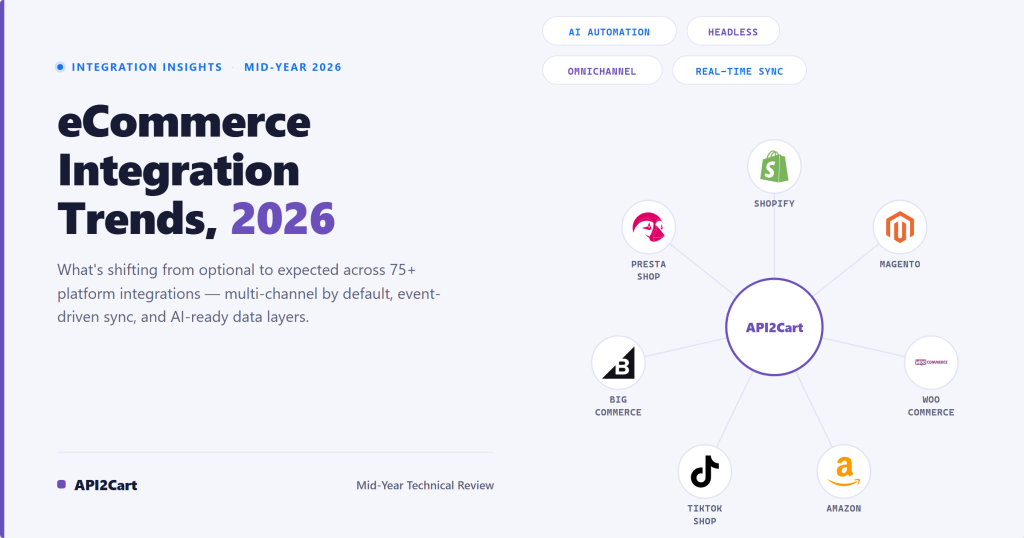
If your roadmap also includes Shopify, Magento, WooCommerce, Amazon, eBay, Walmart, and other storefront or marketplace systems, one custom ERP-side integration quickly turns into a mesh of cart-specific adapters. That’s where unified architecture starts to matter more than connector-level craftsmanship.
What a unified layer changes
A unified API approach gives your team a stable surface for commerce operations like orders, products, customers, shipments, and inventory, while platform-specific logic stays underneath. That means your application can work against normalized methods and then translate to each underlying platform only where needed.
In practical terms, that helps developers:
- Reduce adapter sprawl: fewer custom cart connectors in your codebase
- Standardize sync services: one internal object model for order and catalog flows
- Shorten testing cycles: less repeated endpoint-by-endpoint validation per platform
- Contain platform drift: changes in one platform don’t force a redesign of your whole integration layer
API2Cart is one example of this model for multi-cart connectivity. Its unified API approach for e-commerce integrations is relevant when your SaaS needs a single surface across many shopping carts and marketplaces while keeping Sage Intacct-related logic on the ERP side consistent.
Where this is useful in Sage Intacct projects
This matters most when your product sits between commerce and finance. Think OMS, WMS, shipping automation, returns, analytics, PIM, or inventory synchronization.
Instead of building one-off connectors for every storefront first and then separately building Sage Intacct translation logic, your team can normalize the commerce inputs earlier. That changes the shape of the problem. You spend more time on business rules like order state mapping, receivables timing, or inventory ownership, and less time writing repetitive cart-specific plumbing.
The strategic gain isn’t that Sage Intacct becomes simple. It’s that the rest of the ecosystem stops multiplying complexity around it.
Getting Started With Your Next Steps
You should decide one thing before writing connector code. Are you building a Sage Intacct integration as a product capability you’ll own for years, or are you solving a near-term customer request with minimal architectural planning?
If it’s the first, invest in a proper integration layer. Model business actions independently from transport, separate REST and XML concerns, define record ownership, and make retries idempotent from day one.
If it’s the second, be careful. Sage Intacct has a real migration wrinkle. The official developer resources don’t provide a detailed side-by-side migration strategy from legacy XML to modern REST, especially around unsupported objects and query differences, which is one reason unified integration layers can reduce platform-specific migration burden over time (Sage Intacct developer documentation).
A practical next step list looks like this:
- Validate your target workflow: customer sync, order posting, invoice creation, inventory update, or GL export
- Choose the source of truth per object: don’t postpone ownership decisions
- Prototype with the smallest complete flow: one customer, one order, one accounting outcome
- Plan for change: especially if your design touches both REST and XML surfaces
A good integration isn’t the one that connects fastest in a sandbox. It’s the one that still reconciles cleanly when customers add channels, locations, returns, and finance controls.
If your roadmap includes Sage Intacct plus many storefronts or marketplaces, API2Cart is worth evaluating as a way to normalize commerce-side integrations while your team keeps focus on the business rules that matter most. Start with a test workflow, connect a store, and confirm how much platform-specific code you can remove before committing engineering time to another custom connector.