Summary: This article walks through how to build a product listing tool that publishes products to multiple eCommerce platforms simultaneously using API2Cart. It covers reading product data from a source, transforming it for different channels, and using product.add and product.add.batch to create listings across Shopify, WooCommerce, Magento, eBay, Etsy, Amazon, and more.
What Is a Multi-Channel Listing Tool?
A multi-channel listing tool allows merchants to manage their product catalog in one place and push listings to multiple sales channels simultaneously. Instead of manually creating products on each platform, the merchant maintains a single source of truth and the tool handles distribution.
Common use cases:
- A brand selling on Shopify, Amazon, and eBay from one catalog
- A wholesaler pushing products to multiple retailers’ WooCommerce or Magento stores
- A marketplace aggregator listing supplier products across multiple channels
Architecture Overview
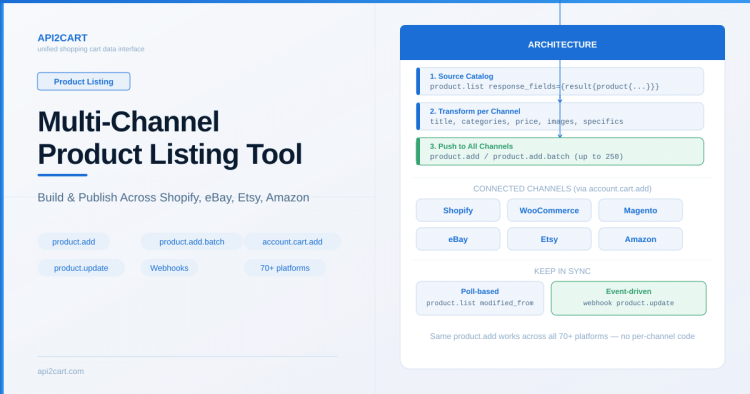
A typical multi-channel listing tool built on API2Cart has three layers:
- Source catalog — your database or a primary store connected via API2Cart
- Transformation layer — adapts product data for each channel (titles, descriptions, pricing, categories)
- Distribution layer — pushes products to target stores via API2Cart’s unified
product.addmethod
Because API2Cart provides the same product methods across all platforms, your distribution layer doesn’t need platform-specific code.
Step 1: Connect Target Stores
First, connect each sales channel using account.cart.add:
POST /account.cart.add.json
    ?api_key=KEY
    &cart_id=shopify
    &store_url=brand.myshopify.com
    &access_token=shpat_xxx

POST /account.cart.add.json
    ?api_key=KEY
    &cart_id=WoocommerceApi
    &store_url=store.example.com
    &wc_consumer_key=ck_xxx
    &wc_consumer_secret=cs_xxx

POST /account.cart.add.json
    ?api_key=KEY
    &cart_id=EtsyAPIv3
    &store_url=etsy.com/shop/MyShop
    &etsy_client_id=xxx
    &etsy_refresh_token=xxx
Each connection returns a unique store_key that you’ll use for all subsequent operations on that channel.
Step 2: Read Product Data from Source
If your source catalog is also an eCommerce store connected to API2Cart, retrieve products with:
GET /product.list.json?api_key=KEY&store_key=SOURCE_KEY&response_fields={result{product{id,name,description,price,sku,images,quantity,categories_ids}}}&count=100For each product, you get a normalized data structure regardless of whether the source is Shopify, Magento, or any other platform.
Step 3: Transform for Each Channel
Different channels have different requirements:
- Title length: eBay allows up to 80 characters, Etsy up to 140, Shopify has no strict limit
- Categories: Each platform has its own category tree. Use
category.liston each target store to map your categories - Pricing: You might apply different margins per channel
- Images: Some platforms require specific dimensions or file sizes
- Required fields: Marketplaces often require specifics (item condition, shipping template, return policy) that storefront platforms don’t
Use account.supported_platforms and the platform API comparison to understand which fields are required or supported per platform.
Step 4: Push Products to Target Channels
For individual product creation:
POST /product.add.json?api_key=KEY&store_key=SHOPIFY_KEY&name=Product+Name&description=...&price=29.99&sku=SKU-001&quantity=50&category_id=12For bulk listing (up to 250 products per call):
POST /product.add.batch.json
    ?api_key=KEY
    &store_key=ETSY_KEY

Body:
{
  "payload": [
    {
      "name": "...",
      "price": 29.99,
      "sku": "SKU-001",
      ...
    },
    ...
  ]
}
Use idempotency_key on each request to prevent duplicate listings if your sync retries after a failure.
Step 5: Keep Listings in Sync
After initial listing, you need to keep data consistent. Two approaches:
Poll-based sync
- Periodically check your source for changes using
product.listwithmodified_from - For each changed product, call
product.updateon all target channels - Use
product.update.batchfor efficiency when many products changed
Event-driven sync
- Set up webhooks on your source store for
product.updateevents - When notified, fetch the updated product data
- Push changes to all target channels immediately
Step 6: Handle Inventory Across Channels
When a product sells on one channel, stock must decrease everywhere. This requires:
- Webhooks for
order.addon all channels - When an order comes in, reduce quantity on all other channels using
product.updatewithreduce_quantity - Use
warehouse_idif the merchant has multi-location inventory
For details on inventory sync patterns, see our article on syncing inventory across multiple stores.
Handling Platform-Specific Requirements
Some channels need extra data that others don’t:
- eBay/Etsy: Shipping templates, return policies, item specifics — use the
specificsparameter andshipping_template_id - Amazon SP-API: ASIN matching, condition, fulfillment channel
- Shopify: Product type, vendor, tags
API2Cart’s product.add method accepts all these platform-specific parameters. Check the interactive documentation with the platform filter to see exactly which fields apply to each channel.
Key Takeaways
- One set of API methods (
product.add,product.update,product.list) works across all 80+ platforms - Use
product.add.batchfor initial bulk listing (up to 250 items per call) - Use
idempotency_keyto prevent duplicate listings on retries - Use webhooks +
reduce_quantityfor cross-channel inventory sync - Use
response_fieldsto optimize API response size for large catalogs - Check platform comparison for field support differences
For more on getting started with API2Cart, see How to Start Your Integration.

Technical author at API2Cart focused on practical API integration, webhooks, store authentication, data synchronization and developer workflows.