
As the eCommerce industry expands at a fast pace, APIs have become a significant factor in providing integration and improving the performance of applications. APIs are important for any software developer as they enhance the capacity to develop efficient and reliable software. Overall, there is one more powerful tool in the eCommerce environment, which is the OTTO API. This comprehensive guide is designed to provide you with the fundamental knowledge and real-world experience to help you harness the power of the OTTO API.
What is OTTO API?
The OTTO Market API is a robust tool that aims to enable developers to integrate with OTTO, an eCommerce platform in Europe. This API offers a rich and reliable toolset to integrate with OTTO’s platform and perform operations on it through code.
Imagine your order and inventory management system effortlessly syncing with OTTO Market's product listings or your customer loyalty program seamlessly integrating with OTTO Market's vast customer base. According to statistics, OTTO Market has 2.2 million active customers on its platform. Particularly, this is the strength of the OTTO Market API. It allows you to create software applications that leverage the capabilities of the OTTO Market and reach more people. In turn, this makes your and your customers’ experience much stronger.
As for the technical aspect, the OTTO Market API has a solid list of features aimed at making the integration process for developers as smooth as possible. Certainly, one of the most important advantages is that it works in accordance with RESTful architecture. This approach that is typical for working with databases uses HTTP methods (GET, POST, PUT, DELETE) for data reading, creation, modification, and deletion, respectively. So, it should be easy for developers who have experience in web development. Besides, the API is quite flexible with a nicely defined structure of the endpoints. Moreover, these endpoints serve as the entry points to certain operations within the OTTO Market digital business ecosystem. Having a list of endpoints and their specific uses documented, developers can focus on creating the integration they require.
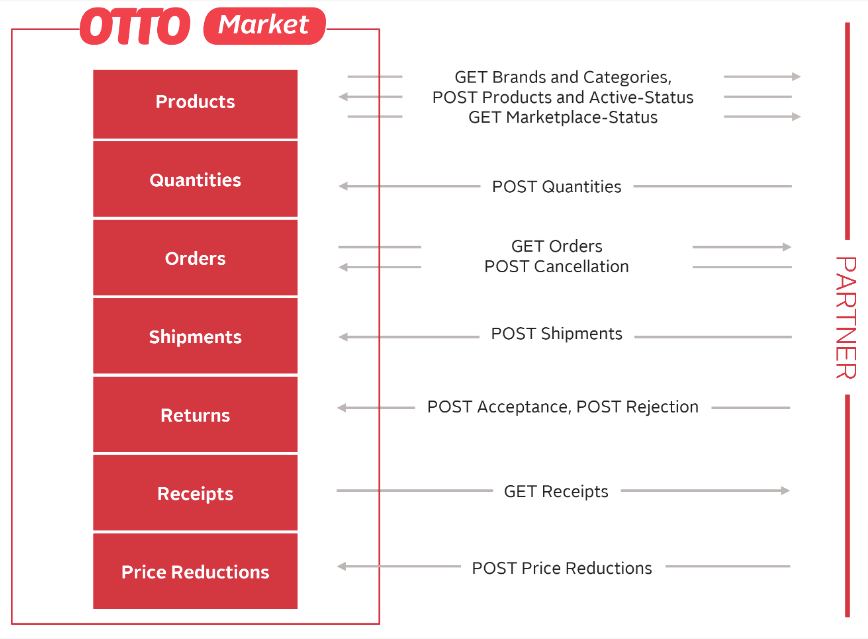
Image Source: https://api.otto.market/
OTTO API Quick Reference
For developers just getting their feet wet, this table summarizes the essential components of the OTTO API ecosystem. It's a quick way to understand the main building blocks you'll be working with.
| Endpoint Category | Primary Function | Authentication Method | Key Data Objects |
|---|---|---|---|
| Products | Create, update, and manage product listings. | OAuth 2.0 | Product, Variant, Image |
| Orders | Retrieve new orders and update statuses. | OAuth 2.0 | Order, OrderItem, Shipment |
| Inventory | Synchronize stock levels and availability. | OAuth 2.0 | Inventory, Stock |
| Shipments | Provide tracking info and confirm delivery. | OAuth 2.0 | Shipment, Tracking |
This overview should give you a solid foundation. As you dive deeper, you'll find each category has multiple endpoints for granular control over the data.
Why Use OTTO Market API?
Basically, here are a few key reasons software providers and developers should integrate with the OTTO Market API. Firstly, it opens up a vast market for the company. Secondly, OTTO Market is home to a large and active user base, which allows you to target more people and extend the usage of your software. As an application, connecting to OTTO Market means reaching millions of users interested in the latest solutions in the sphere of eCommerce.
Furthermore, the OTTO Market API provides access to a wide range of information and analytical tools. Also, they are extremely helpful when it comes to decision-making and business development. This means that software providers can allow their clients to see through their applications all the aspects of sales performance, customer behavior, and trends in the market.
Getting Started with OTTO API
As an OTTO Market service provider (developer), you can connect your software to this platform. Thus, here are the necessary steps you have to take:
1. Explore and Register:
- Head over to servicepartner.otto.market and understand how the integration process will be conducted.
- Use the registration form available to register as a developer.
2. Partner Up:
- Once registered, you will receive credentials allowing you to access the “OTTO Partner Connect (OPC),” which is a dedicated developer platform.
- Provide all the necessary documents and data to make your partnership credible.
3. Dive into the Details:
- Make sure to explore the huge list of resources available in the Developer Program.
- The " Use-Cases " section will help you find out how other developers use the OTTO Market API.
4. Test and Refine:
- The OTTO Market also has a mock-up environment called a sandbox section where you can freely run your code without actually activating it in the live stream.
- Basically, his enables you to fine-tune integration and ensure that all works as it should.
5. Go Live and Connect:
- Once you are comfortable with the integration, apply for it with production access in the “OTTO Partner Connect (OPC).”
- Approval allows you to build your first official OTTO Market App and link your first seller, marking your official entry into the OTTO Market world.
Synchronizing Inventory Levels in Real Time
For any marketplace seller, accurate inventory management is non-negotiable. It's also one of the most important jobs for any software that integrates with a marketplace. Using the otto-api directly lets developers pull current stock levels and push updates right back to product listings. Getting this right is crucial—it prevents overselling, which kills a seller's reputation, and stops you from underselling, which leaves money on the table.
For a developer, this means building a solid system to track every stock change. A typical setup involves scheduled jobs that poll the OTTO API for inventory counts, check those numbers against your own system's data, and then send any updates back. This approach works, but you have to be careful with how often you make API calls to avoid hitting rate limits, especially if you're working with merchants who have large, fast-moving catalogs.

Best Practices for Native Inventory Sync
When you're building a direct integration for near-real-time synchronization, there are a few complexities you absolutely have to plan for.
- Handling Product Variations: Products with multiple attributes like size and color need individual stock level updates for each variant SKU. Your code has to correctly map and update inventory for every single variation to keep things accurate.
- Batching Updates: Instead of firing off an API call for every single SKU change, it's far more efficient to bundle multiple inventory updates into a single request whenever the API supports it. This keeps your call volume down and helps you stay well under the rate limits.
- Delta Sync Logic: A "delta sync" is a much smarter way to work. Instead of doing a full catalog refresh, you only push updates for products whose stock levels have actually changed. This dramatically cuts down on unnecessary API traffic and reduces the processing load on both your system and OTTO's.
Building a solid integration with the otto-api is about more than just successful API calls. It's about creating a system that can manage API traffic smartly and recover from failures without missing a beat. Like any well-designed API, OTTO’s has governors in place to ensure stability for everyone. Getting a handle on these rules is key to building a reliable, scalable app that won’t get shut down.
These governors are better known as rate limits, and they dictate how many requests your app can make in a given time frame. If you go over that limit, your requests will be temporarily denied with a 429 Too Many Requests status code. This isn't just an error—think of it as a signal from the API to ease off the gas. Ignoring it could get your API keys blocked for longer periods.
Implementing Smart Retry Logic
In any connected system, temporary errors are just a part of life. A brief network hiccup or a momentary server load can cause a perfectly good request to fail. A basic integration might just give up, but a resilient one knows how to try again. The trick is how you retry, because hammering the API immediately after a failure can actually make things worse.
This is where a retry strategy with exponential backoff comes in. When a request fails with a temporary error (like a 503 Service Unavailable), your application should wait a moment before trying again. If that second attempt also fails, it waits for an even longer period before the next one, and so on. This approach gives the API breathing room during periods of instability and prevents your app from adding to the problem.
A common pitfall for developers is retrying every single error. You should only ever retry on transient, server-side issues (5xx status codes). Retrying a
400 Bad Requestor401 Unauthorizedwithout fixing the root cause is a surefire way to waste resources and get the same failure every time.

Wait!
Before you leave, get our guide on how to easily integrate with the OTTO API and 80+ other eCommerce platforms in less than a month!
How to Integrate with OTTO API with Ease?
Working through a third-party tool like API2Cart can make the integration with OTTO much easier and add more functionality to your integration. API2Cart is an API that integrates your eCommerce software to OTTO and other popular eCommerce platforms with ease. Also, this unifies the approach that allows you to integrate with API2Cart once and get access to a wide range of functionalities across the multiple platforms including OTTO. API2Cart takes care of authentication, data processing and error handling which saves time and efforts in building application integrations.

API2Cart helps developers facilitate real-time connections with OTTO and keep up-to-date information in their applications and stores. Moreover, API2Cart includes detailed documentation and support, ensuring that developers can work effectively with the integrations.
API2Cart provides an opportunity to test its integration possibilities absolutely for FREE for 14 days without preliminary payment. Moreover, in this trial period, users can explore API2Cart and its features and integrate with 80+ eCommerce platforms, such as OTTO, Shopify, Magento, etc.
OTTO API Integration Development via API2Cart
There are two approaches to integrating with OTTO: building it internally or opting for a third-party solution. The in-house approach requires significant resources, including hiring developers and maintaining the integration. The alternative is quicker, more cost-effective, and scalable.
API2Cart simplifies integration with OTTO and over 60 other eCommerce platforms and marketplaces, including Shopify, Magento, WooCommerce, Amazon, Etsy, Wix, Shopee, Temu, OpenCart, Shopee, TikTok Shop, and others, at once. This allows your app to interact with multiple platforms through a single connection.
Step-by-Step Guide on How to Develop OTTO API Integration
To develop an integration between your eCommerce software or app and the OTTO platform, follow these steps:
1. Sign Up for API2Cart
Register an API2Cart account to get access to its unified API, which allows you to connect with the OTTO API and over 60 other platforms.
2. Create an OTTO Developer Account and Get Necessary Credentials
Follow the instructions on how to create your application and obtain the required credentials to add an OTTO store to your API2Cart account.
3. Test API2Cart API Methods
Once you have added an OTTO store, you can test out the supported API methods for OTTO to get and manage essential store data (products, orders, and customer information).
4. Develop Integration with API2Cart
Connect your software to API2Cart to start managing store data in the most convenient way.
Currently, API2Cart allows working with the following data through the API methods for OTTO integration:
- For working with orders:
order.count/list/info/add/abandoned.list - For working with products:
product.list/count/info/find/child_item.list - For working with customers:
customer.list/count/info/find/add/update - For working with categories:
category.list/count/info/find
API2Cart constantly releases new supported methods and works on adding new cart versions and support for new platforms. With API2Cart, you can get OTTO integration quickly and easily.
Here is how the response structure of product.list method for OTTO API integration looks like:
{
  "return_code": 0,
  "return_message": "string",
  "pagination": {
    "previous": "string",
    "next": "string",
    "additional_fields": {},
    "custom_fields": {}
  },
  "result": {
    "products_count": 0,
    "product": [
      {
        "id": "string",
        "type": "string",
        "u_model": "string",
        "u_sku": "string",
        "name": "string",
        "description": "string",
        "short_description": "string",
        "price": 0,
        "advanced_price": [
          {
            "id": "string",
            "value": 0,
            "avail": true,
            "group_id": "string",
            "quantity_from": 0,
            "start_time": {
              "value": "string",
              "format": "string",
              "additional_fields": {},
              "custom_fields": {}
            },
            "expire_time": {
              "value": "string",
              "format": "string",
              "additional_fields": {},
              "custom_fields": {}
            },
            "additional_fields": {},
            "custom_fields": {}
          }
        ],
        "cost_price": 0,
        "quantity": 0,
        "inventory": [
          {
            "warehouse_id": "string",
            "quantity": 0,
            "in_stock": true,
            "priority": 0,
            "additional_fields": {},
            "custom_fields": {}
          }
        ],
        "group_items": [
          {
            "child_item_id": "string",
            "product_id": "string",
            "default_qty_in_pack": "string",
            "is_qty_in_pack_fixed": true,
            "price": 0,
            "additional_fields": {},
            "custom_fields": {}
          }
        ],
        "u_brand_id": "string",
        "u_brand": "string",
        "categories_ids": [
          "string"
        ],
        "stores_ids": [
          "string"
        ],
        "url": "string",
        "seo_url": "string",
        "meta_title": "string",
        "meta_keywords": "string",
        "meta_description": "string",
        "avail_sale": true,
        "avail_view": true,
        "is_virtual": true,
        "is_downloadable": true,
        "weight": 0,
        "weight_unit": "string",
        "sort_order": 0,
        "in_stock": true,
        "backorders": "string",
        "manage_stock": "string",
        "is_stock_managed": true,
        "on_sale": true,
        "create_at": {
          "value": "string",
          "format": "string",
          "additional_fields": {},
          "custom_fields": {}
        },
        "modified_at": {
          "value": "string",
          "format": "string",
          "additional_fields": {},
          "custom_fields": {}
        },
        "tax_class_id": "string",
        "special_price": {
          "value": 0,
          "avail": true,
          "created_at": {
            "value": "string",
            "format": "string",
            "additional_fields": {},
            "custom_fields": {}
          },
          "modified_at": {
            "value": "string",
            "format": "string",
            "additional_fields": {},
            "custom_fields": {}
          },
          "expired_at": {
            "value": "string",
            "format": "string",
            "additional_fields": {},
            "custom_fields": {}
          },
          "additional_fields": {},
          "custom_fields": {}
        },
        "tier_price": [
          {
            "qty": 0,
            "price": 0,
            "additional_fields": {},
            "custom_fields": {}
          }
        ],
        "group_price": [
          {
            "id": "string",
            "group_id": "string",
            "price": 0,
            "store_id": "string",
            "quantity": 0,
            "start_time": "string",
            "expire_time": "string",
            "additional_fields": {},
            "custom_fields": {}
          }
        ],
        "images": [
          {
            "id": "string",
            "http_path": "string",
            "file_name": "string",
            "mime-type": "string",
            "size": 0,
            "create_at": {
              "value": "string",
              "format": "string",
              "additional_fields": {},
              "custom_fields": {}
            },
            "modified_at": {
              "value": "string",
              "format": "string",
              "additional_fields": {},
              "custom_fields": {}
            },
            "alt": "string",
            "avail": true,
            "sort_order": 0,
            "type": "string",
            "additional_fields": {},
            "custom_fields": {}
          }
        ],
        "product_options": [
          {
            "id": "string",
            "product_option_id": "string",
            "name": "string",
            "description": "string",
            "sort_order": 0,
            "type": "string",
            "required": true,
            "available": true,
            "used_in_combination": true,
            "option_items": [
              {
                "id": "string",
                "product_option_item_id": "string",
                "name": "string",
                "sort_order": 0,
                "price": "string",
                "weight": "string",
                "quantity": 0,
                "type_price": "string",
                "sku": "string",
                "is_default": true,
                "additional_fields": {},
                "custom_fields": {}
              }
            ],
            "additional_fields": {},
            "custom_fields": {}
          }
        ],
        "u_upc": "string",
        "u_mpn": "string",
        "u_gtin": "string",
        "u_isbn": "string",
        "u_ean": "string",
        "related_products_ids": [
          "string"
        ],
        "up_sell_products_ids": [
          "string"
        ],
        "cross_sell_products_ids": [
          "string"
        ],
        "dimensions_unit": "string",
        "width": 0,
        "height": 0,
        "length": 0,
        "discounts": [
          {
            "id": "string",
            "name": "string",
            "modifier_type": "string",
            "value": 0,
            "from_time": "string",
            "to_time": "string",
            "customer_group_ids": "string",
            "sort_order": 0,
            "additional_fields": {},
            "custom_fields": {}
          }
        ],
        "additional_fields": {},
        "custom_fields": {}
      }
    ],
    "additional_fields": {},
    "custom_fields": {}
  },
  "additional_fields": {},
  "custom_fields": {}
}
Conclusion
In conclusion, integrating with OTTO using the OTTO API or another connector, such as API2Cart, can significantly improve your eCommerce software functionality, allowing for smooth data sharing and effective process management. For a software developer, embracing these integration capabilities enables one to deliver clients better, elastic, and adaptive solutions. Also, the OTTO API provides a wide range of tools for managing products, orders, and stocks. Sigh up today and explore how API2Cart makes the integration process easier by offering a single API for connecting to various shopping platforms, such as OTTO.
Fill out the form below to get the guide:
This comprehensive guide will help you streamline your OTTO integration process and save you valuable time!
Find out how extra functionality can help your business win its place in the sun.
FAQs
1. Efficient Data Sync: You can easily sync and manage all valuable store data, such as products, orders, and customers, inventory, and more, across multiple platforms, in real-time.
2. Simplified Integration: API integration solution like API2Cart offers a unified API that enables eCommerce software to integrate with OTTO Market and 80+ other eCommerce platforms and marketplaces, including Shopify, Magento, WooCommerce, Etsy, Wix, Temu, Shopee, Flipkart, TikTok Shop, and others, at once - all though a single integration, streamlining your development process.
3. Scalability: As your business grows, the API allows you to easily add new platforms or adjust your integration without a major overhaul, ensuring long-term flexibility.
4. Cost and Time Savings: You can save time, reduce the need for manual updates, and minimize the potential for errors, resulting in more efficient business management.
Beyond the initial build, your team is on the hook for all ongoing maintenance. This means constantly watching for API version changes or deprecations that OTTO might release. Over the long term, that eats up a surprising amount of developer time and resources.