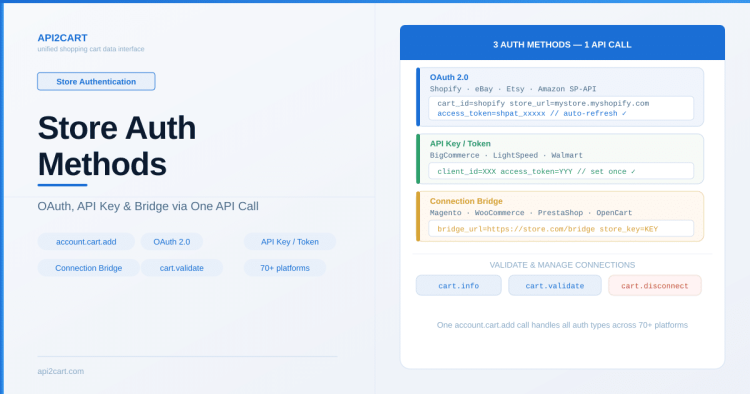
Summary: API2Cart supports three authentication methods for connecting stores: OAuth 2.0 (Shopify, eBay, Etsy, Amazon), API key/token (BigCommerce, LightSpeed), and Connection Bridge (Magento, WooCommerce, PrestaShop, OpenCart). All methods are accessed through a single account.cart.add API call.
Before your application can access store data through API2Cart, each store must be connected with proper authentication. The connection method depends on the eCommerce platform — some use OAuth flows, others require API keys or access tokens. API2Cart handles these differences so your application uses a single connection method regardless of the platform.
Authentication Methods by Platform Type
eCommerce platforms fall into several authentication categories:
OAuth 2.0 Platforms
Platforms like Shopify, eBay, Etsy, and Amazon SP-API use OAuth authorization. The merchant grants your application access through a consent screen. API2Cart manages the OAuth flow including:
- Token exchange after merchant authorization
- Automatic token refresh when access tokens expire
- Secure storage of credentials
For Shopify specifically, you create a Shopify App, and merchants install it to grant access. The resulting access token is provided to API2Cart via account.cart.add.
API Key / Token Platforms
Platforms like BigCommerce and LightSpeed provide API credentials directly (client ID, access token). These are entered once during connection and don’t require periodic re-authorization.
Bridge-Based Platforms
Self-hosted platforms (Magento, WooCommerce, PrestaShop, OpenCart) use the Connection Bridge file. Authentication happens through a bridge key that’s generated when the bridge is installed on the store server. For a detailed explanation of how the bridge works and when it’s needed, see What is the Connection Bridge and why do I need it?
Connection Builder
For a streamlined onboarding experience, API2Cart provides the Connection Builder — an embeddable UI widget that guides merchants through the store connection process. Instead of building your own connection form, you can integrate the Connection Builder into your application, and it handles platform selection, credential input, and bridge installation automatically.
Connecting a Store Programmatically
Use account.cart.add to connect stores from your application. The required parameters vary by platform:
POST https://api.api2cart.com/v1.1/account.cart.add.json?api_key=YOUR_KEY&cart_id=shopify&store_url=mystore.myshopify.com&access_token=shpat_xxxxxCommon parameters:
cart_id— platform identifier (shopify, magento, woocommerce, bigcommerce, etc.)store_url— the store’s URLaccess_token— for OAuth/token-based platformsbridge_url— for bridge-based platformsstore_key— for bridge-based platforms (bridge authentication key)
To get the full list of required parameters for each platform, use account.supported_platforms.
Validating a Connection
After adding a store, verify the connection is active:
GET https://api.api2cart.com/v1.1/cart.info.json?api_key=YOUR_KEY&store_key=STORE_KEYThis returns store information (platform version, store name, URL) confirming the connection works. If credentials are invalid or expired, the response will indicate the authentication error.
Managing Multiple Store Connections
Your API2Cart account can hold connections to many stores simultaneously. Use these methods to manage them:
account.cart.list— view all connected storescart.validate— check if a connection is still active and clear cached datacart.delete— remove a store connection from your accountaccount.config.update— update connection settings (e.g., credentials, user_agent parameter)
Security Considerations
- All API communication happens over HTTPS
- Store credentials are encrypted and stored securely by API2Cart
- Your application only needs to store the API key and store_key — not the merchant’s platform credentials
- For bridge connections, the bridge file can be configured to accept requests only from API2Cart IP addresses
This store authentication API abstraction means your application code stays the same whether connecting to Shopify, Magento, Amazon, or any of the 70+ supported platforms. For platform-specific setup guides, visit the connection documentation.

Technical author at API2Cart focused on practical API integration, webhooks, store authentication, data synchronization and developer workflows.