
How to set up an API2Cart integration for your store?
To integrate your customer's store with your business system via API2Cart, this guide will show you how to set up an API2Cart integration for your store in the following steps:
- Register: Create free account on API2Cart and fill in the necessary information that is required during registration.
- Get an API key: After registration, you will receive an API key, which will be used as an authentication token to make API requests. The API key will be available in the account.
- Choose supported integrations: API2Cart supports more than 80+ different eCommerce integrations, such as Shopify, WooCommerce, Magento, BigCommerce, Amazon, eBay, and more. You need to choose the specific integration for the store.
- Get required settings for integration connection: Depending on the integration you connect, you will need to provide specific authentication credentials, such as store URL, access token, and other relevant information required to add the store to API2Cart.
- Connect the integration: After successfully connecting the integration to the unified API provided by API2Cart, you will be able to access various data on the store, such as products, orders, customers, categories, and more.

There are two integration types - API-based and bridge-based.
API-based integrations such as Shopify, BigCommerce, eBay, Amazon, and many others have their own unique sets of parameters required to connect to the API2Cart.
When adding a store through the dashboard, there will be prompts for the parameters that are required to be added, as well as a link to the documentation on how to get the necessary parameters for the selected integration:

Note: Store key is generated automatically for API-based integrations.
To connect bridge-based integrations (Magento, OpenCart, WooCommerce, and others), before they connect, you need to download and drop a bridge into the root of the site or install the "Bridge Connector" plugin for the corresponding integration. Also, in addition to the store URL, you need to specify the store_key parameter received after downloading or connecting the plugin. You can also set additional parameters for the connection. Read more about the bridge here.
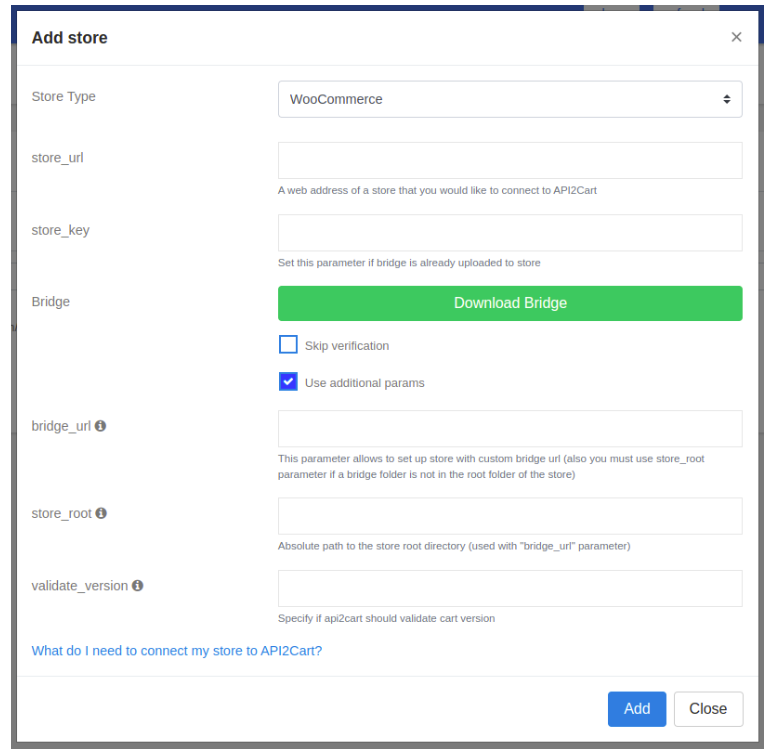
It is also possible to connect a store using the API2Cart API, having an API key and the necessary parameters to connect using the account.cart.add method This will establish a connection between the store and API2Cart.
It's also worth noting that for some eCommerce systems, both integration types are available: API-based and bridge-based. These include WooCommerce, Magento 2, Prestashop, and Shopware. You can identify a bridge-based integration by the presence of the bridge_url parameter. Before connecting a store, you should decide in advance which integration type to use for the selected eCommerce system. API-based integration does not require the installation of a bridge, which makes it easier to set up. However, API-based integrations, unlike bridge-based integrations where all data is processed on our server, handle data processing on the store's server. This means that API-based integrations put a higher load on the store's server and operate more slowly than bridge-based integrations.
Also, since bridge-based integrations are not limited to the functionality of the native eCommerce API, they support more methods and parameters in the API2Cart API. To determine which methods and parameters are supported by a particular type of integration, you can compare both types of integration for a specific eCommerce system using our API methods comparison tool.
