
How to connect WooCommerce API?
First, you must ensure that the WooCommerce REST API is working. The following conditions must be met:

Next, you need to create API keys:

The following fields must be filled in:

In the User field, you need to specify a user who has the Administrator role. The Permissions field must be Read/Write.
As a result, you will get Consumer key and Consumer secret, which are needed to add a store to API2Cart:

If you do not want to generate WooCommerce API keys manually, you can use
the native WooCommerce authorization endpoint
/wc-auth/v1/authorize.
In this flow, the store owner opens the generated URL, approves access, and WooCommerce sends API keys to your application callback.
- Enter the store URL and your application URLs.
- Generate the authorization link.
- Send the link to the merchant or open it during onboarding.
- After approval, WooCommerce redirects the merchant to the return URL and sends API keys to the callback URL by POST request.
Fill in the form to generate a link.
WooCommerce sends a JSON payload with consumer_key,
consumer_secret, key_id,
user_id, and key_permissions to the callback
URL. This means the full "authorize and add store to app" flow requires a
server-side handler in your application.
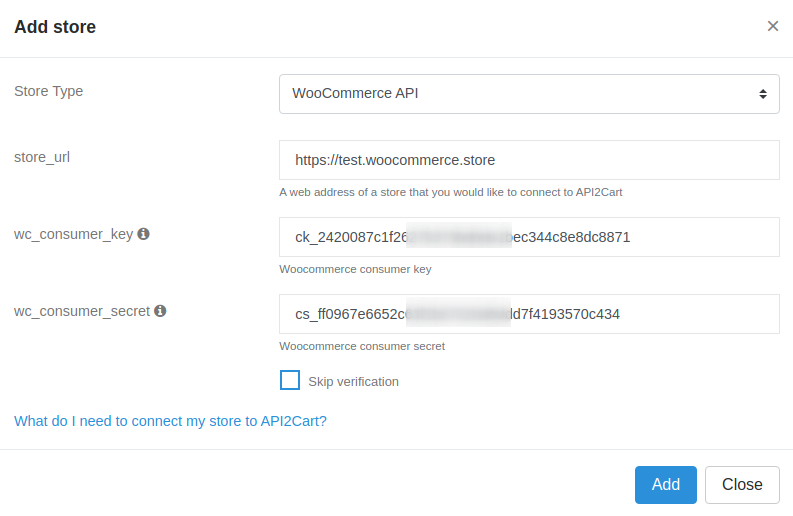
To add a store in the API2Cart admin panel, fill in the fields as follows:
Troubleshooting
If you receive the following message while adding a store:
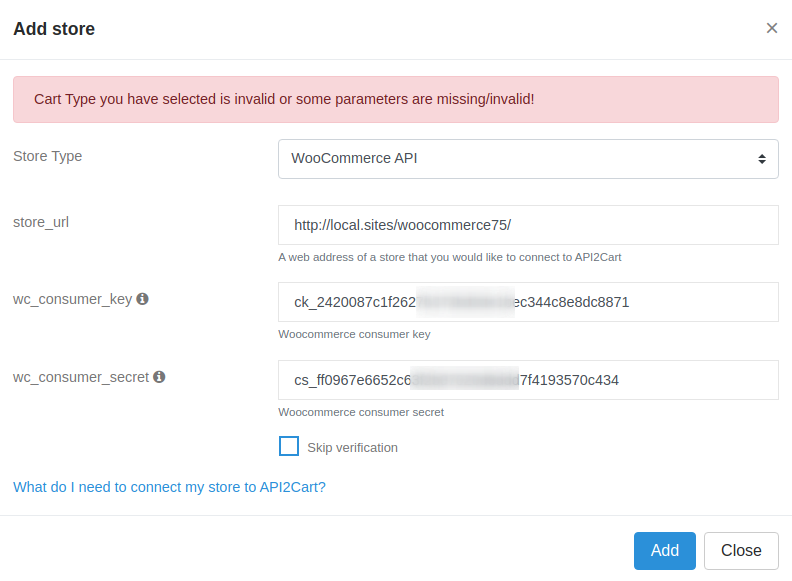
First of all, you need to check whether you have specified the correct store_url, wc_consumer_key and wc_consumer_secret.
If all the fields are correct, another reason can be that your server may be configured in such a way that it does not accept authorization tokens in request headers. You need to add the following line to the .htaccess file in the folder with the WooCommerce project:
RewriteRule ^index\.php$ - [E=HTTP_AUTHORIZATION:%{HTTP:Authorization},L]
You can find additional information in the WooCommerce guide.
