Zoho API integration helps eCommerce software vendors connect their solutions with Zoho Commerce and other Zoho services. It enables data exchange between systems and supports automation across multiple business processes.
Zoho reports that it serves over 100 million users worldwide, which shows the масштаб its ecosystem and the growing demand for scalable integrations.
However, integrating with Zoho is not always straightforward. Developers must handle multiple services, different APIs, and ongoing updates.
Therefore, SaaS companies look for ways to simplify integration and reduce development effort. In this guide, you will explore Zoho API and learn how to build integrations more efficiently.
What Is Zoho API?
Zoho API allows developers to connect their eCommerce software with Zoho Commerce and other Zoho services. It provides structured endpoints to access and manage data such as products, orders, customers, and inventory.
With Zoho API, your software can retrieve, update, create, and delete store data in real time. As a result, you can synchronize operations between your system and Zoho without manual work.
In addition, Zoho API supports key eCommerce processes, including inventory management, order processing, shipping, and payments. However, each Zoho service has its own API structure, which increases integration complexity.
Therefore, developers must handle multiple endpoints, authentication flows, and data formats when building integrations with Zoho Commerce.
How Zoho API Follows REST Principles
The Zoho Commerce API follows REST principles. As a result, developers can work with predictable endpoints and standard HTTP methods when building integrations.
Resource-based architecture. Zoho API is built around resources such as products, orders, customers, and categories. Each resource has its own URI. Therefore, your software can retrieve and update store data using standard methods like GET, POST, PUT, and DELETE. This simplifies data synchronization across systems.
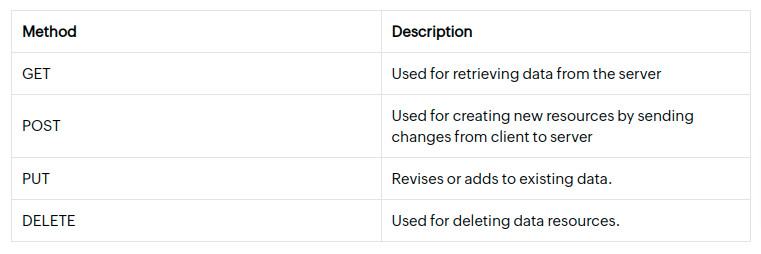
Stateless communication. Each request contains all required data, including authentication details. The server processes requests independently and does not store session state. As a result, integrations remain stable and scalable even when handling multiple stores or large data volumes.
Uniform interface. Zoho API uses standard HTTP methods for CRUD operations. In addition, it returns responses in consistent formats such as JSON or XML. However, different Zoho services may still have unique endpoints and data structures. Therefore, developers must adapt their integration logic for each service.
Benefits of Integrating Third-Party Applications with Zoho
Integrating third-party applications with Zoho API helps eCommerce software vendors expand their product capabilities and deliver more value to clients. As a result, your solution can connect with Zoho Commerce and other Zoho services within a unified business ecosystem.
Zoho provides tools for inventory management, order processing, customer engagement, and marketing automation. Therefore, your software can complement these features and offer a more complete solution for online store management.
Integration also enables real-time data exchange. For example, your system can sync products, update orders, and manage customer data automatically. This reduces manual work and improves operational efficiency.
Zoho serves businesses of different sizes, from small companies to enterprise-level organizations. As a result, integration with Zoho helps you reach a broader audience and expand your market presence.
In addition, supporting Zoho integrations strengthens your product positioning. It allows you to offer features that match real business needs and improve adoption.
Benefits of Integrating Third-Party Applications with Zoho
Integrating third-party applications with Zoho API allows eCommerce software vendors to expand functionality and support a wider range of business processes. As a result, your solution can operate within a connected ecosystem that includes CRM, inventory, and order management tools.
Zoho provides features for inventory tracking, order processing, customer management, and marketing automation. Therefore, your software can extend these capabilities and deliver more value to merchants.
Integration also enables real-time data exchange between systems. For example, your application can sync products, update orders, and manage customer data automatically. This reduces manual work and improves operational efficiency.
Zoho supports businesses of different sizes, from small companies to enterprise-level organizations. As a result, integration helps you expand your market reach and support more clients.
How to Simplify Zoho API Integration
However, integrating directly with Zoho API requires handling multiple services, endpoints, and data structures. As a result, development becomes more complex and time-consuming.
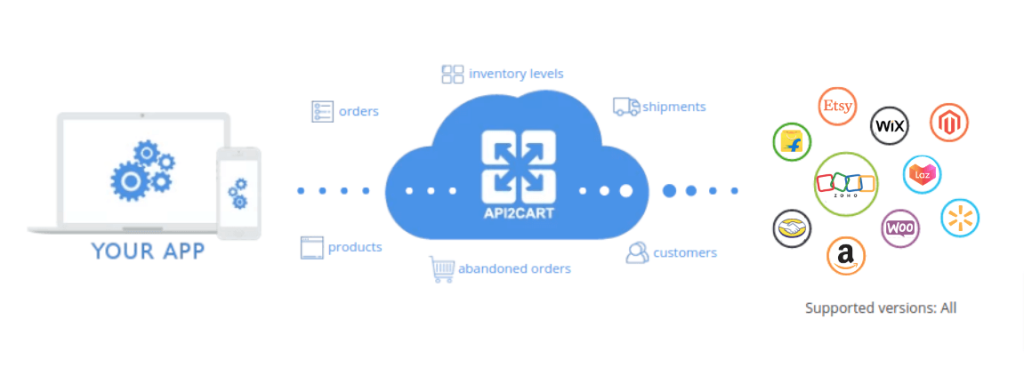
API2Cart provides a unified API that allows you to connect your software with Zoho and 80+ other platforms through a single integration. Therefore, you can standardize data handling and reduce development effort.
For example, you can retrieve order data from Zoho using a single API method:
View Order List API method for Zoho
{
  "return_code": 0,
  "return_message": "string",
  "pagination": {
    "previous": "string",
    "next": "string",
    "additional_fields": {},
    "custom_fields": {}
  },
  "result": {
    "orders_count": 0,
    "order": [
      {
        "id": "string",
        "order_id": "string",
        "basket_id": "string",
        "channel_id": "string",
        "customer": {
          "id": "string",
          "email": "string",
          "first_name": "string",
          "last_name": "string",
          "phone": "string",
          "additional_fields": {},
          "custom_fields": {}
        },
        "create_at": {
          "value": "string",
          "format": "string",
          "additional_fields": {},
          "custom_fields": {}
        },
        "currency": {
          "id": "string",
          "name": "string",
          "iso3": "string",
          "symbol_left": "string",
          "symbol_right": "string",
          "rate": 0,
          "avail": true,
          "default": true,
          "additional_fields": {},
          "custom_fields": {}
        },
        "shipping_address": {
          "id": "string",
          "type": "string",
          "first_name": "string",
          "last_name": "string",
          "postcode": "string",
          "address1": "string",
          "address2": "string",
          "phone": "string",
          "phone_mobile": "string",
          "city": "string",
          "country": {
            "code2": "string",
            "code3": "string",
            "name": "string",
            "additional_fields": {},
            "custom_fields": {}
          },
          "state": {
            "code": "string",
            "name": "string",
            "additional_fields": {},
            "custom_fields": {}
          },
          "company": "string",
          "fax": "string",
          "website": "string",
          "gender": "string",
          "region": "string",
          "default": true,
          "tax_id": "string",
          "identification_number": "string",
          "alias": "string",
          "additional_fields": {},
          "custom_fields": {}
        },
        "billing_address": {
          "id": "string",
          "type": "string",
          "first_name": "string",
          "last_name": "string",
          "postcode": "string",
          "address1": "string",
          "address2": "string",
          "phone": "string",
          "phone_mobile": "string",
          "city": "string",
          "country": {
            "code2": "string",
            "code3": "string",
            "name": "string",
            "additional_fields": {},
            "custom_fields": {}
          },
          "state": {
            "code": "string",
            "name": "string",
            "additional_fields": {},
            "custom_fields": {}
          },
          "company": "string",
          "fax": "string",
          "website": "string",
          "gender": "string",
          "region": "string",
          "default": true,
          "tax_id": "string",
          "identification_number": "string",
          "alias": "string",
          "additional_fields": {},
          "custom_fields": {}
        },
        "payment_method": {
          "name": "string",
          "additional_fields": {},
          "custom_fields": {}
        },
        "shipping_method": {
          "name": "string",
          "additional_fields": {},
          "custom_fields": {}
        },
        "shipping_methods": [
          {
            "name": "string",
            "additional_fields": {},
            "custom_fields": {}
          }
        ],
        "status": {
          "id": "string",
          "name": "string",
          "history": [
            {
              "id": "string",
              "name": "string",
              "modified_time": {
                "value": "string",
                "format": "string",
                "additional_fields": {},
                "custom_fields": {}
              },
              "notify": true,
              "comment": "string",
              "additional_fields": {},
              "custom_fields": {}
            }
          ],
          "refund_info": {
            "shipping": 0,
            "fee": 0,
            "tax": 0,
            "total_refunded": 0,
            "time": {
              "value": "string",
              "format": "string",
              "additional_fields": {},
              "custom_fields": {}
            },
            "comment": "string",
            "refunded_items": [
              {
                "product_id": "string",
                "variant_id": "string",
                "order_product_id": "string",
                "qty": 0,
                "refund": 0,
                "additional_fields": {},
                "custom_fields": {}
              }
            ],
            "additional_fields": {},
            "custom_fields": {}
          },
          "additional_fields": {},
          "custom_fields": {}
        },
        "totals": {
          "total": 0,
          "subtotal": 0,
          "shipping": 0,
          "tax": 0,
          "discount": 0,
          "additional_fields": {},
          "custom_fields": {}
        },
        "total": {
          "subtotal_ex_tax": 0,
          "wrapping_ex_tax": 0,
          "shipping_ex_tax": 0,
          "total_discount": 0,
          "total_tax": 0,
          "total": 0,
          "total_paid": 0,
          "additional_fields": {},
          "custom_fields": {}
        },
        "discounts": [
          {
            "code": "string",
            "value": 0,
            "type": "string",
            "additional_fields": {},
            "custom_fields": {}
          }
        ],
        "order_products": [
          {
            "product_id": "string",
            "order_product_id": "string",
            "model": "string",
            "name": "string",
            "price": 0,
            "price_inc_tax": 0,
            "quantity": 0,
            "discount_amount": 0,
            "total_price": 0,
            "tax_percent": 0,
            "tax_value": 0,
            "tax_value_after_discount": 0,
            "options": [
              {
                "option_id": "string",
                "name": "string",
                "value": "string",
                "price": 0,
                "weight": 0,
                "type": "string",
                "product_option_value_id": "string",
                "additional_fields": {},
                "custom_fields": {}
              }
            ],
            "variant_id": "string",
            "weight_unit": "string",
            "weight": 0,
            "barcode": "string",
            "parent_order_product_id": "string",
            "additional_fields": {},
            "custom_fields": {}
          }
        ],
        "bundles": [
          {
            "product_id": "string",
            "order_product_id": "string",
            "model": "string",
            "name": "string",
            "price": 0,
            "price_inc_tax": 0,
            "quantity": 0,
            "discount_amount": 0,
            "total_price": 0,
            "tax_percent": 0,
            "tax_value": 0,
            "tax_value_after_discount": 0,
            "options": [
              {
                "option_id": "string",
                "name": "string",
                "value": "string",
                "price": 0,
                "weight": 0,
                "type": "string",
                "product_option_value_id": "string",
                "additional_fields": {},
                "custom_fields": {}
              }
            ],
            "variant_id": "string",
            "weight_unit": "string",
            "weight": 0,
            "barcode": "string",
            "parent_order_product_id": "string",
            "additional_fields": {},
            "custom_fields": {}
          }
        ],
        "modified_at": {
          "value": "string",
          "format": "string",
          "additional_fields": {},
          "custom_fields": {}
        },
        "finished_time": {
          "value": "string",
          "format": "string",
          "additional_fields": {},
          "custom_fields": {}
        },
        "comment": "string",
        "store_id": "string",
        "warehouses_ids": [
          "string"
        ],
        "refunds": [
          {
            "id": "string",
            "shipping": 0,
            "fee": 0,
            "tax": 0,
            "total": 0,
            "modified_time": {
              "value": "string",
              "format": "string",
              "additional_fields": {},
              "custom_fields": {}
            },
            "comment": "string",
            "items": [
              {
                "product_id": "string",
                "variant_id": "string",
                "order_product_id": "string",
                "qty": 0,
                "refund": 0,
                "additional_fields": {},
                "custom_fields": {}
              }
            ],
            "additional_fields": {},
            "custom_fields": {}
          }
        ],
        "gift_message": "string",
        "order_details_url": "string",
        "additional_fields": {},
        "custom_fields": {}
      }
    ],
    "additional_fields": {},
    "custom_fields": {}
  },
  "additional_fields": {},
  "custom_fields": {}
}
This request allows your software to retrieve order data from Zoho in a unified format. In addition, the same integration logic can be reused across all supported platforms, which simplifies scaling and maintenance.
Conclusion
Zoho API integration allows eCommerce software vendors to expand functionality and support complex workflows across multiple services. However, building and maintaining direct integrations requires significant development effort and ongoing updates.
A unified API approach helps reduce complexity, standardize data handling, and scale integrations faster across platforms. Instead of managing multiple APIs, you can focus on your core product and deliver features faster.
To simplify Zoho API integration and connect your software with multiple platforms, you can start your free trial and test how a unified API works in practice, while also exploring additional integration capabilities in this guide.
FAQs
Why do developers struggle when integrating with multiple Zoho services?
Developers often face challenges because Zoho includes multiple services, each with its own API structure, authentication flow, and data format. As a result, integration requires handling different endpoints and adapting logic for each service.
Moreover, this increases development time and complexity. Therefore, many SaaS teams look for ways to standardize integrations and reduce the effort required to maintain multiple connections.
How can Zoho API integration impact time-to-market for SaaS products?
Zoho API integration can significantly affect time-to-market, especially when built from scratch. For example, developers need to spend time on authentication, data mapping, and testing across services.
However, by simplifying integration processes, teams can launch features faster. As a result, SaaS products can respond quicker to market demands and stay competitive.
What role does data consistency play in Zoho integrations?
Data consistency is critical when working with Zoho integrations. For instance, mismatched product, order, or customer data can lead to operational issues and poor user experience.
In addition, consistent data ensures that all connected systems operate correctly. Consequently, businesses can rely on accurate information when making decisions or automating workflows.
How can SaaS companies future-proof their Zoho integrations?
SaaS companies can future-proof their Zoho integrations by reducing dependency on individual APIs and adopting more flexible integration approaches. For example, using a unified API layer helps standardize communication across services.
Furthermore, this approach minimizes the impact of API updates and changes. As a result, companies can scale integrations more efficiently and focus on product development instead of ongoing maintenance.

SEO Content Specialist with 7+ years of experience in SEO content creation and 14+ years in marketing. Expertise includes SEO copywriting, keyword research, search intent analysis, and content strategy. Experienced in creating content for B2B SaaS, technology, fintech, and eCommerce companies. Focused on developing content that aligns user needs, business goals, and search engine requirements.