Quick Definition: A marketplace integrator, often delivered as marketplace integrator software, connects online marketplaces such as Amazon, eBay, Walmart, and Etsy with business applications. It moves product, inventory, order, and fulfillment data between those systems through marketplace APIs, so software does not need a separate workflow for every channel.
A marketplace integrator connects marketplaces with the systems that run commerce operations: OMS, inventory, ERP, WMS, PIM, and shipping software. In practice, it retrieves orders, updates listings and stock, and sends fulfillment data back to each channel. For SaaS vendors, this layer decides how many marketplaces their product can support and how much code they must maintain.
Marketplace connectivity matters because a large share of online retail happens there. In 2024, online marketplaces generated 62% of global retail eCommerce sales, according to Euromonitor. In addition, according to DHL’s 2026 E-Commerce Trends Report, 54% of 5,800 surveyed online businesses sell on marketplaces, and businesses sell across an average of three platforms. However, managing each channel separately can lead to overselling, delayed order processing, inconsistent listings, and inaccurate stock data.
The general concept of connecting software to marketplaces is covered in our guide to marketplace integration. This article focuses on the integrator itself: what it does, which features it needs, and how SaaS developers evaluate it. We also show how API2Cart fits into that picture.
What Is a Marketplace Integrator?
A marketplace integrator is the component that links online marketplaces with business applications and synchronizes their data. Depending on context, the term can mean three different things:
- A software component inside your product that talks to marketplace APIs;
- An integration solution — an application, middleware, or API service that provides those connections;
- A provider — a company that builds and maintains marketplace connections for clients.
These meanings overlap. However, they are not identical. For example, a provider may sell services, while a software component is something your team builds and owns.
According to ProductFlow, this type of solution acts as a bridge between marketplaces such as Amazon, eBay, Walmart, and Etsy and business systems, including eCommerce platforms, ERP, inventory management, shipping, and fulfillment software. As a result, data moves between systems with less manual work.
However, a marketplace integrator does not necessarily manage listings for sellers, provide a storefront, or support every marketplace operation. What it can do always depends on each marketplace API and on the solution you choose.

How Does a Marketplace Integrator Work?
Marketplace integrator software sits between your application and marketplace APIs. Technically, the workflow usually includes five steps:
- Connection and authentication. The integrator authorizes access to a merchant's marketplace account, usually through OAuth or API credentials, and stores tokens securely.
- Data retrieval and updates. Next, it requests orders, products, and inventory, and sends updates such as stock quantities or tracking numbers.
- Data model mapping. Each marketplace names and structures fields differently, for example. Therefore, the integrator maps them to one internal model.
- Synchronization and event processing. Changes arrive through webhooks where available or through scheduled polling. Then the integrator applies them to connected systems.
- Error handling and maintenance. Finally, it retries failed requests, respects rate limits, logs errors, and adapts to API changes.
Keep in mind that supported operations vary by platform. For instance, one marketplace may allow order updates through its API, while another may not. Our guide to API integration between software systems explains the underlying data exchange in more detail.
Essential Marketplace Integrator Features
First, the features below cover the main business workflows of marketplace integrator software. Not every solution supports all of them, so check each one against your requirements.
1. Centralized Product Listing Management
The integrator publishes and updates product information across multiple marketplaces from a single source of truth. Consequently, product data stays more consistent.
- Synchronizes product titles, descriptions, images, attributes, and pricing;
- Supports bulk product uploads and updates where marketplace APIs allow them;
- Maps categories and attributes to marketplace requirements.
2. Inventory Synchronization
Inventory synchronization keeps stock levels aligned across connected sales channels. Therefore, merchants can reduce overselling while keeping products available. Update frequency depends on each API and its rate limits.
- Synchronizes inventory between online stores, warehouses, and fulfillment centers;
- Updates stock after completed sales and warehouse changes;
- Helps prevent stock discrepancies and duplicate orders.
3. Order Processing and Fulfillment
The integrator consolidates orders from multiple marketplaces into a single workflow. As a result, teams process orders with fewer manual steps. For a closer look at these data flows, see our article on eCommerce marketplace integration workflows.
- Collects orders from multiple marketplaces in one system;
- Transfers order data to ERP, WMS, suppliers, or fulfillment providers;
- Synchronizes order statuses, such as shipped, cancelled, or returned, where supported.
4. Shipping and Logistics Connectivity
Some solutions also connect marketplace orders with shipping and logistics providers. Consequently, merchants get better delivery visibility.
- Passes shipments and tracking numbers back to marketplaces;
- Synchronizes shipment updates across connected channels;
- May connect with carriers such as FedEx, UPS, USPS, and DHL, depending on the solution.
5. Pricing and Promotion Management
In addition, centralized pricing keeps product prices consistent across marketplaces and supports promotional campaigns.
- Updates prices across connected sales channels;
- Applies bulk discounts, seasonal promotions, and campaign pricing;
- Reduces pricing inconsistencies and helps maintain marketplace compliance.
6. Developer-Level Capabilities
For SaaS vendors, technical features matter as much as business workflows. In particular, look for:
- Connection management for many merchant accounts at once;
- Secure authentication and token refresh handling;
- Pagination and rate-limit management for large data sets;
- Webhook support where the platform provides events;
- Clear error codes, logging, and retry logic.

How to Choose a Marketplace Integrator
Selecting the right marketplace integrator software depends on your product, technical requirements, and growth plans. For example, some vendors only need order and inventory synchronization. However, others require broad API coverage, ERP connectivity, fulfillment workflows, and support for both marketplaces and shopping carts.
Many marketplace integrators look similar on paper. Instead of comparing feature lists alone, consider how well the solution fits your current architecture. In addition, evaluate whether it can support new channels, higher data volumes, and future product development. The following checklist covers the key criteria.
1. Define Your Integration Requirements
First, identify the processes you want to automate and the systems that must exchange data.
- Determine which marketplaces and eCommerce platforms you need to support;
- Decide how often inventory and orders must be synchronized;
- Consider connections with ERP, CRM, WMS, accounting, or fulfillment software;
- Define the required data entities, API methods, and automation capabilities.
2. Evaluate Marketplace and Platform Compatibility
Next, confirm that the solution supports both your current stack and planned integrations.
- Supports marketplaces such as Amazon, eBay, Walmart, Etsy, and other sales channels;
- Connects with platforms such as Shopify, WooCommerce, Magento, and BigCommerce;
- Covers the regions and marketplaces your clients sell in.
3. Review API Coverage and Automation
Above all, a reliable integrator should expose the operations your workflows depend on. As a result, your team writes less platform-specific code.
- Lists which methods each platform supports, not just which platforms are connected;
- Centralizes order data from multiple marketplaces;
- Synchronizes inventory quantities across sales channels;
- Supports order status updates, shipments, returns, and refunds where marketplaces allow them.
4. Compare Pricing Management Capabilities
Pricing automation helps maintain consistent product data while reducing manual updates. Moreover, it allows connected systems to apply pricing changes more efficiently.
- Supports price updates based on predefined rules;
- Applies bulk price updates across multiple channels;
- Helps maintain compliance with marketplace pricing policies.
5. Assess Shipping and Fulfillment Connectivity
In addition, review logistics and fulfillment capabilities before choosing a solution.
- Supports the carriers and delivery providers your clients use;
- Connects with fulfillment services and third-party logistics providers;
- Synchronizes tracking numbers and shipment statuses across connected channels.
6. Check Scalability for Multi-Marketplace Growth
Furthermore, choose a solution that can scale with your software and its customers. A scalable architecture should add platforms without a complete rebuild.
- Adds new marketplaces and eCommerce platforms with minimal code changes;
- Handles growing API request and transaction volumes;
- Supports international markets, currencies, and localization requirements.
7. Review Security and Compliance
Also, verify that the solution follows recognized security practices and protects business data.
- Encrypts customer, order, and transaction data;
- Supports GDPR, PCI DSS, and other relevant requirements;
- Provides role-based access control and user permissions;
- Uses secure authentication methods for API connections.
8. Check Documentation, Maintenance, and Pricing Model
Finally, look at the long-term cost of working with the solution. After all, maintenance often costs more than the initial build.
- Clear API documentation, SDKs, and test environments;
- Who maintains connectors when marketplace APIs change;
- Error reporting and support responsiveness;
- A pricing model that fits your number of connected stores and request volume.
Ultimately, the best marketplace integrator solves current connectivity needs and supports future growth. Broad platform coverage, transparent API capabilities, strong security, and predictable maintenance can reduce integration complexity.

Marketplace Integrator vs Unified eCommerce API
Marketplace integrator software comes in several forms. However, these solution types are not interchangeable:
- Marketplace integration applications are end-user tools. Merchants use them to manage listings, stock, and orders across channels through a dashboard.
- Integration platforms and middleware connect many business systems through configurable workflows. They usually target internal IT teams rather than software vendors.
- A unified eCommerce API such as API2Cart is infrastructure for developers. Your SaaS product calls one API, and the API handles connections to supported platforms and marketplaces.
For software vendors, the unified API approach keeps marketplace data inside their own product. In contrast, a seller-facing application adds another interface for the merchant. If you plan to build direct connections instead, our guide to marketplace API integration explains that architecture.
How API2Cart Supports Marketplace Integrations
Building and maintaining separate integrations for every marketplace requires significant development effort. After all, each platform has its own authentication, data models, API limitations, and release cycle. Consequently, supporting many marketplaces increases maintenance work and slows product development.
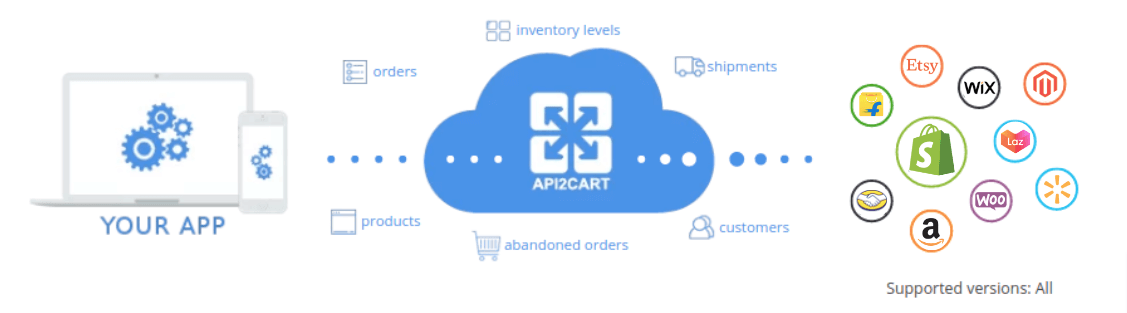
API2Cart addresses this challenge with a unified API that lets software vendors integrate with 80+ eCommerce platforms and marketplaces through a single implementation. Instead of maintaining many individual connectors, developers work with one consistent API for products, orders, customers, inventory, shipments, and other commerce data.
Using API2Cart, developers can:
- Connect multiple eCommerce platforms and marketplaces through one REST API;
- Retrieve orders, products, customers, shipments, and inventory using unified methods;
- Receive event notifications through webhooks on platforms that support them, and use polling elsewhere;
- Reduce the amount of platform-specific code they need to maintain.
Note that supported methods and fields still differ by platform. You can check each one in the supported API methods list.
Example: Retrieve Orders from Connected Marketplaces
API2Cart provides the order.list method, which retrieves orders from connected platforms and marketplaces using the same request format. Full parameters and response fields are listed in the order.list API documentation.
curl -G "https://api.api2cart.com/v1.1/order.list.json" \
  -H "x-api-key: YOUR_API_KEY" \
  -H "x-store-key: STORE_KEY" \
  --data-urlencode "count=25" \
  --data-urlencode "modified_from=2026-10-14 00:00:00" \
  --data-urlencode "response_fields={return_code,return_message,pagination,result{orders_count,order{id,order_id,status,totals}}}"
A shortened response looks like this (values are illustrative):
{
  "return_code": 0,
  "return_message": "",
  "pagination": {
    "previous": null,
    "next": "NEXT_PAGE_CURSOR"
  },
  "result": {
    "orders_count": 58,
    "order": [
      {
        "id": "1052",
        "order_id": "1052",
        "status": {
          "id": "Shipped",
          "name": "Shipped"
        },
        "totals": {
          "total": 120.5,
          "subtotal": 110,
          "shipping": 10.5,
          "tax": 0,
          "discount": 0
        }
      }
    ]
  }
}
In a marketplace integrator workflow, your application sends the same request for every connected store and changes only the store key. Then it follows pagination.next until all pages are processed. The response uses the same structure across platforms, so one import routine can serve several channels. However, field availability and status values still depend on the connected platform.
By providing one unified API instead of many separate integrations, API2Cart helps software vendors reduce integration work and add marketplace connections faster. Create a free API2Cart account to explore the API and start building your first integration.
Conclusion
As merchants expand across marketplaces, reliable integration becomes essential for accurate inventory, efficient order processing, and consistent product data. A marketplace integrator automates these workflows and reduces manual effort.
For software providers, building separate integrations with every marketplace takes time and ongoing maintenance. That is why the choice of marketplace integrator software affects both development speed and long-term costs. Instead, API2Cart provides a unified API that connects applications with 80+ eCommerce platforms and marketplaces. Developers can then work with orders, products, customers, inventory, shipments, and other data through a single integration, within the limits of each platform.
Ready to simplify your marketplace connectivity? Create a free API2Cart account and see how one unified API can help you launch integrations faster and scale your eCommerce software.
Marketplace Integrator FAQs
What does a marketplace integrator do?
A marketplace integrator connects online marketplaces with business applications such as OMS, ERP, WMS, and inventory software. It retrieves orders, updates products and stock, and sends shipment data back to marketplaces. As a result, software can work with several channels through one integration layer.
What features should SaaS developers look for in a marketplace integrator?
Look for broad marketplace coverage, a clear list of supported methods per platform, and a consistent data model. In addition, check authentication handling, pagination, rate-limit management, webhook support, error reporting, and documentation quality.
How does a marketplace integrator handle inventory and orders?
It imports new and updated orders, usually by polling with date filters or by processing webhook events. After each sale or warehouse change, it sends stock updates to connected channels. Sync frequency depends on each marketplace API and its rate limits.
What is the difference between a marketplace integrator and a unified eCommerce API?
A marketplace integrator is a broad term for any solution that connects marketplaces with business systems, including seller dashboards and middleware. A unified eCommerce API, such as API2Cart, is developer infrastructure. Software vendors call one API to work with many supported platforms inside their own product.