Quick Definition: Marketplace integration is the API connection between eCommerce software and online marketplaces such as Amazon, eBay, Etsy, and Walmart. It lets OMS, ERP, WMS, and inventory tools retrieve and update orders, products, stock, and shipments. For any eCommerce marketplace solution, a unified API can reduce the number of separate marketplace connections developers must build and maintain.
Marketplace integration connects eCommerce software to online marketplaces such as Amazon, eBay, Etsy, and Walmart. For vendors of OMS, ERP, WMS, PIM, inventory, and multichannel tools, it is now a core part of any eCommerce marketplace solution. Without it, your clients cannot manage marketplace orders, listings, and stock inside your software.
Moreover, marketplaces now drive most online retail. According to Euromonitor International, online marketplaces generated 62% of global retail e-commerce sales in 2024. Therefore, support for marketplace integrations directly affects how many merchants your product can serve.
This article explains what marketplace integration involves and how development works. It also covers the main technical challenges and shows how a unified eCommerce API can simplify the work.
What Is Marketplace Integration?
In the context of B2B SaaS, marketplace integration means connecting your software to online marketplaces through their APIs. As a result, your application can access store data from merchants who sell on Amazon, eBay, Etsy, Walmart, and other channels. Without this connection, shipping, OMS, ERP, WMS, repricing, and marketing tools cannot work with marketplace data.
In practice, online marketplace integration lets your system retrieve, create, and update products, orders, customers, inventory, and shipments. However, how fast that data stays in sync depends on each marketplace API, its rate limits, and webhook availability.

For B2B SaaS providers, marketplace connectivity is not just a feature — it is infrastructure. To automate retail workflows, software must access merchant data and keep it synchronized across channels. This is especially critical for inventory management, order processing, fulfillment automation, and analytics platforms.
However, building a stable eCommerce marketplace solution is complex. It requires research, development time, ongoing API monitoring, version updates, and experienced engineers. As a result, many SaaS teams look for ways to simplify development and reduce long-term maintenance.
What Is Marketplace Integration Software?
The term marketplace integration software covers two different product types. First, there are seller-facing tools that help merchants list products and manage orders across channels. Second, there is developer infrastructure that lets software vendors build these capabilities into their own products.
For ERP, OMS, WMS, and inventory vendors, the second type matters most. Your clients already use your software. Consequently, you need marketplace data inside your product, not a separate dashboard. If you are still comparing approaches, see our overview of marketplace integrator options and integration tools.
Marketplace Integration Platform vs. Seller Dashboard
A marketplace integration platform for developers works at the API level. It provides authentication handling, unified data models, and methods for orders, products, and shipments. In contrast, a seller dashboard is an end-user interface for managing listings and sales.
API2Cart belongs to the first category. It does not operate merchants' stores. Instead, it gives your software one API to work with the store data that merchants authorize.
How Does Marketplace Integration Development Work?
Building marketplace integration requires planning, technical work, and ongoing support. It is not a one-time setup. Instead, it is a continuous process that demands time, budget, and skilled developers.
Below are four main stages of marketplace integration development:
-
Stage 1: Research and API Analysis
First, you analyze each marketplace API. Every platform has its own structure, rules, authentication methods, and limits. Because of this, each integration is different. Careful API research is the foundation of a stable eCommerce marketplace solution. -
Stage 2: Integration Development
Next, you build the connection. You can develop it in-house or use a third-party integration provider. In-house development gives full control but requires more time and resources. A unified API solution can reduce complexity and connect multiple marketplaces faster. -
Stage 3: Data Synchronization
After the connection is established, your software must exchange data with the marketplace. This includes products, orders, inventory levels, shipping details, prices, and taxes. Depending on the platform, you can receive changes through webhooks or poll for them on a schedule. -
Stage 4: Ongoing Maintenance
Finally, APIs change frequently. Marketplaces update versions, adjust limits, and modify data structures. Therefore, regular monitoring and updates are required to keep your integration stable.
Marketplace Software Integration Development
Explore how marketplace integration can help your eCommerce software become more successful.
What Are the Common Challenges of Marketplace Integration and How Can You Overcome Them?
Building marketplace integration requires time, budget, and strong technical skills. In many cases, companies spend months before seeing real results.
If you decide to build integration in-house, consider the following challenges:
-
Need for experienced developers.
Marketplace APIs require solid backend knowledge and hands-on experience. However, finding and hiring a qualified team quickly can be difficult and costly. -
Marketplace-specific APIs.
Each marketplace has its own API structure. For example, order data and product data may use different formats and logic. As a result, your team must build custom logic for every platform. -
Rate limits and data freshness.
Every marketplace limits how many requests you can send. In addition, not all platforms support webhooks for every event. Therefore, your sync logic must combine event notifications, scheduled polling, and retries. -
Long development cycles.
Integration with just one marketplace can take several months. In addition, developers must first study the documentation and test different scenarios. -
Ongoing maintenance.
APIs change regularly. Therefore, your team must constantly update the integration to avoid errors or data issues.
Because of these factors, many SaaS companies choose a faster approach. Instead of building everything from scratch, they use a unified integration layer.
For example, you can use API2Cart — a unified shopping platform API integration interface. This approach reduces the number of separate marketplace APIs your team has to build and maintain.
As a result, your team can spend more time on your core product and less time on integration upkeep.
Read our guide on "10 Marketplace APIs: Uncover the Key to Seamless Integration"
What Are the Main Benefits of Connecting with Marketplaces?
Why should SaaS companies invest in marketplace integrations? In today’s multichannel environment, merchants expect their software to work with the marketplaces they sell on. As a result, marketplace support influences product competitiveness, revenue growth, and customer retention.
-
Full access to structured store data.
Marketplace integration enables your software to retrieve orders, products, categories, inventory levels, customers, taxes, and shipping details. Accurate, centralized data is the foundation of automation and reporting. -
Timely synchronization across channels.
Once connected, your software can track new orders, stock changes, and product updates. Where a platform supports webhooks, changes arrive as events. Elsewhere, scheduled polling keeps data current. As a result, merchants can reduce overselling and manual corrections. -
Expanded merchant coverage.
The more marketplaces your software supports, the broader your potential client base. Supporting Amazon, eBay, Walmart, and Etsy increases your relevance for sellers operating in multiple regions. -
Accelerated market expansion.
Stable marketplace integrations allow you to enter new markets faster. Consequently, your SaaS product becomes easier to scale across industries and geographic regions. -
Higher recurring revenue potential.
Broader platform support translates into more subscription opportunities. In turn, it can strengthen long-term revenue stability and customer lifetime value.
API2Cart: A Unified Marketplace Integration Platform for Developers
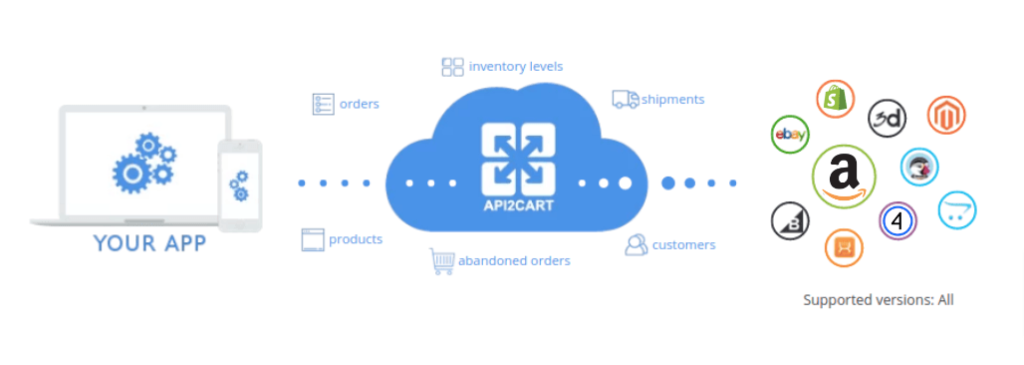
API2Cart is a unified API that helps you build marketplace integration faster and with less effort. Instead of working with each marketplace API separately, you connect once to API2Cart and access multiple marketplaces such as Amazon, eBay, Etsy, and Walmart.
API2Cart has already analyzed marketplace-specific APIs and built connections to them. Therefore, your team does not need to implement each authentication flow and data structure on its own. You use one unified API and 100+ API methods to retrieve, add, and update store data.
Keep in mind that marketplaces expose different capabilities. Consequently, supported methods and data fields vary by platform. You can check each platform in the supported API methods list.
As a result, your eCommerce marketplace solution becomes easier to scale. Moreover, you do not need a large team to maintain separate integrations. Instead, your developers can focus on core features and deliver more value to your clients.
Which Marketplaces and Platforms Can You Support?
For SaaS vendors building an eCommerce marketplace solution, platform coverage defines scalability. The more ecosystems you support, the more markets and merchants your product can serve.
API2Cart supports integration with 80+ eCommerce platforms and marketplaces across North America, Europe, MENA, and Asia-Pacific regions.
- Amazon (US, EU, Global marketplaces)
- eBay
- Walmart
- Etsy
- Shopify (including Shopify Plus)
- WooCommerce
- Magento / Adobe Commerce
- BigCommerce
- PrestaShop
- OpenCart
- Wix
- Squarespace
- Salla
- Ecwid
- and many other regional and niche platforms
Instead of developing and maintaining separate integrations for every platform, you can rely on one API that standardizes data mapping and authentication flows. If your product must cover both shopping carts and marketplaces, read more about ecommerce marketplace integration across stores and marketplaces.
Explore the full list of supported platforms here: View all supported platforms →
How to Build Amazon Integration Using API2Cart
Amazon remains one of the largest global marketplaces. Therefore, adding Amazon to your eCommerce marketplace solution gives your software access to a very large base of potential merchant clients.
Amazon integration gives your software access to store data such as products and orders. As a result, your system can automate order processing, update listings, and keep data current.
Instead of building a direct connection to Amazon SP-API from scratch, you can use API2Cart. It provides a unified API on top of Amazon’s own interfaces. For a deeper look at this marketplace, see our Amazon integration guide.
What Amazon Data Can You Access via API2Cart?
- Cart management: cart.list / info / validate / methods / delete
- Product management: product.list / count / info / add / update / delete / child_item.list / variant.update
- Order management: order.list / count / info / status.list / shipment.add
Example: Retrieving Amazon Orders via API2Cart
Below is a simple example of how you can retrieve Amazon orders using the order.list method. The request authenticates with your API key and the store key of the connected Amazon account. It returns orders created after a given date and limits the response to selected fields.
curl -G "https://api.api2cart.com/v1.1/order.list.json" \
  -H "x-api-key: YOUR_API_KEY" \
  -H "x-store-key: AMAZON_STORE_KEY" \
  --data-urlencode "count=2" \
  --data-urlencode "created_from=2026-10-01 00:00:00" \
  --data-urlencode "response_fields={return_code,return_message,pagination,result{orders_count,order{id,order_id,create_at,status,totals}}}"
A shortened response looks like this (values are illustrative):
{
  "return_code": 0,
  "return_message": "",
  "pagination": {
    "previous": null,
    "next": "NEXT_PAGE_CURSOR"
  },
  "result": {
    "orders_count": 37,
    "order": [
      {
        "id": "114-1234567-1234567",
        "order_id": "114-1234567-1234567",
        "create_at": {
          "value": "2026-10-02T09:15:00+0000",
          "format": "Y-m-d\\TH:i:sO"
        },
        "status": {
          "id": "Unshipped",
          "name": "Unshipped"
        },
        "totals": {
          "total": 64.98,
          "subtotal": 59.99,
          "shipping": 4.99,
          "tax": 0,
          "discount": 0
        }
      }
    ]
  }
}
This response shows the core idea of marketplace integration through a unified API. Amazon order data arrives in the same order structure that API2Cart uses for other platforms. The orders_count field tells you the total number of matching orders. The pagination.next value lets you request the next page. Consequently, your OMS or ERP can reuse the same import logic for several marketplaces. Field availability can still differ by platform. For the full parameter list, see the API2Cart API Documentation, and for a developer-focused walkthrough, read our guide to marketplace API integration.
For step-by-step connection details, see the Amazon Connection Instruction .
How to Build eBay Integration Using API2Cart
eBay is another key marketplace for SaaS providers. Its API differs from Amazon’s in authentication, listing structure, and order data. Instead of building a direct connection to the eBay API, you can work with eBay data through the same API2Cart methods. Learn more on the eBay integration page.
What eBay Data Can You Manage via API2Cart?
Using API2Cart, your application can work with the following data:
- Cart management: cart.create / list / validate / delete / methods / info
- Product management: product.list / count / fields / add / update / image.add / image.delete / child_item.list / variant.update / variant.delete
- Category management: category.list / count / info
- Order management: order.list / count / info / update / status.list / financial_status.list / shipment.add
Consequently, your system can retrieve orders, update listings, and manage shipping data with the same logic it uses for other channels.
To get started, follow the step-by-step guide in the eBay Connection Instruction .
How to Build Etsy Integration Using API2Cart
In addition to Amazon and eBay, Etsy is an important marketplace for handmade, vintage, and custom goods. According to Etsy’s own results, the Etsy marketplace had 5.6 million active sellers at the end of 2025.
Therefore, Etsy support makes your software more attractive to sellers who operate across several channels. Instead of building a separate integration from scratch, you can use API2Cart. For more details, read our Etsy integration guide.
What Etsy Data Can You Manage via API2Cart?
- Cart management: cart.create / list / validate / delete / methods / info
- Product management: product.list / count / info / add / update / delete / image.add
- Category management: category.list / count / info
- Order management: order.list / count / info / update / status.list / shipment.add
To get started, follow the step-by-step guide in the Etsy Connection Instruction .
How to Integrate Walmart Marketplace Using API2Cart
Furthermore, API2Cart allows you to connect your software to Walmart Marketplace. Walmart is one of the largest retail ecosystems and a strong competitor to Amazon and eBay.
According to Marketplace Pulse, Walmart Marketplace crossed 200,000 active sellers in 2025. Consequently, Walmart support helps your software serve more sellers in the United States and other regions where Walmart operates its marketplace. See the Walmart integration page for details.
What Walmart Data Can You Access via API2Cart?
- Cart management: cart.create / list / validate / delete / methods / info
- Product management: product.list / count / info / add / update
- Order management: order.list / count / info / status.list / shipment.list / shipment.add
To learn how to connect Walmart, see the Walmart Connection Instruction .
Conclusion
In summary, marketplace integration is now a core requirement for SaaS providers building shipping, OMS, ERP, WMS, or other eCommerce tools. Without reliable access to marketplace data, your software cannot deliver full functionality to online sellers.
However, building direct integrations with Amazon, eBay, Etsy, and Walmart requires time, budget, and ongoing maintenance. Therefore, many companies choose a unified API instead of separate connectors.
With API2Cart, you can connect your eCommerce marketplace solution to multiple marketplaces through one unified API. You can then work with orders, products, and other store data that each platform supports.
Ready to simplify marketplace integration? Start a free trial and connect marketplaces faster.
FAQs
What architecture works best for marketplace integration?
Most SaaS products use a dedicated integration layer between their core application and marketplace APIs. This layer handles authentication, data mapping, request queues, and error handling. A unified API such as API2Cart can act as that layer, so your core code works with one data model instead of several.
How is marketplace data kept in sync with your software?
Synchronization usually combines webhooks and scheduled polling. Webhooks notify your system about events such as new orders, where the marketplace and API support them. For other data, your software periodically requests changes using filters such as creation or modification dates.
How do API rate limits affect marketplace integrations?
Each marketplace limits how many requests an app can send in a given period. Large catalogs or high order volumes can therefore slow down synchronization. To stay within limits, request only the fields you need, paginate results, and use queues with retries.
How much maintenance do marketplace integrations require?
Marketplaces regularly release new API versions, change limits, and deprecate endpoints. Direct integrations need monitoring and updates for every connected channel. With a unified API, the provider maintains the platform connections, while your team still tracks method support and field changes.

SEO Content Specialist with 7+ years of experience in SEO content creation and 14+ years in marketing. Expertise includes SEO copywriting, keyword research, search intent analysis, and content strategy. Experienced in creating content for B2B SaaS, technology, fintech, and eCommerce companies. Focused on developing content that aligns user needs, business goals, and search engine requirements.