You're probably dealing with this right now. A merchant wants a new store connection, product wants it this sprint, and the ticket just says “set up OAuth.” For one platform, that sounds routine. Register an app, add a callback URL, request scopes, exchange the code, store the token, done.
Then the second integration arrives. Then the fifth. Then the versioning differences start. One provider is strict about redirect URIs. Another treats scopes differently. Another rotates refresh tokens in ways your token store didn't anticipate. At that point, setting up oauth stops being a setup task and becomes an identity architecture problem.
That's where a lot of teams get burned. According to enterprise OAuth and SSO implementation data, only 35% of corporate applications are fully onboarded to SSO systems, leaving 65% of the attack surface exposed through local accounts and fragmented identity management. The same data notes that full implementation cuts support tickets by 55% through efficient access. If your integration layer still depends on scattered auth logic and fallback local accounts, you're carrying both engineering debt and security debt.
Beyond Single-Platform Authentication
The first OAuth integration usually feels clean. You read the provider docs, wire the auth endpoint and token endpoint, map a few scopes, and move on. That experience creates a false sense of repeatability.
In eCommerce work, repeatability breaks fast. Every platform has its own app registration flow, callback rules, token lifecycles, and edge cases around store authorization. Even when the protocol is nominally the same, implementation details are not. The problem isn't learning OAuth once. The problem is maintaining dozens of slightly different OAuth systems without creating auth gaps.

What changes when integrations multiply
A single integration lets you think in terms of one redirect URI, one credential pair, and one consent model. Multi-platform work forces you into a matrix:
- Different registration models that change how you provision client credentials
- Different scope vocabularies for roughly similar resources like orders, inventory, or products
- Different callback handling across development, staging, and production
- Different token refresh behavior that affects retries, background sync, and recovery logic
That complexity spills into support. Merchants see failed reconnects. Your team sees intermittent 401s, token mismatch bugs, and stores that authorize successfully but can't perform expected API calls because the wrong scope set was requested.
Practical rule: If your team is tracking OAuth behavior in spreadsheets per platform, you already have an architecture problem, not just a documentation problem.
Fragmented auth becomes a security issue
Developers often treat authentication fragmentation as an operations nuisance. It's more serious than that. Once local accounts, fallback credentials, and platform-specific exceptions accumulate, you create more places for bad state to persist.
Risk shows up in ordinary implementation shortcuts:
- A temporary local admin login that never gets removed
- An approximate redirect URI match used to “make staging easier”
- A broad permission request added because product needs a feature fast
- A shared callback handler that doesn't distinguish tenant context cleanly
Each shortcut looks survivable in isolation. Together, they create a system that's hard to reason about and harder to secure.
For a mid-level developer, the most useful shift is this: stop thinking of OAuth as a login button feature. Treat it as part of your integration control plane. When you do that, your setup decisions change. You care more about exact redirect matching, token storage boundaries, environment separation, and whether your app should even own the complexity for every platform directly.
The Core of Modern OAuth The Authorization Code Flow with PKCE
If you're setting up oauth for a web app, mobile app, or any public client, the flow you should understand cold is Authorization Code Flow with PKCE. OAuth 2.0 was formalized in RFC 6749 in 2012, and PKCE later became a key security enhancement for public clients and is now a best practice for all clients, as noted in Google's OAuth 2.0 documentation.
That sounds abstract until you frame it correctly. PKCE exists because sending tokens through the browser is a bad idea. The browser is part of the user journey, not the safe place to complete your final credential exchange.
The handshake that actually matters
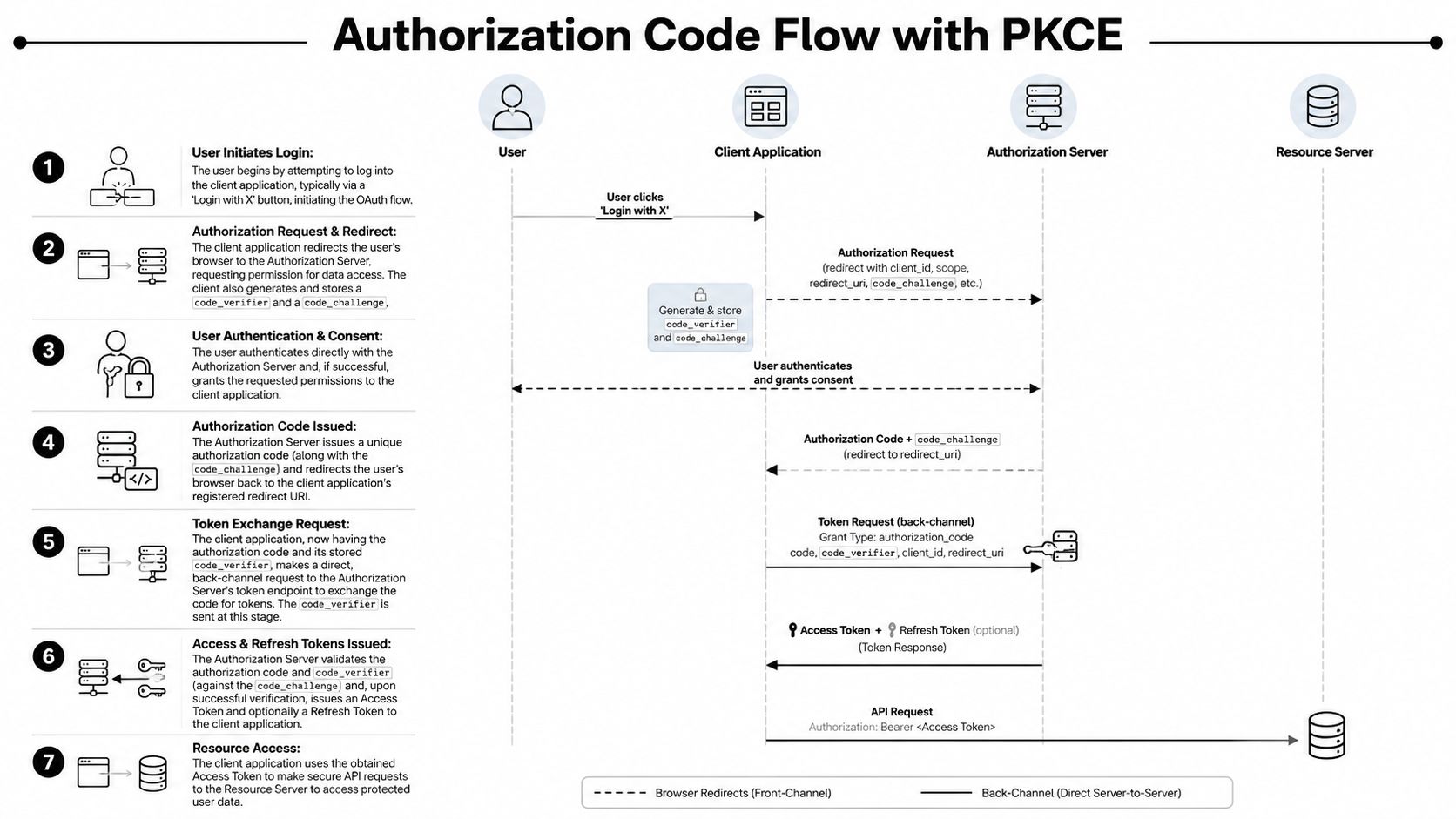
The clean mental model is this:
- Your app sends the user to the authorization server
- The user authenticates and grants consent there
- The provider redirects back with a short-lived authorization code
- Your backend exchanges that code for tokens
- PKCE proves that the app finishing the exchange is the same app that started it
Without PKCE, an intercepted authorization code is far more dangerous. With PKCE, the code alone isn't enough. The token endpoint expects a code_verifier that matches the earlier code_challenge.
The actors in the flow
Keep the roles distinct. A lot of implementation mistakes come from collapsing them mentally.
| Actor | What it does |
|---|---|
| User | Signs in and approves access |
| Client application | Starts the flow, stores PKCE material, handles callback |
| Authorization server | Authenticates user, records consent, issues code and tokens |
| Resource server | Serves protected data after token validation |
When you build this out, your application has two very different responsibilities. The frontend initiates the redirect. The backend performs sensitive validation and token exchange. Mixing those responsibilities carelessly leads to brittle code.
Why this flow is the default choice
Authorization Code with PKCE works well because it gives you a secure back-channel token exchange and removes the need to expose sensitive details in the browser. It also scales better operationally than improvised auth patterns.
A practical implementation sequence looks like this:
- Generate a
code_verifierusing high-entropy random data. - Derive the
code_challengefrom that verifier. - Create a
statevalue tied to the backend session. - Redirect the user to the provider with scopes, redirect URI, state, and PKCE challenge.
- Receive the callback with the authorization code.
- Validate the returned state before doing anything else.
- Exchange the code server-to-server using the stored verifier.
- Persist tokens securely and attach them to the right tenant or store record.
If you want a practical breakdown of which OAuth pattern fits which integration context, API client type, and trust model, this overview of choosing an OAuth API type is a useful reference.
Don't optimize for the shortest implementation. Optimize for the flow you can still trust six months later when token bugs start showing up under load.
Implementing Your First OAuth Connection A Practical Walkthrough
The fastest way to understand OAuth is to build one complete connection end to end. Not pseudo-code. A real callback handler, state validation, token exchange, and one authenticated API call after consent.
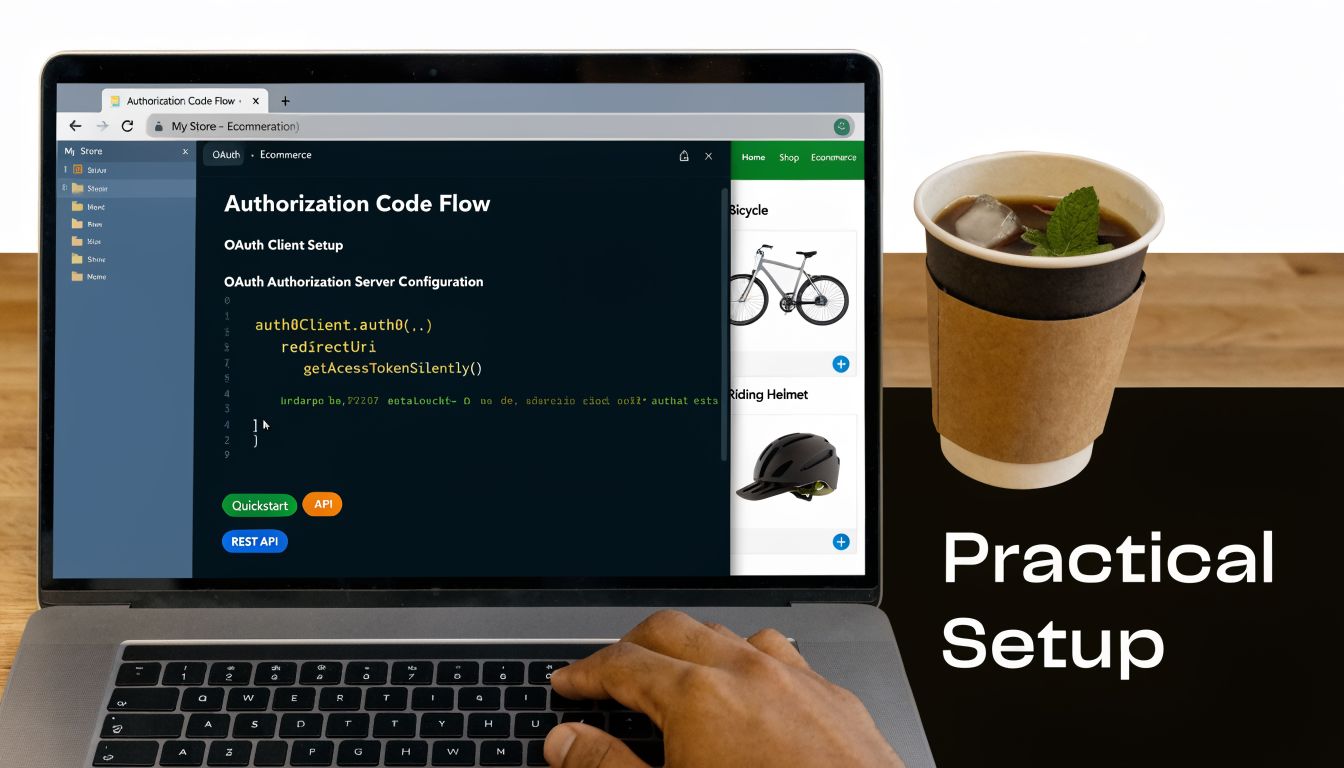
Step 1 Register the application correctly
In the provider's developer dashboard, create your application and capture the values the provider assigns. Usually that means a client ID, and for confidential clients, a client secret.
Your callback configuration needs discipline from day one:
- Register each environment separately so development, staging, and production aren't blurred together.
- Use the exact redirect URI your backend will receive on callback.
- Keep environment ownership clear so token exchanges don't cross the wrong deployment boundary.
This setup work seems administrative, but it controls whether the rest of your flow is trustworthy.
At login or “connect store” time, generate the PKCE pair and the state value on the server. Store both against the user's current session before redirecting the browser.
A simplified Node-style sketch looks like this:
import crypto from 'crypto';

function base64url(buffer) {
  return buffer.toString('base64')
    .replace(/+/g, '-')
    .replace(///g, '_')
    .replace(/=+$/, '');
}

function generatePkce() {
  const codeVerifier = base64url(crypto.randomBytes(32));
  const codeChallenge = base64url(
    crypto.createHash('sha256').update(codeVerifier).digest()
  );
  return { codeVerifier, codeChallenge };
}

function generateState() {
  return base64url(crypto.randomBytes(32));
}
Then construct the authorization URL with your client ID, exact redirect URI, requested scopes, state, and PKCE challenge.
const authUrl = new URL('https://provider.example.com/oauth/authorize');
authUrl.searchParams.set('response_type', 'code');
authUrl.searchParams.set('client_id', process.env.CLIENT_ID);
authUrl.searchParams.set('redirect_uri', process.env.REDIRECT_URI);
authUrl.searchParams.set('scope', 'orders:read products:read');
authUrl.searchParams.set('state', session.oauthState);
authUrl.searchParams.set('code_challenge', session.codeChallenge);
authUrl.searchParams.set('code_challenge_method', 'S256');
If your team is standardizing these flows internally, it helps to document request and callback contracts in a reusable format. A good companion practice is building AI-ready API specifications so auth assumptions, required parameters, and token behaviors are explicit rather than tribal knowledge.
Step 3 Handle the callback without shortcuts
When the provider redirects back, don't exchange the code immediately. Validate the callback first.
According to DigitalOcean's OAuth introduction, a common implementation mistake is mismanaging the state parameter. The state value must be cryptographically bound to the user's backend session via session cookies, not stored as a standalone value, because that's what helps prevent CSRF attacks.
Implementation check: If your callback handler accepts a valid code but doesn't verify a session-bound
state, your flow is incomplete.
Your handler should do this in order:
- Compare returned
stateto the one stored in the active session - Reject missing or mismatched state
- Confirm the callback is associated with the expected store or tenant context
- Only then call the token endpoint
A callback sketch:
app.get('/oauth/callback', async (req, res) => {
  const { code, state } = req.query;

  if (!state || state !== req.session.oauthState) {
    return res.status(400).send('Invalid OAuth state');
  }

  const tokenResponse = await fetch('https://provider.example.com/oauth/token', {
    method: 'POST',
    headers: { 'Content-Type': 'application/x-www-form-urlencoded' },
    body: new URLSearchParams({
      grant_type: 'authorization_code',
      code,
      redirect_uri: process.env.REDIRECT_URI,
      client_id: process.env.CLIENT_ID,
      code_verifier: req.session.codeVerifier
    })
  });

  const tokens = await tokenResponse.json();

  // Persist to encrypted storage associated with the merchant/store record
  await saveTokens(req.session.storeId, tokens);

  res.redirect('/connected');
});
Step 4 Store tokens like credentials, not convenience data
An access token belongs in secure backend storage, mapped to the correct merchant or tenant record. Refresh tokens deserve stricter handling because they often outlive access tokens and can re-establish access.
Don't leave them in browser storage. Don't log them. Don't pass them around jobs and services without clear ownership.
For teams that need a baseline on credential handling in REST integrations, these REST API authentication practices are worth reviewing before your first production rollout.
Step 5 Prove the connection with one useful API call
After the token exchange succeeds, make one small authenticated request that validates the scope set you asked for. In eCommerce, reading a limited order list or product list is usually enough to verify the connection path without performing write operations.
That final step matters because it catches a very common setup failure: successful authorization with insufficient permissions. The flow can look healthy while the integration is functionally useless.
Critical Security Practices for OAuth Integrations
A working OAuth flow isn't production-ready by default. Most failures happen in the gaps between “it authenticates” and “it's safe under real traffic.”

Redirect URI discipline
The callback URL is one of the least glamorous parts of setting up oauth, and one of the easiest places to create security holes. Exact matching matters. Character-for-character matters. Trailing slash differences matter. Protocol differences matter.
Wildcard thinking is dangerous here. If your implementation accepts “close enough,” an attacker only needs one misrouted callback path to exploit the gap.
Scope design is access control design
Scope requests are where many integrations get lazy. The team asks for broad permission because it's faster than designing capability-specific access. That speed disappears later when audit, compliance, or incident response asks what a compromised token could do.
According to guidance on implementing OAuth securely, best practice is to define granular, task-specific scopes such as orders:read or products:read instead of broad permissions like full_access. Broad scopes violate least privilege and expand the damage if a token is compromised.
A practical way to think about scopes:
- Read scopes first when onboarding new integrations
- Separate write scopes for inventory, product, or fulfillment actions
- Request only what the current workflow needs
- Review scope drift regularly when product adds features
Broad scopes feel efficient during implementation. They feel reckless during incident review.
Token and secret handling
You don't need exotic infrastructure to improve OAuth security. You need consistency.
| Area | What works | What fails in practice |
|---|---|---|
| Client secrets | Store in managed secret storage and restrict access | Hardcoding in app config or sharing across environments |
| Access tokens | Keep server-side and attach to the correct tenant record | Exposing in browser storage or logs |
| Refresh tokens | Encrypt, rotate carefully, monitor failures | Treating them like permanent credentials |
| Callback validation | Enforce exact URI and state checks every time | Skipping checks for internal or staging flows |
Your support team also needs to understand the human side of OAuth abuse. Many auth failures begin outside your system, especially when attackers trick users into authorizing malicious apps or fake consent screens. Training customer-facing teams to spot social engineering helps. This guide on how to identify phishing emails is a practical resource for teams that handle onboarding or merchant support.
For developers, the architectural companion to all of this is having a clear security baseline around your APIs and integration services. These API security best practices are a good checklist when you're reviewing how auth, token use, and access boundaries fit together.
The Scaling Challenge Managing OAuth Across 80+ Platforms
The first few integrations teach you how OAuth works. The next several teach you how fragile your implementation assumptions were.
At small scale, a custom per-platform auth layer is manageable. At eCommerce scale, it turns into a maintenance system of its own. You're tracking client registrations across many providers, callback differences across environments, scope translations across APIs, and token lifecycle quirks across merchant connections. The protocol isn't the hard part anymore. Operational consistency is.
Where teams usually lose control
The hardest part of multi-platform OAuth isn't getting a single merchant connected. It's managing auth correctly when many merchants connect across many providers and all of them need to stay isolated from each other.
That's exactly where multi-tenant mistakes show up. A 2025 OWASP finding discussed in FusionAuth's modern OAuth guide notes that 68% of OAuth breaches in SaaS stem from misconfigured multi-tenant flows, including missing per-tenant PKCE enforcement. For integration developers, that's the warning sign. Once tenant context, callback routing, and token ownership become fuzzy, your blast radius expands fast.
The architectural trade-off
You can keep building direct integrations one by one. Sometimes that's the right call when you only need a narrow set of providers and can afford deep platform-specific maintenance.
But if your product roadmap points toward broad ecosystem coverage, a unified integration layer changes the shape of the problem. Instead of owning every provider-specific OAuth handshake, your application integrates once with a normalized connectivity layer and works against a standard API surface.
That changes daily development in practical ways:
- Fewer platform-specific auth branches in your codebase
- Less duplicate callback and token storage logic
- More consistent merchant onboarding
- Cleaner separation between your product logic and integration plumbing
One option in this category is API2Cart, which provides a unified eCommerce integration API for connecting to 80+ platforms through a single interface and supports 100+ API methods for orders, products, customers, inventory, and related commerce data. In practice, that means your team can avoid re-implementing the same auth and data access patterns for each platform connection.
Manual OAuth vs Unified API
| Task | Manual Multi-Platform Setup | Using API2Cart |
|---|---|---|
| App registration | Register and maintain apps per platform | Work through one integration layer |
| Redirect handling | Maintain provider-specific callback logic | Reduce platform-specific callback ownership |
| Scope mapping | Translate permissions across providers | Work against a more standardized access model |
| Token lifecycle | Handle refresh and storage logic for each integration pattern | Offload more of the platform-level auth complexity |
| Merchant onboarding | Build custom connection UX per platform | Use a more consistent store connection flow |
| Ongoing maintenance | Track provider changes one by one | Concentrate effort on one integration surface |
If auth work is consuming roadmap time that should be going into order logic, inventory logic, or customer workflows, your integration strategy is probably upside down.
Your Path to Scalable eCommerce Integration
Setting up oauth is still a core developer skill. You need to understand the authorization code flow, PKCE, callback validation, token exchange, and scope design well enough to spot weak implementations before they reach production.
That said, knowing how to build OAuth yourself doesn't mean you should own every variation of it forever. In eCommerce SaaS, the bigger challenge is scale. More platforms mean more auth edge cases, more tenant boundaries to protect, and more engineering time spent maintaining connectivity rather than shipping product value.
The practical path is simple. Build enough OAuth depth to make good decisions, review integrations critically, and avoid dangerous shortcuts. Then decide where custom ownership stops paying off. If your roadmap includes broad commerce connectivity, a unified API model usually makes more sense than stacking one-off platform auth flows for years.
For integration developers, that's where the shift happens. OAuth remains foundational, but it shouldn't become the thing that crowds out your actual product.
If your team needs to connect stores across many commerce platforms without owning every provider-specific OAuth implementation, API2Cart gives you a practical way to centralize that integration layer and move faster on the workflows your product sells.