You’ve probably hit this point already. Your product handles orders, inventory, shipping, subscriptions, or reporting well, but customers still export CSVs from their storefront, then re-enter data into accounting. That manual gap becomes your problem fast.
For an integration developer, zoho books api work usually starts with one request from sales or product. “Can we sync invoices?” Then it expands. Customers want contacts created automatically, items mapped cleanly, payments reconciled, and inventory reflected without drift. If your SaaS serves multiple merchants or business accounts, that scope grows quickly.
Zoho Books matters because it sits close to the financial source of truth. Once accounting data is in play, mistakes are expensive, duplicate writes are hard to unwind, and “good enough” sync logic stops being good enough. You need predictable API behavior, clear auth, disciplined retries, and a sane plan for long-term maintenance if more accounting or commerce platforms get added later.
Why Integrate with the Zoho Books API
Teams don’t integrate Zoho Books because they want another connector on a slide deck. They do it because customers hate double entry. If an order already exists in a storefront, ERP, OMS, or subscription app, someone shouldn’t have to recreate that same business event in accounting.
That’s where the zoho books api becomes practical, not theoretical. It gives your application a direct way to create invoices, manage contacts, update items, and keep accounting records aligned with what already happened elsewhere. For a B2B SaaS product, that means fewer support tickets about mismatched totals, fewer internal workarounds, and a product that becomes harder to replace.
Where the integration pays off
A few use cases show up repeatedly:
- Order to invoice sync: An eCommerce order becomes an invoice in Zoho Books without staff retyping customer and line item data.
- Customer creation: Your app creates or updates contacts when new buyers appear in a storefront or CRM.
- Catalog alignment: Products and services in your system stay consistent with item records used for billing.
- Payment visibility: Finance teams can match operational events with accounting entries faster.
If you work on subscription or billing products, it also helps to understand how Zoho’s broader billing workflows fit around accounting records. This overview of Zoho Billing software is useful context when you’re mapping where recurring charges stop and where accounting automation starts.
Practical rule: Don’t start with “we need a Zoho integration.” Start with one concrete flow, such as paid order to invoice, then design every field mapping around that event.
Why developers should care early
The technical work affects product retention. If your integration creates duplicate contacts, pushes incomplete invoices, or can’t handle edge cases like partial fulfillment, finance teams stop trusting it. Once trust is gone, they export data manually again.
The better way to think about this is simple. Accounting integration isn’t a side feature. It’s part of the operational backbone of your customer’s business. If your app touches orders, products, customers, or payments, Zoho Books usually belongs somewhere in your architecture.
Understanding the Zoho Books API Architecture
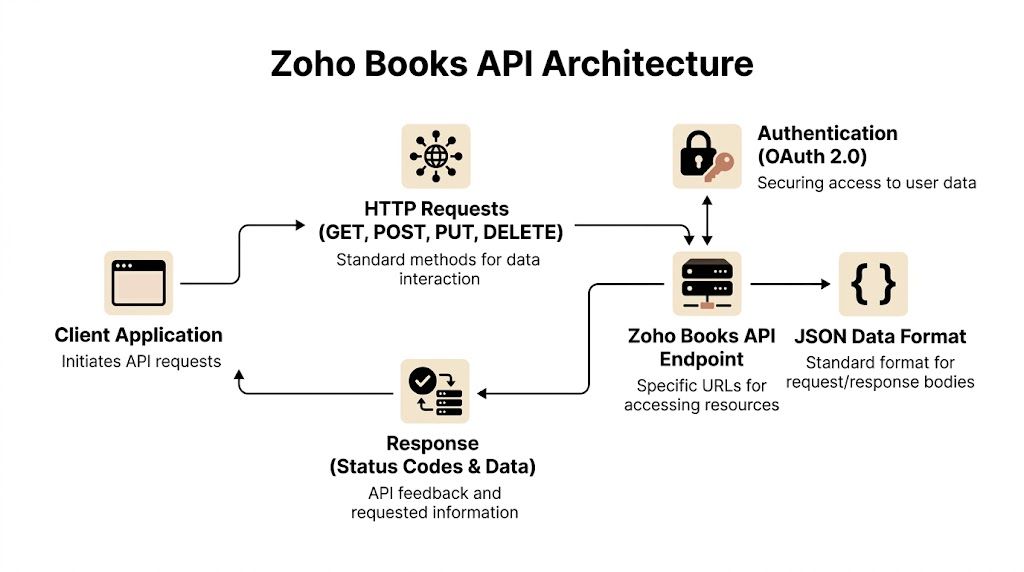
The Zoho Books API is straightforward once you understand its three pillars: REST, OAuth 2.0, and organization_id. If any one of those is missing in your implementation, your integration won’t behave reliably.
REST gives you predictable behavior
Zoho states that the API uses a RESTful architecture with OAuth 2.0 authentication, supports standard HTTP methods, and mirrors web client operations through predictable endpoints such as organization and invoice resources in JSON form via the Zoho Books API introduction. That predictability matters when you’re building real sync logic instead of one-off scripts.
In practice, that means your mental model stays clean:
- GET reads records
- POST creates records
- PUT updates records
- DELETE removes records where supported
A properly authenticated request to invoice resources returns JSON you can filter against. That’s useful when you need to find one invoice by a business key instead of pulling a giant dataset and filtering locally.
OAuth is the key, organization_id is the address
Developers new to Zoho usually get authentication half right. They register a client, obtain a token, and assume they’re done. They aren’t. You also need the organization_id on every request, and Zoho documents that requirement in its API materials.
Think of it this way:
| Component | What it does | Why it matters |
|---|---|---|
| OAuth access token | Proves the app is allowed to act | Prevents unauthorized access |
| Refresh token | Lets long-running integrations renew access | Keeps scheduled syncs from failing after token expiry |
| organization_id | Identifies the exact Zoho Books org to work with | Prevents writes to the wrong tenant |
If you’re building a multi-tenant SaaS, this isn’t optional discipline. Token storage and org mapping need to be first-class parts of your design.
What junior developers usually miss
The easy mistake is treating Zoho as a single-account integration. In production, you’re dealing with many customer organizations, each with distinct credentials, permissions, and data boundaries.
Use a setup flow that does all of the following:
- Register the app in Zoho Developer Console
- Request the right OAuth scopes
- Exchange the grant token cleanly
- Store refresh tokens securely
- Fetch and persist the organization_id before any sync starts
If you want a platform-specific view of connecting Zoho into commerce workflows, this guide on connecting Zoho API commerce flows is a helpful implementation reference.
A lot of auth bugs aren’t really auth bugs. They’re tenant-mapping bugs where the token is valid but the wrong organization_id gets attached to the request.
Once auth is stable, most of your day-to-day work lands on a small set of endpoints. For many production integrations, the heavy lifting happens around contacts, items, invoices, and customer payments. Get those flows right before you branch into advanced modules.

Zoho documents that resource-specific endpoints such as /items and /invoices provide granular control, responses are JSON-structured, pagination is supported, and there’s no dedicated Customer Advance endpoint, which means you need a workaround through the Customer Payment API as described in the Zoho Books items API documentation.
Contacts keep customer identity under control
If you skip contact matching and just create a new customer every time an order arrives, your accounting data gets messy fast. The right pattern is to search first by the business identifier you trust most, then create only when no match exists.
A conceptual contact creation payload looks like this:
{
  "contact_name": "Acme Retail",
  "company_name": "Acme Retail",
  "contact_type": "customer",
  "email": "[email protected]"
}
Use contacts to anchor everything else. Invoices and payments become much easier to reconcile when the customer record is stable.
Items drive line-level accuracy
Items usually represent products or services. This endpoint matters more than many teams expect because line items on invoices depend on clean item mapping. If your app has SKUs, service plans, bundles, or fulfillment labels, you need a translation layer between your domain model and Zoho’s item records.
A simplified item payload might look like this:
{
  "name": "Blue Widget",
  "sku": "BW-001",
  "rate": 29.99,
  "description": "Catalog item for storefront sync"
}
What works well is maintaining a local cross-reference table between your product IDs and Zoho item IDs. What doesn’t work is trying to infer identity from names alone after customers edit records manually.
Invoices are the center of most automations
Invoices are where contact mapping, item mapping, and accounting logic all meet. In many commerce or ERP flows, the invoice is the record that finance teams care about.
A conceptual invoice payload:
{
  "customer_id": "123456",
  "reference_number": "ORD-10025",
  "line_items": [
    {
      "item_id": "98765",
      "quantity": 2,
      "rate": 29.99
    }
  ]
}
The most useful business key here is often your external order reference. Store it. Query by it when reconciling. Build idempotency around it.
Don’t treat invoice creation as a fire-and-forget write. Treat it as a state transition that must be traceable from your source system.
Payments need more care than developers expect
Recording a payment sounds simple until you deal with partial captures, deposits, manual settlements, and customer advances. Zoho’s lack of a dedicated Customer Advance endpoint means some implementations need a workaround through the customer payment flow. That’s manageable, but you need to model it deliberately.
Here’s the practical split:
- Straight invoice payment: Record against a known invoice when settlement is final.
- Advance or unlinked money movement: Use the payment workflow carefully and document how your system will reconcile it later.
- Marketplace payouts: Don’t force payout logic into customer payment records unless your accounting rules support that mapping.
Pagination and filters matter early
Even if your first tenant is small, build list handling correctly from day one.
- Use pagination consistently: Don’t assume one response contains everything.
- Filter aggressively: Pull only records relevant to the sync window or reference key.
- Persist cursors or checkpoints: You’ll need them when sync jobs restart after failure.
That discipline keeps your connector maintainable when one customer turns into many.
Handling Webhooks Rate Limits and Errors
Production integrations fail in boring ways. Tokens expire. Upstream services return temporary errors. Sync jobs retry too aggressively. A customer imports a batch of records and your connector suddenly starts hitting usage ceilings.

Zoho introduced a major infrastructure update on June 1, 2024, adding www.zohoapis.com/books alongside the legacy endpoint and exposing API Usage monitoring with dashboard data that refreshes every 3 hours, according to the Zoho Books API usage dashboard documentation. For developers, that’s useful because it gives you a cleaner view of third-party API consumption and helps surface overuse before throttling becomes a customer-facing issue.
Webhooks where possible, polling where necessary
Real-time sync is always nicer in theory than in production. If the connected system supports event delivery, use it for narrow, high-value triggers such as order creation or shipment updates. If not, rely on filtered polling with a checkpoint strategy.
For a good primer on event-driven integrations versus polling, this overview of what a webhook is is worth keeping handy.
What works:
- Webhook for event notification
- Follow-up API read for the authoritative record
- Checkpointed polling for backstop recovery
What doesn’t work:
- Blind trust in incoming payload completeness
- High-frequency polling with no filters
- Retry storms after temporary failures
Error handling should be boring and strict
You don’t need clever logic here. You need predictable logic.
| Error class | Typical cause | Response strategy |
|---|---|---|
| 400-range validation issues | Bad payload, missing field, invalid scope | Log full context and stop retrying until fixed |
| 401 unauthorized | Expired token or broken token storage | Refresh token, then retry once |
| 403 forbidden | Scope or permission mismatch | Flag for operator review |
| 429 throttling | Too many requests in a burst | Back off and retry with delay |
| 500-range server issues | Upstream instability | Retry with capped exponential backoff |
Zoho’s materials referenced earlier note the need to handle retries around rate-limit behavior in practice. The lesson is simple. Your connector should slow down gracefully, not collapse under load.
Build logs so another developer can answer three questions fast: what record failed, why it failed, and whether a retry is safe.
Common Integration Patterns for eCommerce and ERP
The best integration patterns are usually the least glamorous. They map one business event to a small sequence of dependable API calls, and they leave an audit trail when something goes wrong.

Pattern one, order to invoice sync
This is the most common commerce flow. A customer places an order in a storefront or marketplace-connected system, and your app needs to reflect that event in Zoho Books cleanly.
A reliable sequence looks like this:
Receive the source event
Your OMS, storefront connector, or middleware detects a new paid or approved order.Check customer identity
Search for the existing contact using the business key you trust. Email can help, but an internal customer mapping table is safer.Resolve item mappings
Match each order line to a Zoho item. If your catalog changes frequently, maintain a synchronization job instead of creating items ad hoc during checkout-driven events.Create the invoice
Use the external order number as your reference key so you can detect duplicates and support reconciliation.Optionally attach payment logic
Only create the accounting payment when the settlement event is final in your business process.
This is where discipline matters more than code volume. If your source system allows edits after checkout, make sure your sync model distinguishes between create, update, cancel, and refund paths.
Pattern two, ERP and inventory sync
Inventory synchronization tends to break when teams assume accounting inventory and warehouse inventory behave the same way. They don’t. Zoho Books can be part of the item and stock picture, but your warehouse or commerce engine may still own the operational truth.
Use this pattern instead:
- Fetch item records on a schedule
- Read only the subset changed since your last successful sync
- Map item identifiers carefully
- Push approved updates into the downstream ERP, WMS, or storefront
- Log conflicts rather than overwriting without notification
A small decision table helps here:
| Scenario | Better source of truth | Zoho Books role |
|---|---|---|
| Financial catalog sync | Zoho Books or ERP | Billing item reference |
| Warehouse stock movements | WMS or ERP | Secondary reporting input |
| Marketplace listing updates | Commerce platform or PIM | Accounting-side item alignment |
One of the better framing documents on this broader systems problem is this guide to enterprise application integration best practices. It’s useful when you’re deciding ownership boundaries instead of just wiring endpoints together.
What separates durable integrations from fragile ones
Durable connectors make ownership explicit. They don’t let two systems fight over the same field without rules.
Fragile connectors usually fail for one of these reasons:
- No source-of-truth model
- No duplicate prevention strategy
- No replay-safe processing
- No conflict logging
- No operator visibility into failed jobs
That’s why the implementation plan matters as much as the API call itself.
Zoho Books API vs QuickBooks Online API: Developer Comparison
If you're evaluating accounting API options for your integration, here's how the two most common choices compare from an implementation perspective:
| Feature | Zoho Books API | QuickBooks Online API |
|---|---|---|
| Architecture | REST + JSON | REST + JSON |
| Authentication | OAuth 2.0 + organization_id | OAuth 2.0 + realmId |
| Self-client tokens | Yes (server-to-server, no user interaction) | No (requires interactive OAuth for production) |
| Multi-org routing | organization_id per request | realmId (company ID) per request |
| Rate limits | Plan-based, dashboard monitoring every 3h | Throttled per app (~500 req/min) |
| Webhooks | Limited event types | Broader coverage via Event Notifications |
| Sandbox | Available in Developer Console | Required for production approval |
| International tax | Strong (VAT, GST, multi-currency native) | Primarily US-focused, regional for international |
| Invoice creation | POST /invoices with line_items array | POST /invoice with Line array |
| Contact/Customer | /contacts, search by email or name | /customer, query filter syntax |
| Pagination | page + per_page parameters | startPosition + maxResults |
| Official SDKs | Java, Python, Node.js, PHP, C# | Java, .NET, PHP, Node.js, Ruby |
| API access by plan | All paid plans (lower entry cost) | Plus plan and above |
| Best for | International SaaS, multi-org, cost-sensitive | US-market products, large QBO user base |
Key takeaway: Choose Zoho Books API when you need self-client tokens for server-to-server sync, stronger international tax handling, or lower entry cost. Choose QuickBooks when your customers are primarily US-based or expect native QBO connectivity.
The Unified API Advantage with API2Cart
A single Zoho Books integration is manageable. A product roadmap with Zoho Books, Shopify, WooCommerce, Magento, Amazon, eBay, Walmart, and other commerce systems is a different class of problem.
This is the point where many engineering teams make an expensive mistake. They evaluate each connector in isolation. The first one looks reasonable. The second still feels manageable. By the time the team supports several platforms, they’re maintaining multiple auth models, different pagination rules, inconsistent product schemas, divergent webhook behavior, and a growing pile of edge-case logic. The cost isn’t just initial development. It’s ongoing change management.
Build-it-yourself breaks down in maintenance
Native integrations give you control, but they also give you every maintenance burden. Someone has to monitor vendor changes, update field mappings, patch sync bugs, retest historical flows, and keep onboarding documentation current.
The hidden trade-offs usually show up in these areas:
- Engineering time: Every new platform demands research, implementation, testing, and long-tail support.
- Product speed: Integration requests compete with core roadmap work.
- Operational risk: Each connector fails differently, so support and QA work multiplies.
- Tenant scale: Multi-store and multi-platform customers expose gaps quickly.
For a SaaS vendor, that turns integration from a feature into a permanent tax on the roadmap.
Unified APIs change the economics
A unified API approach abstracts platform-specific differences behind one integration layer. Instead of writing and maintaining many direct connectors, your team integrates once to a common interface and uses that to interact with multiple commerce systems.
API2Cart fits that model. According to the product information provided, it gives B2B software vendors access to 80+ shopping carts and marketplaces, supports 100+ API methods for orders, products, customers, shipments, inventory, and related entities, and can reduce integration costs by up to 9x through a unified approach, as described in the unified API overview. For teams building OMS, WMS, ERP, PIM, shipping, or analytics software, that’s a strategic architecture choice more than a convenience feature.
Notice what this changes for a developer:
| Approach | What your team maintains | Long-term effect |
|---|---|---|
| Direct native connectors | Separate code paths for each platform | Higher maintenance load |
| Unified API layer | One main integration model with mapping logic | Faster expansion to new platforms |
Why this matters even if Zoho Books is the current ask
Product requests rarely stop at one platform. Today it’s Zoho Books support tied to order sync. Next quarter it’s another accounting stack, another marketplace, or a new storefront channel that has to feed the same billing workflow.
If your core product value isn’t “we build bespoke connectors,” then spending a large chunk of engineering capacity on repetitive platform work is usually the wrong bet. The smarter long-term move is to protect your team’s time for business logic that customers notice: reconciliation rules, exception handling, onboarding, reporting, workflow automation, and controls.
The integration layer should not become the product unless your company has decided that integrations are the product.
What works well with a unified strategy
A unified approach is especially sensible when your product needs to:
- support many commerce platforms with similar order and catalog workflows
- onboard customers quickly without custom engineering
- standardize data access for reporting and automation
- avoid rebuilding auth and sync infrastructure for every new connector
What doesn’t work is pretending a unified API removes all mapping work. It doesn’t. You still need a domain model, field normalization rules, tenant isolation, retries, logs, and conflict handling. The difference is that you’re solving those problems once at the product level instead of many times across platform-specific codebases.
That’s why, for multi-platform SaaS, a unified API is usually the more defensible architecture. Not because native integrations are impossible. Because maintenance eventually dominates build time, and that’s where teams lose speed.
Actionable Best Practices and Key FAQs
You can avoid most Zoho Books integration problems by being strict early. Not fancy. Strict.
Best practices that save you later
- Store tokens like production secrets: Access and refresh tokens belong in secure storage with tenant scoping. Don’t leave them in logs, support notes, or ad hoc config files.
- Persist organization mappings carefully: A valid token with the wrong organization_id is still a bad write.
- Make writes idempotent: Use an external reference such as your order number so retries don’t create duplicate invoices or contacts.
- Use pagination from day one: Even if your first customer has a small dataset, your code should already handle paged responses.
- Prefer filtered reads over full syncs: Pull the smallest useful slice of data. It reduces load and makes failure recovery easier.
- Log business context, not just stack traces: Include tenant, source entity, target entity, operation type, and retry status.
- Separate sync states: New, synced, failed, retrying, and conflict need distinct states. A boolean flag won’t carry enough meaning for support and operations.
- Test ugly flows: Cancellations, partial payments, item changes, duplicate events, and manual edits are where connectors tend to break.
A short implementation checklist
Before shipping, confirm all of this:
- OAuth refresh flow works without manual intervention
- organization_id is stored and validated per tenant
- Invoice creation is replay-safe
- Contact matching prevents duplicate customer records
- Item mapping doesn’t rely on mutable names alone
- Errors are categorized into retryable and non-retryable
- Operators can re-run failed jobs safely
- Audit logs connect each Zoho write to the source event
If support can’t explain a failed sync without pulling a developer into the ticket, your logging isn’t good enough yet.
FAQ for developers
Can I mirror the web client behavior through the API
Yes. Zoho documents the API as RESTful and designed to replicate web client operations through predictable endpoints and JSON responses, which is why it works well for programmatic invoice, contact, and inventory workflows.
What’s the most common beginner mistake
Skipping a solid tenant model. Developers often focus on access tokens first and treat org mapping as a detail. In practice, token handling and organization binding are inseparable.
Should I create contacts and items on the fly during every order sync
Only if your rules are tight. It’s safer to search first, map explicitly, and maintain reference tables. Blind creation leads to duplicates and inconsistent accounting data.
How should I handle customer advances
Be careful. Zoho’s API doesn’t provide a dedicated Customer Advance endpoint, so implementations may need to use the Customer Payment API as a workaround. That can work, but only if your reconciliation logic is designed around it.
What’s the right sync model for large datasets
Use pagination, filters, and checkpointed jobs. Don’t rely on “fetch everything and diff locally” once customers have meaningful data volume.
When does a unified API become the smarter choice
As soon as your roadmap includes multiple commerce platforms or you know customers will ask for more than one connector family. The point isn’t to avoid technical work. It’s to avoid repeating the same integration work across many APIs.
If your team needs Zoho Books connectivity as part of a broader multi-platform commerce strategy, API2Cart is worth evaluating as a unified integration layer. It lets B2B software vendors connect to many shopping carts and marketplaces through one API model, which can reduce the amount of platform-specific connector code your team has to build and maintain.
Frequently Asked Questions: Zoho Books API
What is the Zoho Books API and what can it do?
The Zoho Books API is a RESTful interface that lets developers programmatically create invoices, manage contacts, update items, record payments, and sync accounting data. It uses OAuth 2.0 authentication and returns JSON responses, making it suitable for automating order-to-invoice flows, inventory sync, and multi-tenant SaaS integrations.
How does Zoho Books API authentication work?
Zoho Books API uses OAuth 2.0 with three required components: an access token (proves authorization), a refresh token (renews access for long-running jobs), and an organization_id (identifies the target Zoho Books org). All three are required on every request. Register your app in the Zoho Developer Console, request the correct OAuth scopes, and store refresh tokens securely per tenant.
What are the Zoho Books API rate limits?
Zoho Books enforces rate limits that vary by plan. When exceeded, the API returns HTTP 429. Best practice: implement exponential backoff with jitter, monitor usage via Zoho's API Usage dashboard (refreshes every 3 hours), and design sync jobs with throttling awareness. Avoid retry storms by categorizing errors — retryable (429, 5xx) vs. non-retryable (4xx validation).
How is the Zoho Books API different from QuickBooks Online API?
Both are REST APIs with OAuth 2.0 but differ in key areas. Zoho Books uses organization_id for multi-tenant routing; QuickBooks uses realmId. Zoho supports self-client server-to-server tokens; QuickBooks requires interactive OAuth for production. Zoho has stronger international tax support (VAT, GST, multi-currency); QuickBooks is primarily US-focused. See the comparison table above for a full feature breakdown.
Can I use the Zoho Books API to sync eCommerce orders automatically?
Yes. The standard pattern: (1) receive the order event from your storefront or OMS, (2) match or create the customer contact in Zoho Books, (3) map order line items to Zoho item records, (4) create an invoice using the external order number as reference key for idempotency, (5) optionally record payment when settlement is confirmed. For multi-platform support across 70+ shopping carts, consider API2Cart as a unified integration layer.