The Etsy Developer API enables software developers to build applications that connect with Etsy and work programmatically with marketplace data. By setting up an Etsy developer account and registering an application, developers can access the API capabilities needed for Etsy development and marketplace integration. Etsy remains a major global marketplace for unique and creative goods, with 86.5 million active buyers and 5.6 million active sellers as of December 31, 2025.
For SaaS vendors and integration developers, the Etsy Open API v3 provides a REST-based interface for building applications that work with Etsy shops, listings, inventory, sales orders, and other marketplace data. These capabilities support use cases such as inventory synchronization, order management, product listing management, and other eCommerce workflows.
In this guide, we explain how the Etsy Developer API works, how to set up an Etsy developer account, authenticate an application, and build an Etsy API integration. We also cover common development challenges and show how software vendors can simplify Etsy integration through a unified API.
Looking for the full integration picture rather than just the developer portal? See our Etsy API integration guide.
What Is the Etsy Developer API?
The Etsy Developer API, officially documented as the Etsy Open API v3, is a REST API that enables developers to connect applications with Etsy programmatically. It provides access to marketplace resources such as listings, inventory, shops, sales orders, shipping and fulfillment data, and users.
The API uses resource-based endpoints and standard HTTP methods to retrieve or modify Etsy data. Depending on the endpoint and granted permissions, developers can use the API to:
- Create, retrieve, update, and manage Etsy listings;
- Access and update listing inventory;
- Retrieve and manage shop-related data;
- Work with sales orders and transaction data;
- Support shipping and order fulfillment workflows;
- Connect Etsy data with third-party software and SaaS applications.
Every Etsy Open API v3 request requires an API key. Endpoints that access private user data or perform authorized operations also require an OAuth 2.0 access token with the appropriate scopes. Developers obtain the required API credentials by registering an application through Etsy’s Developer Portal.
What Can Developers Do With the Etsy API?
Developers can use the Etsy API to build applications that work with listings, inventory, shops, sales orders, payments, shipping, and other Etsy marketplace data. The available operations depend on the endpoint, application access, and OAuth scopes granted by the Etsy user.
Manage Listings and Inventory
Developers can build applications that retrieve and manage Etsy listings and their inventory data. This enables SaaS solutions to support workflows such as product listing management, inventory synchronization, and stock updates.
Work With Orders and Transactions
The Etsy API provides access to shop receipts and transaction data for authorized applications. Software vendors can use this data to support order management, reporting, fulfillment, and other post-purchase workflows.
Support Shipping and Fulfillment Workflows
Applications can work with shipping-related data and fulfillment operations available through the Etsy API. For example, integration software can use Etsy order data as part of shipping workflows and update tracking information for fulfilled orders.
Connect Etsy With Third-Party Software
Etsy API capabilities allow developers to connect marketplace data with external systems such as order management software, inventory management platforms, shipping solutions, ERP systems, PIM software, and other eCommerce applications.

How to Set Up an Etsy Developer Account
To set up an Etsy developer account for API development, register an application through the Etsy Developer Portal and choose the access path that matches your use case. Etsy distinguishes between apps built for a seller’s own shop and applications designed for use by other Etsy buyers or sellers.
Register for Etsy Developer Access
Developers can start by signing in to Etsy and registering an application through the Etsy Developer Portal. When creating an app, you need to choose the appropriate type of access.
- Seller App: Designed for an Etsy seller building tools, automations, reports, or workflows for their own shop. The app can authenticate only with the registered seller’s shop.
- Personal App: Designed for developers building applications beyond their own shop, including tools that other Etsy buyers or sellers may use at a limited scale.
- Commercial Access: Intended for approved applications that need to support other Etsy sellers at a broader scale. Developers must first have an approved Personal App before requesting Commercial Access.
For SaaS vendors building an Etsy integration for multiple customers, the Personal App and Commercial Access path is particularly relevant because a Seller App is restricted to the developer’s own Etsy shop.
Create an Etsy App
After choosing the appropriate access path, register the application in the Developer Portal and provide the information Etsy requests about the app and its intended use. Seller Apps for eligible sellers can receive approval quickly, while Personal Apps undergo a more detailed review. Commercial Access requires a separate review after the Personal App has been approved.
When evaluating Commercial Access requests, Etsy also reviews factors such as compliance with its API Terms of Use, use of OAuth for private member data, caching practices, application branding, and the proposed use of Etsy data.
Get Your API Key and Credentials
Registering an application creates an Etsy App API keystring and a shared secret. Developers can find these credentials in the Your Apps section of the Etsy Developer Portal after registering the app.
Every Etsy Open API v3 request requires the API credentials in the x-api-key header. However, the API key alone does not authorize access to scoped endpoints. Operations involving private user data or authorized actions also require an OAuth 2.0 access token with the appropriate permissions.
Once the Etsy developer account and application are configured, the next step is to implement authentication and request the OAuth scopes required by the integration.
How Etsy API Authentication Works
Etsy Open API v3 uses OAuth 2.0 for endpoints that require access to a member’s private data or permission to perform actions on their behalf. Applications also use their Etsy API credentials to identify themselves when sending requests to the API.
API Key Authentication
Every request to Etsy Open API v3 requires an x-api-key header. The header identifies the registered application using its API keystring and shared secret.
However, API credentials alone do not provide access to protected Etsy resources. When an endpoint requires authorization, the application must also obtain an OAuth 2.0 access token from the Etsy user.
OAuth 2.0 Authorization
Etsy uses the OAuth 2.0 Authorization Code flow with PKCE for user authorization. The application redirects the user to Etsy, where the user reviews the requested permissions and authorizes access. Etsy then returns an authorization code that the application exchanges for an access token.
The access token is sent with authorized API requests in the Authorization: Bearer header. Because access tokens expire, applications also need to handle token renewal using the refresh token returned during authorization.
OAuth Scopes and Permissions
OAuth scopes determine which Etsy resources and operations an application can access on behalf of a user. Therefore, developers should request only the scopes required by their integration.
For example, Etsy provides separate scopes for operations involving listings, shops, transactions, and other protected resources. The exact scopes required depend on the endpoints and workflows implemented by the application.
For SaaS applications that connect multiple Etsy sellers, authentication must be handled separately for each authorized account. The application needs to securely associate credentials and tokens with the correct connection while managing expiration, refresh, and permission changes.
Etsy Development: Building an Integration
Etsy development involves defining the marketplace data your software needs, selecting the required resources and operations, implementing requests, and handling responses reliably. For SaaS vendors, the development process should also account for authentication, rate limits, errors, and synchronization across multiple connected shops.
Choose the Data and Operations You Need
Start by defining which Etsy resources your application needs to work with and what operations it must perform. For example, an order management solution may need to retrieve sales orders and transaction data, while an inventory platform may need to read listings and update inventory.
This step helps developers identify the required endpoints and OAuth scopes before implementation. It also prevents applications from requesting permissions or data that are not necessary for their workflows.
Send Requests and Process Responses
Once the required resources are defined, the application can send requests to the appropriate endpoints and process the returned data. Developers should map Etsy resource fields to their software’s internal data model and account for differences in structures such as listings, variations, inventory, and orders.
For multi-platform SaaS applications, this mapping is particularly important. Etsy structures and identifiers may differ from those used by other marketplaces, so the integration layer needs a consistent way to transform and synchronize data between systems.
Handle Rate Limits and Errors
Reliable Etsy development also requires applications to handle request limits and API errors correctly. Etsy applies rate limits to requests, so integrations should monitor the rate-limit information returned by the service and avoid sending unnecessary requests.
Applications should also distinguish between authentication problems, invalid requests, rate-limit responses, unavailable resources, and temporary service errors. Logging, retry logic where appropriate, and clear error handling help prevent individual request failures from disrupting larger synchronization workflows.
Once these development fundamentals are in place, developers can test a real request and response to verify how the integration works in practice.
Etsy Developer API Example
A practical Etsy Developer API integration can use API2Cart to retrieve Etsy order data through a unified request. Instead of implementing platform-specific request logic directly in the application, developers can use the same API2Cart method structure for Etsy and other supported eCommerce platforms.
For example, the order.list method retrieves orders from a connected Etsy store:
{
  "return_code": 0,
  "return_message": "string",
  "pagination": {
    "previous": "string",
    "next": "string",
    "additional_fields": {},
    "custom_fields": {}
  },
  "result": {
    "orders_count": 0,
    "order": [
      {
        "id": "string",
        "order_id": "string",
        "basket_id": "string",
        "channel_id": "string",
        "customer": {
          "id": "string",
          "email": "string",
          "first_name": "string",
          "last_name": "string",
          "phone": "string",
          "additional_fields": {},
          "custom_fields": {}
        },
        "create_at": {
          "value": "string",
          "format": "string",
          "additional_fields": {},
          "custom_fields": {}
        },
        "currency": {
          "id": "string",
          "name": "string",
          "iso3": "string",
          "symbol_left": "string",
          "symbol_right": "string",
          "rate": 0,
          "avail": true,
          "default": true,
          "additional_fields": {},
          "custom_fields": {}
        },
        "shipping_address": {
          "id": "string",
          "type": "string",
          "first_name": "string",
          "last_name": "string",
          "postcode": "string",
          "address1": "string",
          "address2": "string",
          "phone": "string",
          "phone_mobile": "string",
          "city": "string",
          "country": {
            "code2": "string",
            "code3": "string",
            "name": "string",
            "additional_fields": {},
            "custom_fields": {}
          },
          "state": {
            "code": "string",
            "name": "string",
            "additional_fields": {},
            "custom_fields": {}
          },
          "company": "string",
          "fax": "string",
          "website": "string",
          "gender": "string",
          "region": "string",
          "default": true,
          "tax_id": "string",
          "identification_number": "string",
          "alias": "string",
          "additional_fields": {},
          "custom_fields": {}
        },
        "billing_address": {
          "id": "string",
          "type": "string",
          "first_name": "string",
          "last_name": "string",
          "postcode": "string",
          "address1": "string",
          "address2": "string",
          "phone": "string",
          "phone_mobile": "string",
          "city": "string",
          "country": {
            "code2": "string",
            "code3": "string",
            "name": "string",
            "additional_fields": {},
            "custom_fields": {}
          },
          "state": {
            "code": "string",
            "name": "string",
            "additional_fields": {},
            "custom_fields": {}
          },
          "company": "string",
          "fax": "string",
          "website": "string",
          "gender": "string",
          "region": "string",
          "default": true,
          "tax_id": "string",
          "identification_number": "string",
          "alias": "string",
          "additional_fields": {},
          "custom_fields": {}
        },
        "payment_method": {
          "name": "string",
          "additional_fields": {},
          "custom_fields": {}
        },
        "shipping_method": {
          "name": "string",
          "additional_fields": {},
          "custom_fields": {}
        },
        "shipping_methods": [
          {
            "name": "string",
            "additional_fields": {},
            "custom_fields": {}
          }
        ],
        "status": {
          "id": "string",
          "name": "string",
          "history": [
            {
              "id": "string",
              "name": "string",
              "modified_time": {
                "value": "string",
                "format": "string",
                "additional_fields": {},
                "custom_fields": {}
              },
              "notify": true,
              "comment": "string",
              "additional_fields": {},
              "custom_fields": {}
            }
          ],
          "refund_info": {
            "shipping": 0,
            "fee": 0,
            "tax": 0,
            "total_refunded": 0,
            "time": {
              "value": "string",
              "format": "string",
              "additional_fields": {},
              "custom_fields": {}
            },
            "comment": "string",
            "refunded_items": [
              {
                "product_id": "string",
                "variant_id": "string",
                "order_product_id": "string",
                "qty": 0,
                "refund": 0,
                "additional_fields": {},
                "custom_fields": {}
              }
            ],
            "additional_fields": {},
            "custom_fields": {}
          },
          "additional_fields": {},
          "custom_fields": {}
        },
        "totals": {
          "total": 0,
          "subtotal": 0,
          "shipping": 0,
          "tax": 0,
          "discount": 0,
          "additional_fields": {},
          "custom_fields": {}
        },
        "total": {
          "subtotal_ex_tax": 0,
          "wrapping_ex_tax": 0,
          "shipping_ex_tax": 0,
          "total_discount": 0,
          "total_tax": 0,
          "total": 0,
          "total_paid": 0,
          "additional_fields": {},
          "custom_fields": {}
        },
        "discounts": [
          {
            "code": "string",
            "value": 0,
            "type": "string",
            "additional_fields": {},
            "custom_fields": {}
          }
        ],
        "order_products": [
          {
            "product_id": "string",
            "order_product_id": "string",
            "model": "string",
            "name": "string",
            "price": 0,
            "price_inc_tax": 0,
            "quantity": 0,
            "discount_amount": 0,
            "total_price": 0,
            "tax_percent": 0,
            "tax_value": 0,
            "tax_value_after_discount": 0,
            "options": [
              {
                "option_id": "string",
                "name": "string",
                "value": "string",
                "price": 0,
                "weight": 0,
                "type": "string",
                "product_option_value_id": "string",
                "additional_fields": {},
                "custom_fields": {}
              }
            ],
            "variant_id": "string",
            "weight_unit": "string",
            "weight": 0,
            "barcode": "string",
            "parent_order_product_id": "string",
            "additional_fields": {},
            "custom_fields": {}
          }
        ],
        "bundles": [
          {
            "product_id": "string",
            "order_product_id": "string",
            "model": "string",
            "name": "string",
            "price": 0,
            "price_inc_tax": 0,
            "quantity": 0,
            "discount_amount": 0,
            "total_price": 0,
            "tax_percent": 0,
            "tax_value": 0,
            "tax_value_after_discount": 0,
            "options": [
              {
                "option_id": "string",
                "name": "string",
                "value": "string",
                "price": 0,
                "weight": 0,
                "type": "string",
                "product_option_value_id": "string",
                "additional_fields": {},
                "custom_fields": {}
              }
            ],
            "variant_id": "string",
            "weight_unit": "string",
            "weight": 0,
            "barcode": "string",
            "parent_order_product_id": "string",
            "additional_fields": {},
            "custom_fields": {}
          }
        ],
        "modified_at": {
          "value": "string",
          "format": "string",
          "additional_fields": {},
          "custom_fields": {}
        },
        "finished_time": {
          "value": "string",
          "format": "string",
          "additional_fields": {},
          "custom_fields": {}
        },
        "comment": "string",
        "store_id": "string",
        "warehouses_ids": [
          "string"
        ],
        "refunds": [
          {
            "id": "string",
            "shipping": 0,
            "fee": 0,
            "tax": 0,
            "total": 0,
            "modified_time": {
              "value": "string",
              "format": "string",
              "additional_fields": {},
              "custom_fields": {}
            },
            "comment": "string",
            "items": [
              {
                "product_id": "string",
                "variant_id": "string",
                "order_product_id": "string",
                "qty": 0,
                "refund": 0,
                "additional_fields": {},
                "custom_fields": {}
              }
            ],
            "additional_fields": {},
            "custom_fields": {}
          }
        ],
        "gift_message": "string",
        "order_details_url": "string",
        "additional_fields": {},
        "custom_fields": {}
      }
    ],
    "additional_fields": {},
    "custom_fields": {}
  },
  "additional_fields": {},
  "custom_fields": {}
}
The response returns standardized order data that the application can process for workflows such as order import, reporting, inventory synchronization, or fulfillment.
Because API2Cart provides a unified data model, developers can use the same integration approach when connecting their software to additional supported platforms. Platform-specific differences are handled within the API2Cart integration layer.
How API2Cart Simplifies Etsy Development
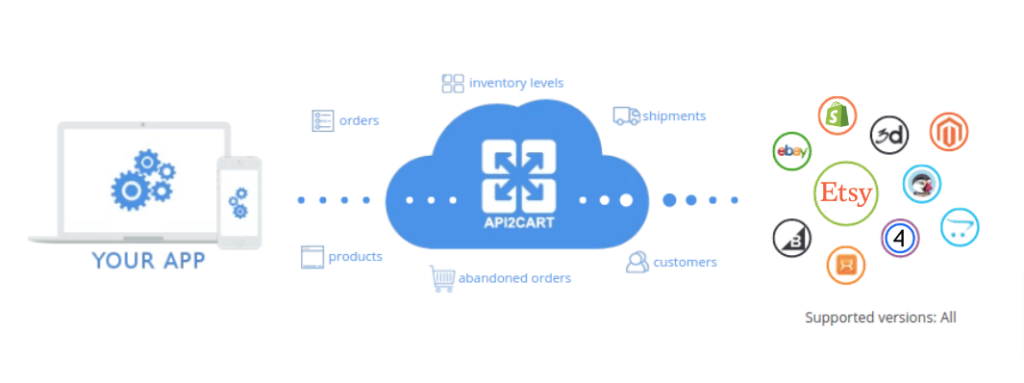
API2Cart provides a unified API that allows SaaS vendors to connect their software with Etsy and 80+ eCommerce integrations through a single integration layer. Instead of developing and maintaining separate connections for every platform, developers can work with standardized methods and data structures.
This approach is useful for order management systems, inventory management software, shipping solutions, ERP systems, PIM platforms, and other eCommerce SaaS applications that need to support Etsy alongside multiple sales channels.
Work With Etsy Data Through Unified Methods
After connecting an Etsy store to API2Cart, developers can use supported methods to work with different types of eCommerce data. For example:
order.list— retrieve orders from a connected Etsy store;product.update— update supported product data;category.info— retrieve information about a category;order.shipment.add— add shipment information to a supported order.
API2Cart also provides webhooks for supported events, allowing applications to receive updates without relying exclusively on repeated polling.
Extend the Integration to Other Platforms
Once software is integrated with API2Cart, the same integration layer can be used to connect additional supported shopping platforms and marketplaces. Therefore, developers do not need to rebuild the entire integration architecture whenever their SaaS product adds another sales channel.
Conclusion
The Etsy Developer API gives software developers the tools to build applications that work with Etsy marketplace data and seller workflows. However, successful Etsy development requires more than sending individual requests. Developers also need to manage application access, authentication, permissions, data mapping, rate limits, and ongoing integration maintenance.
For SaaS vendors that need Etsy together with other eCommerce platforms, a unified integration layer can reduce platform-specific development and provide a more scalable foundation for expanding integrations.
Want to simplify Etsy development for your software? Create an API2Cart account and connect your application to Etsy and 80+ eCommerce integrations through one unified API.
FAQs
What is the Etsy Developer API used for?
The Etsy Developer API allows developers to build applications that interact programmatically with Etsy marketplace resources. Depending on access and permissions, applications can work with listings, inventory, shops, sales orders, shipping, and other supported data.
These capabilities can be used to build order management, inventory synchronization, listing management, fulfillment, reporting, and other eCommerce workflows.
How do I set up an Etsy developer account?
To set up an Etsy developer account for integration development, sign in to Etsy and register an application through the Etsy Developer Portal. The appropriate application and access path depends on whether you are building for your own shop or creating software that other Etsy users will authorize.
After the application is registered, you receive the credentials required to identify it when working with Etsy Open API v3. Protected operations also require OAuth 2.0 authorization.
Does the Etsy Developer API use OAuth 2.0?
Yes. Etsy Open API v3 uses OAuth 2.0 for endpoints that require authorization to access private data or perform actions on behalf of a user. Applications need an access token with the appropriate scopes for these operations.
Developers also need to handle token expiration and refresh securely, especially when building SaaS applications that connect multiple Etsy sellers.
Can SaaS software connect Etsy with other eCommerce platforms?
Yes. SaaS applications can build separate integrations with individual platforms or use a unified integration solution such as API2Cart. A unified approach provides a common integration layer for working with Etsy and other supported eCommerce platforms.
With API2Cart, software vendors can connect to Etsy and 80+ eCommerce integrations through one API and use standardized methods for supported eCommerce data and workflows.