Your sprint board says core product work. Your inbox says something else. Sales wants a CRM sync for a prospect in the pipeline. Customer success wants order history visible inside account records. A new customer wants marketplace and store data pushed into their CRM so their ops team can stop exporting CSVs every morning.
That tension is normal in B2B eCommerce SaaS. Integration work rarely looks strategic when it first arrives. It looks like one more connector request. Then you trace what the request means. Customer data has to move cleanly between systems. Orders, products, inventory, shipments, and support events need ownership rules. Authentication, retries, field mapping, and observability have to work from day one.
For developers, CRM integration services aren't just about connecting APIs. They're about deciding where the product should spend engineering effort, and where an abstraction layer provides an advantage.
Why CRM Integration Is on Every Product Roadmap
CRM integration requests usually start as feature asks, but they behave like infrastructure work. Once customers rely on your product to exchange customer and commerce data with a CRM, the integration stops being optional. It becomes part of onboarding, retention, and expansion.
That pressure exists because CRM usage is already widespread. Flowlu reports that 91% of companies with 11 or more employees use CRM, 74% of U.S. businesses have a CRM system, and 87% of CRM systems are cloud-based in its CRM statistics overview. In practical terms, most of your target customers already operate in a CRM-first environment. They don't see integration as an add-on. They assume your product will fit into the systems they already run.
The roadmap problem is really a systems problem
A roadmap discussion often frames CRM work as “build one connector for one customer.” That framing breaks down fast. The moment one team asks for customer sync, another asks for order sync, then support wants ticket context, then finance asks why billing status doesn't match account state.
A useful way to handle that tension is to treat integrations as a portfolio decision inside your broader planning process. If your team is refining priorities, a solid product roadmap guide can help structure the trade-off between platform capabilities and customer-facing features.
The engineering reality is simple. Every new integration adds surface area:
- More schemas that don't match your internal model
- More event flows to reconcile when updates happen out of order
- More operational ownership after go-live
- More support burden when a customer changes fields, permissions, or workflow rules
Why developers need a capability, not a one-off build
Salesforce explains that CRM integration connects CRM software with email, marketing automation, accounting, ERP, and other business applications so data flows in real time instead of being re-entered manually in its overview of API integration services and connected systems. That's the business case. The developer takeaway is different. Once data moves across systems, your team owns consistency, failure handling, and lifecycle changes.
Practical rule: If multiple customers are asking for CRM connectivity, you're not shipping a feature. You're defining an integration capability your product will have to support for years.
That's why CRM integration services keep moving up the roadmap. They enable workflows customers already depend on, and they expose whether your product can act like a connected part of the stack instead of a disconnected destination.
A Developer's Guide to Integration Architectures
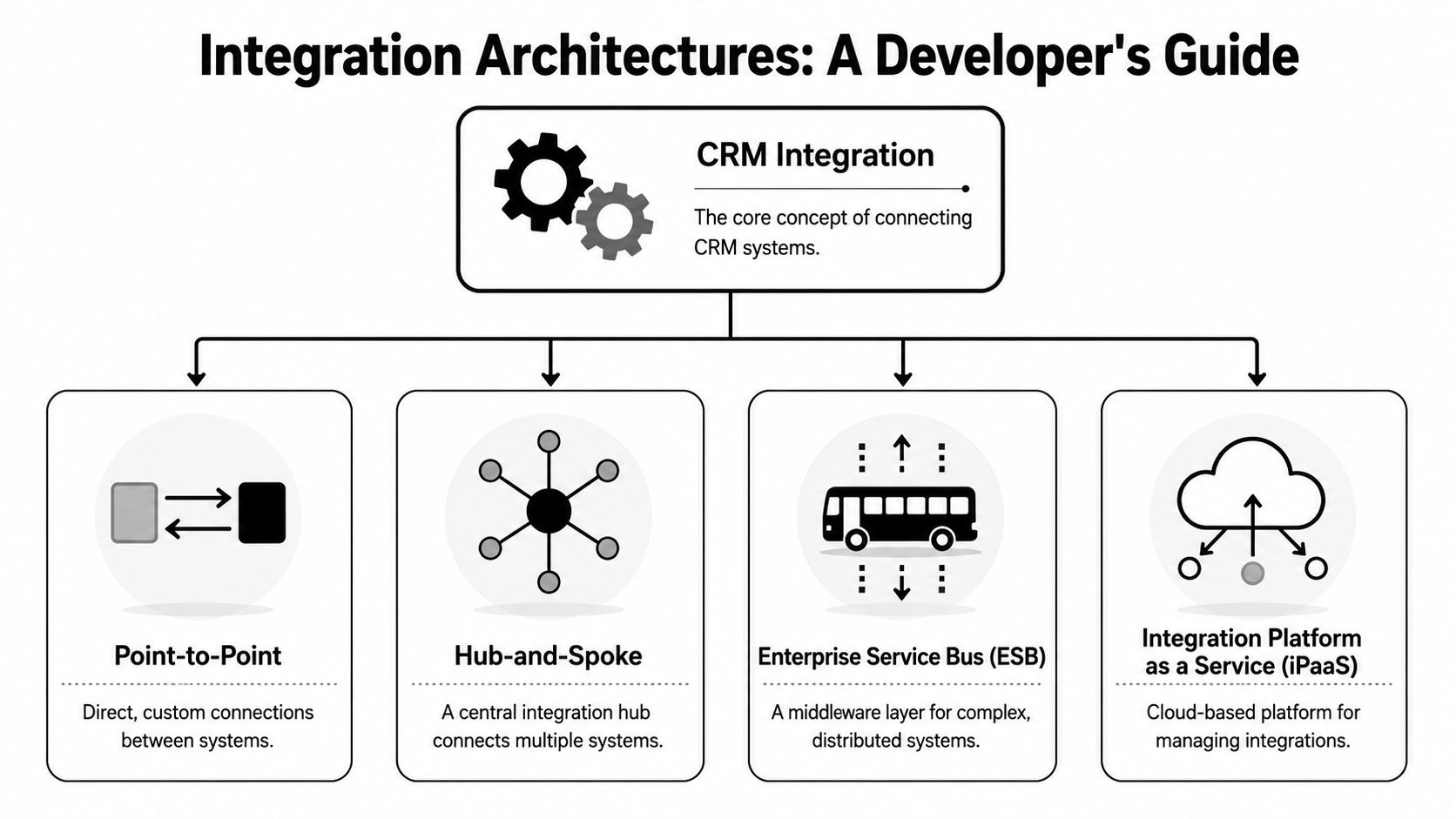
The architecture choice decides whether integration work stays manageable or turns into a maintenance tax. Teams usually end up choosing among three patterns: point-to-point connectors, centralized middleware, or a unified API approach that hides platform-specific differences behind one contract.
IBM notes that CRM systems are commonly integrated through APIs, middleware, prebuilt connectors, or iPaaS, and that iPaaS is useful for building and deploying flows across cloud and on-premises environments in its CRM integration architecture guidance. The important part isn't the category name. It's the consequence. As connected apps multiply, centralized orchestration reduces interface sprawl and simplifies change management.
Point-to-point works until it doesn't
A direct connector feels efficient at first. One team needs one CRM connection. You write auth handling, map the key entities, subscribe to webhooks where available, and ship.
That approach can be fine when all of these are true:
- The data model is narrow and mostly contact-centric
- The sync rules are simple and mostly one-way
- The customer count is limited enough that support can inspect failures manually
But direct connectors age badly. Every platform variation creates a special case. Every API version change becomes your problem. Every new system turns one bridge into many bridges.
A simple analogy helps. Building one connector is like building one bridge across one river. Building a product that supports many CRMs and many commerce sources is building a transport network. Bridges don't scale the way adapters do.
Middleware and iPaaS create control
A hub-and-spoke layer or iPaaS model gives you a place to centralize routing, transformation, retries, and observability. That matters when you need to normalize different object models, preserve auditability, and support both real-time and delayed sync patterns.
Developers usually feel the benefit in four places:
Schema normalization
You stop rewriting business logic for each endpoint.Operational consistency
Retries, logs, and dead-letter handling can follow one standard.Change isolation
Upstream API changes affect adapters instead of core product services.Cross-environment flexibility
Some customers still have mixed deployment realities, even when your product is cloud-native.
A lightweight external example helps make this concrete. Even simple workflows like connect Amazon to Google Sheets show how quickly “just move the data” becomes a question of event timing, schema consistency, and ownership of updates.
Unified API is the product-minded shortcut
For B2B eCommerce SaaS, the hardest problem often isn't CRM connectivity in isolation. It's the combination of CRM plus store, marketplace, order, inventory, shipment, and customer data. A unified API approach is attractive because it compresses many external models into one integration surface your developers can target.
That pattern is especially useful when your product roadmap depends on shipping workflows fast, not becoming an expert in every upstream API. If you're evaluating the practical model for this kind of setup, the CRM web integration overview is a useful reference point for how field mapping, sync design, and ownership rules fit together.
Centralize where variability is highest. In CRM integrations, variability usually lives at the system edge, not in your product's core workflows.
eCommerce SaaS Use Cases That Drive Value
A sales rep is about to call a high-value account. The CRM shows an open opportunity and a healthy relationship. What it does not show is the delayed shipment, partial refund, and sudden drop in order volume across two storefronts. That gap is where B2B eCommerce SaaS teams lose trust in their own product.
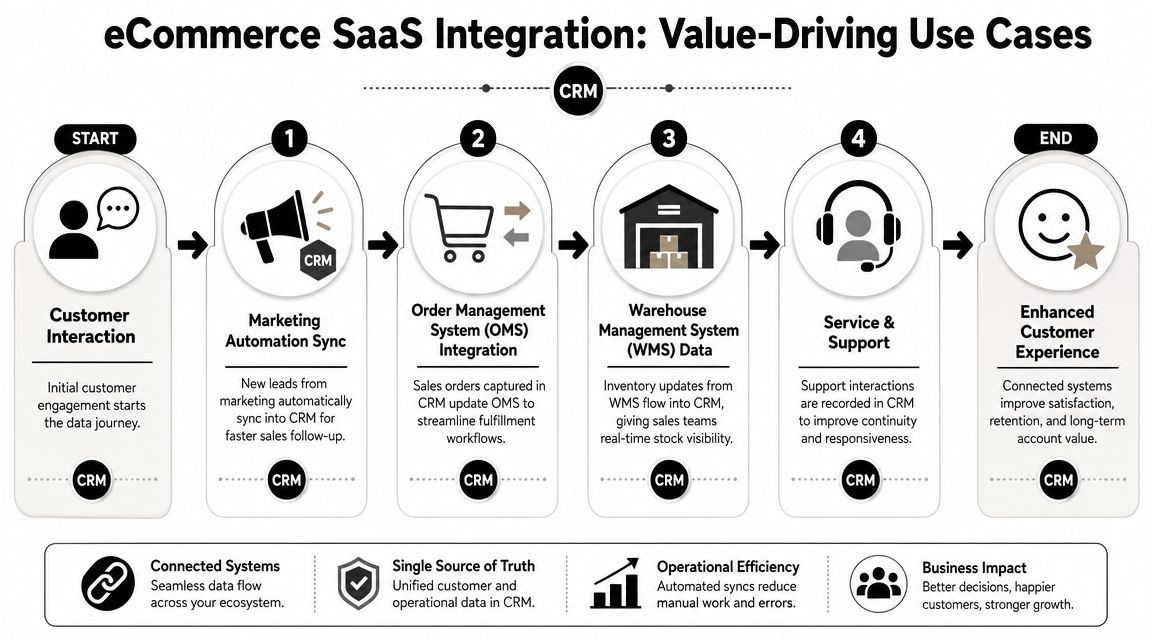
The use cases that create value are the ones that put commercial context inside the CRM, fast enough to affect a decision. For developers, that changes the goal. The job is not to sync records for its own sake. The job is to move the subset of commerce data that helps sales, support, and customer success act on current account reality.
Order activity that changes account decisions
In B2B commerce, account management depends on order behavior. Reps need more than a customer name and last touch date. They need to know whether the customer is buying, stalling, canceling, or shifting spend to another channel.
Useful CRM flows usually include:
- Order headers so account teams can see buying activity at the account level
- Status changes so sales and success teams know when fulfillment issues threaten renewals
- Refunds and cancellations so the CRM reflects revenue risk, not just pipeline optimism
- Customer and company identifiers so transactions map to the correct contact, account, or buying group
The trade-off is scope control. Teams that sync every line item, note, and operational field often create noisy timelines that sales ignores. Teams that sync only summary records move faster and keep the CRM usable.
Product and inventory context for revenue workflows
Many B2B eCommerce platforms already manage catalog, pricing, warehouse, or availability data. That data matters in the CRM when it changes the outcome of an opportunity, quote, renewal, or expansion conversation.
Three patterns come up often:
| Use case | What moves into the CRM | Why product teams care |
|---|---|---|
| Availability-aware pipeline management | Stock status, backorder flags, replenishment dates | Reps stop promising what ops cannot deliver |
| Catalog context for account teams | Product records, assortment data, account-specific pricing signals | CRM users can discuss the right products without switching systems |
| Expansion and reorder signals | Repeat purchases, category shifts, dormant SKUs | Success and sales teams can act on buying behavior instead of static lead scores |
Selective sync matters here too. If a field does not change a workflow, leave it out. Every extra object increases mapping work, support load, and the chance of drift between systems.
Support workflows that need commerce history
Support teams should not have to hunt across order systems, shipment tools, and the CRM to answer a simple account question. In B2B SaaS, one missed order or delayed delivery can become a billing dispute, a CSM escalation, or a churn event.
A practical integration usually sends enough commerce history into the CRM to answer common support questions immediately:
- recent orders and statuses
- shipment or fulfillment references
- return and refund activity
- key account attributes such as billing contacts, locations, or parent-child relationships
Architecture begins to impact roadmap speed. Once customers ask for order context, account hierarchies, product data, and fulfillment state in one place, point-to-point connectors become a drag on delivery. A unified API for CRM and commerce integrations gives developers one target model to build against instead of rewriting the same logic for each upstream system.
For B2B eCommerce SaaS teams, that is the core value. CRM integrations are not isolated features. They are a way to ship account-aware workflows faster, with less custom connector work every time product expands into a new channel, storefront, or customer data requirement.
The Developer's Dilemma Building vs Buying
The build versus buy decision usually gets framed as cost control. For developers, that's the wrong lens. The key question is what your team should own.
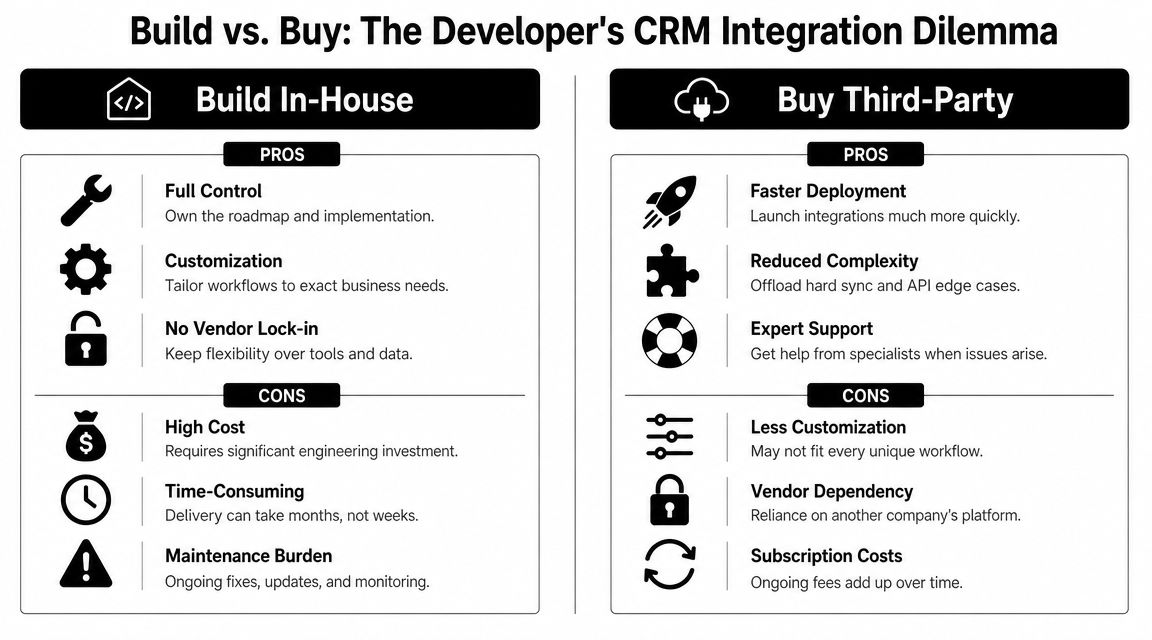
Building in-house gives you control. It also commits you to years of integration lifecycle work. Itransition warns that CRM integration introduces ongoing security and scalability issues, and its CRM integration guide points toward a reality many teams underestimate: after launch, governance, monitoring, and exception handling become the hard part.
What building really includes
Organizations often account for initial connector development. Fewer account for everything attached to it.
You don't just write one integration. You also need to own:
- Authentication handling across different auth patterns and token lifecycles
- Polling and webhook orchestration for systems with uneven event support
- Field mapping infrastructure for standard and custom objects
- Conflict resolution logic when two systems update the same entity differently
- Version drift response when upstream APIs deprecate endpoints or alter payloads
- Support tooling so your own team can inspect failures without reading raw logs all day
That hidden workload changes roadmap velocity. Developers end up spending cycles on edge conditions instead of product differentiation.
What buying changes
A unified API shifts the ownership boundary. Your team still owns your product logic, sync strategy, and customer-facing behavior. But you don't have to become the maintainer of dozens of upstream platform differences.
For teams in eCommerce SaaS, one option is API2Cart, which provides a unified eCommerce API for connecting to many shopping carts and marketplaces through one contract. In this context, that matters because CRM features often depend on upstream store data such as customers, orders, products, shipments, and inventory. The unified API model is useful when the product goal is to ship workflows faster without building a separate connector for every commerce platform.
Buying doesn't remove complexity. It relocates commodity complexity so your team can focus on product-specific complexity.
Build vs buy through a developer lens
| Factor | Building In-House | Using Unified API (e.g., API2Cart) |
|---|---|---|
| Architecture control | Full control over connector behavior and deployment model | Control over your product logic, less control over the abstraction layer |
| Time to first integration | Slower, because each external system needs dedicated work | Faster, because developers target one contract |
| Schema handling | Custom mapping per connector | Normalized access pattern reduces repeated adapter work |
| Maintenance burden | High, especially as APIs and customer requirements change | Lower at the connector layer, still requires product-side governance |
| Operational support | Internal team owns logs, retries, incident response, and updates | Shared responsibility, with your team focused on business logic and customer workflows |
| Roadmap impact | Integration work competes directly with core features | More engineering capacity stays available for core product work |
The trade-off is straightforward. Build when the integration is your product. Buy when integration enables your product.
A Practical Integration Implementation Checklist
Good CRM integration services fail less because the team planned for ugly realities early. Field mismatches, stale records, partial failures, and permission gaps are normal. The difference between a reliable integration and a noisy one is whether you designed for them before launch.
DCKAP recommends identifying discrepancies between source and CRM formats, applying transformation rules, and validating the results before loading in its CRM data integration guide. That should be treated as baseline engineering discipline, not optional polish.

Start with data contracts
Before you write sync code, define the business meaning of each entity. “Customer” sounds obvious until one system means contact, another means company, and a third means storefront user.
Use this checklist:
- Define system of record for each entity and critical field
- Map custom fields deliberately instead of dumping everything into generic properties
- Document null behavior so deletes, blanks, and missing values don't overwrite good data
- Separate canonical IDs from display fields because names and labels change
A lot of defects that look like API problems are data contract problems.
Design failure paths before happy paths
Integrations break at the edges. Rate limits, delayed webhooks, malformed payloads, and transient auth failures aren't rare. They're routine.
Build for them explicitly:
Retry with intent
Retries need idempotency controls. Otherwise you duplicate records and create harder cleanup work.Queue asynchronous work
Not every sync should run inline with a user action. Decouple where latency and reliability matter.Log business context, not just technical errors
“Validation failed” isn't enough. Log which entity, which field, and which rule rejected it.Create exception workflows
Some failures need human review. Don't let them disappear into a dashboard nobody checks.
The best integration logs answer three questions fast: what failed, why it failed, and who owns the fix.
Test the ugly scenarios
A surprising number of teams test only successful syncs with clean fixture data. That's not enough. You need test cases that reflect the data customers produce.
Focus on scenarios like these:
- Format mismatches between source values and CRM expectations
- Duplicate identities that resolve to the same real customer
- Schema drift when a customer changes fields after go-live
- Rate-limit behavior under batch loads
- Out-of-order updates where stale data arrives after newer data
Secure the integration and operationalize it
Security isn't separate from reliability. If auth expires unnoticed or permission scopes change, the integration becomes both unsafe and broken.
A practical production checklist includes:
| Control area | What to verify |
|---|---|
| Authentication | Token lifecycle, rotation handling, and failed-auth alerts |
| Data transfer | Encrypted transport and least-privilege access |
| Monitoring | Entity-level failure tracking and alert routing |
| Ownership | Named team or role responsible for mapping, exceptions, and SLA response |
| Change management | Process for upstream API changes and customer schema updates |
For teams using a unified eCommerce connector layer, some of this edge complexity is already abstracted, especially around upstream platform variation. That doesn't remove the need for disciplined data engineering. It does reduce how much custom adapter logic your own team has to maintain.
Measuring Success and Preparing for the Future
A CRM integration is successful when two things happen at once. The sync stays reliable in production, and the business stops working around missing data. If either side is weak, the integration isn't finished.
Track technical performance with operational measures your team can improve. Useful ones include sync success rate, latency by flow type, backlog depth for asynchronous jobs, and time to resolve integration incidents. Pair those with business-facing indicators such as less manual re-entry, fewer support escalations caused by missing order context, and cleaner account records.
AI readiness starts with integration quality
The future-facing reason to care about integration quality is AI. Salesforce notes that CRM integration is critical for enabling AI and automation because those systems need complete, unified data. It also notes that the average company uses nearly a thousand apps in its CRM integration and AI overview. That creates a hard problem for developers. If data arrives late, incomplete, or contradictory, AI workflows won't become smarter. They'll become harder to trust.
The practical implication is that AI readiness isn't a separate initiative. It's the result of sound integration design:
- Canonical entities have to be defined clearly
- Latency expectations need to match the workflow
- Conflict resolution can't be hand-waved
- Auditability has to exist when automated actions are triggered
Clean syncs create usable automation. Dirty syncs create confident mistakes.
Teams that treat CRM integration services as foundational infrastructure will be in a better position to ship AI-assisted workflows later, because the underlying records will already be structured, timely, and governable.
If your product roadmap depends on CRM features that also require store, order, inventory, shipment, or customer data, API2Cart is worth evaluating as a unified eCommerce connectivity layer. It gives developers one API to work with across many commerce platforms, which can shorten the path from integration request to shipped workflow while leaving your team focused on product logic, data rules, and customer-facing outcomes.