You've probably had this happen. A payment fails, an order sync stalls, or a production deploy finishes, and nobody notices until a customer asks what's going on. The problem usually isn't that the event data doesn't exist. It's that the team doesn't see it at the moment it matters.
That's where the question behind Whats a webhook Discord usually comes from. You don't need a full alerting product for every operational event. Sometimes you just need a fast path from a business system to a channel your team already watches.
A Discord webhook is a built-in HTTPS endpoint that lets outside applications send automated messages and data updates directly into a text channel with an HTTP POST request instead of manual posting, as described in Discord's webhook introduction. For integration work, that matters because it gives you a low-friction destination for events that already exist in your stack.
If you work on commerce systems, post-purchase flows are a good example. Teams often spend time optimizing post-purchase for Shopify stores, but the operational side matters too. If shipment issues, failed captures, or refund events don't reach the right people fast, the customer experience still degrades.
A broader webhook refresher helps too if you need to align teammates on terminology. API2Cart's overview of what a webhook is is useful context before you start wiring store events into Discord channels.
Your Need for Real-Time Application Alerts
A lot of Discord webhook tutorials stop at “send a message to a channel.” That's fine for a first test. It's not enough when the message represents a failed payment, a new wholesale order, or an inventory issue that can block fulfillment.
For a developer, the value is operational clarity. You already have events happening in payment systems, storefronts, internal services, and back-office jobs. The question isn't whether to surface them. The question is where the team will respond.
Where Discord fits in a production workflow
Discord works well when you need a lightweight notification surface that people already keep open. A channel can become a focused stream for one class of event:
- Order exceptions that need human review
- Fulfillment updates that matter to operations
- Deploy or release notices for engineering
- Customer-generated events that sales or support should see quickly
That's especially useful in mid-sized engineering environments where you don't want every alert going into the same inbox or dashboard.
Practical rule: If an event should change what a human does in the next few minutes, it deserves a real-time destination.
What makes a webhook a good fit
A Discord webhook gives you a simple target. Your app or integration service sends an HTTP request to the generated URL, and Discord posts the message into the selected channel. No user has to log in and paste anything. No one has to refresh a dashboard waiting for state changes.
That simplicity is why webhooks work so well for business notifications. They fit the shape of the problem. An event occurs, your system transforms it into a readable message, and the team sees it in the channel where coordination already happens.
For mid-level developers building internal tooling or external integrations, that's often the fastest way to move from “we should monitor this” to “the team now sees it in production.”
How a Discord Webhook Actually Works
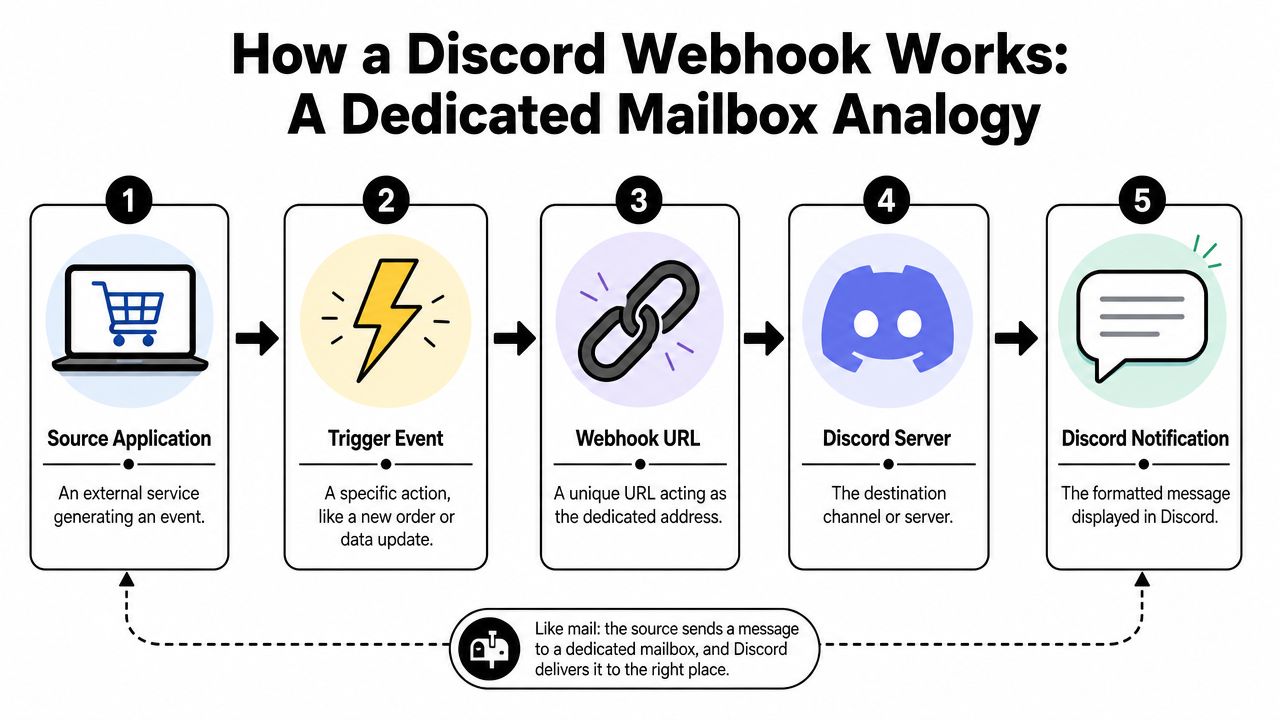
A useful mental model is a dedicated mailbox. A Discord webhook URL is not a general API you browse. It's a specific address for delivering one-way messages into one channel.
When an external system has something to report, it sends a single HTTP POST to that URL. Discord reads the JSON payload, formats the content, and posts it into the destination channel. That pattern makes Discord webhooks a clean fit for alerts, release messages, and business event notifications.
The request flow in practice
The core flow is straightforward:
- An event happens in a source application, such as a new order, a failed payment, or a completed deployment.
- Your integration code builds a payload, usually JSON with content the team can read quickly.
- Your service sends an HTTP POST to the Discord webhook URL.
- Discord renders the message in the target text channel.
That's the whole loop. No polling cycle. No separate listener inside Discord that you have to manage for basic delivery.
According to this explanation of Discord webhook behavior, the sending service performs a single HTTP POST, Discord parses the JSON payload, and the message appears immediately in the selected channel. The same guide also frames the broader event-driven benefit clearly: callbacks replace repeated status checks, which is more efficient than polling because data arrives when the change happens.
If you need a non-Discord-specific explanation for teammates, Tagada's glossary on how webhooks function is a clean reference for the push model.
Why this beats polling for alerts
Polling still has a place in integration work, but it's not ideal for human-facing notifications. If your service checks for changes on a schedule, you create two problems:
| Approach | What happens | Operational downside |
|---|---|---|
| Polling | Your app keeps asking whether something changed | You waste requests when nothing changed and add delay when something did |
| Webhook push | The source sends the event when it occurs | You get the event at the time it matters |
That difference is why webhook-based notifications feel more “live” in production.
For integration developers, this matters even more when multiple systems are involved. One service creates the event, another normalizes it, and Discord becomes the final human-readable endpoint. If you want a deeper conceptual comparison, API2Cart's piece on webhooks vs APIs is helpful for sorting out where each pattern belongs.
Polling is fine when you need periodic state reconciliation. It's the wrong default when a team needs to react now.
The payload is simple, but the design work isn't
The actual POST body can be minimal. The harder part is deciding what to send.
Good Discord alerts usually include:
- A clear event label so readers know what happened
- The business identifier such as an order number or customer email
- A severity cue so the team can triage fast
- A direct next step when action is required
What doesn't work is dumping raw payloads into chat. Developers do that for the first hour of testing, then the channel becomes noise. A good webhook integration compresses the event into something a human can scan in seconds.
Quick Setup and Your First Notification
Getting a Discord webhook running is fast. The important part is to test the full loop early. Don't spend an hour designing the perfect payload before you've confirmed the channel, URL, and request format all work.
Create the webhook in Discord
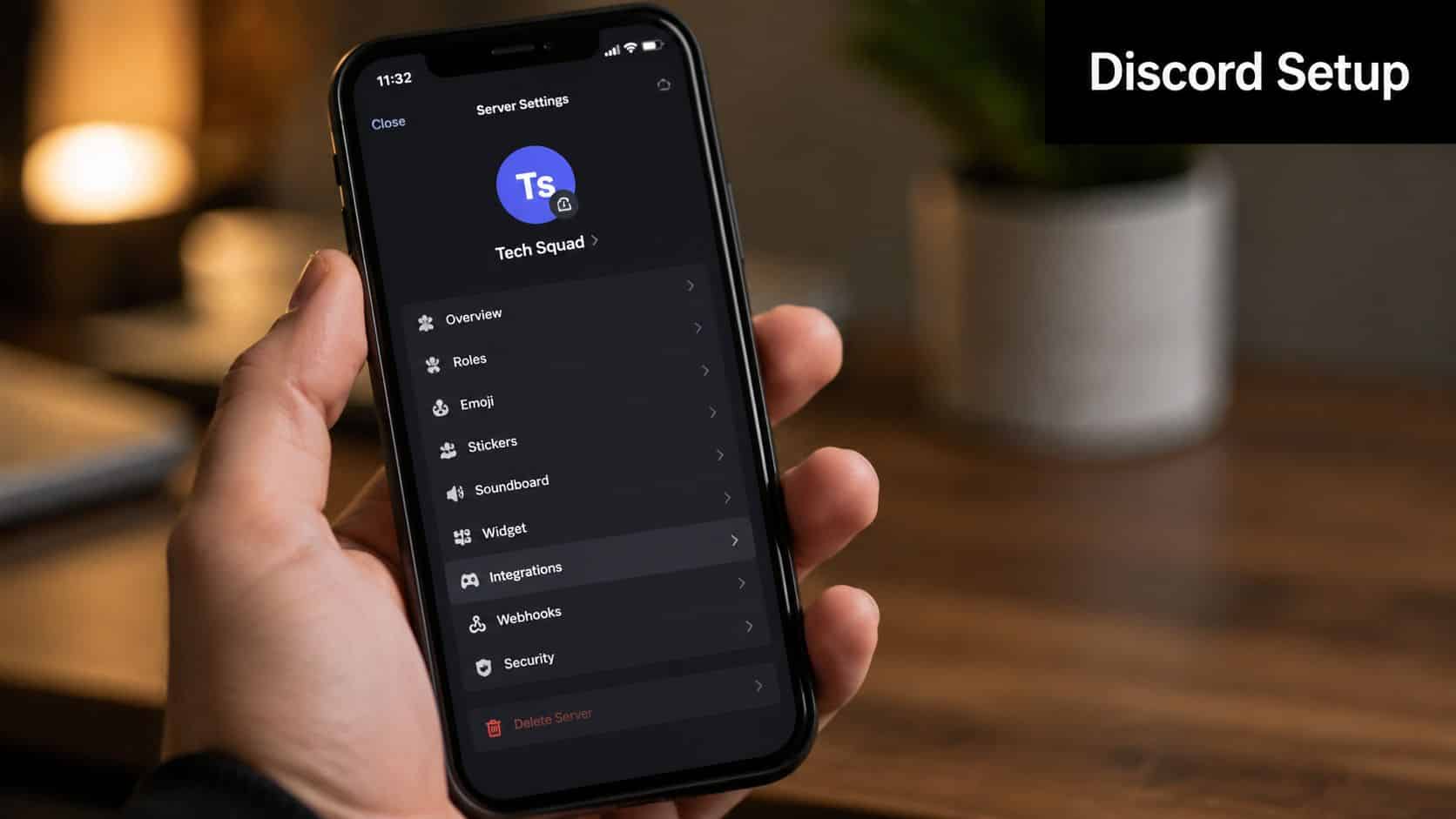
Discord's setup flow is direct. Server owners create a webhook through Server Settings → Integrations → Create Webhook, then copy the generated URL into the sending service. That's the operational model described in Discord's support docs linked earlier.
Use a dedicated channel for testing first. It keeps mistakes out of a production channel and gives you room to tweak message formatting.
A sensible naming pattern helps too:
- app-orders-alerts
- app-fulfillment-events
- app-release-notices
The name should tell you what kind of traffic belongs there. If you dump unrelated notifications into one webhook destination, people stop trusting the channel.
Send a first test with cURL
Start with the smallest possible payload:
curl -X POST "YOUR_DISCORD_WEBHOOK_URL"
  -H "Content-Type: application/json"
  -d '{"content":"Webhook test from local dev"}'
If everything is configured correctly, Discord posts that message in the chosen channel.
That first test tells you three things at once:
- the webhook URL is valid
- your network path works
- Discord is accepting the payload format
Once that works, move on to application-shaped messages.
Send the same test from Node.js
If you want to wire this into an internal service, a minimal Node example is enough:
const webhookUrl = process.env.DISCORD_WEBHOOK_URL;

async function sendDiscordMessage() {
  const response = await fetch(webhookUrl, {
    method: 'POST',
    headers: {
      'Content-Type': 'application/json'
    },
    body: JSON.stringify({
      content: 'New order received: #1001'
    })
  });

  if (!response.ok) {
    throw new Error(`Discord webhook failed with status ${response.status}`);
  }
}

sendDiscordMessage().catch(console.error);
Store the webhook URL in an environment variable. Don't hardcode it in your repo, and don't paste it into logs.
Common mistake: Teams prove the webhook works, then they leave the test message format untouched. Production alerts need context, not just proof of delivery.
Shape messages for humans, not just systems
A raw alert like order.created isn't enough once real traffic starts. Add meaning.
For example, this is weak:
{
  "content": "order.created"
}
This is much better:
{
  "content": "New paid order received. Store: North Region. Order: #1001. Total requires review by fulfillment."
}
Even without advanced formatting, you can make messages readable and actionable. The fastest win is to structure text in the same order every time:
- Event
- Source
- Identifier
- Required action
That consistency matters more than flashy formatting. When operations people scan a busy channel, predictable structure wins.
Scaling Notifications with eCommerce Use Cases
Discord webhooks get more interesting when you stop thinking about single apps and start thinking about event streams across many stores. In commerce environments, that's where simple examples break down. One store is easy. A portfolio of merchants on different platforms isn't.
The useful pattern is to treat Discord as the final destination for operational signals, not as the place where integration logic lives.
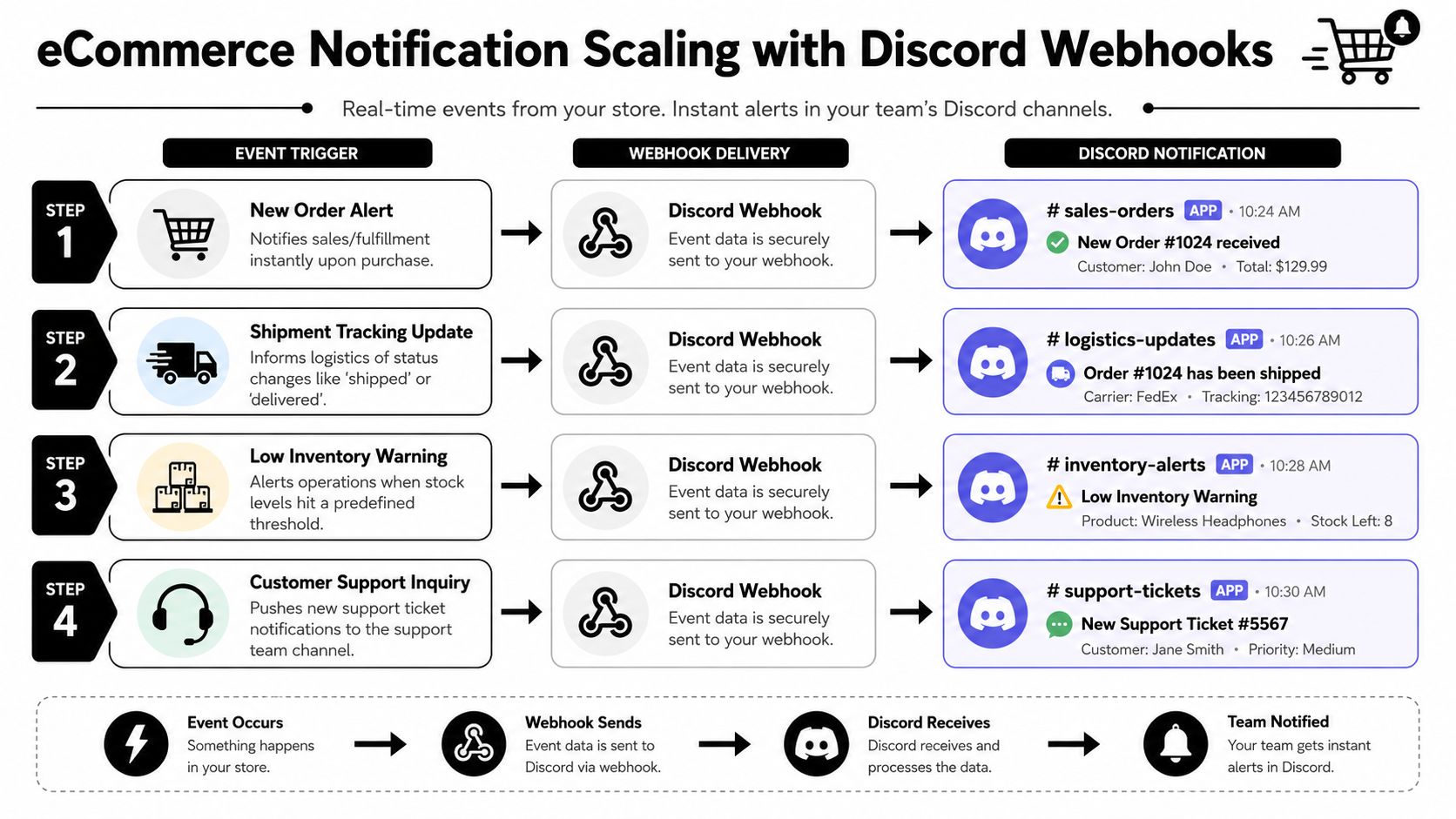
High-value eCommerce events to push into Discord
Not every commerce event belongs in chat. Good candidates are the ones that need human awareness or fast escalation.
A few that consistently matter:
- New order alerts for high-priority sales or unusual order patterns
- Payment failures that can affect conversion or require customer follow-up
- Low inventory warnings that operations teams should see before items go unavailable
- Shipment status exceptions when fulfillment falls outside expected flow
- New customer registrations when sales or account teams monitor strategic accounts
The rule is simple. If the event changes what a team does today, sending it to Discord makes sense. If it's just background data, keep it in your system of record.
Where scaling gets painful
The hard part isn't posting to Discord. The hard part is collecting events consistently from different commerce platforms, normalizing them, and routing them to the right channels.
Without a unified layer, teams usually end up building and maintaining separate connectors for each platform they support. Then they discover that event names differ, payload shapes differ, and store-specific edge cases differ too.
That's where a unified integration approach can help. API2Cart provides a single API for connecting with many shopping carts and marketplaces, and it supports webhook-based event handling where available. For a developer building alerts for order, product, inventory, or shipment changes across many merchant stores, that means you can centralize event intake and then fan those normalized events out to Discord channels.
A practical routing model
A workable production design often looks like this:
| Layer | Responsibility | What to avoid |
|---|---|---|
| Commerce event source | Emits the order, product, customer, or shipment event | Mixing source-specific logic into the notification message |
| Integration service | Normalizes event fields and applies routing rules | Passing raw payloads straight through |
| Discord webhook | Delivers the final alert to the correct channel | Using one channel for every team and every event |
A support-oriented channel might get failed payment and customer issue events. A fulfillment channel might get shipment exceptions and stock alerts. Engineering might only receive integration failures or sync errors.
The most effective Discord alerting setups are narrow. One channel, one audience, one reason to pay attention.
That's the missing piece in most beginner guides. Posting a message is easy. Designing a notification stream that people still respect after weeks of real traffic takes more thought.
Advanced Considerations and Security Practices
Once you've proven delivery, key questions start. Should this stay a webhook integration, or has the use case crossed into bot territory? How do you keep the URL secure? What happens when bad payload design turns a useful channel into noise?
Webhook versus bot
This is the architecture decision most short guides skip.
Discord's developer documentation notes that webhooks do not require a bot user or authentication, while bots are needed for broader interaction and subscription-style capabilities inside Discord, as described in Discord's developer resource on webhooks. In practice, that means webhooks are strongest for one-way message delivery, while bots are the right choice for commands, richer interaction, and workflows that need state or permissions logic.
Use a webhook when:
- You only need to send notifications
- The sender lives outside Discord
- The interaction is fire-and-forget
Use a bot when:
- Users need to trigger actions from Discord
- You need per-user behavior or permissions
- The app has to read, respond, or manage state inside Discord
Sometimes the right answer is both. A webhook can handle event delivery, while a bot handles command-driven follow-up actions.
Security and operational hygiene
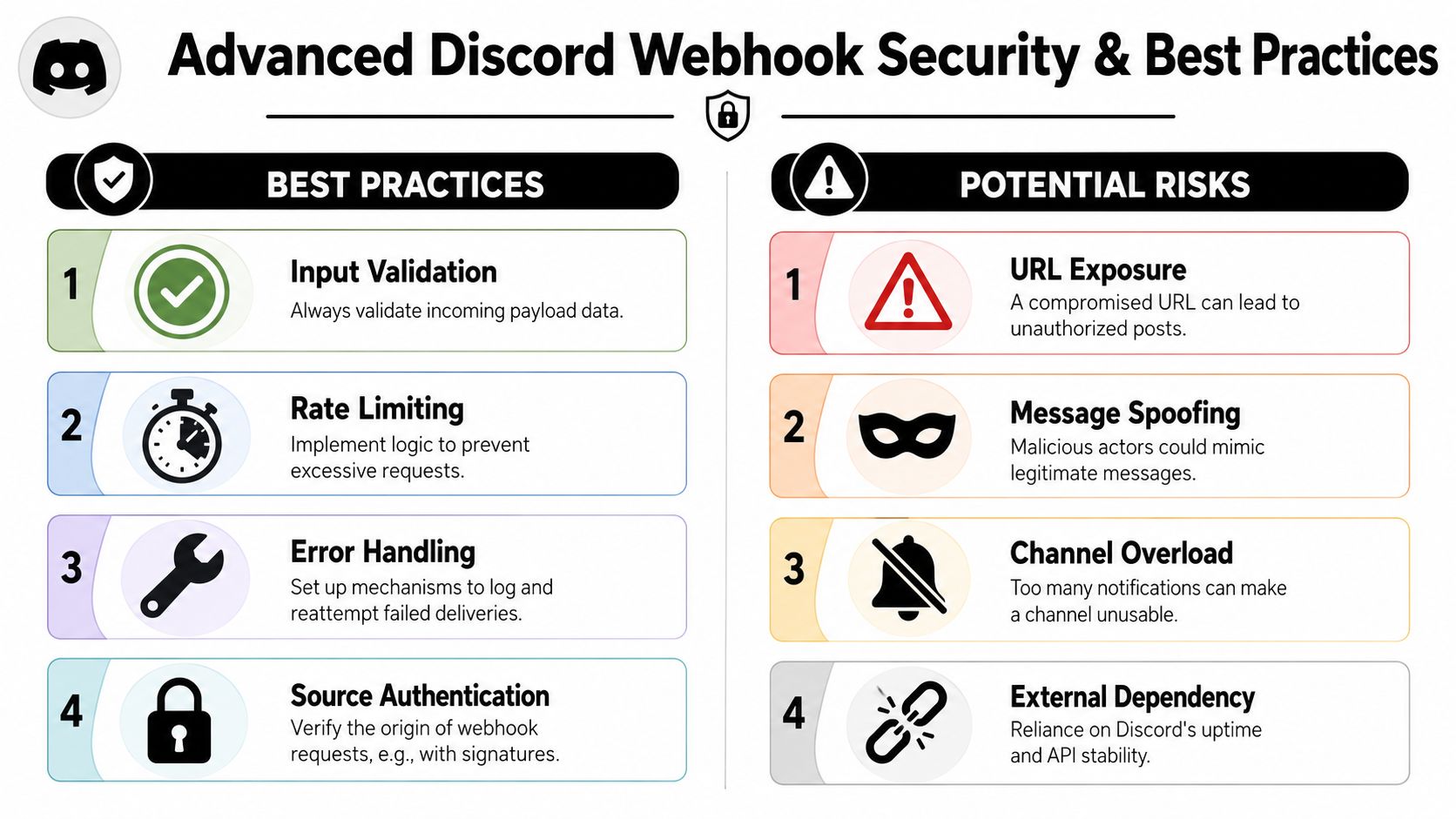
Treat the webhook URL like a secret. Anyone who has it can post into that channel.
Good production practice includes:
- Store secrets outside code in environment variables or your secret manager
- Rotate exposed URLs quickly if they appear in logs, screenshots, or commits
- Validate upstream event data before building the message content
- Log failed sends carefully without leaking the full webhook URL
If your organization handles sensitive customer or commerce data, basic secure coding around notification systems matters too. A broader review of affordable SaaS pentesting is useful context when you're treating integrations as part of your attack surface, not just convenience plumbing.
For teams building the receiving and routing side of event pipelines, API2Cart's guide to API security best practices is a practical companion.
What usually fails in production
Most Discord webhook failures aren't about Discord. They come from design shortcuts upstream.
Common issues look like this:
- Channel overload. Too many low-value notifications bury the important ones.
- Unclear message design. A developer understands the alert, but operations can't tell what action is needed.
- No retry strategy. Your sending service fails once, and the event disappears from human view.
- Leaky secrets. A webhook URL gets exposed in a shared code sample or debug log.
Keep the webhook layer dumb. Validate, enrich, and route before you send.
You should also think about formatting. Richer payload structures can make messages easier to scan than plain text, especially when you need consistent sections for event type, order identifier, store, and status. But readability matters more than decoration. If every alert becomes visually dense, people stop reading them.
Integrating Webhooks into Your Development Workflow
The reason developers ask “what's a webhook Discord” usually isn't academic. They need visibility. They want production events to show up where a team can act on them without opening three dashboards and guessing which system changed first.
Discord webhooks are good at that specific job. They're simple, one-way, fast to test, and easy to fold into an existing integration layer. That makes them a strong fit for application alerts, release notices, and commerce events that matter to humans right now.
A good rollout starts small. Pick one event that already causes pain when it's missed. A failed payment review, a fulfillment exception, a broken import job, or a release notification is enough. Get the event into the right Discord channel, make the message readable, and watch how the team uses it for a few days.
Then widen the design carefully. Route different event classes to different channels. Keep noise out. Normalize upstream payloads before they hit chat. If your product connects to many stores or commerce systems, treat event collection as a separate integration problem and Discord as the final delivery surface.
That's the practical answer to Whats a webhook Discord. It's not a novelty posting feature. It's a lightweight endpoint that becomes genuinely useful when you connect real business events to the right people with the right amount of context.
If you're building commerce integrations and want one layer for store events before routing them into Discord, API2Cart is worth evaluating. It gives B2B software teams a unified way to work with many shopping carts and marketplaces through one API, which can simplify the event collection side of webhook-driven notification workflows.