The market signal is hard to ignore. The global retail and ecommerce data integration market was valued at US$ 2,822.5 million in 2024 and is projected to reach US$ 6,525.1 million by 2030, with a 14.9% CAGR according to Grand View Research’s retail and e-commerce data integration market outlook. For a B2B SaaS team, that’s not just a market trend. It’s a direct product roadmap signal.
If you build software for order management, shipping, ERP, PIM, analytics, marketing automation, or warehouse workflows, ecommerce data integration decides how fast you can enter new accounts and how expensive those accounts become to support. Developers usually feel that pressure first. Product promises multi-platform support. Sales wants Shopify, Magento, WooCommerce, Amazon, eBay, and Walmart. Engineering inherits a pile of mismatched schemas, webhook edge cases, auth flows, and brittle sync jobs.
That’s why the build decision matters so much. Integration work can enable a larger customer base, but one-by-one connector development can also become a maintenance trap that slows your SaaS business down at exactly the point where it should be scaling.
Why Data Integration is a SaaS Goldmine in 2026

A market growing at a double digit rate creates a predictable product opportunity. For B2B SaaS teams, ecommerce data integration stands out because it drives revenue expansion and operational cost at the same time.
The demand signal was already established earlier. Buyers are no longer asking whether their commerce stack should connect. They are asking how quickly your product can plug into the systems they already run, and how much engineering effort that setup will require on both sides.
That shift matters because integration changes the economics of a SaaS business.
A team that supports more carts, marketplaces, ERPs, and fulfillment systems can close more deals. A team that integrates thoroughly into order flow, catalog updates, inventory sync, or shipment events tends to keep accounts longer. A team that normalizes data well can ship higher value workflow features without rebuilding the same connector logic for every customer segment.
From the developer side, the goldmine becomes evident. Every net new integration can bring in pipeline, but every custom connector also creates a long tail of maintenance work. Auth changes, API version updates, rate limits, webhook retries, field mismatches, and store-specific edge cases keep billing hours low and engineering cost high if the architecture is wrong.
That is the trade-off product and engineering need to evaluate. Integration can increase addressable market, or it can trap the team in connector maintenance that slows releases and raises support load. In practice, the winners are usually the teams that treat integration as a platform capability instead of a side project.
A useful framing is connecting business processes, not just passing records between APIs. An order import only matters if downstream logic can trust the status, line items, taxes, customer data, and fulfillment state. The core effort is making inconsistent systems behave predictably enough for automation, reporting, and customer-facing features.
I have seen teams underestimate this point repeatedly. Initial connectivity gets demoed in a sprint. Production reliability takes months.
That is why ecommerce data integration has become a strong SaaS growth engine for 2026. It affects time-to-market, onboarding speed, expansion potential, support burden, and gross margin. For a SaaS company that plans to scale across multiple commerce platforms, a unified API is usually the better strategic choice because it reduces duplicate engineering work and keeps the roadmap focused on product differentiation instead of connector churn.
Understanding the Core of Connectivity Data Types and Flow
From a developer’s perspective, ecommerce data integration is a translation layer. Your SaaS app asks for something simple, like “give me new paid orders since this timestamp,” but every platform answers in its own structure, field names, data conventions, and update semantics.
If you need a quick technical refresher on what sits underneath that exchange, this overview of API integration is a useful companion. In practice, ecommerce data integration means building a stable contract between your product and a changing set of commerce systems.
The core data types you’ll work with
Most B2B SaaS integrations revolve around a small set of entities. The complexity comes from how differently platforms represent them.
Orders
These drive order import, routing, label creation, fraud review, returns, and ERP handoff. The usual problems are status differences, partial fulfillments, tax breakdowns, bundled items, and edited orders.Products
Product data powers listing management, catalog sync, merchandising tools, and PIM workflows. The hard parts are variants, attributes, category structures, localized descriptions, and image handling.Inventory
Operational risk is swiftly evident within inventory. Inventory feeds stock availability, marketplace listing accuracy, and allocation logic. If sync lags or stock semantics differ, overselling starts immediately.Customers
Customer records support CRM sync, support tooling, personalization, loyalty, and post-purchase workflows. Data privacy rules, duplicates, guest checkout behavior, and platform-specific customer IDs all complicate the model.Shipments and fulfillment events
These matter for carrier platforms, WMS tools, tracking software, and customer communication systems. A mismatch between fulfillment states across systems creates support tickets quickly.
Flow matters as much as schema
A lot of teams focus on fields first and direction second. That’s backwards.
You need to define whether each entity is:
- Read-only for reporting or import
- Read-write for operational updates
- Event-driven through webhooks
- Batch-polled on a schedule
- Bi-directional with conflict handling
An analytics platform may only need read access to orders and customers. A shipping app usually needs to read orders, write shipment updates, and push tracking details back. A multichannel listing tool often needs product read-write plus inventory synchronization with strict timing expectations.
The cleanest integrations start by narrowing scope. Teams get into trouble when they promise “full sync” before they define direction, ownership, and error behavior for each object.
What this enables in real products
When the flow is designed correctly, the end-user experience becomes straightforward:
- A shipping app can pull new orders and push fulfillment updates back.
- A PIM can publish product changes across multiple sales channels.
- An ERP connector can normalize sales and inventory updates into one operational view.
- A marketing automation tool can trigger campaigns from order and customer events.
That’s the practical value of ecommerce data integration. It turns disconnected commerce data into product functionality your customers will pay for.
Choosing Your Integration Architecture A Developer's Breakdown
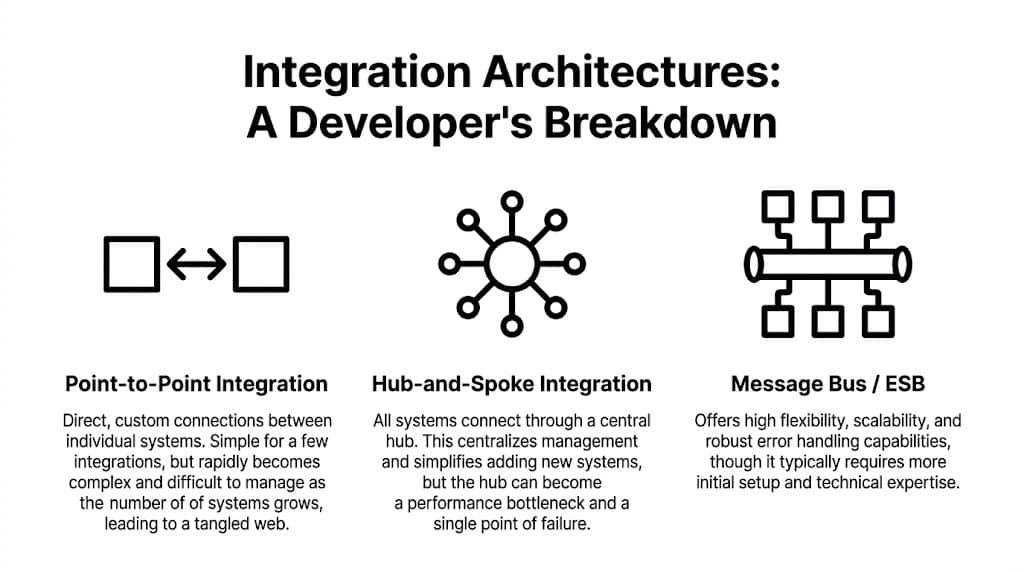
Architecture choice determines whether your integration layer becomes an asset or a drag on the roadmap. The wrong choice usually looks fine in the first release and painful a year later.
The urgency here is clear. 67% of retailers cite integration as their main technology focus for the next two years, and organizations with integrated systems can grow up to 5X faster according to Diginyze’s summary of ecommerce integration trends. That pressure reaches SaaS vendors directly, because your customers expect your software to fit into their existing stack.
Point-to-point connections
This is the most familiar pattern. Your app connects directly to Shopify. Then Magento. Then WooCommerce. Then Amazon. Each connector has custom logic.
It works when:
- you support only a few platforms,
- your customer base is narrow,
- and the feature surface is small.
It breaks when each connector starts drifting. Every new platform adds another auth path, rate-limit strategy, webhook implementation, and object translation layer. The codebase becomes a patchwork of exceptions.
ETL pipelines
ETL is useful when your main job is extracting, transforming, and loading data into a warehouse, analytics layer, or central catalog. It’s especially good for reporting, customer segmentation, operational dashboards, and product normalization.
But ETL alone doesn’t solve transactional interaction well. If your product needs to push updates back, react to near-real-time events, or manage write operations into multiple commerce systems, ETL needs help from other components.
Middleware and hub patterns
Middleware centralizes orchestration. Instead of dozens of direct links, systems connect through a hub, orchestration layer, or service bus. This usually improves observability and standardization.
The trade-off is operational complexity. You gain control, but you also own more infrastructure. A central hub can become a bottleneck if queues back up, transformations get expensive, or one service failure cascades outward.
Unified API model
This model abstracts many commerce platforms behind one contract. Your team integrates once against a common schema and method set, while the provider handles platform-specific differences underneath.
That doesn’t remove all complexity. You still need mapping rules, state ownership, retry logic, and product-level decisions. But it changes where complexity lives. Your team focuses on product workflows instead of platform-by-platform plumbing.
A related design choice comes up in transport and querying style. Teams comparing endpoint patterns often weigh REST API vs GraphQL based on payload efficiency, query flexibility, and implementation simplicity. That matters, but the larger architectural question is whether you want to manage dozens of commerce contracts yourself.
Comparison of Integration Architectures
| Architecture | Development Time | Maintenance Burden | Scalability | Best For |
|---|---|---|---|---|
| Point-to-point | Fast at the start | High after a few connectors | Weak when platform count grows | Early-stage apps with narrow platform scope |
| ETL pipelines | Moderate | Moderate | Good for data processing workloads | Analytics, reporting, catalog consolidation |
| Middleware | Longer upfront | Moderate to high | Strong if operated well | Enterprises with internal integration teams |
| Unified API | Faster than building many custom connectors | Lower platform-specific burden | Strong for multi-platform SaaS products | B2B SaaS vendors needing broad commerce coverage |
A good architecture reduces repeated decisions. A bad one forces the team to rediscover the same failure modes in every connector.
The hardest part of ecommerce data integration isn’t the first successful API call. It’s everything that happens after launch.

Teams often encounter the full cost in production. A merchant changes product structure. A marketplace event arrives late. A webhook fails unnoticed. A rate limit hits during a sales spike. Support opens a ticket saying inventory is wrong in one channel but correct in another.
Data mapping turns into ongoing engineering work
One of the deepest problems is schema mismatch. Ecommerce platforms organize data around storefront logic and customer journeys. ERPs and manufacturing systems organize it around materials, processes, and operational constraints. Flxpoint’s explanation of ecommerce API integration challenges describes this clearly: without normalization into a single clean data structure, teams get cascading errors and heavy manual intervention.
That’s exactly what happens in real projects. A product option in one platform might be a variant matrix in another and a configurable assembly in an ERP. If you don’t define a canonical model early, every downstream sync has custom translation logic.
Real-time sync is rarely as clean as teams expect
Inventory and order status are where reliability problems show up first. The moment two systems disagree, users notice.
Common trouble spots include:
- Webhook gaps because some platforms deliver events late, duplicate them, or occasionally miss them.
- Polling windows that create race conditions when updates happen near boundary timestamps.
- Write conflicts when two systems both think they own the latest inventory or order status.
- Peak traffic behavior where retry storms amplify failures instead of recovering cleanly.
A lot of developers eventually need a hybrid strategy: webhooks where available, polling where necessary, and reconciliation jobs for when neither is enough.
Rate limits and volume ceilings are product concerns
Rate limits are often treated like implementation details. They’re not. They shape onboarding capacity, sync freshness, and customer segmentation.
A platform may look fine with a handful of stores and become painful when you scale to high-volume merchants. Developers building importers, inventory sync services, or reporting jobs need queueing, backoff, request prioritization, and selective fetch logic from day one. This guide on API rate limits in ecommerce integrations is worth reviewing before your team hardcodes assumptions into every connector.
If your sync design only works in test stores, you don’t have an integration architecture. You have a demo.
Security and support complexity compounds quietly
Every new direct connector adds credentials, permission scopes, tenant isolation concerns, platform-specific auth renewal logic, and support documentation. Then come API version changes, platform deprecations, and merchant-specific configuration bugs.
That’s why one-by-one integration strategies age badly. The first connector feels productive. The tenth changes your team structure. The twentieth starts competing with your core product roadmap for engineering time.
How a Unified API Like API2Cart Drives Faster Growth
The strategic case for a unified API is simple. It moves platform-specific complexity out of your product team’s daily work.
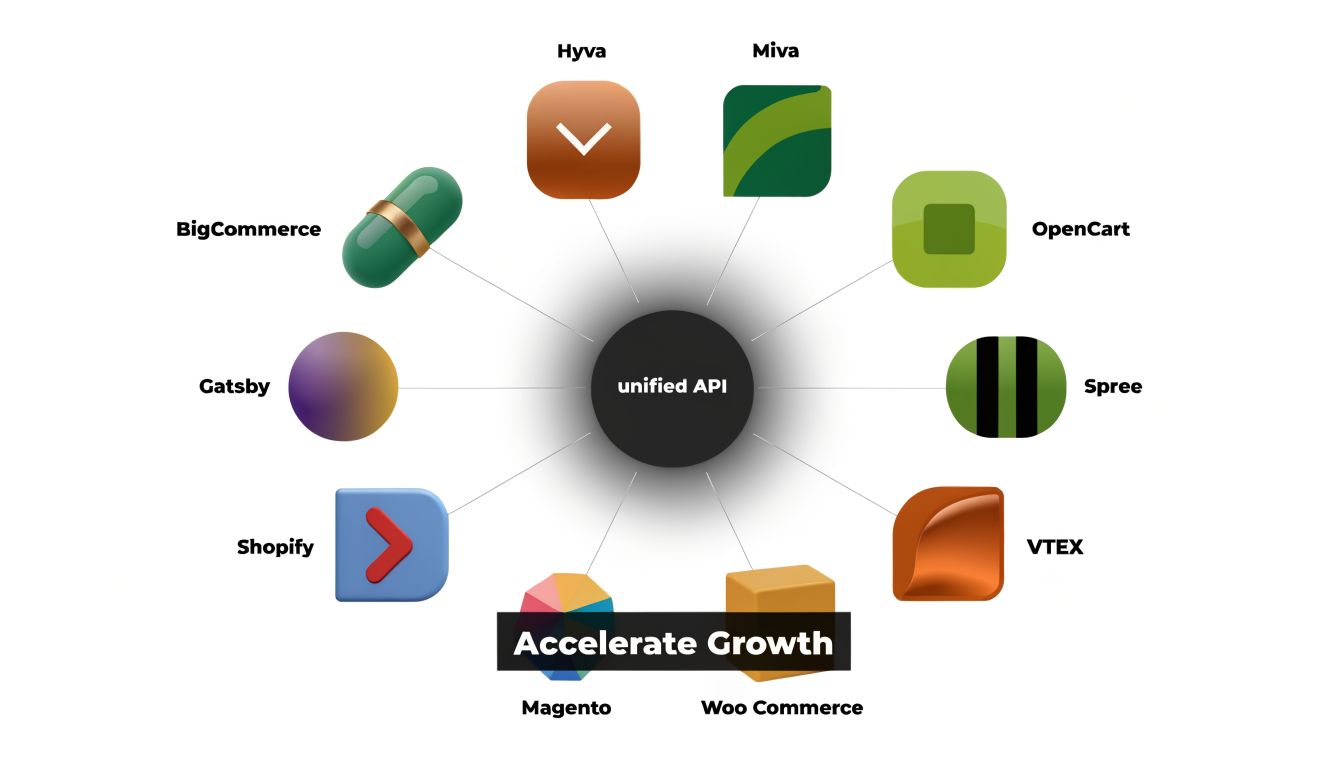
That matters most when your product needs breadth. Shipping software, OMS tools, PIMs, repricers, analytics products, and ERP connectors usually don’t win by becoming experts in twenty separate commerce APIs. They win by delivering the business workflow the merchant bought them for.
What changes in practice
Take a shipping platform. If the team builds direct connectors one by one, developers spend substantial time on store authorization, order retrieval differences, fulfillment writebacks, and webhook behavior per platform. With a unified layer, the engineering work shifts toward routing rules, carrier logic, batching, exception handling, and customer-facing features.
The same is true for a PIM or multichannel listing product. The hard commercial problem is syndicating product data accurately across channels. The platform-specific plumbing is necessary, but it’s not the part customers value most.
A unified API also helps with one of the nastiest operational problems in commerce systems. Twikit’s discussion of ecommerce and manufacturing integration challenges points to the synchronization gap where storefronts show availability while backend systems show backorders. That mismatch creates overselling, delays, and manual intervention. A unified layer can standardize how sync events are consumed and processed across platforms, which makes this problem more manageable.
One practical option for B2B SaaS teams
One example is unified API infrastructure for ecommerce software vendors. API2Cart gives B2B SaaS products one API for connecting with 80+ shopping carts and marketplaces, using 100+ API methods to work with orders, products, customers, shipments, inventory, and catalog data. For a development team, the value is straightforward: fewer custom connectors to build, fewer platform differences to hide in application code, and a faster path to multi-platform support.
Typical use cases include:
- Shipping and fulfillment apps that need to import orders and push tracking updates
- PIM and catalog tools that need to read products and update listings across channels
- OMS or ERP systems that need consistent access to orders, customers, and inventory data
- Analytics and automation products that need normalized store data from many commerce sources
The strongest reason to use a unified API isn’t convenience. It’s that your team can spend more of its time on product logic instead of connector maintenance.
That’s the key growth lever. Faster time-to-market is useful, but lower long-term maintenance drag is what keeps a SaaS platform moving.
Your Developer Checklist for a Successful Integration Project
Most integration failures start before coding. They begin when the team skips scope discipline, canonical modeling, and operational planning.
Use this checklist before you commit to build or buy.
Scope the data before you scope the project
Start by defining exactly which objects you need and what actions matter.
- Pick entities first such as orders, products, customers, inventory, and shipments.
- Define direction for each entity. Read-only, write-only, bi-directional, event-driven, or scheduled sync.
- Set freshness expectations so everyone knows where real-time matters and where delay is acceptable.
If you skip this, the project balloons from “order import” into “full commerce synchronization” without anyone saying it out loud.
Design the canonical model early
Create one internal representation for each key object. Don’t let platform schemas leak into your core application.
That means documenting:
- required fields,
- optional fields,
- normalization rules,
- conflict behavior,
- and fallback logic when platforms don’t provide equivalent data.
Evaluate tools like an operator, not just a coder
Documentation quality matters. SDK quality matters. Changelog clarity matters. Support responsiveness matters even more once real merchants are involved.
For test planning and validation workflows, these SubmitMySaas insights on API tools are useful when deciding how your team will verify payloads, retries, and failure handling in practice.
Plan for failure as a first-class feature
Include these from the start:
- Retry logic with bounded backoff
- Idempotency controls for duplicate events and repeated writes
- Monitoring and alerting for sync lag, failed jobs, and auth issues
- Reconciliation jobs to repair state drift between systems
- Tenant isolation so one bad store connection doesn’t degrade the rest
Don’t ask whether failures will happen. Ask which failures you can absorb automatically and which ones need a human response.
Make the buy-versus-build call honestly
If integrations are your core product, deeper internal ownership may make sense. If integrations are an enabling layer for a broader SaaS product, buying abstraction is often the better engineering decision.
The key metric isn’t whether your team can build connectors. It’s whether maintaining them is the highest-value use of your roadmap.
Key Integration Questions Answered
How should teams compare custom integration cost against a subscription product?
Look at total engineering ownership, not just initial delivery. Connector development is only the start. The larger cost often comes from maintenance, platform changes, support load, and sync reliability work over time.
Are webhooks enough for ecommerce data integration?
Usually not by themselves. Shopify’s discussion of data integration challenges notes that webhook reliability is a hidden issue during peak periods, and developers often need backup polling logic. In practice, strong integrations use webhooks where they help and polling where they protect consistency.
What should security review focus on first?
Credential storage, tenant isolation, permission scope, auditability, and failure containment. Those are the areas that tend to become expensive later if the team treats them as cleanup work.
When does a unified API make the most sense?
When your product needs to support multiple commerce platforms without turning your roadmap into connector maintenance.
If your team needs multi-platform ecommerce data integration but wants to keep engineering effort focused on product features, API2Cart is worth evaluating. It gives B2B SaaS vendors one API for connecting to many ecommerce platforms and marketplaces, which can reduce custom connector work and speed up delivery for order sync, product data access, inventory updates, and fulfillment workflows.