You get the request on a normal sprint. “We need to integrate with Zendesk so agents can see customer orders, shipments, refunds, and account history in one place.”
The Zendesk side sounds straightforward. The eCommerce side usually isn't.
Support teams often discover that the hard part isn't creating a ticket or updating a user. It's pulling clean commerce data from many stores, translating it into something support agents can use, and keeping it current without creating duplicates, stale records, or brittle connector code. If your product serves merchants across multiple carts and marketplaces, that complexity multiplies fast.
The Developer's Challenge of Zendesk eCommerce Integration
Support teams want context. They want to open a ticket and immediately know what the customer bought, whether it shipped, whether payment failed, whether a return was opened, and whether the same customer has a long order history. That context improves support quality, but getting it into Zendesk is a systems problem, not a UI tweak.
For an eCommerce SaaS product, the request to integrate with Zendesk usually means building a bridge between two very different worlds. On one side, Zendesk works with tickets, users, comments, triggers, and apps. On the other, commerce systems work with carts, customers, orders, fulfillment events, inventory, and product catalogs. Those models don't line up neatly.
Where projects get complicated
The first problem is source diversity. One merchant stores shipping events one way. Another splits billing and fulfillment differently. Another exposes customer identifiers inconsistently across guest checkout and registered checkout.
The second problem is normalization. You need a canonical model for customer, order, shipment, refund, and item-level details before anything reaches Zendesk. If you skip that layer, your ticket enrichment logic turns into a pile of store-specific exceptions.
The third problem is maintenance. Once the first connector works, stakeholders assume the rest are “more of the same.” They aren't. Every additional platform adds API quirks, auth differences, edge cases in pagination, and version drift over time.
A practical pattern is to think in two tracks:
- Agent-facing context: what must appear inside Zendesk at ticket time
- Backend sync discipline: what must be ingested, transformed, stored, and reconciled behind the scenes
The integration fails when developers optimize for data access instead of support workflow. Agents don't need raw commerce payloads. They need reliable context attached to the right ticket and user.
If you're connecting CRM, support, and store systems together, this broader view of web integration between customer platforms is useful because it frames the problem as data orchestration, not just endpoint wiring.
What a good implementation actually does
A strong design usually does four things well:
- Matches identities carefully so the right order history appears for the right customer.
- Surfaces only support-relevant commerce fields instead of dumping every attribute into Zendesk.
- Separates historical backfill from ongoing updates so onboarding doesn't break live sync.
- Keeps mapping logic centralized so adding a new commerce source doesn't rewrite your Zendesk layer.
That's the difference between a demo and a productized integration.
Choosing Your Integration Architecture
The architecture decision controls almost everything that follows. Teams often treat it as an implementation detail. It isn't. It decides how much custom code you write, how much maintenance you inherit, and how painful expansion becomes when another merchant asks for a new cart.
Direct builds
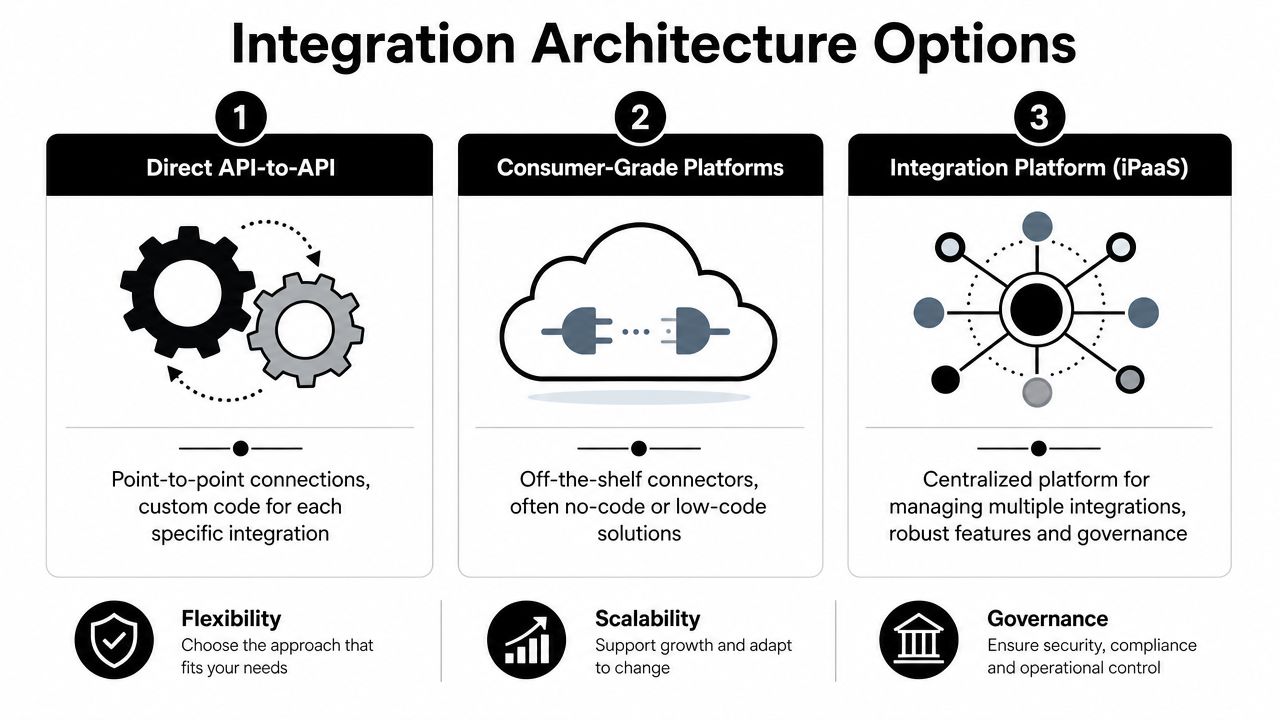
The most obvious route is direct API-to-API integration. You connect Zendesk to each commerce platform individually and control every field, every retry, every webhook, and every workflow.
That works when your product supports a very small number of source systems and your team wants maximum control. It breaks down when your customer base spans many carts or marketplaces. Then you're maintaining multiple authentication models, multiple order schemas, multiple event models, and multiple failure modes.
Zendesk itself gives a good reminder that even one side of the connection needs careful engineering. Its API guidance notes that a simple script can fetch only “up to two dozen or so records,” and larger jobs need pagination, rate-limit protection, and often sideloading of related data. It also notes that most list endpoints cap page size at 100 records in its guidance on handling large Zendesk API data sets. That matters because support data volume grows quickly once you start syncing users, tickets, comments, organizations, and historical records.
Consumer-grade automation
Some teams try lightweight automation platforms first. They're useful for proving a narrow workflow, such as “new ticket triggers a lookup” or “new order adds a note.” They're less useful when you need deep schema control, idempotency, replay handling, historical backfills, or tenant-specific mapping rules.
These platforms usually become awkward when your product, not your internal operations team, owns the integration. B2B software vendors need governed, reusable integration behavior. They can't rely on fragile recipe logic scattered across customer accounts.
Unified commerce connectivity
The third model is a unified commerce API layer in front of your product, with your application still owning the Zendesk-side experience and business logic. This is often the cleanest architecture when your hardest problem is commerce fragmentation, not Zendesk itself.
Instead of building one connector per cart, your team works against a standardized order, customer, product, shipment, and inventory model. That changes the economics of the project. Developers spend less time writing source-specific plumbing and more time defining what support agents should see and when.
A simple decision table
| Approach | Best when | Main strength | Main weakness |
|---|---|---|---|
| Direct API-to-API | Few source systems, heavy customization | Full control | High maintenance burden |
| Consumer-grade automation | Narrow internal workflows | Fast proof of concept | Weak fit for productized multi-tenant integrations |
| Unified API layer | Many commerce sources, recurring integration demand | Standardization and faster expansion | Requires good canonical model design |
Architecture rule: If Zendesk is only one endpoint but commerce connectivity spans many systems, optimize the commerce side first. That's usually where long-term complexity lives.
For most integration teams, the winning pattern is simple: keep the Zendesk experience custom, keep your business rules in your application, and reduce connector sprawl wherever source systems vary the most.
Core Integration Mechanics and Data Sync
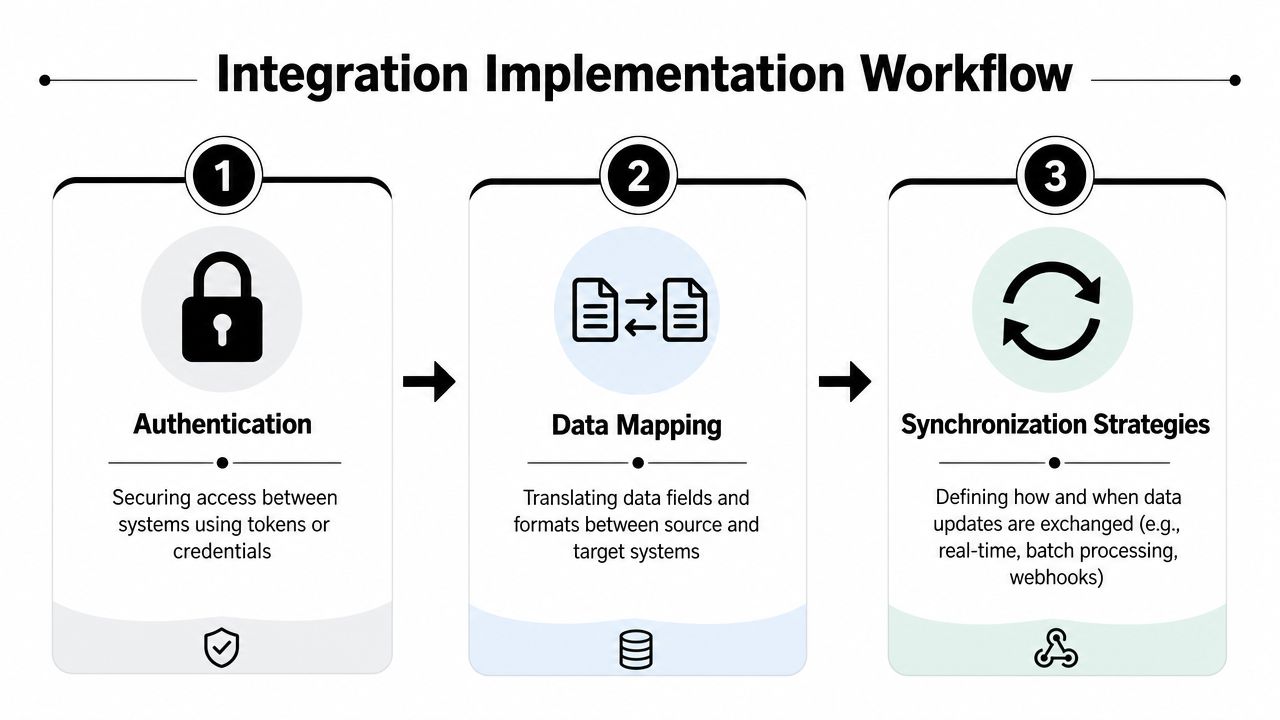
Once the architecture is chosen, implementation comes down to three things: authentication, mapping, and synchronization. Teams usually underestimate the second and oversimplify the third.
Authentication choices
Zendesk integrations often start with API credentials or OAuth, depending on whether you're building an internal-controlled integration or a broader installable flow. If your application serves multiple customer accounts, OAuth usually gives cleaner tenant separation and easier revocation handling. If you're operating in a tightly controlled internal environment, token-based access may be simpler.
On the commerce side, authentication gets messy because each store platform exposes different credential patterns and permission scopes. That's one reason developers should isolate credential handling from business logic. Your sync worker shouldn't care how a store authenticated. It should receive an authorized client and a stable canonical response.
A practical implementation guide also recommends splitting extraction workflows by data type, rather than treating everything as one sync. Its Zendesk guidance describes identifying the instance URL, generating credentials, and separating sync processes for tickets and comments versus knowledge-base articles in an ETL pattern that transforms data into standardized JSON and loads it into PostgreSQL, with a monthly refresh for controlled freshness in that practical Zendesk implementation guide. That same discipline helps on the commerce side too. Orders, customers, and shipments rarely belong in one undifferentiated pipeline.
Data mapping that supports agents
Don't map fields mechanically. Map them according to support decisions.
A support agent usually needs answers to questions like these:
- Who is this customer
- What did they buy
- What happened after purchase
- Is there a payment, shipment, or return issue
- What should the agent do next
That means your canonical commerce model should produce support-ready objects, not just source-normalized records.
Here's a practical mapping pattern:
- Customer maps to a Zendesk user or related profile context
- Order maps to ticket context, custom fields, sidebar app data, or internal notes
- Shipment status maps to visible support state, especially for “where is my order” cases
- Refund or return state maps to escalation logic and macros
- Line items map to issue-specific troubleshooting context
A common mistake is trying to create a new Zendesk ticket for every commerce event. That floods queues and hides context across records. In many cases, the better approach is to enrich the existing ticket or user with commerce history and only create a ticket when a support workflow requires one.
Support context should be composable. A ticket needs the current order summary, recent fulfillment state, and customer identity confidence. It doesn't need every raw field from the commerce API.
Real-time versus polling
In this context, many integrations either become responsive or become annoying.
Some events should feel immediate. Order cancellation, payment failure, shipment delivery exception, and billing updates often need to appear in Zendesk quickly because agents are actively handling those conversations. Other data, like historical catalog metadata or deep order history, can arrive on a scheduled cadence.
Zendesk's Integration Services points toward this distinction. Zendesk says ZIS is designed to reduce the need for middleware by handling webhook ingestion and business logic inside Zendesk-hosted services, which reflects a shift toward more event-driven integrations in its Integration Services documentation.
For developers weighing trigger models, this overview of API vs Webhook for digital products is a useful companion read because it frames when request-driven access works better than event delivery.
You also need a fallback. Webhooks are excellent for freshness, but polling is still necessary for reconciliation, missed events, and systems that don't emit reliable notifications. This breakdown of API and webhook integration patterns is helpful when you're deciding which records belong in push-based updates and which belong in scheduled catch-up jobs.
A durable sync pattern
Use a layered sync model:
- Initial backfill for customer and order history
- Event-driven updates for high-value operational changes
- Scheduled reconciliation to repair misses and confirm final states
That combination gives agents fresh data without forcing your platform to trust a single delivery path.
Building Resilient and Secure Integrations
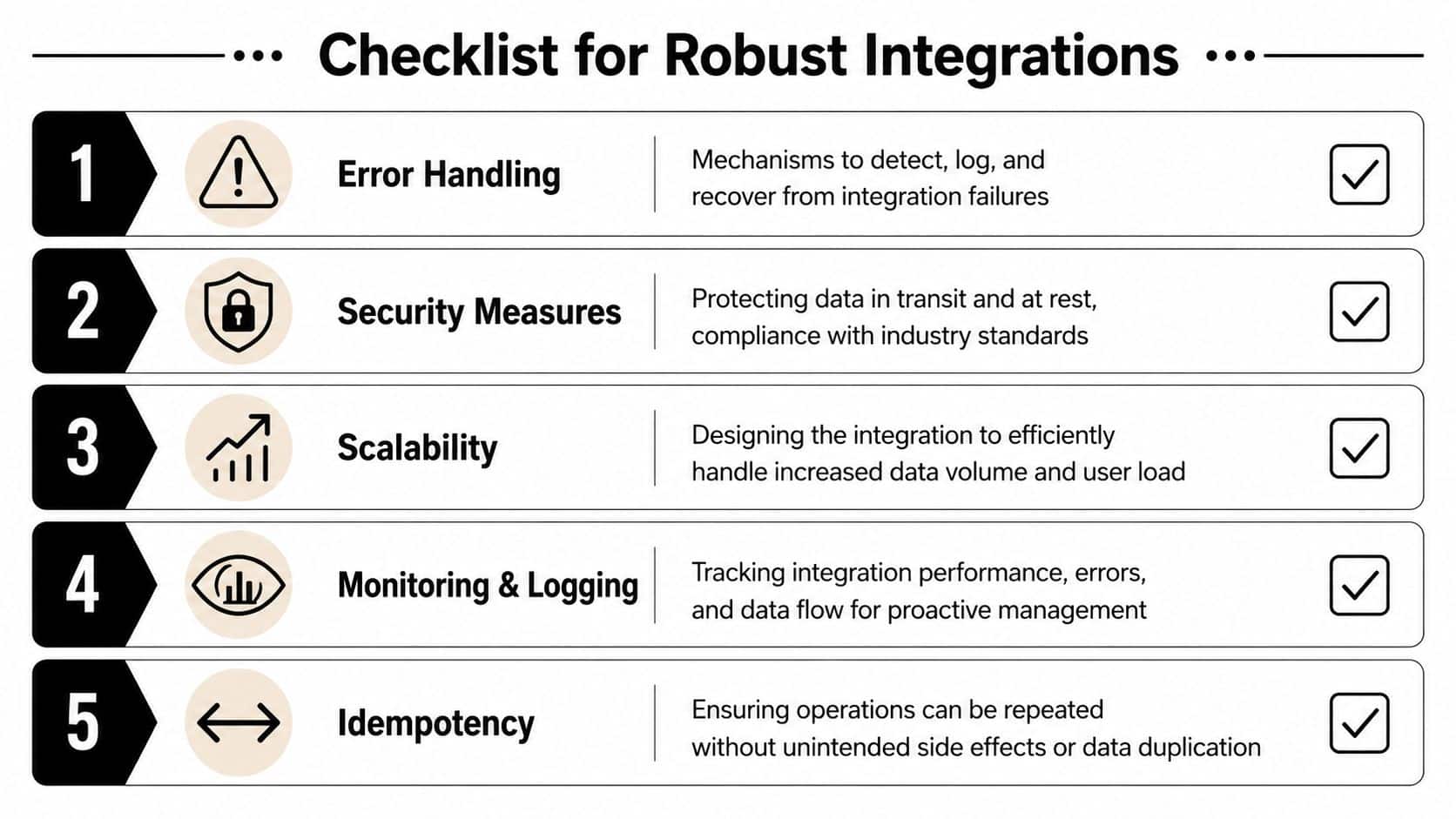
A working integration handles the happy path. A production integration survives bad payloads, partial outages, duplicate events, revoked credentials, malformed identities, and repeated retries.
Start with failure handling
Your integration needs predictable retry behavior. Not aggressive retry loops. Not silent drops. Predictable behavior.
At minimum, define:
- Retryable failures such as transient transport issues or temporary upstream errors
- Non-retryable failures such as invalid credentials, schema violations, or missing required mappings
- Dead-letter handling for records that need operator review
- Replay rules so the same event can be processed safely after a failure
If your team needs a compact refresher on implementation patterns, Doczen's exception handling resource is worth reviewing before you finalize worker logic.
The biggest mistake here is coupling retries to business side effects. If a shipment update retries three times, it shouldn't create three internal notes or overwrite a more recent state.
Idempotency and rate discipline
Every sync action that can run twice eventually will run twice. Build for that reality from day one.
A reliable approach includes:
- Stable external identifiers for orders, customers, shipments, and tickets
- Upsert semantics instead of blind inserts
- Event version or timestamp checks before applying updates
- State transition guards so old events don't overwrite newer records
Authentication and request discipline matter here too. Credentials should live in managed secrets storage, not in application config files or logs. Scope access narrowly. Rotate when roles change. This background on API authentication patterns is useful if your team is cleaning up credential handling before launch.
Data hygiene and sync governance
The least glamorous part of the project often causes the most visible support issues.
A Zendesk integration can look technically correct and still fail operationally if customer identity data is messy. A guidance piece on Zendesk integration calls out cleaning customer data before sync and setting role restrictions, highlighting that data hygiene and permission governance matter as much as the connector in its Zendesk integration governance guidance.
That advice lines up with what integration teams see in practice. Duplicate emails, guest checkout aliases, merged storefront accounts, and inconsistent phone formatting can all cause the wrong commerce record to appear in the wrong support conversation.
A good governance model usually includes this short checklist:
- Identity resolution rules for email, phone, external customer ID, and order ownership
- Permission boundaries around which agents or workflows can write back to commerce systems
- Schema ownership so one team approves field additions and mapping changes
- Frontend compatibility checks when widgets, placeholders, and support UI elements coexist
Operational warning: Most painful Zendesk-commerce incidents aren't caused by exotic API bugs. They come from duplicate identities, over-permissive write access, and weak replay controls.
Security that fits support reality
Support agents need context fast, but that doesn't mean every order attribute belongs in Zendesk. Restrict what you expose. Only sync fields that support workflows require. Keep sensitive commerce data out of comments and macros if it doesn't belong there.
The right question isn't “Can we sync it?” It's “Should an agent see it, and does that improve resolution?”
Effective Testing Monitoring and Maintenance
Launch isn't the finish line. It's the point where your integration starts encountering real tenants, real data weirdness, and real operational pressure.
A stable rollout usually starts small. One Zendesk integration guide recommends a staged flow: connect accounts, define flow direction, apply rules, map fields, then launch. It also recommends a pilot before scaling because early pilots expose synchronization failures and workflow exceptions before they affect the wider workspace in its staged Zendesk rollout guidance.
Test in layers
Don't rely on one end-to-end test and call it done. Break the integration into parts that fail independently.
Use at least these layers:
- Transformation tests for mapping store payloads into your canonical model
- Contract tests for Zendesk write operations and expected field behavior
- Replay tests for duplicate events and out-of-order updates
- Tenant configuration tests for field mappings, scopes, and feature flags
- Pilot validation with a narrow customer group before broad release
The key is to test business meaning, not just transport success. A request returning success doesn't prove the right ticket got enriched with the right order.
Monitor what users actually feel
Good monitoring starts with three practical questions:
| Question | What to monitor |
|---|---|
| Is data arriving? | Sync job success, webhook receipt, backlog growth |
| Is data current? | Processing delay, stale records, missed reconciliation windows |
| Is data correct? | Mapping failures, duplicate identities, write conflicts |
Alert on symptoms that support teams notice first. Missing order context on open tickets is more urgent than an abstract worker warning. Repeated reconciliation mismatches deserve attention before agents begin reporting “wrong customer” issues.
The long-term burden rarely comes from Zendesk alone. It comes from every commerce source evolving differently while your customers expect uninterrupted support context.
That's why integration teams should price maintenance into the architecture decision early. Every custom connector adds future work: auth updates, schema changes, webhook drift, and support escalations when one platform behaves differently from the others. If your product depends on broad commerce coverage, reducing that connector surface area is a strategic engineering choice, not a convenience.
Teams that ignore maintenance debt usually end up freezing roadmap work just to keep integrations operational.
Conclusion Accelerate Your Product Roadmap
Building a way to integrate with Zendesk for eCommerce support sounds small until you trace the full path of the data. You're not only connecting a help desk to an API. You're building identity resolution, order normalization, event handling, sync governance, and support-facing context that has to stay correct under real customer load.

The teams that do this well usually separate concerns clearly. Zendesk becomes the support surface. A canonical commerce layer becomes the source of normalized business context. Sync strategy balances event-driven freshness with reconciliation. Security and governance prevent support convenience from turning into data chaos.
There's also a timing dimension. Mature integrations don't make all data available at once. One Zendesk-connected vendor documents an initial sync, then incremental updates every hour, plus overnight validation of the prior 12 months of data in its Zendesk synchronization workflow documentation. That's a useful reminder that well-designed integrations are staged systems. They deliver operational visibility quickly, then keep historical records aligned over time.
For product teams, the main decision isn't whether Zendesk can be connected. It can. The decision is where your developers should spend their energy. If they spend it on one-off commerce connectors, progress slows and maintenance keeps growing. If they reduce the connector burden and keep their effort focused on support logic, agent experience, and product-specific workflows, they ship faster and own a cleaner system.
That's how you turn a support integration request into a scalable product capability instead of a permanent engineering tax.
If your team needs broad commerce connectivity without building and maintaining dozens of store-specific connectors, API2Cart gives B2B software vendors a unified way to work with orders, customers, shipments, products, inventory, and marketplace data across 80+ platforms. It's a practical option when you want to integrate with Zendesk faster, keep your developers focused on product logic instead of connector upkeep, and validate the approach quickly with a trial or demo.