Your team probably has this request in the backlog right now.
A customer wants orders to flow into your system automatically. Another wants inventory kept in sync across multiple sales channels. A third wants customer and shipping updates without exporting CSVs, emailing support, or asking ops to reconcile mismatched records every morning. None of these requests are exotic. They're the baseline expectation for modern commerce software.
That's the definitive answer to what is ecommerce automation for a B2B SaaS team. It isn't a collection of isolated shortcuts. It's the integration layer that turns disconnected commerce events into reliable system behavior across order management, inventory, fulfillment, support, and marketing.
Why Manual Ecommerce Operations No Longer Scale
Manual ecommerce operations fail in predictable ways. Someone copies an order into another system. Inventory gets updated in one place but not another. A refund changes a financial status, but the shipping workflow never sees it. Support answers a customer using stale order data. The work gets done, but only because people keep patching gaps between systems.
For a merchant, that feels like operational drag. For a SaaS vendor, it becomes a product problem.
The volume is too large for human glue work
Ecommerce automation became strategically important because online retail is operating at a scale that manual workflows can't absorb. Global ecommerce sales are projected at $7.41 trillion in 2026, an 8% increase from 2025, and are expected to reach $8 trillion by 2027. At the same time, 21.8% of retail purchases are expected to happen online in 2026, rising to 22.6% by 2027, according to projected ecommerce market statistics.
That matters for developers because every increase in transaction volume multiplies integration pressure. More orders mean more state transitions. More channels mean more inventory conflicts. More customer touchpoints mean more systems need the same truth at nearly the same time.
Manual work doesn't disappear at scale. It turns into queueing, reconciliation, and support overhead.
Automation is infrastructure, not a convenience feature
If your product sits anywhere near commerce data, automation isn't a nice add-on anymore. It's part of the product's operational contract. Customers expect your platform to respond to order events, ingest catalog changes, and keep downstream processes current without operator intervention.
That expectation is also why adjacent topics like AI for commerce are gaining attention. Once teams automate the movement of commerce data, they start asking a harder question: how can software make decisions on top of that data, not just pass it around?
For developers, the practical takeaway is simple. The engineering effort you put into reliable automation has compounding value. It reduces customer churn caused by fragile workflows, lowers support load created by sync issues, and gives your product a stronger place in the merchant's operating stack.
The Core Components of Ecommerce Automation
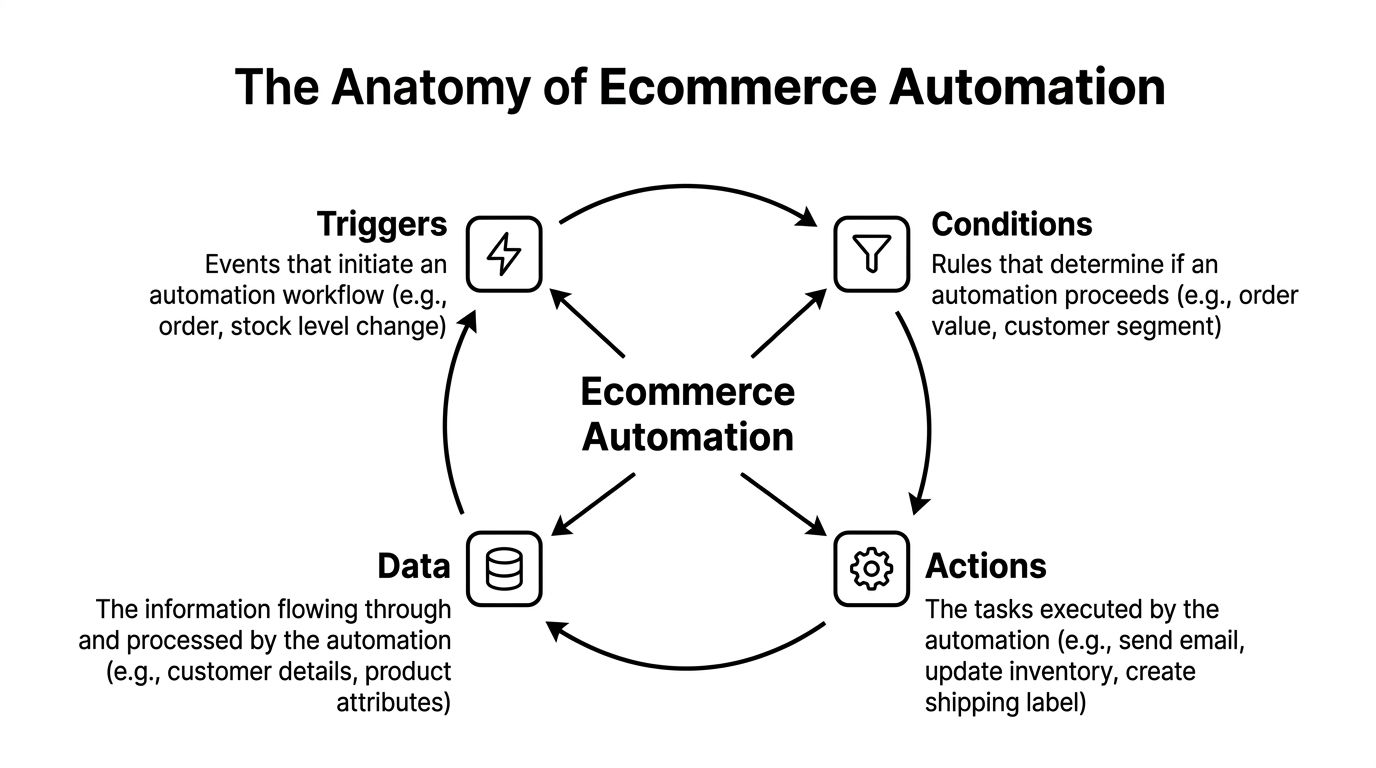
Ecommerce automation works like a digital nervous system. An event happens, the system evaluates context, and one or more actions fire across connected applications. If you strip away the marketing language, that's the core model.
Technically, ecommerce automation is an event-driven workflow system. When a trigger such as a new order, inventory drop, or abandoned cart occurs, predefined actions execute across connected systems. The required data model includes product catalog data, inventory levels, order and fulfillment states, customer identifiers, payment and refund statuses, and shipping or tracking data, as described in this overview of ecommerce automation architecture.
Trigger, condition, action
Most workflows reduce to three moving parts:
- Trigger. A state change occurs. A new order is placed, stock falls below a threshold, or a shipment status changes.
- Condition. The system checks whether the event should proceed down a given path. Is the item in stock? Is the payment captured? Is the customer in a segment that requires a different workflow?
- Action. The platform performs work. It creates a fulfillment task, updates stock, sends a notification, or writes data into another system.
A simple example looks like this:
- New order arrives
- System validates payment and inventory
- Order is pushed to fulfillment
- Customer record is updated
- Confirmation and tracking communications are sent
That sequence sounds straightforward until one field is missing or inconsistent. If the order state is present but payment status isn't normalized, you can't safely route fulfillment. If shipping data lands late, customer messaging becomes inaccurate.
Data quality decides whether the workflow is trustworthy
Most failed automations aren't caused by the workflow engine. They're caused by weak inputs.
A reliable automation layer depends on a stable schema for:
| Data domain | Why it matters |
|---|---|
| Catalog data | SKUs, attributes, pricing, and availability drive downstream order and listing logic |
| Inventory data | Stock counts and location context determine whether you can allocate or backorder |
| Order state | Payment, fulfillment, cancellation, and return states control routing decisions |
| Customer identity | Matching records across systems avoids duplicates and broken personalization |
| Shipping data | Tracking and carrier events keep support and customer communications aligned |
Teams building retrieval-heavy automation features sometimes also need external content ingestion for documentation, catalog enrichment, or support workflows. In those cases, a tool like Web Scraping API for RAG can help gather structured source material before it enters your own data pipeline.
If your data model is ambiguous, your automation logic will become a collection of exceptions.
High-Impact Automation Workflows for SaaS Products
The most valuable automation features aren't the flashy ones. They're the workflows that remove repeated human coordination between systems your customer already uses every day.
For a SaaS product, high-impact automation usually starts where state changes are frequent, errors are expensive, and users can't tolerate delay.
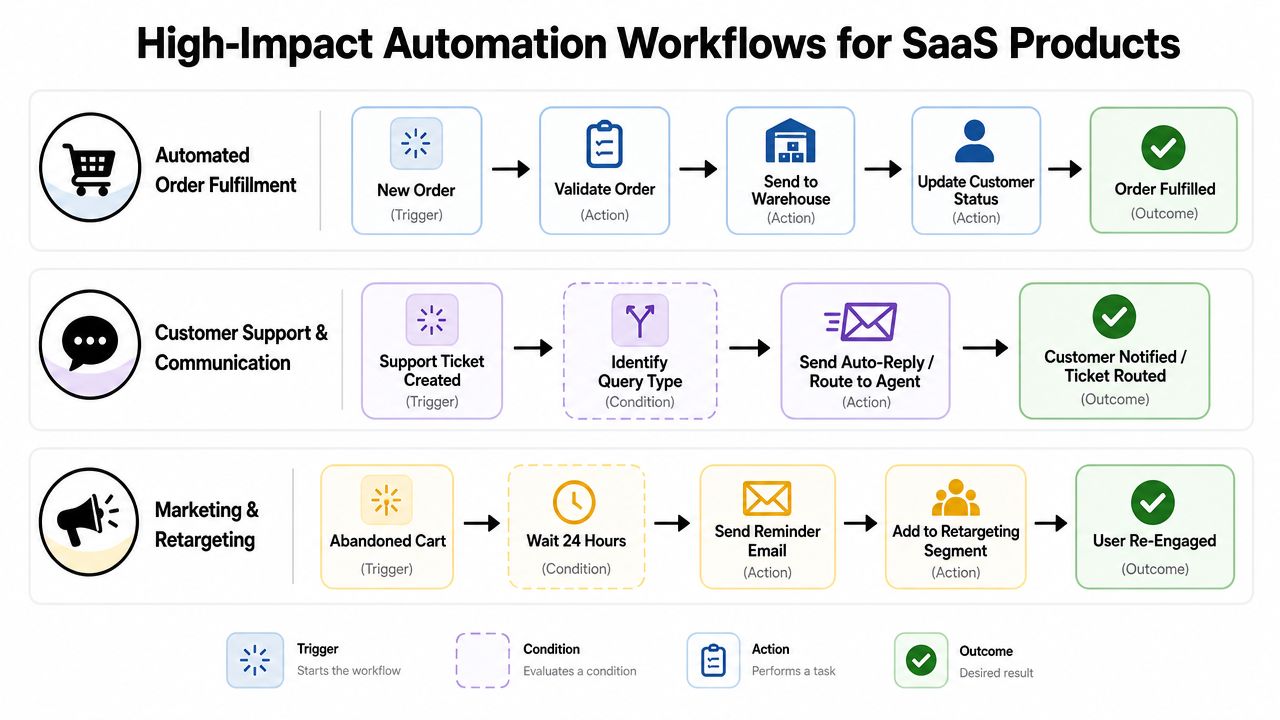
Order import and fulfillment handoff
Before automation, a merchant's staff watches for new orders, checks whether data is complete, and re-enters or exports it into an order, warehouse, or shipping system. Errors show up as missed shipments, duplicate fulfillment, or customer emails that don't match actual order state.
After automation, the product handles the handoff. New orders enter your platform, validation rules run, exceptions get flagged, and valid orders move into downstream execution.
This workflow is strong when your product can do three things well:
- Normalize incoming order fields so platform-specific differences don't leak into business logic.
- Preserve state transitions so users can tell whether an order is new, paid, packed, shipped, refunded, or canceled.
- Make failures visible so an exception queue exists when automation can't proceed safely.
Inventory synchronization across channels
Many teams discover that ecommerce automation isn't just task automation. It's distributed systems work wearing a retail label.
The merchant's pain is easy to recognize. Stock is edited in one store, but another channel still shows old availability. A marketplace accepts an order for an item that's already been sold elsewhere. Someone manually adjusts quantities, then a later sync overwrites the correction.
A good inventory workflow needs careful handling of source-of-truth rules, update sequencing, and conflict resolution. The feature sounds simple to customers because they experience one expectation: available stock should be correct everywhere.
The hard part isn't pushing inventory updates. It's deciding which update should win when systems disagree.
Catalog, pricing, and listing updates
Merchants with large or changing catalogs don't want to edit product data separately in each channel. They want a central system, or your system, to propagate changes once and reliably.
Useful automation here includes:
- Product creation and update propagation when titles, descriptions, attributes, or images change
- Price synchronization when promotional or rule-based updates need to reflect across connected channels
- Listing status management when products should be activated, paused, or hidden based on availability or business rules
These workflows are attractive for B2B SaaS because they tie directly to retention. If your platform becomes the place where catalog updates originate and distribute, it becomes much harder for customers to remove you from the stack.
For teams working on campaign and lifecycle use cases, this practical guide to ecommerce marketing automation is relevant because it connects commerce events to customer messaging patterns without treating marketing as a separate data island.
Customer communication and recovery flows
Support and marketing workflows become more effective when they react to operational events rather than schedule alone.
An abandoned cart event can trigger a follow-up sequence. A shipment delay can route a service message. A delivered order can move a customer into a review or reorder path. These automations are valuable because they use actual commerce state, not broad assumptions.
The caveat is that customer-facing automation tolerates less ambiguity than internal ops workflows. If your shipment status is stale, your outbound communication becomes misleading fast. Developers should treat message-triggering events as high-trust actions that require validated data and conservative fallbacks.
Choosing Your Integration Architecture
Automation looks simple in a product demo because the demo doesn't show the integration layer underneath. In production, architecture decides whether the workflow remains manageable after more stores, channels, and data volume arrive.
Industry guidance frames this correctly. At scale, ecommerce automation becomes an integration architecture problem. Systems need to handle scalability, performance, and data quality under peak load, and weak validation causes automation to spread bad data faster instead of fixing it, as noted in this guide to ecommerce workflow automation architecture.
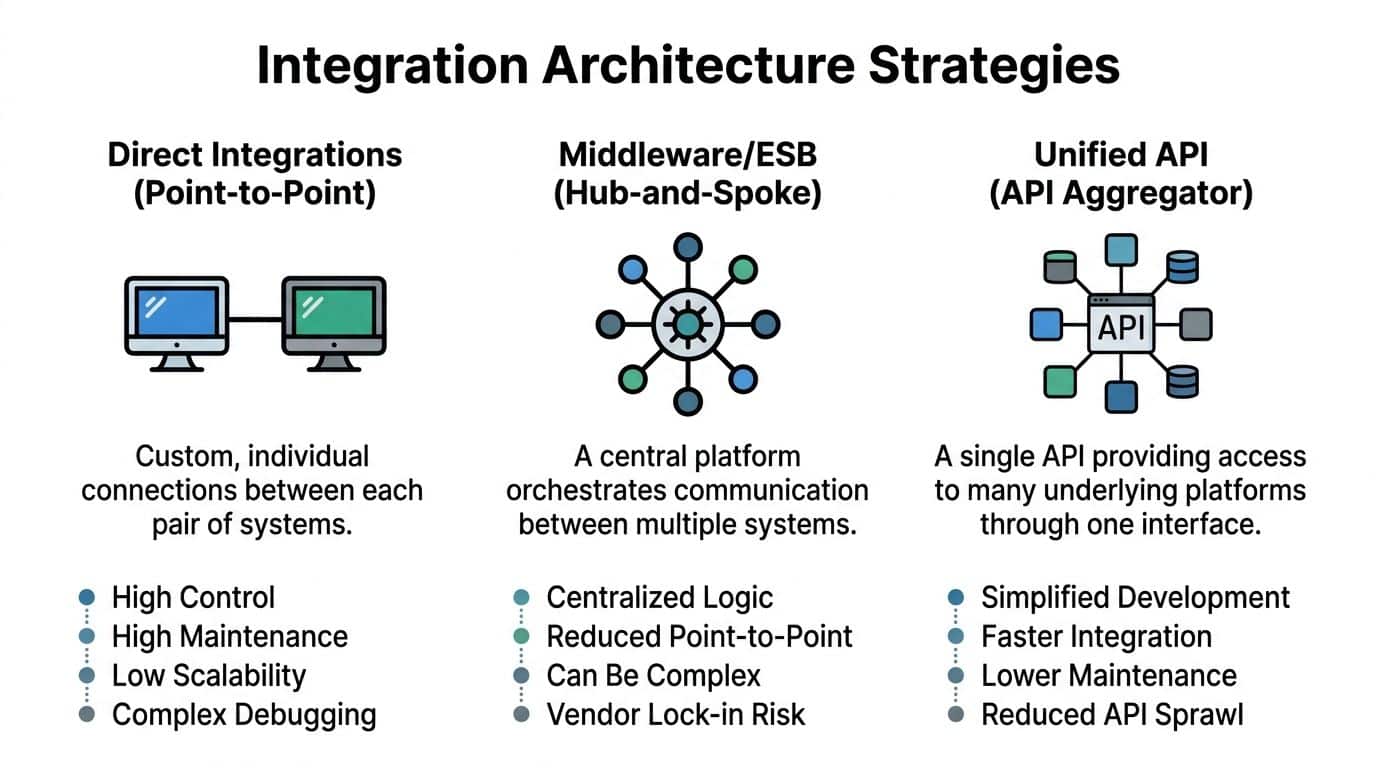
Native integrations versus an abstraction layer
You usually have two broad choices.
Build direct connectors to each platform, or place an abstraction layer between your product and the underlying commerce systems.
| Architecture choice | Strength | Cost |
|---|---|---|
| Direct integrations | Maximum control over platform-specific behavior | High maintenance, duplicated logic, difficult version management |
| Middleware or integration hub | Centralized orchestration and mapping | Added operational complexity and another layer to monitor |
| Unified API abstraction | One consistent interface across many platforms | You depend on the abstraction's coverage and mapping quality |
Direct integrations make sense when a small number of target platforms matter, and your roadmap needs deep platform-specific behavior that generic abstractions can't represent cleanly.
An abstraction layer makes sense when your product's value isn't in rebuilding commerce connectivity over and over. That's common for SaaS teams in operations, analytics, shipping, ERP, PIM, and customer automation.
Webhooks and polling solve different problems
A second architectural decision is how your product receives changes.
This side-by-side summary is useful:
| Pattern | Best for | Trade-off |
|---|---|---|
| Webhooks | Fast reaction to supported events | Event delivery isn't always complete or uniform across platforms |
| Polling | Consistent retrieval and backfill workflows | More latency and more careful rate management |
| Hybrid model | Production-grade sync systems | More moving parts, but better resilience |
If a platform emits reliable event notifications, webhooks reduce delay. They work well for new orders, shipment updates, or customer-facing workflows that benefit from quick reaction.
Polling is less elegant, but often more dependable for reconciliation. It helps when event support is incomplete, events arrive out of order, or you need to recover from outages. This discussion of API versus webhook patterns is useful because it reflects the actual trade-off developers face. Speed versus completeness isn't a binary choice.
Use webhooks for responsiveness. Use polling for certainty. Use both when failure recovery matters.
Design for growth, not just launch
Teams often make the wrong architecture decision by optimizing only for initial build speed. The better question is what happens after onboarding more customers, more channels, and more data shapes.
Choose an approach that lets you:
- Enforce schema normalization before workflows execute
- Observe sync health with logs, replay capability, and exception tracking
- Absorb platform variance without rewriting your core product logic
- Handle backlog recovery when an upstream API is slow, unavailable, or inconsistent
That's what separates a working integration from an automation platform your customers trust.
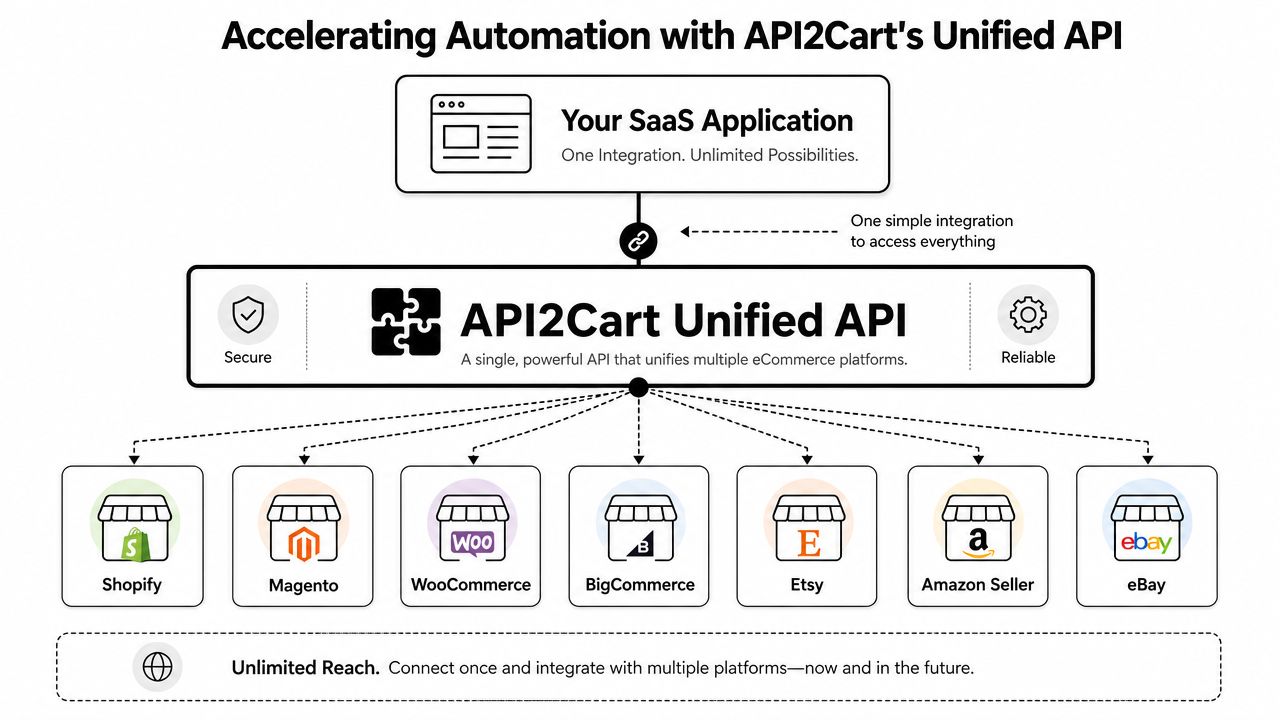
Accelerating Automation with API2Cart's Unified API
Unified integration becomes crucial. Teams often don't struggle with writing a single connector, but rather with supporting numerous connectors over time while attempting to build actual product features.
The gap in most discussions of ecommerce automation is operational reality across multiple storefronts, marketplaces, and systems. The hard parts are data conflicts, latency, and exception handling across channels, as described in this analysis of where ecommerce automation breaks in multi-system operations.
Why unified access changes the build plan
If your SaaS product needs store, order, customer, shipment, catalog, or inventory data from many commerce platforms, writing and maintaining separate connectors becomes a roadmap tax. Every new platform adds authentication work, schema mapping, edge-case handling, change monitoring, and support burden.
A unified API changes that plan by moving platform-specific complexity behind one interface. Instead of building separate logic for each commerce backend, your team integrates once against a consistent set of methods and works with normalized entities where possible.
That's the practical reason to consider a unified commerce API approach for automation-heavy products. It narrows the amount of integration code your team owns directly.
Where this helps B2B SaaS developers
For an integration engineer, the value isn't abstract. It shows up in concrete product workflows:
- Order import automation where your app ingests new orders from many commerce systems without separate connector projects
- Inventory synchronization where quantity and availability updates flow through a shared integration model
- Catalog and pricing updates where product changes can be pushed or retrieved across stores and marketplaces
- Customer and shipment sync where support, analytics, or post-purchase workflows need reliable state from the storefront side
API2Cart fits this pattern. It provides a unified ecommerce API for connecting B2B software to 80+ shopping carts and marketplaces, with 100+ API methods for orders, products, customers, shipments, inventory, and catalog data. It also supports webhooks where available and polling-style list methods with date filters, which is useful when you're building hybrid sync logic. For teams trying to reduce custom connector work, the service is positioned to lower integration costs by up to 9x and expand reach to 1M+ merchant stores, based on the publisher information provided in the brief.
What it doesn't remove
A unified API doesn't eliminate architecture work. You still need:
- Canonical internal models so your product logic doesn't depend on raw external payloads
- Idempotent processing so retries don't create duplicate side effects
- Exception handling paths for unsupported fields, missing events, and business-rule conflicts
- Monitoring and replay tools so failures can be diagnosed and corrected
What it does remove is a large share of repetitive platform integration work. That changes where your engineering time goes. Less effort on connector sprawl. More effort on workflow quality, product differentiation, and operational reliability.
Common Pitfalls and Architectural Best Practices
A lot of teams still talk about automation like it's "set it and forget it." In production, that mindset creates fragile systems. Automation doesn't remove work by default. It often moves work into exception handling, data cleanup, and reconciliation if the design is weak.
That tension is real. A key question in ecommerce automation is whether it reduces labor or just shifts effort into exception management and data cleanup, as discussed in this review of ecommerce automation trade-offs.
Where automations usually fail
The common failure modes aren't mysterious. They show up repeatedly:
- Race conditions in inventory updates. Two channels sell the same item near the same time, and update order determines whether stock stays accurate.
- Non-idempotent retries. A failed request gets replayed and creates duplicate shipments, messages, or records.
- Schema drift. One platform changes a field or status mapping and your downstream logic misbehaves unnoticed.
- Weak exception paths. The system knows something failed but gives operators no useful queue, reason code, or recovery action.
- Over-automation of ambiguous tasks. Teams automate workflows that still need judgment, then spend more time cleaning up than they saved.
Good automation isn't the absence of humans. It's the deliberate placement of humans where rules stop being reliable.
Best practices that hold up
The most useful design patterns are boring in the right way. They reduce surprise.
Make every workflow idempotent
Assume retries will happen. Key writes and side effects against stable identifiers so reprocessing the same event doesn't create duplicate outcomes.
Separate event intake from business execution
Don't let raw inbound events directly mutate critical records. Buffer, validate, and normalize first. Then execute business logic from your internal model.
Keep a system of record per domain
Inventory, pricing, fulfillment, and customer identity shouldn't all be edited everywhere with equal authority. Define ownership. Then enforce it in code.
Build operator-facing exception queues
When automation can't proceed, the fallback shouldn't be "search logs and hope." Give support and ops a visible review path with enough context to act.
Automate in layers
The safest rollout pattern is incremental:
- Start with read-heavy syncs such as order import or reporting feeds.
- Add bounded write actions like customer notifications or status updates.
- Move into high-risk writes such as inventory and pricing only after reconciliation and alerting are proven.
That sequence won't look glamorous in a launch announcement. It does produce systems that survive real customer usage.
Building the Future of Automated Commerce
The useful way to think about what ecommerce automation is isn't as a workflow builder or a set of triggers. It's a product architecture discipline. Your software is taking events from commerce systems, deciding what those events mean, and coordinating the next action across other systems with as little human glue work as possible.
For B2B SaaS teams, that changes the job. You're not just exposing integrations. You're designing operational reliability for merchants who already have too many disconnected tools and too little tolerance for stale data.
Teams that want to explore broader service models around implementation and process design sometimes look at partners such as an AI automation agency when internal bandwidth is limited. The important part isn't the label. It's whether the automation architecture is grounded in data quality, failure handling, and maintainable integration patterns.
The teams that get this right won't win because they automated the most tasks. They'll win because they automated the right workflows, used the right integration model, and kept exceptions from swallowing the promised efficiency.
If you're building a SaaS product that needs ecommerce connectivity, API2Cart gives you a practical way to validate automation workflows without building every cart and marketplace connector from scratch. You can use it to connect your app to many commerce platforms through one API, test order, inventory, product, and customer data flows, and decide faster whether a unified integration layer fits your roadmap.