Automated workflows have moved from a nice-to-have to a core product capability in ecommerce software. Automated emails produce 320% more revenue than non-automated ones, and companies that implement marketing automation see a 10%+ revenue boost within 6-9 months according to Mailmend’s roundup of email automation statistics. For a B2B SaaS team, that number reframes the problem. The hard part usually isn’t deciding whether ecommerce marketing automation matters. The hard part is building a system that works across many carts, many schemas, and many event models without turning your backlog into connector maintenance.
Most articles on ecommerce marketing automation stop at campaign ideas. Developers need the layer underneath that. They need a way to collect customer, cart, order, catalog, and inventory data from Shopify, WooCommerce, Magento, Amazon, and the rest, normalize it, and trigger workflows fast enough to matter.
That’s where architecture decides whether the feature scales or stalls.
The Multi-Platform Challenge in Automation
If you review lists of best marketing automation software platforms, the product comparison usually focuses on journey builders, segmentation, templates, and channel coverage. That’s useful for buyers. It doesn’t answer the implementation question facing integration teams.
Where the real complexity starts
A single-store automation flow looks simple on a whiteboard:
- Detect cart activity
- Enrich with customer and product data
- Trigger a workflow
- Track outcome
That model breaks the moment your SaaS supports multiple commerce platforms.
Each cart exposes different APIs, different auth models, different date formats, different event support, and different object structures. One platform gives you clean webhook coverage for order events. Another gives you partial webhooks but weak cart visibility. A marketplace may expose order data but not enough customer context for lifecycle segmentation. WooCommerce stores often include plugin-driven customizations that shift what “standard” data looks like in practice.
Why developers feel the pain first
Marketing teams ask for “abandoned cart,” “post-purchase upsell,” and “VIP win-back” as if they’re product toggles. In the codebase, each one becomes an integration problem:
- Cart state detection: Not every platform exposes cart data the same way.
- Customer identity resolution: Guest checkouts and duplicate emails break neat segmentation.
- Product context: Recommendation logic is only as good as the catalog payload.
- Timing guarantees: A delayed event can turn a relevant message into spam.
Practical rule: Don’t design automation around campaign names. Design it around reliable event capture, normalized entities, and idempotent processing.
What a scalable engine actually needs
For ecommerce marketing automation to work across dozens of platforms, the engine needs a stable internal contract. That usually means:
- A normalized event model for cart, order, customer, product, and inventory changes
- A sync strategy that supports both push and pull
- A deduplication layer so one platform glitch doesn’t trigger the same flow three times
- A workflow runtime that can act on incomplete data and retry enrichment safely
That’s the difference between building “email automation features” and building automation infrastructure. The second approach takes more discipline upfront, but it keeps your roadmap open when product asks for SMS, push, audience sync, or cross-channel orchestration later.
Laying the Foundation Why Unified Integration is Non-Negotiable
Globally, 79% of marketers are already automating their customer journeys, and demand for marketing automation skills and tools has increased by 91% according to GTM 8020’s marketing automation statistics roundup. If your product serves merchants, agencies, or retail operators, that market behavior lands directly on your roadmap.
Unified access changes product economics
Supporting more commerce platforms does more than expand a feature checklist. It changes who can buy your product.
An OMS, PIM, shipping platform, loyalty tool, or analytics product becomes easier to sell when prospects don’t have to ask, “Do you support my stack?” The commercial effect is obvious, but the technical effect matters just as much. Teams with a unified integration layer ship customer-facing features faster because they aren’t rebuilding the same plumbing for each cart.
That affects roadmap quality in a few practical ways:
- Product managers can prioritize workflows, not connectors
- Developers can reuse trigger logic across platforms
- Support teams can troubleshoot one normalized model instead of dozens of raw APIs
- QA can test one contract thoroughly instead of spreading effort thin
A good overview of this architectural approach appears in API2Cart’s explanation of a unified API for ecommerce integrations.
Why separate connectors usually age badly
Teams often start with direct integrations because the first one looks manageable. Shopify first. Then WooCommerce. Then Magento. Then a marketplace request from sales. By the time the fifth connector lands, engineering is maintaining auth flows, pagination quirks, field mapping, webhook differences, and version changes across unrelated systems.
The main trade-off isn’t just build time. It’s feature velocity versus connector debt.
Separate connectors feel cheaper at the start because the architecture cost is hidden. You pay it later through slow releases, brittle edge cases, and constant schema exceptions.
What unified integration enables upstream
Once you centralize data access, ecommerce marketing automation stops being a one-off feature and becomes a shared platform capability. That opens the door to:
- Audience building from customer and order history
- Behavioral triggers based on recent store activity
- Cross-store analytics for agencies and multi-brand operators
- Reusable enrichment services for recommendation or messaging logic
This is why unified integration isn’t optional for a serious B2B SaaS product. It’s the layer that lets the rest of the product behave like one system instead of a pile of special cases.
Architecting for Scale Data Sync Patterns
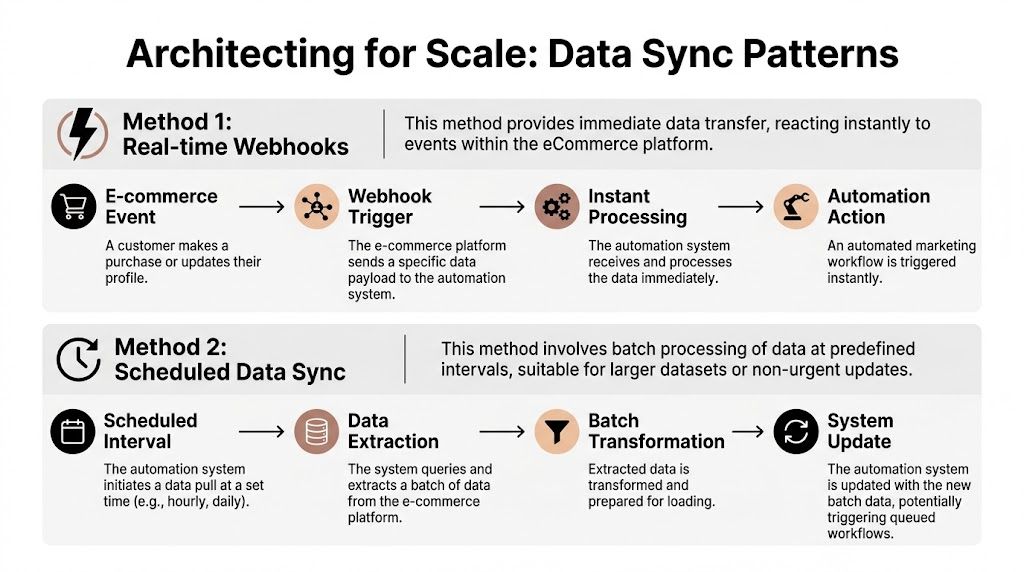
The sync model determines whether your automation feels timely or stale, reliable or noisy, maintainable or fragile. For most ecommerce marketing automation systems, the choice isn’t “webhooks or polling” in the abstract. It’s how to support both without letting platform differences leak into your workflow engine.
Webhooks are fast, but not universal
Webhooks are the cleanest path when the platform supports the event you need with stable payloads. They reduce latency and avoid unnecessary API calls.
They also create new operational work. You need signature validation, replay protection, dead-letter handling, and a retry strategy that doesn’t trigger duplicate automations.
Polling still matters because many integrations are incomplete at the event layer. Some platforms expose order events but not enough cart activity. Others support webhooks, but merchants misconfigure them or apps lose subscriptions during reinstall flows.
Polling is slower, but often safer
Polling gives you control. You decide frequency, pagination, backfill windows, and retry logic. For lifecycle segmentation and non-urgent workflow entry, that predictability is often worth the trade.
The downside is obvious. Poll too often and you waste requests. Poll too slowly and the message misses the buying window.
Building integrations in-house can lead to 9x higher development and maintenance costs compared to using a unified API solution, and 40% of automation failures are caused by integration issues and data silos according to Zoko’s ecommerce marketing automation statistics post. Those failures usually show up in the sync layer first.
Data Synchronization Methods Compared
| Attribute | Webhooks | Polling | API2Cart Unified Approach |
|---|---|---|---|
| Speed | Immediate when supported | Interval-based | Supports real-time where available and polling where needed |
| Operational risk | Missed subscriptions, duplicate delivery, payload drift | Window gaps, rate pressure, delayed processing | Abstracts platform differences behind one integration layer |
| Implementation effort | High per platform | Moderate per platform | Build workflow logic once against unified methods |
| Best fit | Order events, status changes, urgent triggers | Backfills, segmentation refresh, audit sync | Mixed estates with different platform capabilities |
| Failure handling | Needs replay and idempotency | Needs checkpointing and cursor control | Centralizes sync strategy and normalization |
The pattern that holds up
The architecture I trust most looks like this:
- Ingest events through webhooks where possible.
- Run scheduled polling as a safety net and for unsupported entities.
- Normalize into internal models before workflow logic sees any data.
- Process through an idempotent event bus keyed by store, entity, and timestamp.
- Persist checkpoints so recovery doesn’t depend on raw platform state.
A simplified event intake flow might look like this:
def ingest_order_event(store_id, source, payload):
    event = normalize_order_payload(source, payload)
    event_key = build_idempotency_key(store_id, event["id"], event["updated_at"])

    if already_processed(event_key):
        return "skip"

    save_event(event_key, event)
    enqueue_workflow_jobs(event)
    return "processed"
The key design choice is simple. Your workflow service should never need to know whether the source was Shopify webhook delivery, WooCommerce polling, or a marketplace order sync. Once that detail leaks upward, every future automation feature gets harder to build.
Implementing Core Automation Workflows with API Calls
Good automation features aren’t abstract. They’re made of entity lookups, filters, timing windows, retries, and message payloads. That’s where teams either build something dependable or end up with a demo-only feature.
For developers evaluating orchestration patterns, this broader comparison of workflow automation software is useful because it shows how teams think about triggers, branching, and execution models outside ecommerce. In commerce systems, though, the implementation always comes back to data quality and event timing.
A detailed reference for integration-specific methods is available in API2Cart’s guide to API methods for email marketing automation software.
Abandoned cart recovery
This workflow lives or dies on detection accuracy.
A well-implemented abandoned cart workflow can recover up to 5.4% of lost revenue, and personalized emails in the sequence can achieve up to 2,361% higher conversions than standard scheduled campaigns as noted earlier in the linked Mailmend source. From an engineering perspective, that means you can’t afford vague cart logic.
Typical implementation pattern:
- Detect a cart or order state that implies checkout started but purchase didn’t complete
- Wait through a configurable delay window
- Re-check whether the cart converted
- Enrich with line items, prices, image URLs, and customer identity
- Trigger the flow only once per eligible abandonment window
Pseudo-code:
def process_abandoned_cart(store_id, cart_id):
    cart = api.cart.info(store_id=store_id, id=cart_id)

    if not cart or cart["converted"]:
        return

    customer = api.customer.list(
        store_id=store_id,
        filter={"email": cart["customer_email"]}
    )

    message = build_cart_recovery_message(cart, customer)
    enqueue_campaign("abandoned_cart", store_id, customer, message)
What works:
- A delay before first send
- A conversion re-check immediately before send
- Pulling current product data, not stale cached titles or images
What doesn’t:
- Triggering from a single raw event with no state verification
- Treating guest and logged-in carts the same
- Ignoring stock changes before reminder delivery
Post-purchase upsell and cross-sell
This workflow starts with an order event, but the logic shouldn’t stop at “order completed.”
The useful version checks what was bought, whether fulfillment has started, whether the catalog has related items available, and whether the customer should be excluded from overlapping campaigns.
A practical event chain:
- Receive order creation or import recent paid orders
- Map purchased SKUs to related products or bundles
- Exclude refunded or cancelled orders
- Suppress if inventory is unavailable
- Send after a timing rule that matches product type
Pseudo-code:
def handle_post_purchase(store_id, order_id):
    order = api.order.info(store_id=store_id, id=order_id)
    if order["status"] not in ["paid", "completed"]:
        return

    related = get_related_products(order["order_products"])
    available = [p for p in related if p["in_stock"]]

    if not available:
        return

    audience = build_customer_profile(order["customer"])
    enqueue_campaign("post_purchase_upsell", store_id, audience, available)
Lifecycle segmentation
Segmentation gets underestimated because it sounds less exciting than triggered flows. In practice, it supports almost every serious automation program.
You can build audiences from customer history, order recency, total spend bands, purchase categories, or inactivity windows. The engineering challenge is making these segments cheap to refresh and consistent across platforms.
Useful audience models include:
- New customers: First order placed recently
- Repeat buyers: Multiple completed purchases
- At-risk customers: No purchase inside a defined recency window
- VIPs: High spend or high order count with recent inactivity
Don’t compute every segment in real time from raw store APIs. Pull, normalize, and materialize audience states first. Workflow execution gets simpler and cheaper after that.
A segment refresh job often looks more like ETL than campaign logic:
def refresh_customer_segments(store_id, updated_from):
    customers = api.customer.list(store_id=store_id, modified_from=updated_from)

    for customer in customers:
        orders = api.order.list(
            store_id=store_id,
            customer_id=customer["id"]
        )
        segment_flags = derive_segments(customer, orders)
        save_segment_state(store_id, customer["id"], segment_flags)
That pattern is less glamorous than a drag-and-drop journey builder. It’s what makes the journey builder trustworthy.
Measuring Success KPIs and Testing Strategies
Shipping ecommerce marketing automation features without instrumentation creates a familiar problem. The flows run, merchants like the idea, but no one can prove which workflows influence revenue, retention, or lead volume.
Businesses using marketing automation report an 80% increase in leads and a 77% increase in conversions according to MarketingLTB’s marketing automation statistics roundup. Development teams only get credit for that kind of impact when the product captures attribution cleanly.
A solid companion resource for instrumentation decisions is this roundup of ecommerce analytics tools, especially when you’re deciding what belongs in your core platform versus what should feed external BI.
KPIs that developers should wire first
Start with metrics that can be tied to identifiable entities and workflow runs.
- Workflow entry count: How many customers or carts entered a flow
- Send eligibility rate: How many were suppressed because of missing data, consent, or exclusions
- Conversion by flow: Orders or actions attributed to a specific workflow execution
- Recovery rate: Especially important for cart and browse recovery programs
- Revenue per workflow run: Useful for comparing high-volume and high-value flows
Avoid vanity metrics as primary success indicators. Opens and clicks can still help diagnose message quality, but they don’t prove the integration is doing useful work.
Testing architecture matters more than test ideas
A/B testing in automation is mostly a data problem.
You need stable experiment assignment, event logging at each decision point, and a way to attribute downstream orders back to the variant that influenced them. If a customer gets reassigned across runs, your results are unreliable. If your event schema doesn’t persist workflow version and branch ID, your reports are weak.
A minimal assignment model:
def assign_variant(customer_id, experiment_key):
    seed = hash(f"{customer_id}:{experiment_key}")
    return "A" if seed % 2 == 0 else "B"
Store that assignment and carry it through every send, suppression, and conversion event.
What teams usually miss
Implementation note: Track why a workflow didn’t fire, not just when it did. Suppression reasons expose data gaps much faster than success logs.
Common blind spots include:
- No holdout group: You can’t measure incremental lift if everyone gets the workflow.
- No versioning: Results blur together when template or logic changes aren’t recorded.
- Weak revenue mapping: Orders need a clear path back to the triggering workflow.
- Broken identity stitching: Guest checkout and merged accounts can distort outcomes.
The strongest teams treat measurement as part of workflow design, not a reporting task added later.
Common Development Pitfalls and How to Avoid Them
The most expensive problems in ecommerce marketing automation aren’t dramatic. They’re repetitive and operational.
Schema drift breaks segmentation
Shopify, Magento, WooCommerce, and marketplaces don’t agree on field shape, status labels, or extension behavior. If your segmentation engine reads raw source fields directly, every new connector adds exception logic.
Fix it by enforcing internal contracts for customer, order, product, and cart objects. Normalize first. Segment second.
Rate limits punish naive polling
A polling strategy that works in staging often fails at scale. High-store-count environments magnify bad cursor logic and unnecessary full fetches.
Use incremental filters, checkpointing, and backoff rules. Separate urgent sync jobs from low-priority enrichment work so recovery traffic doesn’t block live workflows.
Retries can create duplicate automations
A failed send isn’t the worst outcome. A duplicated cart recovery message or repeated upsell sequence is worse because merchants notice it immediately.
Build idempotency keys into event processing and campaign dispatch. Retry safely only after you define what “same event” means across platforms.
Maintenance debt grows quietly
Connector-by-connector integration looks practical until platforms change auth requirements, deprecate fields, or alter webhook payloads. Teams then spend release cycles preserving old behavior instead of shipping new product value.
This is the point where a unified API approach earns its keep. It reduces the number of moving parts your team owns directly and keeps the workflow layer focused on business logic instead of connector survival.
If your automation roadmap depends on every engineer understanding every commerce API, the architecture won’t hold as the product expands.
The teams that win here don’t automate everything. They standardize the hard parts, isolate source-specific complexity, and keep workflow logic independent from platform quirks.
If your product needs ecommerce marketing automation across multiple carts and marketplaces, API2Cart gives B2B SaaS teams one API to work with orders, products, customers, carts, shipments, and related store data across 80+ platforms. That shortens the path from connector work to usable workflows. Start with a trial or book a demo to validate your sync model before you commit engineering time to one-off integrations.