Your team usually hits the google contacts api when a product requirement sounds simple. Import customer contacts from a user's Google account. Push CRM edits back to Google. Match store buyers to existing people records. Sync directory data for sales or support workflows.
The first prototype is usually easy. The production version isn't. You're dealing with OAuth scopes, field masks, sync logic, stale records, concurrent updates, and a Google API surface that changed materially when the old Contacts API gave way to the People API. If your SaaS also connects to eCommerce platforms, the contact sync problem expands fast because Google is only one side of the data flow.
This guide is written from the integration engineer's perspective. It focuses on what matters when you implement and maintain a Google contact integration, where direct integration works well, where it gets expensive, and where a unified API strategy starts to make more sense.
Understanding the Google Contacts and People API
If you're building contact sync today, you're not integrating with the old Google Contacts API in the historical sense. You're integrating with the People API, which is Google's current model for reading and managing a signed-in user's contacts.
Google originally launched the Google Contacts Data API in 2007, with delegated authentication and authorization so apps could access contact data without asking users for their passwords, as described in Google's original launch announcement. That shift matters because it established the permission model that has become a common expectation. The app gets scoped access. The user keeps control of credentials.
For developers, the practical meaning is straightforward. The modern google contacts api story sits inside a broader people and identity layer that touches Gmail, Android, Google Workspace, and signed-in Google experiences. If your product needs to read contacts, create records, edit them, or remove them, the People API is the API surface you design around.
What the API is good at
The People API fits well when your app needs to:
- Import contacts into your product for onboarding, segmentation, or account mapping
- Write updates back to Google when users edit customer records in your UI
- Search for existing people before creating duplicates
- Pull both private contacts and other contact sources when your workflow depends on more than one address book bucket
A lot of teams also use it for identity resolution. Email address, phone number, and profile-linked fields become useful keys when you're trying to unify user, customer, and communication data across systems.
Where developers get tripped up
The confusion usually starts with naming. Search results, old tutorials, and legacy code still refer to the Google Contacts API. The live implementation path is the People API, and the data model is more structured than many old examples suggest.
The hardest part usually isn't reading contacts. It's deciding what your product means by “the same person” when Google, your app, and a store platform all represent that person differently.
If you need a user-facing refresher on how Google contact data behaves outside the API layer, Tooling Studio published a comprehensive guide to Gmail contacts that's useful context before you start mapping fields and sync rules.
Authentication and Authorization Setup
Most integration issues show up before your first API call. The People API is unforgiving about scopes, consent setup, and token handling. If you get those wrong early, every downstream bug looks like a data bug when it's really an auth bug.
Setup sequence that avoids rework
Use this order:
- Create a Google Cloud project
- Enable the People API
- Configure the OAuth consent screen
- Create OAuth client credentials
- Request only the scopes your workflow needs
- Implement code exchange and refresh token storage
If your team needs a broader OAuth implementation checklist for product work, this OAuth setup reference for integrations is a practical companion.
Scope choice is where many builds break
Google's migration guidance matters here because the old one-scope approach no longer applies. Google notes in its migration documentation that the old Contacts API was turned down on January 19, 2022, and the legacy https://www.google.com/m8/feeds scope was split into separate permissions such as contacts for personal contacts and directory.readonly for Workspace directory access in the Contacts API migration guide.
That means you need to model permissions around data type, not around a vague “contacts access” concept.
A practical split looks like this:
- Personal contact management: use
https://www.googleapis.com/auth/contacts - Other contacts read access: use
https://www.googleapis.com/auth/contacts.other.readonly - Workspace directory reads: use
https://www.googleapis.com/auth/directory.readonly
Don't request directory scope if your app only needs personal contacts. Don't ask for write scope if your product only imports data. Narrow scopes reduce friction during consent review and reduce the blast radius when security teams inspect your app.
OAuth flow details that matter in production
For a server-side SaaS app, the standard pattern is:
- Redirect the user to Google's consent screen
- Receive an authorization code at your redirect URI
- Exchange that code for an access token and refresh token
- Store the refresh token securely
- Use refresh flow for long-lived access
Three implementation rules save time later:
- Persist scope metadata with the token so support engineers can tell what the user granted
- Version your redirect URI handling if multiple environments share the same app registration
- Treat refresh token loss as a normal recovery case in your UX, not as an edge case
Practical rule: tie every token record to tenant, environment, granted scopes, and acquisition time. Support gets much easier when you can inspect auth state without guessing.
A clean auth layer is what makes the rest of the google contacts api integration predictable.
Migrating from the Legacy Contacts API to the People API
A common migration scenario looks like this. A SaaS team has a contact sync that worked for years, then support starts seeing missing records, failed refresh jobs, or consent flows that no longer match the app's actual behavior. In practice, that usually means the integration still carries assumptions from the legacy Contacts API.
The migration is not just an endpoint rename. Google retired the old Contacts API, and the replacement changed the resource model, permission model, and update semantics. Teams that try to keep the old architecture and swap URLs usually end up with a brittle integration that passes basic tests but fails in production sync jobs.
What changed is straightforward once you model it correctly. The legacy API centered on feed-style contact access. The People API uses person resources, explicit methods, and field masks. It also separates personal contacts, other contacts, and directory data more clearly. That matters for B2B SaaS because contact sync rarely lives in isolation. The same tenant may expect Google contacts to line up with CRM data, order notifications, account records, or buyer profiles across several systems.
Legacy Contacts API vs Modern People API
| Aspect | Legacy Contacts API (Deprecated) | Modern People API (Current) |
|---|---|---|
| Primary model | Contact feed style access | Structured person and contact resources |
| Scope model | Single broad legacy scope | Separate scopes for contacts, other contacts, and directory data |
| Status | Turned down | Current supported path |
| Migration impact | Old auth assumptions break | Requires explicit scope mapping and endpoint updates |
| Data access pattern | Older contact-specific design | People-oriented resources with clearer separation across data types |
The biggest migration mistake is treating this as a narrow Google-specific refactor. For an eCommerce or B2B SaaS product, contact data usually feeds more than one workflow. Sales handoff, account ownership, notifications, customer support, and storefront identity resolution can all depend on the same record. If the Google side changes shape, the downstream mapping layer should change with it.
What to audit before changing code
Run a short audit first:
- Find legacy endpoint and scope assumptions: search for
m8/feeds, old XML or feed parsers, and any logic that assumes one broad consent grant. - Map each product action to a People API operation: import, search, create, update, delete, group membership, and directory lookup need explicit replacements.
- Review your data model: People API fields and source metadata often expose edge cases that older flat contact models hid.
- Test account types separately: consumer Google accounts and Workspace tenants can behave differently, especially where directory-related data is involved.
One more practical check helps. Review where contact identity is resolved in your app. If deduplication currently depends on a single email field or a legacy contact ID, migration is a good time to fix it.
Trade-offs teams run into
A direct People API integration gives full control, which is useful if Google is the only source you care about. It also means you own every translation layer, every field mapping decision, and every account-specific edge case. That cost is manageable for a single integration. It grows fast when the product roadmap includes multiple commerce, CRM, and contact systems.
For teams building B2B SaaS in the eCommerce space, this is often the point where architecture matters more than the API call itself. If Google Contacts is one of many systems you need to connect, keeping normalization, sync rules, and retry logic in one service layer reduces long-term maintenance. If you expect to support many platforms, a unified API such as API2Cart can reduce how much custom integration code your team has to carry across the stack.
Migrate the permission model, data model, and sync rules together. Partial migrations usually fail at the edges, where support teams spend the most time.
A clean migration usually leaves the codebase in better shape than the legacy integration ever was. It is also a good opportunity to centralize field mapping, tighten source-of-truth rules, and remove one-off logic that accumulated around the old feed model.
Core People API Endpoints and Operations
A direct Google Contacts integration usually looks simple until the write path goes live. Reading contacts is easy. Keeping records consistent across Google, your app, and the other systems an eCommerce SaaS customer already uses is where endpoint choice and payload discipline start to matter.
The People API gives you the main resources you need for contact sync and contact lifecycle work. v1.people handles person records, v1.people.connections is the standard path for a user's contacts, v1.otherContacts covers auto-saved contacts, and v1.contactGroups lets you work with grouping and membership. For a product team building B2B workflows, that split matters because import, search, segmentation, and update logic often belong to different jobs and services.
Read and search patterns
The standard read path for user contacts is people.connections.list. Use it for initial loads, periodic reconciliation, and targeted cache rebuilds when you only need a selected field set.
GET /v1/people/me/connections?personFields=names,emailAddresses,phoneNumbers
A representative response shape:
{
  "connections": [
    {
      "resourceName": "people/c123",
      "etag": "%EgUBAi43PRoEAQIFByIM...",
      "names": [
        { "displayName": "Alex Johnson", "givenName": "Alex", "familyName": "Johnson" }
      ],
      "emailAddresses": [
        { "value": "[email protected]" }
      ],
      "phoneNumbers": [
        { "value": "+15551234567" }
      ]
    }
  ],
  "nextPageToken": "token-value"
}
Search needs extra care. Contact search can behave inconsistently if the cache has not been primed first, so teams often misread test results as indexing bugs. In practice, build user-facing search with that warm-up behavior in mind and test it under the same request pattern you expect in production.
That detail matters more in SaaS than it first appears. If your product routes contacts into quoting, invoicing, CRM sync, or marketing workflows, a flaky search experience turns into duplicate records and support tickets. Teams trying to unify marketing and sales data for SMBs usually discover that contact lookup quality affects much more than the address book screen.
Create update and delete flows
Creating a contact is straightforward when you keep the payload tight and only send fields you own.
POST /v1/people:createContact
{
  "names": [
    { "givenName": "Sam", "familyName": "Lee" }
  ],
  "emailAddresses": [
    { "value": "[email protected]" }
  ],
  "phoneNumbers": [
    { "value": "+15550001111" }
  ]
}
Representative response:
{
  "resourceName": "people/c456",
  "etag": "%EgUBAi43PRoBAgMEBQ==",
  "names": [
    { "displayName": "Sam Lee", "givenName": "Sam", "familyName": "Lee" }
  ],
  "emailAddresses": [
    { "value": "[email protected]" }
  ]
}
Updates are less forgiving. people.updateContact expects you to send the latest etag, and production code should update only the fields named in updatePersonFields. If you treat updates like full document replacement, you increase the chance of overwriting edits made in Google or in another connected system.
PATCH /v1/people/c456:updateContact?updatePersonFields=names,emailAddresses
{
  "resourceName": "people/c456",
  "etag": "%EgUBAi43PRoBAgMEBQ==",
  "names": [
    { "givenName": "Samuel", "familyName": "Lee" }
  ],
  "emailAddresses": [
    { "value": "[email protected]" }
  ]
}
Delete is explicit and should be logged carefully, especially in multi-system SaaS environments where support teams may need to reconcile a removal later.
DELETE /v1/people/c456:deleteContact
Field masks and batch operations
Field masks are one of the easiest ways to keep the integration predictable. Request only what a given job needs. A sync worker reconciling names and email addresses should not fetch photos, biographies, or unrelated profile data.
Batch operations help when you need controlled bulk updates, but they also raise the stakes. Bulk writes should carry explicit update masks, read masks, and current etag values so your job can fail safely instead of inadvertently overwriting newer contact data.
A practical operating model looks like this:
- List calls: optimize for paging, selected fields, and stable ingestion
- Search calls: account for cache warm-up before exposing results to users
- Create calls: send narrow payloads and capture returned IDs and etags
- Update calls: patch only owned fields and treat etag mismatches as normal conflict cases
- Delete calls: store external IDs and audit context before removal
- Batch calls: use them for throughput, not as a shortcut around conflict handling
For a single Google-only integration, that approach is manageable. For an eCommerce SaaS product that also connects CRMs, storefronts, ERPs, and marketing systems, the hard part is keeping these endpoint rules consistent across every connector. That is one reason teams often isolate Google-specific logic behind an internal service layer or use a unified API such as API2Cart when contact and customer sync is part of a broader multi-platform integration strategy.
Practical Integration Patterns for B2B SaaS
The API call layer is only half the job. In B2B SaaS, the hard part is building sync behavior that survives messy customer data, retries, edits from multiple systems, and changing account permissions.
Build around change tracking
Google's People API contact workflows support sync tokens for retrieving only changed contacts, and the docs also show etag protection for updates in the People API contacts documentation. Those two features should shape your architecture.
A practical sync loop usually has two phases:
Initial full sync
- Pull all relevant contacts
- Store external IDs, etags, and normalized keys
- Build your local mapping table
Incremental sync
- Request changes using the saved sync token
- Reconcile creates, updates, and deletions
- Refresh the saved sync token after a successful run
If you skip change tracking and re-import everything on every sync cycle, the system may still work. It just gets harder to debug, slower to run, and easier to break when contact counts grow.
Treat field mapping as a product decision
Most failures in contact sync aren't transport failures. They're semantic failures.
Examples:
- Google allows multiple email addresses. Your CRM may want one primary email.
- A store customer may have billing and shipping phone numbers. Google contact records may not align to that split.
- Your app may support account-level contacts and end-customer contacts. Google doesn't know your product distinctions.
That's why field mapping needs explicit rules, not a hand-wavy “best match” utility.
Use a mapping sheet that answers these questions:
| Question | Why it matters |
|---|---|
| Which email becomes primary | Prevents unstable record matching |
| What happens to extra phone numbers | Avoids silent data loss |
| Which side owns name formatting | Prevents flip-flop updates |
| How notes are handled | Stops one system from overwriting richer data |
For teams working on cross-system lifecycle design, this write-up on how to unify marketing and sales data for SMBs is useful background because the same contact identity and field ownership problems show up there too.
A stable sync design starts with deciding which system is authoritative for each field. Without that, every update becomes a negotiation your code has to repeat.
Concurrency is not theoretical
If users can edit a contact in your app and in Google, race conditions are normal. Preserve etag values, fail safely on mismatch, and make your retry worker smart enough to re-read before attempting a second write. That's the difference between a sync engine and a duplicate generator.
Best Practices for eCommerce Contact Synchronization
In eCommerce SaaS, contact data usually isn't just an address book problem. It sits inside order notifications, post-purchase messaging, customer support workflows, shipping coordination, segmentation, and account management.
A merchant might want to pull buyers from a store, match them against Google contacts, and expose a clean contact record in your product. Another merchant may want the reverse flow. Take contacts enriched in your application and sync selected details back into Google for sales or support use.
What works well
The cleanest implementations separate people data from commerce role data.
A useful internal model often looks like this:
- Person record: name, phones, emails
- Commerce record: customer ID, order history, store-specific metadata
- Relationship layer: one person may map to multiple store identities
That separation matters because the same buyer can appear differently across channels. A marketplace order may carry one email. A direct store order may carry another. Google may already have both in one person record.
What usually causes pain
Three recurring problems show up in eCommerce contact sync:
- Identity fragmentation: the same customer exists under several emails or phone formats.
- Platform-by-platform variance: every store platform exposes customer fields differently.
- Ownership ambiguity: support edits one field, marketing edits another, and the sync engine doesn't know which one wins.
A direct Google integration doesn't solve any of that. It only covers one endpoint in a wider graph of systems.
That's why teams should avoid tying business logic too tightly to Google's payload shape. Normalize contact data into your own domain model first. Then write adapters for Google reads and writes on one side, and commerce platform reads and writes on the other.
If your data model says “customer equals contact,” your integration will break as soon as one merchant has shared inboxes, multiple storefronts, or B2B purchasing teams.
For shipping, CRM, marketing automation, and analytics products, the burden isn't just building the google contacts api integration. It's keeping that integration coherent while every store connector evolves on its own schedule.
Accelerating Integration with Unified APIs like API2Cart
Direct integration is manageable when Google is the only external system in scope. The economics change when your product also has to connect to many commerce platforms, each with different auth, customer models, webhook behavior, and edge cases.
That maintenance burden becomes obvious when upstream APIs change. Google's legacy Contacts API had to be migrated before June 15, 2021, after which calls started failing at increasing error rates according to the migration notice cited in the EspoCRM forum summary of Google's deprecation timeline. Every direct connector you own can create that kind of work at the worst possible time.
The trade-off developers should evaluate
A single direct integration gives you full control. It also gives you full responsibility for:
- auth changes
- endpoint deprecations
- schema mismatches
- sync retries
- support diagnostics
- version drift across tenants
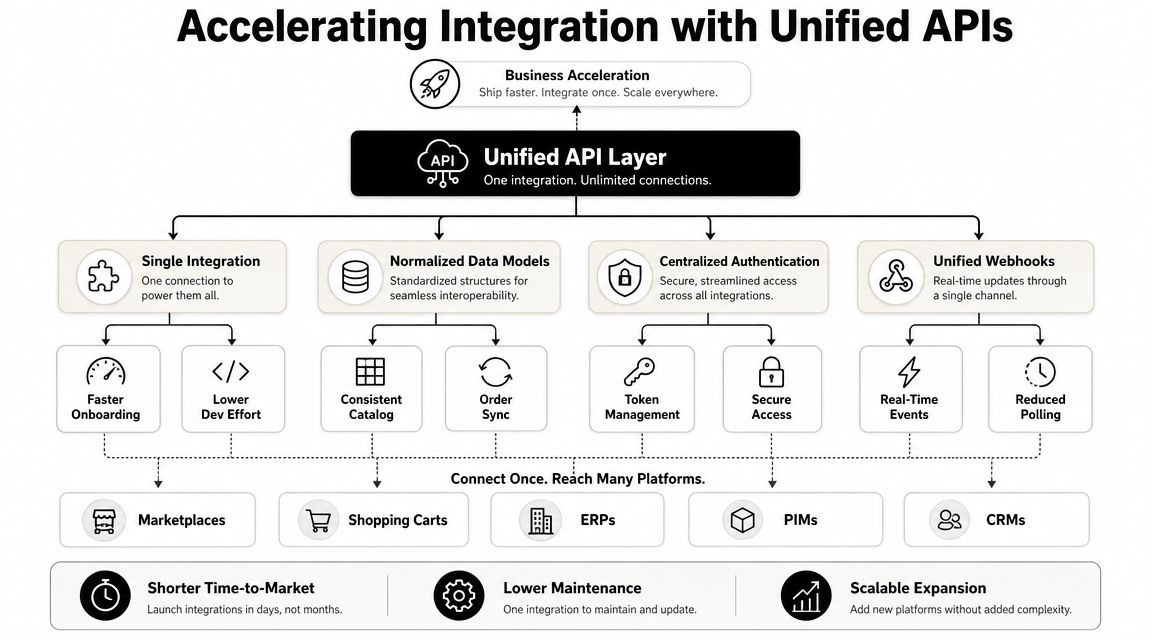
If your roadmap includes many store platforms, a unified commerce integration layer can reduce how many bespoke connectors your team has to own. One approach is to keep your direct Google People API integration where it belongs, but avoid building separate customer and order connectors for every commerce platform from scratch.
That's where a unified API approach for commerce integrations becomes relevant. Instead of writing one connector per platform, your team works against one normalized commerce API surface.
Where this helps a contact workflow
For an eCommerce SaaS product, the practical architecture often becomes:
- Google People API for user-authorized contact read and write
- Unified commerce API for store customer and order data
- Internal identity layer to map people records to customer entities
Used that way, API2Cart gives teams one API to access customer and related commerce data across many shopping platforms, while your Google integration remains focused on contact sync and user-authorized identity workflows. That split reduces connector sprawl without pretending Google and store platforms are the same thing.
One more operational point matters. Unified connectors don't remove data hygiene work. They reduce connection maintenance. You still need solid normalization rules for emails, names, and phone fields. If you're tightening those rules, this overview of best practices for email address validation is useful background before you define your matching logic.
When direct is enough and when it isn't
Direct integration is usually enough when:
- you only need Google
- you support a narrow customer profile
- your sync logic is simple and tenant count is still small
A unified strategy becomes more compelling when:
- merchants ask for many store connectors
- customer support is spending time diagnosing platform-specific payload issues
- your roadmap depends on broad commerce coverage more than bespoke per-platform behavior
The point isn't that one model replaces the other. It's that contact sync and commerce connectivity often belong in different layers.
Rate Limits Error Handling and Code Samples
The People API integration isn't production-ready until retries, token refresh, and partial failure behavior are boring. That's the standard. If your worker crashes on a transient error or keeps retrying a bad request forever, the issue isn't the API. It's your control loop.
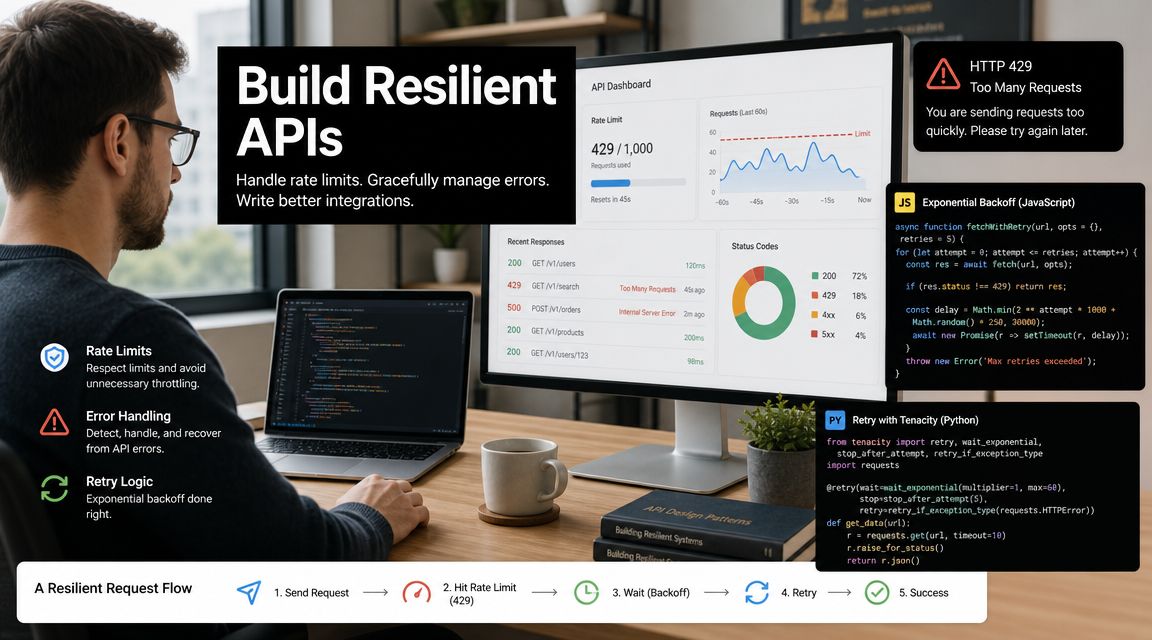
If your broader integration estate deals with varied API quotas, this short guide to handling API rate limits in integration systems is a useful operational reference.
Error handling rules that hold up
Use a small decision table in code.
| HTTP code | Typical meaning | What your app should do |
|---|---|---|
| 400 | Bad request or invalid field mask | Log payload details and stop retrying |
| 401 | Expired or invalid token | Refresh token, then retry once |
| 403 | Scope or access issue | Surface permission problem to tenant admin |
| 429 | Rate limiting | Back off and retry with delay |
| 5xx | Temporary server-side failure | Retry with capped exponential backoff |
Two habits help a lot:
- Log request intent, not sensitive payloads. Keep enough context to debug without dumping private contact data.
- Separate retryable from non-retryable failures. A malformed update request should never enter the same retry queue as a throttled list request.
Retry logic should be idempotent. If a worker restarts mid-run, it shouldn't create duplicate contacts or replay stale updates blindly.
Node.js sample
async function fetchConnections(accessToken, pageToken = null, attempt = 0) {
  const maxAttempts = 5;
  const params = new URLSearchParams({
    personFields: 'names,emailAddresses,phoneNumbers'
  });
  if (pageToken) params.set('pageToken', pageToken);

  const response = await fetch(
    `https://people.googleapis.com/v1/people/me/connections?${params.toString()}`,
    {
      headers: {
        Authorization: `Bearer ${accessToken}`
      }
    }
  );

  if (response.status === 429 || response.status >= 500) {
    if (attempt >= maxAttempts) {
      throw new Error(`Retry limit reached with status ${response.status}`);
    }
    const delayMs = Math.min(1000 * Math.pow(2, attempt), 16000);
    await new Promise(resolve => setTimeout(resolve, delayMs));
    return fetchConnections(accessToken, pageToken, attempt + 1);
  }

  if (response.status === 401) {
    throw new Error('Access token expired or invalid. Refresh token flow required.');
  }

  if (!response.ok) {
    const body = await response.text();
    throw new Error(`People API error ${response.status}: ${body}`);
  }

  return response.json();
}
Python sample
import time
import requests

def fetch_connections(access_token, page_token=None, max_attempts=5):
    url = "https://people.googleapis.com/v1/people/me/connections"
    params = {
        "personFields": "names,emailAddresses,phoneNumbers"
    }
    if page_token:
        params["pageToken"] = page_token

    for attempt in range(max_attempts + 1):
        response = requests.get(
            url,
            headers={"Authorization": f"Bearer {access_token}"},
            params=params,
            timeout=30,
        )

        if response.status_code in (429, 500, 502, 503, 504):
            if attempt == max_attempts:
                raise Exception(f"Retry limit reached with status {response.status_code}")
            delay = min(2 ** attempt, 16)
            time.sleep(delay)
            continue

        if response.status_code == 401:
            raise Exception("Access token expired or invalid. Refresh token flow required.")

        if not response.ok:
            raise Exception(f"People API error {response.status_code}: {response.text}")

        return response.json()

    raise Exception("Unexpected retry loop exit")
These samples are intentionally simple. In a real worker, add token refresh, correlation IDs, structured logs, and checkpointing for page tokens or sync state.
If your team is building both Google contact sync and multi-platform commerce connectivity, API2Cart is worth evaluating as a way to avoid owning separate customer connectors for each shopping platform while you keep your Google People API integration focused on contact-specific logic.