You've probably been handed a project that sounds simple on paper: pull orders and customer data from an external system, push the right records into Salesforce, and keep everything in sync without breaking sales ops.
That's where most Salesforce Python work stops being a tutorial exercise and starts becoming integration engineering. The hard parts aren't just making a request and printing JSON. The hard parts are choosing the right API for the workload, handling authentication that won't collapse under MFA-era policies, and building sync logic that still works when data volume grows.
For integration developers working on order management, fulfillment, reporting, or customer data pipelines, Salesforce API Python work is less about syntax and more about architecture. Python happens to be a strong fit because it gives you a practical middle ground: fast enough for delivery, readable enough for maintenance, and mature enough for real automation.
Why Python is Your Go-To for Salesforce Integration
An e-commerce Salesforce project usually starts with a narrow request. Sync orders. Push customer updates. Export product or fulfillment data for reporting. A week later, the script also needs retries, field mapping, scheduled runs, error logs, and a safe way to recover from partial failures. Python is a strong fit because it handles that progression without forcing a rewrite.
It gives teams one practical language for API calls, transformation logic, job scheduling, test coverage, and operational support. That reduces handoff friction. The prototype that proves a workflow can grow into a service your team can maintain.
Python fits the way integration work expands
Salesforce integration work rarely stays small. A script that begins with a few REST calls often grows into a pipeline that validates records, enriches payloads, batches updates, and writes audit logs for support teams. Python is well suited to that kind of growth because the code stays readable while the workflow becomes more disciplined.
That is significant because the Salesforce side of the project is only half the problem. In e-commerce, the harder part is often normalizing inconsistent source data before it reaches Salesforce. Python gives you enough structure to model those transformations cleanly, while still moving fast during the early build phase.
A typical progression looks like this:
- Start with validation: confirm object access, inspect sample records, and test SOQL queries.
- Add production basics: move credentials into environment-specific config, add retries, logging, and idempotent writes.
- Choose the right API by workload: keep REST for low-latency record operations, then switch to Bulk for large imports, backfills, or nightly catalog and order sync jobs.
- Support long-term operations: package the code, add tests, and make failure handling clear enough for another engineer to own.
That range is why Python shows up so often in integration teams. The same codebase can support a quick proof of concept and still hold up once sales ops starts depending on it.
Practical rule: If the project needs both day-one delivery and month-six maintainability, Python is usually the safest starting point.
It lines up with how integration teams work
Salesforce sits in the middle of systems that do not share the same schema, timing, or failure patterns. One platform sends incomplete order addresses. Another changes tax fields without warning. Salesforce enforces validation rules your source system does not know about. Python makes those edges easier to handle because the language is readable enough for mid-level developers and structured enough for senior engineers to impose standards.
If you're staffing this kind of project or defining responsibilities for it, these Software development Python roles are a useful reference for the overlap between scripting, backend integration, and production support work.
That matters on real teams. A mid-level developer can ship useful sync logic quickly. A senior engineer can add type hints, packaging, tests, CI checks, and clearer deployment patterns without changing languages halfway through the project.
Python is especially strong for e-commerce data movement
E-commerce integrations create repetitive API work with just enough complexity to break fragile scripts. Orders, customers, inventory, refunds, and shipment events all need field mapping, deduplication, and retry logic. Python keeps that logic readable, which helps when you are tracing why one order failed while the previous thousand passed.
It also supports the right level of abstraction for the problem in front of you. If you are integrating one storefront or ERP into Salesforce, direct API work in Python is usually the right call. If you need to pull commerce data from multiple shopping carts or marketplaces before sending it into Salesforce, the bigger problem is no longer just Salesforce. It is source-system fragmentation. In that case, a unified approach to API authentication across platforms can remove a lot of custom connector work before your Salesforce logic even starts.
That is why Python works so well here. It is not just easy to write. It is well suited to integration projects where the architecture changes as the business adds channels, volume, and operational requirements.
Securely Authenticating Your Python Scripts
Authentication is where many Salesforce integrations fail before they reach production. A script that works with a developer's personal credentials isn't the same thing as a stable integration.
Salesforce authentication has become more demanding, especially as MFA-related policies have changed. That's one reason auth remains a major pain point for developers, and why production integrations need modern access patterns instead of outdated login habits, as discussed in this Salesforce and Python integration guide.

Start with the right mental model
There are really two authentication tracks for Salesforce API Python work:
| Approach | Best fit | Main downside |
|---|---|---|
| Username, password, and token style flows | Local testing, quick validation, short-lived internal scripts | Fragile for unattended production jobs |
| OAuth-based flows through a Connected App | Production services, team-owned integrations, headless jobs | More setup upfront |
If your script is going to run on a schedule, support multiple environments, or survive credential rotation, use OAuth-based design from the beginning.
Store secrets outside code
Hard-coding credentials is one of the fastest ways to create an outage later. Keep secrets in environment variables and load them at runtime.
import os
from dotenv import load_dotenv

load_dotenv()

SF_USERNAME = os.getenv("SF_USERNAME")
SF_PASSWORD = os.getenv("SF_PASSWORD")
SF_SECURITY_TOKEN = os.getenv("SF_SECURITY_TOKEN")
SF_CONSUMER_KEY = os.getenv("SF_CONSUMER_KEY")
SF_CONSUMER_SECRET = os.getenv("SF_CONSUMER_SECRET")
That pattern does two things well. It keeps secrets out of source control, and it makes promotion from local to test to production much less painful.
If you want a practical refresher on why token handling deserves more care than it commonly receives, this overview of Token authentication best practices is worth reviewing alongside your integration design. For a broader look at API auth failure modes, this short guide on authentication in APIs is also useful.
A simple connection example
For a lightweight script, the connection can look like this:
from simple_salesforce import Salesforce
import os
from dotenv import load_dotenv

load_dotenv()

sf = Salesforce(
    username=os.getenv("SF_USERNAME"),
    password=os.getenv("SF_PASSWORD"),
    security_token=os.getenv("SF_SECURITY_TOKEN")
)
That's acceptable for controlled development work. It's not where I'd stop for a production integration.
What production teams do differently
Production auth design usually includes:
- A Connected App: so the integration has a formal identity in Salesforce.
- OAuth scopes: only what the integration needs.
- Credential rotation planning: because secrets eventually change.
- Service ownership: a shared team-managed account or app identity, not a developer's personal login.
Treat auth as part of the system design, not setup trivia. If authentication is brittle, the entire sync is brittle.
A lot of integration bugs that look like API bugs are really auth design problems. Expired tokens, changed policies, revoked user access, and environment drift all show up as “the integration suddenly stopped.” Solve that class of problem early.
Mastering Core Data Operations with SOQL and REST
Your first real integration job usually looks simple. Pull customer and order data, match it to Salesforce records, write updates back, then repeat on a schedule. The hard part starts when the volume rises, mappings drift, and the script that worked in testing begins missing records or burning through API calls.
That is why core data operations deserve design work, not just working code. In e-commerce flows especially, REST and SOQL are best for targeted reads, transactional writes, and record-by-record sync logic. They are a poor fit for large backfills or catalog-sized exports. Save those workloads for Bulk, which the next section covers.

Query only what you need
SOQL rewards precision. Developers coming from relational SQL often over-query at first, then spend time cleaning payloads they never needed.
result = sf.query("""
    SELECT Id, Name, Industry
    FROM Account
    WHERE Name != null
""")

for record in result["records"]:
    print(record["Id"], record["Name"])
That pattern works well for focused lookups and operational sync jobs.
For an e-commerce integration, a matching query usually needs only the fields used for identity and routing. Pull Id, external IDs, email, account status, or a small set of fulfillment fields. Do not fetch every field on Account, Contact, or Order unless a downstream step requires them. Smaller payloads are faster to process, easier to debug, and less likely to push you into avoidable API rate limit problems during recurring sync jobs.
Query shape matters too. A selective WHERE clause is safer than a broad scan followed by Python-side filtering. If the source system sends an order update for one customer, query the one customer. Do not pull ten thousand records and search locally because it felt easier in the first draft.
Basic CRUD in Python
REST-style object operations are the right tool for transactional work. A new lead from a storefront form, a status change on an opportunity, or a contact deletion after a merge can all be handled cleanly with single-record calls.
Create a record
lead_data = {
    "LastName": "Nguyen",
    "Company": "Northwind Retail",
    "Status": "Open - Not Contacted"
}

lead_id = sf.Lead.create(lead_data)
print(lead_id)
Update a record
opportunity_id = "006XXXXXXXXXXXX"
sf.Opportunity.update(opportunity_id, {
    "StageName": "Qualification"
})
Delete a record
contact_id = "003XXXXXXXXXXXX"
sf.Contact.delete(contact_id)
Readable code is a real advantage here. It keeps business logic close to the API call, which makes incident response easier when sales or support asks why a specific record changed.
The trade-off is throughput. If you are looping through thousands of product, order, or customer updates one record at a time, REST will become the bottleneck. That is not a code-quality problem. It is an API pattern mismatch.
Handle pagination on purpose
A query that returns records is not the same as a query that returns all records.
Salesforce may paginate the result set, and integrations that ignore that detail often fail unnoticed. In a commerce sync, that can mean only part of the order history gets loaded, or only the first page of customer updates makes it into Salesforce. The script still exits cleanly. The data is still wrong.
If the result size is small and memory is not a concern, convenience methods are fine:
all_accounts = sf.query_all("""
    SELECT Id, Name
    FROM Account
""")
Use them deliberately. query_all() materializes everything in memory, which is acceptable for small pulls and risky for larger extracts.
| Method | Good for | Risk |
|---|---|---|
query() |
Smaller result sets and targeted reads | Misses later pages if you do not follow pagination |
query_all() |
Jobs where holding the full result is acceptable | Loads the entire result into memory |
| Iterative page handling | Larger extracts and repeatable extraction jobs | More code to maintain |
For production work, I prefer page-aware extraction unless the dataset is obviously small. It is easier to reason about, easier to monitor, and much less likely to surprise you after a few months of growth.
Design around mappings and record lifecycle
The API call is rarely the part that breaks first. The data model usually does.
In e-commerce projects, common failure points show up before the POST or PATCH request ever leaves Python:
- Field mismatch: source attributes do not line up with Salesforce object fields
- Lookup dependency: child records arrive before parent records exist
- Idempotency gaps: reruns create duplicates instead of updating the intended record
- Over-fetching: the script pulls more data than the workflow needs
- Wrong API choice: a transactional workflow gets built like a bulk export, or the reverse
A safer structure is to separate the job into four parts:
- Extract from the commerce source or operational system
- Transform into Salesforce-ready payloads
- Load with create, update, or upsert logic
- Reconcile with logs, retry state, and exception handling
That separation matters even more when Salesforce is only one side of the integration. Many teams start by wiring one store into Salesforce directly, then discover they also need data from another storefront, marketplace, or cart platform with different schemas and authentication rules. At that point, the Salesforce code is no longer the only complexity. The upstream sprawl becomes the primary maintenance burden.
That is the point where a unified API layer like API2Cart starts making architectural sense. It standardizes how you extract commerce data from multiple platforms so your Python code can focus on mapping, validation, and the right Salesforce API choice for each workflow.
Scaling Up with the Bulk API and Streaming Events
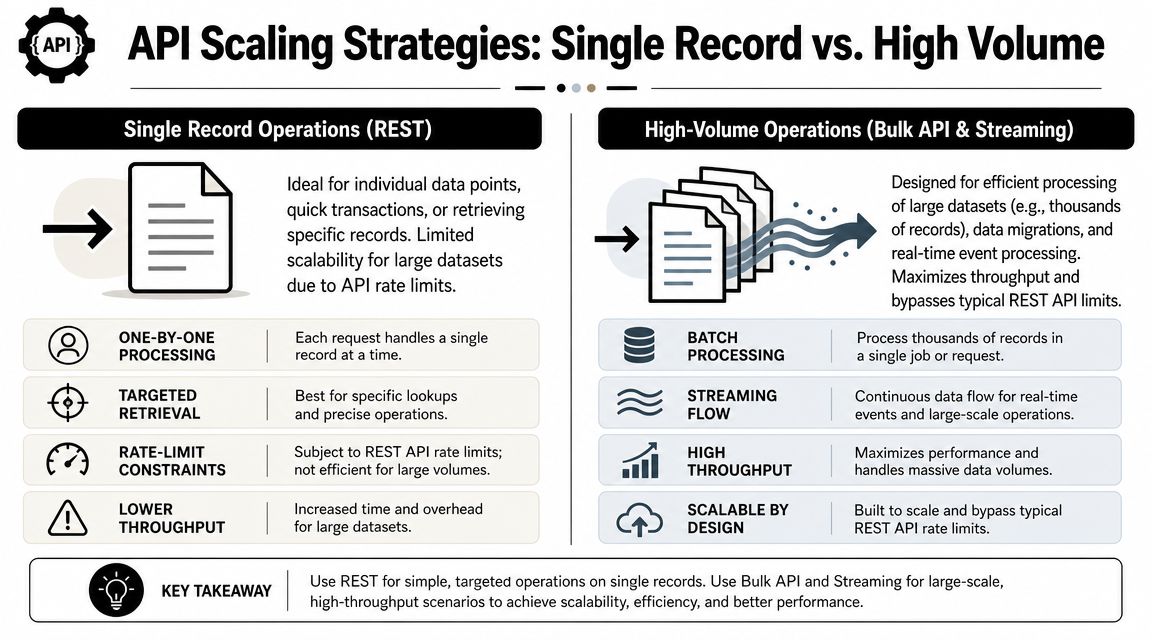
Single-record REST calls are fine until the workload stops being single-record. That usually happens fast in e-commerce and operational integrations. Product catalog loads, order backfills, customer history imports, and nightly sync jobs can turn a clean prototype into a bottleneck.
For high-volume Salesforce API Python work, the key decision is no longer “can I make the request?” It's “which API pattern fits this workload?”
Use REST for transactions and Bulk for throughput
The simple-salesforce package has matured well for larger jobs. It documents support for Python 3.9 through 3.13, supports Bulk API handling with a default batch size of 10,000 records and parallel concurrency mode, and includes Bulk 2.0 query workflows and lazy iteration support in its published package details on PyPI for simple-salesforce.
Those details matter because they tell you how the ecosystem expects Python developers to work at scale.
Here's the practical split:
REST API
- Good for single-record reads and writes
- Better when the workflow is user-driven or low-latency
- Easier to reason about for CRUD-heavy business logic
Bulk API
- Better for inserts, updates, upserts, deletes, and hard deletes at volume
- A stronger fit for migrations, backfills, and large recurring syncs
- More tolerant of workloads that would be noisy or expensive through repeated REST calls
A simple Bulk pattern
When you have a prepared list of records, Bulk operations keep the code simple.
records = [
    {"External_Id__c": "ORD-1001", "Name": "Order 1001"},
    {"External_Id__c": "ORD-1002", "Name": "Order 1002"},
]

results = sf.bulk.Custom_Order__c.upsert(
    records,
    "External_Id__c"
)

print(results)
That pattern is usually better than looping over REST calls one record at a time. It also gives you a cleaner path to retries because the job boundary is explicit.
Build a decision model for latency
A lot of teams choose APIs based only on data size. That's incomplete. You also need to choose based on latency requirement.
| Requirement | Better fit | Why |
|---|---|---|
| A user triggers a small action and expects a fast response | REST | Lower overhead and simpler request flow |
| A nightly product or customer sync processes many changed records | Bulk | Throughput matters more than immediate response |
| An external system needs near-real-time updates | Streaming or Pub/Sub patterns | Event-driven flow reduces repetitive polling |
If your integration keeps polling for changes, review the operational cost of that approach. This short explanation of API rate limit behavior is a useful reminder that high-frequency polling creates avoidable load and failure modes.
Polling is easy to start with. It's expensive to live with when the sync becomes business-critical.
Where streaming fits
For event-driven or high-frequency synchronization, Salesforce also supports a more advanced path through its Python quick start for the Pub/Sub API. The documented pattern includes generating stubs, building the client, authenticating, configuring channels, and then subscribing or publishing over gRPC in the official Pub/Sub API Python quick start.
That's a very different design from REST or Bulk.
Use streaming-style patterns when:
- You need prompt notification of record changes or platform events
- Polling would create too much unnecessary traffic
- The downstream workflow benefits from event processing rather than scheduled reconciliation
Don't choose streaming just because it sounds more modern. It comes with more moving parts, especially reconnection behavior, channel management, and event schema handling. For many business integrations, a well-designed batch sync is still the right answer.
What works in production
A reliable high-volume integration usually follows these rules:
- Batch writes: don't simulate bulk by looping record-by-record.
- Keep retries narrow: retry failed batches or failed records, not the entire job blindly.
- Separate sync modes: use one pattern for transactional updates and another for backfills.
- Measure memory use: especially if you're loading complete result sets into Python structures.
- Log job boundaries: records attempted, records accepted, records rejected.
The biggest mistake I see is trying to force one API style to solve every problem. REST isn't wrong. Bulk isn't always necessary. Streaming isn't always worth the complexity. Good integrations mix them based on the actual job.
Solving E-commerce Integration with a Unified API
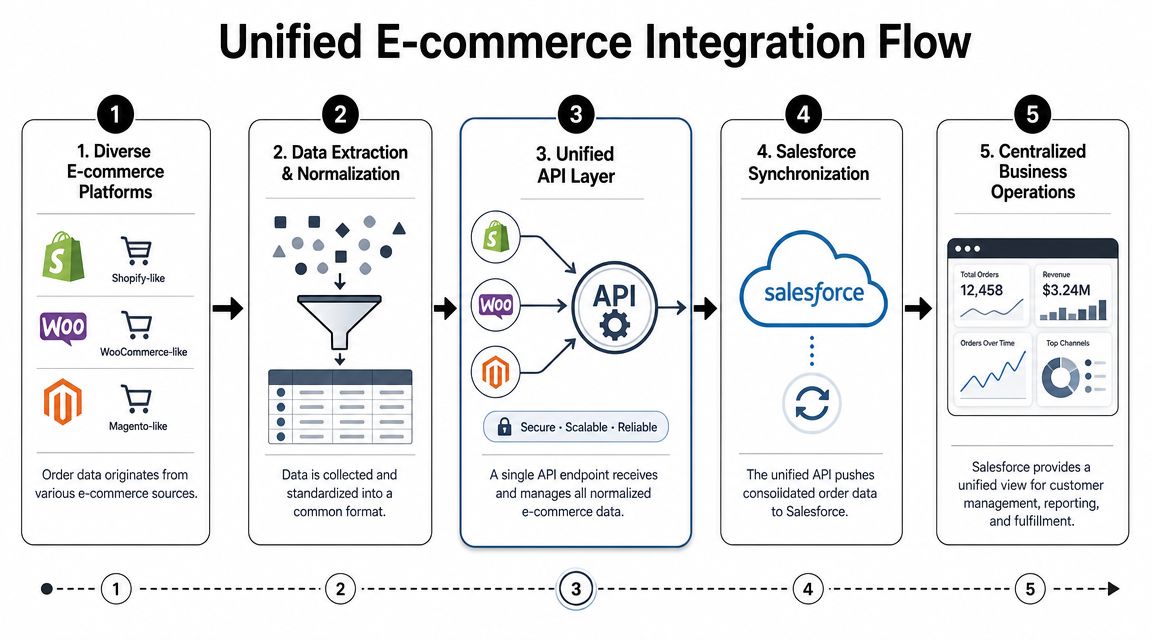
The Salesforce side is only half the problem in many projects. The other half is upstream chaos.
If your product needs to move order, customer, inventory, or shipment data from many commerce platforms into Salesforce, the hard work isn't just object mapping. It's managing dozens of source systems that all expose data differently, authenticate differently, paginate differently, and change over time.
The direct-connector approach breaks down fast
For a single merchant platform, writing a custom connector can be reasonable. For a product that supports many commerce sources, that approach becomes hard to justify.
Each source tends to bring its own problems:
- Different order schemas: line items, taxes, discounts, refunds, and status models vary.
- Different auth models: every connector needs its own onboarding and token lifecycle.
- Different sync semantics: some systems are event-friendly, others need polling.
- Different maintenance load: API changes upstream create recurring engineering work.
That's why many B2B commerce SaaS teams move toward a unified API approach instead of building and maintaining separate integrations for every store platform.
Where a unified API helps the Salesforce side
For a Salesforce integration developer, the value is straightforward. You can normalize upstream extraction and focus your engineering time on the downstream Salesforce model.
That changes the architecture:
| Layer | Without unified access | With unified access |
|---|---|---|
| Upstream connectors | Many custom integrations to maintain | One normalized integration surface |
| Data mapping | Repeated per platform | More standardized transformation logic |
| Salesforce sync | Mixed with source-specific exceptions | Cleaner create, update, and upsert paths |
This matters most for teams building OMS, WMS, ERP, shipping, inventory, analytics, or customer data workflows. In those products, Salesforce is often the destination for commercial visibility, while commerce platforms are the source of operational truth.
A realistic workflow
A practical pattern looks like this:
- Pull normalized order and customer data from a unified upstream layer.
- Transform that payload into Salesforce object mappings.
- Use REST for targeted operational writes and Bulk for larger loads.
- Track external identifiers so reruns become upserts instead of duplicates.
- Reconcile failures separately from successful batches.
The cleaner the source contract is, the more reliable your Salesforce mapping becomes.
That doesn't eliminate integration work. You still need thoughtful object design, deduplication rules, and error handling. But it does remove a large class of repetitive connector engineering that doesn't differentiate your product.
When abstraction is the better engineering choice
Some developers resist abstraction because they want direct control. That instinct is valid. Direct integrations can be the right choice when the source system count is small and the business logic is highly customized.
But if your roadmap includes many commerce platforms, direct control can turn into connector debt. In that case, a unified layer isn't a shortcut. It's a way to keep the Salesforce side maintainable while upstream complexity grows.
The best architecture is the one your team can support six months after launch, not just the one that feels pure on day one.
Production-Ready Tips for Your Python Integration
A script that succeeds once isn't an integration. A production integration has to keep running after schema changes, token refreshes, partial outages, and ugly data.
One of the biggest gaps in Salesforce Python content is that it over-focuses on single requests and under-focuses on large datasets and API limits. The ecosystem has clearly moved beyond that, including support for newer asynchronous clients and more pipeline-oriented design, which you can see in the broader discussion around the simple-salesforce project on GitHub.
The checklist that actually matters
Use this as a pre-production review:
- Own your retry logic: wrap network and API calls in targeted
try...exceptblocks. Retry transient failures, not validation errors. - Log with context: include object type, external ID, job run ID, and operation type so support teams can trace failures.
- Make writes idempotent: prefer upsert patterns where possible, especially for recurring syncs.
- Test mapping rules: most production defects come from bad assumptions in field mapping, not transport code.
- Separate config from code: credentials, object names, and environment-specific settings should be externalized.
Don't ignore security just because the code works
Integration developers often think of security reviews as something that happens later. That's risky. API clients deserve the same scrutiny as the rest of your application surface.
If your team already works across multiple backend services, this practical review of secure Supabase and Firebase APIs is a useful reminder of the kinds of issues that also show up in integration layers: weak token handling, exposed endpoints, and insufficient validation around data access paths.
Know when not to build everything yourself
You should build direct Salesforce integrations when the system boundaries are clear and the source environment is stable.
You should consider a higher-level abstraction when:
- upstream platforms vary widely
- the integration roadmap includes many source systems
- your product team needs to ship workflows faster than connector maintenance allows
- your engineers should be spending time on business logic, not repetitive API plumbing
That's the dividing line. Good engineers don't just know how to call an API. They know when a direct connector is the right tool and when abstraction will save the team from years of unnecessary maintenance.
If your product needs to connect many commerce data sources to Salesforce without building a separate connector for each one, API2Cart is worth evaluating. It gives B2B software teams a unified way to work with orders, products, customers, inventory, and related store data across many platforms, which can simplify the upstream side of your Salesforce integration and shorten the path from prototype to production.