In today's fast-paced eCommerce environment, reliable and efficient shipping is a key factor for success. According to Statista, global eCommerce revenue is expected to exceed $6.9 trillion by 2026, increasing the demand for scalable shipping solutions. For shipping software providers, integrating with leading eCommerce platforms, such as Wix, is essential to meet merchants' needs. Wix shipping API enables efficient Wix Shipping Integration, allowing developers to automate shipping workflows and manage delivery data.
As a result, Wix Shipping Integration becomes critical for SaaS solutions working with online merchants. It enables access to shipping settings, label generation, delivery rate calculation, and real-time tracking. In addition, Wix Shipping Software Integration reduces manual operations and improves system performance.
In this article, we'll explore how Wix shipping API benefits shipping software providers, the key features it offers, and how to integrate it into your system. Whether you're building automated shipping solutions, multi-carrier logistics services, or order fulfillment software, leveraging this API helps improve service quality and expand
What is Wix Shipping API?
Wix shipping API is a RESTful interface that allows developers to manage shipping data, automate fulfillment processes, and synchronize orders, shipments, and delivery statuses in Wix-based stores.
However, direct integration may involve limitations such as evolving API logic and maintenance challenges. As a result, many SaaS providers choose Wix Shipping Integration via unified solutions to simplify development and reduce ongoing support effort.
In addition, using Wix Shipping Software Integration through a unified API helps standardize data workflows and enables faster scaling across multiple eCommerce platforms.

How to Simplize the Development of the Wix Shipping API Integration?
Wix shipping API integration can be complex due to REST API requests, authentication, and data synchronization. As a result, many developers choose Wix Shipping Integration via unified solutions to reduce development effort and simplify maintenance.
Using an eCommerce integration platform, such as API2Cart, allows shipping software providers to connect with Wix and 80+ other platforms through a single API. This approach eliminates the need to build separate integrations and provides ready-made methods for receiving orders, managing products, and tracking delivery data.
Wix Integration via API2Cart enables you to:

- retrieve, synchronize and update information on orders, customers, products, categories, abandoned carts, prices, etc.
- use the data from Wix e-stores according to your business purpose
- make updates on both sides
- perform these operations with data from stores across 80+ eCommerce platforms
In addition, Wix Shipping Software Integration via API2Cart standardizes data workflows and reduces ongoing support effort. It provides ready API methods to work with products, orders, shipments, and inventory, making integration faster and more scalable.

Steps to Easily Integrate Shipping Software with Wix
If your eCommerce software requires integration with the Wix Shipping API, the most efficient approach is to use API2Cart. This solution simplifies Wix Shipping Integration and reduces development time. Below are the key steps to integrate your shipping software with Wix.
1. Sign Up for API2Cart
Create an account on API2Cart to access a unified API. It allows you to connect with Wix and 80+ eCommerce platforms through a single integration.
2. Add Wix Store
Add a Wix-based store via the API2Cart dashboard or using the account.cart.add method. Provide store credentials or an access token to establish the connection.
3. Install Wix Plugin
Download the Wix plugin from API2Cart and provide it to your client. After installation, it generates a store key for secure access. This simplifies Wix Shipping Software Integration and ensures stable data exchange.
4. Test API Methods
Once connected, test API2Cart methods to retrieve and manage orders, shipments, products, and customer data. This step ensures your Wix Shipping Integration works correctly.
5. Develop and Scale Integration
During the 14-day trial, build and test your integration. You can automate shipping tasks, update order statuses, and sync inventory from a single API. In addition, API2Cart handles updates to the Wix Shipping API automatically, reducing maintenance effort.
As a result, shipping software providers can implement Wix Shipping Software Integration faster and focus on building advanced logistics features instead of maintaining integrations.
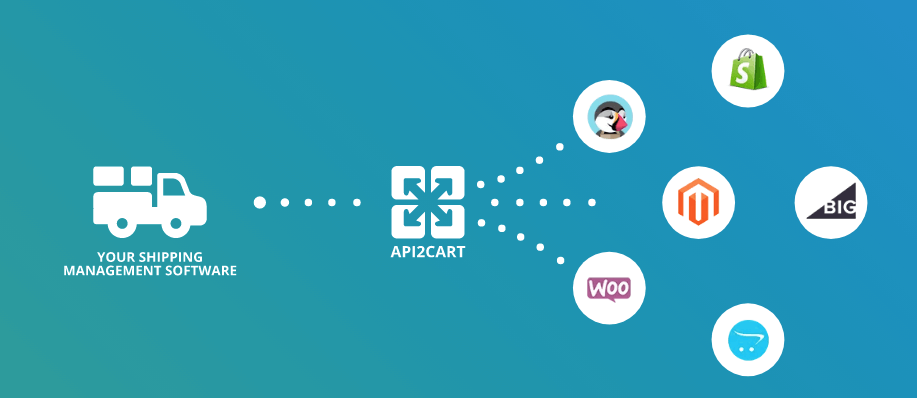
API2Cart's API Methods to Manage Wix Shipping Data
API2Cart provides easy access to order data, statuses and shipping methods, as well as tracking information by integrating the Wix Shipping API. Here are the main methods of shipping management in Wix:
- order.list - This method allows you to get a list of orders with the specified statuses (for example, processing, pending);
- order.info - Allows you to get advanced information about a specific order, including its status, delivery address, used carrier and order content;
- order.update - Used to change the order status, for example, after the goods have been shipped;
- order.shipment.update and order.shipment.add - Adds information about the carrier and tracking number to the order;
- product.info - To check the stock level of an item, Preventing delivery errors by getting accurate inventory data;
- product.update - Used to update stock when an order is placed;
- customer.info and customer.list - Retrieve detailed customer information for smooth order processing and communication.
Here is the response structure of order.list method:
{
  'return_code': 0,
  'return_message': 'string',
  'pagination': {
    'previous': 'string',
    'next': 'string',
    'additional_fields': {},
    'custom_fields': {}
  },
  'result': {
    'orders_count': 0,
    'order': [
      {
        'id': 'string',
        'order_id': 'string',
        'basket_id': 'string',
        'channel_id': 'string',
        'customer': {
          'id': 'string',
          'email': 'string',
          'first_name': 'string',
          'last_name': 'string',
          'phone': 'string',
          'additional_fields': {},
          'custom_fields': {}
        },
        'create_at': {
          'value': 'string',
          'format': 'string',
          'additional_fields': {},
          'custom_fields': {}
        },
        'currency': {
          'id': 'string',
          'name': 'string',
          'iso3': 'string',
          'symbol_left': 'string',
          'symbol_right': 'string',
          'rate': 0,
          'avail': true,
          'default': true,
          'additional_fields': {},
          'custom_fields': {}
        },
        'shipping_address': {
          'id': 'string',
          'type': 'string',
          'first_name': 'string',
          'last_name': 'string',
          'postcode': 'string',
          'address1': 'string',
          'address2': 'string',
          'phone': 'string',
          'phone_mobile': 'string',
          'city': 'string',
          'country': {
            'code2': 'string',
            'code3': 'string',
            'name': 'string',
            'additional_fields': {},
            'custom_fields': {}
          },
          'state': {
            'code': 'string',
            'name': 'string',
            'additional_fields': {},
            'custom_fields': {}
          },
          'company': 'string',
          'fax': 'string',
          'website': 'string',
          'gender': 'string',
          'region': 'string',
          'default': true,
          'tax_id': 'string',
          'identification_number': 'string',
          'alias': 'string',
          'additional_fields': {},
          'custom_fields': {}
        },
        'billing_address': {
          'id': 'string',
          'type': 'string',
          'first_name': 'string',
          'last_name': 'string',
          'postcode': 'string',
          'address1': 'string',
          'address2': 'string',
          'phone': 'string',
          'phone_mobile': 'string',
          'city': 'string',
          'country': {
            'code2': 'string',
            'code3': 'string',
            'name': 'string',
            'additional_fields': {},
            'custom_fields': {}
          },
          'state': {
            'code': 'string',
            'name': 'string',
            'additional_fields': {},
            'custom_fields': {}
          },
          'company': 'string',
          'fax': 'string',
          'website': 'string',
          'gender': 'string',
          'region': 'string',
          'default': true,
          'tax_id': 'string',
          'identification_number': 'string',
          'alias': 'string',
          'additional_fields': {},
          'custom_fields': {}
        },
        'payment_method': {
          'name': 'string',
          'additional_fields': {},
          'custom_fields': {}
        },
        'shipping_method': {
          'name': 'string',
          'additional_fields': {},
          'custom_fields': {}
        },
        'shipping_methods': [
          {
            'name': 'string',
            'additional_fields': {},
            'custom_fields': {}
          }
        ],
        'status': {
          'id': 'string',
          'name': 'string',
          'history': [
            {
              'id': 'string',
              'name': 'string',
              'modified_time': {
                'value': 'string',
                'format': 'string',
                'additional_fields': {},
                'custom_fields': {}
              },
              'notify': true,
              'comment': 'string',
              'additional_fields': {},
              'custom_fields': {}
            }
          ],
          'refund_info': {
            'shipping': 0,
            'fee': 0,
            'tax': 0,
            'total_refunded': 0,
            'time': {
              'value': 'string',
              'format': 'string',
              'additional_fields': {},
              'custom_fields': {}
            },
            'comment': 'string',
            'refunded_items': [
              {
                'product_id': 'string',
                'variant_id': 'string',
                'order_product_id': 'string',
                'qty': 0,
                'refund': 0,
                'additional_fields': {},
                'custom_fields': {}
              }
            ],
            'additional_fields': {},
            'custom_fields': {}
          },
          'additional_fields': {},
          'custom_fields': {}
        },
        'totals': {
          'total': 0,
          'subtotal': 0,
          'shipping': 0,
          'tax': 0,
          'discount': 0,
          'additional_fields': {},
          'custom_fields': {}
        },
        'total': {
          'subtotal_ex_tax': 0,
          'wrapping_ex_tax': 0,
          'shipping_ex_tax': 0,
          'total_discount': 0,
          'total_tax': 0,
          'total': 0,
          'total_paid': 0,
          'additional_fields': {},
          'custom_fields': {}
        },
        'discounts': [
          {
            'code': 'string',
            'value': 0,
            'type': 'string',
            'additional_fields': {},
            'custom_fields': {}
          }
        ],
        'order_products': [
          {
            'product_id': 'string',
            'order_product_id': 'string',
            'model': 'string',
            'name': 'string',
            'price': 0,
            'price_inc_tax': 0,
            'quantity': 0,
            'discount_amount': 0,
            'total_price': 0,
            'tax_percent': 0,
            'tax_value': 0,
            'tax_value_after_discount': 0,
            'options': [
              {
                'option_id': 'string',
                'name': 'string',
                'value': 'string',
                'price': 0,
                'weight': 0,
                'type': 'string',
                'product_option_value_id': 'string',
                'additional_fields': {},
                'custom_fields': {}
              }
            ],
            'variant_id': 'string',
            'weight_unit': 'string',
            'weight': 0,
            'barcode': 'string',
            'parent_order_product_id': 'string',
            'additional_fields': {},
            'custom_fields': {}
          }
        ],
        'bundles': [
          {
            'product_id': 'string',
            'order_product_id': 'string',
            'model': 'string',
            'name': 'string',
            'price': 0,
            'price_inc_tax': 0,
            'quantity': 0,
            'discount_amount': 0,
            'total_price': 0,
            'tax_percent': 0,
            'tax_value': 0,
            'tax_value_after_discount': 0,
            'options': [
              {
                'option_id': 'string',
                'name': 'string',
                'value': 'string',
                'price': 0,
                'weight': 0,
                'type': 'string',
                'product_option_value_id': 'string',
                'additional_fields': {},
                'custom_fields': {}
              }
            ],
            'variant_id': 'string',
            'weight_unit': 'string',
            'weight': 0,
            'barcode': 'string',
            'parent_order_product_id': 'string',
            'additional_fields': {},
            'custom_fields': {}
          }
        ],
        'modified_at': {
          'value': 'string',
          'format': 'string',
          'additional_fields': {},
          'custom_fields': {}
        },
        'finished_time': {
          'value': 'string',
          'format': 'string',
          'additional_fields': {},
          'custom_fields': {}
        },
        'comment': 'string',
        'store_id': 'string',
        'warehouses_ids': [
          'string'
        ],
        'refunds': [
          {
            'id': 'string',
            'shipping': 0,
            'fee': 0,
            'tax': 0,
            'total': 0,
            'modified_time': {
              'value': 'string',
              'format': 'string',
              'additional_fields': {},
              'custom_fields': {}
            },
            'comment': 'string',
            'items': [
              {
                'product_id': 'string',
                'variant_id': 'string',
                'order_product_id': 'string',
                'qty': 0,
                'refund': 0,
                'additional_fields': {},
                'custom_fields': {}
              }
            ],
            'additional_fields': {},
            'custom_fields': {}
          }
        ],
        'gift_message': 'string',
        'order_details_url': 'string',
        'additional_fields': {},
        'custom_fields': {}
      }
    ],
    'additional_fields': {},
    'custom_fields': {}
  },
  'additional_fields': {},
  'custom_fields': {}
}
API2Cart allows you to work with the Wix Shipping API quickly and without complex requests directly to this eCommerce platform. With the help of ready-made API methods, software vendors can automate receiving orders, managing logistics processes, adding tracking numbers, and updating statuses. If you want to know more information, start a FREE trial right now!
Conclusion
The Wix shippping integration opens up new opportunities for shipping software providers, allowing you to automate the processes of calculating rates, processing orders, tracking shipments, and updating statuses. Thanks to this, logistics companies and developers of SaaS solutions can offer customers more efficient delivery management and improved service.
However, this integration can be quite complex, as it involves configuring REST requests, authentication, and data synchronization. The best way to make this easier is to use API2Cart, which connects to Wix and other eCommerce platforms through a single API. For shipping software vendors looking to increase customer reach and simplify eCommerce integration with Wix and other eCommerce platforms, this service is the perfect solution. This minimizes technical difficulties, ensures rapid integration and allows you to focus on improving logistics services.
For software vendors, connecting with the Wix Shipping API is an opportunity to expand services, reach a wider merchant base, and strengthen your product's value in the competitive eCommerce market. If shipping is a core part of your solution, this integration can make it faster, smarter, and more reliable for your users.
Please fill in the form to download your document:
Special Wix Integration via API2Cart
Find out how extra functionality can help your business win its place in the sun.
FAQs
Can Wix Shipping API be used to automate order fulfillment?
Yes, Wix Shipping API can be used to automate fulfillment workflows by syncing orders and updating shipment statuses. Therefore, developers can trigger shipping processes automatically after order creation.
Moreover, this reduces manual handling and speeds up delivery operations. As a result, businesses can process higher order volumes more efficiently.
How can developers sync tracking information with Wix stores?
Developers can send tracking numbers and shipment updates through API requests. Therefore, customers receive real-time delivery information directly in the store.
In addition, this improves transparency and customer experience. As a result, support requests related to shipping status can be reduced.
Does Wix Shipping API support multi-channel shipping workflows?
Wix Shipping API focuses on Wix store data. However, multi-channel workflows require integration across multiple platforms and marketplaces.
Therefore, developers often use unified APIs to manage shipping across systems. As a result, they can centralize order and shipment data from different sources.
How can developers reduce complexity when integrating Wix Shipping API?
Instead of building custom integrations, developers can use unified API solutions like API2Cart. Therefore, they can manage shipping data across multiple platforms through a single connection.
Moreover, this reduces development time and ongoing maintenance. As a result, SaaS products can scale integrations faster and more efficiently.