
To connect a Jumpseller store to API2Cart, you need to specify the following credentials:
There are two authentication options available:
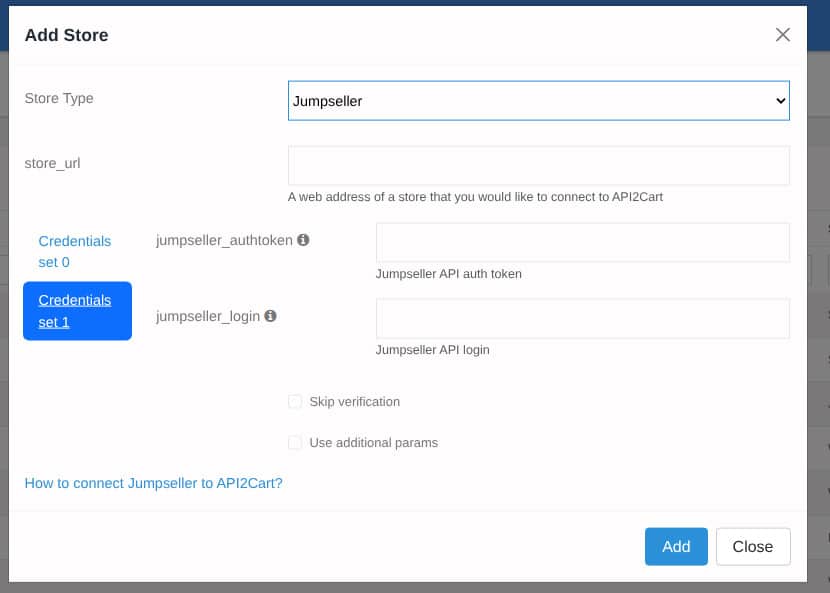
Option A: Basic Authentication
- jumpseller_login - API login key
- jumpseller_authtoken - API auth token (32-character string)
Option B: OAuth2 Authentication
- jumpseller_client_id - OAuth2 App ID
- jumpseller_client_secret - OAuth2 App Secret
- jumpseller_refresh_token - OAuth2 refresh token (used to automatically obtain a new access token when it expires)
Important: These two options are mutually exclusive. Do not provide both Basic Auth and OAuth2 parameters at the same time.
Option A: Connect using Basic Authentication
Each Jumpseller administrator account has its own API credentials. To find them:
Step 1. Log into your Jumpseller Admin Panel.

Step 2. In the left sidebar, go to Settings → Account → Preferences. This opens the list of administrator accounts. Click on the administrator account (email link) to open the account details.

Step 3. On the account details page, find the API section in the right sidebar. It contains the Login and Auth Token fields.

Step 4. Copy the Login and Auth Token values and use them as the jumpseller_login and jumpseller_authtoken parameters when adding the store to API2Cart.
Note: The auth token can be reset on the same page. If you reset it, any existing integrations using the old token will stop working.
Use the following request to add the store to API2Cart:
curl -X POST "https://api.api2cart.com/v1.1/cart.create.json" \
  -H "Content-Type: application/json" \
  -d '{
    "api_key": "YOUR_API2CART_API_KEY",
    "cart_id": "jumpseller",
    "store_url": "https://yourstore.jumpseller.com",
    "jumpseller_login": "YOUR_API_LOGIN",
    "jumpseller_authtoken": "YOUR_AUTH_TOKEN"
  }'
Option B: Connect using OAuth2
This option is used when connecting through a Jumpseller App (OAuth2 flow). Use this option if you are building an app that will be installed on multiple stores.
Step 1. Register a Jumpseller App
Go to Integrations → Apps in the left sidebar of your Admin Panel. Scroll to the bottom of the Apps Gallery page and click the "Create your app" link.

Fill out the app registration form:
- Name – your app title (will be shown in Apps Gallery)
- Author – developer or company name
- Email – contact email
- App URL – root URL of your app (must be HTTPS)
- Redirect URL – OAuth callback URI (where the user is redirected after authentication)
- Description – short description

Step 2. Get Client ID and Client Secret
After saving the app, go back to Apps in the sidebar. Your newly created app will appear in the list. Click the Settings icon next to it and select Edit. The edit page displays the App Id (this is your client_id) and App Secret (this is your client_secret).

Step 3. Obtain a Refresh Token via OAuth2 Authorization Code Flow
Build the authorization URL and open it in a browser:
https://accounts.jumpseller.com/oauth/authorize?client_id={client_id}&redirect_uri={redirect_uri}&response_type=code&scope={scopes}
Where:
- client_id – your App Id
- redirect_uri – redirect URL specified during app creation (must match exactly)
- scopes – space-separated list of required scopes (see the table below)
After the store owner approves access, a code parameter will be sent to the redirect URL. Exchange it for tokens:
curl -X POST "https://accounts.jumpseller.com/oauth/token" \
  -F grant_type=authorization_code \
  -F client_id={client_id} \
  -F client_secret={client_secret} \
  -F code={authorization_code} \
  -F redirect_uri={redirect_uri}
The response will include access_token, refresh_token, and expires_in (3600 seconds = 1 hour). API2Cart will automatically refresh the access token using the provided refresh token.
Step 4. Add the store to API2Cart
Use the obtained credentials in the following request:
curl -X POST "https://api.api2cart.com/v1.1/cart.create.json" \
  -H "Content-Type: application/json" \
  -d '{
    "api_key": "YOUR_API2CART_API_KEY",
    "cart_id": "jumpseller",
    "store_url": "https://yourstore.jumpseller.com",
    "jumpseller_client_id": "YOUR_APP_ID",
    "jumpseller_client_secret": "YOUR_APP_SECRET",
    "jumpseller_refresh_token": "YOUR_REFRESH_TOKEN"
  }'
Verifying the Connection
After adding the store, API2Cart validates the connection by calling the Jumpseller API endpoint GET /v1/store/info.json. If the credentials are correct, the request returns a 200 status and the connection is considered valid.
Table of Required Jumpseller OAuth2 Scopes for our API Methods:
| Method | Scopes |
|---|---|
| cart.info | read_store, read_locations |
| category.count | read_categories |
| category.list | read_categories |
| category.info | read_categories |
| category.add | read_categories, write_categories |
| category.update | read_categories, write_categories |
| category.delete | read_categories, write_categories |
| category.assign | read_categories, read_products,
write_products |
| category.unassign | read_categories, read_products,
write_products |
| product.count | read_products |
| product.list | read_products, read_settings |
| product.info | read_products, read_settings |
| product.child_item.list | read_products |
| product.child_item.info | read_products |
| product.review.list | read_products |
| product.attribute.list | read_products, read_custom_fields |
| product.add | read_products, write_products,
read_categories |
| product.update | read_products, write_products,
read_categories |
| product.delete | read_products, write_products |
| product.variant.add | read_products, write_products |
| product.variant.update | read_products, write_products |
| product.image.add | read_products, write_products |
| product.image.update | read_products, write_products |
| product.image.delete | read_products, write_products |
| order.count | read_orders |
| order.list | read_orders |
| order.info | read_orders |
| order.abandoned.list | read_orders |
| order.add | read_orders, write_orders,
read_shipping_methods, read_countries |
| order.shipment.list | read_orders, read_fulfillments |
| order.shipment.info | read_fulfillments |
| order.status.list | No scopes required (static list) |
| order.fulfillment_status.list | No scopes required (static list) |
| customer.count | read_customers |
| customer.list | read_customers |
| customer.info | read_customers |
| customer.add | read_customers, write_customers,
read_countries |
| customer.update | read_customers, write_customers,
read_countries |
| customer.delete | read_customers, write_customers |
| customer.address.add | read_customers, write_customers,
read_countries |
| customer.group.list | read_customer_categories |
| customer.group.add | read_customer_categories,
write_customer_categories |
| customer.attribute.list | read_customers, read_custom_fields |
| tax.class.list | read_settings |
| tax.class.info | read_settings |
